
WordPress interview questions and answers for WordPress 7
Forty-two WordPress interview questions answered for WordPress 7.1: posts and taxonomies, roles, themes, hooks, the Loop, database tables, security, performance, REST API and blocks.
Updated 20 min read
In this article
WordPress interviews now cover two kinds of knowledge: the fundamentals that have not changed in twenty years (posts, taxonomies, hooks, the Loop, roles) and the block-era skills every new build needs (block themes, theme.json, blocks built with block.json, the REST API). A candidate who can explain a filter hook and also say why a block theme has no functions.php-registered sidebars stands out.
Updated for WordPress 7.1 (7.1.3 is the current release in October 2026). WordPress 7.0 shipped on 20 May 2026 and raised the minimum PHP version to 7.4; 7.1 followed on 19 August 2026. The questions below keep the classic WordPress interview set, with answers corrected for 7.x, and add the developer questions that interviews now include.
Checked against: WordPress 7.1.3 source, the WordPress developer handbooks and wordpress.org requirements, October 2026. PHP snippets pass php -l on PHP 8.5.
Basics
1. What is WordPress?
WordPress is a free, open-source content management system written in PHP, using MySQL or MariaDB for storage, and licensed under the GPL version 2 or later. It runs blogs, company sites, shops (with WooCommerce), membership sites and headless back ends. Distinguish the software, downloaded from WordPress.org and hosted by you, from WordPress.com, Automattic's hosted service that runs the same software.
2. When was WordPress released, and when did it become open source?
Matt Mullenweg and Mike Little released version 0.70 on 27 May 2003, as a fork of the b2/cafelog blogging software. Because b2 was GPL-licensed, WordPress has been open source from its first release; there was no separate "open-source announcement". The WordPress Foundation now holds the trademark, and releases are made by a volunteer core team.
3. What are the key features of WordPress?
- The block editor for posts, pages and, in block themes, the whole site (Site Editor).
- Themes and plugins for design and features, with tens of thousands in the official directories.
- Custom post types, custom taxonomies and metadata, which make it a general content system.
- Built-in REST API, user roles and capabilities, media library, revisions, comments and multisite.
- Automatic minor and security updates, translations into many languages, and WP-CLI for command-line management.
- Recent additions such as the Interactivity API, block bindings and the Abilities API, which exposes plugin actions to AI tools in a controlled way.
4. What are the system requirements?
WordPress.org recommends PHP 8.3 or newer, MySQL 8.0 or newer or MariaDB 10.11 or newer, and HTTPS. The minimum that still runs WordPress 7.x is PHP 7.4, which has reached end of life, so a good answer is "it runs on 7.4, but do not host it there". Apache or nginx both work; nginx needs rewrite rules for pretty permalinks. Check exactly what the code requires in wp-includes/version.php: $required_php_version is 7.4 in 7.1.3.
5. How do you install WordPress?
Create a database and user, download WordPress, create wp-config.php with the database credentials and unique keys and salts, upload the files, and run the installer at /wp-admin/install.php to set the site title and the first administrator. With WP-CLI the same steps are scriptable:
wp core download
wp config create --dbname=site --dbuser=site --prompt=dbpass
wp core install --url=https://example.com --title="Example" --admin_user=siteadmin --admin_email=admin@example.com --prompt=admin_password
Choose an admin username other than admin, and set file permissions so the web server cannot rewrite core files.
6. What appears on the admin Dashboard home screen?
The Dashboard shows widgets you can rearrange or hide through Screen Options: At a Glance (counts of posts, pages and comments, the WordPress version and theme), Activity (recent posts and comments), Quick Draft, WordPress Events and News, Site Health Status, and a Welcome panel. Plugins often add their own widgets. The left menu gives access to Posts, Media, Pages, Comments, Appearance, Plugins, Users, Tools and Settings.
7. What are the limitations of WordPress, and when is it not the right choice?
- Performance and security depend heavily on plugin quality; a site with dozens of plugins becomes slow and hard to maintain.
- Complex applications with heavy transactional logic, real-time features or unusual data models are usually better built on an application framework.
- The database schema is generic (posts and post meta), so large, query-heavy data sets need custom tables or another system.
- Regular updates are mandatory, which means someone must own maintenance.
If a project is mostly an application with some content, a framework such as Laravel, or a headless set-up, is often a better fit. Our article on when to rebuild a WordPress site and when not to covers that decision.
8. Can a WordPress site rank on the first page of Google?
Yes, but WordPress itself is only the foundation. It produces clean permalinks, semantic HTML from core blocks, an XML sitemap at /wp-sitemap.xml (since 5.5) and lazy-loaded images. Rankings come from useful content, fast pages, correct titles and descriptions (usually through an SEO plugin), internal links and good backlinks. A slow theme or a page builder that outputs heavy markup can hold a site back.
9. Is WordPress secure, and which is more secure: WordPress.com or self-hosted WordPress?
Core WordPress has a dedicated security team and automatic security releases; most real compromises come from outdated plugins and themes, weak passwords and poor hosting. WordPress.com manages updates, hosting and plugin vetting for you, which removes many common risks. A self-hosted site can be just as secure, but only if someone keeps it updated, limits plugins, uses strong authentication and backs it up. Security is about who maintains the site, not about the software alone.
Content: posts, pages, taxonomies and comments
10. What is the difference between posts and pages?
| Posts | Pages | |
|---|---|---|
| Purpose | Time-based content: news, articles | Timeless content: About, Contact, Services |
| Order | Reverse chronological, in feeds and archives | Not in feeds; arranged by hierarchy and menus |
| Taxonomies | Categories and tags | None by default |
| Hierarchy | Flat | Parent and child pages |
| Templates | Single post templates | Page templates selectable per page |
Both are rows in the wp_posts table with different post_type values (post and page), which is why custom post types are so natural in WordPress.
11. What are categories and tags, and how do they differ?
Both are built-in taxonomies for posts. Categories are hierarchical, intended for the main sections of a site, and every post has at least one (Uncategorized by default). Tags are flat, optional and describe specific topics. Use a handful of broad categories and tags sparingly; hundreds of thin tag archives add little for readers or search engines.
12. How do you convert categories to tags, or tags to categories?
Install the official "Categories to Tags Converter" importer from Tools > Import, select the terms and convert them. On the command line, WP-CLI does it in one step, for example wp term migrate news --by=slug --from=category --to=post_tag. Set up redirects from the old archive URLs afterwards, because the URL base changes from /category/ to /tag/.
13. What are taxonomies?
A taxonomy groups content. WordPress has categories, tags, link categories, post formats and, for block themes, internal taxonomies such as wp_theme. You can register your own with register_taxonomy(), hierarchical (like categories) or flat (like tags), and attach them to any post type, for example a "Genre" taxonomy for a "Book" post type. Terms are stored in wp_terms, wp_term_taxonomy and wp_term_relationships.
14. How do you turn off comments?
For new posts, untick "Allow people to submit comments on new posts" in Settings > Discussion. That does not change existing posts: close them individually in the Discussion panel, in bulk from the Posts list (Bulk actions > Edit > Comments), or with WP-CLI. You can also close comments automatically on posts older than a set number of days. Block themes show comments through the Comments block, so removing the block from templates hides them visually too.
15. How do you edit or moderate comments?
Edit a comment from Comments in the admin using Quick Edit or Edit. Moderation means holding comments for approval: in Settings > Discussion you can require manual approval, require that the author has a previously approved comment, hold comments with more than a set number of links, and list words that send comments to moderation or straight to the bin. Anti-spam plugins add automated filtering.
16. How do you allow only registered users to comment?
Tick "Users must be registered and logged in to comment" in Settings > Discussion. To allow registration, enable "Anyone can register" in Settings > General and keep the default role as Subscriber.
17. What are avatars and Gravatars?
An avatar is the small image shown next to a user's name and comments. By default WordPress uses Gravatar, a service that maps a hash of an email address to an image the person uploaded. Settings > Discussion controls whether avatars show, the maximum rating and the default image for people without one. Because Gravatar requests send a hashed email address to a third party, some sites disable avatars or use a local avatar plugin for privacy reasons.
18. What are custom fields, and what replaced them in the editor?
Custom fields are key and value pairs stored in wp_postmeta, used for extra data such as a price or an event date. Read them with get_post_meta( $post_id, 'price', true ). The classic "Custom Fields" panel still exists in the block editor (enable it in Preferences), but modern code registers meta with register_post_meta() and show_in_rest, then edits it through a block or sidebar panel. Block bindings can display registered meta inside core blocks without custom code.
Users, themes and plugins
19. What user roles does WordPress have?
- Super Admin (multisite only): manages the whole network.
- Administrator: everything on a single site.
- Editor: publishes and manages all posts and pages, including other users'.
- Author: publishes and manages their own posts.
- Contributor: writes and edits their own posts but cannot publish or upload files.
- Subscriber: manages their profile only.
Roles are bundles of capabilities. Code should check capabilities, not roles: current_user_can( 'edit_post', $post_id ) rather than "is the user an editor?".
20. What are themes, and how do you choose one?
A theme controls how the site looks. A block theme is built from HTML templates and template parts made of blocks, plus theme.json for settings and styles, and is edited in the Site Editor. A classic theme uses PHP templates and the Customizer. Choose a theme that is actively maintained, fast, accessible and compatible with the current WordPress version; check the update history and support forum rather than the demo. See block themes versus classic themes in 7.1 for the trade-offs.
21. What is the difference between custom, free and premium themes?
Free themes in the WordPress.org directory pass a review for coding standards and security basics and are GPL-licensed. Premium themes add features and support for a fee, quality varies, and they often bundle page builders or plugins that lock in content. A custom theme is built for one site: lean, matched to the brand and free of unused features, but you pay for development and maintenance. For a business site with a clear design, a custom block theme or a child of a well-made theme is usually the most maintainable choice.
22. What is a child theme?
A child theme inherits templates, functions and styles from a parent theme and overrides only what you change, so parent updates do not wipe out your edits. It needs a style.css with a Template: header naming the parent folder. Block themes support child themes too: the child's theme.json is merged with the parent's, and any template in the child replaces the parent's version.
/*
Theme Name: Acme Child
Template:   twentytwentyfive
Version:    1.0.0
*/
23. What are plugins, and how do they differ from themes?
Plugins add functionality; themes control presentation. The test is "should this still work if I change the theme?". Custom post types, forms, integrations and shortcodes belong in a plugin, otherwise switching themes breaks content. Put site-specific code that must always run in a small custom plugin or a must-use plugin in wp-content/mu-plugins, which cannot be deactivated from the admin.
24. What are widgets?
Widgets are content blocks placed in a classic theme's widget areas (sidebars, footers). Since WordPress 5.8 the widget screen uses blocks, so any block can be a widget. Block themes have no widget areas: you edit template parts such as the footer directly in the Site Editor. Register widget areas in a classic theme with register_sidebar() and output them with dynamic_sidebar().
25. What are shortcodes, and are they still used?
A shortcode is a tag such as [gallery ids="1,2"] that a PHP callback replaces with output. Register one with add_shortcode() and always return, never echo, the output. Shortcodes still work and are handy inside text, but for new features a block is better: editors see a real preview, attributes are validated, and dynamic blocks can render with PHP on the server.
Developer questions
26. What are hooks, and what is the difference between actions and filters?
Hooks let plugins and themes change WordPress without editing core files. An action runs your code at a point in execution (do_action() fires it, add_action() attaches to it), such as sending an email when a post is published. A filter receives a value, lets you change it and must return it (apply_filters() and add_filter()), such as changing the excerpt length. Both accept a priority (default 10, lower runs first) and the number of arguments.
add_action( 'transition_post_status', function ( $new, $old, $post ) {
    if ( 'publish' === $new && 'publish' !== $old && 'post' === $post->post_type ) {
        // Notify subscribers once, when a post is first published.
    }
}, 10, 3 );

add_filter( 'excerpt_length', fn () => 30 );
27. In what order do the main hooks run?
For a front-end request the commonly used actions run in this order:
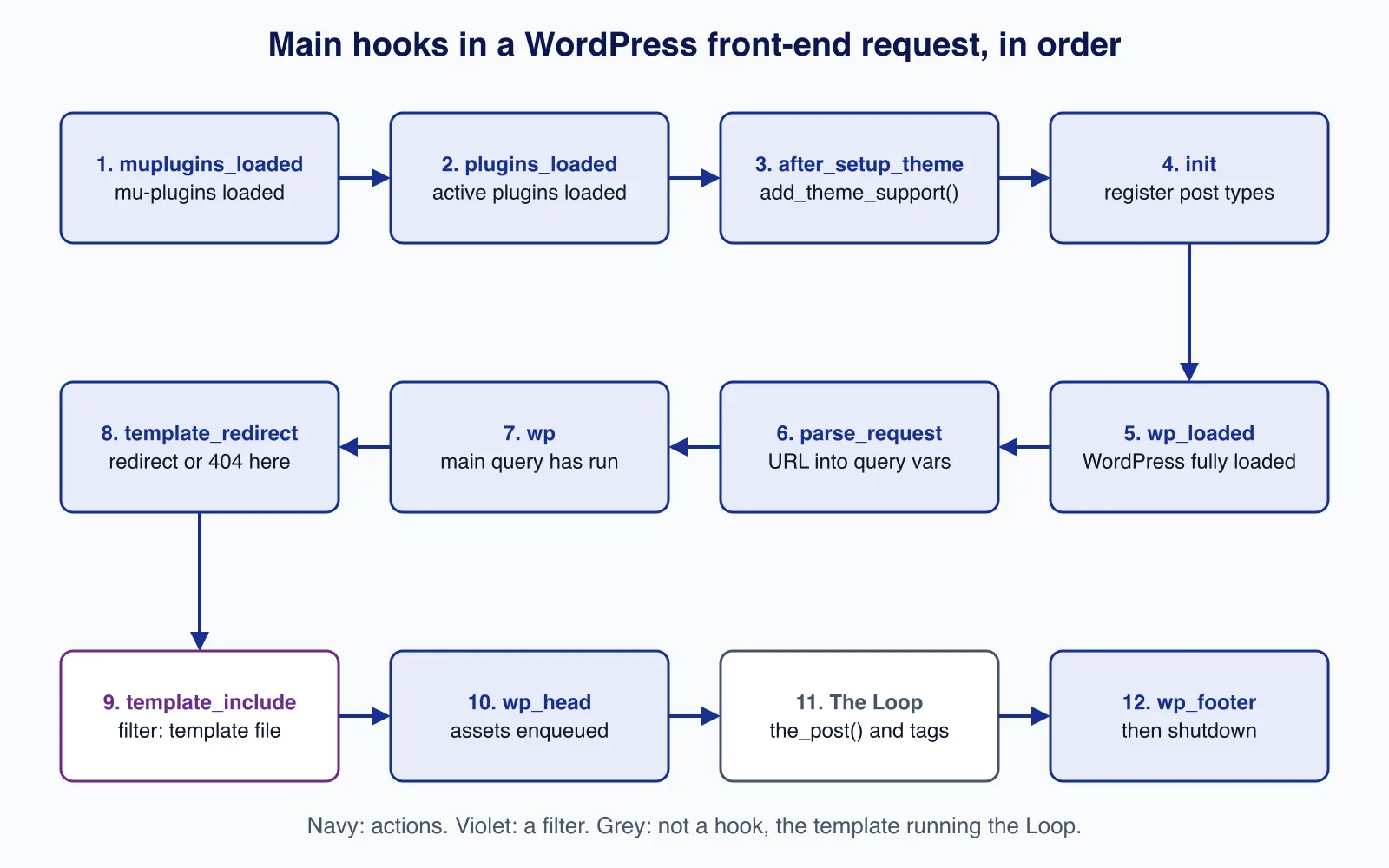
Register post types and taxonomies on init, add theme support on after_setup_theme, redirect on template_redirect (the main query is ready but nothing is output yet), and enqueue assets on wp_enqueue_scripts. Hooking too early, for example calling current_user_can() before init, is a common source of bugs.
28. What is the Loop?
The Loop is the PHP code that iterates over the posts in the current query and sets up global post data so template tags work:
if ( have_posts() ) {
    while ( have_posts() ) {
        the_post();
        the_title( '<h2>', '</h2>' );
        the_excerpt();
    }
    the_posts_pagination();
} else {
    echo '<p>' . esc_html__( 'No posts found.', 'acme' ) . '</p>';
}
For a secondary list, create a new WP_Query( [...] ), loop over it the same way, and call wp_reset_postdata() afterwards. Never use query_posts(); change the main query with the pre_get_posts action instead. In block themes the Query Loop block does this job without PHP.
29. What are template tags? Name some common ones.
Template tags are functions used in theme templates to output or return data: the_title(), the_content(), the_excerpt(), the_permalink(), the_post_thumbnail(), the_author(), the_date(), get_header(), get_footer(), get_sidebar(), wp_nav_menu(), bloginfo() and body_class(). Functions starting with the_ usually echo, and get_ versions return the value. In block themes most of these become blocks, such as Post Title and Post Content.
30. What are meta tags, and how does WordPress handle them?
HTML meta tags in the <head> describe the page to browsers and search engines: description, robots, viewport, Open Graph tags for social sharing. Core WordPress outputs the title tag (with title-tag theme support), the viewport tag in block themes, a robots tag when needed, and the canonical link, but not descriptions or Open Graph tags; SEO plugins or your theme add those through the wp_head action. The old keywords meta tag has no effect on Google rankings.
31. Why MySQL, how many default tables are there, and what is the default prefix?
WordPress grew up on the PHP and MySQL hosting stack that was everywhere in 2003, and it still requires MySQL or MariaDB; SQLite support exists only as a plugin. A single site has 12 tables: wp_posts, wp_postmeta, wp_comments, wp_commentmeta, wp_users, wp_usermeta, wp_terms, wp_termmeta, wp_term_taxonomy, wp_term_relationships, wp_options and wp_links. Multisite adds six network tables (wp_blogs, wp_blogmeta, wp_site, wp_sitemeta, wp_signups, wp_registration_log) and a set of per-site tables. The default prefix is wp_, set by $table_prefix in wp-config.php; in code always use $wpdb->prefix or properties such as $wpdb->posts.
32. How do you register a custom post type?
add_action( 'init', function () {
    register_post_type( 'book', array(
        'labels'       => array( 'name' => __( 'Books', 'acme' ), 'singular_name' => __( 'Book', 'acme' ) ),
        'public'       => true,
        'has_archive'  => true,
        'show_in_rest' => true, // required for the block editor and REST API
        'supports'     => array( 'title', 'editor', 'thumbnail', 'excerpt', 'custom-fields' ),
        'rewrite'      => array( 'slug' => 'books' ),
    ) );
} );
Put it in a plugin, not the theme, and flush rewrite rules once on plugin activation (not on every request) so the new URLs work.
33. How do you write secure WordPress code?
- Check capabilities with
current_user_can()before every privileged action. - Verify intent with nonces:
wp_nonce_field()in forms andcheck_admin_referer()orwp_verify_nonce()when processing. Nonces are not authentication; they only prove the request came from your form. - Sanitise input:
sanitize_text_field(),absint(),sanitize_email(). - Escape output late:
esc_html(),esc_attr(),esc_url(),wp_kses_post(). - Prepare SQL with
$wpdb->prepare().
$rows = $wpdb->get_results(
    $wpdb->prepare( "SELECT ID, post_title FROM {$wpdb->posts} WHERE post_author = %d AND post_status = %s", $author_id, 'publish' )
);
34. How do you improve security on a WordPress site?
Keep core, plugins and themes updated and remove unused ones; use strong passwords and two-factor authentication for administrators; limit login attempts; disable file editing with define( 'DISALLOW_FILE_EDIT', true );; set correct file permissions; use HTTPS; put a firewall in front; and take tested off-site backups. Our WordPress security hardening checklist covers each step.
35. What would you do if a WordPress site were hacked?
- Put the site into maintenance or take it offline, and preserve logs and a copy of the files and database for analysis.
- Change all passwords: WordPress users, hosting, database, SFTP, and regenerate the keys and salts in
wp-config.php, which logs everyone out. - Find the entry point (an outdated plugin, a stolen password) from logs and modification dates.
- Replace core with clean files (
wp core download --forceandwp core verify-checksums), reinstall plugins and themes from official sources, and inspect uploads for PHP files. - Check the database for injected admin users, options and content.
- Restore from a clean backup if the damage is wide, then patch the cause, monitor, and request a review if search engines flagged the site.
Recovering a compromised site under time pressure is where mistakes are expensive. If you need help, Cloudsoft Zone's WordPress and WooCommerce development service includes clean-up, hardening and maintenance.
36. How do you reset a WordPress password?
Use "Lost your password?" on the login page to get a reset link by email; an administrator can also send a reset link or set a new password from Users. If email does not work, use WP-CLI: wp user reset-password siteadmin sends a reset email, and wp user update siteadmin --user_pass=... --skip-email sets one directly. Since WordPress 6.8 new passwords are hashed with bcrypt; editing the hash in the database is a last resort, and WordPress still accepts and rehashes an old MD5 hash on the next login, which is why that old trick works.
37. How do you improve WordPress performance?
- Page caching (a caching plugin, a server cache or a CDN) so most visits never run PHP.
- A persistent object cache such as Redis or Valkey, so repeated queries and transients are served from memory.
- Current PHP with OPcache, and a fast host.
- Optimised images (WebP or AVIF, correct sizes); WordPress adds lazy loading and, since 6.8, speculative loading of likely next pages.
- Fewer and better plugins; avoid heavy page builders.
- Clean up autoloaded options and use
no_found_rowsin queries that do not paginate.
Our guide to WordPress performance in 7.1 covers the details.
38. What are transients and WP-Cron?
Transients store cached values with an expiry (set_transient(), get_transient()), in the options table or in the object cache if one is installed. Treat them as a cache that can vanish at any time. WP-Cron runs scheduled events (wp_schedule_event()), but only when someone visits the site; on busy or very quiet sites, set DISABLE_WP_CRON and run wp cron event run --due-now from a real system cron every minute or few minutes.
39. What is the REST API, and how do you add an endpoint?
The REST API exposes content as JSON under /wp-json/, for example /wp-json/wp/v2/posts. The block editor uses it, and headless front ends read from it. Add your own route with register_rest_route() on rest_api_init, and always supply a permission_callback; returning __return_true is only acceptable for genuinely public data. Use application passwords or cookie authentication with a nonce for authenticated requests. See our headless WordPress architecture guide for when to use REST or WPGraphQL.
40. How do you build a block?
Describe it in block.json (name, attributes, scripts, styles, apiVersion 3), register it with register_block_type() pointing at the folder, and write the editor interface in React with @wordpress/scripts. A static block saves its HTML into the post; a dynamic block renders on the server with render.php, which is better when output depends on current data. Since 7.1 the post editor is always inside an iframe, so editor styles must be loaded through block.json or enqueue_block_assets. Our tutorial on building a dynamic block and the WordPress 7.x compatibility checklist cover this in depth.
41. What is theme.json?
theme.json is the configuration file for global settings and styles: colour palettes, font sizes and families, spacing scale, layout widths, and which design tools editors may use. WordPress turns it into CSS custom properties and editor controls. It works in classic themes as well as block themes, and users' changes in the Site Editor are saved as a separate global styles record layered on top. Version 7.1 added responsive style variations and pseudo-state styles to it.
42. What is multisite?
Multisite runs a network of sites from one installation, sharing code, plugins, themes and users, with a Super Admin managing the network. It suits a university or franchise with many similar sites; it is a poor fit when sites need different plugins, separate hosting or independent owners. See multisite versus separate installs.
How to prepare
Set up a local site with wp-env or another local tool, then build a small plugin: a custom post type with registered meta, a REST endpoint with a permission check, a dynamic block, and an admin settings page protected by a capability check and a nonce. Use WP-CLI to install, update and inspect it. Then switch between a block theme and a classic theme and notice what changes. For the PHP side, read our PHP interview questions for 2026, and for site operations, updating WordPress safely with WP-CLI.
Need a custom WordPress theme, plugin or WooCommerce feature built properly, or an existing site cleaned up and kept current? Cloudsoft Zone builds and maintains WordPress and WooCommerce sites, with secure, tested code and a clear update routine.
Frequently asked questions
What PHP version does WordPress 7 need?
WordPress 7.0 raised the minimum to PHP 7.4, but WordPress.org recommends PHP 8.3 or newer. PHP 7.4 is past end of life, so use a supported PHP version in production.
How many database tables does a default WordPress install have?
Twelve on a single site, with the
wp_prefix by default. Multisite adds six network-wide tables plus a set of tables for each site.Should I learn classic themes or block themes?
Both. New builds increasingly use block themes and
theme.json, but many existing sites run classic themes, and interviews often ask you to work on both.What is the difference between an action and a filter?
An action runs code at a point in execution and returns nothing. A filter receives a value, may change it, and must return it.
Your next customer could start right here.
Introduce your tool, product or business to readers exploring technology.
Explore placements and request a private quote
Sources
- WordPress requirements — WordPress.org
- History of WordPress — WordPress.org
- Plugin Handbook: Hooks — WordPress.org
- Theme Handbook: The Loop — WordPress.org
- WordPress 6.8 will use bcrypt for password hashing — Make WordPress Core, 2025-02-17
- Roles and Capabilities — WordPress.org
- Common APIs Handbook: Security — WordPress.org
- WordPress 7.1.3 source (version.php, schema.php) — GitHub
Written with substantial AI assistance. Facts checked against cited sources. Editorial policy.
Comments
No comments yet. Be the first to join the conversation.
Leave a comment
Every comment is read by a moderator before it appears. Your email address is never published; it is used only to contact you about this comment.
More from Cloudsoft Zone

Interview preparationInterview questions
PHP interview questions and answers for 2026 (PHP 8.4 and 8.5)
22 PHP interview questions grouped by level, with concise model answers and short examples covering strict types, enums, match, PDO, password hashing, property hooks and the PHP 8.5 pipe operator.
By Cloudsoft Zone
Interview preparationInterview questions
Docker interview questions and answers for Docker Engine 29
18 Docker interview questions from images and volumes to build cache, Compose, networking, signals and the containerd image store, with short model answers.
By Cloudsoft Zone

Resource guideWordPress
WordPress security hardening checklist for 2026 (WordPress 7.1)
A practical WordPress 7.1 hardening checklist based on the official handbook: updates, two-step logins, wp-config.php constants, file permissions, database privileges, firewalls, WP-CLI checksum checks and tested backups.
By Cloudsoft Zone