
WordPress 7.x for plugin and theme developers: check before you update
WordPress 7.0 and 7.1 raised PHP to 7.4, made the editor always iframed, moved image resizing into the browser and changed CSS specificity. A checklist for plugin and theme code.
Updated 10 min read

In this article
WordPress 7.0 shipped on 20 May 2026 and 7.1 on 19 August 2026, and together they changed more for plugin and theme code than any pair of releases in years: a new PHP minimum, an editor that is now always inside an iframe, image resizing that moves into the browser, a jQuery UI jump and several CSS specificity changes. This is the checklist we would run on a plugin or theme before telling customers it is ready for 7.1.x, with the dev note behind each item.
Tested with: WordPress 7.1.2 (current release on 25 September 2026), PHP 7.4 minimum and PHP 8.5 for linting, @wordpress/env. PHP snippets checked with php -l; the block JavaScript was syntax-checked with the TypeScript compiler.
This article is for people who write plugins and themes. If you run a site and need the safe update routine itself, follow how to update WordPress safely with WP-CLI.
1. Confirm PHP and header requirements
WordPress 7.0 raised the minimum PHP version to 7.4 and dropped 7.2 and 7.3; sites on those versions stay on the 6.9 branch (dev note). The recommended version is still PHP 8.3. That gives you a clean test matrix: the oldest PHP your customers can run 7.x on, and the newest their hosts offer.
<?php
/**
 * Plugin Name:       Acme Bookings
 * Requires at least: 6.9
 * Requires PHP:      7.4
 * Version:           3.2.0
 */
Keep Requires PHP honest. If you already use typed properties or arrow functions, 7.4 is the real floor. Only raise Tested up to to 7.1 after the checks below pass; the plugin directory shows a warning to users when it is behind.
Set up both ends of the matrix with wp-env:
{
  "core": "https://wordpress.org/wordpress-7.1.2.zip",
  "phpVersion": "7.4",
  "plugins": [ "." ]
}npx @wordpress/env start
# Repeat with "phpVersion": "8.3" (or your hosts' newest PHP) in .wp-env.override.json
npx @wordpress/env start --update2. Make every block work inside the iframed editor
This is the change most likely to break real plugins. In 7.0, the post editor was iframed only when every block in the post used Block API version 3; one older block switched the iframe off. In 7.1, the post editor is always iframed, whatever the theme or the blocks involved. Code that worked in 6.x because the iframe was quietly dropped now runs inside it.
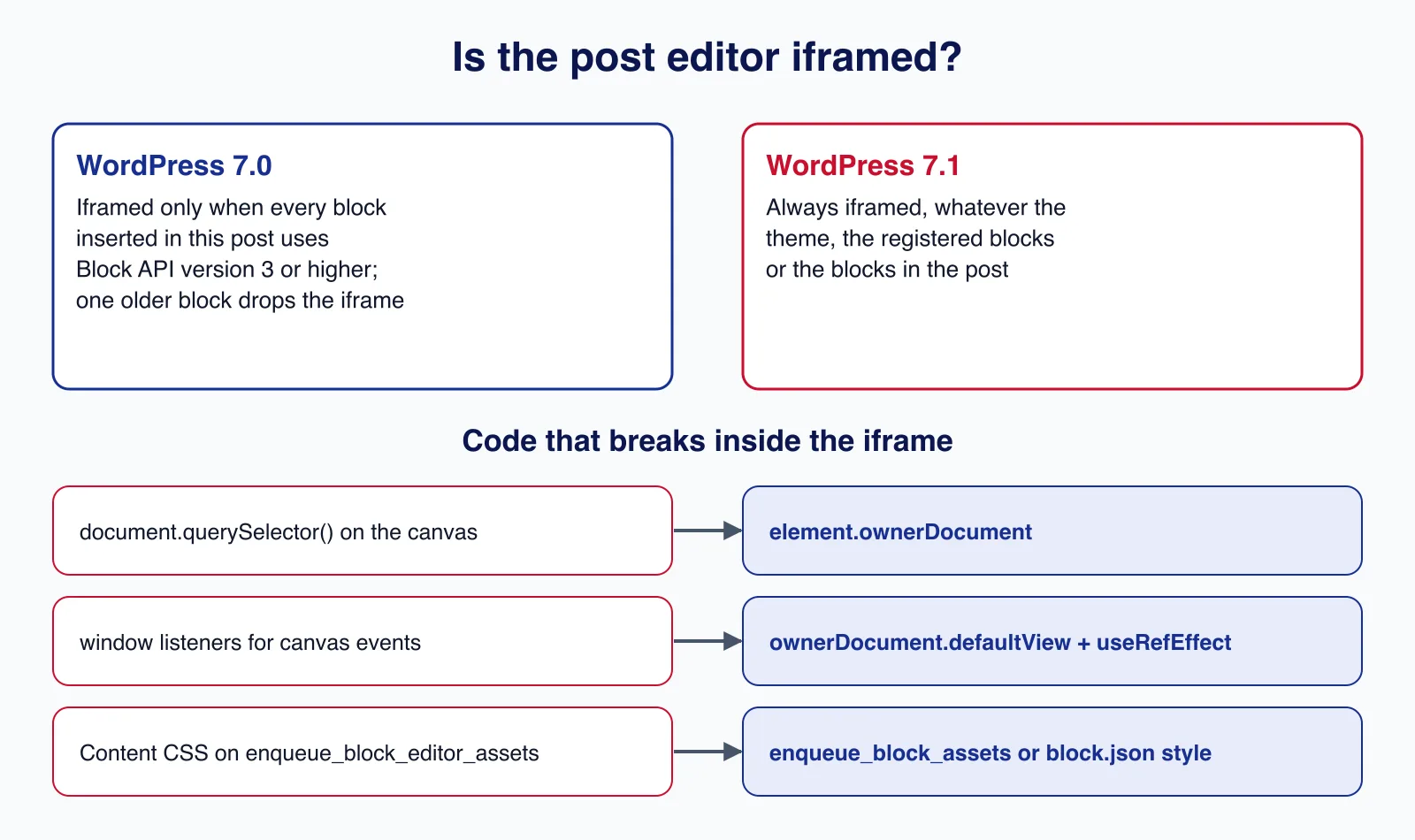
The iframe has its own document and window. Editor scripts still run in the admin page, so document.querySelector() looks in the wrong place and global listeners never see canvas events. Get the right document from the element:
import { useBlockProps } from '@wordpress/block-editor';
import { useRefEffect } from '@wordpress/compose';

export default function Edit() {
	// Attach listeners to the document the block actually lives in.
	const ref = useRefEffect( ( element ) => {
		const { ownerDocument } = element;
		const view = ownerDocument.defaultView;
		function onKeyDown( event ) {
			if ( event.key === 'Escape' ) {
				ownerDocument.querySelector( '.acme-popover' )?.remove();
			}
		}
		view.addEventListener( 'keydown', onKeyDown );
		return () => view.removeEventListener( 'keydown', onKeyDown );
	}, [] );

	return <div { ...useBlockProps( { ref } ) }>Booking form</div>;
}
Then bump apiVersion to 3 in each block.json, and make sure content styles are declared where the iframe can load them:
{
	"$schema": "https://schemas.wp.org/trunk/block.json",
	"apiVersion": 3,
	"name": "acme/booking-form",
	"title": "Booking form",
	"category": "widgets",
	"editorScript": "file:./index.js",
	"style": "file:./style-index.css",
	"editorStyle": "file:./index.css"
}<?php
// Styles for block content: loaded inside the editor iframe and on the front end.
add_action( 'enqueue_block_assets', function () {
wp_enqueue_style(
'acme-bookings-content',
plugins_url( 'build/content.css', __FILE__ ),
array(),
'3.2.0'
);
} );
// Scripts and styles for the editor UI only (sidebars, panels, toolbars).
add_action( 'enqueue_block_editor_assets', function () {
$asset = include __DIR__ . '/build/editor.asset.php';
wp_enqueue_script(
'acme-bookings-editor',
plugins_url( 'build/editor.js', __FILE__ ),
$asset['dependencies'],
$asset['version'],
true
);
} );The rule of thumb: enqueue_block_assets (or style/editorStyle in block.json, or add_editor_style() in a theme) reaches the canvas; enqueue_block_editor_assets only reaches the editor's outer page. A stylesheet that styled your block in 6.x through the wrong hook will simply stop applying.
3. Check image handling: uploads are processed in the browser
7.1 introduced client-side media processing. In supported browsers (Chromium 137 and later, on devices with more than 2 GB of memory and at least two cores), the block editor resizes images with a WebAssembly build of libvips and uploads each size through new REST routes: POST /wp/v2/media/{id}/sideload and POST /wp/v2/media/{id}/finalize. Firefox and Safari fall back to server-side processing.
What that means for plugin code:
wp_image_editors,image_memory_limitandimage_make_intermediate_sizenever fire for client-processed uploads. Custom image editors and per-size hooks silently stop running.wp_generate_attachment_metadatafires twice: with context'create'on upload and'update'after finalize. Sync jobs that run on every call will now run twice.- Quality and format filters such as
jpeg_quality,wp_editor_set_quality,image_editor_output_formatandbig_image_size_thresholdare still honoured. - A Content Security Policy without
blob:inworker-srcforces the server fallback.
<?php
// Keep server-side image processing while a custom image editor or
// image_make_intermediate_size hook is still needed.
add_filter( 'wp_client_side_media_processing_enabled', '__return_false' );

// Runs for both upload paths. On 7.1 client-side uploads it fires twice:
// once with 'create' and again with 'update' after the finalize request.
add_filter( 'wp_generate_attachment_metadata', function ( $metadata, $attachment_id, $context ) {
	if ( 'update' === $context || empty( $metadata['sizes'] ) ) {
		// Sub-sizes are complete here; safe to sync to a CDN or DAM.
	}
	return $metadata;
}, 10, 3 );
Opting out is a legitimate stopgap for image-optimisation and DAM plugins, but plan to support the new flow; it is the direction core has chosen.
4. Retest front-end CSS in block themes
Two 7.1 changes from the miscellaneous editor changes note can change how a site looks after the update, with no PHP warning to tell you:
- Navigation font size no longer reaches its items. Navigation links, submenus, page lists and home links stop inheriting the Navigation block's preset class. Themes that styled
has-{slug}-font-sizeon items will see smaller or larger menus. - Block-level preset classes are wrapped in
:where(). Classes such as.has-primary-colorgenerated fromsettings.blockspresets lost specificity, so custom CSS that used to lose now wins, and the reverse.
For the navigation change, move any theme CSS that targeted the preset class on individual items to the Navigation block itself, or use the PHP filter the dev note provides on render_block_core/navigation-link and the related blocks if you need the old markup exactly. For the specificity change, search your stylesheets for selectors that were written to beat (or lose to) .has-* classes. Take before-and-after screenshots of menus, buttons and coloured groups on a staging copy; visual regression tools catch these faster than people do. If you are still deciding between theme types, see block themes vs classic themes in 7.1.
5. Scan for removed and deprecated APIs
| Change | Release | What to do |
|---|---|---|
jQuery UI 1.13.3 to 1.14.2; $.fn._form, $.ui.ie, $.ui.safeActiveElement, $.ui.safeBlur removed; no IE or legacy Edge support | 7.1 | Replace the removed helpers; retest dialogs, sortables and date pickers |
Non-HTML5 script output removed; html5 theme support for script and style deprecated | 7.0 | Drop those two arguments from add_theme_support( 'html5', ... ) |
wp_sanitize_script_attributes() deprecated | 7.0 | Use wp_get_script_tag() or wp_get_inline_script_tag() |
__experimentalCloneSanitizedBlock, __experimentalSanitizeBlockAttributes | 7.1 | Rename to cloneSanitizedBlock, sanitizeBlockAttributes |
@wordpress/nux is a no-op; @wordpress/reusable-blocks APIs warn | 7.1 | Use the Guide component; use core entity methods for synced patterns |
Core Data getEntityRecords() no longer slices non-paginated entities to 10 | 7.1 | Set supportsPagination: false on custom entities; check loops that assumed 10 items |
Author link functions no longer output title attributes by default | 7.0 | Pass true to the_author_link() if a theme depends on it |
A quick first pass over a codebase:
# Removed in jQuery UI 1.14 (WordPress 7.1)
grep -rnE "\$\.fn\._form|\$\.ui\.(ie|safeActiveElement|safeBlur)\b" --include=*.js .

# Deprecated in 7.0 and 7.1
grep -rn "wp_sanitize_script_attributes\|__experimentalCloneSanitizedBlock\|__experimentalSanitizeBlockAttributes" .
grep -rn "add_theme_support( *'html5'" --include=*.php .

# Canvas access that breaks inside the iframe
grep -rnE "(window|document)\.(querySelector|getElementById|addEventListener)" --include=*.js src/
Then run the site with WP_DEBUG and WP_DEBUG_LOG on and read debug.log after clicking through every admin screen your plugin adds. Deprecation notices name the replacement.
6. React: still 18.3, but test for 19 now
WordPress 7.1 continues to use React 18.3; the React 19 upgrade was reverted after compatibility problems and moved to a long testing period. The Gutenberg plugin (23.4 and later) has an experiment under Settings, Gutenberg, Experiments that switches a site to React 19. Turn it on in a test site now. The failures the core team saw most often were plugins bundling their own react/jsx-runtime instead of using WordPress's externalised copy, and old APIs such as string refs, defaultProps on function components and legacy context. If you build with @wordpress/scripts, the dependency extraction plugin handles the externals for you.
7. Abilities and the AI client: declare exposure on purpose
7.0 added the client-side Abilities API, the AI Client and the Connectors API; 7.1 added a unified public flag in an ability's meta, which defaults to false, plus filtering through wp_get_abilities() and execution lifecycle filters. Existing show_in_rest registrations keep working. If your plugin registers abilities, decide explicitly which ones are public and check each one's permission callback; our Abilities API guide covers the details.
8. Release it like a compatibility update
Once the checks pass, treat the release itself as part of the work:
- Run the official Plugin Check plugin against the build you will ship, not your development folder.
- Write a changelog entry that names what changed for 7.1 (iframe fixes, image handling, CSS), so site owners and support staff know what to look for.
- Raise
Tested up toinreadme.txtin the same release, and keepRequires at leastandRequires PHPin step with the code you actually tested. - Keep one environment on the previous major (6.9 on PHP 7.2 or 7.3 still exists in the wild) if your
Requires at leastallows it, and test both. - Follow the Make WordPress Core blog during the 7.2 cycle and test betas and release candidates, not just the final release. Dev notes appear weeks before the release, which is when fixes are cheapest.
Common mistakes
- Raising
Tested up to: 7.1after activating the plugin on one site with the classic editor. - Testing only on Firefox or Safari, where client-side media processing does not run and the image hooks behave as before.
- Keeping block content CSS on
enqueue_block_editor_assetsand deciding the block "looks different in 7.1". - Bundling React or
react/jsx-runtimeinto a plugin build. - Treating deprecation notices as noise; several 7.1 deprecations become no-ops later.
When this checklist is not enough
A plugin that replaces the editor (a page builder), hooks deep into media, or ships its own React tree needs a full regression pass in real browsers, not a code scan. The same goes for WooCommerce extensions with custom checkout blocks. If your plugin or theme has paying users and you cannot spare a week to test 7.1 properly, our WordPress development team can run the compatibility pass and fix what it finds. And if the plugin is abandoned upstream, replacing it may be cheaper than patching it.
Cloudsoft Zone builds and maintains WordPress plugins, block themes and WooCommerce extensions: 7.1-compatible blocks, tested upgrade paths and release notes your customers can trust. See our WordPress and WooCommerce development service.
Frequently asked questions
What is the minimum PHP version for WordPress 7.x?
PHP 7.4, from WordPress 7.0. Sites on PHP 7.2 or 7.3 remain on the 6.9 branch. The recommended version is PHP 8.3.
Is the block editor always iframed in WordPress 7.1?
Yes. In 7.1 the post editor is always iframed, regardless of theme or block API versions. In 7.0 it was iframed only when every block in the post used Block API version 3.
Why did my image size hook stop running after updating to 7.1?
Uploads from Chromium-based browsers are now resized in the browser, and
image_make_intermediate_size,wp_image_editorsandimage_memory_limitdo not fire for them. Usewp_generate_attachment_metadata, or disable the feature with thewp_client_side_media_processing_enabledfilter while you adapt.Does WordPress 7.1 use React 19?
No. WordPress 7.1 ships React 18.3. React 19 can be tested through an experiment in the Gutenberg plugin, version 23.4 or later.
Your next customer could start right here.
Introduce your tool, product or business to readers exploring technology.
Explore placements and request a private quote
Sources
- WordPress 7.0 Field Guide — Make WordPress Core, 2026-05-14
- WordPress 7.1 Field Guide — Make WordPress Core, 2026-08-05
- Iframed Editor Changes in WordPress 7.1 — Make WordPress Core, 2026-08-03
- Client-Side Media Processing in WordPress 7.1 — Make WordPress Core, 2026-07-22
- Miscellaneous Editor Changes in WordPress 7.1 — Make WordPress Core, 2026-08-04
- jQuery UI updated to 1.14.2 in WordPress 7.1 — Make WordPress Core, 2026-07-29
- Dropping support for PHP 7.2 and 7.3 — Make WordPress Core, 2026-01-09
- React 19: punted beyond WordPress 7.1, experiment in Gutenberg — Make WordPress Core, 2026-07-24
- A unified public exposure flag for Abilities in WordPress 7.1 — Make WordPress Core, 2026-08-04
- @wordpress/env — WordPress Developer Resources
Written with substantial AI assistance. Facts checked against cited sources. Editorial policy.
Comments
No comments yet. Be the first to join the conversation.
Leave a comment
Every comment is read by a moderator before it appears. Your email address is never published; it is used only to contact you about this comment.
Related tools
- Directory profile
Cloudflare
Global network service providing DDoS protection, a web application firewall, CDN and DNS, with a free plan for websites.
A tool connected to a service selected for this article. Compare its fit for your project; inclusion is not an endorsement.
- Directory profile
Sucuri
Website security service combining a cloud web application firewall, DDoS mitigation and CDN with malware scanning, unlimited hack cleanups and blocklist removal.
A tool connected to a service selected for this article. Compare its fit for your project; inclusion is not an endorsement.
More from Cloudsoft Zone

Resource guideWordPress
WordPress security hardening checklist for 2026 (WordPress 7.1)
A practical WordPress 7.1 hardening checklist based on the official handbook: updates, two-step logins, wp-config.php constants, file permissions, database privileges, firewalls, WP-CLI checksum checks and tested backups.
By Cloudsoft Zone

TutorialWordPress
How to update WordPress safely with WP-CLI: backup, update, verify, roll back
A repeatable WordPress update routine with WP-CLI: check pending updates, export the database and archive files, update core, plugins, themes and translations in order, verify checksums, and restore if something breaks.
By Cloudsoft Zone

Troubleshooting guideCodeIgniter
CodeIgniter 4 validation not working? 9 causes and fixes
Fix CodeIgniter 4 validation problems fast: wrong input source, lost errors after redirect, permit_empty, strict JSON rules, is_unique placeholders and more.
By Cloudsoft Zone