
MCP server security update: why v2 users must upgrade manually
MCP server security update: v2.1.0 fixes the filesystem, everything and fetch reference servers. Why date-versioned npm installs do not upgrade on their own.
3 min read
In this article
The MCP server security update released on 25 October 2026, v2.1.0 of the official reference servers, fixes eight vulnerabilities across three servers: filesystem, everything and fetch. If you installed a date-versioned package, your package manager will not offer the fix. You must install it explicitly.
This is a package release, not a new MCP specification. It follows v2.0.0 on 19 October, which moved the servers to the current specification while still answering legacy clients.
Sources checked on 26 October 2026. Advisories, prices and availability can change; confirm the linked primary sources before acting.
What the MCP server security update fixes
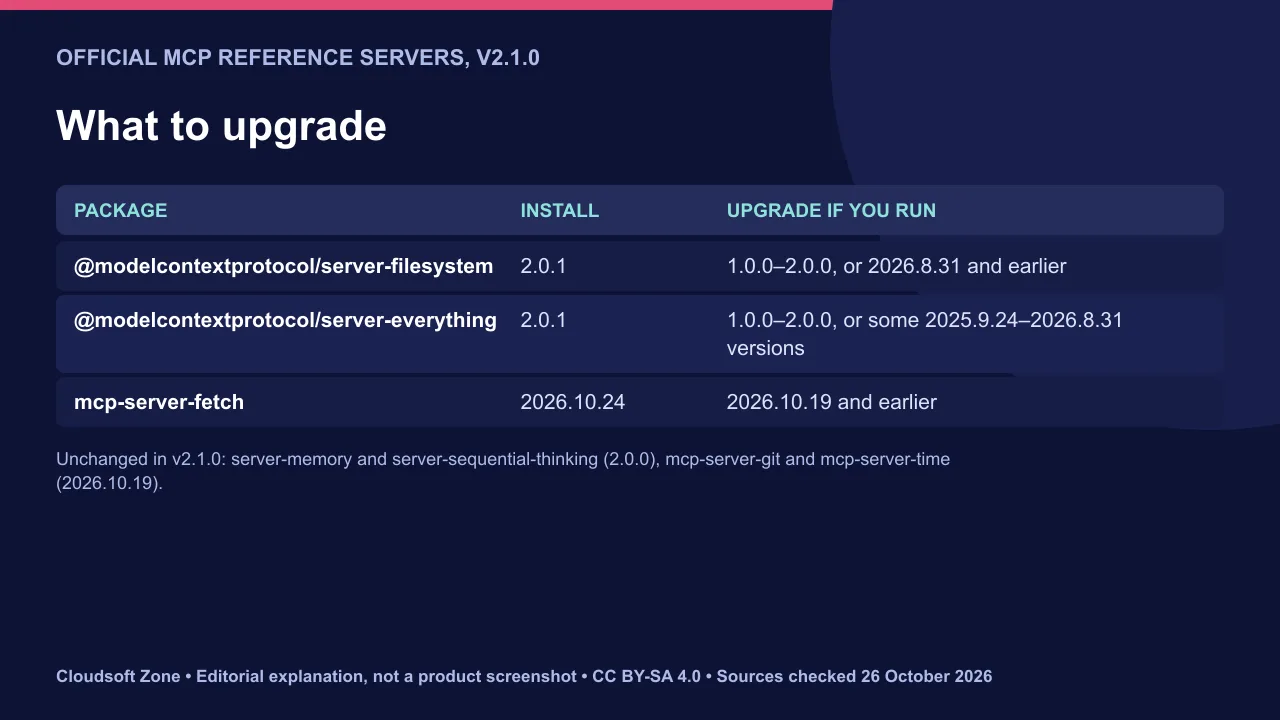
Three packages changed. The other reference servers were not updated in v2.1.0.
| Package | Fixed version | Fix area |
|---|---|---|
| @modelcontextprotocol/server-filesystem | 2.0.1 | Symlink and exact path checks; listings that exposed file sizes outside allowed directories |
| @modelcontextprotocol/server-everything | 2.0.1 | HTTP and SSE transports now check the Origin header |
| mcp-server-fetch | 2026.10.24 | Address checks for IDNA names and NAT64; robots.txt rechecked after redirects |
The release notes say the symlink write fix is only partly complete on Windows. Windows users should keep allowed directories narrow.
The versioning trap for date-versioned installs
Package managers compare version numbers, not dates. They rank 2.0.1 below any 2025.x or 2026.x release, so npm update stays on the old date version.
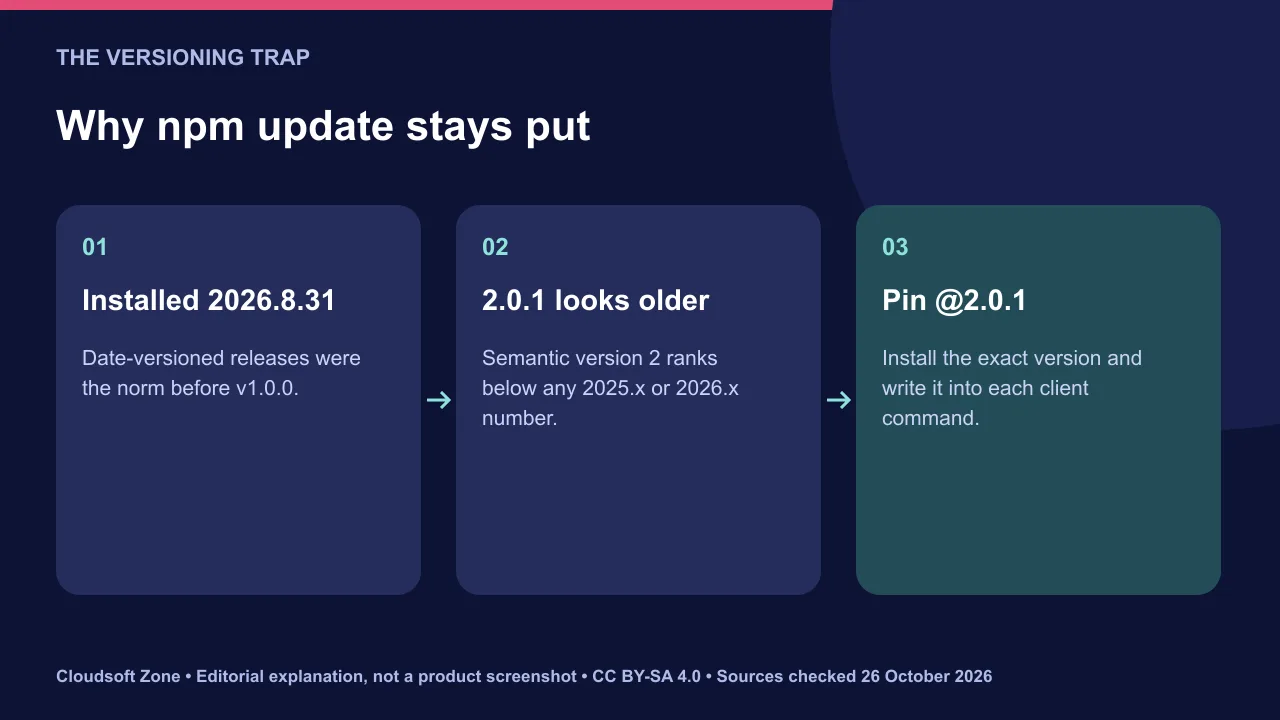
Install the new versions explicitly:
npm install @modelcontextprotocol/server-filesystem@2.0.1
npm install @modelcontextprotocol/server-everything@2.0.1
Many MCP clients start servers with npx. Write the exact version into that command, for example npx -y @modelcontextprotocol/server-filesystem@2.0.1, so the client cannot fall back to a cached date version. Upgrade the fetch server to 2026.10.24 or later.
Origin controls and SSRF protection
Two of the fixes address classic web risks that agent tools inherit. Apply the same rules to servers you build yourself.
A local HTTP server that accepts any origin can be called by a web page in the user's browser. The everything server now checks the Origin header. Allow listed origins only, and bind to localhost unless remote access is required.
The fetch fixes target server-side request forgery. Address checks now match the host the connection actually uses, including internationalised domain names and NAT64 addresses that wrap private IPv4 ranges. In your own fetch tools, resolve once, validate the address and connect to that same address.

Post-upgrade validation
Confirm the version every client launches, not the one in a lockfile. Then re-test the boundaries the fixes touch.
- Check the version in each client's server log or with
npm ls. - In a disposable workspace, confirm the filesystem server refuses paths outside its allowed directories.
- Confirm the fetch tool refuses the internal address ranges your network uses.
- Keep human approval on tools that write files or fetch URLs.
Our verdict: treat reference servers as examples to harden, not production gateways. Our MCP security guide covers least privilege, and our secure MCP server in NestJS tutorial shows origin and authentication checks. For a review of your agent setup, see our AI business process automation service.
Sources and further reading
- modelcontextprotocol/servers releases (v2.1.0 and v2.0.0) — Model Context Protocol on GitHub
Image credits
Explanatory diagrams: Cloudsoft Zone, CC BY-SA 4.0. Featured photograph: Cycling2, CC0, via Wikimedia Commons. Clear padlock and keys: zaphad1, CC BY 2.0, via Wikimedia Commons.
Frequently asked questions
Is this a new MCP specification?
No. v2.1.0 is a release of the official reference server packages. The specification did not change with it.
Why did npm update not install the fix?
Package managers rank 2.0.1 below date versions such as 2026.8.31, so they do not offer it. Install 2.0.1 explicitly.
Do the memory, git or time servers need an upgrade?
Not for v2.1.0. Those packages were unchanged in this release.
Your next customer could start right here.
Introduce your tool, product or business to readers exploring technology.
Explore placements and request a private quote
Sources
- modelcontextprotocol/servers releases (v2.1.0 and v2.0.0) — Model Context Protocol on GitHub, 2026-10-25
Written with substantial AI assistance. Facts checked against cited sources. Editorial policy.
Comments
No comments yet. Be the first to join the conversation.
Leave a comment
Every comment is read by a moderator before it appears. Your email address is never published; it is used only to contact you about this comment.
More from Cloudsoft Zone
Industry updateAI and Automation
Thousands of AI agents analysed brain-cell data in 32 minutes: how
Thousands of AI agents running GPT-Rosalind analysed data from millions of mouse brain cells in 32 minutes. The pattern, and what it does not prove.
By Cloudsoft Zone

Industry updateAI and Automation
NVIDIA Minerva: AIOps for GPU clusters and AI factory observability
NVIDIA Minerva is an AIOps platform for AI factory observability: GPU, network, storage and job telemetry in one graph. What it does and what is unproven.
By Cloudsoft Zone

Industry updateAI and Automation
WebMCP ecommerce: nearly 100,000 stores become AI-agent ready
WebMCP ecommerce at scale: Cloudflare and Commerce.com enabled agent shopping tools on almost 100,000 storefronts. The architecture and the checkout rule.
By Cloudsoft Zone