
Build a secure MCP server with NestJS
Build a remote MCP server in NestJS with the MCP TypeScript SDK v2: audience-checked tokens, RFC 9728 metadata, scope-filtered tools, strict inputs and real-client tests.
Updated 18 min read

In this article
A remote MCP server is an API that AI clients call on behalf of your users, so it needs everything a normal API needs plus a few things specific to the Model Context Protocol: tokens that were issued for this server and nothing else, a discovery document that tells clients where to sign in, tools that only appear when the caller may use them, and inputs validated before a handler runs. This tutorial builds that server inside a NestJS application with the official MCP TypeScript SDK v2, tests it with the SDK's own client, and shows which checks the SDK does for you and which it leaves to your code.
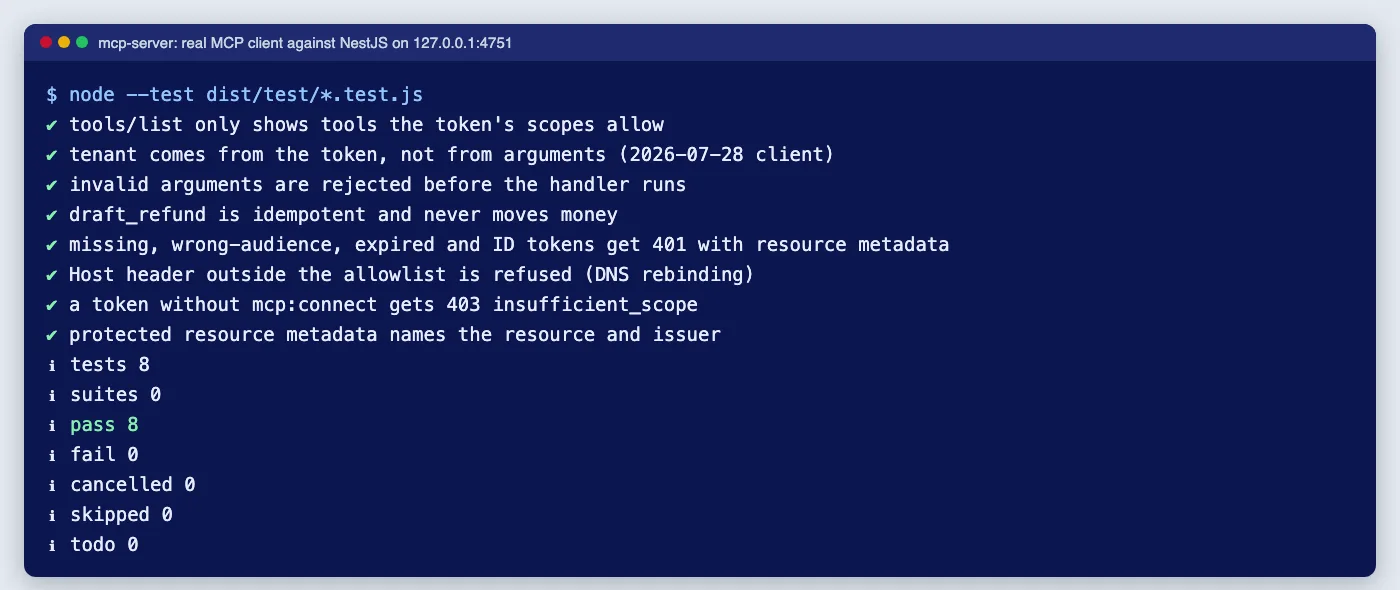
Tested with: Node.js 24.19.0, NestJS 11.1.29 (Express adapter), @modelcontextprotocol/server, @modelcontextprotocol/node and @modelcontextprotocol/client 2.0.0, jose 6.2.8, Zod 4.4.3 and TypeScript 5.9.3, against MCP specification revision 2026-07-28. Eight end-to-end tests run a real MCP client against the server on a local port with locally signed ES256 tokens.
This is the build guide. For the threat model behind it (tool poisoning, approval UX, confused deputies and published MCP vulnerabilities) read MCP security in 2026: tool approval, server trust and least privilege; those points are not repeated here.
Which SDK package to install
The MCP TypeScript SDK changed shape with version 2, released on 27 July 2026 alongside the stateless 2026-07-28 specification. The single @modelcontextprotocol/sdk package (still maintained on the 1.x line) is replaced by separate packages: @modelcontextprotocol/server, @modelcontextprotocol/client, a Node.js adapter @modelcontextprotocol/node, and adapters for Express, Fastify and Hono. Examples that import from @modelcontextprotocol/sdk/server/mcp.js are v1 code; the migration guide covers the move.
npm i @modelcontextprotocol/server @modelcontextprotocol/node zod jose
npm i -D @modelcontextprotocol/client   # for tests
Under 2026-07-28 the protocol is stateless: there is no session to set up, and each HTTP request carries what the server needs. In SDK v2, createMcpHandler() takes a factory and builds a fresh McpServer for every request. That is useful for security, because the factory receives the request's verified token and can register only the tools that token may use.
Step 1: configuration that never comes from the request
/** Everything security-relevant comes from configuration, never from the request. */
export const MCP_CONFIG = Symbol('MCP_CONFIG');

export interface McpConfig {
  /** Public URL of this MCP endpoint: the RFC 8707 resource and the required token audience. */
  resource: URL;
  /** Authorization server that issues tokens for this resource. */
  issuer: string;
  jwksUrl: URL;
  /** Host header values accepted (DNS rebinding protection). */
  allowedHosts: string[];
}

export function mcpConfigFromEnv(): McpConfig {
  return {
    resource: new URL(process.env.MCP_RESOURCE_URL ?? 'https://mcp.example.com/mcp'),
    issuer: process.env.MCP_ISSUER ?? 'https://auth.example.com',
    jwksUrl: new URL(process.env.MCP_JWKS_URL ?? 'https://auth.example.com/.well-known/jwks.json'),
    allowedHosts: (process.env.MCP_ALLOWED_HOSTS ?? 'mcp.example.com').split(','),
  };
}
The resource URL is the server's canonical address, and it is also the audience every token must carry. The specification requires clients to send it as the RFC 8707 resource parameter when they ask for a token, and requires servers to check it: "MCP servers MUST validate that access tokens were issued specifically for them as the intended audience" (Authorization, 2026-07-28).
Step 2: verify tokens, including the audience
import { Inject, Injectable } from '@nestjs/common';
import { OAuthError, OAuthErrorCode, type AuthInfo, type OAuthTokenVerifier } from '@modelcontextprotocol/server';
import { createRemoteJWKSet, errors, jwtVerify, type JWTVerifyGetKey } from 'jose';
import { MCP_CONFIG, type McpConfig } from './mcp.config.js';

export const JWKS = Symbol('JWKS');
export const remoteJwks = (config: McpConfig): JWTVerifyGetKey => createRemoteJWKSet(config.jwksUrl);

/**
 * The SDK's bearer helpers check the header format, scopes and expiry.
 * Issuer, signature and audience are this class's job, and the audience check is the one that matters most.
 */
@Injectable()
export class JwtTokenVerifier implements OAuthTokenVerifier {
  constructor(
    @Inject(MCP_CONFIG) private readonly config: McpConfig,
    @Inject(JWKS) private readonly keys: JWTVerifyGetKey,
  ) {}

  async verifyAccessToken(token: string): Promise<AuthInfo> {
    try {
      const { payload } = await jwtVerify(token, this.keys, {
        issuer: this.config.issuer,
        audience: this.config.resource.href, // a token minted for another API is refused here
        algorithms: ['ES256', 'RS256'],
        typ: 'at+jwt', // RFC 9068 access tokens, not ID tokens
        requiredClaims: ['exp', 'sub', 'client_id'],
        clockTolerance: 30,
      });
      const tenantId = payload.tenant_id;
      if (typeof tenantId !== 'string') throw new OAuthError(OAuthErrorCode.InvalidToken, 'Token has no tenant');
      return {
        token,
        clientId: String(payload.client_id),
        scopes: typeof payload.scope === 'string' ? payload.scope.split(' ') : [],
        expiresAt: payload.exp,
        resource: this.config.resource,
        extra: { sub: payload.sub, tenantId },
      };
    } catch (err) {
      if (err instanceof OAuthError) throw err;
      if (err instanceof errors.JOSEError) throw new OAuthError(OAuthErrorCode.InvalidToken, 'Invalid access token');
      throw err;
    }
  }
}
This is the most important file. The SDK's verifyBearerToken() parses the header, calls your verifier, enforces required scopes and rejects tokens without an exp or past it. Reading its source in 2.0.0 confirms that it does not check the issuer, the signature or the audience: that is the verifier's job. A server that skips the audience check accepts any token your identity provider issues, for any API, which is exactly the token-reuse problem the specification forbids.
The verifier also requires typ: at+jwt (an RFC 9068 access token rather than an OpenID Connect ID token), pins the algorithms, and requires a tenant claim. If your authorization server issues opaque tokens instead of JWTs, implement the same interface with RFC 7662 token introspection and check the aud it returns.
Step 3: a NestJS guard that returns proper challenges
import { CanActivate, ExecutionContext, ForbiddenException, Inject, Injectable } from '@nestjs/common';
import { bearerAuthChallengeResponse, getOAuthProtectedResourceMetadataUrl, validateHostHeader, verifyBearerToken, type AuthInfo } from '@modelcontextprotocol/server';
import type { Request } from 'express';
import { JwtTokenVerifier } from './jwt-token.verifier.js';
import { MCP_CONFIG, type McpConfig } from './mcp.config.js';

/** Carries a ready-made 401/403 challenge to McpChallengeFilter. */
export class McpChallenge extends Error {
  constructor(readonly response: Response) {
    super('MCP authorization failed');
  }
}

export type McpRequest = Request & { mcpAuth?: AuthInfo };

@Injectable()
export class McpAuthGuard implements CanActivate {
  private readonly resourceMetadataUrl: string;

  constructor(private readonly verifier: JwtTokenVerifier, @Inject(MCP_CONFIG) private readonly config: McpConfig) {
    this.resourceMetadataUrl = getOAuthProtectedResourceMetadataUrl(config.resource);
  }

  async canActivate(ctx: ExecutionContext): Promise<boolean> {
    const req = ctx.switchToHttp().getRequest<McpRequest>();
    // DNS rebinding protection first: only our public hostname may reach the endpoint.
    if (!validateHostHeader(req.headers.host, this.config.allowedHosts).ok) throw new ForbiddenException('Host not allowed');
    try {
      // Missing or malformed header, bad token, no expiry, expired: all become OAuthErrors.
      req.mcpAuth = await verifyBearerToken(req.headers.authorization, {
        verifier: this.verifier,
        requiredScopes: ['mcp:connect'],
        resourceMetadataUrl: this.resourceMetadataUrl,
      });
      return true;
    } catch (err) {
      // 401/403 with WWW-Authenticate: Bearer ..., resource_metadata="..." so clients can discover the AS.
      throw new McpChallenge(bearerAuthChallengeResponse(err, {
        requiredScopes: ['mcp:connect'],
        resourceMetadataUrl: this.resourceMetadataUrl,
      }));
    }
  }
}import { ArgumentsHost, Catch, ExceptionFilter } from '@nestjs/common';
import type { Response as ExpressResponse } from 'express';
import { McpChallenge } from './mcp-auth.guard.js';
@Catch(McpChallenge)
export class McpChallengeFilter implements ExceptionFilter {
async catch(exception: McpChallenge, host: ArgumentsHost) {
const res = host.switchToHttp().getResponse<ExpressResponse>();
const challenge = exception.response;
challenge.headers.forEach((value, key) => res.setHeader(key, value));
res.status(challenge.status).send(await challenge.text());
}
}The guard first checks the Host header against an allowlist, which stops DNS-rebinding attacks against servers reachable from a browser. It then verifies the token and requires the mcp:connect scope. Failures are turned into the response the specification asks for by bearerAuthChallengeResponse(); the filter just copies it onto Express's response. A request with no token produced this in our run:
HTTP/1.1 401 Unauthorized
WWW-Authenticate: Bearer error="invalid_token", error_description="Missing Authorization header", scope="mcp:connect", resource_metadata="https://mcp.example.com/.well-known/oauth-protected-resource/mcp"
The resource_metadata URL is how an MCP client discovers your authorization server, and a token with the wrong scopes gets 403 with error="insufficient_scope", as the specification's error table requires.
Step 4: tools filtered by scope, inputs validated by schema
import { Injectable } from '@nestjs/common';

export interface Invoice { id: string; tenantId: string; customer: string; status: 'open' | 'paid' | 'void'; totalCents: number }
export interface RefundDraft { id: string; tenantId: string; invoiceId: string; amountCents: number; reason: string; requestedBy: string }

/** Stands in for your database layer. Every method takes the tenant explicitly. */
@Injectable()
export class InvoicesService {
  private readonly invoices: Invoice[] = [
    { id: 'INV-1001', tenantId: 'acme', customer: 'Northwind', status: 'paid', totalCents: 129_00 },
    { id: 'INV-1002', tenantId: 'acme', customer: 'Contoso', status: 'open', totalCents: 87_50 },
    { id: 'INV-2001', tenantId: 'globex', customer: 'Initech', status: 'paid', totalCents: 990_00 },
  ];
  readonly drafts = new Map<string, RefundDraft>();

  list(tenantId: string, status: Invoice['status'] | undefined, limit: number): Invoice[] {
    return this.invoices.filter((i) => i.tenantId === tenantId && (!status || i.status === status)).slice(0, limit);
  }

  find(tenantId: string, id: string): Invoice | undefined {
    return this.invoices.find((i) => i.tenantId === tenantId && i.id === id);
  }

  /** Idempotent: one open draft per invoice. A person approves it outside MCP. */
  draftRefund(draft: Omit<RefundDraft, 'id'>): RefundDraft {
    const key = `${draft.tenantId}:${draft.invoiceId}`;
    const existing = this.drafts.get(key);
    if (existing) return existing;
    const created = { ...draft, id: `RFD-${this.drafts.size + 1}` };
    this.drafts.set(key, created);
    return created;
  }
}import { Injectable } from '@nestjs/common';
import { McpServer, type AuthInfo } from '@modelcontextprotocol/server';
import { z } from 'zod';
import { InvoicesService, type Invoice } from './invoices.service.js';
const InvoiceOut = z.object({
id: z.string(),
customer: z.string(),
status: z.enum(['open', 'paid', 'void']),
totalCents: z.number().int(),
});
const InvoiceId = z.string().regex(/^INV-\d{4,10}$/, 'Invoice IDs look like INV-1001');
const toOut = ({ id, customer, status, totalCents }: Invoice) => ({ id, customer, status, totalCents });
const text = (s: string) => [{ type: 'text' as const, text: s }];
/**
* Builds a fresh McpServer for one request. Only tools the token's scopes allow are registered,
* so tools/list never advertises something the caller cannot use.
*/
@Injectable()
export class McpServerFactory {
constructor(private readonly invoices: InvoicesService) {}
create(auth: AuthInfo): McpServer {
const tenantId = String(auth.extra?.tenantId); // from the verified token, never from tool arguments
const can = (scope: string) => auth.scopes.includes(scope);
const server = new McpServer({ name: 'billing', version: '1.0.0' });
if (can('invoices:read')) {
server.registerTool('list_invoices', {
title: 'List invoices',
description: 'List invoices for the signed-in customer account, newest first.',
inputSchema: z.object({
status: z.enum(['open', 'paid', 'void']).optional(),
limit: z.number().int().min(1).max(50).default(20),
}).strict(),
outputSchema: z.object({ invoices: z.array(InvoiceOut) }),
annotations: { readOnlyHint: true, openWorldHint: false },
}, async ({ status, limit }) => {
const invoices = this.invoices.list(tenantId, status, limit).map(toOut);
return { content: text(`${invoices.length} invoice(s)`), structuredContent: { invoices } };
});
server.registerTool('get_invoice', {
title: 'Get invoice',
description: 'Get one invoice by ID.',
inputSchema: z.object({ invoiceId: InvoiceId }).strict(),
outputSchema: InvoiceOut,
annotations: { readOnlyHint: true, openWorldHint: false },
}, async ({ invoiceId }) => {
const invoice = this.invoices.find(tenantId, invoiceId);
// Same answer for "missing" and "belongs to someone else": no existence oracle.
if (!invoice) return { content: text(`No invoice ${invoiceId}`), isError: true };
return { content: text(`${invoice.id}: ${invoice.status}`), structuredContent: toOut(invoice) };
});
}
if (can('refunds:draft')) {
server.registerTool('draft_refund', {
title: 'Draft a refund',
description: 'Create a refund draft for a paid invoice. A staff member must approve it before any money moves.',
inputSchema: z.object({
invoiceId: InvoiceId,
amountCents: z.number().int().positive().max(1_000_000),
reason: z.string().trim().min(5).max(500),
}).strict(),
annotations: { readOnlyHint: false, destructiveHint: false, idempotentHint: true, openWorldHint: false },
}, async ({ invoiceId, amountCents, reason }) => {
const invoice = this.invoices.find(tenantId, invoiceId);
if (!invoice) return { content: text(`No invoice ${invoiceId}`), isError: true };
if (invoice.status !== 'paid') return { content: text('Only paid invoices can be refunded'), isError: true };
if (amountCents > invoice.totalCents) return { content: text('Refund exceeds the invoice total'), isError: true };
const draft = this.invoices.draftRefund({
tenantId, invoiceId, amountCents, reason, requestedBy: `${auth.clientId}/${String(auth.extra?.sub)}`,
});
return { content: text(`Refund draft ${draft.id} created and waiting for approval`) };
});
}
return server;
}
}Four rules are built into this factory:
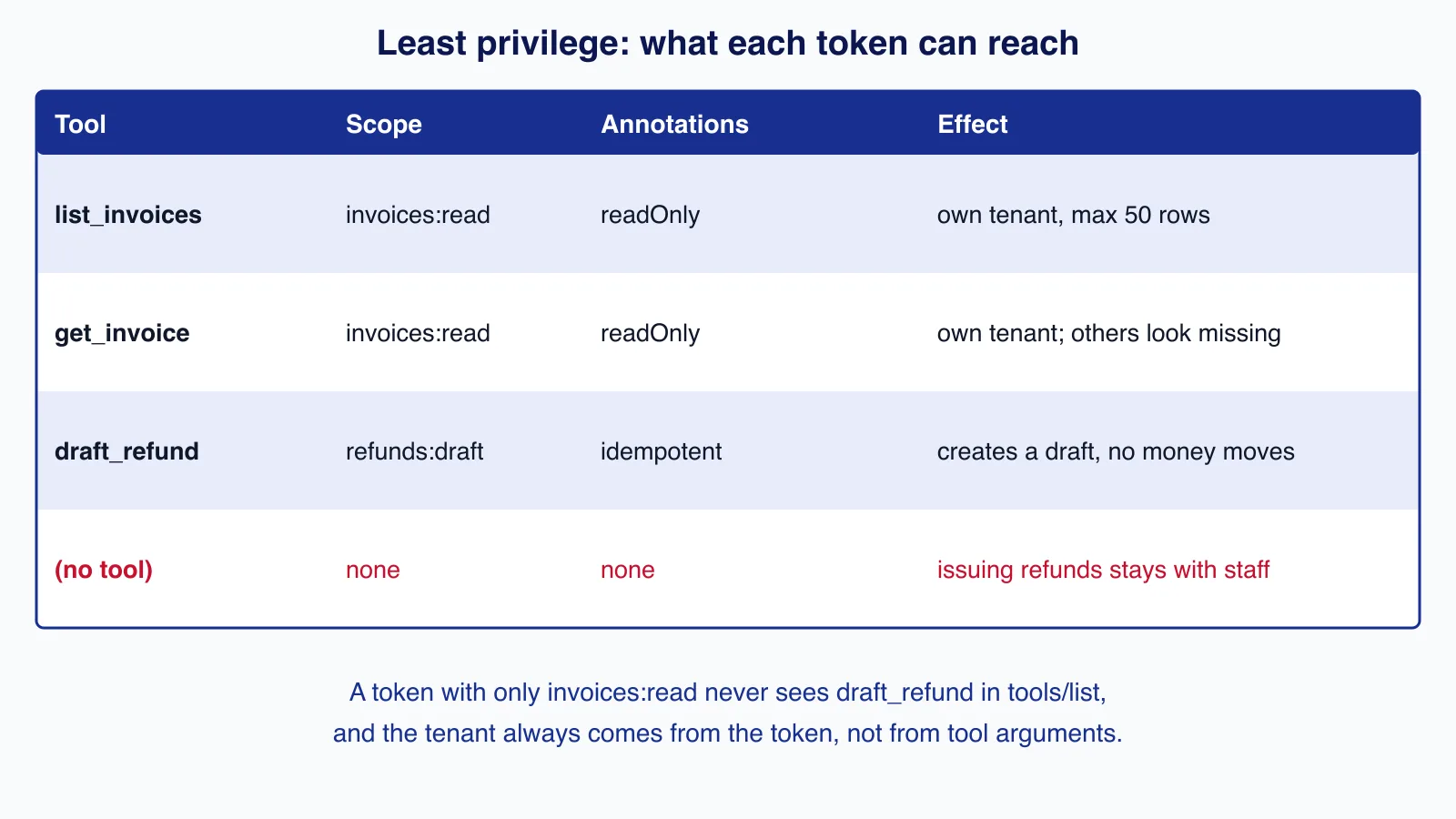
- Register only what the token allows. A token with
invoices:readnever seesdraft_refundintools/list, so the model cannot be talked into calling it. Calling an unregistered tool fails like any unknown tool. - Take identity from the token.
tenantIdcomes from the verified token's claims. No tool accepts a tenant or user ID as an argument, and.strict()schemas refuse unknown keys, so a prompt-injectedtenantIdis rejected rather than ignored. - Bound every input. Enums, regular expressions, integer limits and string lengths are checked by the SDK before your handler runs. A bad call comes back to the model as a result with
isError: true, which it can read and correct. - Make write tools reversible.
draft_refundcreates a draft that a person approves elsewhere, and it is idempotent per invoice. The annotations (readOnlyHint,idempotentHint,destructiveHint) help clients decide what to ask the user about, but they are hints from the server, so never rely on them for enforcement.
Step 5: mount the handler in a controller
import { All, Controller, Get, Inject, OnModuleDestroy, Req, Res, UseFilters, UseGuards } from '@nestjs/common';
import { buildOAuthProtectedResourceMetadata, createMcpHandler, type AuthInfo } from '@modelcontextprotocol/server';
import { toNodeHandler } from '@modelcontextprotocol/node';
import type { Response } from 'express';
import { McpAuthGuard, type McpRequest } from './mcp-auth.guard.js';
import { McpChallengeFilter } from './mcp-challenge.filter.js';
import { MCP_CONFIG, type McpConfig } from './mcp.config.js';
import { McpServerFactory } from './mcp-server.factory.js';

@Controller()
export class McpController implements OnModuleDestroy {
  // Stateless (2026-07-28): one handler, a fresh McpServer per request built from that request's token.
  // legacy: 'stateless' (the default) also answers clients that still open with the 2025 handshake;
  // switch to 'reject' only when every client you support speaks 2026-07-28.
  private readonly handler = createMcpHandler(({ authInfo }) => this.servers.create(authInfo!), {
    legacy: 'stateless',
    onerror: (e) => console.error('mcp error', e.message),
  });
  constructor(private readonly servers: McpServerFactory, @Inject(MCP_CONFIG) private readonly config: McpConfig) {}

  async onModuleDestroy() {
    await this.handler.close();
  }

  /** RFC 9728 metadata: tells clients which authorization server issues tokens for this resource. */
  @Get('.well-known/oauth-protected-resource/mcp')
  metadata() {
    return buildOAuthProtectedResourceMetadata({
      resourceServerUrl: this.config.resource,
      scopesSupported: ['mcp:connect', 'invoices:read', 'refunds:draft'],
      resourceName: 'Billing MCP server',
      oauthMetadata: {
        issuer: this.config.issuer,
        authorization_endpoint: `${this.config.issuer}/authorize`,
        token_endpoint: `${this.config.issuer}/token`,
        response_types_supported: ['code'],
        code_challenge_methods_supported: ['S256'],
      },
    });
  }

  @All('mcp')
  @UseGuards(McpAuthGuard)
  @UseFilters(McpChallengeFilter)
  async mcp(@Req() req: McpRequest, @Res() res: Response) {
    const authInfo: AuthInfo = req.mcpAuth!;
    const serve = toNodeHandler({ fetch: (request, opts) => this.handler.fetch(request, { ...opts, authInfo }) });
    await serve(req, res, req.body);
  }
}import { Module } from '@nestjs/common';
import { InvoicesService } from './invoices.service.js';
import { JWKS, JwtTokenVerifier, remoteJwks } from './jwt-token.verifier.js';
import { McpAuthGuard } from './mcp-auth.guard.js';
import { MCP_CONFIG, mcpConfigFromEnv, type McpConfig } from './mcp.config.js';
import { McpController } from './mcp.controller.js';
import { McpServerFactory } from './mcp-server.factory.js';
@Module({
controllers: [McpController],
providers: [
{ provide: MCP_CONFIG, useFactory: mcpConfigFromEnv },
{ provide: JWKS, useFactory: remoteJwks, inject: [MCP_CONFIG] },
JwtTokenVerifier,
McpAuthGuard,
McpServerFactory,
InvoicesService,
],
})
export class AppModule {}import 'reflect-metadata';
import { NestFactory } from '@nestjs/core';
import { AppModule } from './app.module.js';
const app = await NestFactory.create(AppModule);
app.enableShutdownHooks();
await app.listen(Number(process.env.PORT ?? 3000), process.env.HOST ?? '127.0.0.1'); // TLS terminates at your proxycreateMcpHandler() exposes a web-standard fetch(request, { authInfo }) face, and toNodeHandler() from @modelcontextprotocol/node adapts it to Express's request and response. The handler never reads tokens itself; the guard's verified AuthInfo is passed in and reaches the factory. Express has already parsed the JSON body, so it is passed through as parsedBody.
The metadata route publishes the RFC 9728 document. In our run it returned:
{"resource":"https://mcp.example.com/mcp","authorization_servers":["https://auth.example.com"],"scopes_supported":["mcp:connect","invoices:read","refunds:draft"],"resource_name":"Billing MCP server"}Step 6: test with a real MCP client
The tests start the Nest application on a local port, sign tokens with a throwaway ES256 key, and connect with the SDK's Client and StreamableHTTPClientTransport, so every request goes through the same HTTP, auth and protocol path a production client uses.
async function connect(token: string, modern = false) {
  // Default v2 client: 2025 handshake. modern: pin the 2026-07-28 revision.
  const client = new Client({ name: 'test-client', version: '1.0.0' }, modern ? { versionNegotiation: { mode: { pin: '2026-07-28' } } } : undefined);
  const transport = new StreamableHTTPClientTransport(new URL(`${BASE}/mcp`), {
    requestInit: { headers: { Authorization: `Bearer ${token}` } },
  });
  await client.connect(transport);
  return client;
}

test('tools/list only shows tools the token\'s scopes allow', async () => {
  const reader = await connect(await sign({}));
  assert.deepEqual((await reader.listTools()).tools.map((t) => t.name).sort(), ['get_invoice', 'list_invoices']);
  await reader.close();
  const drafter = await connect(await sign({ scope: 'mcp:connect invoices:read refunds:draft' }));
  assert.ok((await drafter.listTools()).tools.some((t) => t.name === 'draft_refund'));
  await drafter.close();
});

test('tenant comes from the token, not from arguments (2026-07-28 client)', async () => {
  const client = await connect(await sign({ tenant_id: 'acme' }), true);
  const list = await client.callTool({ name: 'list_invoices', arguments: {} });
  assert.deepEqual((list.structuredContent as { invoices: { id: string }[] }).invoices.map((i) => i.id), ['INV-1001', 'INV-1002']);
  const other = await client.callTool({ name: 'get_invoice', arguments: { invoiceId: 'INV-2001' } }); // globex's invoice
  assert.equal(other.isError, true);
  await client.close();
});test('missing, wrong-audience, expired and ID tokens get 401 with resource metadata', async () => {
const cases = {
missing: undefined,
wrongAudience: await new SignJWT({}).setProtectedHeader({ alg: 'HS256' }).sign(new Uint8Array(32)),
otherApi: await sign({}, { aud: 'https://api.other.example.com' }), // valid token, wrong audience
expired: await sign({}, { expSeconds: -120 }),
idToken: await sign({}, { typ: 'JWT' }),
};
for (const [name, token] of Object.entries(cases)) {
const res = await post(token);
assert.equal(res.status, 401, name);
assert.match(res.headers.get('www-authenticate') ?? '', /resource_metadata="https:\/\/mcp\.example\.com\/\.well-known\/oauth-protected-resource\/mcp"/, name);
}
});
Building this surfaced three problems worth knowing about:
- Clients still speak the 2025 handshake. We first set
legacy: 'reject'to accept only 2026-07-28 traffic. Every test using the default v2 client then failed with-32022 Unsupported protocol version: 2025-11-25, because the client's version negotiation defaults to the 2025 handshake. The server now keeps the defaultlegacy: 'stateless', and one test pins the client to 2026-07-28 to cover both paths. Move to'reject'only when every client you support has upgraded. fetch()cannot fake a Host header. The DNS-rebinding test passed a hostileHostheader and got 200, becausefetchsilently drops that header. The test now usesnode:http, and the check fails as it should.- A test token that looked wrong was not. The first "other API" token set
audin the payload and then calledsetAudience(), which overwrote it with the right audience. Removing the audience option fromjwtVerifyafterwards made the corrected test fail, which confirms it is testing the audience check.
Designing scopes
Scopes are the contract between your authorization server, the MCP client and the tools. A few rules keep them manageable:
- One connect scope plus capability scopes.
mcp:connectsays "may use this server at all";invoices:readandrefunds:draftunlock groups of tools. Advertise the minimal set inscopes_supported, since clients may request all of it on first sign-in. - Name scopes after what they allow, not after tools. Tools change more often than permissions, and one scope can cover several read tools.
- Handle hierarchies on purpose. The specification says servers "MUST account for scope hierarchies, where a broader scope implies narrower ones". If you introduce
invoices:admin, decide in one function whether it impliesinvoices:read, and use that function in the factory rather than rawincludes()checks. - Challenge for everything at once. When an operation needs more than the token has, return all missing scopes in one
insufficient_scopechallenge so the client re-authorises once, not once per scope.
Running it behind a proxy
Most deployments put nginx, a load balancer or a platform router in front of Node.js. Three settings matter for MCP. First, the resource URL in configuration must be the public HTTPS address clients use, because it is both the token audience and the address in your metadata; do not derive it from request headers. Second, keep the Host allowlist to that public hostname and make sure the proxy passes the original Host header through. Third, if tools stream progress, the handler answers with server-sent events, so disable response buffering for the MCP path (for nginx, proxy_buffering off or an X-Accel-Buffering: no header) and set read timeouts longer than your slowest tool. Stateless requests mean any instance can serve any request, so no sticky sessions are needed.
Production checklist
- Serve only over HTTPS behind your proxy, bind Node.js to a private interface, and set the Host allowlist to your public hostname only.
- Use your identity provider's JWKS endpoint with caching; rotate signing keys without restarting the server.
- Keep access tokens short-lived (minutes), and never accept tokens in query strings.
- Never forward the client's token to a downstream API. Call downstream services with the server's own narrowly scoped credentials.
- Rate-limit per client ID and per tenant, and cap response sizes; models will happily ask for "all invoices".
- Log tool name, client ID, tenant, argument summary and outcome for every call, not the full arguments or results.
- Treat everything a tool returns as untrusted text for the model. Data from invoices or tickets can contain instructions; the defence patterns are in Prompt injection defence: design AI agents that fail safely.
Token audience checks, scope design and tenant isolation are the parts of an MCP server that are easy to get subtly wrong and hard to notice in testing. If you want a second pair of eyes on an MCP server or need one built against your existing API, our API development and integration service covers that work.
Common mistakes
- Checking the signature but not the audience, so any token from the same identity provider works.
- Accepting ID tokens as access tokens because both are JWTs.
- One global McpServer with every tool registered, relying on the model not to call the ones the user cannot use.
- Taking user, tenant or account IDs as tool arguments.
- Loose schemas without
.strict(), limits or formats, so the model can pass anything. - Trusting tool annotations for enforcement; they are hints for clients.
- Returning internal error messages or saying "that invoice belongs to another customer", which leaks data.
When not to build it this way
- A local tool for one developer should use the stdio transport and credentials from the environment; the specification says stdio implementations should not use this OAuth flow.
- If the only consumer is your own backend calling a model, call your API directly with tool use; MCP adds a protocol layer you do not need.
- If your application does not use NestJS, the SDK's Express, Fastify or Hono adapters are less code than adding Nest for one endpoint.
- If you cannot yet issue audience-bound tokens, do not expose write tools remotely until you can.
If Nest cannot resolve the verifier, guard or factory when you add this module to an existing application, this guide to the "can't resolve dependencies" error lists the usual causes.
Cloudsoft Zone builds MCP servers and APIs in NestJS with audience-checked tokens, scope-filtered tools, tenant isolation and end-to-end tests using a real MCP client. See our API development and integration service.
Frequently asked questions
Which npm package is the official MCP TypeScript SDK in 2026?
Since version 2 (27 July 2026) the SDK is split into
@modelcontextprotocol/server,@modelcontextprotocol/clientand adapters such as@modelcontextprotocol/nodeand@modelcontextprotocol/express. The older@modelcontextprotocol/sdkpackage is the v1 line.Does the MCP SDK check the token audience for me?
No. In SDK 2.0.0,
verifyBearerToken()checks the header format, required scopes and expiry, and calls your verifier. Signature, issuer and audience checks belong in yourOAuthTokenVerifier, and the specification requires the audience check.Should a remote MCP server reject 2025-era clients?
Only when all your clients support the 2026-07-28 revision. In our tests the default v2 client opened with the 2025 handshake and was refused by a
legacy: 'reject'endpoint, so the default stateless legacy mode is the safer choice during the transition.Are tool annotations a security control?
No. Annotations such as
readOnlyHintanddestructiveHintare hints that help clients decide when to ask the user. Enforce permissions on the server with scopes, tenant-scoped queries and by not exposing risky actions as tools.
Your next customer could start right here.
Introduce your tool, product or business to readers exploring technology.
Explore placements and request a private quote
Sources
- Authorization (2026-07-28) — Model Context Protocol, 2026-07-28
- MCP TypeScript SDK v2: serving over HTTP — Model Context Protocol
- MCP TypeScript SDK v2: tools — Model Context Protocol
- Migrating to SDK v2 — Model Context Protocol
- RFC 9728: OAuth 2.0 Protected Resource Metadata — IETF, 2025-04-01
- RFC 8707: Resource Indicators for OAuth 2.0 — IETF, 2020-02-01
- RFC 9068: JWT Profile for OAuth 2.0 Access Tokens — IETF, 2021-10-01
- jose: jwtVerify — panva/jose
Written with substantial AI assistance. Facts checked against cited sources. Editorial policy.
Comments
No comments yet. Be the first to join the conversation.
Leave a comment
Every comment is read by a moderator before it appears. Your email address is never published; it is used only to contact you about this comment.
More from Cloudsoft Zone

TutorialNode.js
How to test a Node.js API with the built-in test runner (node:test)
Write, run, mock and measure coverage for a small Node.js HTTP API using only node:test and node:assert. Covers port-0 servers, fetch(), spies, t.mock.method(), fake dates and coverage thresholds.
By Cloudsoft Zone

TutorialNode.js
Node.js streams in practice: pipeline(), backpressure and async generators
Process files of any size in Node.js with flat memory use. A hands-on guide to stream/promises pipeline(), backpressure, async generator transforms, AbortSignal timeouts and streaming downloads over HTTP.
By Cloudsoft Zone

Industry updateNode.js
Which Node.js version to use in October 2026: LTS lines and the new schedule
Node.js 26 becomes LTS on 28 October 2026, Node.js 24 moves to maintenance and 20.x is already end of life. Here is every supported line, the new yearly release model from Node.js 27, and which version to run.
By Cloudsoft Zone