
MCP security in 2026: tool approval, server trust and least privilege
How to secure Model Context Protocol servers and clients: vet and sandbox servers, pin tool definitions against rug pulls, design approvals, check token audience and keep scopes small.
Updated 16 min read

In this article
An MCP server is code you let an AI model drive. Once it is connected, the model can call its tools with your files, your tokens and your customers' data, and it will read whatever text the server sends back. Securing the Model Context Protocol therefore comes down to three decisions you make on purpose: which servers you trust, which tool calls a person must approve, and how little each server is allowed to touch. This guide works through all three using the MCP specification's own security requirements and the real MCP vulnerabilities published since 2025, with tested code for the two controls most teams skip: token audience checks and tool-definition pinning.
Tested with: MCP specification revision 2026-07-28 (Authorization, Tools and Security Best Practices pages), Node.js 24.19.0, Express 5.2.1 and jose 6.2.12. The code below was run locally against locally signed ES256 tokens.
This article is specific to MCP. For prompt injection in general, including the "lethal trifecta" and patterns such as plan-then-execute, read Prompt injection defence: design AI agents that fail safely. For what changed in the stateless 2026-07-28 revision itself, see MCP 2026-07-28 explained.
Where the trust boundaries are
An MCP deployment has more parties than a normal API integration, and each one is a place where trust can be misplaced:
- The host and its MCP client (Claude Code, an IDE, a desktop chat app or your own agent). It decides which servers are connected, which tools the model sees and which calls need a human.
- Local servers started over
stdio. They are programs running on your machine with your user's privileges. - Remote servers reached over Streamable HTTP. They are OAuth 2.1 resource servers and must check every token they receive.
- The authorization server that issues tokens for a specific MCP server.
- Downstream APIs that a server calls on the user's behalf, such as GitHub, a CRM or a database.
Across all of them runs one rule that the specification states in several places: anything a server sends back, including tool names, descriptions, annotations and results, is untrusted input. The Tools page says clients "MUST consider tool annotations to be untrusted unless they come from trusted servers", so a readOnlyHint from an unknown server proves nothing.
What the specification actually requires
The MCP specification is unusually direct about security. These are the requirements that matter most for small teams, with their normative level:
| Area | Requirement | Level |
|---|---|---|
| Human in the loop | There should always be a human able to deny tool invocations; clients should show which tools are exposed, indicate when tools run and ask for confirmation | SHOULD |
| Tool inputs | Servers validate all tool inputs, enforce access controls, rate limit and sanitise outputs | MUST |
| Before a call | Clients show tool inputs to the user before calling the server, to avoid data exfiltration; log tool usage | SHOULD |
| Token audience | Servers validate that access tokens were issued specifically for them (RFC 8707) | MUST |
| Token passthrough | "MCP servers MUST NOT accept or transit any other tokens." | MUST NOT |
| Resource parameter | Clients send resource with the server's canonical URI in authorization and token requests | MUST |
| Proxy consent | MCP proxy servers using a static client ID implement per-client consent before forwarding to the third-party authorization server | MUST |
| One-click local install | Show the exact command, without truncation, and require explicit approval before running it | MUST |
| State handles | Possession of a state handle is never treated as authentication | MUST NOT |
Read the Security Best Practices page and the Authorization page in full before you ship a remote server. The rest of this article turns them into concrete controls.
Server trust: decide before you install
Most real MCP damage so far came from servers people installed, not from clever protocol attacks. Treat adding an MCP server like adding a dependency that runs with your credentials, because that is what it is.
Verify who publishes it
In September 2025 an npm package called postmark-mcp impersonated the email provider Postmark. According to Postmark's advisory, the package "built trust over 15 versions" before version 1.0.16 added a backdoor that blind-copied every email sent through it to an outside address. Postmark had not published an MCP server to npm at all. Check the publisher against the vendor's own documentation or GitHub organisation, pin an exact version, and review the diff when you upgrade, just as you would with any package (our checklist for vetting an open-source library applies unchanged).
Show the exact command and sandbox local servers
A local server is whatever command your client runs. The specification requires clients that offer one-click local installs to show the full command, mark it as code execution and get explicit approval. It also recommends running local servers with minimal default privileges: in a container or platform sandbox, with access only to the folders and network destinations they need. In practice:
- Run filesystem-style servers against a project folder, never your home directory. The reference filesystem server shipped two path-validation flaws in 2025 (GHSA-q66q-fx2p-7w4m: prefix matching and symlinks), so a sandbox should still hold even when the server's own checks fail.
- Prefer
stdiofor local servers. If a local server must listen on HTTP, bind it to127.0.0.1and require a token: the MCP Inspector's proxy accepted unauthenticated requests that could launch commands until version 0.14.1 (CVE-2025-49596). - Do not let a repository approve its own servers. A cloned project can ship an
.mcp.json; good clients ask before using project-scoped servers. Claude Code, for example, prompts for them in interactive sessions, but its documentation notes that non-interactive runs such asclaude -pand Agent SDK sessions load them without asking, so CI jobs need--strict-mcp-configor an explicit deny list.
Treat clients as attack surface too
Connecting to a hostile remote server is itself a risk. mcp-remote, a widely used bridge between local clients and remote servers, passed an attacker-controlled authorization_endpoint URL to the operating system in a way that allowed command execution (CVE-2025-6514, fixed in 0.1.16). The specification now requires clients to accept only https authorization URLs (or http on loopback in development) and never to open URLs through a shell.
Tool poisoning, shadowing and rug pulls
MCP gives the model a tool's name, description and input schema. The user usually sees a short label. That asymmetry is the root of three attacks first described by Invariant Labs in April 2025:
- Tool poisoning: a description contains hidden instructions, for example asking the model to read
~/.ssh/id_rsaand pass it in an innocent-looking parameter. - Shadowing: one server's description changes how the model uses another server's tool. In Invariant's demonstration, a fake
addtool redirected emails sent by a trustedsend_emailtool, without the malicious tool ever being called. - Rug pull: a server changes a tool's description after you approved it. MCP explicitly allows tool lists to change, and servers can announce it with
notifications/tools/list_changed.
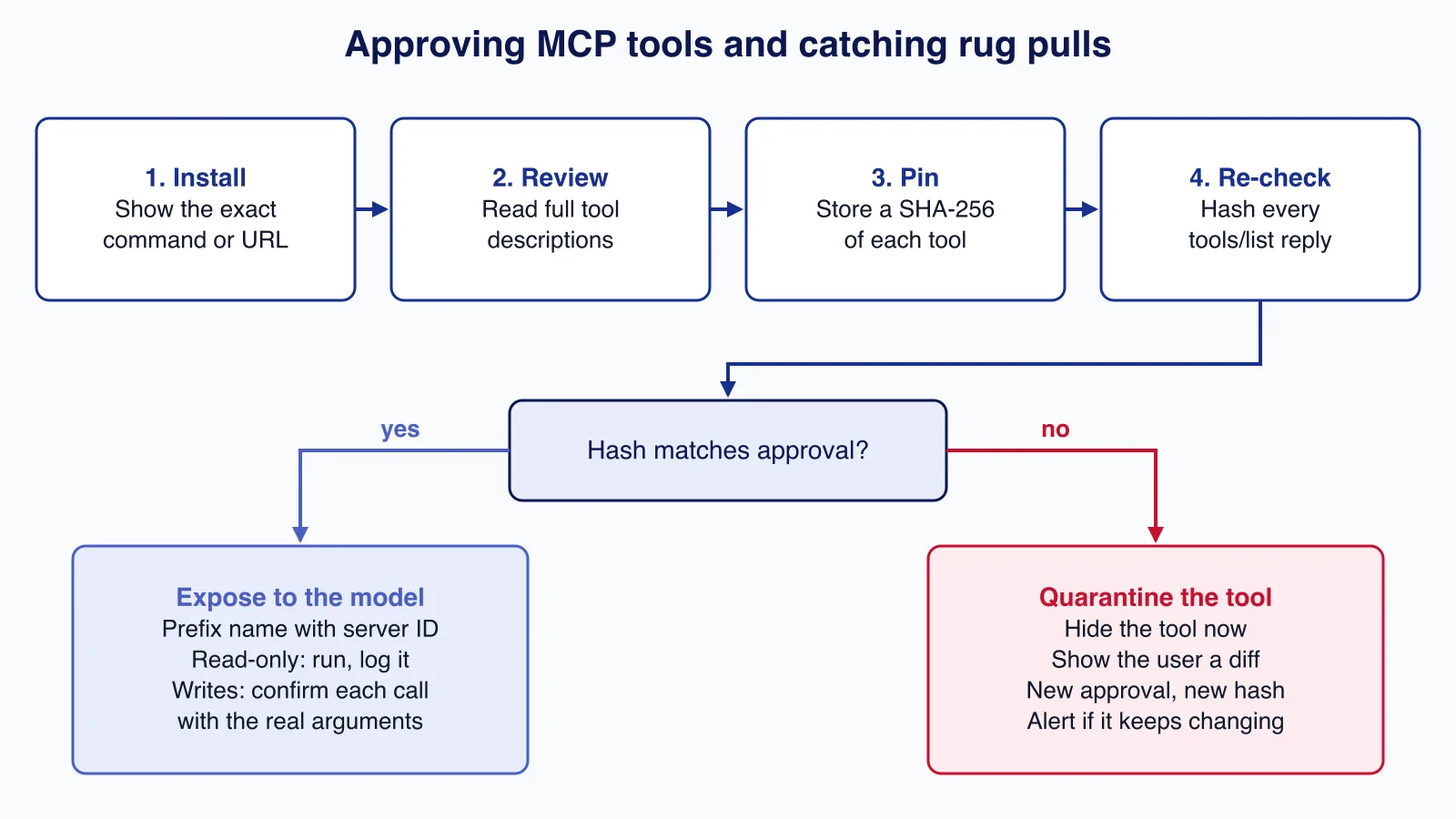
The general defences against injected instructions are covered in our prompt injection article. What is specific to MCP is that tool definitions are configuration you can pin. Hash each tool's definition when a person approves the server, compare on every tools/list response, and hide any tool whose hash has changed until someone reviews the difference:
// pin.mjs - detect changed tool definitions ("rug pulls") before the model sees them
import { createHash } from 'node:crypto';

function canonical(value) {
  if (Array.isArray(value)) return `[${value.map(canonical).join(',')}]`;
  if (value && typeof value === 'object') {
    return `{${Object.keys(value).sort().map((k) => `${JSON.stringify(k)}:${canonical(value[k])}`).join(',')}}`;
  }
  return JSON.stringify(value);
}

export function fingerprint(tool) {
  const { name, title, description, inputSchema, outputSchema, annotations } = tool;
  return createHash('sha256')
    .update(canonical({ name, title, description, inputSchema, outputSchema, annotations }))
    .digest('hex');
}

// approved: Map<"serverId/toolName", sha256> saved when a human approved the server.
export function filterApprovedTools(serverId, tools, approved) {
  const allowed = [];
  const needsReview = [];
  for (const tool of tools) {
    const key = `${serverId}/${tool.name}`;
    const hash = fingerprint(tool);
    if (approved.get(key) === hash) allowed.push({ ...tool, name: `${serverId}__${tool.name}` });
    else needsReview.push({ key, hash, previous: approved.get(key) ?? null, tool });
  }
  return { allowed, needsReview };
}
Use it in your agent or gateway before tools reach the model. Two details matter. First, include the description, schemas and annotations in the hash; changing only the description is the classic rug pull. Second, prefix exposed names with a server ID you assign, not with the server's self-reported name. The specification notes that server names are not guaranteed to be unique and recommends a disambiguation strategy when aggregating tools.
Approval UX that people do not click through
Approval prompts only work if people read them. The best-known MCP data leak shows what happens otherwise. In May 2025, Invariant Labs showed that a malicious issue in a public repository could make an agent using the official GitHub MCP server copy data from the user's private repositories into a public pull request. The client did ask for confirmation on each tool call, but the researchers point out that many users choose "Always allow". Nothing in the server code was wrong: the token simply reached every repository.
Design approvals in tiers so that prompts are rare enough to be taken seriously:
| Tier | Examples | Policy |
|---|---|---|
| Read inside the current scope | Get an issue, list invoices for this customer | Allow, log |
| Write or send | Create a pull request, send an email, update a CRM record | Ask every time, showing the real arguments |
| Destructive or irreversible | Delete, merge, refund, change permissions | Deny for the agent; a person does it in the product's own UI |
| Cross-boundary | A tool that reads private data in a session that has already read public, untrusted content | Ask, or end the session |
Most hosts let you express this as configuration. In Claude Code, MCP tools appear as mcp__<server>__<tool>, rules are evaluated deny first, then ask, then allow, and allow globs are accepted only after a literal server prefix. A project .claude/settings.json for the GitHub server could look like this:
{
  "permissions": {
    "deny": [
      "mcp__github__merge_pull_request",
      "mcp__github__delete_file"
    ],
    "ask": [
      "mcp__github__create_pull_request",
      "mcp__github__create_issue"
    ],
    "allow": [
      "mcp__github__get_*",
      "mcp__github__list_*",
      "mcp__github__search_*"
    ]
  }
}
Tool names differ between server versions, so list them first and write the rules against what the server actually exposes. Whatever the host, three UX rules help: show arguments, not just the tool name (the specification recommends showing inputs before the call); never offer "always allow" for write tools; and re-ask after a tool definition changes.
Authorization for remote servers: audience, scopes and no passthrough
If you run a remote MCP server, it is an OAuth 2.1 resource server, and the specification's rules are the same ones any API should follow, with two MCP-specific traps.
Token passthrough
It is tempting to build a "thin" MCP server that takes whatever bearer token the client sends and forwards it to the real API. The specification forbids this. A server that does not check the token's audience accepts tokens minted for other services; a server that forwards them lets clients bypass its rate limits and audit trail, and makes downstream logs show the wrong caller. The server must accept only tokens issued for its own canonical URI, and must call downstream APIs with its own credential or a token obtained for that API.
The confused deputy in MCP proxies
The second trap applies when your MCP server is itself an OAuth client of a third-party API using one static client ID, while letting MCP clients register dynamically. A third-party consent cookie from an earlier, legitimate login can let an attacker's newly registered client receive an authorization code without the user seeing a consent screen. The fix in the specification is a consent page owned by the MCP server, shown per client before redirecting to the third party, naming the client, the scopes and the exact redirect URI, protected against CSRF and framing, with exact redirect URI matching and single-use state values.
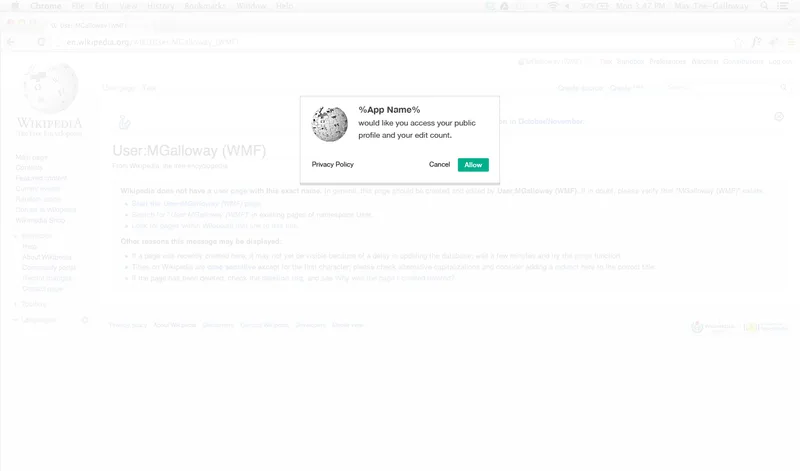
A 2013 Wikimedia design mockup of an OAuth dialog (above) shows the gap: an app name and a vague description of access. An MCP proxy's consent page must also show the redirect URI where tokens will go.
Checking tokens and scopes in code
This Express middleware validates issuer, audience and algorithm with jose, maps each tool to one scope, and answers with the WWW-Authenticate challenges the specification expects: 401 with resource_metadata when the token is missing or invalid, and 403 with error="insufficient_scope" and the needed scope for step-up authorization.
// auth.mjs - resource-server checks for a remote MCP server (Express 5, jose 6)
import { createRemoteJWKSet, jwtVerify } from 'jose';

const RESOURCE = 'https://mcp.example.com/mcp';           // canonical URI of this MCP server
const ISSUER = 'https://auth.example.com';                 // the only authorization server we trust
const METADATA = 'https://mcp.example.com/.well-known/oauth-protected-resource';
const jwks = createRemoteJWKSet(new URL(`${ISSUER}/.well-known/jwks.json`));

// Least privilege: every tool names the one scope it needs.
export const TOOL_SCOPES = {
  search_invoices: 'invoices:read',
  get_invoice: 'invoices:read',
  issue_refund: 'refunds:write',
};

export function bearerAuth(verifyKey = jwks) {
  return async (req, res, next) => {
    const header = req.get('authorization') ?? '';
    const token = header.startsWith('Bearer ') ? header.slice(7) : null;
    if (!token) return challenge(res, 401);
    try {
      const { payload } = await jwtVerify(token, verifyKey, {
        issuer: ISSUER,
        audience: RESOURCE,          // reject tokens minted for any other resource
        algorithms: ['RS256', 'ES256'],
      });
      req.auth = {
        subject: payload.sub,
        clientId: payload.client_id ?? payload.azp,
        scopes: new Set(String(payload.scope ?? '').split(' ').filter(Boolean)),
      };
      return next();
    } catch {
      return challenge(res, 401, { error: 'invalid_token' });
    }
  };
}

// Call this inside each tool handler, before doing any work.
export function requireToolScope(auth, toolName, res) {
  const needed = TOOL_SCOPES[toolName];
  if (!needed) throw new Error(`No scope mapped for tool ${toolName}`); // default deny
  if (auth.scopes.has(needed)) return true;
  challenge(res, 403, { error: 'insufficient_scope', scope: needed });
  return false;
}

function challenge(res, status, extra = {}) {
  const params = [`resource_metadata="${METADATA}"`];
  for (const [k, v] of Object.entries(extra)) params.push(`${k}="${v}"`);
  res.set('WWW-Authenticate', `Bearer ${params.join(', ')}`).status(status).end();
}
Run locally, a token with no audience match returned 401, a token with only invoices:read calling issue_refund returned 403 with scope="refunds:write", and a token with both scopes succeeded. Note the default-deny line: a tool without a mapped scope throws instead of running.
Keep scopes small. The specification's scope minimisation guidance warns against publishing every scope in scopes_supported and against omnibus scopes such as files:* or admin:*, because a leaked broad token gives an attacker every tool at once. Start with a minimal read scope and ask for more through step-up challenges when a privileged tool is first used.
If you are about to put your product's API behind a remote MCP server for customers' agents, this is the part worth a second pair of eyes: an AI automation review can check token audience, scope design and approval rules before the first client connects.
Least privilege for what the server can reach
Token checks protect the front door. Least privilege limits what happens when the model is tricked into using a door you opened deliberately:
- Narrow downstream credentials. Use a fine-grained token limited to the repositories, projects or mailboxes the task needs. Invariant's GitHub demonstration worked because one token covered public and private repositories.
- Database roles per server. A reporting server gets a read-only database user on specific views, not the application's owner account.
- Bind state handles to users. In the stateless 2026-07-28 revision, servers keep state in handles passed as tool arguments. The specification says to key stored state by the user ID from the verified token, for example
user_id:handle, and to reject a handle presented by anyone else. - Egress control. A server that only needs one API should only reach that API. An egress proxy or network policy also blocks the SSRF risk the specification describes for OAuth discovery URLs, including cloud metadata addresses such as
169.254.169.254. - Rate limits and timeouts on every tool, which the specification requires of servers and recommends for clients.
MCP incidents and advisories worth learning from
Each item below was checked against the advisory, the NVD record or the original research.
| Date | What happened | Lesson |
|---|---|---|
| Apr 2025 | Invariant Labs describes tool poisoning, shadowing and rug pulls | Pin and review tool definitions |
| May 2025 | GitHub MCP server used to leak private repository data via a public issue | Narrow tokens; one repository per session; real approvals |
| Jun 2025 | MCP Inspector proxy without authentication, CVE-2025-49596 (fixed 0.14.1) | Local HTTP servers need authentication |
| Jul 2025 | Filesystem server path bypasses, CVE-2025-53109 and CVE-2025-53110 | Sandbox even "restricted" servers |
| Jul 2025 | mcp-remote OS command injection from a malicious server, CVE-2025-6514 (CVSS 9.6, fixed 0.1.16) | Clients must validate URLs from servers |
| Sep 2025 | Impersonating postmark-mcp package BCCs every email from version 1.0.16 | Verify the publisher; pin versions |
| Dec 2025 | Reference Git server: path and argument injection, CVE-2025-68143, -68144 and -68145 | Validate paths and reject option-like arguments |
| Mar 2026 | nginx-ui's /mcp_message endpoint skips authentication, CVE-2026-33032 (CVSS 9.8) | Every MCP route needs the same auth |
| Sep 2026 | LiteLLM MCP authentication bypass, CVE-2026-59822, added to CISA's Known Exploited Vulnerabilities catalogue on 2 September 2026 (fixed 1.84.0) | Invalid tokens must fail closed |
The pattern is consistent: missing authentication on an MCP route, unvalidated paths and arguments, and too much trust in what a server or package claims to be. None of these needs a novel defence; they need the ordinary ones applied to a new kind of component.
Common mistakes
- Trusting tool annotations such as
readOnlyHintfrom servers you do not control. - Approving a server once and never noticing that its tool descriptions changed.
- Giving the model one personal access token that reaches everything the developer can reach.
- Forwarding the client's token to a downstream API, or accepting tokens without an audience check.
- Protecting
/mcpbut not a second endpoint that reaches the same tools, as in the nginx-ui case. - Loading project-scoped servers in CI, where nobody sees the approval prompt.
- Running local servers with the user's full home directory and network access.
When not to use MCP for a task
- Fixed, deterministic workflows. If the steps never change, call the API directly from code or a workflow tool. A model choosing tools adds risk without adding value.
- Irreversible actions with no human in the loop. Payments, deletions and permission changes belong in the product UI or a reviewed job, not behind a model's tool call.
- Servers you cannot inspect or pin. If you cannot see the source, the publisher or the version, do not give it credentials.
- Sessions that mix untrusted input with private data and an outbound channel. Split them into separate agents or sessions instead.
A short checklist
- Inventory every MCP server, its publisher, version and the credentials it holds.
- Run local servers in a sandbox with only the folders and network access they need.
- Pin tool definitions by hash and quarantine changes.
- Allow reads, ask for writes with arguments shown, deny destructive tools.
- On remote servers, check issuer, audience and scope on every request; never pass tokens through.
- Give each server its own narrow downstream credential.
- Log every tool call with user, client, tool, arguments summary and result status.
- Subscribe to advisories for the servers and clients you run, and patch quickly.
If you are also setting company-wide rules for AI tools, our AI governance checklist covers the policy side.
Cloudsoft Zone builds MCP servers and AI agents for small teams with token audience checks, one scope per tool, approval tiers and tool-call audit logs in place from the first release. See our AI and business process automation service.
Frequently asked questions
What is token passthrough in MCP and why is it forbidden?
Token passthrough is when an MCP server accepts a token that was not issued for it and forwards it to a downstream API. The specification says MCP servers MUST NOT accept or transit any other tokens, because it bypasses the server's own controls, breaks audit trails and lets tokens be reused across services.
What is an MCP rug pull?
A rug pull is when a server changes a tool's description or schema after a user has approved it, so the model receives new, possibly malicious instructions. Hashing each approved tool definition and hiding tools whose hash changes until someone re-approves them stops it from happening silently.
Can I trust readOnlyHint and other tool annotations?
Only from servers you trust. The MCP Tools specification says clients MUST consider tool annotations untrusted unless they come from trusted servers. Use your own allow, ask and deny rules instead.
Should local MCP servers use stdio or HTTP?
Prefer stdio, which limits access to the client that started the server. If a local server must use HTTP, bind it to loopback and require an authorization token; the MCP Inspector vulnerability CVE-2025-49596 came from an unauthenticated local proxy.
Does MCP authorization apply to stdio servers?
No. The authorization specification applies to HTTP-based transports; stdio servers should take credentials from the environment. That makes sandboxing and narrow credentials even more important for local servers.
Your next customer could start right here.
Introduce your tool, product or business to readers exploring technology.
Explore placements and request a private quote
Sources
- Security Best Practices (2026-07-28) — Model Context Protocol, 2026-07-28
- Authorization (2026-07-28) — Model Context Protocol, 2026-07-28
- Tools (2026-07-28) — Model Context Protocol, 2026-07-28
- MCP Security Notification: Tool Poisoning Attacks — Invariant Labs, 2025-04-01
- GitHub MCP Exploited: Accessing private repositories via MCP — Invariant Labs, 2025-05-26
- Information regarding malicious postmark-mcp package — Postmark, 2025-09-25
- CVE-2025-6514 (mcp-remote) — NIST NVD, 2025-07-09
- MCP Inspector proxy server lacks authentication (GHSA-7f8r-222p-6f5g) — GitHub Security Advisories, 2025-06-13
- CVE-2026-59822 (LiteLLM MCP authentication bypass) — NIST NVD, 2026-07-08
- Configure permissions — Anthropic (Claude Code docs)
Written with substantial AI assistance. Facts checked against cited sources. Editorial policy.
Comments
No comments yet. Be the first to join the conversation.
Leave a comment
Every comment is read by a moderator before it appears. Your email address is never published; it is used only to contact you about this comment.
More from Cloudsoft Zone

Architecture guideAI and Automation
How to build a safe AI content pipeline with human fact review
An architecture for AI-assisted publishing where people stay responsible: untrusted source snapshots, claim checking with citations, a review queue AI cannot skip, labels and rollback.
By Cloudsoft Zone

TutorialNode.js
How to test a Node.js API with the built-in test runner (node:test)
Write, run, mock and measure coverage for a small Node.js HTTP API using only node:test and node:assert. Covers port-0 servers, fetch(), spies, t.mock.method(), fake dates and coverage thresholds.
By Cloudsoft Zone

TutorialNode.js
Node.js streams in practice: pipeline(), backpressure and async generators
Process files of any size in Node.js with flat memory use. A hands-on guide to stream/promises pipeline(), backpressure, async generator transforms, AbortSignal timeouts and streaming downloads over HTTP.
By Cloudsoft Zone