
Cloudflare WAF response rules: why full-transaction detection matters
Cloudflare WAF response rules and full-transaction detection: the WAF now checks each request with its response. What it catches, limits and how to set it up.
2 min read

In this article
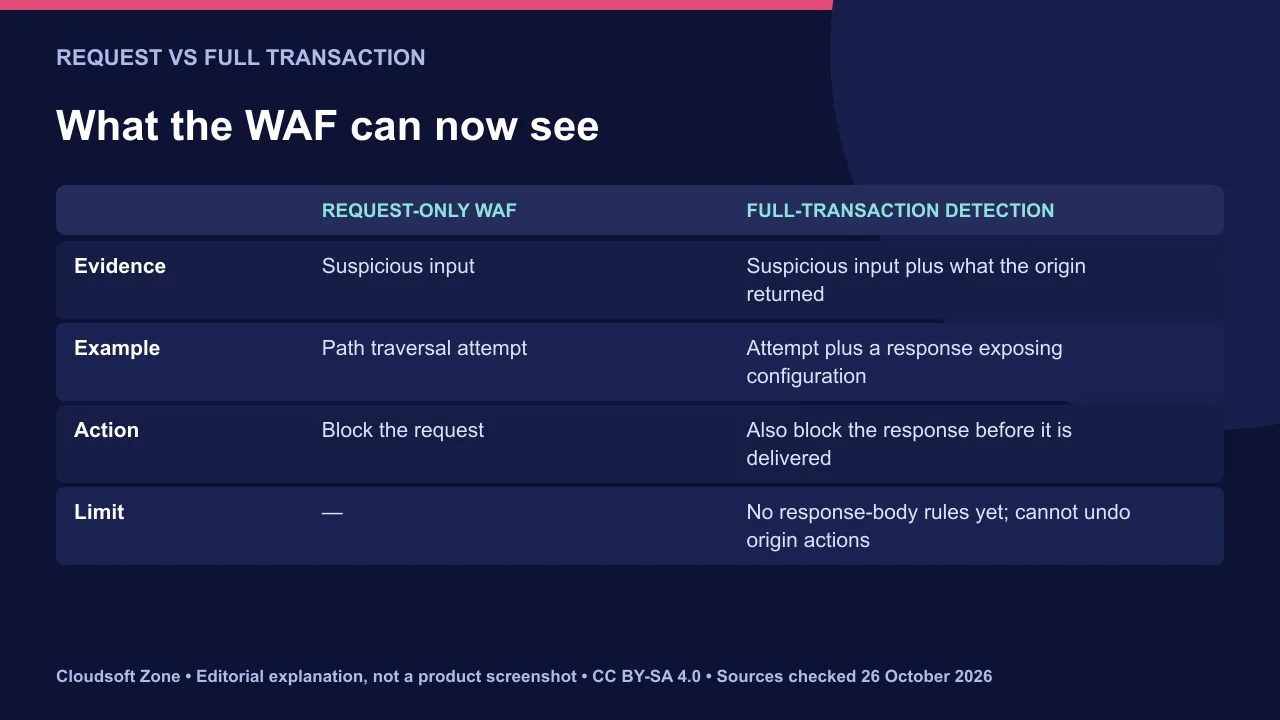
Cloudflare WAF response rules can now act on evidence from both halves of an HTTP exchange. On 21 October 2026 Cloudflare made full-transaction detection generally available: the WAF evaluates each request alongside the origin's response to spot signs of successful exploitation.
Cloudflare says it is available to all zones proxying through Cloudflare, including Free plans. Response rules can block a response before it reaches the requester, but they cannot undo something that already happened at the origin.
Sources checked on 26 October 2026. Features, availability and vendor figures can change; confirm the linked primary sources before acting.
Why response-aware detection matters
A request can look malicious and fail harmlessly, or look ordinary and succeed. The response shows which one happened.
Cloudflare's example is a path-traversal request for a configuration file followed by a response that exposes configuration data. Seeing both raises confidence and reduces false alarms. Exploit confirmation starts with the php2shell vulnerability, with data-exposure signals planned.
How Cloudflare WAF response rules work
Detections attach metadata to the request and response. Rules then decide what to do with it, so detection and mitigation stay separate.
When a response rule matches, the WAF can replace the origin response with a block page and HTTP 403. New fields include cf.waf.signature.response.confidence, cf.waf.signature.response.categories and cf.waf.signature.response.ref.
Rules cannot yet inspect the response body. They also do not reverse actions the origin already performed, such as a write to a database, so fixing the vulnerability remains the real cure.
Set it up without breaking traffic
Start with detection and logging. Block only after you have reviewed what matches.
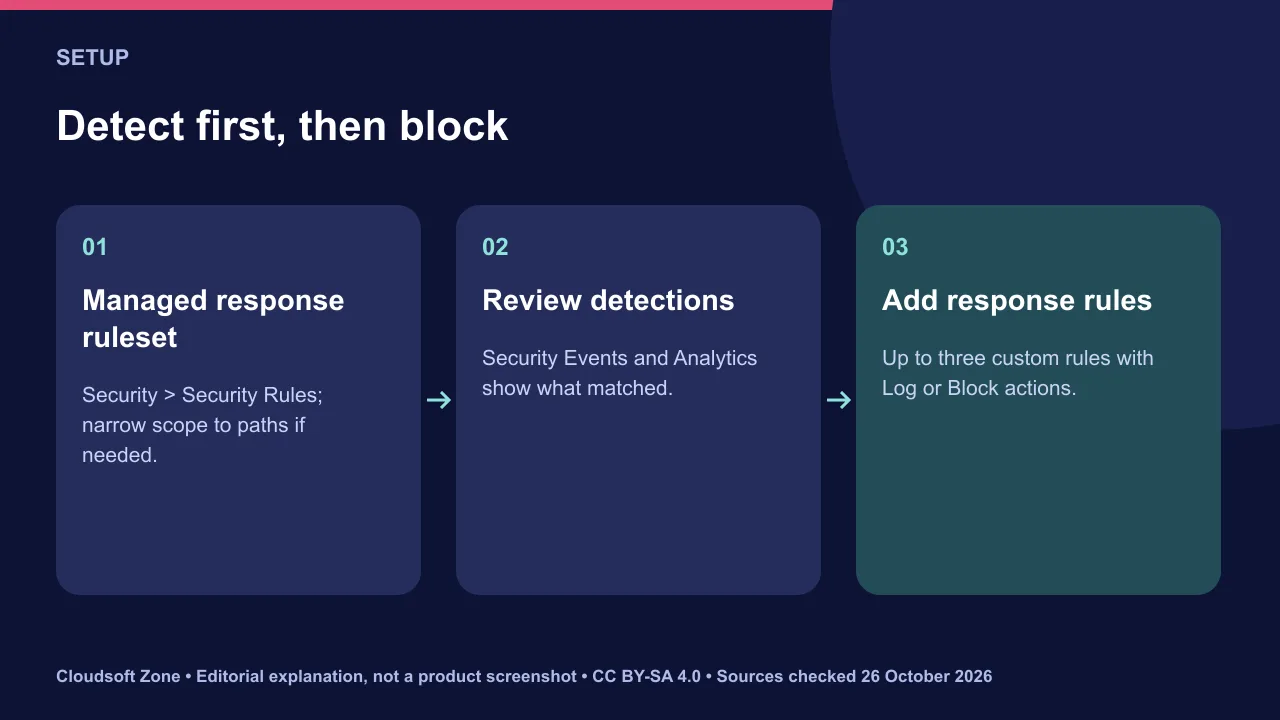
- Open Security, then Security Rules; response-phase controls are at the bottom.
- Enable the Cloudflare Managed Response Firewall Default ruleset, scoped to sensitive paths if needed.
- Review matches in Security Events and Security Analytics for a week.
- Create custom response rules, up to three on every plan, with Log first and Block once you trust them.
Where this fits in your defences
Response rules are a safety net, not a patch. They limit what leaks while you fix the cause.
| Layer | Role |
|---|---|
| Patching | Removes the vulnerability |
| Request rules | Stop known attack patterns early |
| Response rules | Stop sensitive output leaving |
| Monitoring | Shows what was attempted and what succeeded |
Our verdict: turn on the managed response ruleset in log mode today; it costs nothing on any plan and shows which attacks actually succeed. For WAF configuration and application security audits, see our maintenance and support service. Related: our PHP security checklist.
Sources and further reading
Image credits
Explanatory diagrams: Cloudsoft Zone, CC BY-SA 4.0. Featured photograph: HaeB, CC BY-SA 4.0, via Wikimedia Commons.
Frequently asked questions
Is full-transaction detection available on the Free plan?
Cloudflare says it is generally available for all zones proxying through Cloudflare, including Free plans, with up to three custom response rules.
Can response rules inspect the response body?
Not yet. Cloudflare says rules on the response body are not available yet.
Does blocking the response undo the attack?
No. It stops the response reaching the requester but cannot undo actions already performed at the origin. Patch the vulnerability.
Your next customer could start right here.
Introduce your tool, product or business to readers exploring technology.
Explore placements and request a private quote
Sources
- Introducing full transaction detection for Cloudflare WAF — Cloudflare, 2026-10-21
Written with substantial AI assistance. Facts checked against cited sources. Editorial policy.
Comments
No comments yet. Be the first to join the conversation.
Leave a comment
Every comment is read by a moderator before it appears. Your email address is never published; it is used only to contact you about this comment.
More from Cloudsoft Zone
Troubleshooting guideDevOps
Laravel storage permissions on nginx: diagnose the runtime user before changing access
Fix Laravel storage permissions by identifying the real PHP-FPM and worker accounts, tracing parent directories and granting only required runtime access.
By Cloudsoft Zone
TutorialDevOps
Laravel Horizon production controls: dashboard access, capacity and deployment
Review Laravel Horizon production controls for dashboard authorization, queue isolation, bounded capacity, graceful deployments and useful completion alerts.
By Cloudsoft Zone
Troubleshooting guideDevOps
Laravel queue jobs not processing: trace Redis, Supervisor and Horizon
Diagnose Laravel queue jobs not processing without deleting queued work: trace dispatch, connection identity, worker ownership, failures and the business effect.
By Cloudsoft Zone