Security productSecurity

Whatoblock
Threat intelligence and firewall-ready IP blocklists built from a honeypot sensor network, covering scanners, botnet C2s, proxies and DDoS sources.
3 min read
At a glance
Pricing: FreemiumFree plan
Free tier; CTI Unlimited 69 € per month billed yearly; blocklists from 89 € per month
- Platforms
- Web
- Website
- whatoblock.com
Gallery
The globe graphic used for Whatoblock's sensor network and threat map. Whatoblock describes itself as a cyber threat intelligence platform.
What Whatoblock does
Whatoblock is a cyber threat intelligence platform built from a network of HoneyBot sensors that expose services such as HTTP/S, SMB, SSH, RDP and Telnet and record the unsolicited connections that reach them. Each source is fingerprinted and classified as scanner, botnet command and control, proxy or DDoS activity, then published as searchable records, open datasets and blocklist feeds.
The problem it addresses is that much threat intelligence is priced for large security teams and sold through sales calls. Whatoblock publishes its prices, offers a free account, and lets a team pull a feed into its firewall without first talking to sales.
Key features
- Four intelligence products. Heartbeat (proxy, Tor and DDoS IPs), Scanner Recon, Botnet and C2 with malware samples, and OpenData datasets, searchable by IP, ASN, port, service, country, protocol, hash or botnet ID.
- Industry blocklists. Continuously updated feeds of observed source IPs, grouped by industry, such as hosting and data centres, AI infrastructure, retail and ecommerce, or telecommunications.
- Firewall-ready formats. Feeds come as Plain, CIDR, MikroTik, Check Point, F5, Wazuh, Zeek, RPZ, TXT, CSV or JSON, with presets and optional /24 aggregation.
- Setup guides. Documentation covers adding a feed URL to FortiGate, Palo Alto Networks, Sophos Firewall, OPNsense and pfSense.
- Public threat map and rankings. A live threat map and top-ten lists of scanners, C2 servers, DDoS sources, proxies and Tor exit nodes.
Who it is for
SOC analysts, security engineers and network defenders, managed service providers protecting client networks, developers bringing observed threat data into internal tools, and researchers studying scanner and botnet behaviour.
Pricing at a glance
- Free: 0 €, no card; the last 24 hours and the first five pages of live records in each product, plus a sample blocklist feed. No exports, reports or alerts.
- CTI Unlimited: 69 € per month, billed yearly, for all retained history, full filtering, JSON and PNG exports, malware samples, OpenData downloads and email alerts.
- Blocklists: Essential at 89 € per month for 1 industry, Business at 199 € per month for up to 3 industries, and Complete at 259 € per month for every industry, each billed yearly.
Prices include VAT. Checked on the vendor's site on 9 November 2026.
Things to consider
- There is no current API: blocklists are delivered as feed URLs, and the intelligence data is explored in the dashboard. Older API documentation is kept only as a historical reference.
- A listed IP means the sensors observed activity from it; it does not establish intent, and shared gateways or proxies can be listed, so exceptions should be reviewed before blocking.
- The site names no operating company; its terms are governed by the laws of Greece and support runs through a ticket system and contact form.
- The free tier is a sample, so complete history and broader feed coverage need a paid plan.
Getting started
Create a free account, explore Heartbeat, Scanner Recon, Botnet and C2 and OpenData, then use the blocklist builder to generate a sample feed URL in the format your firewall expects and test it before choosing a paid plan.
Capabilities
- Threat intelligence
Whatoblock pricing, platforms and fit
- Pricing
- FreemiumFree planFree tier; CTI Unlimited 69 € per month billed yearly; blocklists from 89 € per month
- Platforms
- Web
Whatoblock reviews
No reviews yet
Ratings appear once our moderators have approved the first review. Nothing is published automatically.
Be the first to reviewWrite a review
New tools, once a week
One short email listing what joined the directory.
Related guides
- Guide
A 2FA and backup checklist for small businesses
A practical afternoon checklist for owners: protect the accounts that matter with passkeys or 2FA, clean up old access, keep two backups including one offline, and prove you can restore. Includes CERT-In and DPDP notes for India.
Further reading for the security category; this is not a tutorial or endorsement of this provider.
- Guide
Employee offboarding IT checklist: revoke access in one day
An IT offboarding checklist for small businesses: block sign-in, wipe devices, rotate shared passwords and hand over data in Google Workspace and Microsoft 365.
Further reading for the security category; this is not a tutorial or endorsement of this provider.
- Guide
Encrypt company laptops with FileVault and BitLocker
Turn on FileVault and BitLocker, check them from the command line and store recovery keys where the business, not one employee, can reach them.
Further reading for the security category; this is not a tutorial or endorsement of this provider.
Whatoblock alternatives
Other published security listings in the same category.
SecuritySecurity product
1Password
Password manager with a Secret Key plus password model and developer tools such as an SSH agent and CLI; paid plans with a 14-day trial.
Subscription · free trial
View detailsContactSecuritySecurity product
Snyk
Developer security scanner whose Free and Team plans cap projects and test counts, while Enterprise bills prepaid credits by contributor, image and target.
Freemium · free plan
View detailsContact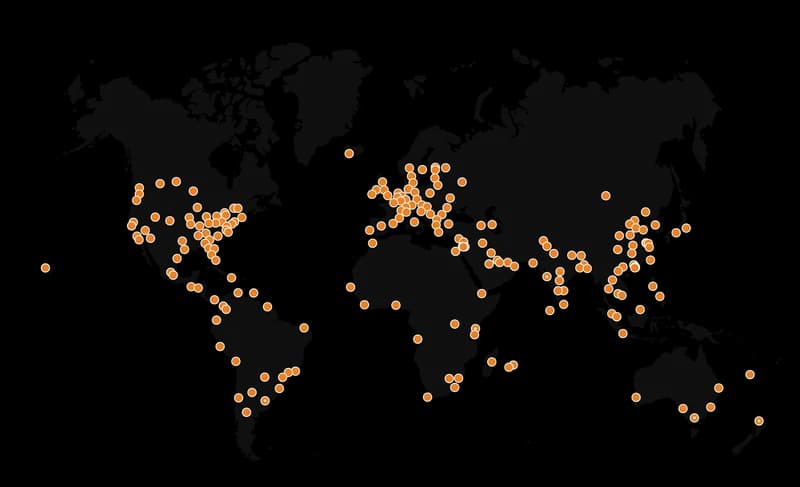

SecuritySecurity product
Cloudflare
Edge network for DNS, CDN, WAF and DDoS protection with website plans from free to $200 a month, plus Workers, R2 and Zero Trust billed separately.
Freemium · free plan
View detailsContactSecuritySecurity product
Okta
Workforce identity suites from $6 to $17 per user per month, billed annually with a $1,500 minimum; Professional and Enterprise are quote-only.
Subscription · free trial
View detailsContact