
Employee offboarding IT checklist: revoke access in one day
An IT offboarding checklist for small businesses: block sign-in, wipe devices, rotate shared passwords and hand over data in Google Workspace and Microsoft 365.
Updated 6 min read

In this article
When someone leaves a small business, their access rarely leaves with them. The email account is suspended, but the shared Wi-Fi password, the social media logins, the GitHub organisation and the old laptop's synced files are forgotten until something goes wrong.
The fix is a written checklist, run on the person's last day, in a fixed order: block sign-in first, preserve data second, transfer ownership third, delete last. This guide gives you that checklist, with the specific steps Google Workspace, Microsoft 365 and GitHub document for departing staff.
Before the last day: prepare
A good offboarding starts a week earlier. Without a list of what the person can access, you cannot remove it.
- Build an access list. Start from your identity provider and password manager, then add anything signed in with a personal email: domain registrar, social accounts, payment dashboards, advertising accounts, analytics, app stores.
- Find what they own. Shared drives and folders, calendars and recurring meetings, automation scripts, API keys, and any domain or SaaS account registered in their name.
- Agree the handover. Name the colleague who inherits email, files and customer conversations.
- Check legal holds. If the person is involved in a dispute, check with your adviser before deleting anything. Google notes that you cannot transfer data from or delete a user on litigation hold until it is lifted.

The last-day checklist
1. Block sign-in and end sessions
Do this at the agreed time, ideally while the conversation is happening, not the next morning.
- Google Workspace: Google's guidance is to change the user's password, reset their sign-in cookies, revoke OAuth 2.0 application tokens, and revoke security keys and app passwords. Remove their recovery email and phone number so password recovery cannot be used to get back in. Suspending the account blocks access while keeping email, documents and calendars intact.
- Microsoft 365: reset the password, then select Sign out of all sessions on the user's Account tab, and select Block sign-in. Microsoft notes that sign-out takes effect within about an hour, and blocking can take up to 24 hours, so the password reset is what stops access immediately. You can also turn off the person's email apps (Outlook, ActiveSync, IMAP, POP3, Outlook on the web) in the Exchange admin center.
- Single sign-on: if you use an identity provider such as Okta or Entra ID, disable the user there first. Every connected app loses access at once, which is the main reason small teams adopt SSO.
2. Secure devices
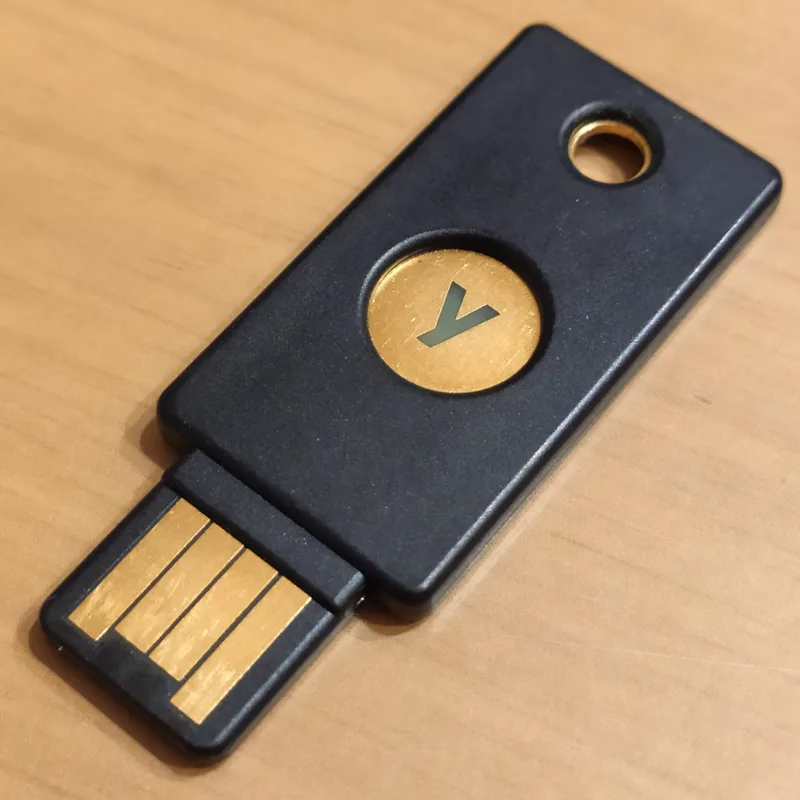
- Collect company laptops, phones and security keys, and record their serial numbers.
- Remotely remove company data from phones. Google's Admin console can wipe the whole device or only your organisation's data; Microsoft's guide covers wiping and blocking a former employee's mobile device so your organisation's data is removed.
- Before reusing a returned laptop, make sure you have its disk-encryption recovery key, then reinstall it.
3. Shared secrets and third-party tools
- Password manager: remove the person from the team account. Then rotate every shared credential they could see, starting with the ones that are not behind SSO: Wi-Fi, domain registrar, bank and payment dashboards, social media.
- GitHub: remove them from the organisation. They lose access to private forks of your private repositories, though they may still have local copies. If you use SCIM or Enterprise Managed Users, remove them through your identity provider instead. GitHub keeps membership data for three months in case you reinstate them.
- Keys and tokens: revoke personal access tokens, SSH keys and API keys created by the person, and replace any in production that were created under their account.
- Chat and meeting tools: deactivate their Slack or Teams account and remove them from shared channels with customers.
After the last day: data and licences
Customers will keep writing to the old address. Microsoft suggests forwarding email to the person taking over or converting the mailbox to a shared mailbox. In Google Workspace, transfer what the successor needs before deleting the account, and decide how the old address will be handled with your Google admin settings.
Files and calendars
- Google Workspace: super admins can transfer Drive and Docs files, primary Calendar data and Looker Studio (Data Studio) data during deletion; other admins must transfer data before deleting. Transferring files changes the owner but not who has access, so review sharing afterwards. You can also move files to a shared drive.
- Microsoft 365: give another employee access to the former employee's OneDrive and Outlook data before you delete the account.
Keep, archive or delete
| Platform | Keep data without an active user | After deletion |
|---|---|---|
| Google Workspace | Suspend the account temporarily; for long-term retention Google suggests an Archived User licence, which keeps data at lower cost | A deleted user can be restored for up to 20 days; after that the data is unrecoverable |
| Microsoft 365 | Remove the licence but keep the account; OneDrive content stays accessible to you even after 30 days | OneDrive and Outlook content is retained for 30 days, during which the account can be restored |
| GitHub | n/a | Membership data kept for three months; reinstating within that time restores it |
Licences and billing
Removing a user does not always reduce your bill. On Google Workspace annual or fixed-term plans, deleting an account does not reduce the number of licences; you can reassign the freed licence. On Flexible plans billing is prorated. On Microsoft 365, remove the licence and either reassign it or reduce the licence count. GitHub notes that volume-licence seats do not downgrade automatically.

A copy-and-paste offboarding checklist
- Access list and data owner confirmed (one week before).
- Sign-in blocked in the identity provider and email platform; sessions and app tokens revoked.
- Recovery email and phone removed; security keys and app passwords revoked.
- Laptop, phone and security keys collected; mobile company data wiped.
- Removed from password manager; shared credentials rotated.
- Removed from GitHub or GitLab, chat, CRM, helpdesk, accounting and advertising tools.
- Personal access tokens, SSH keys and API keys revoked or replaced.
- Email forwarded, delegated or converted to a shared mailbox.
- Files, calendars and owned assets transferred.
- Licence removed or reassigned; account archived or deleted on a recorded date.
- Checklist signed off by the person who ran it, with the date.
Limitations and gotchas
- Suspension is not deletion. A suspended Google account still uses a licence; Google recommends an Archived User licence for long-term retention instead.
- Calendar events lose their organiser. Transfer or cancel recurring meetings before deleting, or nobody will be able to change them.
- Hybrid directories. If accounts sync from on-premises Active Directory, Microsoft says you must delete and restore them there, not in Microsoft 365.
- Personal accounts are the blind spot. Anything registered with a personal email address cannot be switched off centrally. Move those accounts to company-owned addresses now, while everyone is still on good terms.
- Local law applies. Retention periods for email and HR records depend on your jurisdiction; agree them with your adviser rather than deleting by default.
What to do next
Write the checklist into your HR process so it starts automatically when someone resigns. Run it once as a dry run on a test account, and review it whenever you add a new SaaS tool. The best time to prepare for an awkward departure is before anyone is leaving.
Frequently asked questions
Should I suspend or delete a departing employee's Google Workspace account?
Suspend first to block access while you transfer data. For long-term retention Google suggests an Archived User licence, which keeps the data at lower cost. Delete once data is transferred; a deleted user can be restored for up to 20 days.
How long does Microsoft 365 keep a deleted user's data?
After you delete the account, OneDrive and Outlook content is retained for 30 days, during which you can restore the user. If you only remove the licence and keep the account, OneDrive content remains accessible even after 30 days.
Is changing the password enough?
No. Google also advises resetting sign-in cookies, revoking OAuth tokens, security keys and app passwords, and removing recovery email and phone details. Shared credentials in password managers also need rotating.
What happens to a former employee's GitHub forks?
Removed members lose access to private forks of your organisation's private repositories, although they may keep local copies. GitHub keeps membership data for three months in case you reinstate them.
Does deleting a user reduce my Google Workspace bill?
On annual or fixed-term plans, deleting an account does not reduce the number of licences; you can reassign the freed licence. On Flexible plans, billing is prorated.
When should offboarding start?
About a week before the last day: build the access list, identify owned files and accounts, and agree who inherits them. Block sign-in at the agreed time on the last day.
Your next customer could start right here.
Introduce your tool, product or business to readers exploring technology.
Explore placements and request a private quote
Sources
- Remove a former employee - Overview — Microsoft Learn, 2026-06-15
- Step 1 - Prevent user sign-in and block access to Microsoft 365 — Microsoft Learn, 2026-01-05
- Maintain data security after an employee leaves — Google Workspace Admin Help
- Delete or remove a user from your organization — Google Workspace Admin Help
- Removing a member from your organization — GitHub Docs
Written with substantial AI assistance. Facts checked against cited sources. Editorial policy.
Comments
No comments yet. Be the first to join the conversation.
Leave a comment
Every comment is read by a moderator before it appears. Your email address is never published; it is used only to contact you about this comment.
More from Cloudsoft Zone

Resource guideBusiness Technology
10 practical AI automation ideas for small businesses in 2026
Ten AI automations that work for small teams in 2026, each with the workflow, real tools and checked prices, rough effort, risks, and the human review step that keeps it safe.
By Cloudsoft Zone

Resource guideWordPress
WordPress security hardening checklist for 2026 (WordPress 7.1)
A practical WordPress 7.1 hardening checklist based on the official handbook: updates, two-step logins, wp-config.php constants, file permissions, database privileges, firewalls, WP-CLI checksum checks and tested backups.
By Cloudsoft Zone

Troubleshooting guideCodeIgniter
CodeIgniter 4 validation not working? 9 causes and fixes
Fix CodeIgniter 4 validation problems fast: wrong input source, lost errors after redirect, permit_empty, strict JSON rules, is_unique placeholders and more.
By Cloudsoft Zone