
10 practical AI automation ideas for small businesses in 2026
Ten AI automations that work for small teams in 2026, each with the workflow, real tools and checked prices, rough effort, risks, and the human review step that keeps it safe.
14 min read
In this article
The AI automations that pay off for a small business in 2026 are not autonomous agents running the company. They are narrow workflows where AI does the first 80% of a repetitive job and a person checks the result before it reaches a customer, a supplier or your accounts. This guide sets out ten of them. For each one you get the problem it solves, the workflow, tools that do it today with prices checked on the vendors' own pages, the rough effort, the main risks and the review step that keeps it safe.
Prices checked: on vendors' official pricing pages in early October 2026, in US dollars unless stated. Plans and AI add-ons change often, so confirm before you buy.
Two companion articles cover what this one does not. To choose the platform that connects your apps, read Zapier vs Make vs n8n. To set company rules for AI use before you start, use our AI governance checklist for small businesses.
The pattern behind every idea
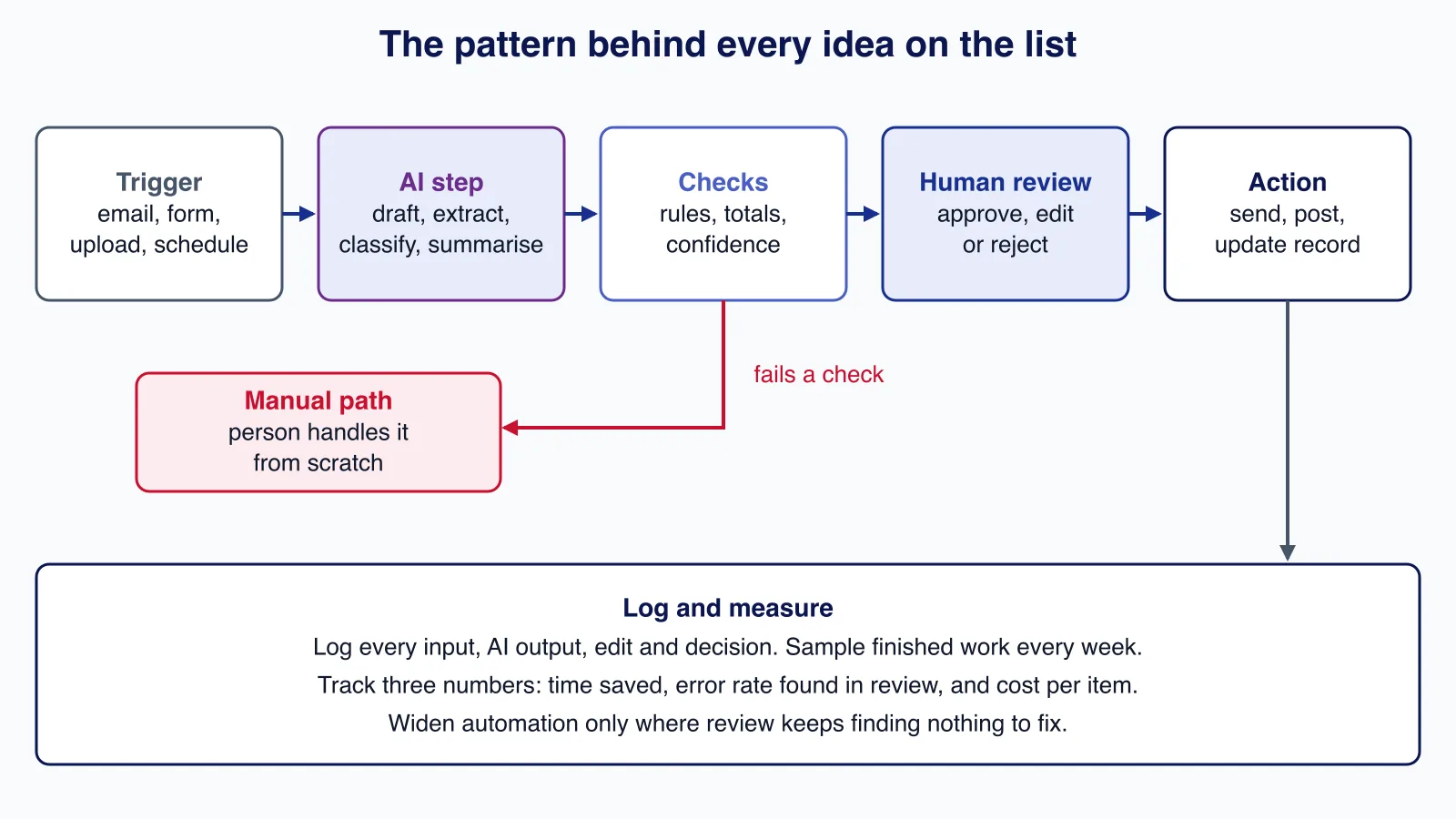
Every workflow below follows the same shape: a trigger, an AI step that drafts, extracts, classifies or summarises, automatic checks, a human decision, and only then an action. Failures drop to a manual path, and everything is logged so you can see where the AI helps and where it creates work.
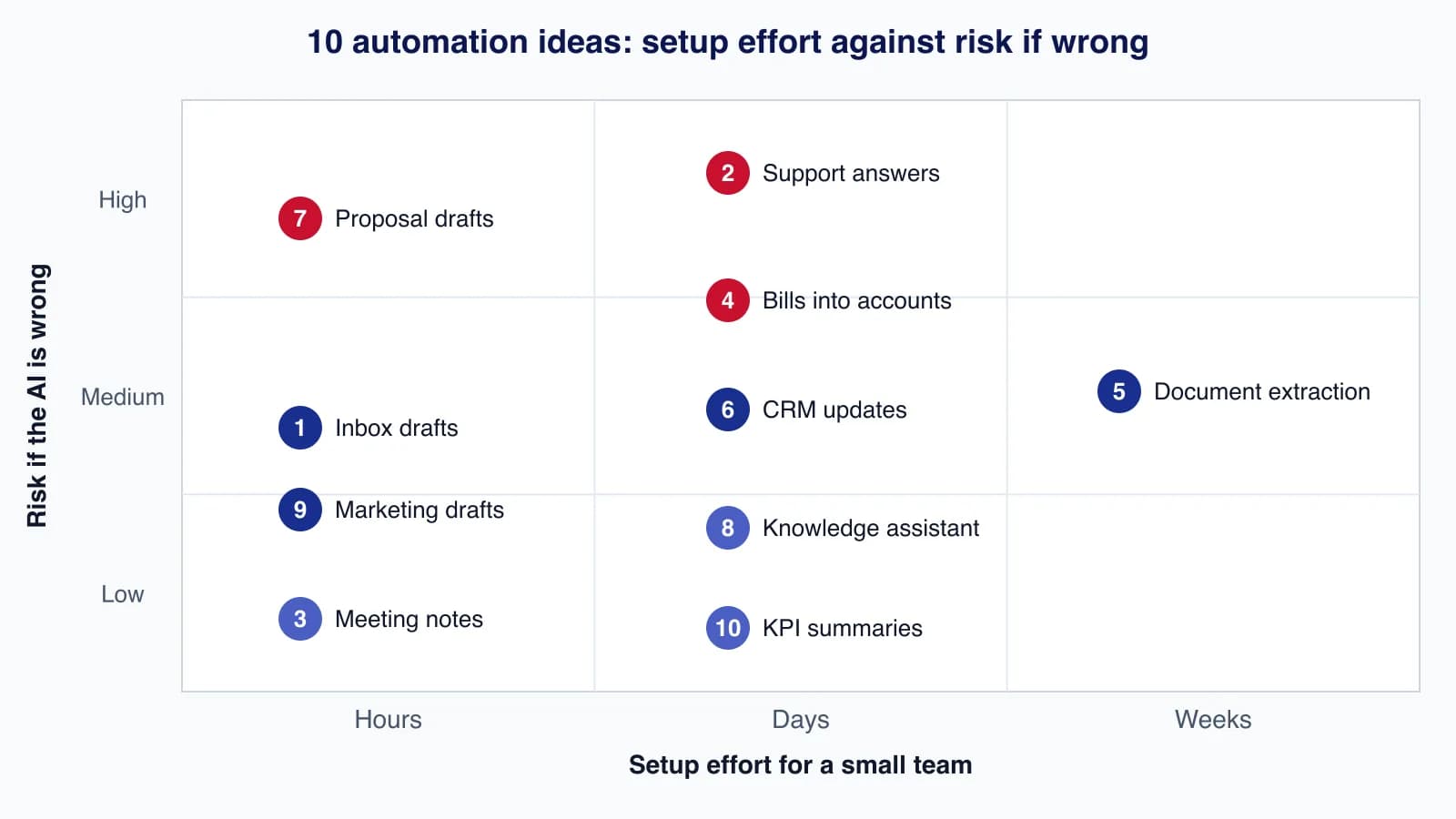
Start where effort is low and the cost of a mistake is small, prove the time saving, then move up. The cover chart places the ten ideas on that map; it is our assessment for a typical small team, not a measurement.
1. Inbox triage and reply drafts
The problem: Owners and office managers lose an hour or more a day reading long threads and writing routine replies about bookings, delivery dates and documents.
The workflow: AI summarises long threads, sorts incoming mail by type, and drafts replies to routine requests using your standard wording. A person reads and sends.
Tools that do this today: Gemini in Gmail: Google's edition comparison lists "Help me write", AI overviews of email threads and suggested replies for Business Starter, Standard and Plus. Workspace prices vary by country, so check the pricing page for your region. On Microsoft 365, Copilot Chat is available at no extra cost with eligible plans, and Microsoft 365 Copilot Business (up to 300 users) lists at $21 per user per month on annual billing, with a promotional $18 for the first year between 1 July and 31 December 2026, and $25.20 on monthly billing.
Rough effort: Hours. Switch the features on, write three or four reply templates, and agree which kinds of email are never drafted by AI.
Risks: Drafts that promise a date, discount or refund nobody approved; summaries that drop the one sentence that mattered; confidential threads summarised into the wrong place.
Human-review step: Nothing is sent automatically. The person sending reads the whole draft and checks every date, amount and commitment against the original thread.
2. Support answers from your own help centre
The problem: The same twenty questions arrive every day by chat and email, and customers wait hours for answers that already exist in your help articles.
The workflow: An AI agent answers only from your published help content, hands over to a person when it is unsure or when the topic is on a no-go list (refunds, complaints, legal, safety), and tags every conversation it handles.
Tools that do this today: Help Scout has a free plan for up to 5 users and paid plans at $25, $45 and $75 per user per month; its AI Answers costs $0.75 per resolution, charged once per conversation, with a monthly spending cap and a three-month free trial for new accounts. Intercom's Fin is priced at $0.99 per outcome with a monthly minimum. Zendesk Suite Team ($55 per agent per month billed annually) includes 5 automated resolutions per agent per month and Professional ($115) includes 10, with pay-as-you-go resolutions at $2.00 each.
Rough effort: Days to weeks. Most of the work is fixing the help centre: out-of-date articles produce confident wrong answers.
Risks: Wrong policy answers, invented discounts, and frustrated customers who cannot reach a person. Per-resolution pricing also means cost grows with volume, so set the spending cap.
Human-review step: Start with the agent suggesting answers to staff before it answers customers. Once live, review a sample of AI-handled conversations every week, and route refunds, complaints and anything involving money to a person.
3. Meeting notes and follow-up tasks
The problem: Decisions from client and team calls live in someone's head or a half-finished note, and follow-ups slip.
The workflow: The meeting tool records with consent, produces a summary and action items, and the organiser edits them before they are shared or turned into tasks.
Tools that do this today: On Zoom, Workplace Pro ($16.99 per user per month billed monthly, $14.16 billed annually) includes unlimited meeting summaries, and the free Basic plan includes summaries for three hosted meetings a month. Zoom says its AI Companion features are now built into Workplace, with a paid add-on called ZoomMate ($20 per user per month, or $16.67 billed annually) for more. Google Meet's "Take notes for me" is listed for Workspace Business Standard and Plus.
Rough effort: Hours. Turn it on, tell participants, and decide where approved notes are stored.
Risks: Recording without proper notice, which is a legal issue in many places; action items assigned to the wrong person; sensitive discussions stored in a shared space.
Human-review step: The organiser reviews and corrects the summary and owners of each action item before it is sent to anyone outside the meeting.
4. Receipts and supplier bills into your accounts
The problem: Receipts pile up, supplier bills are typed in by hand, and month-end takes days.
The workflow: Staff photograph receipts or forward bills to a capture address; the software reads supplier, date, amounts and tax, suggests a category and creates a draft bill or expense. A bookkeeper approves.
Tools that do this today: Dext lists a US plan at $302.50 a year for 5 users and 250 documents a month, with a 14-day trial. Xero (US) lists Early at $27, Growing at $59 and Established at $97 a month, with "Smart Document Capture" on all three. QuickBooks Online (US) lists Simple Start at $38, Essentials at $85, Plus at $140 and Advanced at $340 a month, with AI features now branded Intuit Intelligence that vary by plan.
Rough effort: Days. Set up categories, supplier rules and the capture inbox, then run it alongside your current process for a month.
Risks: Wrong tax amounts, duplicate bills, and fraudulent invoices that look like real suppliers. Automation makes paying a fake invoice faster, not safer.
Human-review step: A person approves every bill before payment and checks new suppliers and changed bank details by phone using a number you already hold. Never let a captured document trigger a payment on its own.

5. Data extraction from forms and PDFs
The problem: Order forms, application forms, delivery notes and statements arrive as PDFs and someone retypes them into a spreadsheet or system.
The workflow: A document AI service extracts fields into structured data, rules check totals and required fields, and anything below a confidence threshold goes to a person. A workflow tool moves the result into your system.
Tools that do this today: Google Cloud Document AI lists the Form Parser at $30 per 1,000 pages, the Invoice and Expense parsers at $0.10 per document of up to 10 pages, and the first 1,000 pages of Enterprise Document OCR free each month. Azure AI Document Intelligence prebuilt invoice and receipt models are $10 per 1,000 pages, with a free tier of 500 pages a month. Connect them with a workflow platform; our Zapier vs Make vs n8n comparison covers how each one bills.
Rough effort: Weeks. Each document type needs testing on real samples, field mapping and error handling.
Risks: Misread numbers that pass silently into your system, personal data sent to a service you have not assessed, and costs that grow with page volume.
Human-review step: Set confidence thresholds per field, send low-confidence and failed-check documents to a review screen that shows the original next to the extracted values, and spot-check a sample of the automatic ones each week.
6. CRM updates and lead research
The problem: Sales notes never reach the CRM, records go stale, and preparing for a call means twenty minutes of searching.
The workflow: AI fills missing company details, summarises recent activity before a call, and drafts follow-up notes into the CRM. A salesperson confirms changes and sends any outreach.
Tools that do this today: HubSpot Starter Customer Platform seats include 500 HubSpot Credits; extra credits cost $10 per 1,000. HubSpot's credit rate sheet lists 10 credits for one Data Agent prompt on one record and 100 credits for a Prospecting Agent outreach recommendation for one lead.
Rough effort: Days. Decide which fields AI may fill, connect email and calendar, and set a monthly credit budget.
Risks: Wrong enrichment overwriting good data, personal data processed without a lawful basis, and automated outreach that damages your sender reputation.
Human-review step: AI-filled fields are marked as such and a person confirms them; every outreach email is read and sent by a salesperson. Keep a log of what was changed automatically so it can be reversed.
7. Proposal and quote first drafts
The problem: Proposals take a day each because every one starts from a blank page or an old document with the wrong client name in it.
The workflow: A shared AI project holds your templates, rate card, case summaries and terms. AI drafts the proposal structure and wording; prices and terms come from the rate card, not from the model.
Tools that do this today: Claude Team lists Standard seats at $20 per seat per month billed annually or $25 monthly, for teams of 2 to 150. ChatGPT Business is OpenAI's comparable team plan; check OpenAI's pricing page for its current seat price.
Rough effort: Hours to set up the project; days to refine templates until drafts need little editing.
Risks: Invented scope, prices or guarantees; confidential material from one client's proposal reused for another; terms that differ from your real contract.
Human-review step: The account owner checks every price, date and deliverable against the rate card and the client's brief, and nothing goes out without the person who will deliver the work reading it.
8. An internal knowledge assistant for your procedures
The problem: New staff ask the same questions about how things are done, and the answers live in scattered documents.
The workflow: Collect procedures in one workspace, give each page an owner and a review date, and let an AI assistant answer questions with links to the pages it used.
Tools that do this today: Notion Business is $20 per member per month billed yearly or $24 monthly and includes Notion Agent, AI meeting notes and enterprise search; Free and Plus get only a trial of Notion AI. Google renamed NotebookLM to Gemini Notebook in July 2026, and the Workspace edition comparison lists it for Business Starter, with higher access on Standard and Plus. Our Notion review covers its AI limits in detail.
Rough effort: Days. The tool takes minutes; cleaning and owning the content takes the time.
Risks: Confident answers from outdated pages, and private HR or finance documents becoming searchable by everyone.
Human-review step: Answers must show the source page; each page owner reviews their pages on a schedule, and staff are told to check the linked page before acting on anything that involves money, safety or customers.
9. Marketing email and social drafts
The problem: Newsletters and posts are always late because nobody has time to write them.
The workflow: AI turns a short brief, product notes or a recent article into draft subject lines, emails and posts in your house style. A person edits, checks claims and schedules.
Tools that do this today: Mailchimp lists its generative AI features on Standard and Premium plans, not Free or Essentials. Brevo has a free plan (300 emails a day), Starter from $9 a month with an AI content generator for subject lines and copy, and Standard from $18 a month.
Rough effort: Hours. Write a style guide and a few example emails for the AI to follow.
Risks: Inaccurate product or price claims, invented testimonials or statistics, and copy that sounds like everyone else's.
Human-review step: A person checks every factual claim, price and offer against the source, and no AI-written review, quote or testimonial is ever published.
10. Weekly KPI summaries
The problem: Reports exist but nobody reads them, so problems such as falling repeat orders are noticed late.
The workflow: A scheduled job exports the week's numbers, your code calculates the changes, and an AI model writes a short plain-language summary of what moved and what might explain it, posted to your team chat.
Tools that do this today: Any workflow platform plus an LLM API works. Keep the arithmetic in code or the spreadsheet and send only the calculated figures to the model; our guide to cutting LLM API costs shows how to keep a weekly job cheap.
Rough effort: Days. Most of the effort is a reliable export and agreeing which numbers matter.
Risks: Models are unreliable at arithmetic and may invent explanations for normal variation.
Human-review step: The owner reads the summary before forwarding it, and every number in it must come from the calculated figures, which are attached alongside.
How to choose where to start
| If your biggest problem is... | Start with | Measure |
|---|---|---|
| Owner time on email | 1. Inbox drafts | Minutes per day on email |
| Repetitive customer questions | 2. Support answers (suggest mode first) | First response time, reopen rate |
| Lost decisions and follow-ups | 3. Meeting notes | Actions completed on time |
| Slow month-end | 4. Bills into accounts | Days to close the month, corrections |
| Retyping documents | 5. Data extraction | Documents per hour, field error rate |
| Missed sales follow-ups | 6. CRM updates | Follow-ups sent within a day |
| Slow proposals | 7. Proposal drafts | Hours per proposal, pricing errors |
| Onboarding questions | 8. Knowledge assistant | Questions to senior staff per week |
| Irregular marketing | 9. Marketing drafts | Emails sent on schedule, claim corrections |
| Problems noticed late | 10. KPI summaries | Issues spotted within a week |
Run any new automation in parallel with the old way for two to four weeks. Compare the time saved with the errors your reviewers caught. If review keeps finding mistakes, narrow the job before widening it.
The step that most often goes wrong is joining these tools to each other: an email trigger that creates a bill, a form that updates the CRM, an AI result that should wait for approval but does not. If you want those connections designed with review steps, retries and logs from the start, workflow automation help is usually quicker than debugging a chain of half-working zaps.
Common mistakes
- Letting AI send, pay or publish on its own because the first fifty results looked fine.
- Buying an AI add-on for every seat before proving the workflow with two or three people.
- Feeding the AI outdated help articles, price lists or procedures and blaming the tool for wrong answers.
- Asking a language model to do arithmetic or to decide tax treatment.
- Pasting customer or employee personal data into tools your company has not approved.
- Not tracking per-use charges (resolutions, credits, pages), which grow quietly with volume.
- No owner: every automation needs a named person who reviews its results and can switch it off.
When not to automate with AI
- Rare tasks. If something happens twice a month, a checklist is cheaper than an automation.
- Judgement calls about people. Hiring, discipline, credit decisions and anything similar need human judgement and, in many places, carry legal duties when automated.
- Irreversible money movements. Payments, refunds and bank detail changes should always need a person.
- Messy source data. Fix the help centre, price list or chart of accounts first; AI on top of bad data scales the mess.
Summary
Pick one painful, repetitive job, put AI on the first draft, keep a person on the decision, and measure for a month. Inbox drafts, meeting notes and marketing drafts are quick wins with modest risk; support answers, bills and proposals pay off well but need firm review rules; document extraction takes the most setup. Whatever you choose, log every AI result, review a sample weekly, and keep payments, refunds and anything sent to customers behind a human approval.
Cloudsoft Zone designs and builds these workflows for small teams, connecting your email, CRM, accounting and support tools with AI steps, approval queues and audit logs so that time is saved without unreviewed actions. See our workflow automation service.
Frequently asked questions
Which AI automation should a small business start with?
Start with a low-risk, high-frequency job such as inbox reply drafts or meeting summaries. They take hours to set up, use features many teams already pay for, and a person still sends or shares the result.
Is it safe to let an AI agent answer customers?
It can be, if it answers only from your published help content, hands over to a person when unsure, never handles refunds or complaints on its own, and you review a sample of its conversations every week. Start in suggest-to-staff mode first.
How much do AI support agents cost?
Most charge per resolved conversation. In October 2026 Help Scout listed AI Answers at $0.75 per resolution, Intercom Fin at $0.99 per outcome, and Zendesk at $2.00 per pay-as-you-go automated resolution beyond the ones included with each plan.
Should AI ever pay bills automatically?
No. Let AI capture and pre-fill bills, but keep a person approving every payment and verifying new or changed supplier bank details through a known phone number.
Do I need Zapier, Make or n8n for these ideas?
Several ideas work inside one product, such as Gmail, Zoom or your help desk. Ideas that move data between systems, such as document extraction or KPI summaries, need a workflow platform or a small custom integration.
Your next customer could start right here.
Introduce your tool, product or business to readers exploring technology.
Explore placements and request a private quote
Sources
- Compare Google Workspace business editions — Google, 2026-10-07
- Microsoft 365 Copilot for business: pricing — Microsoft
- Help Scout pricing — Help Scout
- Zendesk pricing — Zendesk
- Zoom pricing — Zoom
- QuickBooks Online pricing — Intuit
- HubSpot Credits — HubSpot
- Document AI pricing — Google Cloud
- Claude pricing — Anthropic
- Notion pricing — Notion
Written with substantial AI assistance. Facts checked against cited sources. Editorial policy.
Comments
No comments yet. Be the first to join the conversation.
Leave a comment
Every comment is read by a moderator before it appears. Your email address is never published; it is used only to contact you about this comment.
More from Cloudsoft Zone

Resource guideWordPress
WordPress security hardening checklist for 2026 (WordPress 7.1)
A practical WordPress 7.1 hardening checklist based on the official handbook: updates, two-step logins, wp-config.php constants, file permissions, database privileges, firewalls, WP-CLI checksum checks and tested backups.
By Cloudsoft Zone

Troubleshooting guideCodeIgniter
CodeIgniter 4 validation not working? 9 causes and fixes
Fix CodeIgniter 4 validation problems fast: wrong input source, lost errors after redirect, permit_empty, strict JSON rules, is_unique placeholders and more.
By Cloudsoft Zone

Interview preparationInterview questions
Docker interview questions and answers for Docker Engine 29
18 Docker interview questions from images and volumes to build cache, Compose, networking, signals and the containerd image store, with short model answers.
By Cloudsoft Zone