

Productivity platformProductivity
Penpot
Open-source, browser-based design and prototyping platform built on web standards, with design tokens, CSS Grid and Flex layouts, plugins, an MCP server and a self-hosting option.
5 years active (founded 2021)
Essential details
- Pricing
- Open source · Free plan · Free trialOpen source and free to self-host; cloud Professional plan free; Unlimited and Enterprise billed monthly
- Platforms
- Web, Self-hosted, API
- Service region
- Worldwide
- Website
- penpot.app
Details last checked 10 October 2026
Photos
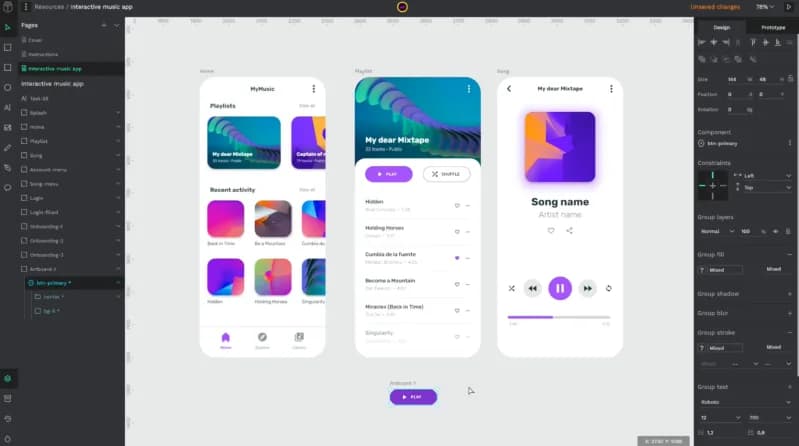
The Penpot editor showing a mobile design for a music app, with pages and layers on the left and design properties on the right. The Penpot team at Penpot Fest, the project's design and code conference.
About Penpot
Penpot is an open-source platform for designing and prototyping digital products. It runs in the browser, so designers, developers and product managers can work on the same files without installing anything, and it can also be installed on a company's own servers. Penpot is developed by Kaleidos, a company based in Madrid that moved from consultancy to building Penpot as an open-source product.
What sets Penpot apart is that its designs are built on open web standards. Shapes are SVG, layouts follow CSS Grid and Flexbox rules, and files use an open format, so what a designer draws maps closely to the code a developer writes. The source code is published under the Mozilla Public License 2.0.
Key features
- Interface design and wireframing. Design responsive, rules-based interfaces, from rough wireframes to detailed screens.
- Interactive prototypes. Link screens with interactions and transitions to test flows before anything is built.
- CSS Grid and Flex layouts. Layouts behave like CSS, which reduces the back-and-forth between design and implementation.
- Design systems and tokens. Components, shared libraries and native design tokens act as a single source of truth across products and teams.
- Code inspection. Developers can inspect designs and get CSS, HTML and SVG that match what was designed.
- Plugins, API and webhooks. A plugin directory lists more than 100 plugins, and an open API, access tokens and outbound webhooks connect Penpot to DesignOps and GitOps workflows.
- MCP server. Penpot's MCP server lets AI agents and tools read and work with designs for design-to-code and code-to-design workflows.
- Self-hosting. Teams can run Penpot on their own infrastructure with Docker, Elestio and other options, including private cloud and on-premise setups.
Who it is for
Penpot suits product teams that want designers and developers to share one source of truth, organisations that need to keep design data on their own servers for privacy or compliance, and open-source projects, agencies and educators looking for a capable design tool without per-seat lock-in. Developers who think in CSS often find its layout model familiar.
Pricing at a glance
- Professional: $0 per user per month on Penpot's cloud, described as free and fully featured.
- Unlimited: $7 per editor per month, capped at $175 per month whatever the team size, adding extra storage, longer history and early features; 14-day free trial.
- Enterprise: $25 per member per month, for centralised administration, team permissions and governance; 14-day free trial.
- Private Server: $50k per year for dedicated infrastructure and custom hosting.
- Self-hosted: the open-source software is free to install on your own servers; Penpot also publishes separate self-host plans for organisations.
Penpot states that all prices are in US dollars, with discounts for non-profits, education and open-source projects. Prices as checked on 10 October 2026; confirm on the vendor's pricing page.
Things to consider
- Penpot is a web application; there is no official desktop app, so work happens in the browser or on a self-hosted instance.
- Teams moving from another design tool should test their existing files and plugins, as feature sets differ.
- Self-hosting gives full control but makes upgrades, backups and security your responsibility.
- The plugin ecosystem is younger and smaller than those of long-established proprietary tools.
Getting started
- Sign up free at penpot.app, or follow the self-host guide to run it with Docker.
- Open a template or library and explore components and Flex layouts.
- Invite a developer to inspect a design and copy its CSS.
- Compare cloud plans on the pricing page as the team grows.
Capabilities
- Design collaboration
- Prototyping
Pricing, platforms and fit
- Pricing
- Open sourceFree plan · Free trialOpen source and free to self-host; cloud Professional plan free; Unlimited and Enterprise billed monthly
- Platforms
- WebSelf-hostedAPI
- Integrations
- DockerElestioTailwind CSSIconifyLucideMermaidLocofy
- Service region
- Worldwide
Reviews
No reviews yet
Ratings appear once our moderators have approved the first review. Nothing is published automatically.
Be the first to reviewWrite a review
Related productivity
Other published listings in the same category.


ProductivityProductivity platform
Notion
Connected workspace for documents, wikis, project databases and calendars, with built-in AI for meeting notes, search and task automation.
Freemium · free plan
View detailsContact

ProductivityProductivity platform
Slack
Team messaging platform built around channels and direct messages, with audio and video huddles, canvases, lists and workflow automation.
Freemium · free plan
View detailsContact

ProductivityProductivity platform
Figma
Browser-based design and prototyping tool with FigJam whiteboards, Dev Mode for developer handoff, Slides and AI prompt-to-code features.
Freemium · free plan
View detailsContact

ProductivityProductivity platform
Miro
Visual collaboration workspace with an online whiteboard canvas for diagrams, wireframes, prototypes, docs and tables, plus AI workflows.
Freemium · free plan
View detailsContact