

Productivity platformProductivity
Obsidian
Local-first note-taking and knowledge base app that stores notes as Markdown files on your device, with linked notes, a graph view, Canvas and thousands of community plugins.
6 years active (founded 2020)
Essential details
- Pricing
- Freemium · Free planApp free for all uses; Sync and Publish add-ons billed monthly or yearly; optional Catalyst and Commercial licenses
- Platforms
- Windows, macOS, Linux, iOS, Android, Browser extension, Command line
- Service region
- Worldwide
- Website
- obsidian.md
Details last checked 10 October 2026
Photos
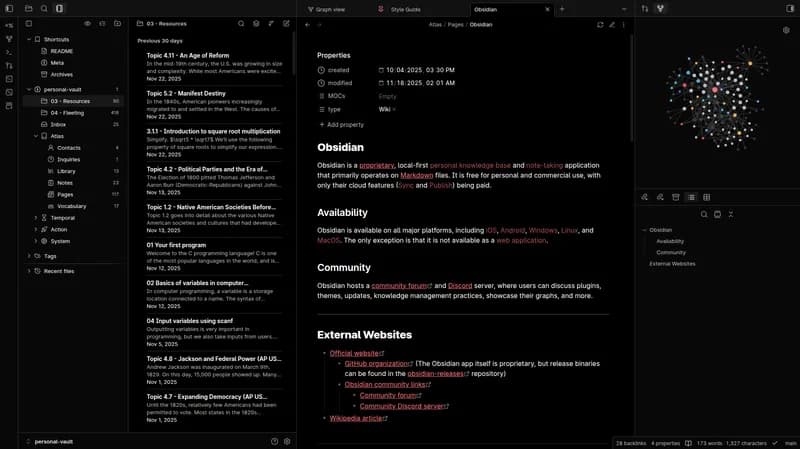
The Obsidian desktop app with a custom dark theme, showing a vault's folders, a note list, an open note and a local graph. Obsidian's graph view, where each dot is a note and each line is a link between notes.
About Obsidian
Obsidian is a note-taking and knowledge management application built around one simple idea: your notes are ordinary Markdown text files in a folder on your own device. That folder is called a vault. Obsidian reads and edits the files, but it does not lock them into a proprietary database, so the same notes can be opened in any text editor, backed up with any tool and kept for as long as the files exist.
The app is free for personal and commercial use and does not require an account. Its makers describe it as 100% user-supported: revenue comes from optional paid services and licences rather than from investors.
Key features
- Linked notes and backlinks. Any note can link to any other with a simple double-bracket syntax, and each note shows the notes that link back to it, which turns a pile of notes into a personal wiki.
- Graph view. An interactive map of notes and the links between them, useful for spotting clusters of ideas and notes that are not yet connected.
- Canvas. An open, infinite space for arranging notes, images and cards visually, for planning, mapping a topic or preparing a talk.
- Plugins and themes. The community directory lists more than 8,600 plugins and 850 themes, from calendars, Kanban boards and task tracking to an Excalidraw drawing plugin. An Importer plugin converts notes from Apple Notes, OneNote, Evernote, Notion and Google Keep.
- Web Clipper and CLI. A browser extension saves web pages into a vault, and a command-line interface lets scripts and automation read, search and write notes.
- Sync. An optional paid service that syncs vaults across devices with AES-256 end-to-end encryption, keeps version history and supports shared vaults for teams.
- Publish. An optional paid service that turns a set of notes into a website, such as a public wiki, documentation or digital garden, with themes and custom domains.
Who it is for
Obsidian suits people who write a lot and want to keep control of their notes: developers keeping technical notes and runbooks, researchers and students building a body of knowledge, writers, and founders who want a private place to plan. Because a vault is just a folder of files, teams can also keep notes in version control or share them through Obsidian Sync. It is less suited to teams that want a hosted, browser-based wiki with real-time co-editing and granular permissions out of the box.
Pricing at a glance
- Obsidian app: free without limits, for personal, commercial and non-profit use.
- Sync Standard: $4 USD per user per month billed annually, or $5 billed monthly, for one synced vault and 1 GB of storage.
- Sync Plus: $8 USD per user per month billed annually, or $10 billed monthly, for 10 synced vaults, 10 GB of storage and 12 months of version history.
- Publish: $8 USD per site per month billed annually, or $10 billed monthly.
- Optional licences: Catalyst is a one-time $25 USD payment that adds early access to beta versions; the Commercial licence is $50 USD per user per year and is not required for work use.
Students, faculty and non-profit employees can get 40% off Sync and Publish. Prices as checked on 10 October 2026; confirm on the vendor's pricing page.
Things to consider
- There is no web app: Obsidian runs as a desktop and mobile application, so a browser-only workflow is not an option.
- Real-time collaboration is limited compared with hosted tools; teams rely on shared vaults in Sync or their own file syncing.
- Many popular features come from community plugins, which are maintained by independent developers and vary in quality and upkeep.
- Keeping notes local means backups are your responsibility unless you use Sync or another backup tool.
Getting started
- Download the app for your platform from obsidian.md; no account is needed.
- Create a vault, or open an existing folder of Markdown files as one.
- Write a few notes, link them with double brackets and open the graph view to see the connections.
- Browse the community plugins once the basics feel familiar, and compare Sync and Publish on the pricing page if you need them.
Capabilities
- Documents
- Knowledge base
Pricing, platforms and fit
- Pricing
- FreemiumFree planApp free for all uses; Sync and Publish add-ons billed monthly or yearly; optional Catalyst and Commercial licenses
- Integrations
- ExcalidrawEvernoteNotionApple NotesMicrosoft OneNoteGoogle Keep
- Service region
- Worldwide
Reviews
No reviews yet
Ratings appear once our moderators have approved the first review. Nothing is published automatically.
Be the first to reviewWrite a review
Related productivity
Other published listings in the same category.


ProductivityProductivity platform
Notion
Connected workspace for documents, wikis, project databases and calendars, with built-in AI for meeting notes, search and task automation.
Freemium · free plan
View detailsContact

ProductivityProductivity platform
Slack
Team messaging platform built around channels and direct messages, with audio and video huddles, canvases, lists and workflow automation.
Freemium · free plan
View detailsContact

ProductivityProductivity platform
Figma
Browser-based design and prototyping tool with FigJam whiteboards, Dev Mode for developer handoff, Slides and AI prompt-to-code features.
Freemium · free plan
View detailsContact

ProductivityProductivity platform
Miro
Visual collaboration workspace with an online whiteboard canvas for diagrams, wireframes, prototypes, docs and tables, plus AI workflows.
Freemium · free plan
View detailsContact