
Moving a legacy PHP or CakePHP application to Laravel: a realistic plan
Migrate a legacy PHP or CakePHP app to Laravel without a rewrite: one router, a shared database, a signed login bridge, tests first and one module per release.
Updated 12 min read
In this article
The realistic way to move a legacy PHP or CakePHP application to Laravel is not a rewrite. It is a strangler fig migration: put one router in front of both applications, send one feature at a time to a new Laravel app that reads the same database, share login between them, and switch the old app off only when nothing routes to it any more. Every step ships to production and every step can be rolled back by changing one router rule. This article lays out that plan in detail: the routing, auth bridging, database reuse, how CakePHP concepts map to Laravel, the test-first discipline that keeps it safe, phasing, cost and risk, and when you should not migrate at all.
Tested with: Laravel 13 on PHP 8.5 for the guard, login and model code (run in a scratch application with PHPUnit 12); the legacy-side token function is written to run on PHP 7.3 or later. The nginx configuration was checked against the nginx proxy module documentation but not run here.
Why not a big-bang rewrite
A rewrite freezes the old application while the new one catches up, and the old one keeps changing because the business does. The cut-over then happens all at once, with years of undocumented behaviour discovered in production. Martin Fowler's Strangler Fig Application describes the alternative: grow the new system around the edges of the old one until the old one can be removed. It suits legacy PHP well, because PHP applications are request-scoped and share nothing between requests except the database, the session store and cookies, which are exactly the things you can share deliberately.
The architecture: one router, two apps, one database
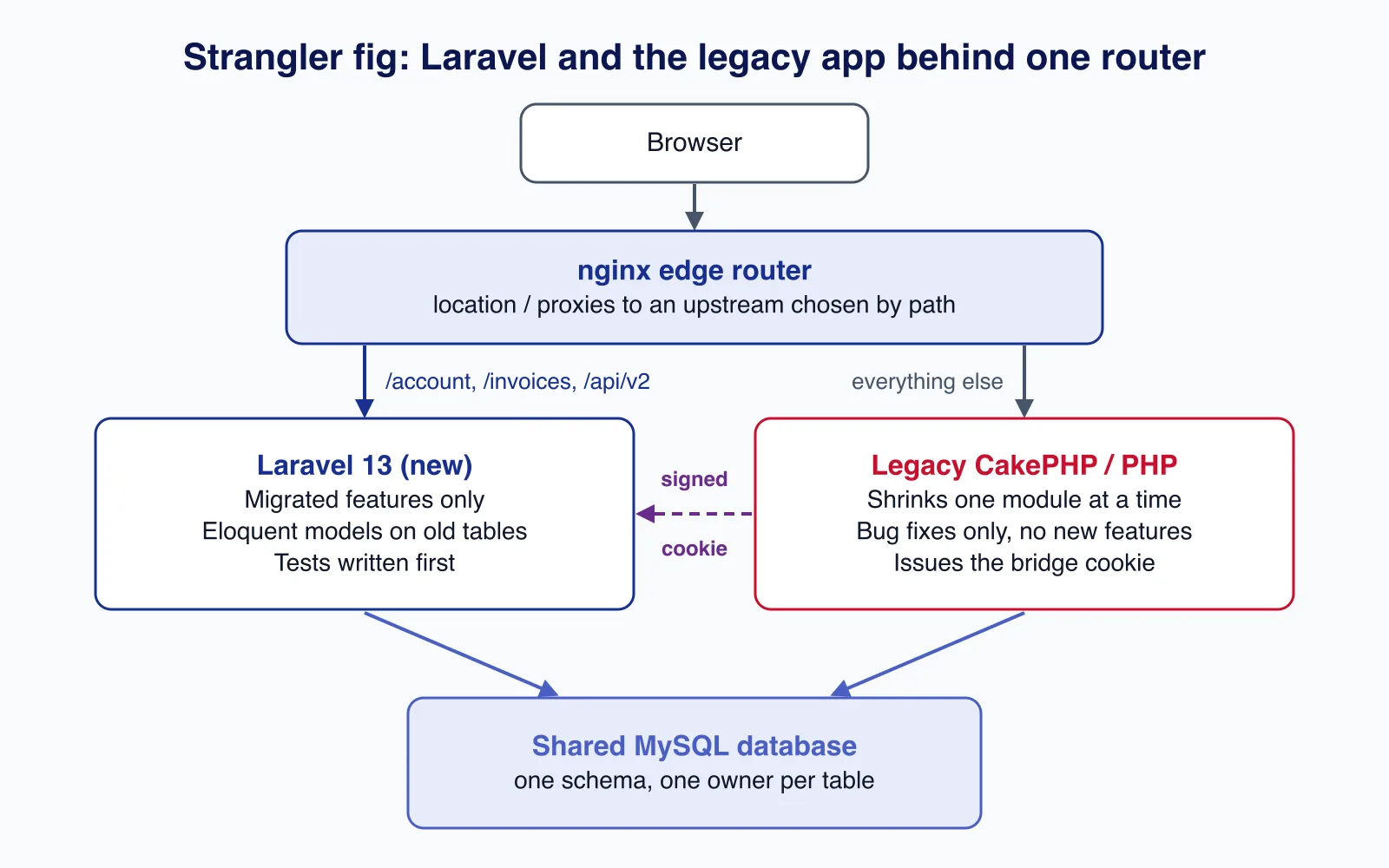
Three pieces make this work:
- An edge router (nginx, a load balancer, or Cloudflare rules) that sends specific URL prefixes to Laravel and everything else to the legacy app. Users see one domain.
- A shared database. Laravel starts by reading and writing the existing tables. You do not migrate data on day one.
- Shared identity. A user who logs in on one side must be logged in on the other. A short-lived signed cookie does this with very little code.
Routing with nginx
Run each application on its own internal port (its own nginx and PHP-FPM pool, or its own container) and let a single public server pick the backend. A map on the request path keeps the routing table in one readable place. When proxy_pass contains a variable, nginx looks the name up among the defined upstream groups first, as the proxy module documentation describes.
upstream legacy  { server 127.0.0.1:8081; }   # CakePHP or plain PHP app
upstream laravel { server 127.0.0.1:8082; }   # new Laravel 13 app

# One place that says which paths have moved.
map $uri $backend {
    default              legacy;
    ~^/account(/|$)      laravel;
    ~^/invoices(/|$)     laravel;
    ~^/api/v2/           laravel;
    ~^/build/            laravel;   # Laravel's Vite assets
}

server {
    listen 443 ssl;
    http2 on;
    server_name app.example.com;
    # ssl_certificate and ssl_certificate_key as usual

    location / {
        proxy_pass http://$backend;
        proxy_set_header Host              $host;
        proxy_set_header X-Forwarded-For   $proxy_add_x_forwarded_for;
        proxy_set_header X-Forwarded-Proto $scheme;
    }
}
Two rules prevent most routing bugs. First, a form and the URL it posts to must live in the same application, because each app has its own CSRF tokens. Move a feature's GET and POST routes together. Second, tell Laravel it sits behind a proxy ($middleware->trustProxies(at: '127.0.0.1') in bootstrap/app.php) so URLs, HTTPS detection and client IPs are correct.
Bridging sessions and login
The two apps cannot read each other's sessions safely: CakePHP and Laravel serialise session data differently and use different cookie names. Instead of sharing the session, share a small, signed statement of who the user is. While login still lives in the legacy app, it sets a cookie after a successful login (and refreshes it on each request), signed with an HMAC secret both apps know:
<?php
// Legacy app (PHP 7.3+): call after login and on each authenticated request.
function bridge_token($userId, $secret, $ttl = 900)
{
    $json = json_encode(array('uid' => (int) $userId, 'exp' => time() + $ttl));
    $payload = rtrim(strtr(base64_encode($json), '+/', '-_'), '=');

    return $payload . '.' . hash_hmac('sha256', $payload, $secret);
}

setcookie('bridge_auth', bridge_token($userId, getenv('LEGACY_BRIDGE_SECRET')), array(
    'path' => '/', 'secure' => true, 'httponly' => true, 'samesite' => 'Lax',
));
On the Laravel side, a closure request guard verifies the signature and expiry and loads the user. Keep the verification in a small class so it can be unit tested:
<?php

namespace App\Auth;

final class LegacyBridgeToken
{
    /** Returns the user id from a valid, unexpired token, or null. */
    public static function userId(string $token, string $secret): ?int
    {
        [$payload, $signature] = array_pad(explode('.', $token, 2), 2, '');

        if ($payload === '' || $secret === '') {
            return null;
        }

        $expected = hash_hmac('sha256', $payload, $secret);
        if (! hash_equals($expected, $signature)) {
            return null;
        }

        $data = json_decode((string) base64_decode(strtr($payload, '-_', '+/'), true), true);
        if (! is_array($data) || ! is_int($data['uid'] ?? null) || ($data['exp'] ?? 0) < time()) {
            return null;
        }

        return $data['uid'];
    }
}<?php
// app/Providers/AppServiceProvider.php
public function boot(): void
{
Auth::viaRequest('legacy-bridge', function (Request $request): ?User {
$userId = LegacyBridgeToken::userId(
(string) $request->cookie('bridge_auth', ''),
(string) config('services.legacy_bridge.secret'),
);
return $userId === null ? null : User::find($userId);
});
}
// config/auth.php, in 'guards': 'legacy' => ['driver' => 'legacy-bridge'],
// config/services.php: 'legacy_bridge' => ['secret' => env('LEGACY_BRIDGE_SECRET')],
// bootstrap/app.php, withMiddleware: $middleware->encryptCookies(except: ['bridge_auth']);
// routes: Route::middleware('auth:legacy')->group(...);The encryptCookies(except: ...) line matters: Laravel encrypts and signs every cookie by default, so a cookie written by another application would otherwise be rejected. We tested the guard with a valid token, a token signed with the wrong secret and an expired token; only the first authenticates. One testing detail: Laravel's getJson() does not send cookies unless you call withCredentials(), which can make a broken guard look correct.
Security notes: generate the secret with at least 32 random bytes, keep it in both apps' environment (never in the repository), keep the token lifetime short, and delete the cookie on logout in both apps. Once login moves to Laravel (phase 2 below), reverse the direction: Laravel issues the cookie and the legacy app verifies it with the same few lines.
Moving password hashes
CakePHP 3 and later hash passwords with PHP's password_hash() (bcrypt by default), which Laravel's hasher verifies directly. CakePHP 2's SimplePasswordHasher defaulted to a salted SHA-1 using Security.salt, which Laravel cannot verify; with bcrypt verification enabled (the default) Laravel throws "This password does not use the Bcrypt algorithm" rather than silently failing. Verify old hashes yourself once, then rehash:
<?php

namespace App\Auth;

use App\Models\User;
use Illuminate\Support\Facades\Auth;
use Illuminate\Support\Facades\Hash;

final class LegacyAwareLogin
{
    public function attempt(string $email, string $password): bool
    {
        $user = User::where('email', $email)->first();

        if ($user === null) {
            Hash::check($password, '$2y$12$'.str_repeat('a', 53)); // similar timing

            return false;
        }

        // CakePHP 3+ used password_hash() (bcrypt): Laravel verifies it directly.
        if (str_starts_with($user->password, '$2y$')) {
            return Auth::attempt(['email' => $email, 'password' => $password]);
        }

        // CakePHP 2 SimplePasswordHasher default: sha1(Security.salt . password).
        $legacy = sha1(config('services.legacy_bridge.cake2_salt').$password);
        if (! hash_equals($user->password, $legacy)) {
            return false;
        }

        $user->forceFill(['password' => Hash::make($password)])->save();
        Auth::login($user);

        return true;
    }
}
Check what your legacy app actually used before copying this: some CakePHP 2 apps configured a different hash type or the Blowfish hasher. Run a report of hash prefixes in the users table first, and plan a forced reset for accounts that never log in during the migration.
This is the point where most migrations get into trouble: two apps, two session systems, and old password formats. If your team has not done this before, a legacy application modernisation review of the auth bridge and router rules before the first slice goes live is cheap insurance.
Reusing the existing database
Eloquent can sit on CakePHP tables with very little configuration, because both frameworks use plural snake_case tables and singular_id foreign keys. The main difference is timestamps: CakePHP's Timestamp behaviour writes created and modified, Laravel expects created_at and updated_at.
<?php

namespace App\Models;

use Illuminate\Database\Eloquent\Model;
use Illuminate\Database\Eloquent\Relations\BelongsTo;
use Illuminate\Database\Eloquent\Relations\HasMany;

class Invoice extends Model
{
    // CakePHP Timestamp behaviour column names
    public const CREATED_AT = 'created';
    public const UPDATED_AT = 'modified';

    protected $table = 'invoices';

    protected $fillable = ['customer_id', 'number', 'status', 'total'];

    protected function casts(): array
    {
        return [
            'total' => 'decimal:2',
            'issued_on' => 'date',
        ];
    }

    public function customer(): BelongsTo
    {
        return $this->belongsTo(Customer::class);
    }

    public function lines(): HasMany
    {
        return $this->hasMany(InvoiceLine::class);
    }
}
Rules that keep a shared database sane:
- One owner per table for schema changes. While both apps run, only one side changes a table's structure, and the other is updated in the same release.
- Additive changes only until the legacy code that reads a column is gone: add columns and tables, do not rename or drop.
- Baseline the schema in Laravel with
php artisan schema:dump. Laravel writes the current schema todatabase/schema/and loads it before running migrations on an empty database, so tests get the real legacy schema. New changes then go in normal Laravel migrations; leave CakePHP'sphinxlogtable alone. - Business rules live in code, not just in the database. CakePHP callbacks such as
beforeSaveand behaviours like CounterCache update data silently. List them per table and reproduce them in Laravel (observers, model events or explicit service code) before Laravel writes to that table.
Mapping CakePHP concepts to Laravel
| CakePHP | Laravel equivalent | Watch out for |
|---|---|---|
| Controller and actions | Controller, routes in routes/web.php | Cake's convention routing; list every reachable URL first |
| Component | Middleware, a service class, or a controller trait | Components that change the request or response |
| Table class (finders, validation, associations) | Eloquent model, query scopes, Form Request validation | Custom finders that hide business rules |
Entity (virtual fields, $_accessible) | Model accessors, $fillable | Mass assignment differences |
| Behaviour (Timestamp, Tree, CounterCache) | Built-in timestamps, model traits, observers | Side effects on save and delete |
| Helper, element, cell | Blade components and view composers | HTML escaping defaults differ |
| Shell or Command, cron entries | Artisan commands and the scheduler | Crons that call URLs instead of commands |
| Authentication and Authorization plugins | Guards, Gates and Policies | Rules spread across controllers |
| Fixtures and TestCase | Factories, RefreshDatabase, feature tests | Fixture data that tests silently depend on |
Phinx migrations, bin/cake bake | Laravel migrations, php artisan make:* | Do not replay old migrations; baseline instead |
Plain PHP applications without a framework map the same way, but expect more of the work to be finding where logic lives: include files, global functions and SQL built in templates.
Test first, then move
Before a feature moves, write tests that describe what the legacy feature does today, run them against the legacy app, and only then implement the Laravel version and run the same tests against it. HTTP-level tests work best because they do not care which framework answers: for each route, assert status codes, key content, redirects, and the database rows that should change. Browser tests (for example Playwright) cover the flows customers actually use, such as checkout, registration and password reset.
Then measure parity in production. For read-only pages you can shadow traffic or compare responses for a sample of real requests; for write flows, compare the rows each app writes for the same input in staging. Keep the legacy route switchable for at least one release after the move.
Phasing the migration
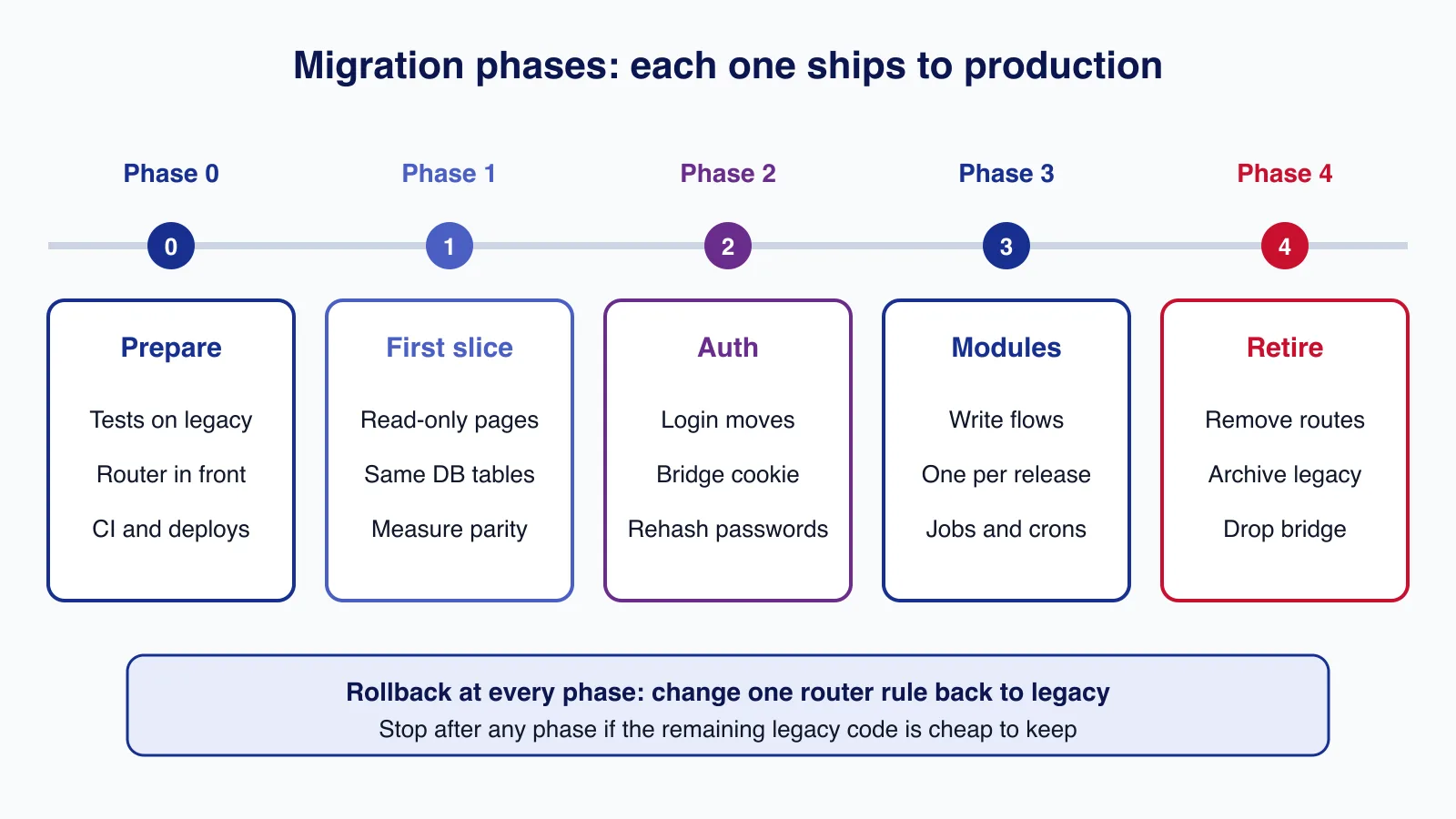
- Phase 0, prepare: put the router in front with every path still going to legacy, set up CI and deployments for the Laravel app, write the first characterisation tests, and inventory routes, crons, queues, integrations and outgoing emails.
- Phase 1, first slice: move a read-only, low-risk area (an account overview or a report) to prove routing, auth bridging, shared database access and deployment.
- Phase 2, auth: move login, logout, registration and password reset to Laravel, rehash passwords on login, and reverse the bridge cookie direction.
- Phase 3, modules: move write flows one module per release, along with their crons and background jobs. Freeze new features in the legacy app; new work is built only in Laravel.
- Phase 4, retire: when the router's default rule serves nothing important, switch the default to Laravel, keep the legacy app read-only for a period, then archive it and remove the bridge.
Cost and risk
We will not quote a generic figure, because the cost depends on things you can count. Estimate from the inventory: number of routes and forms, tables with behaviours or callbacks, cron jobs and integrations (payment gateways, SMS, email providers, accounting exports), and how much of the logic is covered by tests today. Areas with no tests and heavy business rules (pricing, tax, invoicing) cost the most, regardless of size.
| Risk | Mitigation |
|---|---|
| Hidden behaviour in callbacks and behaviours | Per-table list of side effects; characterisation tests before moving writes |
| Both apps writing the same rows differently | One owner per table; move all writes for a table in one release |
| Login loops or users logged out unexpectedly | Bridge cookie tested on staging with real browsers; short TTL with refresh |
| The migration stalls halfway | Every phase is useful on its own; stop and run both apps if needed |
| SEO loss from changed URLs | Keep URLs identical; where they change, add permanent redirects in Laravel |
Common mistakes
- Starting with the hardest module to "get it over with". Start where the risk is lowest and prove the plumbing.
- Sharing the PHP session between frameworks instead of a signed identity cookie.
- Letting the legacy app keep getting new features, so the target keeps moving.
- Renaming columns while legacy code still reads them.
- Forgetting crons, queue consumers and scheduled emails, which keep running in the legacy app long after its pages are gone.
When not to migrate
Do not migrate just because Laravel is more popular. If the application runs on CakePHP 4 or 5, CakePHP is actively maintained (5.4 was released in July 2026), and upgrading within CakePHP is usually far cheaper; our CakePHP 4 to 5.4 upgrade checklist covers that path. Also hold off if the application changes rarely and only needs security patches, if nobody can describe what it does well enough to write tests, or if the business plans to replace it with an off-the-shelf product within a year or two. A migration is justified by a cost you are paying today: slow delivery, hiring difficulty, or a framework or PHP version that no longer gets security fixes.
Cloudsoft Zone runs legacy PHP and CakePHP to Laravel migrations as a sequence of small releases: router and auth bridge first, then one tested module at a time, with the old application kept working until the last route moves. See legacy application modernisation.
Frequently asked questions
Can Laravel use the existing CakePHP database tables?
Yes. Both frameworks use plural snake_case tables and
singular_idforeign keys. SetCREATED_AT = 'created'andUPDATED_AT = 'modified'on models to match CakePHP's Timestamp behaviour, and usephp artisan schema:dumpto baseline the schema for tests.How do users stay logged in across both applications?
Share a short-lived HMAC-signed cookie carrying the user id and expiry rather than the session itself. The other app verifies it with a closure request guard (
Auth::viaRequest) and the cookie is excluded from Laravel's cookie encryption.Will CakePHP password hashes work in Laravel?
Hashes from CakePHP 3 and later use
password_hash()(bcrypt) and verify directly. CakePHP 2's default salted SHA-1 hashes need a one-time legacy check at login, followed by rehashing withHash::make().Should I migrate a CakePHP 5 application to Laravel?
Usually not. CakePHP 5 is actively maintained, and upgrading within CakePHP is cheaper. Migrate only when there is a concrete cost, such as hiring difficulty or slow delivery, that Laravel would remove.
How do I roll back a migrated feature?
Point its path back to the legacy upstream in the router map and reload nginx. This only works if both apps still write compatible data, which is why schema changes stay additive until the legacy code is gone.
Your next customer could start right here.
Introduce your tool, product or business to readers exploring technology.
Explore placements and request a private quote
Sources
- Strangler Fig Application — Martin Fowler
- Module ngx_http_proxy_module (proxy_pass with variables) — nginx
- Laravel 13 authentication: closure request guards and password rehashing — Laravel
- Laravel 13 responses: cookies and encryption — Laravel
- Laravel 13 migrations: squashing migrations (schema:dump) — Laravel
- Laravel 13 Eloquent: timestamps and conventions — Laravel
- CakePHP releases — CakePHP on GitHub, 2026-07-29
- CakePHP 2.10 Security::hash (salted SHA-1 default) — CakePHP on GitHub
- CakePHP Authentication: DefaultPasswordHasher — CakePHP on GitHub
Written with substantial AI assistance. Facts checked against cited sources. Editorial policy.
Comments
No comments yet. Be the first to join the conversation.
Leave a comment
Every comment is read by a moderator before it appears. Your email address is never published; it is used only to contact you about this comment.
Related tools
- Directory profile
Docker
Container platform for building, sharing and running applications, including Docker Desktop, Docker Engine, Docker Hub and Docker Scout.
A tool connected to a service selected for this article. Compare its fit for your project; inclusion is not an endorsement.
- Directory profile
Git
Free, open-source distributed version control system for tracking code changes, branching and merging, created in 2005 and used by GitHub, GitLab and Bitbucket.
A tool connected to a service selected for this article. Compare its fit for your project; inclusion is not an endorsement.
- Directory profile
GitHub
Git-based platform for hosting code, reviewing pull requests, tracking issues and running CI/CD workflows, with free and per-user paid plans.
A tool connected to a service selected for this article. Compare its fit for your project; inclusion is not an endorsement.
More from Cloudsoft Zone

Laravel
Upgrading from Laravel 12 to Laravel 13: a practical guide
Laravel 12 lost bug-fix support in August 2026. This guide covers the PHP 8.3 requirement, Composer changes, the CSRF middleware rename, cache and session hardening, low-impact changes that often bite, and a safe rollout plan.
By Cloudsoft Zone
ComparisonLaravel
Laravel Sanctum vs Passport: which API authentication package to use
Sanctum and Passport both authenticate Laravel APIs, but they solve different problems. This comparison explains tokens, SPA cookies, OAuth2 grants, expiry and clean-up in Laravel 13, and when each package is the right choice.
By Cloudsoft Zone

TutorialLaravel
Laravel AI SDK 1.0 tutorial: build your first AI agent in Laravel 13
Build a tested Laravel 13 AI agent with laravel/ai 1.x: providers, a PHP tool, structured output, queued jobs, fakes for tests, cost caps and a security checklist.
By Cloudsoft Zone