
Human-in-the-loop AI: when agents must ask for approval
Which agent actions need a person to approve them, and how to build approvals that expire, bind to exact arguments, allow delegation and leave an audit trail.
Updated 17 min read

In this article
An AI agent that can issue refunds, email customers or change records will eventually try to do something it should not: because a prompt injection told it to, because it misread the request, or because the request itself was wrong. The fix is not a stricter system prompt. It is a small piece of ordinary software that sits between the model and your tools, decides which calls need a person, and makes sure an approval covers exactly one action, by the right person, for a limited time. This article shows how to decide what needs approval and how to build that approval layer so it still holds up under pressure.
Tested with: Node.js 24.18.0 (built-in node:sqlite, release candidate), TypeScript 7.0.2 with erasableSyntaxOnly, run as node demo.ts using Node's built-in type stripping. The pattern carries over to any language and database with transactions. One error to expect if you write classes this way: Node's type stripping rejects constructor parameter properties such as constructor(private db: DatabaseSync) with ERR_UNSUPPORTED_TYPESCRIPT_SYNTAX, so the store declares its fields explicitly.
Why the approval cannot live in the prompt
"Always ask before refunding more than 50" in a system prompt is a request, not a control. The model can be talked out of it, can misjudge the amount, or can be steered by text in an email or web page it reads. The OWASP entry on Excessive Agency (LLM06:2025) names the three root causes as excessive functionality, excessive permissions and excessive autonomy, and lists two mitigations that this article builds: require human approval for high-impact actions, and "complete mediation", meaning authorisation is enforced in downstream systems rather than by the LLM deciding what is allowed.
So the rule is: the model may propose a tool call; code you control decides what happens to it. That code sees the real tool name and arguments, the user the agent is acting for, and your business rules. It never trusts the model's own description of what the call does. For the injection side of this, see prompt injection defence: design AI agents that fail safely.
Which actions need approval
Most agent calls should not need a person. If every call asks, people stop reading and approve everything. Sort tools, and where needed individual calls, into four tiers using questions you can answer from the arguments:
| Question | If yes, push towards |
|---|---|
| Can it be undone cheaply and completely? | Auto or notify |
| Does money move, or does a customer, supplier or regulator see the result? | Approve above a threshold |
| Does data leave your systems or change who can access what? | Approve, or deny for the agent |
| Is the blast radius one record or many (bulk update, mass email)? | Approve, with the count shown |
| Is it destructive and rare (delete account, change permissions)? | Deny: a person does it in your admin UI |
| Is the tool unknown or new? | Deny until someone classifies it |
The tiers then mean: auto runs and logs; notify runs and tells the owner afterwards (useful for routine, reversible actions you still want visibility of); approve pauses until an authorised person decides; deny refuses and tells the model why so it can tell the user. The same tool can sit in different tiers depending on its arguments: a refund of 40 runs, a refund of 250 waits for a team lead, a refund of 900 waits for finance.
Write this as a plain function and keep it in version control, with tests. Product owners can read a switch statement; they cannot audit a prompt.
The approval record
An approval is a database row, not a boolean in memory. It must survive restarts, because people take minutes or hours to respond, and it must be specific enough that it cannot be reused for something else. The fields that matter:
| Field | Why |
|---|---|
tool, args_json, args_hash | The approval covers these exact arguments. A hash of canonical JSON lets execution check nothing changed. |
on_behalf_of, run_id | Who the agent was acting for, and which run asked. Needed for separation of duties and tracing. |
approver_role | Who may decide, set by the policy, not by the request. |
summary | Generated by your code from the arguments, never written by the model. |
status, expires_at | Pending, approved, rejected, expired or executed, with a deadline. |
decided_by, decided_at, reason | Who decided, when and why. Rejections require a reason. |
Here is the whole store, using Node's built-in SQLite so you can run it without installing anything. In production the same SQL works on PostgreSQL or MySQL with minor changes.
import { DatabaseSync } from 'node:sqlite';
import { createHash, randomUUID } from 'node:crypto';

export type Tier = 'auto' | 'notify' | 'approve' | 'deny';
export type ToolCall = { tool: string; args: Record<string, unknown> };
export type Actor = { id: string; roles: string[] };

// 1. Policy: decided in code from the tool and its real arguments, never by the model.
export function classify(call: ToolCall): { tier: Tier; approverRole?: string; ttlMinutes?: number } {
  switch (call.tool) {
    case 'lookup_order':
      return { tier: 'auto' };
    case 'send_customer_email':
      return { tier: 'notify' };
    case 'issue_refund': {
      const amount = Number(call.args.amountCents);
      if (!Number.isInteger(amount) || amount <= 0) return { tier: 'deny' };
      if (amount <= 5_000) return { tier: 'auto' };
      if (amount <= 50_000) return { tier: 'approve', approverRole: 'support_lead', ttlMinutes: 60 };
      return { tier: 'approve', approverRole: 'finance', ttlMinutes: 240 };
    }
    case 'delete_customer':
      return { tier: 'deny' }; // people do this in the admin UI, not through the agent
    default:
      return { tier: 'deny' }; // unknown tools fail closed
  }
}

// Canonical JSON so the hash does not depend on key order.
function canonical(v: unknown): string {
  if (Array.isArray(v)) return `[${v.map(canonical).join(',')}]`;
  if (v && typeof v === 'object') {
    return `{${Object.keys(v).sort().map((k) => `${JSON.stringify(k)}:${canonical((v as Record<string, unknown>)[k])}`).join(',')}}`;
  }
  return JSON.stringify(v);
}
export const argsHash = (call: ToolCall) => createHash('sha256').update(canonical(call)).digest('hex');

export class ApprovalStore {
  private db: DatabaseSync;
  private now: () => Date;
  constructor(db: DatabaseSync, now: () => Date = () => new Date()) {
    this.db = db;
    this.now = now;
    db.exec(`
      CREATE TABLE IF NOT EXISTS approval_requests (
        id TEXT PRIMARY KEY, run_id TEXT NOT NULL, on_behalf_of TEXT NOT NULL,
        tool TEXT NOT NULL, args_json TEXT NOT NULL, args_hash TEXT NOT NULL,
        approver_role TEXT NOT NULL, summary TEXT NOT NULL,
        status TEXT NOT NULL CHECK (status IN ('pending','approved','rejected','expired','executed')),
        created_at TEXT NOT NULL, expires_at TEXT NOT NULL,
        decided_by TEXT, decided_at TEXT, reason TEXT, executed_at TEXT
      );
      CREATE TABLE IF NOT EXISTS delegations (
        from_user TEXT NOT NULL, to_user TEXT NOT NULL, role TEXT NOT NULL,
        valid_from TEXT NOT NULL, valid_until TEXT NOT NULL
      );
      CREATE TABLE IF NOT EXISTS approval_events (
        request_id TEXT NOT NULL, at TEXT NOT NULL, actor TEXT NOT NULL, event TEXT NOT NULL, detail TEXT
      );`);
  }

  private log(id: string, actor: string, event: string, detail?: string) {
    this.db.prepare('INSERT INTO approval_events VALUES (?,?,?,?,?)').run(id, this.now().toISOString(), actor, event, detail ?? null);
  }

  // 2. The agent asks; we store exactly what will run and who may approve it.
  request(runId: string, onBehalfOf: string, call: ToolCall, summary: string): string {
    const policy = classify(call);
    if (policy.tier !== 'approve') throw new Error(`tool ${call.tool} is tier ${policy.tier}, not approvable`);
    const id = randomUUID();
    const created = this.now();
    const expires = new Date(created.getTime() + (policy.ttlMinutes ?? 60) * 60_000);
    this.db.prepare(`INSERT INTO approval_requests (id, run_id, on_behalf_of, tool, args_json, args_hash, approver_role,
      summary, status, created_at, expires_at) VALUES (?,?,?,?,?,?,?,?, 'pending', ?, ?)`)
      .run(id, runId, onBehalfOf, call.tool, JSON.stringify(call.args), argsHash(call), policy.approverRole!, summary,
        created.toISOString(), expires.toISOString());
    this.log(id, `agent:${runId}`, 'requested', summary);
    return id;
  }

  private canApprove(actor: Actor, role: string): string | null {
    if (actor.roles.includes(role)) return 'role';
    const at = this.now().toISOString();
    const d = this.db.prepare(`SELECT from_user FROM delegations WHERE to_user = ? AND role = ?
      AND valid_from <= ? AND valid_until > ?`).get(actor.id, role, at, at) as { from_user: string } | undefined;
    return d ? `delegated by ${d.from_user}` : null;
  }

  // 3. A person decides. Separation of duties, expiry and a single winner are enforced here.
  decide(id: string, actor: Actor, decision: 'approved' | 'rejected', reason: string): void {
    const row = this.db.prepare('SELECT * FROM approval_requests WHERE id = ?').get(id) as Record<string, string> | undefined;
    if (!row) throw new Error('not found');
    if (row.on_behalf_of === actor.id) throw new Error('you cannot approve a request made on your own behalf');
    const via = this.canApprove(actor, row.approver_role);
    if (!via) throw new Error(`requires role ${row.approver_role}`);
    if (decision === 'rejected' && !reason.trim()) throw new Error('a rejection needs a reason');
    const at = this.now().toISOString();
    const res = this.db.prepare(`UPDATE approval_requests SET status = ?, decided_by = ?, decided_at = ?, reason = ?
      WHERE id = ? AND status = 'pending' AND expires_at > ?`).run(decision, actor.id, at, reason, id, at);
    if (res.changes !== 1) throw new Error('request is no longer pending (decided or expired)');
    this.log(id, actor.id, decision, `${via}; ${reason}`);
  }

  // 4. Execution re-checks everything and consumes the approval exactly once.
  consume(id: string, call: ToolCall): void {
    const at = this.now().toISOString();
    const res = this.db.prepare(`UPDATE approval_requests SET status = 'executed', executed_at = ?
      WHERE id = ? AND status = 'approved' AND args_hash = ? AND tool = ?`).run(at, id, argsHash(call), call.tool);
    if (res.changes !== 1) throw new Error('no matching approval: missing, already used, or arguments changed');
    this.log(id, 'system', 'executed');
  }

  expireStale(): number {
    const at = this.now().toISOString();
    const stale = this.db.prepare(`SELECT id FROM approval_requests WHERE status = 'pending' AND expires_at <= ?`).all(at) as { id: string }[];
    for (const { id } of stale) {
      this.db.prepare(`UPDATE approval_requests SET status = 'expired' WHERE id = ? AND status = 'pending'`).run(id);
      this.log(id, 'system', 'expired');
    }
    return stale.length;
  }
}
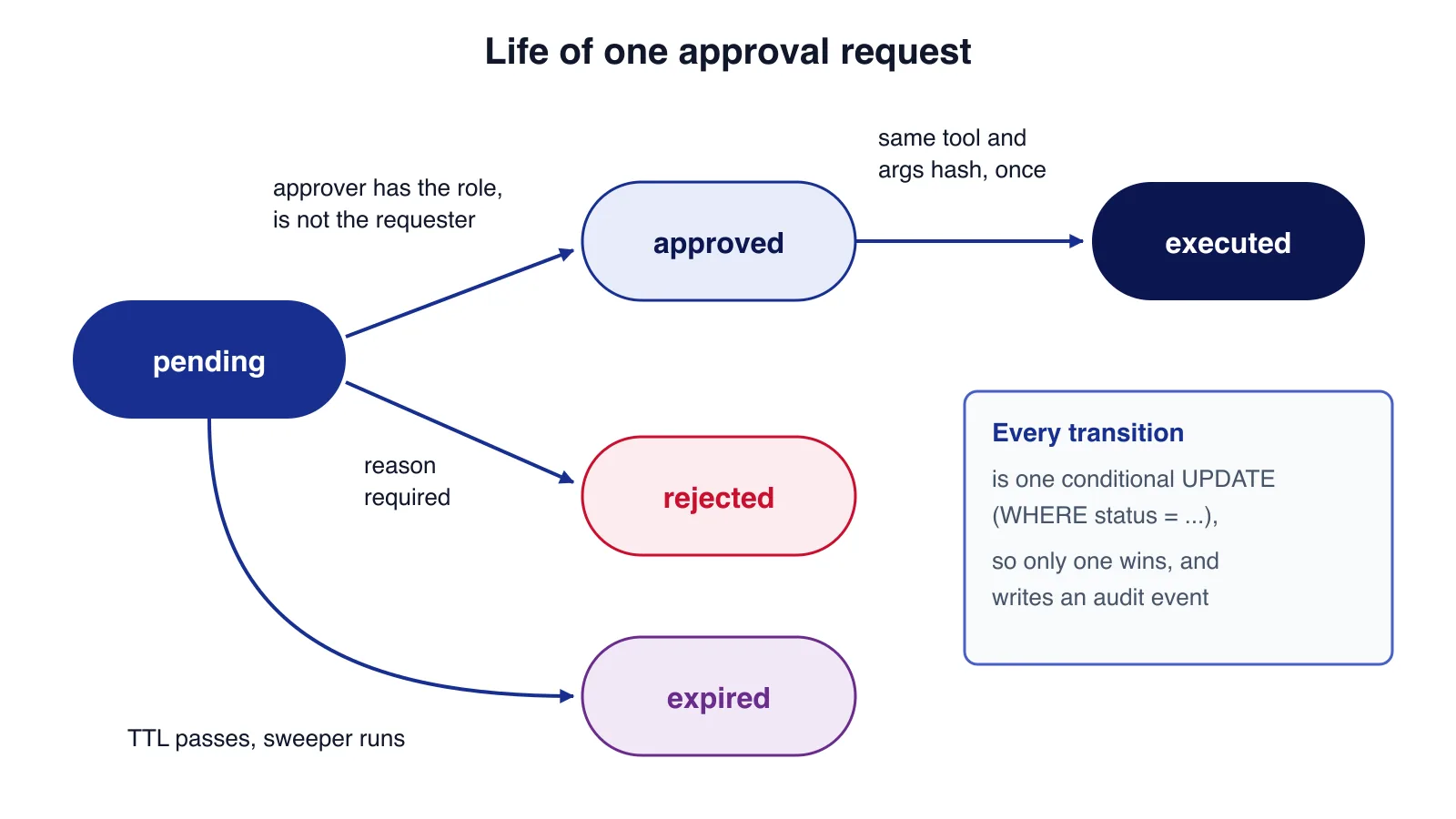
Three details carry most of the safety. First, decide refuses an approval from the person the agent acted for, so an agent working for Maya cannot get Maya to rubber-stamp her own refund. Second, every state change is one conditional UPDATE ... WHERE status = 'pending' AND expires_at > ?, so two reviewers clicking at once, or a click after expiry, cannot both succeed. Third, consume moves the row from approved to executed only if the tool and argument hash match, which makes each approval single use and stops a model from swapping in a larger amount after approval.
Wiring it into the agent loop
Whatever agent framework or raw API loop you use, every tool call should pass through one gate. When a call needs approval, the gate records the request and returns a tool result that tells the model the action is waiting. The model then tells the user, and the run ends or pauses.
import { classify, type ToolCall, type ApprovalStore } from './approvals.ts';

type Handlers = Record<string, (args: Record<string, unknown>) => Promise<string>>;

// What the agent loop calls for every tool_use block. The result goes back to the model as the tool result.
export async function runTool(store: ApprovalStore, handlers: Handlers, runId: string, userId: string,
  call: ToolCall, approvalId?: string): Promise<string> {
  const policy = classify(call);
  if (policy.tier === 'deny') return `Not permitted: ${call.tool} cannot be run by the assistant.`;
  if (policy.tier === 'approve') {
    if (!approvalId) {
      const id = store.request(runId, userId, call, `${call.tool} ${JSON.stringify(call.args)}`);
      return `PENDING_APPROVAL ${id}: a person must approve this before it runs. Tell the user it is waiting.`;
    }
    store.consume(approvalId, call); // throws if not approved, already used, or arguments changed
  }
  const out = await handlers[call.tool](call.args);
  if (policy.tier === 'notify') console.log(`[notify] ${call.tool} ran for ${userId}`);
  return out;
}
When the reviewer approves, your application resumes the run and calls the tool again with the approval ID. The arguments are taken from the stored request, not regenerated by the model, and consume confirms they still match.
Agent frameworks give you the pause and resume mechanics, which saves work, but not the policy or the record:
- OpenAI Agents SDK for JavaScript: mark a tool with
needsApproval(a boolean or an async function), read pending calls fromresult.interruptions, callresult.state.approve()orreject(), and resume with the sameRunState, which you can serialise withtoString(). The guide itself warns thatRunState.fromString()"does not authenticate the snapshot or the person submitting it", so keep snapshots server-side and check decisions against your own pending records. - LangGraph: call
interrupt()inside a node, persist state with a checkpointer and resume withnew Command({ resume: value })on the samethread_id. The node restarts from its beginning on resume, so code beforeinterrupt()must be idempotent. - Claude Agent SDK: hooks run first and can deny any call, then deny, ask and allow rules, then your
canUseToolcallback for anything unresolved. Calls approved by an allow rule or a permissive mode never reach the callback, so put checks that must always run in aPreToolUsehook.
Use these hooks to call your gate. Do not let a framework's in-memory "approved" flag be the only evidence that someone said yes.
Timeouts and expiry
An approval that sits for three days is a liability: prices change, the customer may have been refunded another way, and the reviewer has no idea what the agent was doing at the time. Give each tier a time to live (the example uses 60 minutes for team-lead refunds and four hours for finance) and treat expiry as a final state. Four rules keep this predictable:
- Silence is never consent. When the deadline passes the request expires; it is never auto-approved. The agent, or a scheduled job, tells the user it lapsed.
- Re-check preconditions at execution. Approval says "this was reasonable when I looked". Before running, check the order is still unrefunded and the amount still within what was paid. If not, fail and explain.
- Run a sweeper.
expireStale()marks old rows expired and writes audit events, so dashboards and reminders show the truth. The conditional update indecidealready blocks late approvals even if the sweeper has not run. - Escalate before expiry, not after. If no one has looked at a request halfway through its window, remind the approver group or a named backup.
Delegation without loopholes
Approvers go on holiday. Delegation should be an explicit, time-bound row (who delegates which role to whom, from when, until when), checked at decision time and written into the audit event, as the delegations table above does. Keep three limits: a delegate cannot re-delegate; delegation never lets someone approve a request made on their own behalf; and delegation is per role, so covering a team lead's refunds does not grant finance approvals. For the largest amounts consider a true two-person rule, two different approvers before execution, which is the same idea as the two launch keys in the photograph.

An approval screen people actually read
The reviewer should be able to decide in under a minute without opening another system. Show:
- The action in plain words, built by your code from the arguments: "Refund 250.00 to order A101 (paid 310.00, delivered 3 July)".
- The exact arguments, and for updates a before-and-after diff.
- Who the agent acted for, the conversation or ticket it came from, and the agent's stated reason, labelled as model output, because injected text can shape it.
- What happens on approve, and when the request expires.
- Approve and reject buttons, with a required reason for rejection. No "always approve" option on anything above the auto tier.
Deliver notifications through Slack, Teams or email, but make the decision itself a POST request behind your normal login. One-click approve links in email are risky: mail security scanners and link previewers open URLs automatically, and a GET that approves something can be triggered by a robot. If you also need to design approval prompts for MCP clients and desktop agents, the MCP security guide covers that side; this article is about approvals your own server enforces.
The audit trail
Write an append-only event for every request, decision, expiry and execution: request ID, time, actor, event and detail. Link it to your run and trace IDs so you can answer the three questions that come up after an incident: what did the agent propose, who allowed it, and what actually ran. Do not let the application user that serves the agent delete or update audit rows, and keep them at least as long as the business records they relate to. If the agent drafts content rather than performing actions, the review flow is different; see how to build a safe AI content pipeline with human fact review.
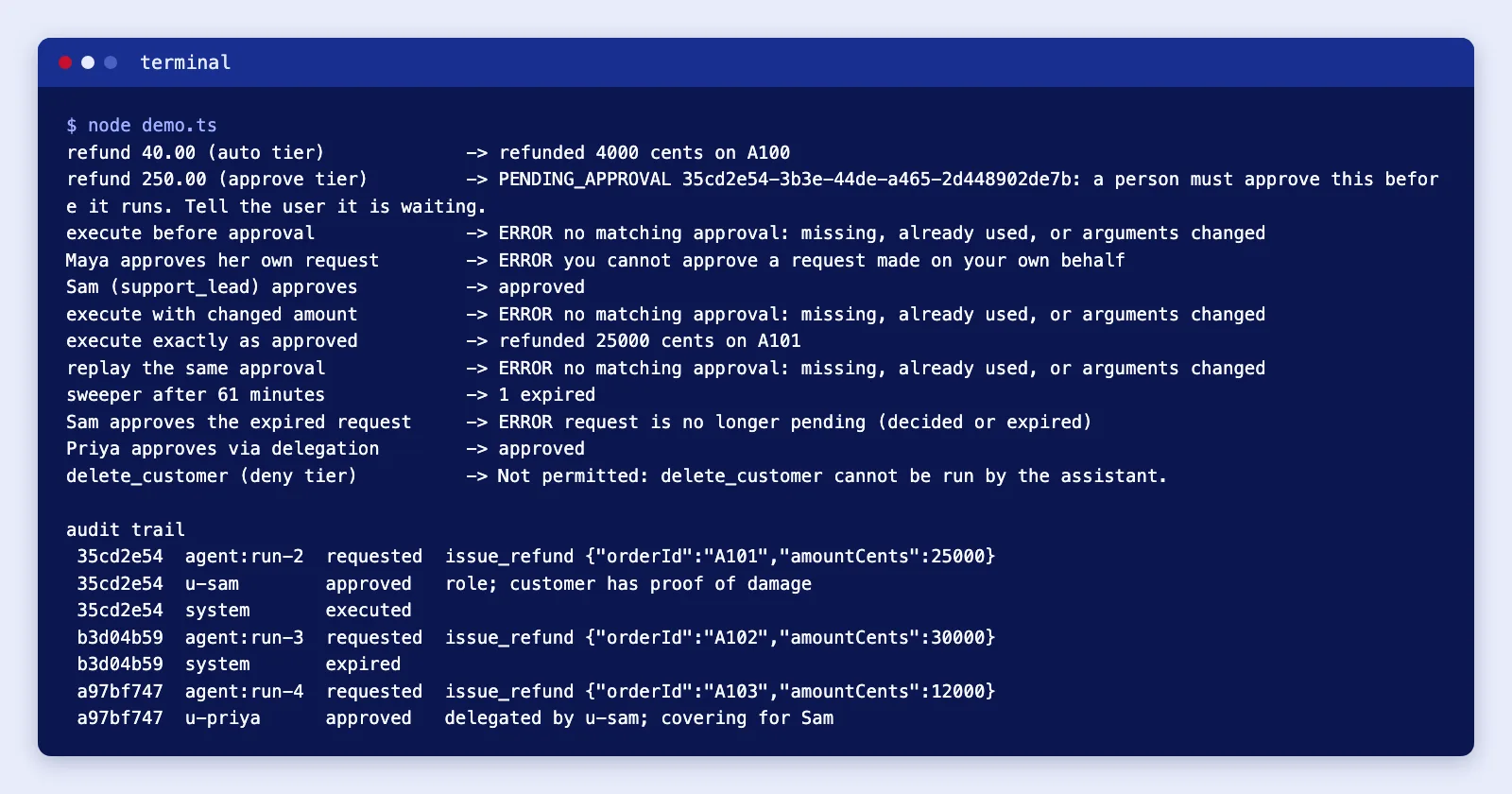
Running the demo below exercises every path: a small refund runs, a larger one waits, self-approval is refused, changed arguments and a replay are rejected, an expired request cannot be approved, and a delegate approves within their window.
Measuring approval load
Approvals cost people's time, and the numbers tell you when a tier is wrong. Track per tool, per week: requests, approval rate, rejection rate, expiry rate and time to decision.
SELECT tool,
       COUNT(*)                                                    AS requests,
       ROUND(100.0 * SUM(status IN ('approved','executed')) / COUNT(*), 1) AS approved_pct,
       ROUND(100.0 * SUM(status = 'rejected') / COUNT(*), 1)       AS rejected_pct,
       ROUND(100.0 * SUM(status = 'expired') / COUNT(*), 1)        AS expired_pct,
       ROUND(AVG((julianday(decided_at) - julianday(created_at)) * 1440), 1) AS avg_minutes_to_decide
FROM approval_requests
WHERE julianday(created_at) >= julianday('now', '-30 days')
GROUP BY tool
ORDER BY requests DESC;
How to read it:
- Approval rate near 100% with decisions in seconds usually means rubber-stamping. Raise the threshold, automate that band and review a weekly sample after the fact instead.
- High rejection rate means the agent is proposing bad actions. Fix the tool description, the retrieval or the model before adding more reviewers.
- High expiry rate means the wrong people are being asked, at the wrong time, or the window is too short.
- Rising volume per approver is the early sign of fatigue. Split the queue, add delegates, or narrow what the agent is allowed to propose.
If you need help deciding which of your agent's actions belong in which tier, or building the approval queue into an existing back office, Cloudsoft Zone's AI process automation work covers exactly this design.
Common mistakes
- Approving the intent, not the call. "Refund the customer" is approved, then the model fills in a different amount. Bind approvals to an argument hash.
- Letting the model write the approval summary. Injected text then decides what the reviewer sees.
- Reusable approvals. Without a single-use transition, a retry or a loop can execute the same approval twice.
- Auto-approve on timeout. It turns every unattended queue into an open door.
- Self-approval. The person the agent works for is the person most likely to click yes without reading.
- Keeping state only in the framework. A serialised run state in a browser or a queue message is not an approval record.
- Asking for everything. Ten prompts an hour trains people to click approve.
When not to use human approval
- Reversible, low-value actions. Log them, notify if useful, and sample afterwards.
- Real-time paths. If a customer is waiting on a live chat for a decision that needs a manager, the honest answer is "a person will follow up", not a chat that hangs.
- Actions that should not be agent actions at all. Deleting accounts or changing permissions belongs in your admin UI with its own controls.
- When a fixed workflow will do. If the steps never change, a normal workflow with a manager sign-off is simpler and cheaper than an agent plus approvals.
Regulation may also require oversight. The EU AI Act's Article 14 sets human-oversight requirements for high-risk AI systems placed on the EU market; if your agent touches areas such as credit, employment or education, take legal advice on whether and when it applies to you.
Cloudsoft Zone designs and builds AI agents with approval queues, delegation and audit trails wired into your existing systems. See our AI business process automation service.
Frequently asked questions
Can I just tell the model to ask before risky actions?
You can, and it helps the conversation, but it is not a control. Enforce approval in code that sees the real tool name and arguments, so a confused or manipulated model still cannot run the action.
How long should an approval stay valid?
As short as your reviewers can reliably manage, usually minutes to a few hours. Expired requests should never auto-approve, and execution should re-check preconditions such as whether the order was already refunded.
Should approvals happen in Slack or email?
Use Slack, Teams or email to notify, but make the decision a POST request in your own authenticated application. Link scanners can open GET links automatically.
How do I know if we ask for approval too often?
Measure approval rate and time to decision per tool. Near-100% approvals made in seconds suggest rubber-stamping; raise the threshold and review a sample afterwards instead.
Your next customer could start right here.
Introduce your tool, product or business to readers exploring technology.
Explore placements and request a private quote
Sources
- LLM06:2025 Excessive Agency — OWASP GenAI Security Project
- Human-in-the-loop — OpenAI Agents SDK (JavaScript)
- Interrupts — LangChain (LangGraph docs)
- Configure permissions — Anthropic (Claude Agent SDK docs)
- SQLite (node:sqlite) — Node.js
- Regulation (EU) 2024/1689 (Artificial Intelligence Act) — EUR-Lex, 2024-07-12
Written with substantial AI assistance. Facts checked against cited sources. Editorial policy.
Comments
No comments yet. Be the first to join the conversation.
Leave a comment
Every comment is read by a moderator before it appears. Your email address is never published; it is used only to contact you about this comment.
Related tools
- Directory profile
Brevo
Customer platform for email, SMS and WhatsApp marketing, transactional messaging and sales pipelines, formerly Sendinblue, with a free plan and contact-based paid tiers.
A tool connected to a service selected for this article. Compare its fit for your project; inclusion is not an endorsement.
- Directory profile
HubSpot
Customer platform combining a CRM with marketing, sales, service, content, data and commerce hubs, with a free tier and seat-based paid plans.
A tool connected to a service selected for this article. Compare its fit for your project; inclusion is not an endorsement.
More from Cloudsoft Zone

Architecture guideAI and Automation
How to build a safe AI content pipeline with human fact review
An architecture for AI-assisted publishing where people stay responsible: untrusted source snapshots, claim checking with citations, a review queue AI cannot skip, labels and rollback.
By Cloudsoft Zone

TutorialNode.js
How to test a Node.js API with the built-in test runner (node:test)
Write, run, mock and measure coverage for a small Node.js HTTP API using only node:test and node:assert. Covers port-0 servers, fetch(), spies, t.mock.method(), fake dates and coverage thresholds.
By Cloudsoft Zone

TutorialNode.js
Node.js streams in practice: pipeline(), backpressure and async generators
Process files of any size in Node.js with flat memory use. A hands-on guide to stream/promises pipeline(), backpressure, async generator transforms, AbortSignal timeouts and streaming downloads over HTTP.
By Cloudsoft Zone