
AI automation for education: admissions, student support and content
Where AI helps schools, colleges and universities, where people must decide, and the FERPA, GDPR, EU AI Act and accessibility rules that shape every design.
Updated 10 min read

In this article
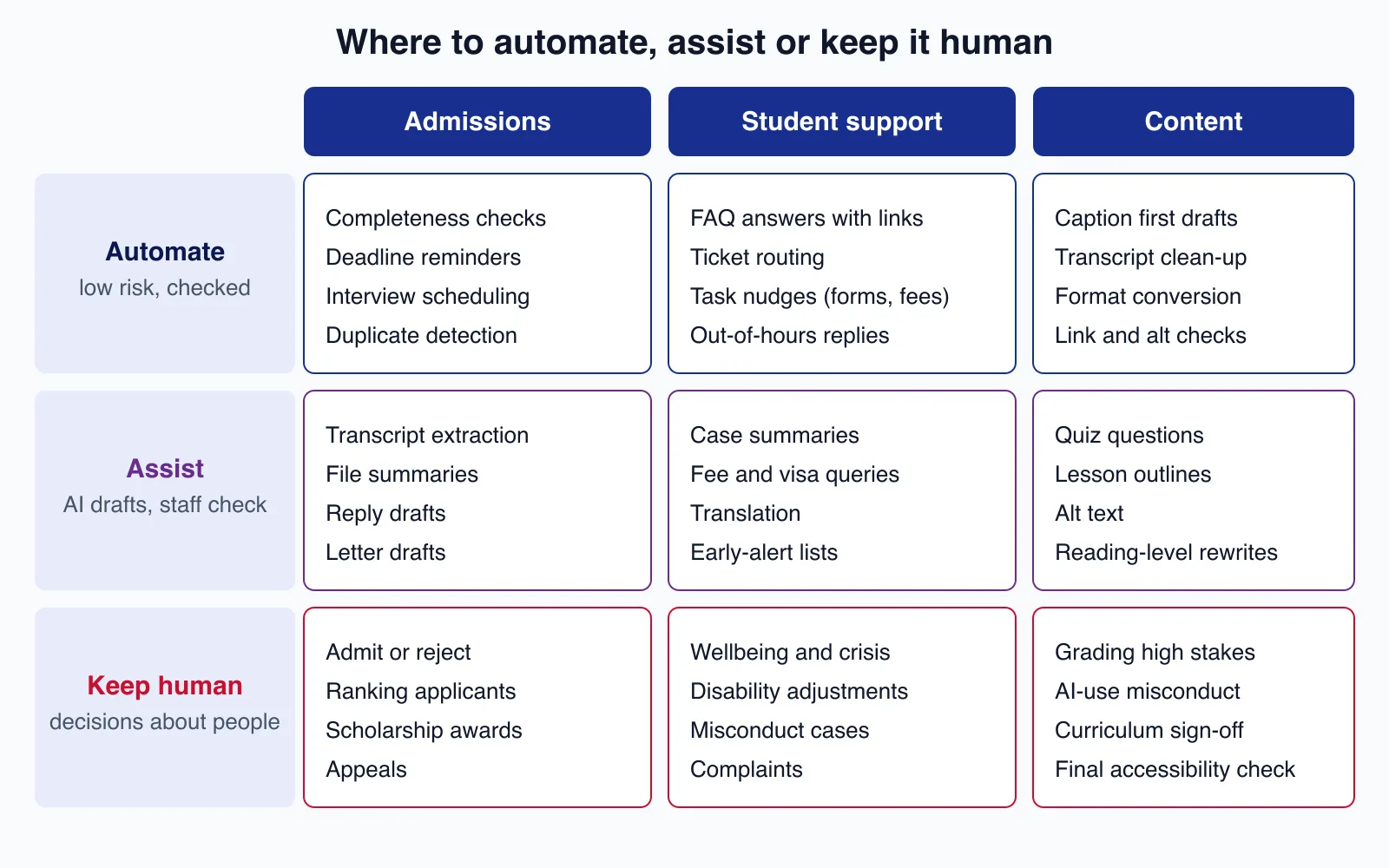
Schools, colleges, universities and course providers can use AI to take repetitive work off admissions, student services and content teams: checking applications for missing documents, answering routine questions at 2 a.m. with links to the right policy, and producing first drafts of captions, quizzes and alt text. What AI should not do is decide who gets in, judge a student in distress, or rule on misconduct. This guide sets out where each line sits, the privacy and accessibility rules that apply in the US, UK, EU and elsewhere, a routing pattern for a student support assistant, and the mistakes that turn a time saver into a complaint.
Who this is for: registrars, admissions and student services leads, edtech founders and the developers who build for them. Regulations are summarised for orientation, not as legal advice; involve your data protection officer or counsel before launch.
The rules that shape every design
Education data is about people, often children, and decisions about them affect their lives. Several regimes apply depending on where your students are:
| Rule | Where it applies | What it means for AI automation |
|---|---|---|
| FERPA (34 CFR Part 99) | US schools and colleges receiving federal education funds | An AI vendor can see education records only as a "school official" with a legitimate educational interest, under the institution's direct control, and may not reuse or redisclose them. Put that in the contract. |
| COPPA Rule, as amended in 2025 | US online services directed at children under 13 | Operators had to comply with the amendments by 22 April 2026, including a written retention policy and separate parental consent for disclosures that are not integral to the service. |
| GDPR and UK GDPR | Students in the EU, EEA and UK | Article 22 restricts decisions based solely on automated processing that significantly affect people, so admissions needs genuine human involvement. Large-scale processing of students' data usually needs a data protection impact assessment (Article 35). |
| EU AI Act, Annex III | AI systems used in the EU | AI used to decide admission, evaluate learning outcomes, steer learning or monitor students during tests is high-risk. The Digital Omnibus amendment published in July 2026 moved these obligations from 2 August 2026 to 2 December 2027; the transparency duties in Article 50 still applied from 2 August 2026. |
| Accessibility law | Widely; for example ADA Title II in the US | US public schools and universities must meet WCAG 2.1 AA for web content and apps by 26 April 2027 (larger entities) or 26 April 2028, after an April 2026 extension. Aim for WCAG 2.2 AA anyway. |
Two practical consequences follow. Every AI feature that touches student records needs a contract that bars the vendor from training on your data, a clear retention period and a named data location. And every feature that influences a decision about a student needs a person who reads the evidence and owns the outcome.
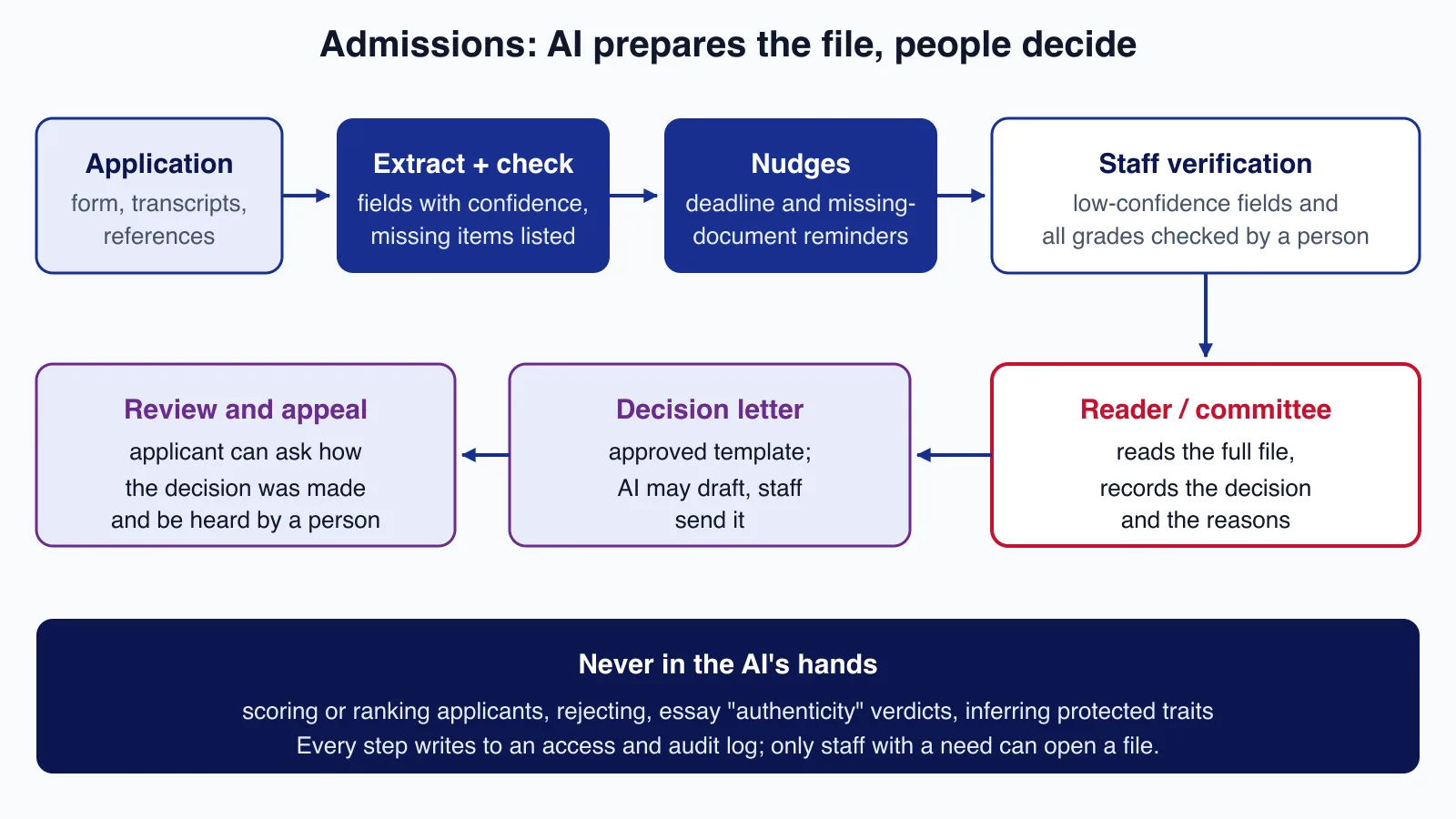
Admissions: AI prepares the file, people decide
Most admissions effort goes into chasing missing documents, reading transcripts from many systems and answering the same questions. That is where AI helps:
- Completeness checks. Compare each application against the programme's checklist and list what is missing, in plain language, the day it arrives rather than the week before the deadline.
- Document extraction. Pull names, dates, institutions and grades from transcripts and certificates into structured fields with a confidence score. Send every low-confidence field, and every grade, to a person for verification against the source document. A misread grade is a wrong decision waiting to happen.
- Reminders and scheduling. Deadline nudges, interview booking and document-received confirmations are rule-based and safe to automate fully.
- File summaries for readers. A neutral summary of what the file contains saves readers time, provided it is labelled as AI-generated, links to the source pages and never includes a recommendation.
Keep these out of the AI's hands: scoring, ranking or rejecting applicants, judging whether an essay was "AI-written", and anything that infers protected characteristics. AI-text detectors are not reliable enough for misconduct decisions; OpenAI withdrew its own AI text classifier on 20 July 2023, citing its low rate of accuracy. Record who decided, on what evidence, and give applicants a route to ask how a decision was made and to be heard by a person.
Student support: answer routine questions, route the rest
Students ask the same questions about fees, timetables, IT accounts, library loans and deadlines, often outside office hours. An assistant that answers from your published help pages, with links, takes real load off staff. There is published evidence that well-designed nudges help: in a field experiment with Georgia State University, students who received AI-assisted text outreach about pre-enrolment tasks were 3.3 percentage points more likely to enrol on time (Page and Gehlbach, AERA Open, 2017).
The design question is routing. Some messages must reach a person immediately, whatever a model thinks. The router below runs a deterministic crisis check before any model call, sends sensitive topics to staff, and answers only when the model is confident and the answer is grounded in an approved page:
<?php

declare(strict_types=1);

enum Route: string
{
    case Answer = 'answer';            // reply with cited help-centre text
    case Staff = 'staff';              // queue for the right team
    case Urgent = 'urgent';            // wellbeing team now, crisis contacts shown
}

final readonly class Classification
{
    /** @param list<string> $sourceUrls pages the draft answer was built from */
    public function __construct(
        public string $topic,          // e.g. fees, timetable, visa, wellbeing, complaint
        public float $confidence,      // the model's own score, 0..1
        public array $sourceUrls,
    ) {}
}

final class SupportRouter
{
    /** Checked before any model call, so an outage cannot hide a crisis message. */
    private const CRISIS_PATTERNS = [
        '/\b(suicid\w*|kill (myself|me)|end (it|my life)|self[- ]?harm)\b/i',
        '/\b(abus(e|ed|ing)|assault(ed)?|unsafe at home)\b/i',
    ];

    /** Topics that always go to a person, whatever the model says. */
    private const HUMAN_ONLY = ['wellbeing', 'complaint', 'disability', 'misconduct', 'admission_decision', 'visa'];

    public function route(string $message, ?Classification $c): Route
    {
        foreach (self::CRISIS_PATTERNS as $pattern) {
            if (preg_match($pattern, $message)) {
                return Route::Urgent;
            }
        }

        if ($c === null || in_array($c->topic, self::HUMAN_ONLY, true)) {
            return Route::Staff;
        }

        // Answer only when confident and grounded in at least one approved page.
        return ($c->confidence >= 0.8 && $c->sourceUrls !== []) ? Route::Answer : Route::Staff;
    }
}
Run against six sample messages with PHP 8.5, it answered the fee question only when a source page was attached, sent the rejected-applicant question to staff despite 97% model confidence, routed "I want to end my life after these exams" as urgent even though the model had labelled it a timetable query, and sent the low-confidence and unclassified messages to staff. Keyword lists are blunt and will need tuning with your wellbeing team; the point is that the safety path does not depend on a model being available or right.
Three more rules for support assistants:
- Say it is an assistant and offer a person on every reply. Students should never have to argue their way past a bot.
- Answer only from approved content. Index your published policies and help pages, not staff email or case notes. Retrieved text is data, not instructions.
- Do not let the assistant read student records until the basic version has proven itself. "When is my fee due?" can be answered with a link to the student's own account page instead.

Content: faster drafts, human sign-off
Course and marketing content is where AI saves the most time with the least risk, as long as an expert checks the result:
- Captions and transcripts. Speech-to-text gives a fast first draft; a person corrects names, technical terms and speaker labels. Captions must be accurate to meet WCAG success criterion 1.2.2.
- Alt text and reading-level rewrites. Useful drafts for diagrams and dense pages; the subject expert confirms meaning.
- Quiz questions and lesson outlines. AI drafts questions from your materials; the teacher checks answers, difficulty and bias before students see them.
- Translation of routine notices such as timetables and enrolment steps, with a native speaker reviewing anything legal or financial.
Our WCAG 2.2 developer guide covers the newer accessibility criteria to check AI-produced pages against.
Data controls that make it safe to start
- Contract first. A data processing agreement (or FERPA school-official terms), no training on your data, retention limits, sub-processor list, breach notice period and data location.
- Minimise. Send the model the fields a task needs. A completeness check needs document types and dates, not dates of birth or disability information.
- Access by role. Admissions staff see applications; support staff see support cases; nobody gets "all students".
- Log access and AI outputs. Keep who viewed a record, what the AI suggested and what the person decided, so you can answer complaints and subject access requests.
- Children's data. For under-13s in the US and children in the UK and EU, apply the stricter rules: parental consent where required, no profiling for marketing, high privacy by default.
A sensible rollout
- Start with reminders and completeness checks in admissions. They are rule-based, measurable (fewer incomplete files at the deadline) and low risk.
- Add a support assistant that answers only from published pages and routes everything else, first in "suggest replies to staff" mode for a term.
- Introduce document extraction with mandatory verification, measuring the correction rate per field before trusting any field more.
- Only then consider anything that summarises student records, after a DPIA and with your data protection lead involved.
Connecting these steps to an existing student information system, admissions portal or LMS is usually the hardest part, more than the AI itself. If you need that integration built with the consent, access and audit controls above, Cloudsoft Zone's education software team can scope it with you.
How to tell whether it works
Agree the measures before launch, and compare against the same weeks of the previous cycle:
- Admissions: share of files complete at the deadline, days from submission to "file complete", and the correction rate on extracted fields (how often staff change what the AI read).
- Support: share of questions answered without staff, share of those answers students rated helpful, time to first human reply for routed cases, and how many urgent messages reached the wellbeing team and how fast.
- Content: editing time per caption hour or per quiz, and accessibility defects found after publication.
Review a random sample of AI answers every week with the owning team. If the correction rate or complaints rise, pause the feature; a switch that turns an assistant back into "suggest to staff" mode is worth building on day one.
Common mistakes
- A model score on the reader's screen. Even labelled "advisory", a number next to an applicant's name anchors decisions. Show evidence, not scores.
- A chatbot with no exit. Students in difficulty must reach a person in one step.
- Training data by accident. Consumer AI accounts used by staff may keep prompts. Use institutional accounts with training disabled and a signed agreement.
- AI-detector verdicts in misconduct cases. Treat them as, at most, a reason to talk to the student.
- Inaccessible AI widgets. A chat panel that traps keyboard focus or lacks labels fails the students who most need help.
When not to automate
If your admissions office handles a few hundred applications a year through one form, better templates and a shared inbox will save more than an AI project. Do not automate where a mistake harms a student and cannot be undone quickly: decisions, sanctions, disability adjustments and safeguarding. And do not start before you know who owns the content the assistant answers from; an assistant reading out-of-date fee pages is worse than none.
Planning admissions automation, a student support assistant or an accessible learning portal? Cloudsoft Zone builds education management software with human approval at every decision point, role-based access to student records and accessibility built in from the first release.
Frequently asked questions
Can AI make admissions decisions?
It should not. Under GDPR Article 22, decisions based solely on automated processing that significantly affect people are restricted, and the EU AI Act treats AI used to decide admission as high-risk. Use AI to check completeness and extract data, and have a person read the file and record the decision.
Is it FERPA-compliant to use an AI vendor with student records?
It can be, if the vendor qualifies as a school official: it performs a service you would otherwise do yourself, is under your direct control for the use of the records, and uses them only for that purpose without redisclosure. Write those terms, plus no training on your data, into the contract.
When do the EU AI Act's education rules apply?
AI systems listed in Annex III for education, such as those deciding admission or evaluating learning outcomes, are high-risk. After the Digital Omnibus amendment published in July 2026, those obligations apply from 2 December 2027. Transparency duties in Article 50 applied from 2 August 2026.
Should we use AI detectors to catch AI-written essays?
Not as evidence of misconduct. Detectors produce false positives, and OpenAI withdrew its own AI text classifier in 2023 because of low accuracy. Use assessment design and conversations with students instead.
Your next customer could start right here.
Introduce your tool, product or business to readers exploring technology.
Explore placements and request a private quote
Sources
- 34 CFR Part 99 (FERPA) — eCFR (US Government)
- Regulation (EU) 2016/679 (GDPR) — EUR-Lex, 2016-04-27
- Regulation (EU) 2024/1689 (AI Act) — EUR-Lex, 2024-07-12
- Fact sheet: ADA Title II web and mobile accessibility rule — US Department of Justice
- How an Artificially Intelligent Virtual Assistant Helps Students Navigate the Road to College — AERA Open, 2017-10-01
- New AI classifier for indicating AI-written text (update: withdrawn) — OpenAI, 2023-01-31
- Children's Online Privacy Protection Rule — US Federal Trade Commission
- Web Content Accessibility Guidelines (WCAG) 2.2 — W3C, 2023-10-05
Written with substantial AI assistance. Facts checked against cited sources. Editorial policy.
Comments
No comments yet. Be the first to join the conversation.
Leave a comment
Every comment is read by a moderator before it appears. Your email address is never published; it is used only to contact you about this comment.
Related tools
- Directory profile
Brevo
Customer platform for email, SMS and WhatsApp marketing, transactional messaging and sales pipelines, formerly Sendinblue, with a free plan and contact-based paid tiers.
A tool connected to a service selected for this article. Compare its fit for your project; inclusion is not an endorsement.
- Directory profile
HubSpot
Customer platform combining a CRM with marketing, sales, service, content, data and commerce hubs, with a free tier and seat-based paid plans.
A tool connected to a service selected for this article. Compare its fit for your project; inclusion is not an endorsement.
More from Cloudsoft Zone

Resource guideBusiness Technology
10 practical AI automation ideas for small businesses in 2026
Ten AI automations that work for small teams in 2026, each with the workflow, real tools and checked prices, rough effort, risks, and the human review step that keeps it safe.
By Cloudsoft Zone

Troubleshooting guideCodeIgniter
CodeIgniter 4 validation not working? 9 causes and fixes
Fix CodeIgniter 4 validation problems fast: wrong input source, lost errors after redirect, permit_empty, strict JSON rules, is_unique placeholders and more.
By Cloudsoft Zone

TutorialPHP
PHPStan tutorial: catch PHP bugs before production with levels
Install PHPStan 2.3, choose a rule level, adopt a baseline for legacy code and fail CI only on new errors, with real output from a worked PHP 8.5 example.
By Cloudsoft Zone