
How much does AI automation cost in the US and UK in 2026?
Four AI automations priced from published API, database and hosting rates, with the arithmetic shown and build, run and maintenance costs kept separate.
Updated 14 min read
In this article
For a small business in the US or UK, the monthly running cost of a typical AI automation is far lower than most people expect: the four workflows priced in this guide come to between about $16 and $96 a month in API and hosting charges. The real money sits elsewhere: in building the integrations, in testing the AI before it touches customers, and in the staff time that reviews its output. This guide builds the cost of four concrete workflows from vendors' published prices, shows the arithmetic, and separates build, run and maintenance so you can plug in your own volumes.
Prices checked: on vendors' official pricing pages in September 2026, in US dollars unless stated. The model API vendors bill in US dollars for US and UK customers alike; where a vendor publishes pounds or euros we say so. Sales tax and VAT are excluded.
The three budgets, and why they behave differently
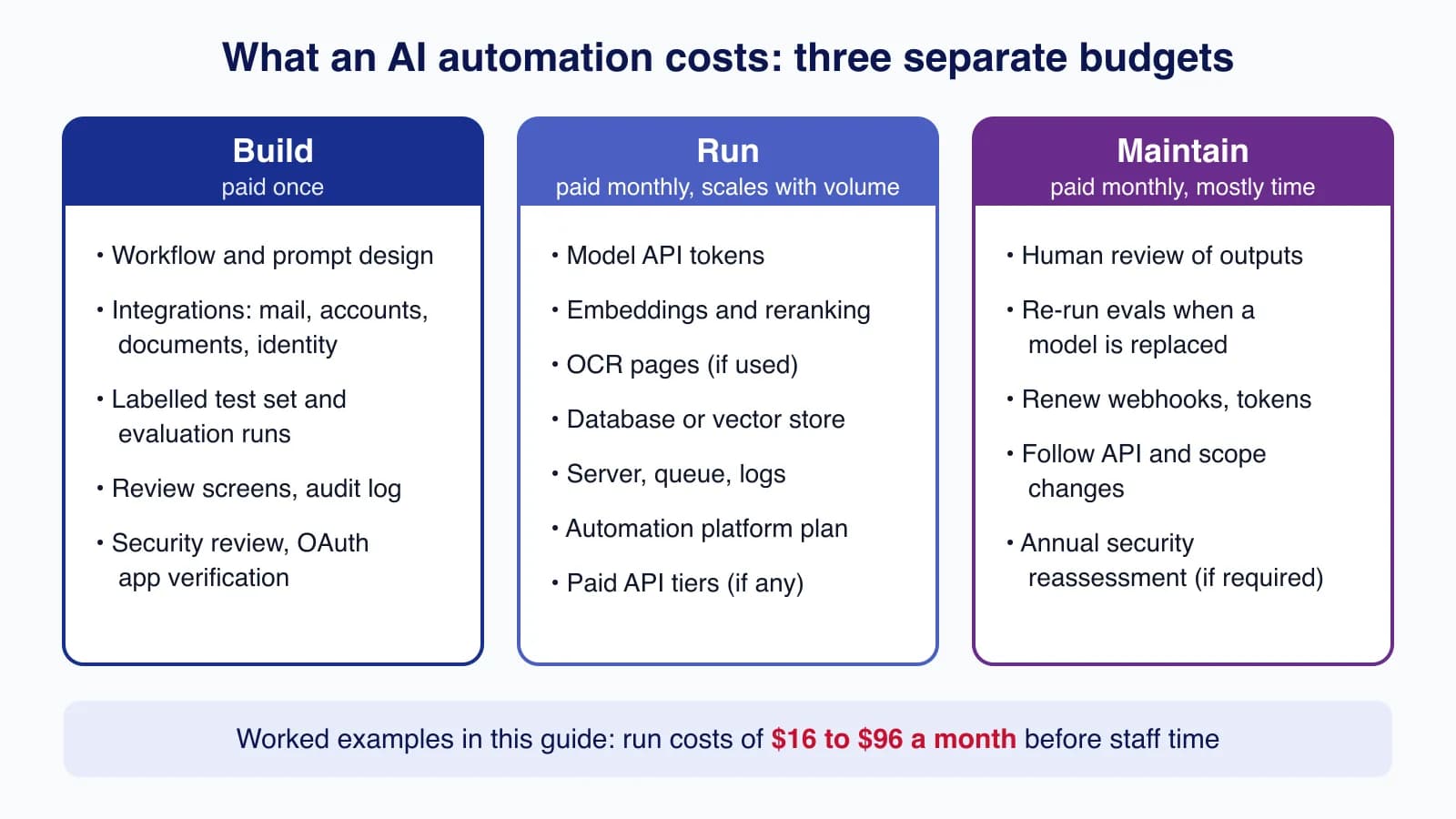
Every AI automation has three separate cost lines. Mixing them up is the most common budgeting mistake.
- Build (one-off): designing the workflow, connecting it to your email, accounting system or documents, building a screen where staff approve the AI's work, and testing it against real examples. This is mostly people's time.
- Run (monthly, scales with volume): model tokens, embeddings, OCR pages, a database, a small server and any paid API tier. This is the part vendors publish prices for, so it is the part we can calculate.
- Maintain (monthly, mostly time): reviewing outputs, re-testing when a model is replaced, renewing webhook subscriptions and OAuth tokens, and following API changes such as new permission scopes.
We do not quote agency day rates or "average project prices" here, because there is no reliable public data for them. Instead, the build section lists the work and the measurable cash costs, so you can price it at your own team's rate or compare quotes line by line.
The prices we use
Model prices are per million tokens (roughly 750,000 English words). Input is what you send; output is what the model writes, including any reasoning tokens it generates.
| Item | Published price (USD) | Source |
|---|---|---|
| Claude Haiku 4.5 | $1 input / $5 output per million tokens | Anthropic |
| Claude Sonnet 5 | $2 input / $10 output per million tokens | Anthropic |
| Anthropic Batch API | 50% off input and output | Anthropic |
| OpenAI gpt-5-mini | $0.25 input / $2.00 output per million tokens | OpenAI |
| Gemini 2.5 Flash-Lite | $0.10 input / $0.40 output per million tokens (text) | |
| voyage-4-lite embeddings | $0.02 per million tokens, first 200 million free | Voyage AI |
| rerank-2.5 / rerank-2.5-lite | $0.05 / $0.02 per million tokens, first 200 million free | Voyage AI |
| Amazon Textract AnalyzeExpense | $0.01 per page (first million pages, US West Oregon) | AWS |
| DigitalOcean Basic Droplet, 2 GiB | $12 a month | DigitalOcean |
| DigitalOcean Managed PostgreSQL, smallest node | $15.15 a month | DigitalOcean |
Two pricing details matter for UK and EU buyers. First, Anthropic adds a 1.1x multiplier on Claude 4.6 and later models when you pin inference to the US with inference_geo: "us"; the default global routing uses standard prices. Second, Gmail API and Microsoft Graph mail calls carry no per-call fee, so connecting a mailbox costs nothing beyond your existing Google Workspace or Microsoft 365 licences.
How to estimate tokens for your own workflow
Every estimate below follows the same formula: calls per month × tokens per call × price per million ÷ 1,000,000, worked out separately for input and output. To get tokens per call, take ten real examples, send them through your prompt, and read the usage figures the API returns, or use Anthropic's token-counting endpoint. Then add a margin: models with adaptive thinking, such as Claude Sonnet 5, bill their reasoning as output tokens, so we allow 800 output tokens for a reply that is only 300 words long.
We ran the arithmetic as a small script so you can change the volumes and prices yourself:
// Monthly AI run-cost estimate. Prices: USD per million tokens, from the vendors' pricing pages.
type Price = { input: number; output: number };
const PRICES: Record<string, Price> = {
  "claude-haiku-4-5": { input: 1.0, output: 5.0 },
  "claude-sonnet-5": { input: 2.0, output: 10.0 },
  "gpt-5-mini": { input: 0.25, output: 2.0 },
  "gemini-2.5-flash-lite": { input: 0.1, output: 0.4 },
};

interface Step { name: string; model: string; calls: number; inTokens: number; outTokens: number; batch?: boolean }

export function stepCost(s: Step): number {
  const p = PRICES[s.model];
  const discount = s.batch ? 0.5 : 1; // Batch APIs: 50% off input and output
  return discount * (s.calls * s.inTokens * p.input + s.calls * s.outTokens * p.output) / 1_000_000;
}

const workflows: Record<string, Step[]> = {
  "A. Inbox triage + reply drafts (2,000 emails/month)": [
    { name: "classify", model: "claude-haiku-4-5", calls: 2000, inTokens: 1500, outTokens: 150 },
    { name: "draft (60%)", model: "claude-sonnet-5", calls: 1200, inTokens: 3000, outTokens: 800 },
  ],
  "B. Supplier invoices (500/month, 2 pages each)": [
    { name: "extract PDF", model: "claude-sonnet-5", calls: 500, inTokens: 9000, outTokens: 1000, batch: true },
  ],
  "C. Internal knowledge assistant (4,200 questions/month)": [
    { name: "answer", model: "claude-sonnet-5", calls: 4200, inTokens: 4500, outTokens: 700 },
  ],
};

for (const [name, steps] of Object.entries(workflows)) {
  const total = steps.reduce((s, x) => s + stepCost(x), 0);
  console.log(`${name}: $${total.toFixed(2)}`);
  for (const s of steps) console.log(`   ${s.name.padEnd(32)} ${s.model.padEnd(22)} $${stepCost(s).toFixed(2)}`);
}

// Workflow D (site search) uses no chat model: embeddings and a reranker, priced per token.
const voyage = { embedLite: 0.02, rerankLite: 0.02 }; // USD per million tokens
const embedQueries = (100_000 * 15 * voyage.embedLite) / 1e6;  // 15 tokens per query
const rerank = (100_000 * (15 * 30 + 30 * 250) * voyage.rerankLite) / 1e6; // query x 30 docs + 30 passages of ~250 tokens
console.log(`D. Site search (100,000 searches/month): $${(embedQueries + rerank).toFixed(2)}`);
console.log(`   embed queries                    voyage-4-lite          $${embedQueries.toFixed(2)}`);
console.log(`   rerank top 30                    rerank-2.5-lite        $${rerank.toFixed(2)}`);

// Same email workflow on cheaper models, for comparison
const alt = [
  { name: "classify", model: "gpt-5-mini", calls: 2000, inTokens: 1500, outTokens: 150 },
  { name: "draft", model: "gpt-5-mini", calls: 1200, inTokens: 3000, outTokens: 800 },
];
console.log(`A on gpt-5-mini only: $${alt.reduce((s, x) => s + stepCost(x), 0).toFixed(2)}`);
const flash = alt.map((s) => ({ ...s, model: "gemini-2.5-flash-lite" }));
console.log(`A on gemini-2.5-flash-lite only: $${flash.reduce((s, x) => s + stepCost(x), 0).toFixed(2)}`);
const haikuAnswers = { name: "answer", model: "claude-haiku-4-5", calls: 4200, inTokens: 4500, outTokens: 700 };
console.log(`C on claude-haiku-4-5: $${stepCost(haikuAnswers).toFixed(2)}`);
const unbatched = { name: "extract", model: "claude-sonnet-5", calls: 500, inTokens: 9000, outTokens: 1000 };
console.log(`B without batch: $${stepCost(unbatched).toFixed(2)}`);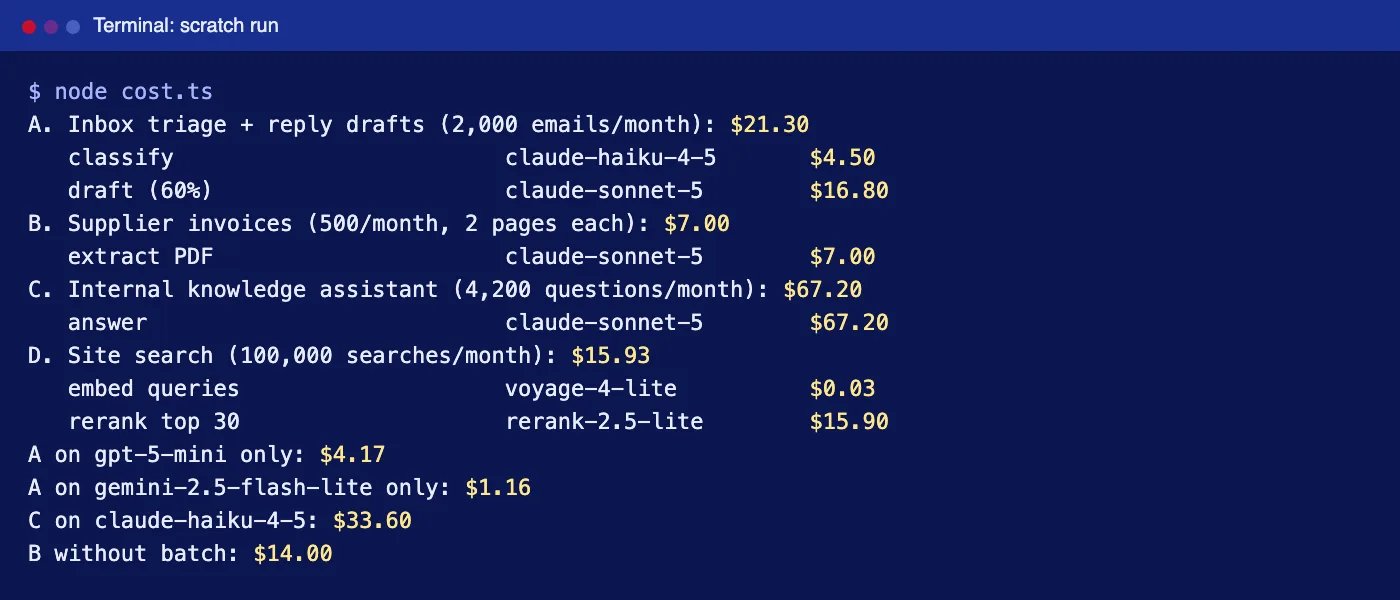
Workflow A: inbox triage and reply drafts
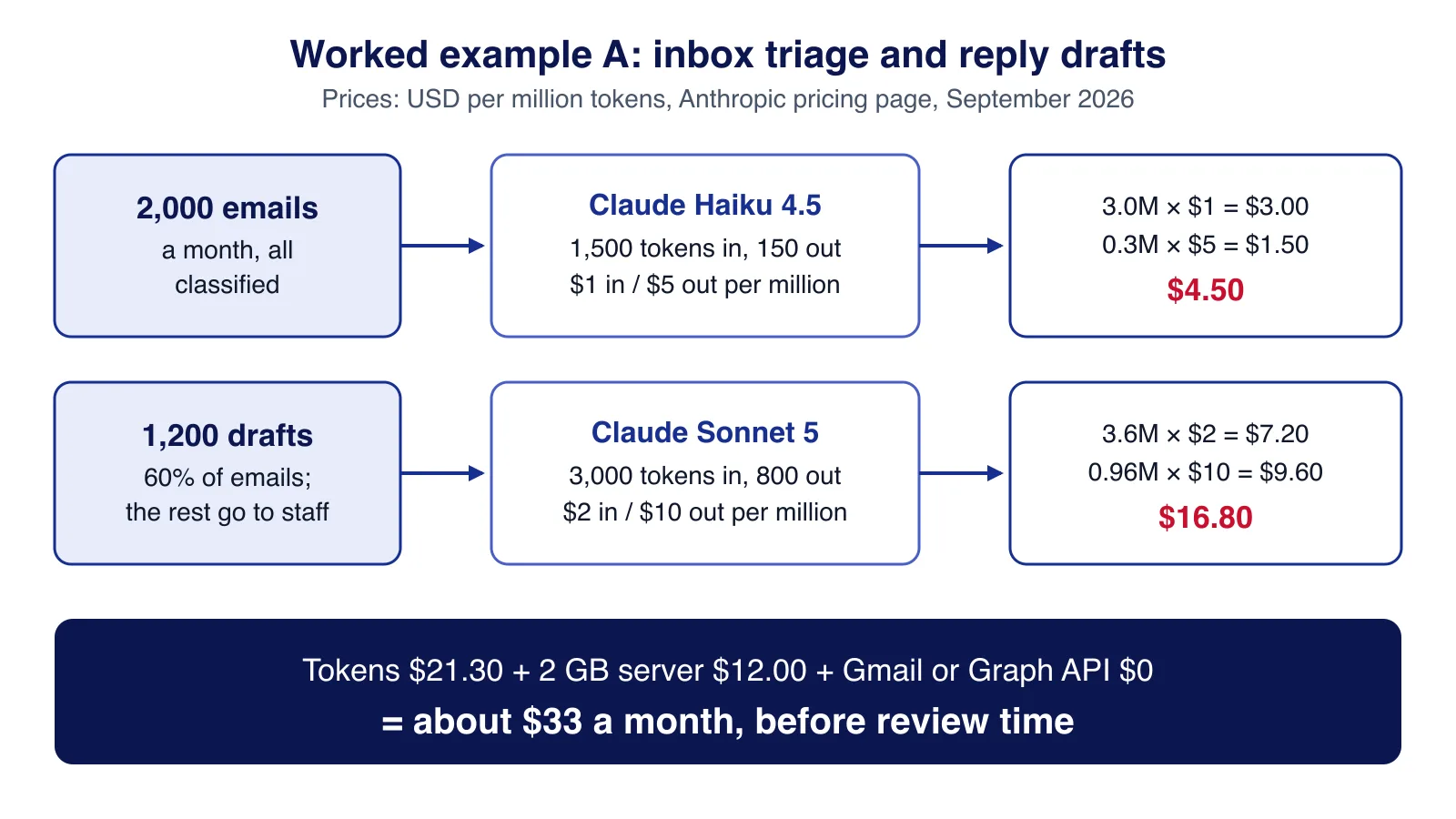
Assumptions: a shared support inbox receives 2,000 emails a month. Every email is classified (order status, billing, complaint, and so on). For the 60% in categories with an approved template, the AI writes a draft reply that a person reviews and sends. Complaints, refunds and anything unusual go straight to staff.
- Classification with Claude Haiku 4.5: 2,000 × 1,500 input tokens = 3.0 million × $1 = $3.00; 2,000 × 150 output tokens = 0.3 million × $5 = $1.50. Subtotal $4.50.
- Drafting with Claude Sonnet 5: 1,200 × 3,000 input tokens (email, template and approved facts) = 3.6 million × $2 = $7.20; 1,200 × 800 output tokens = 0.96 million × $10 = $9.60. Subtotal $16.80.
- A 2 GiB server for the worker: $12.00. Gmail API or Microsoft Graph: $0.
Run cost: about $33 a month. Moving both steps to gpt-5-mini would cut the token bill from $21.30 to $4.17, and Gemini 2.5 Flash-Lite to $1.16, if those models pass your quality tests. At this volume the server costs more than the cheaper models. How to build this workflow safely is covered in our email classification and reply-drafting tutorial.
Workflow B: supplier invoice capture
Assumptions: 500 supplier invoices a month, two pages each, sent as PDFs. The AI extracts supplier, invoice number, dates, line items and totals; code checks the arithmetic and looks for duplicates; clean invoices become draft bills in Xero or QuickBooks Online for a person to approve.
- Extraction with Claude Sonnet 5 reading the PDF directly. Anthropic's PDF guide estimates 1,500 to 3,000 text tokens per page, plus image tokens because each page is also sent as an image; we allow 9,000 input tokens per two-page invoice and 1,000 output tokens. Invoices can wait an hour, so we use the Batch API: 500 × 9,000 = 4.5 million × $1 = $4.50; 500 × 1,000 = 0.5 million × $5 = $2.50. Subtotal $7.00 ($14.00 without batching).
- Alternative: Amazon Textract AnalyzeExpense at $0.01 per page = 1,000 pages × $0.01 = $10.00, before any model you add for supplier matching.
- Accounting API: Xero's Starter tier is free for up to 5 connections, enough for a business connecting its own organisation; Intuit's free Builder tier includes 500,000 metered read calls a month, and create calls such as new bills are not metered. $0 at this volume.
- Server (shared with other jobs if you have one): $12.00.
Run cost: about $19 a month. The expensive part of invoice automation is not the extraction; it is the checking, duplicate detection and approval flow that stop a wrong or fraudulent bill being paid. Our invoice processing guide walks through those controls.
Workflow C: an internal knowledge assistant
Assumptions: 40 staff ask five questions each per working day (21 days), so 4,200 questions a month, over 2,000 internal documents totalling about 5 million tokens. Each question retrieves 20 passages, a reranker keeps the best 8 (about 4,000 tokens), and the model answers with citations.
- Embedding the documents once: 5 million × $0.02 = $0.10, inside Voyage's free 200 million tokens. Re-embedding 10% of documents each month: about $0.01.
- Reranking with rerank-2.5: each request counts query tokens × documents plus document tokens, roughly 4,200 × 20 × 500 = 42 million tokens × $0.05 = $2.10 once the free allowance is used.
- Answering with Claude Sonnet 5: 4,200 × 4,500 input tokens = 18.9 million × $2 = $37.80; 4,200 × 700 output tokens = 2.94 million × $10 = $29.40. Subtotal $67.20. On Claude Haiku 4.5 the same volume costs $33.60.
- Managed PostgreSQL with pgvector: $15.15. App server: $12.00.
Run cost: about $96 a month, or about $63 on Haiku 4.5. The build work that matters here is permission-aware retrieval: staff must only get answers from documents they can already open. See how to build an internal knowledge assistant.
Workflow D: AI search on a website or SaaS product
Assumptions: 20,000 help articles and product pages, 100,000 searches a month, hybrid keyword and semantic search in an existing PostgreSQL database, and a reranker on the top 30 results. No chat model is involved.
- Embedding the content once: 20,000 × 800 tokens = 16 million tokens, free within Voyage's allowance ($0.32 at list price).
- Embedding queries: 100,000 × 15 tokens = 1.5 million × $0.02 = $0.03.
- Reranking with rerank-2.5-lite: 100,000 × (15 × 30 + 30 × 250) tokens = 795 million × $0.02 = $15.90.
- Database: $0 extra if you already run PostgreSQL; $15.15 for a new managed node.
Run cost: about $16 to $31 a month. For comparison, Algolia's Grow plan includes 10,000 searches and charges $0.50 per extra 1,000, which is $45 a month at this volume for keyword search; Algolia lists NeuralSearch on its Elevate plan, which is priced on request. Pinecone's Standard plan has a $50 monthly minimum. Our AI search guide covers the build and how to roll it out without breaking existing search.
Build costs: what you are paying for
Build cost is mainly engineering and testing time, so price it as hours × your rate, or ask each supplier to quote against the same list. The work is similar across all four workflows:
| Work item | Why it cannot be skipped | Cash costs you can measure |
|---|---|---|
| Labelled test set (100 to 300 real examples) | Without it you cannot tell whether a prompt or model change made things better or worse | Staff time to label |
| Evaluation runs | Each prompt change is re-tested on the whole set | Workflow A costs about $0.011 per email, so 300 emails × 10 runs is about $32 |
| Integrations and OAuth | Mailbox, accounting and document APIs each need auth, retries and error handling | None for Gmail, Graph, Xero Starter or Intuit Builder |
| Review screen and audit log | People approve drafts and bills; you need a record of who approved what | Usually runs on the same server |
| Google OAuth verification | Only for public apps using restricted Gmail or Drive scopes | Annual third-party security assessment, fee set by the assessor |
The Google item surprises teams most. Gmail scopes such as gmail.readonly, gmail.compose and gmail.modify are classed as restricted, and Google requires a security assessment for apps that store or transmit restricted-scope data on servers, renewed every 12 months. Apps used only inside your own Google Workspace organisation (an "Internal" OAuth app) are not required to go through verification. If you are building a product for other companies' inboxes, budget for the assessment from the start.
Maintenance costs
- Review time. This is the largest ongoing cost. If a person spends 30 seconds checking each of 1,200 drafts, that is 10 hours a month. Track approval and edit rates so you can see when review can be lighter for a category, and when it cannot.
- Model replacements. Providers retire models on published schedules. Each replacement means re-running your test set and sometimes adjusting prompts. Keep model names in configuration, not code.
- Connector upkeep. Gmail push notifications need
users.watchrenewed at least every 7 days, Microsoft Graph mail subscriptions expire after at most 10,080 minutes, and accounting APIs change their scopes: Xero apps created on or after 2 March 2026 only get the new granular scopes such asaccounting.invoices. - Monitoring. Alert on error rates, refusals, unusual token use and queue backlogs, and set a monthly spend limit in each provider's console. Our guide to cutting LLM API costs covers caching and batching in detail.
Common mistakes when budgeting
- Pricing only the tokens. In every example above, a $12 server or a $15 database is a large share of the run cost, and none of the examples includes review time.
- Using a large model by default. Classification rarely needs the most capable model. Test the cheapest model that might work first, then move up only where your evaluation shows a real gain. Our guide to LLM evals shows how.
- Forgetting reasoning tokens. Output prices apply to thinking or reasoning tokens too; measure real responses instead of counting words in the reply.
- Paying per task for high-volume flows. Automation platforms charge per task, operation or execution. They are quick to start with, but compare them with a small custom worker once volumes grow; our Zapier, Make and n8n comparison shows how each counts usage.
- Skipping the governance work. Decide what data may be sent to which provider, and who approves what, before you build. Our AI governance checklist is a one-page starting point.
When an AI automation is not worth it
If a task happens a few dozen times a month, the build and review effort will outweigh the savings; a template or a checklist is cheaper. The same applies when every output needs expert checking anyway, when mistakes are costly and hard to detect (payments, legal commitments, medical advice), or when the source data is so messy that a person must clean it first. Start with a workflow that is frequent, low-risk and easy to check, prove the time saving with real numbers, and only then fund the next one. If you would like help scoping one, Cloudsoft Zone can review your process and estimate it from your own volumes.
Tested with: the cost script was run with Node.js 24.19.0 (built-in TypeScript type stripping); all arithmetic in this article comes from that script and the published prices listed above.
Need an AI workflow costed and built around your volumes, with review steps and spend limits in place from day one? Cloudsoft Zone designs and builds AI business process automation for small teams in the US, UK and beyond.
Frequently asked questions
How much does a small AI automation cost to run each month?
For the four workflows in this guide, built on published September 2026 prices, run costs came to about $16 to $96 a month including a small server or database where one is needed. Review time and build effort are extra and usually larger.
Are AI API prices different for UK businesses?
The main model API vendors publish prices in US dollars and bill UK customers in dollars too, so the token arithmetic is the same. VAT, card exchange fees and any data-residency surcharge (for example Anthropic's 1.1x multiplier for US-only inference) are extra.
What is the cheapest way to reduce the token bill?
Use the smallest model that passes your tests for each step, batch work that can wait (50% off on Anthropic and OpenAI batch APIs), and cache long repeated prompts. Measure quality after every change.
Does connecting Gmail or Outlook cost anything?
The Gmail API and Microsoft Graph mail endpoints have no per-call fee. Public apps that use restricted Gmail scopes, however, need Google's annual third-party security assessment, which has its own fee.
Why are build costs not given as a fixed price?
There is no reliable public data on what AI automation projects cost to build. The work items are listed instead, so you can price them at your own rate or compare supplier quotes line by line.
Your next customer could start right here.
Introduce your tool, product or business to readers exploring technology.
Explore placements and request a private quote
Sources
- Pricing — Anthropic
- API pricing — OpenAI
- Gemini Developer API pricing — Google
- Pricing — Voyage AI
- Amazon Textract pricing — Amazon Web Services
- Droplet pricing — DigitalOcean
- Tier fees, connection limits and API volume usage — Xero
- Platform service fees for the Intuit App Partner Program — Intuit
- Restricted scope verification — Google
- Algolia pricing — Algolia
Written with substantial AI assistance. Facts checked against cited sources. Editorial policy.
Comments
No comments yet. Be the first to join the conversation.
Leave a comment
Every comment is read by a moderator before it appears. Your email address is never published; it is used only to contact you about this comment.
More from Cloudsoft Zone

Resource guideBusiness Technology
10 practical AI automation ideas for small businesses in 2026
Ten AI automations that work for small teams in 2026, each with the workflow, real tools and checked prices, rough effort, risks, and the human review step that keeps it safe.
By Cloudsoft Zone

Resource guideWordPress
WordPress security hardening checklist for 2026 (WordPress 7.1)
A practical WordPress 7.1 hardening checklist based on the official handbook: updates, two-step logins, wp-config.php constants, file permissions, database privileges, firewalls, WP-CLI checksum checks and tested backups.
By Cloudsoft Zone

Troubleshooting guideCodeIgniter
CodeIgniter 4 validation not working? 9 causes and fixes
Fix CodeIgniter 4 validation problems fast: wrong input source, lost errors after redirect, permit_empty, strict JSON rules, is_unique placeholders and more.
By Cloudsoft Zone