
How to add AI search to an existing website or SaaS product
Add hybrid AI search to an existing site: keyword plus semantic search fused with RRF, hosted versus self-run options and prices, relevance tests and safe rollout.
Updated 12 min read

In this article
"AI search" on a website or SaaS product usually means one thing in practice: finding the right page when the user's words do not match the page's words, so "can't log in" finds the article titled "Reset your password". The reliable way to get there is hybrid search: keep your keyword search, add semantic search based on embeddings, merge the two rankings, and optionally rerank the top results. This guide explains the options, shows a working hybrid query for PostgreSQL with pgvector, compares hosted and self-run products with their published prices, and sets out how to measure relevance and roll the change out without breaking the search your users rely on today.
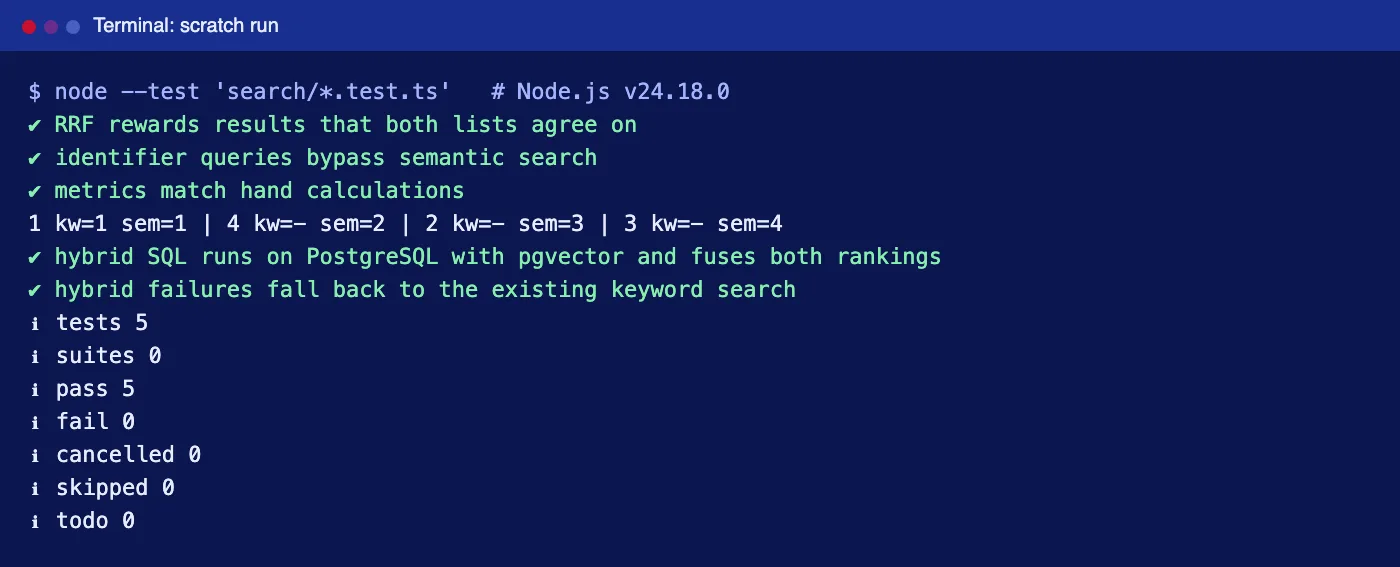
Tested with: Node.js 24.18.0 and TypeScript 7.0.2. The hybrid SQL was run on PostgreSQL 18.3 with pgvector 0.8.1 inside PGlite 0.5.4, using small stand-in vectors; the fusion, routing, fallback and relevance-metric code was run with node --test (five tests pass). The Voyage embeddings call was type-checked but not run against the live API. Prices were read from the vendors' pricing pages as published in July 2026.
Keyword, semantic and hybrid search
| Keyword (full-text) | Semantic (embeddings) | Hybrid | |
|---|---|---|---|
| Matches | The words typed, with stemming and synonyms you configure | The meaning, even with different words | Both |
| Strong at | Product codes, error codes, names, exact phrases | Questions, symptoms, vague or long queries | Mixed traffic, which most sites have |
| Weak at | "can't sign in" vs "reset password" | Exact identifiers; can return confident but loose matches | Needs tuning and evaluation |
| Extra cost | None if you already have it | Embedding every document and query, a vector index | Both, plus optional reranking |
Pure semantic search tends to disappoint on real sites because a large share of queries are identifiers and names. Hybrid search keeps keyword precision for those and adds semantic recall for the rest.
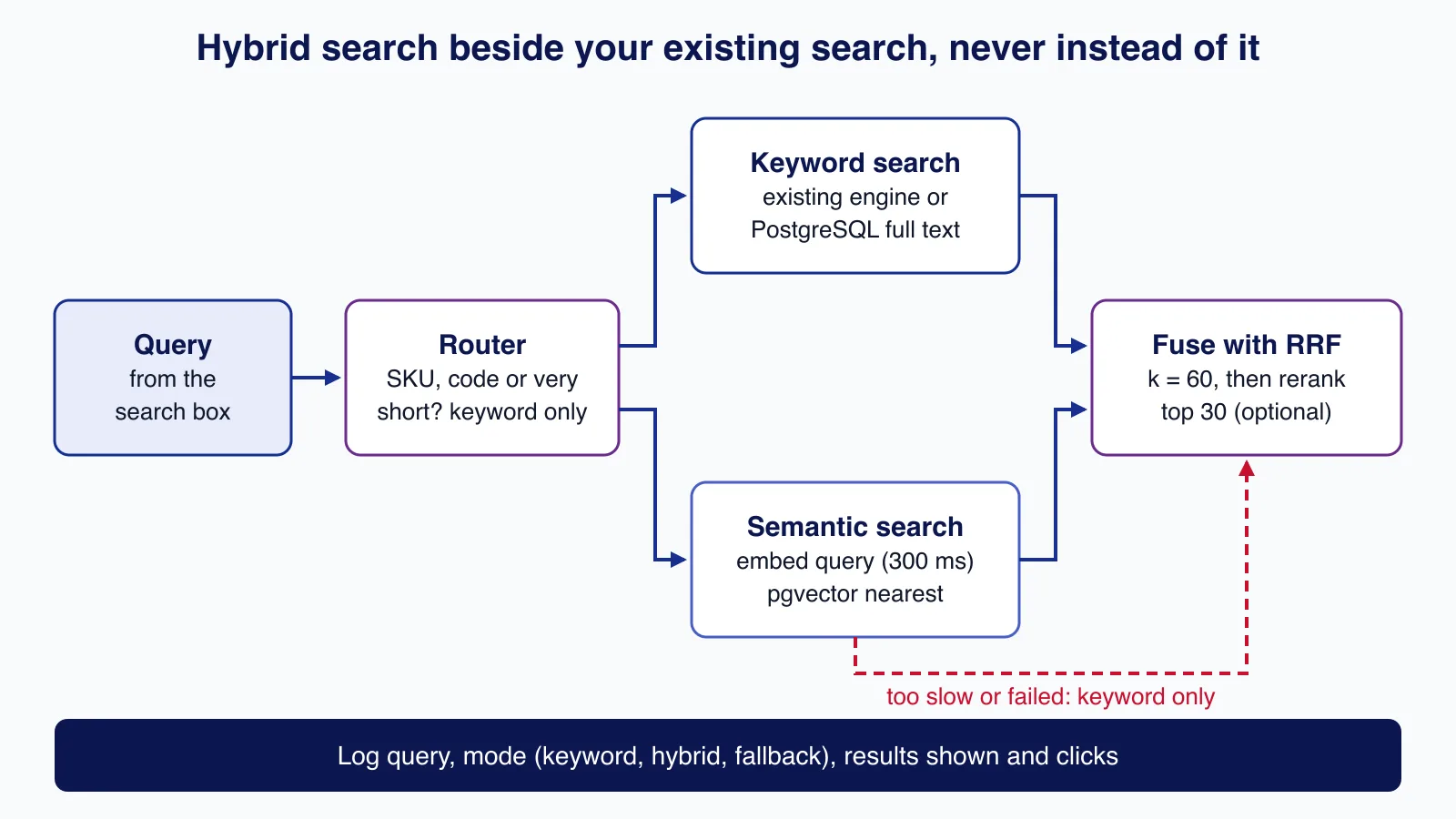
The building blocks
- Embeddings: a model turns each document chunk and each query into a vector; similar meanings end up close together. Index documents with the model's document mode and queries with its query mode. Voyage AI's
voyage-4-litecosts $0.02 per million tokens and OpenAI'stext-embedding-3-smallalso $0.02 per million. - A vector index: pgvector's HNSW index in PostgreSQL, or the vector features of a search engine or hosted vector database.
- Fusion: keyword scores and vector distances are not comparable, so merge rankings instead of scores. Reciprocal rank fusion (RRF) gives each result 1 / (k + rank) from each list and adds them up; k = 60 is the common default, and it is OpenSearch's default too.
- A reranker (optional): a model that reads the query and each of the top 20 to 50 results together and reorders them. It is slower than retrieval but often the biggest single relevance gain. Voyage's
rerank-2.5-litecosts $0.02 per million tokens. Our RAG pipeline tutorial shows embeddings and reranking in Python.
Hybrid search in PostgreSQL with pgvector
If your product already runs on PostgreSQL, you can add hybrid search without a new service. A generated tsvector column gives weighted full-text search (titles above body text), and a vector column with an HNSW index gives semantic search.
CREATE EXTENSION IF NOT EXISTS vector;

CREATE TABLE docs (
  id        bigint PRIMARY KEY,
  title     text NOT NULL,
  body      text NOT NULL,
  tsv       tsvector GENERATED ALWAYS AS (
              setweight(to_tsvector('english', title), 'A') ||
              setweight(to_tsvector('english', body), 'B')) STORED,
  embedding vector(3)   -- 1024 or whatever your embedding model returns
);
CREATE INDEX docs_tsv_idx ON docs USING gin (tsv);
CREATE INDEX docs_embedding_idx ON docs USING hnsw (embedding vector_cosine_ops);
The query runs both searches, numbers each result list, and fuses them with RRF in SQL. A document found by both lists rises to the top; a document found only by meaning still appears.
-- $1 = the user's text, $2 = the query embedding. Reciprocal rank fusion, k = 60.
WITH keyword AS (
  SELECT id, row_number() OVER (ORDER BY ts_rank_cd(tsv, q) DESC) AS r
  FROM docs, websearch_to_tsquery('english', $1) AS q
  WHERE tsv @@ q
  ORDER BY ts_rank_cd(tsv, q) DESC
  LIMIT 50
), semantic AS (
  SELECT id, row_number() OVER (ORDER BY embedding <=> $2::vector) AS r
  FROM docs
  ORDER BY embedding <=> $2::vector
  LIMIT 50
)
SELECT id, d.title,
       COALESCE(1.0 / (60 + keyword.r), 0) + COALESCE(1.0 / (60 + semantic.r), 0) AS score,
       keyword.r AS keyword_rank, semantic.r AS semantic_rank
FROM keyword
FULL OUTER JOIN semantic USING (id)
JOIN docs d USING (id)
ORDER BY score DESC, id
LIMIT 10;
In our test the query "password" with an embedding close to the sign-in articles returned the password article first (rank 1 in both lists), followed by "Account locked after failed logins", which contains neither word but was the nearest by meaning. That second result is exactly what keyword search alone misses.
If your application runs on MySQL or another database, keep its full-text search as the keyword side and run the vector side in a separate store; the fusion step works the same in application code:
// Reciprocal rank fusion: score = sum of 1 / (k + rank) over every list a result appears in.
export function rrf(lists: string[][], k = 60): { id: string; score: number }[] {
  const scores = new Map<string, number>();
  for (const list of lists) list.forEach((id, i) => scores.set(id, (scores.get(id) ?? 0) + 1 / (k + i + 1)));
  return [...scores].map(([id, score]) => ({ id, score })).sort((a, b) => b.score - a.score || a.id.localeCompare(b.id));
}

// Identifiers such as SKUs, invoice numbers and error codes must match exactly: skip embeddings.
export function looksLikeIdentifier(q: string): boolean {
  // One token, at least five characters, containing a digit: "SKU-10442", "E1045".
  return /^(?=.*\d)[A-Za-z0-9][\w-]{4,}$/.test(q.trim());
}
Route, time-box and fall back
The new search must never be worse than the old one when something goes wrong. Three rules in the request handler protect that: hybrid search is behind a flag, queries that look like identifiers skip embeddings entirely, and the embedding call has a hard time limit after which the user gets the existing keyword results.
import { looksLikeIdentifier } from "./fusion.ts";

export interface Hit { id: string; title: string }
export interface Backends {
  keyword(q: string): Promise<Hit[]>;                    // your existing search, unchanged
  hybrid(q: string, embedding: number[]): Promise<Hit[]>; // hybrid.sql
  embed(q: string, signal: AbortSignal): Promise<number[]>;
  log(event: Record<string, unknown>): void;
}

// The new path is opt-in per request, and every failure falls back to the old search.
export async function search(q: string, b: Backends, hybridEnabled: boolean): Promise<{ hits: Hit[]; mode: string }> {
  if (!hybridEnabled || q.trim().length < 3 || looksLikeIdentifier(q)) return { hits: await b.keyword(q), mode: "keyword" };
  try {
    const embedding = await b.embed(q, AbortSignal.timeout(300)); // latency budget for the embedding call
    return { hits: await b.hybrid(q, embedding), mode: "hybrid" };
  } catch (err) {
    b.log({ event: "hybrid_fallback", reason: (err as Error).name });
    return { hits: await b.keyword(q), mode: "keyword-fallback" };
  }
}

// Voyage AI embeddings API; use input_type "query" for searches and "document" when indexing.
export async function voyageEmbed(q: string, signal: AbortSignal): Promise<number[]> {
  const res = await fetch("https://api.voyageai.com/v1/embeddings", {
    method: "POST",
    headers: { Authorization: `Bearer ${process.env.VOYAGE_API_KEY}`, "Content-Type": "application/json" },
    body: JSON.stringify({ input: [q], model: "voyage-4-lite", input_type: "query" }),
    signal,
  });
  if (!res.ok) throw new Error(`embeddings ${res.status}`);
  const body = (await res.json()) as { data: { embedding: number[] }[] };
  return body.data[0].embedding;
}
One real bug turned up while testing this. The first identifier pattern also matched "2fa", which sent a common natural-language query down the keyword-only path. The test caught it, and the rule now requires at least five characters including a digit. Expect your own query logs to need similar tuning; check the top few hundred queries by hand.
test("hybrid failures fall back to the existing keyword search", async () => {
  const events: Record<string, unknown>[] = [];
  const b = {
    keyword: async () => [{ id: "k1", title: "keyword result" }],
    hybrid: async () => [{ id: "h1", title: "hybrid result" }],
    embed: (_q: string, signal: AbortSignal) => new Promise<number[]>((_, reject) =>
      signal.addEventListener("abort", () => reject(signal.reason))),   // embedding API never answers
    log: (e: Record<string, unknown>) => events.push(e),
  };
  assert.equal((await search("can't log in", b, false)).mode, "keyword");
  assert.equal((await search("SKU-10442", b, true)).mode, "keyword");
  const slow = await search("can't log in", b, true);
  assert.deepEqual([slow.mode, slow.hits[0].id], ["keyword-fallback", "k1"]);
  assert.deepEqual(events, [{ event: "hybrid_fallback", reason: "TimeoutError" }]);
});
Hosted or self-run: the options and their prices
Prices below are the vendors' published list prices in July 2026, in US dollars.
| Option | Type | Hybrid or semantic search | Published pricing |
|---|---|---|---|
| PostgreSQL + pgvector | Self-run, or your managed Postgres | Full-text plus vectors in one query, as above | Open source; you pay for the database you already run |
| Meilisearch | Open source (MIT) or Meilisearch Cloud | Configure embedders per index, then search with hybrid: { embedder, semanticRatio } | Self-hosting free; Cloud plans on Meilisearch's pricing page |
| OpenSearch | Open source, or a managed service such as Amazon OpenSearch Service | Hybrid query with a normalisation processor, or RRF via the score ranker processor (OpenSearch 2.19 and later) | Self-hosting free; managed pricing by instance |
| Algolia | Hosted search | NeuralSearch (semantic plus keyword) on the Elevate plan | Grow: 10,000 searches a month included, then $0.50 per 1,000; Grow Plus: $1.75 per 1,000 with AI Ranking; Elevate priced on request |
| Pinecone | Hosted vector database | Vector search; keyword side kept elsewhere, or sparse vectors | Starter free; Builder $20 a month flat; Standard $50 monthly minimum, then pay as you go |
For a typical small SaaS with tens of thousands of documents, the arithmetic favours extending what you have. At 100,000 searches a month, Algolia Grow costs (100 − 10) × $0.50 = $45 a month for keyword search alone, before NeuralSearch. Embedding the same 100,000 queries with voyage-4-lite at about 15 tokens each is 1.5 million tokens, or $0.03; reranking the top 30 for every search adds roughly $16 a month with rerank-2.5-lite. A hosted service starts to make sense when you need merchandising, analytics dashboards, typo tolerance and synonyms managed by non-developers, or when you have no search infrastructure at all.
Measure relevance before users do
"It feels better" is not a release criterion. Build a judged query set: take the 200 most frequent queries from your logs plus a sample of queries that returned nothing or were immediately retyped, and for each one mark which documents are relevant (a 0 to 3 grade works well). Then score each search configuration:
// Judgements: for each query, the ids people marked relevant (grade 1-3; 3 = perfect).
export type Grades = Map<string, number>;

export function recallAtK(ranked: string[], grades: Grades, k: number): number {
  const relevant = [...grades].filter(([, g]) => g > 0).map(([id]) => id);
  if (relevant.length === 0) return 0;
  const top = new Set(ranked.slice(0, k));
  return relevant.filter((id) => top.has(id)).length / relevant.length;
}

export function reciprocalRank(ranked: string[], grades: Grades): number {
  const i = ranked.findIndex((id) => (grades.get(id) ?? 0) > 0);
  return i === -1 ? 0 : 1 / (i + 1);
}

export function ndcgAtK(ranked: string[], grades: Grades, k: number): number {
  const dcg = (gs: number[]) => gs.slice(0, k).reduce((s, g, i) => s + (2 ** g - 1) / Math.log2(i + 2), 0);
  const ideal = dcg([...grades.values()].sort((a, b) => b - a));
  return ideal === 0 ? 0 : dcg(ranked.map((id) => grades.get(id) ?? 0)) / ideal;
}- Recall@k: of the relevant documents, how many appear in the top k. Shows whether the right answer is findable at all.
- Reciprocal rank: 1 divided by the position of the first relevant result; averaged, this is MRR.
- nDCG@10: rewards putting the most relevant documents first, using the grades.
Report the scores per query type (identifiers, questions, short phrases), not just the average; hybrid search often helps questions a lot while slightly hurting exact lookups, which the router should fix. Our RAG tutorial uses the same idea for answer quality.
Roll it out without breaking existing search
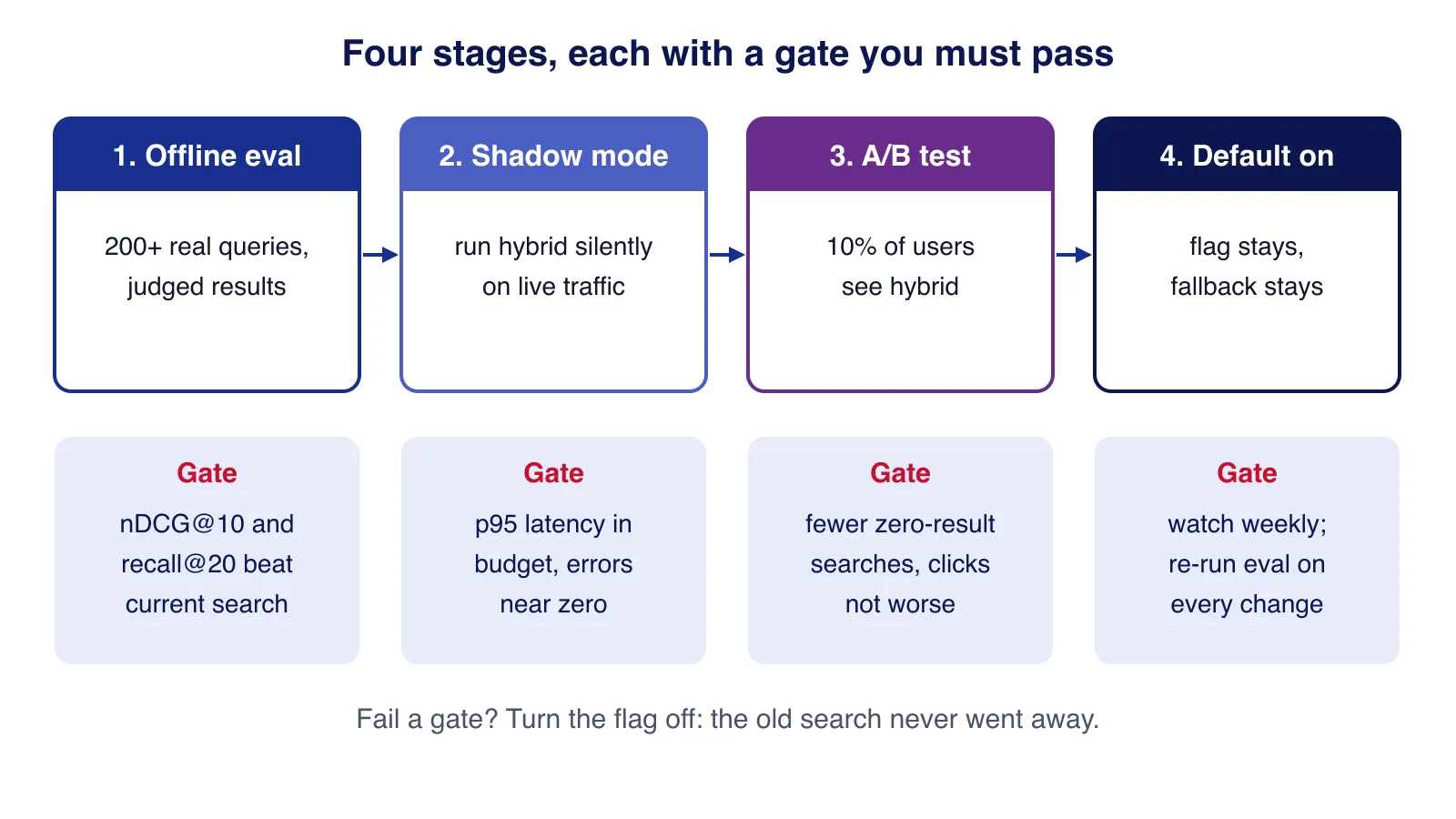
- Offline evaluation: hybrid must beat the current search on your judged set, overall and for each query type.
- Shadow mode: run hybrid search silently alongside the live search for real traffic, log both result lists, and check latency at the 95th percentile and the error rate.
- A/B test: show hybrid results to about 10% of users. Watch the zero-result rate, click-through on the first results and how often people retype their query.
- Default on, with the flag and the keyword fallback kept. Re-run the evaluation whenever you change the embedding model, chunking, fusion constant or reranker.
Changing the embedding model means re-embedding every document, because vectors from different models are not comparable. Store the model name with each vector and re-index into a new column or index before switching.
This is the stage where an outside review often pays for itself, because a search regression is visible to every user at once. Cloudsoft Zone can add hybrid AI search to an existing product with an evaluation set, shadow testing and a fallback in place.
Production notes
- Index updates: embed new and changed documents in a background job; search should never wait on indexing.
- Permissions: if some content is private, filter by tenant or user inside both the keyword and the vector query, never after fusion.
- Latency: run the keyword and vector queries in parallel; embed the query once and cache embeddings for frequent queries.
- Privacy: queries can contain personal data and are sent to the embedding provider; say so in your privacy notice and check the provider's retention terms.
- Cost guard: rate-limit search per user or IP so bots cannot run up embedding and reranking bills.
Common mistakes
- Replacing keyword search with vector search. Identifiers, names and codes get worse.
- Adding raw scores together. BM25-style scores and cosine distances live on different scales; fuse ranks.
- Embedding whole long pages. Chunk by heading so a match points to the right section.
- Shipping without a judged query set. You cannot tell whether a change helped.
- No fallback. An embedding API outage should mean slightly worse results, not an error page.
When not to add AI search
If your site has a few dozen pages, good navigation and a well-tuned keyword search with synonyms will do. If most searches are for SKUs, order numbers or names, semantic search adds little. And if your current search problems come from missing or outdated content, fix the content first: no ranking method can find an answer that was never written.
Want AI search added to your website or SaaS product without risking the search your customers use today? Cloudsoft Zone builds AI features into existing products, from hybrid search and reranking to evaluation and staged rollout.
Frequently asked questions
What is the difference between semantic search and hybrid search?
Semantic search ranks documents by meaning using embeddings. Hybrid search runs keyword and semantic search together and merges the rankings, so exact matches such as product codes still work while meaning-based matches are added.
Do I need a vector database to add AI search?
Not necessarily. If you use PostgreSQL, the pgvector extension adds vector columns and indexes, and one SQL query can combine full-text and vector search. Separate vector databases make sense at larger scale or when your main database cannot host vectors.
How much does AI search cost to run?
Embedding queries is cheap: 100,000 queries of about 15 tokens cost about $0.03 with a $0.02-per-million-token model. Reranking the top 30 results adds roughly $16 a month at that volume with Voyage's rerank-2.5-lite. Hosted search services price per search request instead.
How do I know if the new search is better?
Build a judged set of real queries with graded relevant documents and compare configurations with recall@k, MRR and nDCG@10, per query type. Then confirm with shadow mode and an A/B test before switching everyone over.
What is reciprocal rank fusion?
A way to merge several ranked lists: each result scores 1 / (k + rank) in every list it appears in, and the scores are added. With k = 60, results that both keyword and semantic search rank highly rise to the top.
Your next customer could start right here.
Introduce your tool, product or business to readers exploring technology.
Explore placements and request a private quote
Sources
- pgvector (README: HNSW, filtering, iterative scans) — pgvector
- Controlling text search (websearch_to_tsquery, ts_rank_cd) — PostgreSQL Global Development Group
- Getting started with AI-powered search — Meilisearch
- Score ranker processor — OpenSearch
- Algolia pricing — Algolia
- Pinecone pricing — Pinecone
- Pricing — Voyage AI
- Rerankers — Voyage AI
Written with substantial AI assistance. Facts checked against cited sources. Editorial policy.
Comments
No comments yet. Be the first to join the conversation.
Leave a comment
Every comment is read by a moderator before it appears. Your email address is never published; it is used only to contact you about this comment.
More from Cloudsoft Zone

Architecture guideAI and Automation
How to build a safe AI content pipeline with human fact review
An architecture for AI-assisted publishing where people stay responsible: untrusted source snapshots, claim checking with citations, a review queue AI cannot skip, labels and rollback.
By Cloudsoft Zone

TutorialNode.js
How to test a Node.js API with the built-in test runner (node:test)
Write, run, mock and measure coverage for a small Node.js HTTP API using only node:test and node:assert. Covers port-0 servers, fetch(), spies, t.mock.method(), fake dates and coverage thresholds.
By Cloudsoft Zone

TutorialNode.js
Node.js streams in practice: pipeline(), backpressure and async generators
Process files of any size in Node.js with flat memory use. A hands-on guide to stream/promises pipeline(), backpressure, async generator transforms, AbortSignal timeouts and streaming downloads over HTTP.
By Cloudsoft Zone