

AI toolAI tools
Google Gemini
Google's AI assistant for chat, research, image and video generation and document analysis, with a developer API for the Gemini models.
3 years active (founded 2023)
Essential details
- Pricing
- Freemium · Free planFree tier; paid Google AI Plus, Pro and Ultra plans billed monthly
- Platforms
- Web, iOS, Android, API
- Service region
- Worldwide
- Website
- gemini.google.com
Details last checked 7 October 2026
Photos
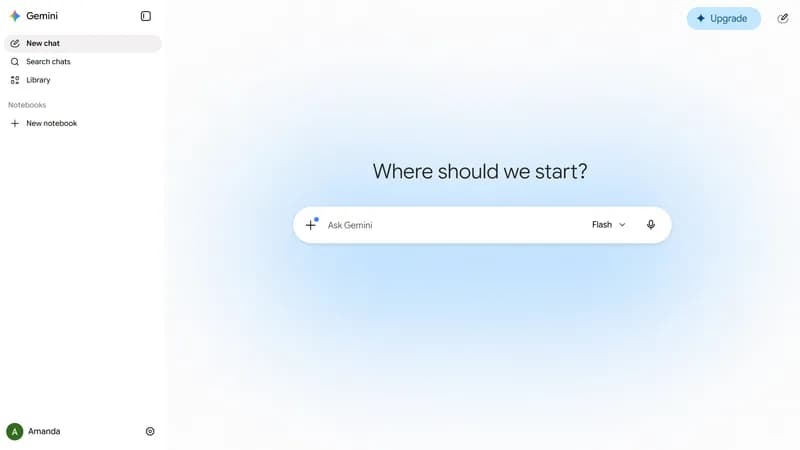
The Gemini web app at gemini.google.com, with a placeholder account name, showing the new chat screen and model picker. An earlier version of the Gemini web interface, captured in December 2024 with a placeholder user name. Diagram from Google's 2023 Gemini technical report showing how the models accept mixed text, image, audio and video input. Demis Hassabis of Google DeepMind, whose teams build the Gemini models, at 10 Downing Street in May 2023.
About Google Gemini
Google Gemini is Google's AI assistant, available on the web, on Android and iOS, and on desktop. It first launched in March 2023 under the name Bard. Gemini handles text, images and other inputs, and is used for writing, research, learning, coding and creative work.
Its main advantage is its place inside Google's ecosystem: it connects with Google services such as Workspace, Maps and YouTube, and the paid Google AI plans bundle Gemini features with Google cloud storage and other Google benefits.
Key features
- Deep Research. Gemini can investigate a topic across many sources and produce a structured report.
- Gemini Live. Real-time voice conversation for talking through ideas or questions.
- Canvas. A workspace for drafting and editing documents and code with Gemini.
- Gems. Custom versions of Gemini set up for a specific purpose or set of instructions.
- Image and video generation. Image generation is available on the free plan; video generation starts with Google AI Plus.
- Google app integration. Gemini works with Google services, and paid plans extend it into apps such as Gmail, Docs and Vids.
- Jules coding agent. Google AI Pro includes the Jules coding agent with higher limits.
Who it is for
Gemini suits people who already live in Google's tools: students, writers, researchers and small business owners using Gmail, Drive and Docs. Individuals can start free; the paid tiers make sense for heavier daily use or when the bundled cloud storage is also needed. Organisations on Google Workspace use Gemini under separate work account terms.
Pricing at a glance
Free costs $0 with Gemini 3.6 Flash, limited access to 3.1 Pro, image generation, Deep Research, Gemini Live, Canvas and 15 GB of storage. Google AI Plus costs $4.99 per month with twice the free usage limits, video generation, 200 Google Flow credits and 400 GB of storage. Google AI Pro costs $19.99 per month with four times the free usage limits, 1,000 Flow credits, Jules with higher limits, 5 TB of storage and YouTube Premium Lite. Google AI Ultra starts at $99.99 per month (5x usage) or $199.99 per month (20x usage), with 10,000 to 25,000 Flow credits, early access to features such as Deep Think, a YouTube Premium individual plan and storage from 20 TB. Prices differ by country; in India they are shown in rupees. Prices as checked on 7 October 2026; confirm on the vendor's pricing page.
Things to consider
- With Keep Activity on, chats are saved (auto-deleted after 18 months by default) and can be used to improve Google services, with human review of a subset of chats.
- Chats reviewed by people are kept separately for up to three years, disconnected from your account.
- With Keep Activity off, chats are kept for 72 hours and are not used to train models unless you send feedback.
- Work or school accounts may have different data handling terms, so businesses should check the Workspace privacy terms.
Getting started
- Sign in with a Google Account at gemini.google.com or in the mobile app.
- Review the Keep Activity setting in the Gemini Apps Privacy Hub.
- Try Deep Research or Canvas on a real task, and create a Gem for work you repeat.
- Compare plans on the subscriptions page if you need higher limits.
Capabilities
- Chat assistant
- Model API
- Image generation
- Document analysis
Pricing, platforms and fit
- Pricing
- FreemiumFree planFree tier; paid Google AI Plus, Pro and Ultra plans billed monthly
- Integrations
- Google SearchGmailGoogle WorkspaceGoogle MapsYouTube
- Service region
- Worldwide
Reviews
No reviews yet
Ratings appear once our moderators have approved the first review. Nothing is published automatically.
Be the first to reviewWrite a review
Related guides
- Guide
GitHub Copilot, Cursor, Claude Code and Gemini Code Assist: plans compared
A plain comparison of four AI coding assistants as of October 2026: where each runs, individual and team prices, how usage is billed, admin controls, and a two-week trial plan to choose the right one for your team.
This article discusses Google Gemini. Read the directory profile alongside the guide and verify current product details with its official sources.
- Guide
A provider-neutral AI layer with OpenAI, Gemini and Claude fallbacks
Build one TypeScript interface over the official OpenAI, Gemini and Claude SDKs, with capability checks, retries, fallbacks, shared schemas, tool calling and cost routing.
This article discusses Google Gemini. Read the directory profile alongside the guide and verify current product details with its official sources.
Related AI tools
Other published listings in the same category.

AI toolsAI tool
Claude
Anthropic's AI assistant for chat, writing, research, coding and file analysis, available on web, desktop and mobile and through a developer API.
Freemium · free plan
View detailsContact

AI toolsAI tool
Hugging Face
Platform for hosting and sharing machine learning models, datasets and Spaces apps, with managed inference and open-source ML libraries.
Freemium · free plan
View detailsContact

AI toolsAI tool
Cursor
AI code editor and coding agent with autocomplete, available for macOS, Windows and Linux, from the terminal and as cloud agents.
Freemium · free plan
View detailsContact

AI toolsAI tool
GitHub Copilot
GitHub's AI coding assistant offering code completion, chat, a coding agent and pull request review across IDEs, GitHub.com and the terminal.
Freemium · free plan
View detailsContact