

Developer toolDeveloper tools
GitLab
DevSecOps platform combining Git repositories, merge request reviews, CI/CD pipelines and issue tracking, offered as SaaS, dedicated or self-managed.
15 years active (founded 2011)
Essential details
- Pricing
- Freemium · Free plan · Free trialFree tier; Premium billed per user annually; Ultimate on request; free trial offered
- Platforms
- Web, Self-hosted, Command line, API
- Service region
- Worldwide
- Website
- about.gitlab.com
Details last checked 7 October 2026
Photos
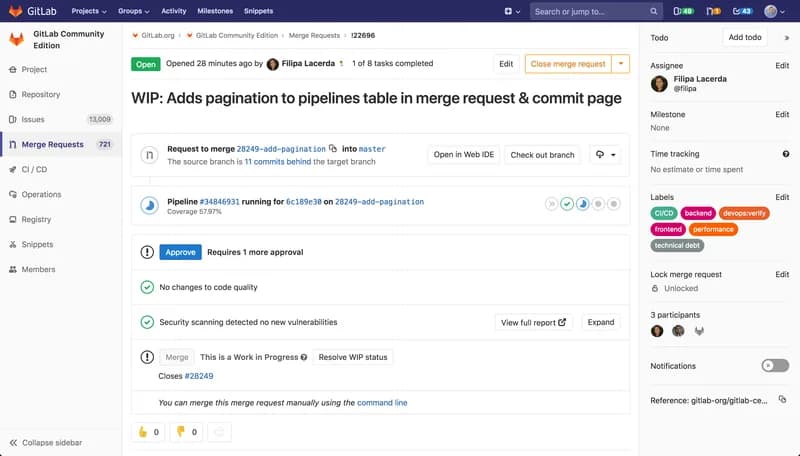
A GitLab merge request with its running pipeline, approval rule and security scanning result. A GitLab CI/CD pipeline graph, with jobs grouped into build, prepare, test and cleanup stages. A GitLab issue board that sorts issues into columns by label. The changes view of a GitLab merge request, with a file tree, code diff and review discussion.
About GitLab
GitLab is a single application for the whole software delivery process: source code management, CI/CD, security testing, planning and deployment. It is developed by GitLab Inc. and is available as the hosted GitLab.com service, as software you install on your own servers, and as a single-tenant managed service.
The main idea is one platform instead of a chain of separate tools. Code, merge requests, pipelines, issues and security findings live in the same place, so teams can follow a change from an issue to a merge request, through a pipeline and into production. AI features are paid for with GitLab Credits, which the paid plans include each month.
Key features
- Source code management. Git repositories with merge requests, approval rules, code owners and a Web IDE.
- Built-in CI/CD. Pipelines defined in a .gitlab-ci.yml file, run on GitLab-hosted runners or on your own GitLab Runner machines.
- Planning. Issues, issue boards, milestones and labels; Premium adds team project management features.
- Security testing. Ultimate adds application security testing, vulnerability management and compliance and governance controls.
- Package and container registries. Store build artefacts and container images next to the project.
- Flexible deployment. Use GitLab.com, run GitLab Self-Managed with the Linux package, Helm chart, Operator or Docker image, or choose GitLab Dedicated, a single-tenant SaaS service.
- AI features. Premium and Ultimate include a monthly amount of GitLab Credits per user for AI features; Free users can buy credits as an add-on.
Who it is for
GitLab fits teams that want source control and CI/CD in one product, organisations that must host their tools on their own infrastructure, and regulated industries that need security scanning and compliance controls built into the delivery process. Small teams can start on the Free tier; larger companies typically use Premium or Ultimate, and very large or regulated enterprises can choose GitLab Dedicated.
Pricing at a glance
- Free: $0 per user per month; 400 compute minutes a month and 10 GiB storage, limited to 5 users per top-level group on GitLab.com.
- Premium: $29 per user per month, billed annually; 10,000 compute minutes, 500 GiB storage, advanced CI/CD and $12 of GitLab Credits per user per month for AI features.
- Ultimate: custom pricing from sales; 50,000 compute minutes, security testing, vulnerability management, compliance features, unlimited guest users and $24 of GitLab Credits per user per month.
Prices as checked on 7 October 2026; confirm on the vendor's pricing page.
Things to consider
- The Free tier on GitLab.com is capped at 5 users per top-level group, so most growing teams will need a paid plan.
- Subscriptions do not transfer between GitLab.com, Self-Managed and Dedicated; switching offering means buying a new subscription (see choosing a subscription).
- Self-managed installations give you control over data location but also make you responsible for backups, upgrades and scaling.
- Ultimate's price is not published, so budget planning needs a sales conversation.
Getting started
- Decide between GitLab.com, Self-Managed and Dedicated.
- Sign up for GitLab.com, or follow the installation guide for your own server.
- Create a group and a project, then push or import a repository.
- Add a .gitlab-ci.yml file so a pipeline runs on every merge request.
- Invite your team and set merge request approval rules.
Capabilities
- Continuous integration
- Version control
- Code review
- Package registry
Pricing, platforms and fit
- Pricing
- FreemiumFree plan · Free trialFree tier; Premium billed per user annually; Ultimate on request; free trial offered
- Platforms
- WebSelf-hostedCommand lineAPI
- Integrations
- JiraSlackMicrosoft TeamsJenkinsDatadogMattermostConfluence WorkspaceDiscordVaultAsana
- Service region
- Worldwide
Reviews
No reviews yet
Ratings appear once our moderators have approved the first review. Nothing is published automatically.
Be the first to reviewWrite a review
Related guides
- Guide
Merge commit, squash or rebase: choosing a pull request merge strategy
Merge commits, squash merges and rebase merges all land the same code but leave very different history behind. This comparison explains what each method does on GitHub and in plain Git, what you lose with each, and how to pick one rule for your team.
The article notes GitLab's equivalent merge options.
- Guide
GitHub vs GitLab in 2026: plans, CI minutes, self-hosting and AI compared
GitHub and GitLab compared from their published plans: free-tier limits, per-seat prices, CI minutes, branch protection, security tooling, AI pricing and self-hosting, with the same CI job written for both.
This article discusses GitLab. Read the directory profile alongside the guide and verify current product details with its official sources.
Related developer tools
Other published listings in the same category.

Developer toolsDeveloper tool
GitHub
Git-based platform for hosting code, reviewing pull requests, tracking issues and running CI/CD workflows, with free and per-user paid plans.
Freemium · free plan
View detailsContact

Developer toolsDeveloper tool
Visual Studio Code
Free source-code editor from Microsoft for Windows, macOS, Linux and the browser, with built-in Git, debugging, a terminal and an extensions marketplace.
Free
View detailsContact

Developer toolsDeveloper tool
Docker
Container platform for building, sharing and running applications, including Docker Desktop, Docker Engine, Docker Hub and Docker Scout.
Freemium · free plan
View detailsContact

Developer toolsDeveloper tool
Postman
API platform for designing, testing, documenting and monitoring APIs, with desktop and web apps, a CLI and a free plan.
Freemium · free plan
View detailsContact