
MySQL index design: composite, covering, functional and invisible indexes
How InnoDB clustered and secondary indexes work, and the design rules that follow: short primary keys, composite column order, covering indexes, functional and multi-valued JSON indexes, and safe removal with invisible indexes.
Updated 8 min read

In this article
Most application developers learn MySQL indexing one slow query at a time: add an index on the column in the WHERE clause, see the query speed up, move on. That works until a table has a dozen overlapping indexes, inserts slow down, and the optimizer still ignores the index you expected it to use.
This guide explains how InnoDB indexes are actually organised and turns that into a short set of design rules: how to choose a primary key, how to order the columns in a composite index, when a covering index is worth it, and how the newer index types (functional, descending, multi-valued and invisible) fit in. It applies to MySQL 8.4 LTS, 9.7 LTS and the 26.7 Innovation release, and every behaviour described is taken from the MySQL 9.7 Reference Manual.
How InnoDB stores tables and indexes
Every InnoDB table has a clustered index that stores the row data itself. It is normally the primary key. If you do not declare one, InnoDB uses the first UNIQUE index whose columns are all NOT NULL, and if there is none it generates a hidden index called GEN_CLUST_INDEX.
Every other index is a secondary index. The manual is explicit about what it contains: each secondary index record holds the indexed columns plus the primary key columns for that row, and InnoDB uses that primary key value to find the full row in the clustered index. Both kinds are B-tree structures, so entries are kept in sorted order.
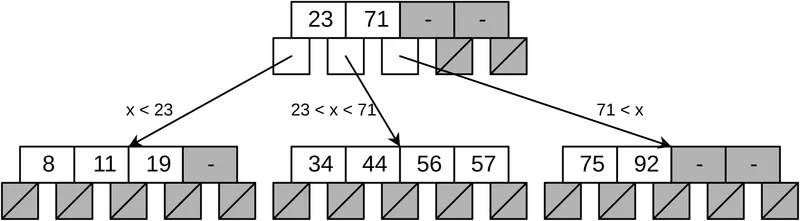
Three practical consequences follow from this layout:
- A lookup through a secondary index is usually two searches: one in the secondary index, one in the clustered index to fetch the row. Avoiding the second search is what a covering index does.
- The primary key is copied into every secondary index. The manual's advice is direct: if the primary key is long, the secondary indexes use more space, so a short primary key is advantageous.
- Sorted order is free to read. Because entries are sorted, an index can deliver rows in order for
ORDER BYand serve range conditions without a separate sort.
Choosing a primary key
For most application tables, an BIGINT UNSIGNED AUTO_INCREMENT primary key is a sound default: it is compact (8 bytes in every secondary index) and new rows are appended at the end of the clustered index. If your application needs globally unique identifiers, consider storing a UUID as BINARY(16) rather than a 36-character string, and keep it as a separate unique column if you want the clustered index to stay compact and sequential. With a swap flag of 1, MySQL's UUID_TO_BIN() function swaps the time-low and time-high groups of a time-based UUID, moving the fastest-changing part to the right, which the manual says can improve indexing efficiency.
Always declare a primary key explicitly. Hidden clustered indexes cannot be referenced by your application, and tools such as MySQL Shell's dump utilities have compatibility options precisely because tables without primary keys cause problems for replication and cloud imports.
Composite indexes: column order is the whole game
An index can contain up to 16 columns. The rule that governs how it can be used is the leftmost prefix: with an index on (col1, col2, col3), MySQL can search on (col1), (col1, col2) and (col1, col2, col3), but not on col2 or col3 alone. The manual's own example uses INDEX name (last_name, first_name): a query on last_name uses it, a query on first_name alone does not, and neither does last_name = 'Jones' OR first_name = 'John'.
From that rule comes a practical ordering for each index:
- Equality columns first (
=,IN), the ones your queries always supply. - Then one range or sort column (
>,BETWEEN,ORDER BY). Once the index is used for a range, columns after it cannot narrow the search further in the same way. - Then, optionally, extra columns that make the index covering for a hot query.
Consider a support-ticket table queried like this:
SELECT id, subject, updated_at
FROM tickets
WHERE account_id = ? AND state = 'open'
ORDER BY updated_at DESC
LIMIT 50;
The best single index is (account_id, state, updated_at). The manual's ORDER BY optimisation section describes exactly this case: when the leading key parts are constants in the WHERE clause, rows read through the index are already in order of the next key part, so no filesort is needed. Putting updated_at first would make the index useless for the equality filters; putting state first would work but only if every query also filters by state.
Avoid redundant indexes
Because of the leftmost-prefix rule, an index on (account_id) is redundant once (account_id, state, updated_at) exists: the longer index serves every query the shorter one did. Redundant indexes cost disk, memory in the buffer pool and time on every insert, update and delete. The sys schema's schema_redundant_indexes view lists candidates.
Covering indexes
When every column a query needs is in the index, InnoDB can answer it without visiting the clustered index. EXPLAIN shows this as Using index in the Extra column, which the manual describes as retrieving column information using only the index tree, without an additional seek to read the actual row.
Remember that the primary key is already in every secondary index, so you never need to add it. For the ticket query above, a covering index would be (account_id, state, updated_at, subject). Whether that is worth it depends on how hot the query is and how wide subject is; covering indexes are a tool for a few critical paths, not a default.
Index types beyond the plain B-tree column
| Feature | Syntax example | Use it when |
|---|---|---|
| Prefix index | INDEX (email(32)) | Long strings where the first characters are selective. InnoDB limits key prefixes to 3072 bytes with DYNAMIC or COMPRESSED row format (767 bytes with REDUNDANT or COMPACT). A prefix index cannot cover a query. |
| Functional key part | INDEX ((LOWER(email))) | Queries filter on an expression. Note the double parentheses that distinguish an expression from a column. |
| Descending key part | INDEX (account_id, created_at DESC) | Queries mix sort directions, such as ORDER BY a DESC, b ASC. |
| Multi-valued index | INDEX ((CAST(tags->'$' AS CHAR(32) ARRAY))) | Filtering on values inside a JSON array with MEMBER OF(), JSON_CONTAINS() or JSON_OVERLAPS(). |
| Invisible index | ALTER TABLE t ALTER INDEX i INVISIBLE | Testing the effect of removing an index without dropping it. |
Functional indexes in practice
A function around a column normally prevents index use. If your login query is WHERE LOWER(email) = ?, either store a normalised copy or index the expression:
ALTER TABLE users ADD INDEX idx_users_email_lower ((LOWER(email)));

-- The query must use the same expression to match the index:
SELECT id FROM users WHERE LOWER(email) = 'asha@example.com';
Often the simpler fix is a case-insensitive collation such as the default utf8mb4_0900_ai_ci, under which a plain index on email already matches regardless of case.
Multi-valued indexes on JSON arrays
The manual's example indexes zip codes stored in a JSON document:
CREATE TABLE customers (
  id       BIGINT NOT NULL AUTO_INCREMENT PRIMARY KEY,
  custinfo JSON,
  INDEX zips ((CAST(custinfo->'$.zipcode' AS UNSIGNED ARRAY)))
);

SELECT id FROM customers
WHERE 94507 MEMBER OF (custinfo->'$.zipcode');
A multi-valued index can have several index records for one row. ASC and DESC are not supported on multi-valued, HASH or SPATIAL indexes.
Removing indexes safely with invisible indexes
Dropping an index on a large table is quick, but recreating it if you were wrong can take a long time and load the server. Invisible indexes remove the risk. An invisible index is still maintained on every write, but the optimizer ignores it:
-- 1. Find candidates that have not been used since the server started
SELECT * FROM sys.schema_unused_indexes
WHERE object_schema = 'app';

-- 2. Hide one and watch performance for a full business cycle
ALTER TABLE orders ALTER INDEX idx_orders_legacy_status INVISIBLE;

-- 3a. If something slows down, restore it instantly
ALTER TABLE orders ALTER INDEX idx_orders_legacy_status VISIBLE;

-- 3b. If nothing changed, drop it in your next reviewed migration
ALTER TABLE orders DROP INDEX idx_orders_legacy_status;
Two caveats from the manual. First, sys.schema_unused_indexes is only meaningful once the server has been running long enough for its workload to be representative; an index used by a month-end report will look unused in week two. Second, primary keys (explicit or implicit) cannot be made invisible. To test a query against a hidden index without changing it for everyone, use the optimizer hint /*+ SET_VAR(optimizer_switch = 'use_invisible_indexes=on') */.
An index design checklist
- Every table has an explicit, short primary key.
- Each index is designed for named queries, ideally the ones using the most total time.
- Composite index columns are ordered: equality, then one range or sort column, then covering columns.
- No index is a leftmost prefix of another index on the same table.
- Columns in
WHEREare not wrapped in functions unless a matching functional index exists. - Join columns have the same data type and collation on both sides, and the inner side of each join is indexed.
- Foreign key columns are indexed (InnoDB requires an index on referencing columns and creates one if missing).
- Every new index is verified with
EXPLAINbefore and after, and every removal goes through an invisible stage first. - Write-heavy tables are reviewed for index count; each secondary index adds work to every insert.
Summary
InnoDB stores rows in the primary key's B-tree and copies that key into every secondary index. Design around that: keep the primary key short, order composite indexes by equality columns, then range or sort columns, cover only the hottest queries, and use functional, descending and multi-valued indexes when the query shape calls for them. Retire indexes by making them invisible first. Pair this guide with our EXPLAIN tutorial to confirm each change does what you expect.
Frequently asked questions
How many columns can a MySQL index have?
Up to 16 columns, according to the MySQL Reference Manual. In practice most useful composite indexes have two to four.
Do I need to add the primary key to a secondary index to make it covering?
No. In InnoDB every secondary index record already contains the primary key columns, so queries that select the primary key are covered automatically.
What is an invisible index for?
It lets you check whether an index is still needed. The optimizer ignores it but it is still maintained, so you can make it visible again instantly if performance drops.
Can I index a value inside a JSON column?
Yes. Use a functional index on an extracted scalar, or a multi-valued index with
CAST(... AS ... ARRAY)for arrays, queried withMEMBER OF(),JSON_CONTAINS()orJSON_OVERLAPS().
Your next customer could start right here.
Introduce your tool, product or business to readers exploring technology.
Explore placements and request a private quote
Sources
- MySQL 9.7 Reference Manual: Clustered and Secondary Indexes — Oracle (MySQL documentation)
- MySQL 9.7 Reference Manual: Multiple-Column Indexes — Oracle (MySQL documentation)
- MySQL 9.7 Reference Manual: CREATE INDEX Statement — Oracle (MySQL documentation)
- MySQL 9.7 Reference Manual: Invisible Indexes — Oracle (MySQL documentation)
- MySQL 9.7 Reference Manual: ORDER BY Optimization — Oracle (MySQL documentation)
- MySQL 9.7 Reference Manual: The schema_unused_indexes View — Oracle (MySQL documentation)
- MySQL 9.7 Reference Manual: FOREIGN KEY Constraints — Oracle (MySQL documentation)
- MySQL 9.7 Reference Manual: Miscellaneous Functions (UUID_TO_BIN) — Oracle (MySQL documentation)
Written with substantial AI assistance. Facts checked against cited sources. Editorial policy.
Comments
No comments yet. Be the first to join the conversation.
Leave a comment
Every comment is read by a moderator before it appears. Your email address is never published; it is used only to contact you about this comment.
Related tools
- Directory profile
Docker
Container platform for building, sharing and running applications, including Docker Desktop, Docker Engine, Docker Hub and Docker Scout.
A tool connected to a service selected for this article. Compare its fit for your project; inclusion is not an endorsement.
- Directory profile
Git
Free, open-source distributed version control system for tracking code changes, branching and merging, created in 2005 and used by GitHub, GitLab and Bitbucket.
A tool connected to a service selected for this article. Compare its fit for your project; inclusion is not an endorsement.
More from Cloudsoft Zone

ComparisonMySQL
MySQL 8.4 LTS, 9.7 LTS or 26.7 Innovation: choosing a version and upgrading
MySQL now ships LTS and Innovation releases with calendar version numbers. Compare 8.4 LTS, 9.7 LTS and 26.7 Innovation, see the supported upgrade paths, and follow a checklist for moving an application from 8.4 to 9.7.
By Cloudsoft Zone

Resource guideWordPress
WordPress security hardening checklist for 2026 (WordPress 7.1)
A practical WordPress 7.1 hardening checklist based on the official handbook: updates, two-step logins, wp-config.php constants, file permissions, database privileges, firewalls, WP-CLI checksum checks and tested backups.
By Cloudsoft Zone

TutorialWordPress
How to update WordPress safely with WP-CLI: backup, update, verify, roll back
A repeatable WordPress update routine with WP-CLI: check pending updates, export the database and archive files, update core, plugins, themes and translations in order, verify checksums, and restore if something breaks.
By Cloudsoft Zone