
Magento 2 interview questions and answers for Magento 2.4.9
Fifty Magento interview questions answered for Magento Open Source and Adobe Commerce 2.4.9: EAV, ORM, DI, plugins, layout, caching, indexers, APIs, security and what Magento 1 answers changed.
Updated 20 min read

In this article
Magento interviews in 2026 are about Magento 2.4: dependency injection, plugins, service contracts, declarative schema, indexers, caching and the deployment pipeline. Many question lists still ask about Mage::getModel(), code pools and Magento Connect, which belong to Magento 1, a platform that reached end of life on 30 June 2020. Good candidates can explain what replaced each of those, and why.
Updated for Magento Open Source and Adobe Commerce 2.4.9 (released 12 May 2026; tested with PHP 8.5, MySQL 8.4 or MariaDB 12.3, OpenSearch 3 and Valkey 9). The list keeps every question from the classic Magento set that still applies, answers it for Magento 2, notes the ones that no longer exist, and adds what interviewers now ask most.
Checked against: Magento 2.4.9 source on GitHub and Adobe Experience League documentation, October 2026.
Platform basics
1. What is Magento?
Magento is an open-source e-commerce platform written in PHP. Adobe owns it and sells it as Adobe Commerce; the free edition is Magento Open Source. It handles catalogues, carts, checkout, orders, customers, promotions and multiple websites and stores from one installation, and it is built to be extended through modules. The community also maintains Mage-OS, a distribution based on Magento Open Source.
2. When was Magento first released?
Varien, founded by Roy Rubin and Yoav Kutner, released the first public beta on 31 August 2007 and the first general release on 31 March 2008. Magento 2.0 followed on 17 November 2015. Adobe completed its purchase of Magento in June 2018 for 1.68 billion US dollars. Magento 1 reached end of life on 30 June 2020.
3. What editions and versions exist?
- Magento Open Source: free, self-hosted.
- Adobe Commerce: licensed, adds B2B features, staging and content scheduling, customer segments, gift cards, reward points and support. It runs on-premises or on Adobe's cloud infrastructure.
- Adobe Commerce as a Cloud Service: Adobe's fully managed SaaS version, in which you extend the platform outside the core rather than by changing its code.
On versions: 2.4.9 is the current line, with standard support until 31 May 2029; 2.4.8 runs to 31 May 2028 and 2.4.7 to 31 May 2027. Our comparison of Open Source, Adobe Commerce and the Cloud Service and the 2.4.9 upgrade checklist go into detail.
4. Explain Magento 2's architecture.
Magento is a collection of modules on top of a framework (Magento\Framework). Adobe describes four layers: presentation (layout XML, blocks, templates, UI components, GraphQL and REST), service (service contracts: PHP interfaces in each module's Api folder, such as ProductRepositoryInterface), domain (models and business logic) and persistence (resource models and collections). Modules talk to each other through service contracts, are wired together by dependency injection configured in di.xml, and are customised through plugins, observers and preferences rather than edits to core files.
5. What technologies does Magento use?
For 2.4.9: PHP 8.5, Composer 2, MySQL 8.4 or MariaDB 12.3, OpenSearch 3 for catalogue search, Valkey for cache and sessions, Varnish 8 for full-page cache, RabbitMQ or ActiveMQ Artemis for message queues, and nginx or Apache. The framework uses Symfony components (Symfony 7.4 in 2.4.9) and, from 2.4.9, Symfony Cache and a native MVC layer instead of Zend_Cache and Laminas MVC. The default Luma front end uses LESS, RequireJS, jQuery and Knockout.js; many new stores use the Hyvä theme (Alpine.js and Tailwind CSS) or a headless front end over GraphQL.
6. What are Magento's key features?
Multi-website, multi-store and multi-currency from one admin; six product types; layered navigation and OpenSearch-backed search; flexible price rules and coupons; customer groups and tax rules; REST, SOAP and GraphQL APIs; asynchronous and bulk APIs through message queues; import and export; full-page caching; and a large extension marketplace. Adobe Commerce adds B2B (company accounts, shared catalogues, quotes), content staging and segmentation.
7. What are Magento's limitations?
- It needs serious hosting: OpenSearch, a cache server and usually Varnish, as well as PHP and a database.
- Development is slower than on simpler platforms: deploy steps (DI compile, static content), many extension points, and a steep learning curve.
- Upgrades take real work, because extensions must support each new minor release and PHP version.
- The default Luma front end is heavy, which is why many stores use Hyvä or headless front ends.
- Adobe Commerce licences are expensive, and smaller merchants often find hosted platforms cheaper to run.
EAV, the database and the ORM
8. What is EAV in Magento?
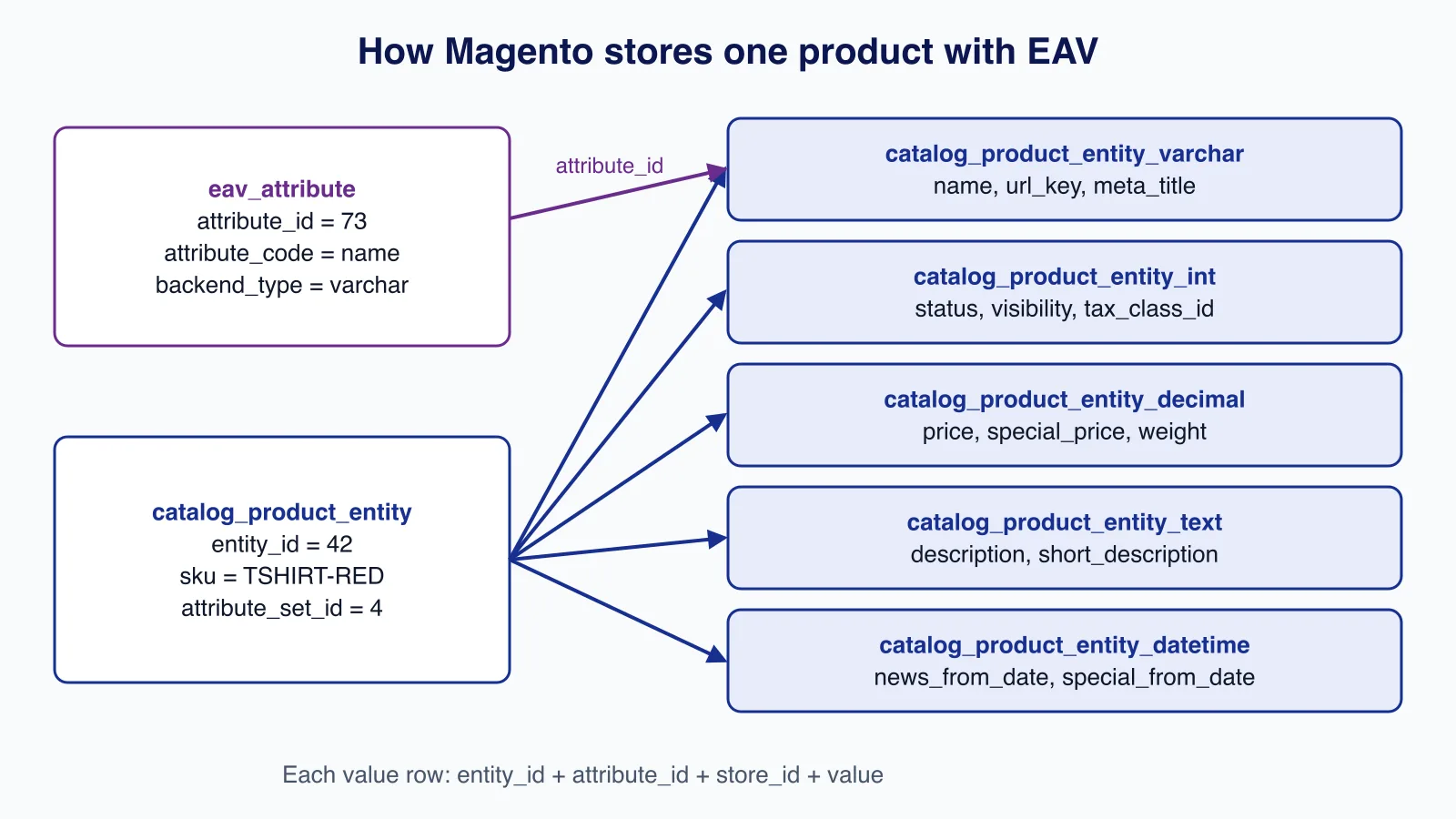
Entity-Attribute-Value is a way to store entities whose attributes vary and can be added in the admin without schema changes. Instead of one column per attribute, Magento keeps a narrow entity table and stores each value as a row in a value table, keyed by entity, attribute and store. Products, categories, customers and customer addresses use EAV. Orders, quotes and most other data use ordinary flat tables.
9. Which tables does Magento use for an EAV entity?
For products: catalog_product_entity holds the entity rows (ID, SKU, type, attribute set). Values go into typed tables by backend type: catalog_product_entity_varchar, _int, _decimal, _text and _datetime, plus _gallery for media. Attribute definitions live in eav_attribute and catalog_eav_attribute; entity types in eav_entity_type; attribute sets and groups in eav_attribute_set and eav_attribute_group. So the classic answer to "how many tables does a new EAV entity need?" is one entity table plus five value tables, with attribute metadata in the shared EAV tables. In Adobe Commerce, staging adds a row_id column, and value tables join on row_id rather than entity_id, which breaks hand-written joins copied from Open Source.
10. What is the difference between EAV and the flat model?
EAV is flexible but needs many joins to read one product. Flat tables have one column per attribute and are fast to read but must be rebuilt by an indexer. Magento used "flat catalog" tables for this, but Adobe now says using the flat catalog is no longer a recommended practice and that it is known to cause performance and indexing problems. Today, reads are served by indexes (price, stock, category, search in OpenSearch) and by caching, not flat tables.
11. How does Magento's ORM work?
Three classes per entity: a model holds data and behaviour; a resource model maps it to a table and handles load, save and delete; a collection loads many records with filters, sorting and paging. On top sits the repository from the service contract, which external code should use: $productRepository->get($sku), save(), and getList(SearchCriteriaInterface) for filtered lists. Calling $model->save() directly is deprecated in favour of resource models and repositories.
12. How do you change the database schema?
With declarative schema: describe tables, columns, indexes and foreign keys in etc/db_schema.xml, generate db_schema_whitelist.json with bin/magento setup:db-declaration:generate-whitelist, and run setup:upgrade. Data changes, such as creating an attribute or a CMS block, go in data patches (classes implementing DataPatchInterface), which run once and are recorded in patch_list. The old InstallSchema and UpgradeData scripts are the pre-2.3 approach.
13. How do you run a custom query?
Prefer repositories or collections. When you need SQL, inject Magento\Framework\App\ResourceConnection, get the connection, and build a select with bound parameters, never string concatenation. Use getTableName() so table prefixes work.
$connection = $this->resource->getConnection();
$select = $connection->select()
    ->from($this->resource->getTableName('sales_order'), ['entity_id', 'increment_id', 'grand_total'])
    ->where('customer_id = ?', $customerId)
    ->order('created_at DESC')
    ->limit(10);
$orders = $connection->fetchAll($select);
14. How do you get the five best-selling products in code?
Magento aggregates bestsellers into sales_bestsellers_aggregated_daily, _monthly and _yearly when statistics are refreshed (Reports > Statistics, or the nightly cron). Read from those tables rather than summing order items on every request:
$connection = $this->resource->getConnection();
$select = $connection->select()
    ->from(
        $this->resource->getTableName('sales_bestsellers_aggregated_monthly'),
        ['product_id', 'name' => 'MAX(product_name)', 'qty' => 'SUM(qty_ordered)']
    )
    ->where('store_id = ?', $storeId)
    ->where('period >= ?', $fromDate)
    ->group('product_id')
    ->order('qty DESC')
    ->limit(5);
$top = $connection->fetchAll($select);
Mention that the data is only as fresh as the last statistics refresh, and cache the result.
15. How do you get the first and last items of a collection?
$collection->getFirstItem() and $collection->getLastItem(). Both load the whole collection first, so for "the newest order" set the order and page size instead: $collection->setOrder('created_at', 'DESC')->setPageSize(1)->getFirstItem().
16. How do you log a collection's SQL?
Cast the select to a string: $this->logger->debug((string) $collection->getSelect());. To log every query, run bin/magento dev:query-log:enable, which writes to var/debug/db.log, and disable it again with dev:query-log:disable; never leave it on in production.
17. How do you join a flat table to an EAV collection?
On a product collection, use addAttributeToSelect() and addAttributeToFilter() for EAV attributes, and joinField() or getSelect()->joinLeft() for a flat table, for example a custom vendor_product_rating table keyed by product ID. Check whether the store is Adobe Commerce: with staging, join on row_id through the entity metadata rather than assuming entity_id.
18. Where is the link between a configurable product and its simple products stored?
In catalog_product_super_link (parent_id, product_id), with the generic parent-child relation also in catalog_product_relation. The attributes that the shopper chooses, such as size and colour, are in catalog_product_super_attribute.
Modules, MVC and customisation
19. Explain Magento's MVC.
A route in etc/frontend/routes.xml maps a front name to a module. Each action is its own controller class implementing HttpGetActionInterface or HttpPostActionInterface with an execute() method. The view is not a single template: layout XML assembles a page from containers and blocks, blocks provide data to .phtml templates, and view models (classes implementing ArgumentInterface) are the preferred way to give templates logic without custom block classes. Models and repositories form the M.
20. What makes up a module, and is the vendor namespace mandatory?
A module needs registration.php, etc/module.xml (name and load order through <sequence>) and usually composer.json. Its name is always Vendor_Module, matching the PHP namespace Vendor\Module, so yes, the vendor part is mandatory. Your own modules live in app/code/Vendor/Module; third-party ones are installed with Composer into vendor/. Enable a module with bin/magento module:enable Vendor_Module and setup:upgrade.
21. What was codePool, and what replaced it?
Magento 1 put modules in core, community or local code pools, and the local pool could override core classes by copying them. Magento 2 has no code pools: modules come from app/code or Composer packages, and you change behaviour through dependency injection, never by copying core files.
22. What replaced Mage::getModel() and Mage::getSingleton()?
In Magento 1, getModel() returned a new instance and getSingleton() a shared one. In Magento 2 you declare dependencies in the constructor and the object manager injects them. Injected objects are shared by default, which is the singleton case. When you need a new instance each time, such as a new product, inject a generated factory (ProductFactory) and call create(). A type can be made non-shared with shared="false" in di.xml. Calling the ObjectManager directly in your code is considered a mistake outside factories and a few framework places.
23. How do you override a block, model or controller?
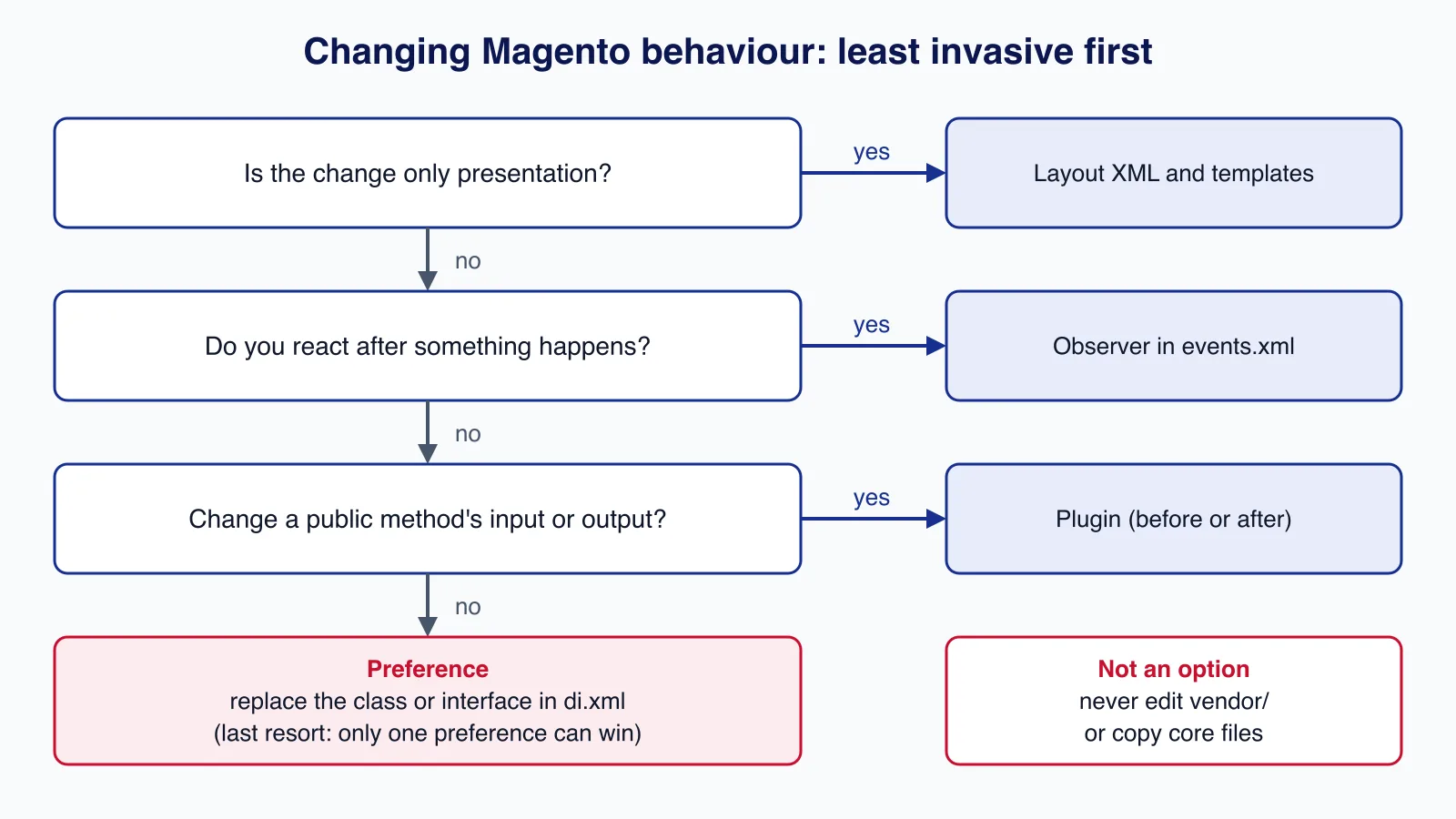
Choose the least invasive option:
| Tool | What it does | Use when |
|---|---|---|
| Plugin (interceptor) | before, after or around a public method, declared in di.xml | Changing inputs or outputs of a public method; several plugins can coexist |
| Observer | Reacts to a dispatched event, declared in events.xml | Side effects after something happens, such as an order being placed |
| Preference | Replaces a class or interface implementation globally | Implementing an interface, or as a last resort; only one preference wins |
| Layout XML and templates | Moves, removes or replaces blocks and templates | Presentation changes |
Adobe lists where plugins cannot be used: final methods and classes, non-public methods, static methods, __construct and __destruct, virtual types, and objects created before interception is bootstrapped. Also, around plugins add overhead and make stack traces harder to read, so prefer before and after.
<!-- etc/di.xml -->
<type name="Magento\Catalog\Api\ProductRepositoryInterface">
    <plugin name="vendor_audit_product_save" type="Vendor\Audit\Plugin\ProductRepositoryPlugin"/>
</type>
24. What does compilation do?
Magento 1's "compiler" copied classes into one folder and is long gone. In Magento 2, bin/magento setup:di:compile generates factories, proxies and interceptors (the classes that make plugins work) into generated/ and builds dependency injection metadata. It is required in production mode and is part of every deployment, with setup:static-content:deploy for front-end assets.
25. What are the application modes?
Default (out of the box, not for production), developer (errors shown, static files generated on demand, no compilation required) and production (code compiled, static files deployed to pub/static, errors logged rather than displayed). Set the mode with bin/magento deploy:mode:set production. Adobe Commerce on cloud infrastructure supports only production and maintenance modes.
26. What are layout handles?
A handle names a layout XML file to apply. Every page loads default, then a handle built from the route, controller and action, such as catalog_product_view or checkout_cart_index, plus more specific ones such as product type or ID handles. Your module adds view/frontend/layout/catalog_product_view.xml to change that page. Use <referenceBlock>, <referenceContainer>, <move> and remove="true" rather than copying core layout files into a theme.
27. What are the common block types, and what replaced core/text_list?
Most blocks are Magento\Framework\View\Element\Template with a template and optional view model. Magento 1's core/text_list rendered all its children automatically; in Magento 2 that job belongs to containers, which are layout structure elements that render their children and can wrap them in an HTML tag. Magento\Framework\View\Element\Text\ListText still exists for the same purpose. UI components (ui_component XML) build admin grids and forms.
28. How do you show a CMS block or page content in a template?
The clean way is layout XML, so the block is cached and editable:
<referenceContainer name="content">
    <block class="Magento\Cms\Block\Block" name="vendor.promo.block">
        <arguments>
            <argument name="block_id" xsi:type="string">summer_promo</argument>
        </arguments>
    </block>
</referenceContainer>
Inside a template you can render a child block with $block->getChildHtml('vendor.promo.block'). Content from a CMS page is normally linked rather than embedded; if you must, load it through Magento\Cms\Api\GetPageByIdentifierInterface and render it with the CMS template filter so widgets and variables work.
29. Can a module have more than one admin grid?
Yes. Each grid is a UI component listing with its own XML file in view/adminhtml/ui_component/, its own data provider and its own admin route and ACL resource. There is no limit per module.
30. How do you add or remove content in the admin configuration (system.xml)?
Create etc/adminhtml/system.xml in your module. Files from all modules are merged, so you can add fields to an existing section by using the same section and group IDs. To hide a core field, redeclare it with showInDefault="0" showInWebsite="0" showInStore="0", and make your module load after the original with <sequence>. Default values belong in etc/config.xml, and access is controlled by an ACL resource.
31. Where should business logic go?
In service classes and models in the domain layer, exposed through interfaces in Api/ when other modules need them. Not in controllers, templates, observers or plugins, which should stay thin and call services. That keeps the logic reusable from REST, GraphQL, CLI commands and queue consumers.
32. What are magic methods in Magento?
Classes extending Magento\Framework\DataObject handle calls such as getCustomerName(), setCustomerName(), hasCustomerName() and unsCustomerName() through __call(), mapping them to the customer_name key of the internal data array. They are convenient but untyped and invisible to static analysis, so service contract interfaces define real typed getters and setters, and new code should use those.
33. What design patterns does Magento use?
Dependency injection, factory, proxy (lazy loading of heavy dependencies), interceptor (plugins), observer (events), repository, service contracts, composite (layout, UI components), strategy (for example payment methods), and object pool. The object manager acts as a service locator internally, which is why using it directly in your own code is discouraged. The registry (Magento\Framework\Registry) is deprecated.
Sessions, caching and store configuration
34. What session types are there, and why are they separate?
Each area keeps its own session namespace: customer (Magento\Customer\Model\Session), checkout (Magento\Checkout\Model\Session, holding the quote), catalogue (Magento\Catalog\Model\Session) and admin (Magento\Backend\Model\Auth\Session). Separation keeps data from colliding and lets admin and storefront sessions have different lifetimes and cookies. A key interview point: do not read the customer session in a block on a cacheable page. Full-page cache would store the first visitor's data; use customer data sections (private content loaded by JavaScript) or HTTP context instead.
35. How would you show a different theme or design to logged-in customers?
Magento 2 assigns themes per store view (Content > Design > Configuration); there is no setting per login state. For a different look, add a layout handle for logged-in customers, or vary content through customer groups and, in Adobe Commerce, customer segments. Whatever you do, make it work with full-page cache: the cache varies by HTTP context values such as customer group, not by session. The Magento 1 answer, calling setTheme() on the design package during the request, no longer applies.
36. When do you need to clear the cache?
After changing configuration, layout XML, templates, translations or anything else stored in cache types, and after deploying code. bin/magento cache:clean removes Magento's own entries for the enabled types and is usually enough; cache:flush clears the whole storage, which may be shared with other applications. DI changes in production also need setup:di:compile, and front-end assets need setup:static-content:deploy. Varnish is purged by Magento automatically when products or CMS content change, provided it is configured.
37. How do you improve Magento performance?
- Run production mode, with Varnish for full-page cache and Valkey for cache and sessions.
- Keep indexers on "Update by schedule" and cron healthy; see our cron and indexer guide.
- Use OpenSearch on adequate hardware, OPcache with enough memory, and current PHP.
- Avoid uncached blocks (
cacheable="false"in layout disables full-page cache for the whole page). - Remove unused modules and audit extensions with a profiler.
- Serve images through a CDN, and consider Hyvä for a lighter front end.
Our guide to Varnish for Magento 2.4.9 covers the biggest single gain.
38. How do you change the default currency?
In Stores > Configuration > General > Currency Setup, set the base currency (global or website scope, depending on the catalogue price scope), the default display currency and the allowed currencies. Then import or enter rates in Stores > Currency Rates. The base currency is what orders are recorded in, so changing it on a live store affects reporting and should be planned.
39. How do you change the store domain?
Update the base URLs and flush the cache:
bin/magento setup:store-config:set --base-url="https://www.example.com/" --base-url-secure="https://www.example.com/"
bin/magento cache:flush
You can also set web/unsecure/base_url and web/secure/base_url per scope with bin/magento config:set. Update the web server, TLS certificate, Varnish configuration and any hard-coded URLs in CMS content.
40. How do you enable maintenance mode?
bin/magento maintenance:enable --ip=203.0.113.10 creates var/.maintenance.flag and lets the listed IP addresses through; maintenance:disable removes it, and maintenance:status shows the state. Deployments in production mode enable it automatically while switching.
41. How do you reset file and directory permissions?
Adobe's documented commands for a two-user set-up (a file system owner and a web server group), run from the application root:
find var generated vendor pub/static pub/media app/etc -type f -exec chmod g+w {} +
find var generated vendor pub/static pub/media app/etc -type d -exec chmod g+ws {} +
chown -R :<web-server-group> .
chmod u+x bin/magento
Never "fix" permission errors with chmod -R 777: it lets any process on the server change your code.
42. How do you make a custom product attribute visible on the storefront?
In Stores > Attributes > Product, set "Visible on Catalog Pages on Storefront" to show it in the product page's More Information tab, "Used in Product Listing" to load it in category lists, and "Use in Layered Navigation" or "Use in Search" as needed. Assign it to the right attribute sets. In code, create the attribute in a data patch with properties such as visible_on_front and used_in_product_listing, then reindex.
APIs, security and patches
43. How do you configure API access?
Magento exposes REST, SOAP and GraphQL. Routes are declared in etc/webapi.xml and mapped to service contract methods, each protected by an ACL resource. Server-to-server access uses integrations (System > Extensions > Integrations), which use OAuth 1.0a; since 2.4.4, integration access tokens cannot be used as plain bearer tokens unless an admin enables "Allow OAuth Access Tokens to be used as standalone Bearer tokens". Admin and customer tokens are issued by the token endpoints. Grant each integration only the resources it needs.
44. What account information can a customer manage?
Contact details and password, the address book (default billing and shipping addresses), order history and reorders, saved payment methods where the payment module supports vault storage, wish lists, newsletter subscriptions and product reviews; Adobe Commerce adds store credit, reward points, gift registries and returns. Card numbers are never stored by Magento itself; payment providers store them and Magento keeps a token.
45. How do you keep a Magento store secure?
- Apply security patches promptly; since 2026 Adobe publishes monthly isolated patches, which our patch guide explains.
- Use a custom admin path, two-factor authentication (enabled by default since 2.4), strong passwords and restricted admin IPs.
- Keep extensions current and remove unused ones; run the Adobe Security Scan.
- Use HTTPS everywhere, a web application firewall, a Content Security Policy, and correct file permissions.
- Monitor
var/log, admin action logs (Adobe Commerce) and file integrity.
Patching is where stores most often fall behind, because each patch must be tested against the store's extensions before release. If that backlog is growing, Cloudsoft Zone's application maintenance and support service can handle patching and testing on a schedule.
46. What replaced Magento Connect patches?
Magento Connect and its patch downloads belonged to Magento 1. In Magento 2, updates come through Composer, Adobe publishes isolated security patches for supported lines, and the Quality Patches Tool (magento/quality-patches) applies individual fixes from Adobe and the community. Custom patches are usually applied with a Composer patches plugin so they are versioned and repeatable.
47. What happened to Google Checkout?
Google shut down Google Checkout in 2013, and Magento removed support for it. The question is obsolete; today's equivalent is integrating payment providers such as PayPal, Braintree or Stripe through payment modules, often with wallet buttons such as Google Pay and Apple Pay.
Questions interviewers now add
48. What are indexers, and what do "Update on Save" and "Update by Schedule" mean?
Indexers transform EAV and other data into tables optimised for reading: prices, stock, category products, URL rewrites, catalogue rules and the search index. "Update on Save" reindexes immediately when an entity is saved, which slows admin saves and imports. "Update by Schedule" records changes through MySQL triggers into changelog tables and lets cron process them, which is the right choice for production. Check with bin/magento indexer:status.
49. What are message queues used for?
Long or bulk work: asynchronous and bulk REST APIs, product attribute mass updates, export, inventory reservations and your own background jobs. Publishers send messages to topics declared in communication.xml and queue_*.xml; consumers process them. Without RabbitMQ or ActiveMQ Artemis, Magento falls back to MySQL queues run by cron. Run consumers with bin/magento queue:consumers:start or let cron spawn them.
50. How do GraphQL and headless front ends fit in?
Magento provides a GraphQL API for storefront operations (catalogue, cart, checkout, customer). Modules add schema in etc/schema.graphqls with resolver classes. Headless front ends such as Adobe's PWA Studio or custom React or Vue apps use it. Interviewers often ask about caching GraphQL queries (GET requests with Varnish) and about keeping cart operations secure with customer tokens.
How to prepare
Install 2.4.9 locally and build one module end to end: a db_schema.xml table, a data patch that adds a product attribute, a repository, a plugin on a core repository method, an observer for sales_order_place_after, an admin grid, and a CLI command. Our custom Magento 2.4.9 module tutorial walks through several of these. Then explain each choice: why a plugin rather than a preference, why update by schedule, why the block is cacheable. That reasoning is what interviewers listen for.
Running a Magento store that needs regular patches, upgrades and monitoring? Cloudsoft Zone provides application maintenance and support, applying and testing security patches and version upgrades so the store stays on a supported release.
Frequently asked questions
Should I learn Magento 1 for interviews?
No. Magento 1 reached end of life on 30 June 2020. Interviews focus on Magento 2.4; knowing what replaced Magento 1 concepts (code pools,
Mage::getModel(), Connect) is enough.What PHP version does Magento 2.4.9 need?
Adobe tests 2.4.9 with PHP 8.5 for production. The release notes allow PHP 8.4 only as a step during upgrades.
Plugin or observer: which should I use?
Use a plugin to change the arguments or result of a specific public method. Use an observer to react to an event, such as an order being placed, without changing the flow. Use a preference only when you must replace a whole implementation.
Is the flat catalog still recommended?
No. Adobe says using the flat catalog is no longer a best practice and can cause performance and indexing problems. Keep it disabled unless an extension truly requires it.
Your next customer could start right here.
Introduce your tool, product or business to readers exploring technology.
Explore placements and request a private quote
Sources
- Adobe Commerce: Set file system permissions and ownership — Adobe
- Adobe Commerce: Set operation mode — Adobe
- Adobe Commerce Admin: Flat catalogs — Adobe
- Adobe Commerce 2.4.9 release notes — Adobe, 2026-05-12
- Adobe Commerce: Plugins (Interceptors) — Adobe
- Adobe Commerce: Declarative schema — Adobe
- magento/magento2 repository (tag 2.4.9) — GitHub, 2026-05-12
- Magento (history) — Wikipedia
Written with substantial AI assistance. Facts checked against cited sources. Editorial policy.
Comments
No comments yet. Be the first to join the conversation.
Leave a comment
Every comment is read by a moderator before it appears. Your email address is never published; it is used only to contact you about this comment.
More from Cloudsoft Zone

Interview preparationInterview questions
PHP interview questions and answers for 2026 (PHP 8.4 and 8.5)
22 PHP interview questions grouped by level, with concise model answers and short examples covering strict types, enums, match, PDO, password hashing, property hooks and the PHP 8.5 pipe operator.
By Cloudsoft Zone

Interview preparationInterview questions
Docker interview questions and answers for Docker Engine 29
18 Docker interview questions from images and volumes to build cache, Compose, networking, signals and the containerd image store, with short model answers.
By Cloudsoft Zone

Industry updateCakePHP
What's new in CakePHP 5.4: ORM changes, DTO mapping and a built-in container
CakePHP 5.4 changes default eager loading, enforces entity-table ownership and adds request-to-DTO mapping, an optional built-in DI container, typed unhydrated queries and JSON streaming. Here is what to check before upgrading.
By Cloudsoft Zone