
Laravel Docker Compose with nginx, MySQL and Redis: separate images, workers and retained data
Design a Laravel Docker Compose stack with matching PHP/nginx artifacts, private database and Redis services, explicit worker lifecycle and retained storage contracts.
6 min read
In this article
A Laravel stack starts five containers and appears healthy. Then nginx serves old assets, the queue worker runs an earlier release and a recreated container loses uploaded files. The containers are running, but their release and storage contracts disagree.
Laravel Docker Compose works when release and storage contracts are explicit. This Laravel Docker production setup builds web artifacts, declares private services, configures nginx and a Docker Compose Laravel queue worker from the same release image, and preserves data for recovery.
Laravel Docker Compose should make those contracts explicit: one revision for web artifacts, private state services, an independent worker lifecycle and retained data outside disposable layers. This guide is an implementation blueprint with a scoped Compose fragment, not a claim that a generic YAML file fits every Laravel application.
Our Laravel production checklist supplies the application acceptance criteria. Review the locked PHP extensions, Vite build and queue backend before choosing images.
Step 1: Define the two application artifacts
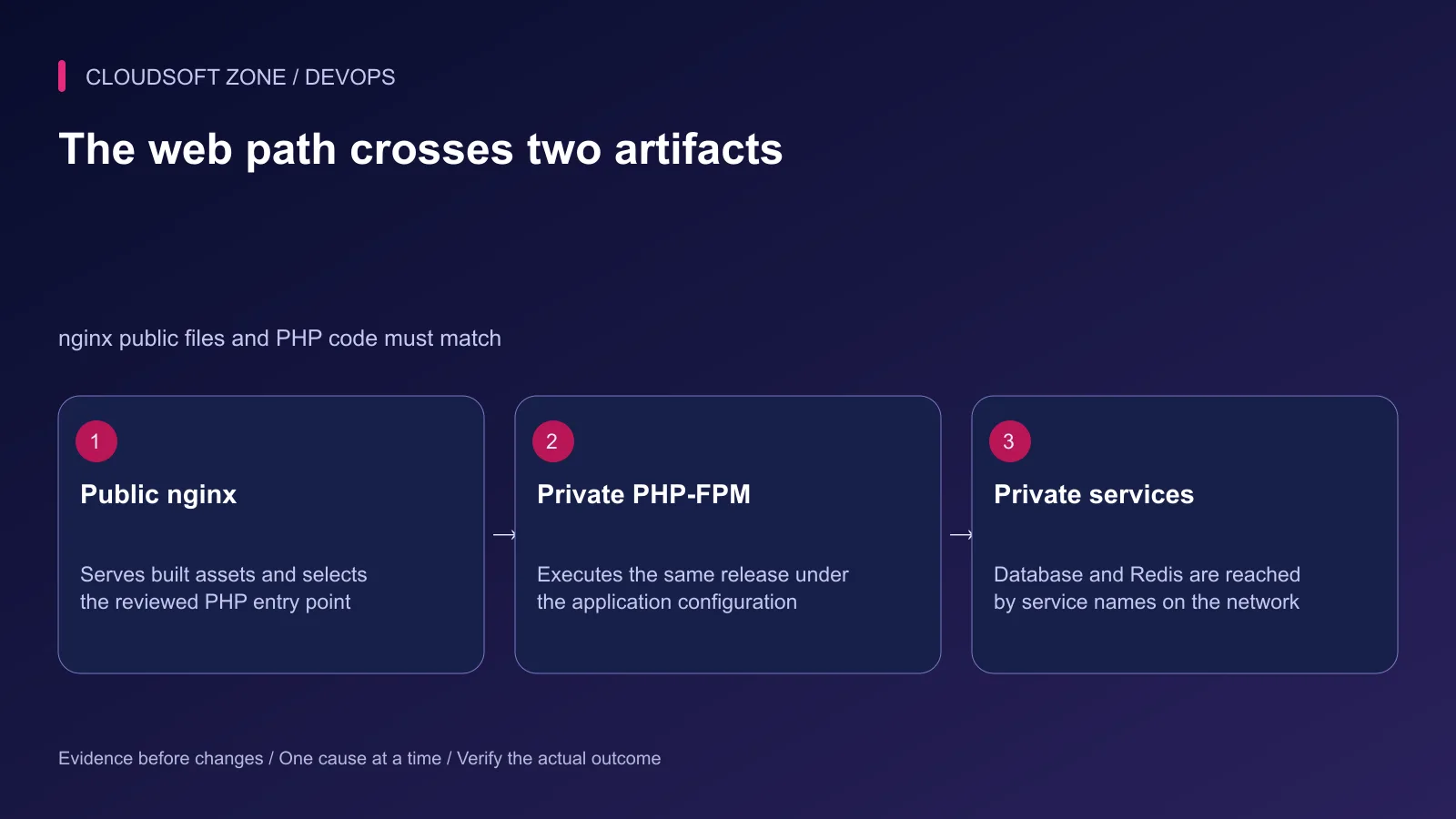
Build a PHP runtime image containing the locked Composer dependencies, Laravel code and required extensions. Build an nginx image containing the matching compiled public assets and reviewed server configuration.
Use one immutable source revision for both. The nginx document root and FastCGI script path must agree with the PHP image's public entry point even though they are separate filesystems.
| Service | Artifact or retained state | Public exposure |
|---|---|---|
| nginx | Public assets and FastCGI route policy | Only the reviewed edge port |
| PHP-FPM | Laravel code, dependencies and runtime extensions | Private FastCGI listener |
| Queue worker | Same Laravel release image | No public listener |
| MySQL | Named database volume | Private service network |
| Redis | Reviewed persistence and access configuration | Private service network |
Exclude real environments, local vendor directories and previous build output from the build context. Use Composer's platform checks against the actual PHP runtime; installing dependencies in an unrelated Composer image is not proof that FPM has their required extensions.
Step 2: Build with application-specific requirements
The official PHP image supplies extension installation helpers. Select extensions from the application's lockfile and configuration rather than installing an arbitrary list from a tutorial. A PhpRedis client requires that extension; a Predis-based application requires its installed PHP package instead.
Build Vite assets using the committed JavaScript lockfile. Keep development hot-reload output out of the nginx artifact. Do not bundle database credentials into public build variables.
Define writable Laravel storage and cache paths under the intended runtime user. Compile application configuration using the deployment environment at the appropriate release step; a build-time config cache can freeze the wrong credentials.
Step 3: Declare private services and one release identity
The fragment below requires two prebuilt images, a protected application environment file and three protected secret files. Replace the example registry paths with actual reviewed artifacts. The PHP image's working directory and public path are /srv/app and /srv/app/public; its extensions, storage permissions and dependencies must already satisfy the application.
services:
  web:
    image: registry.example.com/acme/laravel-web:reviewed-release
    ports: ["127.0.0.1:8080:80"]
    depends_on: [app]
    restart: unless-stopped
  app:
    image: registry.example.com/acme/laravel-php:reviewed-release
    env_file: /etc/acme/laravel.env
    environment:
      DB_HOST: db
      DB_PORT: "3306"
      REDIS_HOST: redis
    depends_on:
      db: {condition: service_healthy}
      redis: {condition: service_started}
    restart: unless-stopped
  worker:
    image: registry.example.com/acme/laravel-php:reviewed-release
    env_file: /etc/acme/laravel.env
    environment:
      DB_HOST: db
      DB_PORT: "3306"
      REDIS_HOST: redis
    command: ["php", "artisan", "queue:work", "redis", "--timeout=60"]
    stop_grace_period: 120s
    depends_on: [app]
    restart: unless-stopped
  db:
    image: mysql:8.4
    environment:
      MYSQL_DATABASE: app
      MYSQL_USER: app
      MYSQL_PASSWORD_FILE: /run/secrets/db_password
      MYSQL_ROOT_PASSWORD_FILE: /run/secrets/db_root_password
    secrets: [db_password, db_root_password]
    volumes: ["mysql_data:/var/lib/mysql"]
    healthcheck:
      test: ["CMD", "mysqladmin", "ping", "--silent"]
      interval: 10s
      timeout: 5s
      retries: 10
    restart: unless-stopped
  redis:
    image: redis:7.4
    command: ["redis-server", "/run/secrets/redis_config"]
    secrets: [redis_config]
    volumes: ["redis_data:/data"]
    restart: unless-stopped
secrets:
  db_password: {file: /etc/acme/secrets/db-password}
  db_root_password: {file: /etc/acme/secrets/db-root-password}
  redis_config: {file: /etc/acme/secrets/redis.conf}
volumes:
  mysql_data:
  redis_data:
The loopback web port is intended for a separately configured TLS edge on the host. MySQL and Redis have no published host ports. Tags illustrate image families; record approved immutable digests in a production release manifest.
Step 4: Supply configuration through a real contract
The protected Laravel environment must contain the same non-root database identity and password used for initialization, APP_KEY, APP_ENV=production, APP_DEBUG=false and the selected Redis credentials. Keep it out of source control and logs.
The protected Redis configuration must explicitly define its listener, data directory, authentication/access policy and persistence appropriate to queues or cache. Do not treat a secret filename as a complete Redis configuration.
Compose secrets arrive as files. MySQL's documented _FILE variables consume those files, but that convention is not automatically implemented by Laravel. Choose a protected environment delivery method or an explicit file-reading application mechanism.
MySQL initialization variables affect first initialization of an empty data directory. Changing an environment file is not a password rotation procedure for an existing database volume.
Step 5: Configure nginx and worker behavior
Use the app service name for the private FastCGI listener. Serve only the public root, select the intended index.php entry point and deny arbitrary PHP files. Keep asset and PHP paths consistent across both images.
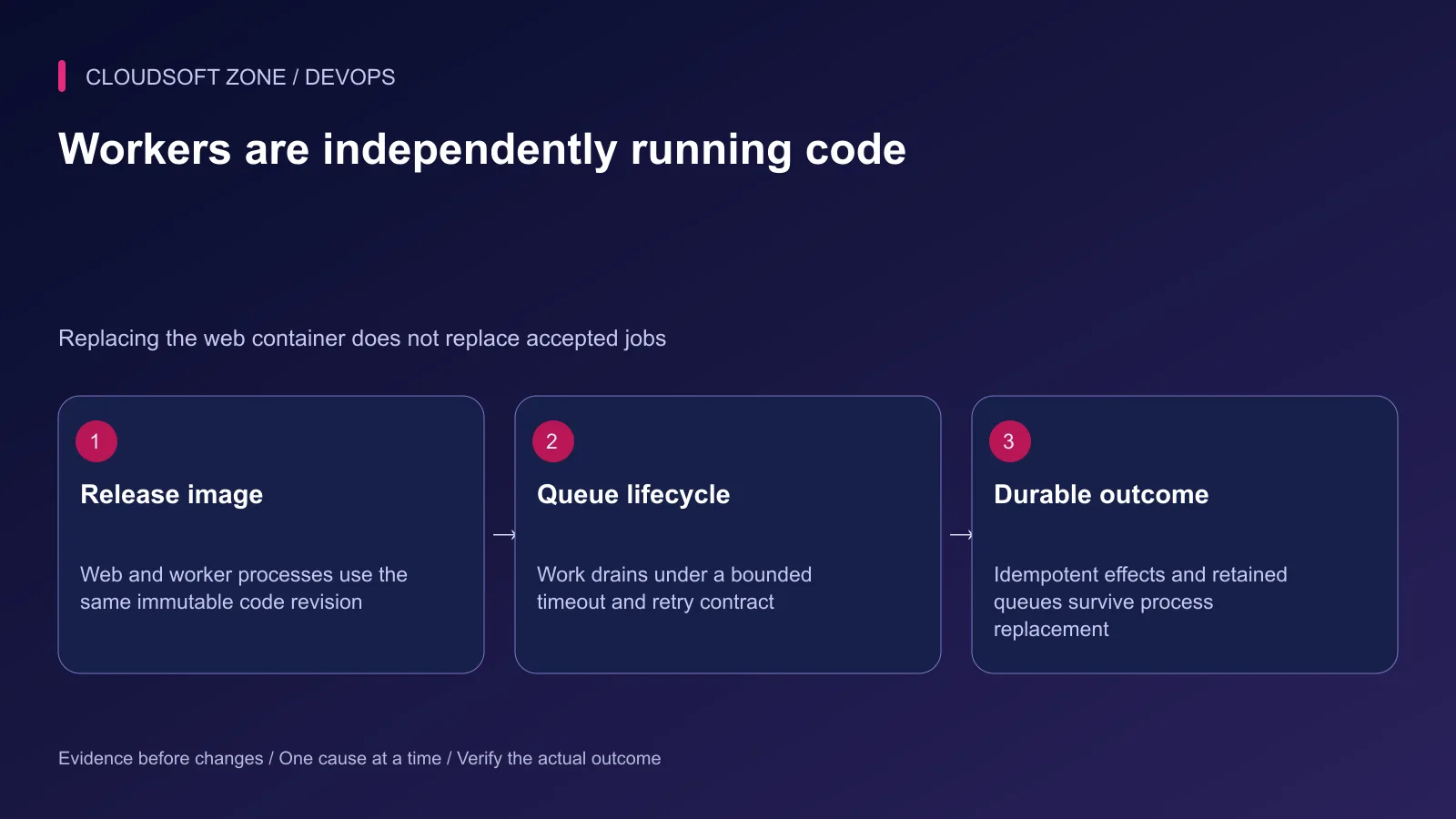
The worker example uses a 60-second timeout and 120-second stop grace for rehearsal. Set Redis queue retry_after above the job timeout and align application deadlines. Review signal handling and accepted-job behavior before choosing the actual production values.
A worker is independently running code. Replacing app does not establish that worker is on the same revision. Scheduler ownership also needs an explicit service or external scheduler with duplicate-execution controls.
Step 6: Gate the release on application readiness
The MySQL ping is only a basic liveness indication; it can succeed even when a particular application's credentials are wrong. Redis service_started likewise does not establish authenticated readiness.
Perform a bounded authenticated application query, a harmless cache operation and a controlled queue round trip before accepting the release. Include an unavailable dependency case so startup does not hang indefinitely.
Run reviewed migrations once through the deployment process, not concurrently in every container entrypoint. Keep old/new schema compatibility and the rollback artifact documented.
Step 7: Preserve data and rehearse recovery
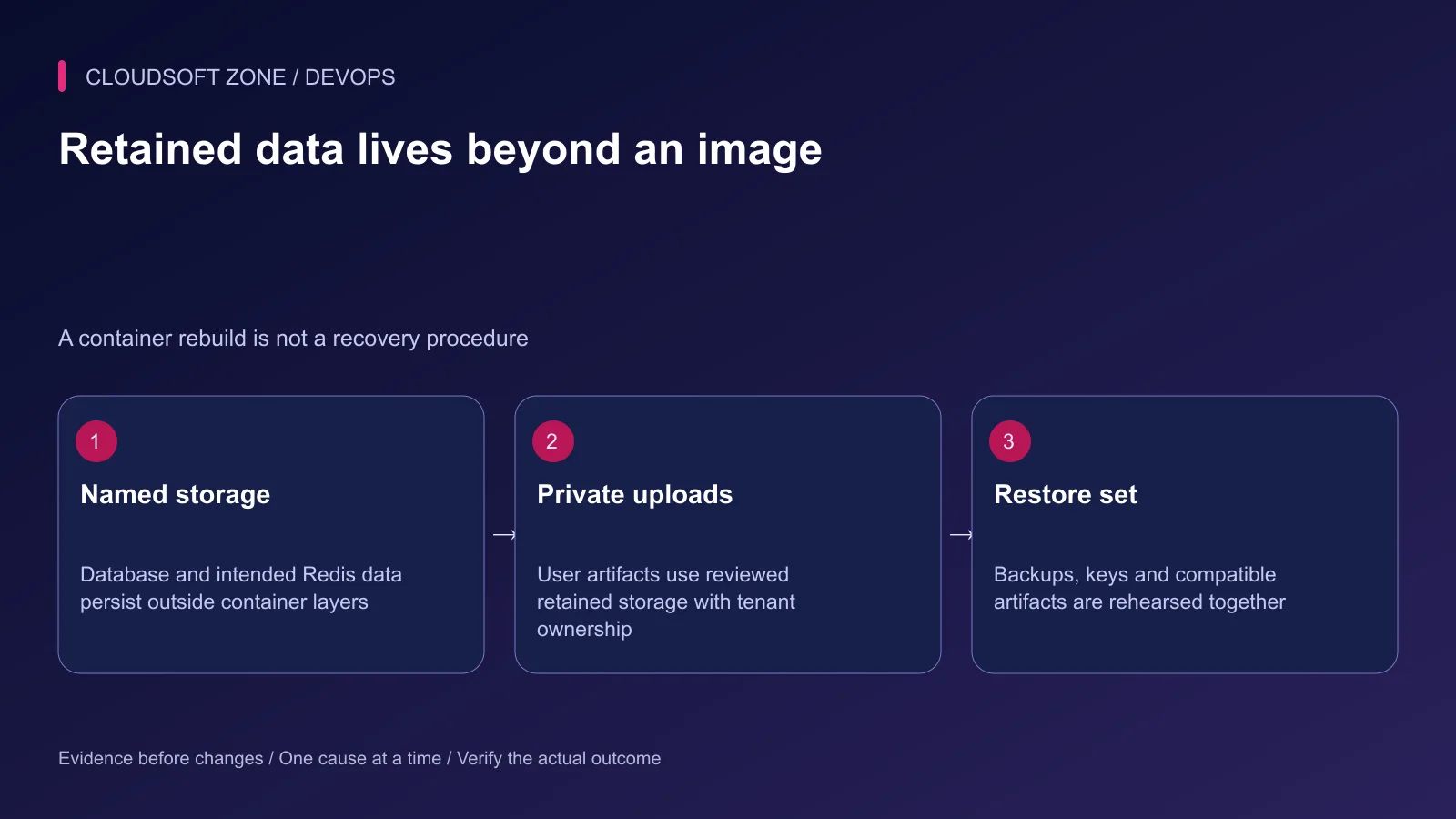
Named volumes retain intended database and Redis state across container replacement, but they are not backups. Define off-host recovery, retained encryption keys and uploaded-file storage separately.
Do not use compose down -v, volume pruning or database resets as release troubleshooting. Restore into an isolated environment first and verify the complete application outcome. Our MySQL backup guide covers database recovery mechanics.
Record image digests, configuration revision, migration outcome, worker revision and readiness evidence together. For an application-specific container and release design, contact Cloudsoft Zone.
Featured image: Cloudsoft Zone technical layout with docker artwork by dotCloud, Inc. (Apache License 2.0). Product mark resized proportionally for identification; no endorsement implied. Layout: CC BY-SA 4.0.
Frequently asked questions
Should nginx and PHP-FPM share the whole source directory?
They must agree on the PHP entry-point path and public assets, but nginx generally needs only the built public artifact. Build both from the same revision rather than live-mounting the whole repository in production.
Does depends_on mean Laravel can query the database?
Not automatically. A configured health condition can gate initial startup, but a listening database or basic ping is not an authenticated application query. Application readiness and bounded retry behavior remain necessary.
Will a Compose secret named DB_PASSWORD automatically configure Laravel?
No. Compose mounts selected secrets as files. Laravel needs an explicit configuration or entrypoint mechanism to consume a file; environment variable _FILE conventions are image-specific.
Sources
- Docker Laravel application guide — Docker
- Compose startup dependencies — Docker
- Compose secret file delivery — Docker
- MySQL official image initialization — Docker Official Images
- Laravel Redis clients and configuration — Laravel
- Official PHP image extension handling — Docker Official Images
Read next
TutorialDevOps5 min read
Laravel backup restore: recover the application, database and uploaded files together
Plan Laravel backup restore around a recoverable set of code, database, uploaded objects and protected keys, then verify the complete application in isolation.
Comments
No comments yet. Be the first to join the conversation.
Leave a comment
Every comment is read by a moderator before it appears. Your email address is never published; it is used only to contact you about this comment.
More from Cloudsoft Zone
TutorialDevOps6 min read
Laravel pending migrations: deploy safely without breaking the running application
Review Laravel pending migrations before activation: confirm the target database, check code compatibility, rehearse schema changes and verify recovery without resetting data.
By Nilesh Kushvaha
TutorialDevOps5 min read
nginx PHP upload limits: safely increase file sizes without exposing the server
Align nginx PHP upload limits with multipart overhead, PHP-FPM configuration, Laravel validation and temporary-storage capacity. Diagnose 413 errors before raising every limit.
By Nilesh Kushvaha
Troubleshooting guideDevOps6 min read
Laravel works locally, fails in production: trace runtime, configuration and request differences
Diagnose the Laravel works locally fails production problem by locating the first failing boundary: runtime, cached values, routing, permissions, dependencies or assets.
By Nilesh Kushvaha