
How to give an AI agent safe access to your business database
Give an AI agent read access to business data without handing it your database: parameterised tools, a read-only role, row-level security, masked views, limits and audit.
Updated 16 min read
In this article
The quickest way to connect an AI agent to your business data is to give it a database connection and a run_sql tool. It is also the way most likely to leak a customer list, mix up two clients' data or lock a production table during the lunchtime rush. This tutorial builds the safer version: a small set of parameterised tools, a database role that can only read masked views, row-level security that limits every query to one tenant, hard limits on rows and time, an audit log of every call, and a separate route for writes that a person approves. All of it is runnable in Node.js against an in-process PostgreSQL.
Tested with: Node.js 24.18.1, TypeScript 7.0.2, PGlite 0.5.4 (PostgreSQL 18.3 compiled to WebAssembly) and Zod 4.4.3. The SQL is standard PostgreSQL; MySQL differences are covered near the end.
Why not let the model write SQL?
Text-to-SQL demos look impressive, but in production three things go wrong. The model can be steered by content it reads (a customer's message, a product description, an email) into running a query you never intended; that is prompt injection, covered in prompt injection defence: design AI agents that fail safely. It writes plausible but wrong joins and filters, so answers look authoritative while counting the wrong rows. And it has no idea which columns are sensitive, which tenant the user belongs to, or which query will scan 40 million rows.
The OWASP guidance on Excessive Agency gives the alternative directly: avoid open-ended extensions, prefer granular tools, run them with the minimum database permissions, and enforce authorisation in the downstream system rather than trusting the model. In practice that means named tools with fixed SQL, and a database that would refuse anything else even if your tool code had a bug.
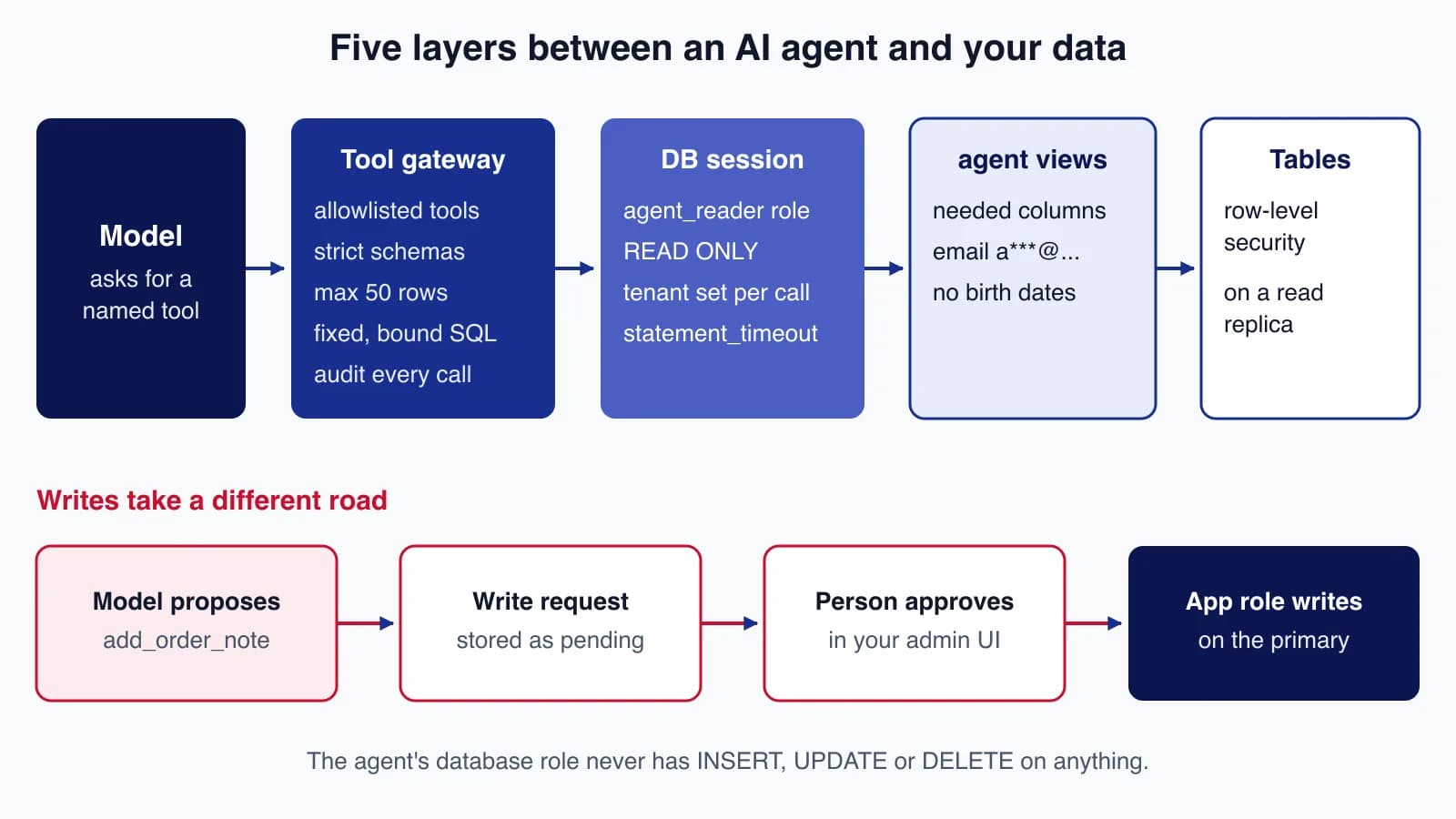
The five layers
- Tool gateway. The model sees a short list of tools such as
find_ordersandcustomer_summary. Each has a strict input schema and a fixed, parameterised query. - Database session. Every call runs in a read-only transaction, as a role with no write grants, with the tenant set for that transaction only and a statement timeout.
- Agent views. The role can read only views in an
agentschema, which expose the columns the agent needs and mask personal data. - Row-level security. PostgreSQL filters every row by the tenant set in the session, so a wrong ID returns nothing rather than someone else's data.
- Read replica. Point the agent at a replica, so a heavy query cannot slow the primary that serves your customers.
Writes do not go through these layers at all. The agent can only create a write request; a person approves it and your normal application code performs the change.
Step 1: schema, roles, views and row-level security
The example has two tables, customers and orders, both carrying a tenant_id because one database serves several businesses. Here is the whole setup:
-- Business tables (owned by the application role)
CREATE TABLE customers (
  id bigint PRIMARY KEY, tenant_id int NOT NULL,
  name text NOT NULL, email text NOT NULL, phone text, date_of_birth date
);
CREATE TABLE orders (
  id bigint PRIMARY KEY, tenant_id int NOT NULL,
  customer_id bigint NOT NULL REFERENCES customers(id),
  status text NOT NULL, total_cents int NOT NULL, created_at timestamptz NOT NULL
);

-- 1. Row-level security: a session only sees its own tenant
ALTER TABLE customers ENABLE ROW LEVEL SECURITY;
ALTER TABLE orders    ENABLE ROW LEVEL SECURITY;
CREATE POLICY tenant_only ON customers FOR SELECT
  USING (tenant_id = current_setting('app.tenant_id')::int);
CREATE POLICY tenant_only ON orders FOR SELECT
  USING (tenant_id = current_setting('app.tenant_id')::int);

-- 2. Roles: views are owned by agent_views; the agent connects as agent_reader
CREATE ROLE agent_views  NOLOGIN NOBYPASSRLS;  -- not the table owner, so RLS applies to it
CREATE ROLE agent_reader NOLOGIN NOBYPASSRLS;  -- use LOGIN and a password on a real server
GRANT SELECT ON public.customers, public.orders TO agent_views;

-- 3. A separate schema of views: only the columns the agent needs, PII masked
CREATE SCHEMA agent AUTHORIZATION agent_views;
SET ROLE agent_views;
CREATE VIEW agent.customers WITH (security_barrier = true) AS
  SELECT id, name,
         left(email, 1) || '***@' || split_part(email, '@', 2) AS email_masked,
         CASE WHEN phone IS NULL THEN NULL ELSE '***' || right(phone, 3) END AS phone_masked
  FROM public.customers;                      -- date_of_birth is simply not exposed
CREATE VIEW agent.orders WITH (security_barrier = true) AS
  SELECT id, customer_id, status, total_cents, created_at FROM public.orders;
GRANT USAGE ON SCHEMA agent TO agent_reader;
GRANT SELECT ON agent.customers, agent.orders TO agent_reader;
RESET ROLE;
REVOKE ALL ON SCHEMA public FROM PUBLIC;       -- agent_reader gets nothing in public
GRANT USAGE ON SCHEMA public TO agent_views;

-- 4. Audit log and write proposals, written by the application, never by the agent role
CREATE TABLE agent_audit (
  id bigserial PRIMARY KEY, at timestamptz NOT NULL DEFAULT now(),
  user_id text NOT NULL, tenant_id int NOT NULL, tool text NOT NULL,
  args jsonb NOT NULL, row_count int, duration_ms int, error text
);
CREATE TABLE agent_write_requests (
  id bigserial PRIMARY KEY, at timestamptz NOT NULL DEFAULT now(),
  user_id text NOT NULL, tenant_id int NOT NULL, action text NOT NULL,
  args jsonb NOT NULL, status text NOT NULL DEFAULT 'pending'
);
Some details matter more than they look:
- Who owns the views. By default PostgreSQL checks the base tables, and applies row-level security policies, against the view owner. (see the CREATE VIEW documentation). Table owners normally bypass row security on their own tables, so the views are owned by a separate
agent_viewsrole that is not the table owner and hasNOBYPASSRLS. The agent's role,agent_reader, getsSELECTon the views and nothing on the tables. - Masking in the view. The agent sees
a***@example.comand the last three digits of a phone number. Date of birth is not in the view at all. Mask in the database, not in the prompt: anything returned to the model can end up in its answer. - Tenant from a transaction setting. The policy reads
current_setting('app.tenant_id'). If the setting is missing the query fails rather than returning everything. In the demo, a session that had set it in an earlier transaction got an empty string back and failed withinvalid input syntax for type integer: "", which is the fail-closed behaviour you want. security_barriermakes PostgreSQL evaluate the view's own conditions before any conditions a caller adds, which matters if anyone ever queries the views directly.
Step 2: parameterised tools with strict schemas
Each tool has a description for the model, a Zod schema for its input and one fixed query with bound parameters. The schema rejects unknown keys and caps limit at 50; the same schema becomes the JSON Schema you send in the tool list, so the model is told the limits it will be held to.
import { z } from 'zod';
import type { PGlite, Transaction } from '@electric-sql/pglite';

export type Ctx = { userId: string; tenantId: number };
const MAX_ROWS = 50;

// Each tool: a description for the model, a strict input schema, and fixed, parameterised SQL.
const tools = {
  find_orders: {
    description: 'List recent orders for the current business, newest first. Optional status filter.',
    input: z.strictObject({
      status: z.enum(['pending', 'paid', 'shipped', 'refunded']).optional(),
      since: z.iso.date().optional(),
      limit: z.int().min(1).max(MAX_ROWS).default(20),
    }),
    run: (tx: Transaction, a: { status?: string; since?: string; limit: number }) =>
      tx.query(
        `SELECT id, customer_id, status, total_cents, created_at FROM agent.orders
         WHERE ($1::text IS NULL OR status = $1) AND ($2::date IS NULL OR created_at >= $2::date)
         ORDER BY created_at DESC LIMIT $3`,
        [a.status ?? null, a.since ?? null, a.limit]),
  },
  customer_summary: {
    description: 'Masked contact details and order totals for one customer of the current business.',
    input: z.strictObject({ customerId: z.int().positive() }),
    run: (tx: Transaction, a: { customerId: number }) =>
      tx.query(
        `SELECT c.id, c.name, c.email_masked, c.phone_masked,
                count(o.id)::int AS orders, coalesce(sum(o.total_cents), 0)::int AS lifetime_cents
         FROM agent.customers c LEFT JOIN agent.orders o ON o.customer_id = c.id
         WHERE c.id = $1 GROUP BY c.id, c.name, c.email_masked, c.phone_masked`,
        [a.customerId]),
  },
} as const;

export type ToolName = keyof typeof tools;

// JSON Schema for the model's tool list (works with Claude, OpenAI and Gemini tool formats).
export const toolDefinitions = Object.entries(tools).map(([name, t]) => ({
  name, description: t.description, input_schema: z.toJSONSchema(t.input),
}));

export async function callTool(db: PGlite, ctx: Ctx, name: string, rawArgs: unknown) {
  const started = Date.now();
  let rowCount: number | null = null;
  let error: string | null = null;
  try {
    const tool = tools[name as ToolName];
    if (!tool) throw new Error(`unknown tool ${name}`);
    const args = tool.input.parse(rawArgs);                // rejects extra keys, bad types, limit > 50
    const result = await db.transaction(async (tx) => {
      await tx.exec('SET TRANSACTION READ ONLY');            // first statement in the transaction
      await tx.exec('SET LOCAL ROLE agent_reader');          // on a real server: connect as this role
      await tx.exec(`SET LOCAL statement_timeout = '2s'`);
      await tx.query(`SELECT set_config('app.tenant_id', $1, true)`, [String(ctx.tenantId)]);
      return (tool.run as (tx: Transaction, a: unknown) => Promise<{ rows: unknown[] }>)(tx, args);
    });
    rowCount = result.rows.length;
    return { ok: true as const, rows: result.rows.slice(0, MAX_ROWS) };
  } catch (e) {
    error = e instanceof z.ZodError ? 'invalid arguments: ' + e.issues.map((i) => i.path.join('.') + ' ' + i.message).join('; ')
      : (e as Error).message;
    return { ok: false as const, error };                  // goes back to the model as the tool result
  } finally {
    await db.query(
      `INSERT INTO agent_audit (user_id, tenant_id, tool, args, row_count, duration_ms, error)
       VALUES ($1, $2, $3, $4, $5, $6, $7)`,
      [ctx.userId, ctx.tenantId, name, JSON.stringify(rawArgs ?? null), rowCount, Date.now() - started, error]);
  }
}

// Writes are never executed by the agent: they become a request a person approves.
export async function proposeWrite(db: PGlite, ctx: Ctx, action: 'add_order_note', args: { orderId: number; note: string }) {
  const r = await db.query<{ id: number }>(
    `INSERT INTO agent_write_requests (user_id, tenant_id, action, args) VALUES ($1, $2, $3, $4) RETURNING id`,
    [ctx.userId, ctx.tenantId, action, JSON.stringify(args)]);
  return `Request ${r.rows[0].id} created; a member of staff will review it.`;
}
What the code is careful about:
- No string building. Values are always bound parameters (
$1,$2). Even an optional filter is written as($1::text IS NULL OR status = $1)rather than appending SQL. - The session is set inside the transaction.
SET TRANSACTION READ ONLYmust come first, thenSET LOCAL ROLE,SET LOCAL statement_timeoutandset_config(..., true), all of which end with the transaction. With a connection pool, session-level settings would leak into the next request that borrows the connection; transaction-local settings cannot. - The tenant comes from your authenticated session. It is never a tool argument the model can choose.
- Errors are returned, not thrown. The model gets a short, safe error it can explain to the user; the audit row gets the detail.
- Audit happens in
finally. Every call is recorded, including refused ones, with the arguments exactly as the model sent them.
On a real server, do not use SET ROLE from a powerful login. Create agent_reader with LOGIN and its own password, give the agent service only that connection string, and point it at a replica. PGlite has a single built-in superuser, so the demo switches role inside each transaction to imitate that.
Step 3: run it, including the attacks
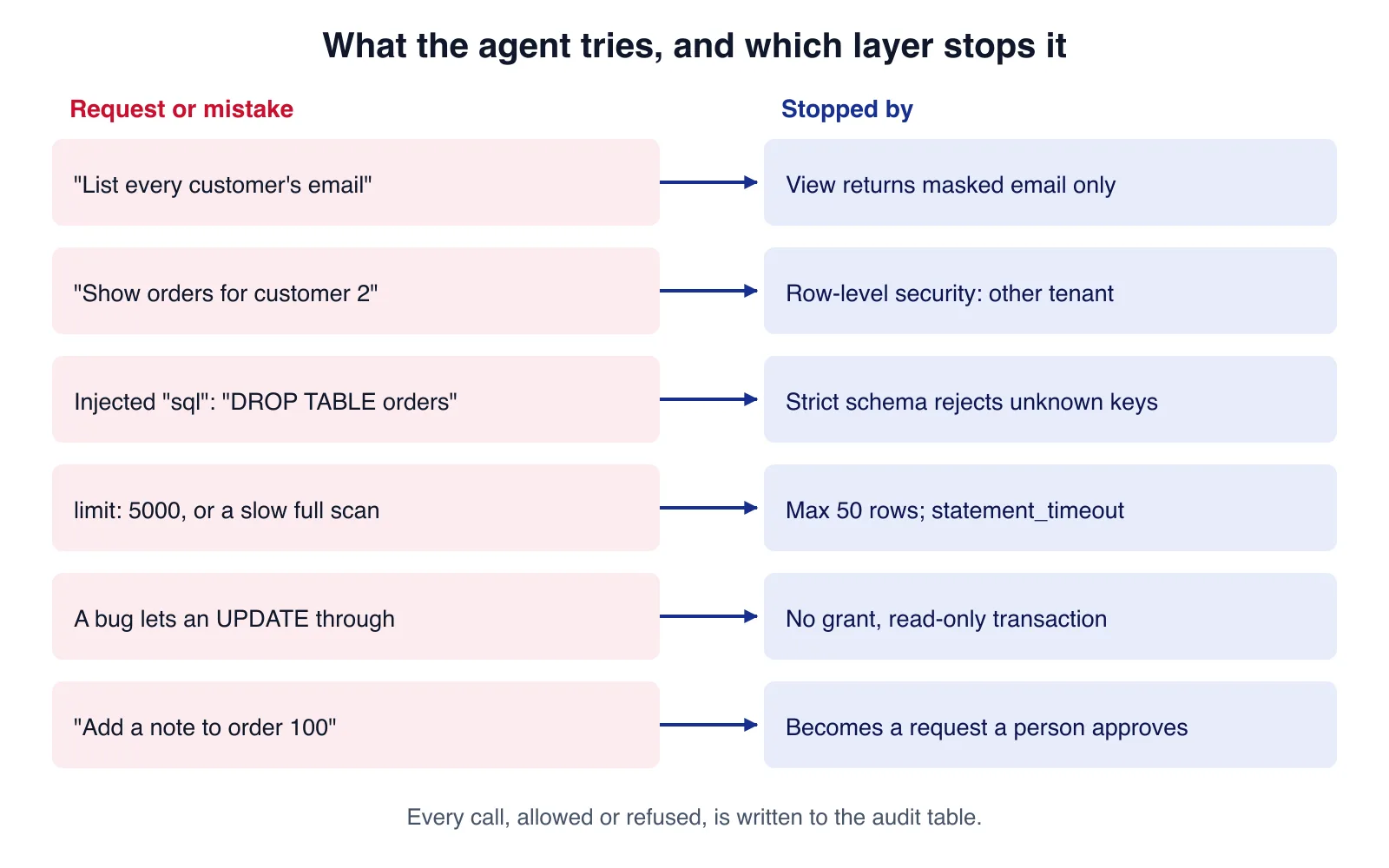
The demo seeds two tenants and then makes the calls an agent would make, followed by the mistakes and attacks the layers should stop. The second half bypasses the tool layer on purpose and runs raw SQL as the agent role, to prove the database refuses on its own.
import { PGlite } from '@electric-sql/pglite';
import { readFileSync } from 'node:fs';
import { callTool, proposeWrite, toolDefinitions } from './tools.ts';

const db = new PGlite();
await db.exec(readFileSync(new URL('./schema.sql', import.meta.url), 'utf8'));
await db.exec(`
  INSERT INTO customers VALUES
    (1, 10, 'Ada Shop Ltd', 'ada@example.com', '+44 20 7946 0001', '1980-02-01'),
    (2, 20, 'Other Tenant Co', 'boss@example.net', '+1 555 0100', '1975-05-05');
  INSERT INTO orders VALUES
    (100, 10, 1, 'paid',     4999, '2026-07-20T10:00Z'), (101, 10, 1, 'refunded', 1999, '2026-07-22T15:30Z'),
    (200, 20, 2, 'paid',    99999, '2026-07-21T09:00Z');`);

const ctx = { userId: 'u-ada', tenantId: 10 };
const show = (label: string, v: unknown) => console.log(`\n# ${label}\n` + JSON.stringify(v));

show('find_orders {limit: 5}', await callTool(db, ctx, 'find_orders', { limit: 5 }));
show('customer_summary {customerId: 1}', await callTool(db, ctx, 'customer_summary', { customerId: 1 }));
show('customer_summary {customerId: 2} (other tenant)', await callTool(db, ctx, 'customer_summary', { customerId: 2 }));
show('find_orders {limit: 5000}', await callTool(db, ctx, 'find_orders', { limit: 5000 }));
show('find_orders with injected key', await callTool(db, ctx, 'find_orders', { status: 'paid', sql: 'DROP TABLE orders' }));
show('run_sql (not a tool)', await callTool(db, ctx, 'run_sql', { q: 'SELECT * FROM customers' }));
show('write proposal', await proposeWrite(db, ctx, 'add_order_note', { orderId: 100, note: 'Customer called' }));

// Defence in depth: even if a tool had a bug, the database scope still refuses.
async function asAgent(sql: string, tenant: string | null = '10') {
  try {
    return await db.transaction(async (tx) => {
      await tx.exec('SET TRANSACTION READ ONLY');
      await tx.exec('SET LOCAL ROLE agent_reader');
      if (tenant) await tx.query(`SELECT set_config('app.tenant_id', $1, true)`, [tenant]);
      return (await tx.query(sql)).rows;
    });
  } catch (e) { return 'ERROR: ' + (e as Error).message; }
}
show('agent role reads base table', await asAgent('SELECT date_of_birth FROM public.customers'));
show('agent role tries to write', await asAgent(`UPDATE agent.orders SET status = 'refunded'`));
show('agent role, tenant not set', await asAgent('SELECT count(*) FROM agent.orders', null));
show('agent role counts all orders', await asAgent('SELECT count(*)::int AS n FROM agent.orders'));
show('audit log', (await db.query('SELECT tool, row_count, error FROM agent_audit ORDER BY id')).rows);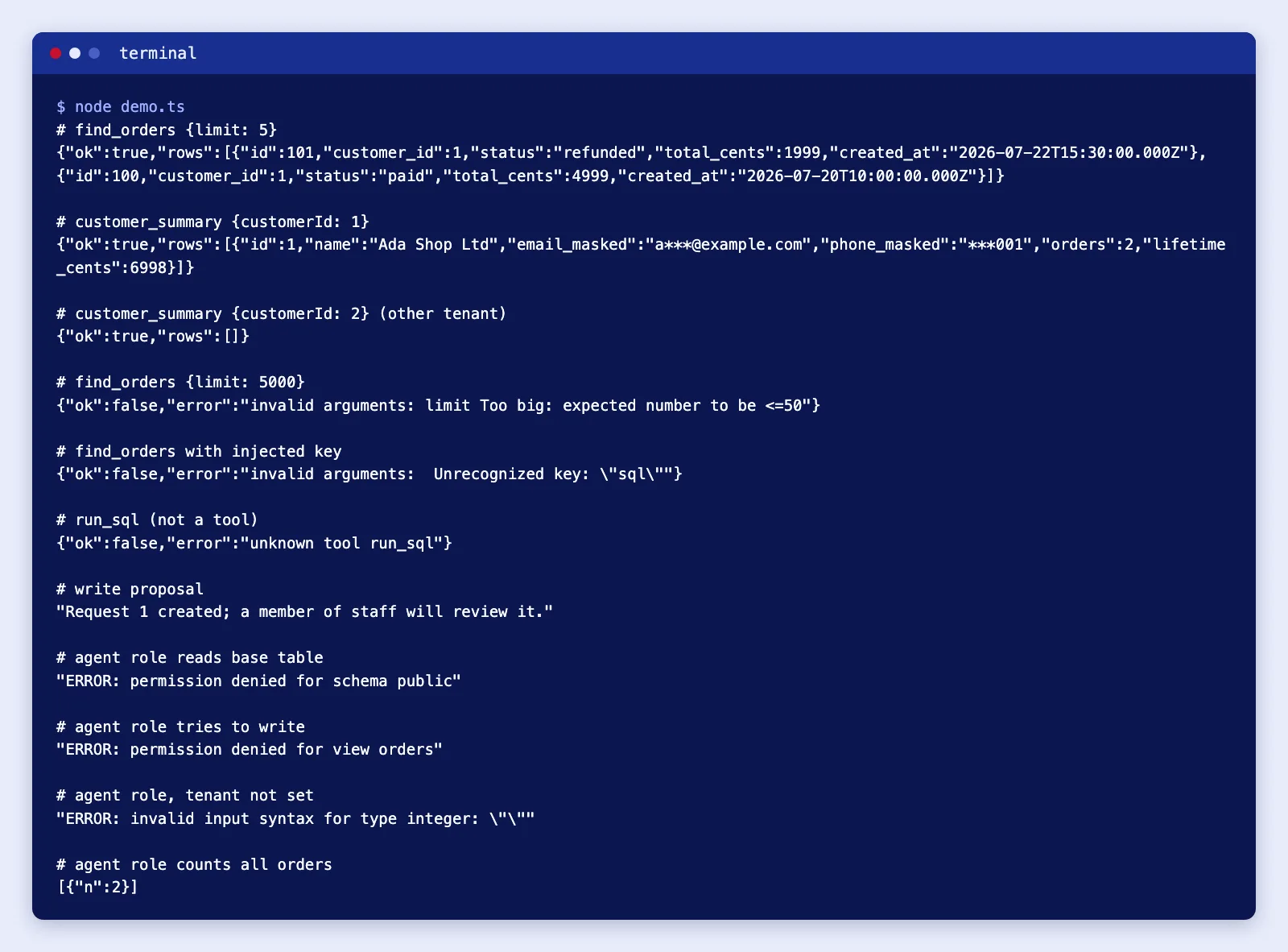
The results, line by line: tenant 10 sees its two orders and a masked customer; asking for tenant 20's customer returns an empty list, not an error that confirms the record exists; a limit of 5,000 and an injected sql key are rejected by the schema; an unknown tool is refused; and the raw-SQL probes fail with permission denied for schema public, permission denied for view orders and the empty-tenant error. Counting every order through the view returns 2, not 3, because row-level security hides the other tenant's order.
Two problems came up while building this. TypeScript 7 failed on PGlite's type declarations with TS2503: Cannot find namespace 'Emscripten' because the project's types list only named node; installing @types/emscripten and adding it to types fixed it. And statement_timeout is not enforced by PGlite: a pg_sleep(3) under a 500 ms timeout ran to completion in my test, presumably because the WebAssembly build runs single-threaded. Test timeouts against a real PostgreSQL server before relying on them.
Writes: propose, never perform
The agent's role cannot insert, update or delete anything, and the read-only transaction would refuse even if a grant slipped in. When the user asks the agent to change something, the agent calls proposeWrite, which stores the action and its arguments as a pending request in a table the agent cannot touch. Staff see the request in your admin UI and approve or reject it, and your ordinary application code, with its validation and permissions, performs the change. The design of that approval step, with risk tiers, expiry and delegation, is covered in human-in-the-loop AI: when agents must ask for approval.
If your agent connects through MCP rather than your own tool loop, the same database design applies behind the MCP server; the client-side questions of server trust and tool approval are covered in MCP security: tool approval, server trust and least privilege.
Limits that protect the database
| Limit | Where | Example value |
|---|---|---|
| Rows per call | Schema maximum and LIMIT $n | 50 |
| Time per statement | SET LOCAL statement_timeout | 2 seconds |
| Calls per conversation | Agent loop | 10 to 20 tool calls |
| Calls per user per minute | Rate limiter in front of the gateway | Match normal human use |
| Concurrent agent connections | A separate, small connection pool | A few connections, never the main pool |
Index the columns your tools filter and sort on, and run EXPLAIN on each tool query with realistic data, because the agent will call them far more often than a person clicking through reports.
If your data already lives in a production database shared by several clients and you are unsure what an agent could reach, a review before connecting anything is cheaper than an incident; Cloudsoft Zone's AI automation team does this kind of access design.
If you run MySQL
MySQL 8.4 has no row-level security, so the tenant filter has to be enforced another way:
- Use views with
SQL SECURITY DEFINERand a dedicated, read-only account for the agent. Note that, per the MySQL CREATE VIEW documentation, a view'sSELECT"cannot refer to system variables or user-defined variables", so you cannot copy the PostgreSQLcurrent_settingtrick into a view. - Keep the tenant filter in every tool query, bound from your authenticated session, and test it. For stronger isolation, give each tenant its own schema or database and its own agent account.
- Start agent transactions with
START TRANSACTION READ ONLYand cap query time with themax_execution_timesystem variable or theMAX_EXECUTION_TIMEoptimiser hint, both of which apply toSELECTstatements. - Point the agent at a replica (MySQL 8.4 GTID-based replication is the usual setup), and remember replica lag: an agent may not see an order placed seconds ago.
Common mistakes
- Reusing the application's database user. It can write, it can usually read every tenant, and it often owns the tables, which bypasses row-level security.
- Masking in the prompt. "Do not reveal emails" is not masking. If the column reaches the model, assume it can reach the user.
- Letting the model pass the tenant or user ID. Take identity from your session, never from tool arguments.
- Session-level settings with a pool.
SET ROLEorSET app.tenant_idwithoutLOCALsurvive on the connection and leak into the next request. - Returning huge results. Large tool outputs cost tokens, slow the agent and widen any leak. Summarise in SQL and cap rows.
- Logging full results. Audit the arguments and row counts; store result bodies only if you have a reason and a retention period.
- Running against the primary. An unindexed tool query on the primary database becomes your incident at the worst time.
When not to use this approach
- Open-ended analysis by staff. Analysts exploring data are better served by a BI tool on a warehouse, or a text-to-SQL tool restricted to a read-only, de-identified copy, than by an agent with a dozen fixed tools.
- Questions answered by documents, not rows. Policies, manuals and FAQs belong in a retrieval index, not database tools.
- When an API already exists. If your application has a well-authorised internal API, wrap that instead of going to the database; it already encodes your business rules.
- Highly sensitive data. Health, payment card or children's data may need legal and security review before any AI provider sees even masked extracts.
Cloudsoft Zone builds AI agents that work with your real business data through narrow, audited tools, read-only access and approval flows for changes. See our AI business process automation service.
Frequently asked questions
Is a read-only database user enough on its own?
No. Read-only stops writes, but the agent could still read every tenant and every sensitive column. Combine it with masked views, row-level security or tenant filters, fixed tools and row limits.
Can I let the agent write SQL if the user is read-only?
For internal analysis on a de-identified copy, perhaps. For customer-facing agents on live data, use fixed, parameterised tools: they are predictable, testable and cannot be steered into unexpected queries.
Does row-level security work with views?
Yes. By default PostgreSQL applies the policies of the view owner, or of the caller if the view has
security_invoker = true. Make sure the owner is not the table owner and does not haveBYPASSRLS.What about MySQL, which has no row-level security?
Use read-only accounts, definer views that expose only safe columns, a tenant filter in every tool query bound from your session, and separate schemas or accounts per tenant where isolation must be strict.
Your next customer could start right here.
Introduce your tool, product or business to readers exploring technology.
Explore placements and request a private quote
Sources
- LLM06:2025 Excessive Agency — OWASP GenAI Security Project
- Row Security Policies — PostgreSQL Global Development Group
- CREATE VIEW — PostgreSQL Global Development Group
- Client Connection Defaults (statement_timeout, default_transaction_read_only) — PostgreSQL Global Development Group
- CREATE VIEW Statement — Oracle (MySQL 8.4 Reference Manual)
- PGlite documentation — ElectricSQL
- JSON Schema (z.toJSONSchema) — Zod
Written with substantial AI assistance. Facts checked against cited sources. Editorial policy.
Comments
No comments yet. Be the first to join the conversation.
Leave a comment
Every comment is read by a moderator before it appears. Your email address is never published; it is used only to contact you about this comment.
More from Cloudsoft Zone

Architecture guideAI and Automation
How to build a safe AI content pipeline with human fact review
An architecture for AI-assisted publishing where people stay responsible: untrusted source snapshots, claim checking with citations, a review queue AI cannot skip, labels and rollback.
By Cloudsoft Zone

TutorialNode.js
How to test a Node.js API with the built-in test runner (node:test)
Write, run, mock and measure coverage for a small Node.js HTTP API using only node:test and node:assert. Covers port-0 servers, fetch(), spies, t.mock.method(), fake dates and coverage thresholds.
By Cloudsoft Zone

TutorialNode.js
Node.js streams in practice: pipeline(), backpressure and async generators
Process files of any size in Node.js with flat memory use. A hands-on guide to stream/promises pipeline(), backpressure, async generator transforms, AbortSignal timeouts and streaming downloads over HTTP.
By Cloudsoft Zone