
Git interview questions and answers: from commits to reflog
17 Git interview questions with model answers: index and branches, merge vs rebase, reset modes, revert, conflicts, reflog recovery, bisect and Git 3.0.
Updated 8 min read

In this article
Git questions appear in almost every developer interview, from a quick "merge or rebase?" to "you just ran reset --hard on the wrong branch, what now?". This guide gives you short, correct answers to the questions interviewers actually ask, from the three areas of a repository to recovering lost commits with the reflog and finding a bug with git bisect.
Answers are checked against the official Git documentation for Git 2.56 (released on 28 September 2026), and every command shown was run in a scratch repository with Git 2.54. Git 3.0 has been announced but has no release date yet, so you should know what it will change too.
Beginner questions: how Git stores your work
1. What are the working tree, the index and the repository?
The working tree is the files you edit. The index (or staging area) is the snapshot you are preparing for the next commit; git add copies changes into it. The repository (the .git directory) stores committed snapshots permanently. git status compares all three: "Changes to be committed" are index versus HEAD, and "Changes not staged" are working tree versus index.
2. What is a commit, and what is a branch?
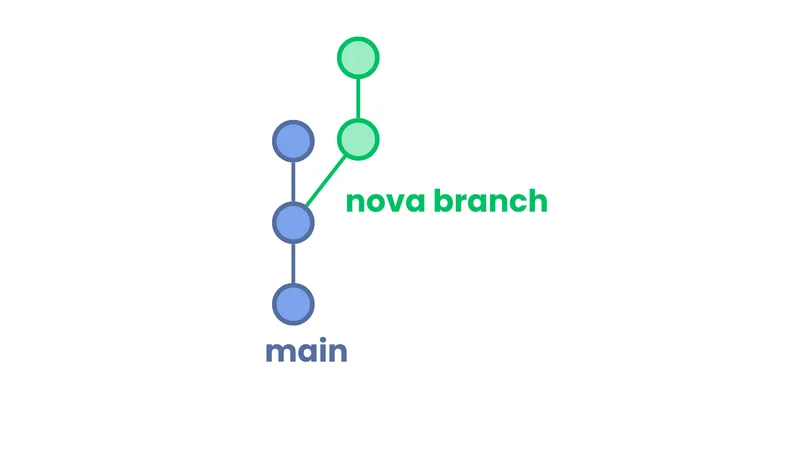
A commit is an immutable snapshot of the whole project plus metadata (author, message, parent commit or commits), identified by a hash of its content. A branch is just a movable pointer to a commit; each new commit on the branch moves the pointer forward. HEAD normally points to the current branch. That is why creating a branch is instant and cheap.
3. What is the difference between git fetch and git pull?
git fetch downloads new commits and updates remote-tracking branches such as origin/main without touching your work. git pull is a fetch followed by integrating the changes into your branch. In current Git, if your branch and the remote have diverged and you have not chosen a method, pull defaults to --ff-only and stops, so you decide explicitly with git pull --rebase, --no-rebase or the pull.rebase setting.
4. How do git switch and git restore relate to git checkout?
git checkout does two unrelated jobs: changing branches and restoring files. git switch handles only branches (git switch -c fix-login creates and switches), and git restore handles only files (git restore --staged file unstages, git restore file discards local edits). The Git project has said checkout is not being removed, but the newer commands are clearer to use and to explain.
5. What does .gitignore do, and why is a committed file still tracked after you ignore it?
.gitignore lists patterns for untracked files Git should not offer to add, such as node_modules/ or .env. It has no effect on files that are already tracked. To stop tracking one, run git rm --cached path and commit; the file stays on disk. If it contained a secret, rotate the secret, because it remains in history.
Intermediate questions: combining and undoing work
6. Merge or rebase: what is the difference?
git merge feature joins two histories with a merge commit that has two parents (or fast-forwards if there is nothing to join). History is preserved exactly as it happened. git rebase main replays your branch's commits on top of main, creating new commits with new hashes and a straight line of history. The rule interviewers want to hear: do not rebase commits that others have already based work on, because rewriting shared history forces everyone else to recover.
git switch feature
git rebase main            # replay feature's commits onto main
git switch main
git merge --no-ff feature  # or: keep an explicit merge commit
7. Explain git reset --soft, --mixed and --hard.
All three move the current branch to another commit. They differ in what else they touch:
| Mode | Index | Working tree | Typical use |
|---|---|---|---|
--soft | Unchanged | Unchanged | Squash the last few commits into one |
--mixed (default) | Reset to match the commit | Unchanged | Unstage everything but keep edits |
--hard | Reset | Overwritten | Throw away local changes entirely |
Mention that --hard discards uncommitted work permanently, and that --keep is a safer variant that aborts if it would overwrite local changes.
8. When do you use git revert instead of git reset?
Use revert on anything already pushed or shared. It creates a new commit that applies the inverse of an earlier one, so history only moves forward and nobody has to force-pull. reset rewrites where the branch points, which is fine for local, unpublished commits.
9. How do you resolve a merge conflict?
Git stops and marks the conflicting regions with <<<<<<<, ======= and >>>>>>>. Edit each file to the correct final content (not simply "ours" or "theirs" without reading), remove the markers, run the tests, then git add the files and run git merge --continue or git rebase --continue. git merge --abort returns you to where you started. A strong answer adds that small, frequently integrated branches cause fewer conflicts.
10. What do git stash and git cherry-pick do?
git stash push -m "wip" saves uncommitted changes and cleans the working tree so you can switch tasks; git stash pop reapplies and drops the latest entry. git cherry-pick <commit> applies the change from one specific commit onto the current branch as a new commit, which is useful for back-porting a fix to a release branch.
Advanced questions: history, recovery and safety
11. You ran git reset --hard by mistake. How do you get your commits back?
Use the reflog, a local log of where HEAD and each branch have pointed. Commits are not deleted immediately; they become unreachable and are only cleaned up later by garbage collection.
git reflog
# 254af1d HEAD@{0}: reset: moving to HEAD~2
# 3514a21 HEAD@{1}: commit: c4
git reset --hard HEAD@{1}   # or: git branch rescue 3514a21
The reflog cannot recover changes that were never committed or staged, which is a good point to make.
12. How do you clean up commits before opening a pull request?
Interactive rebase: git rebase -i main lets you reorder, squash, fixup, reword or drop commits. A neat workflow is git commit --fixup=<hash> during development, then git rebase -i --autosquash main to fold the fixes in automatically. Only do this on your own branch.
13. Why prefer --force-with-lease over --force?
After rewriting a branch you must force-push. git push --force overwrites the remote unconditionally, even if a teammate pushed in the meantime. --force-with-lease only overwrites if the remote branch is still where your last fetch saw it, so you do not silently delete someone else's work.
14. How does git bisect find the commit that introduced a bug?
It runs a binary search over history. You mark one bad commit and one good commit, and Git checks out the midpoint for you to test, halving the range each time. With a script that exits 0 for good and non-zero for bad, it runs unattended:
git bisect start HEAD v2.3.0
git bisect run npm test
# ... "c22c1ad is the first bad commit"
git bisect reset
A thousand commits need only about ten test runs.
15. What is a detached HEAD?
HEAD points directly at a commit instead of a branch, for example after git switch --detach v1.2.0 or checking out a tag. You can look around and even commit, but new commits belong to no branch and become hard to find once you switch away. If you want to keep them, create a branch first: git switch -c keep-this.
16. A secret was committed and pushed. What do you do?
First, revoke and rotate the secret, because anyone who fetched or cloned the repository already has it. Then remove it from history with a history-rewriting tool such as git filter-repo, force-push, and ask collaborators to re-clone. Finally, add the file to .gitignore and consider secret scanning in CI or on the hosting platform. Interviewers listen for "rotate first".
17. What will change in Git 3.0?
The Git project's breaking-changes document lists, for new repositories: main instead of master as the default initial branch, SHA-256 instead of SHA-1 as the default hash function, and the reftable format for storing references. It also removes long-deprecated features such as grafts and git whatchanged, and makes Rust a required build dependency. There is no planned release date yet. Current versions already warn when you run git init without setting init.defaultBranch.
What interviewers look for
- The model behind the commands: commits are snapshots, branches are pointers, the index is a staging snapshot.
- Safety instincts: revert shared history, rewrite only your own branch, force-push with a lease.
- Recovery skills: reflog,
merge --abort,restore. - Team workflow: small branches, pull requests, readable commit messages and code review.
How to practise
- Create a throwaway repository with five commits and a feature branch; merge it once and rebase it once, then compare
git log --oneline --graph --all. - Run
git reset --hard HEAD~2and recover the commits from the reflog. - Plant a "bug" in one commit and find it with
git bisect run. - Explain each step aloud as if to an interviewer.
Those four exercises take under an hour and cover most of what a junior or mid-level Git interview asks.
Frequently asked questions
Should I say merge or rebase is better?
Neither is always better. Say that rebase gives a linear history and suits private branches, merge preserves history and is safe on shared branches, and teams usually agree a convention.
Does git pull rebase by default?
No. When histories have diverged and no method is configured,
git pulldefaults to fast-forward only and stops. Choose with--rebase,--no-rebaseor thepull.rebasesetting.Can the reflog recover everything?
It recovers commits that are unreachable but not yet garbage-collected. It cannot recover changes that were never committed, and it is local to your clone.
Is git checkout deprecated?
No. The Git project states it is not being removed.
git switchandgit restoreare clearer alternatives for its two jobs.When is Git 3.0 released?
There is no planned release date. Its breaking-changes list includes
mainas the default branch, SHA-256 as the default hash and reftable references for new repositories.What is the difference between Git and GitHub?
Git is the distributed version control system that runs on your machine. GitHub, GitLab and similar services host Git repositories and add pull requests, reviews, CI and issue tracking.
Your next customer could start right here.
Introduce your tool, product or business to readers exploring technology.
Explore placements and request a private quote
Sources
- Git downloads and latest source release — git-scm.com
- git-reset documentation — git-scm.com
- git-pull documentation — git-scm.com
- git-switch documentation — git-scm.com
- Upcoming breaking changes (Git 3.0) — git-scm.com
Written with substantial AI assistance. Facts checked against cited sources. Editorial policy.
Comments
No comments yet. Be the first to join the conversation.
Leave a comment
Every comment is read by a moderator before it appears. Your email address is never published; it is used only to contact you about this comment.
More from Cloudsoft Zone

Interview preparationInterview questions
Docker interview questions and answers for Docker Engine 29
18 Docker interview questions from images and volumes to build cache, Compose, networking, signals and the containerd image store, with short model answers.
By Cloudsoft Zone

Interview preparationInterview questions
PHP interview questions and answers for 2026 (PHP 8.4 and 8.5)
22 PHP interview questions grouped by level, with concise model answers and short examples covering strict types, enums, match, PDO, password hashing, property hooks and the PHP 8.5 pipe operator.
By Cloudsoft Zone

Resource guideWordPress
WordPress security hardening checklist for 2026 (WordPress 7.1)
A practical WordPress 7.1 hardening checklist based on the official handbook: updates, two-step logins, wp-config.php constants, file permissions, database privileges, firewalls, WP-CLI checksum checks and tested backups.
By Cloudsoft Zone