
Next.js vs a React SPA for SaaS products: SEO, performance and cost
Marketing site or app shell? We built the same page as a Vite SPA and with Next.js, measured paint and interactivity, and priced hosting from published rates.
Updated 11 min read

In this article
For a SaaS product, "Next.js or a React single-page app?" is really two questions: how should the public marketing pages be built, and how should the logged-in app be built? They have different jobs. Marketing pages must be found by search engines and paint fast on a phone; the app must be quick to use after login and cheap to run. This guide compares a Next.js app with a Vite-built React SPA on SEO, measured performance and hosting cost, using published prices and a test we ran on the same page built both ways, and ends with clear rules for when each is the better choice.
Tested with: Next.js 16.2.11 (Turbopack, output: 'export' for the static comparison), Vite 8.1.5 with @vitejs/plugin-react 6.0.4, React 19.2.8, React Router 8.3.0, Node.js 24.19.0, Chromium via Playwright. Prices from Vercel's pricing page as archived on 23 July 2026 and Cloudflare's Workers pricing documentation as archived on 18 June 2026.
The short answer
| Part of the product | Usually best | Why |
|---|---|---|
| Marketing site, docs, blog, pricing | Pre-rendered HTML (Next.js static or server-rendered pages, or any static site generator) | Content and metadata in the HTML; fastest first paint; works for every crawler |
| Logged-in app behind authentication | Either; an SPA is often simpler and cheaper | No SEO requirement; users load it once and stay; static hosting costs almost nothing |
| Public pages generated from app data (profiles, listings, shared reports) | Next.js (server rendering or ISR) | Thousands of indexable URLs that change with your data |
Many successful SaaS products use both: a pre-rendered marketing site on the main domain and an SPA at app. or /app. Choosing Next.js for everything is also reasonable when one team owns both and wants one codebase. The rest of this article shows the trade-offs behind those rows.
SEO: what changes and what does not
A Vite SPA ships an almost empty HTML file. Ours was 0.38 kB: a <div id="root"> and a script tag. Every heading, price and description is created by JavaScript in the browser. The Next.js build of the same pricing page returned HTML that already contained the heading, the three plans and a <meta name="description"> tag set through the Metadata API.
Google's crawler renders JavaScript, so a well-built SPA can be indexed by Google, usually after a delay for rendering. Many other consumers of your pages do not run JavaScript: link previews in Slack, LinkedIn and messaging apps, and, according to Vercel's December 2024 analysis of crawler traffic, the AI crawlers it measured from OpenAI and Anthropic. For them, the SPA's pricing page is blank. Per-page titles and descriptions are also harder in an SPA: they have to be set at run time, which crawlers that do not render never see.
None of this matters for the logged-in app. Search engines cannot log in, and you should not want them to. So the SEO argument is an argument about the marketing site and any public, data-driven pages, not about the app.
Performance: what we measured
We built one pricing page (a heading, a monthly/annual toggle and three plan cards) twice: as a Vite 8 React SPA with React Router and a lazily loaded dashboard route, and as a Next.js 16.2 page exported to static files. Both were served by the same small gzip server, and each was loaded nine times from a cold cache in Chromium with Lighthouse's Slow 4G network values (150 ms round trip, 1.6 Mbps) and a 4x CPU slowdown, as a stand-in for a mid-range phone on a weak connection.
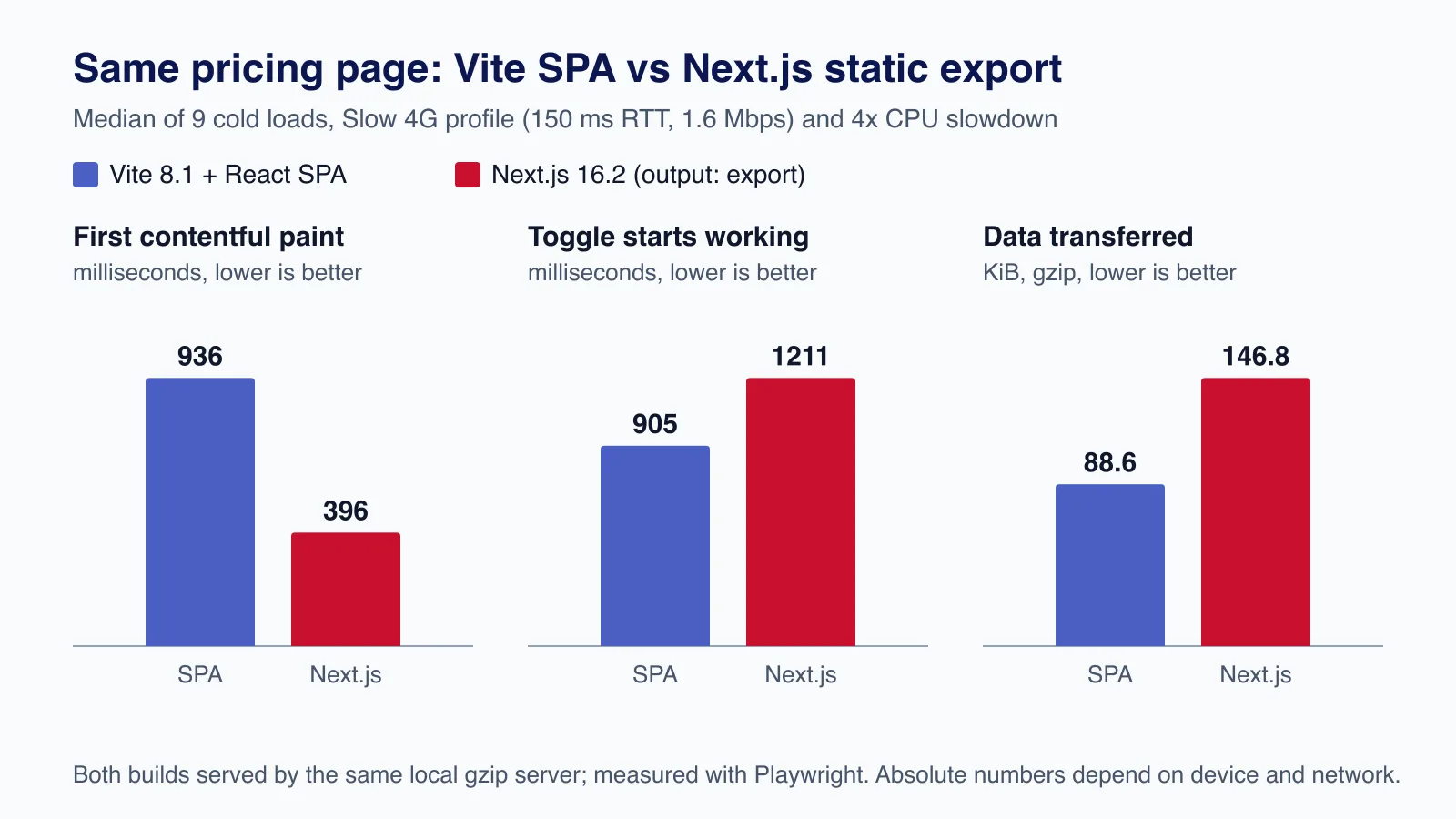
| Median of 9 loads | Vite SPA | Next.js (static export) |
|---|---|---|
| First contentful paint (pricing visible) | 936 ms | 396 ms |
| Annual toggle starts working | 905 ms | 1,211 ms |
| Data transferred (gzip) | 88.6 KiB in 3 requests | 146.8 KiB in 8 requests |
| Pricing text in the HTML | No | Yes |
The results cut both ways, which is the honest picture. The Next.js page showed its content in less than half the time, because the HTML already contained it; the SPA could not paint anything until its 90 KiB bundle had downloaded and run. But the SPA became interactive sooner: the Next.js page shipped about 58 KiB more JavaScript (the App Router client and React Server Components runtime) and had to hydrate before the toggle worked. On a marketing page, first paint and Largest Contentful Paint matter most, which favours pre-rendering. Inside an app that users open once and keep open, the initial load matters less and navigation speed matters more, where a client-side router is fast in both approaches.

Two caveats. This is a small page; real marketing sites add images, fonts, analytics and chat widgets, which often cost more than the framework. And an SPA can pre-render its marketing routes at build time too. The comparison is really "HTML first" versus "JavaScript first", not one framework versus the other.
Hosting cost, with the arithmetic
Hosting prices are easy to quote and easy to misread, so here are the published rates we used and the assumptions behind each estimate. Both set-ups call the same business API (for example a NestJS or Laravel service), which costs the same either way and is excluded.
Vercel Pro (pricing page archived 23 July 2026): $20 per user per month, which includes $20 of usage credit; 1 TB of Fast Data Transfer and 10 million edge requests per month included, then from $0.15 per GB and $2 per million; function invocations from $0.60 per million; Active CPU from $0.128 per hour; provisioned memory from $0.0106 per GB-hour. The Hobby plan is for personal, non-commercial use only, so a SaaS business needs Pro.
Cloudflare Workers static assets (documentation archived 18 June 2026): "Requests to static assets are free and unlimited". The Workers Paid plan costs a minimum of $5 per month and is only needed if you run Worker code, for example to proxy API calls.
Assumptions for an early-stage SaaS: three developers who deploy; 30,000 marketing visits a month at about 1.5 MB each; 1,000 monthly active users with 20 sessions each, every session making 40 server-rendered requests to the Next.js app; 30 ms of CPU and 150 ms of instance time per request at 2 GB of memory. We assume no request concurrency, which overstates memory cost.
| Next.js app on Vercel Pro | Early stage | 10x traffic |
|---|---|---|
| Seats: 3 × $20 | $60.00 | $60.00 |
| Invocations: 0.8M / 8M × $0.60 per million | $0.48 | $4.80 |
| Active CPU: 6.7 h / 66.7 h × $0.128 | $0.85 | $8.53 |
| Memory: 66.7 / 667 GB-h × $0.0106 | $0.71 | $7.07 |
| Data transfer: 105 GB / 1,050 GB (1 TB included) | $0.00 | $7.50 (50 GB × $0.15) |
| Edge requests: about 2M / 20M (10M included) | $0.00 | $20.00 (10M × $2) |
| Usage after the $20 credit | $0.00 (usage $2.04) | $27.90 (usage $47.90) |
| Monthly total | $60.00 | $87.90 |
The same traffic served as a pre-rendered marketing site plus a static SPA on Cloudflare costs $0 for hosting, or $5 a month if you add Workers Paid. So static hosting is cheaper, but the absolute difference for a small SaaS is tens of dollars a month: less than a day of a developer's time a year. Cost becomes a deciding factor only at much higher traffic or when server rendering is heavy, and it can be controlled in both directions: a Next.js app can be exported as static files and hosted like the SPA, and server rendering can be self-hosted on a VPS or containers (see our guide to zero-downtime deployments on a single VPS).
Prices are those published at the time of writing and change often; recheck the pricing pages before you commit, and set a spend limit on any usage-billed platform.
Complexity and team cost
The costs that actually decide most projects are not on a hosting invoice:
- Mental model. A Vite SPA is one runtime: everything runs in the browser and talks to your API. Next.js adds Server Components, client boundaries, caching rules, Server Actions and a server you must secure. That power is useful for public, data-driven pages; for a dashboard behind login it is often more machinery than the job needs.
- Security surface. A Next.js server is an internet-facing server: it needs patching (Next.js and React have shipped several security releases in 2026), and Server Actions are public endpoints that need authorisation checks. A static SPA has no server of its own; the API still needs all the same protection.
- Build and deploy. An SPA builds to static files that any CDN, S3 bucket or nginx can serve, and rollbacks are a file swap. A server-rendered Next.js app needs a Node.js runtime or a platform that provides one.
- Hiring and handover. Both are mainstream React. Next.js knowledge is widely available; so is plain React with Vite.
One real error we hit while building the comparison: Next.js 16.2.11 failed to build with TypeScript 7 installed, stopping at type-checking with The "id" argument must be of type string. Received undefined. Installing TypeScript 5.9.3 fixed it. Check framework support before upgrading the type checker on either stack.
If you are deciding this for a product that already exists, the migration path matters more than the destination; our React and Next.js team can review the routes, SEO needs and hosting bill before you commit to either.
A practical split that works for many SaaS products
- Build the marketing site, docs and blog as pre-rendered pages. Next.js with static generation is a good fit, as are other static site generators.
- Build the app as an SPA with Vite and a client router, served from
app.example.comor/app, with a fallback toindex.htmlfor client routes. - Keep authentication on the API (secure, HTTP-only cookies or tokens issued by your auth provider), not in the front end.
- Share a design system package between the two so they look like one product.
- Add server rendering later, only for pages that need to be public and indexable.
// vite.config.ts for the app (SPA)
import { defineConfig } from 'vite'
import react from '@vitejs/plugin-react'

export default defineConfig({
  plugins: [react()],
  base: '/app/', // when served under example.com/app
})// src/main.tsx: lazy-load heavy routes so the first screen stays small
import { StrictMode, lazy, Suspense } from 'react'
import { createRoot } from 'react-dom/client'
import { createBrowserRouter, RouterProvider } from 'react-router'
const Dashboard = lazy(() => import('./Dashboard').then((m) => ({ default: m.Dashboard })))
const router = createBrowserRouter(
[{ path: '/', element: <Suspense fallback={<p>Loading…</p>}><Dashboard /></Suspense> }],
{ basename: '/app' },
)
createRoot(document.getElementById('root')!).render(
<StrictMode>
<RouterProvider router={router} />
</StrictMode>,
)When an SPA (for example with Vite) is the better choice
- The product is almost entirely behind login: dashboards, admin panels, internal tools, editors.
- The marketing site already exists elsewhere (a CMS, a site builder or a separate static site).
- You want static hosting with no server to patch, and a simple deploy and rollback story.
- The UI is highly interactive and long-lived in one tab, so the first load is paid once per session.
- The team is small and wants one runtime model.
When Next.js is the better choice
- Public pages are a growth channel: marketing, docs, templates, integration pages, public profiles or listings.
- You need per-page metadata, Open Graph images and structured data that every crawler and link preview can read.
- One team owns marketing and app and values a single framework, router and component library.
- You need server-side work close to rendering, such as personalised pages that must load without a client-side waterfall.
Common mistakes
- Building the marketing site as an SPA and relying on Google rendering it, then wondering why link previews and other crawlers show nothing.
- Server-rendering a logged-in dashboard "for SEO" that no crawler can ever reach.
- Comparing frameworks on bundle size alone; first paint and time to interactive moved in opposite directions in our test.
- Putting a usage-billed platform into production without a spend limit.
- Forgetting the SPA fallback rule, so refreshing
/app/settingsreturns a 404 from the static host.
When not to change what you have
If your current set-up ranks, converts and costs little, a rewrite is rarely worth it. Fix the specific problem instead: pre-render the marketing routes of an existing SPA, or export the static parts of an existing Next.js app. Rewrites for framework fashion spend months that could have gone into the product.
Need help choosing, or moving an existing SaaS front end without losing rankings? Cloudsoft Zone's React and Next.js development service plans the split between marketing site and app, builds it, and measures SEO, speed and hosting cost before and after.
Frequently asked questions
Is a React SPA bad for SEO?
For a logged-in app, SEO does not apply. For public pages it is a real weakness: the HTML has no content, so crawlers and link previews that do not run JavaScript see nothing, and Google indexes it only after rendering. Pre-render public pages.
Is Next.js always faster than a Vite SPA?
No. In our test the Next.js page painted in 396 ms against 936 ms, but became interactive later (1,211 ms against 905 ms) because it shipped more JavaScript to hydrate. Pre-rendering helps first paint; less JavaScript helps interactivity.
How much does hosting a Next.js SaaS cost on Vercel?
With July 2026 prices, a team of three on Pro pays $60 a month in seats, and our early-stage traffic fitted inside the $20 usage credit. At ten times that traffic our estimate rose to about $88. Your numbers depend on traffic, rendering work and seats.
Can I host Next.js as static files like an SPA?
Yes, with
output: 'export', as long as you do not need server features such as server-rendered dynamic routes, Route Handlers that run per request, or Server Actions.Should the marketing site and app be separate projects?
Often yes: they have different jobs, release cycles and owners. Share a design system package so they look consistent. One Next.js codebase is also fine when the same team owns both.
Your next customer could start right here.
Introduce your tool, product or business to readers exploring technology.
Explore placements and request a private quote
Sources
- Vercel pricing (archived 23 July 2026) — Vercel via Internet Archive, 2026-07-23
- Vercel Pro plan — Vercel
- Workers pricing (archived 18 June 2026) — Cloudflare via Internet Archive, 2026-06-18
- Static exports — Next.js documentation
- Building for production — Vite documentation
- The rise of the AI crawler — Vercel, 2024-12-17
- Understand the JavaScript SEO basics — Google Search Central
Written with substantial AI assistance. Facts checked against cited sources. Editorial policy.
Comments
No comments yet. Be the first to join the conversation.
Leave a comment
Every comment is read by a moderator before it appears. Your email address is never published; it is used only to contact you about this comment.
Related tools
- Directory profile
Vercel
A hosting platform for web applications and frontend frameworks such as Next.js, with Git-based deployments, serverless functions and a global CDN.
The cost comparison uses Vercel's published pricing for hosting a Next.js application.
- Directory profile
Cloudflare
Global network service providing DDoS protection, a web application firewall, CDN and DNS, with a free plan for websites.
The cost comparison uses Cloudflare Workers pricing for serving a static single-page app.
More from Cloudsoft Zone

Industry updateJavaScript
Next.js 16.4: what's new and should you upgrade from 16.3?
Next.js 16.4 shrinks bundles and the Turbopack cache, ships React 19.3 and turns on strict route matching. What we measured, what breaks and how to upgrade.
By Cloudsoft Zone

ComparisonNode.js
Express 5 vs Fastify 5: which Node.js framework to pick in 2026
Express 5 and Fastify 5 compared on support status, validation, error handling, upgrades and performance, with the same API built and tested in both.
By Cloudsoft Zone

Resource guideResources
Free learning paths for web developers in 2026: freeCodeCamp, Odin Project, CS50
Six free, checked learning resources for aspiring web developers: freeCodeCamp, The Odin Project, CS50x, Full Stack Open, javascript.info and MIT OpenCourseWare, with what each teaches, what costs extra and how to combine them.
By Cloudsoft Zone