
Next.js 16.4: what's new and should you upgrade from 16.3?
Next.js 16.4 shrinks bundles and the Turbopack cache, ships React 19.3 and turns on strict route matching. What we measured, what breaks and how to upgrade.
Updated 12 min read

In this article
Next.js 16.4 was released on 6 October 2026. For most App Router projects it is a quiet win: smaller production bundles, a Turbopack disk cache that takes about a quarter less space, server hot reloading that only recompiles what you are looking at, and React 19.3 bundled in. It also makes Cache Components the recommended model for every app and turns it on for new projects. The one change that can stop a build is new: strict route matching is now on by default, so apps with incomplete parallel or interception routes will fail next build until you fix them.
We upgraded the same scratch App Router app from 16.3.8 to 16.4.0, measured both builds and broke it on purpose to see the new errors. This article covers what changed, what we measured, the upgrade steps and who should upgrade this week.
Tested with: Next.js 16.3.8 and 16.4.0 (Turbopack), React and React DOM 19.3.0, TypeScript 7.0.2, Node.js 24.19.0, macOS on Apple silicon. The 16.4.0 package bundles React 19.3.0-canary-278794d7-20261002 for the App Router.
Next.js 16.4 at a glance
The official 16.4 announcement is long and most of it is about Cache Components and agent tooling. Here are the changes that affect an existing app, sorted by how likely you are to notice them:
| Change | Default in 16.4 | What you do |
|---|---|---|
| Strict route matching: interception routes need a canonical route; incomplete parallel slots are rejected | On | Fix the routes, or set deprecated.looseRouteMatching: true as a short-term escape hatch |
| Turbopack shared runtime: one runtime chunk for all routes | On | Nothing; experimental.turbopackSharedRuntime: false turns it off |
| Export name mangling in production builds | On for next build, off in dev | Nothing; experimental.turbopackMangleExportNames overrides it |
| Shorter CSS Module class names in production | On | Check any test or script that matches generated class names |
| Smaller Turbopack disk cache (Zstandard for bulk data, LZ4 for metadata) | On | Nothing; CI caches shrink |
Lazy server HMR in next dev | On | Nothing |
React 19.3 (stable View Transitions, Fragment refs, browser()) | Bundled | Install react@19.3 and react-dom@19.3 to match |
ensureStatic route segment config; navigation() and prefetch() from next/cache | Opt-in | Use with Cache Components where you need guarantees |
next analyze (formerly experimental-analyze) with route summary, table view and snapshots | Available | Use it to compare bundles before and after |
Upgrade reminders in next dev and next build (experimental.agentUpgrade) | 'security' | Set false to silence, or 'latest' for all releases |
Experimental: turbopackLazyDynamicImports, turbopackGc, worker threads for loaders, additional roots, Rust React Compiler speed-ups | Off | Try them on a branch only |
A note on wording. You may have read that 16.4 brings "lazy compilation". That is close but not exact. What shipped by default is lazy server HMR: when you edit a shared server module, Turbopack now only recompiles and applies the update for the route you are viewing, and other routes wait until they are next requested. Compiling client-side import() calls only when the browser asks for them is a separate, experimental flag, experimental.turbopackLazyDynamicImports, and the docs note that some next/dynamic imports are still compiled eagerly.
What we measured on a real build
Vercel's post gives the headline claims: a 20–25% smaller disk cache, a shared runtime chunk, shorter CSS class names and export mangling. We wanted to see them on our own code, so we built a small App Router app with four pages, two CSS Modules, a client form validated with zod, a date filter using date-fns and a dynamically imported Markdown renderer (marked). We built it from a clean .next folder with 16.3.8 and again with 16.4.0, with no config changes, and summed the gzip size of the JavaScript each prerendered page references.
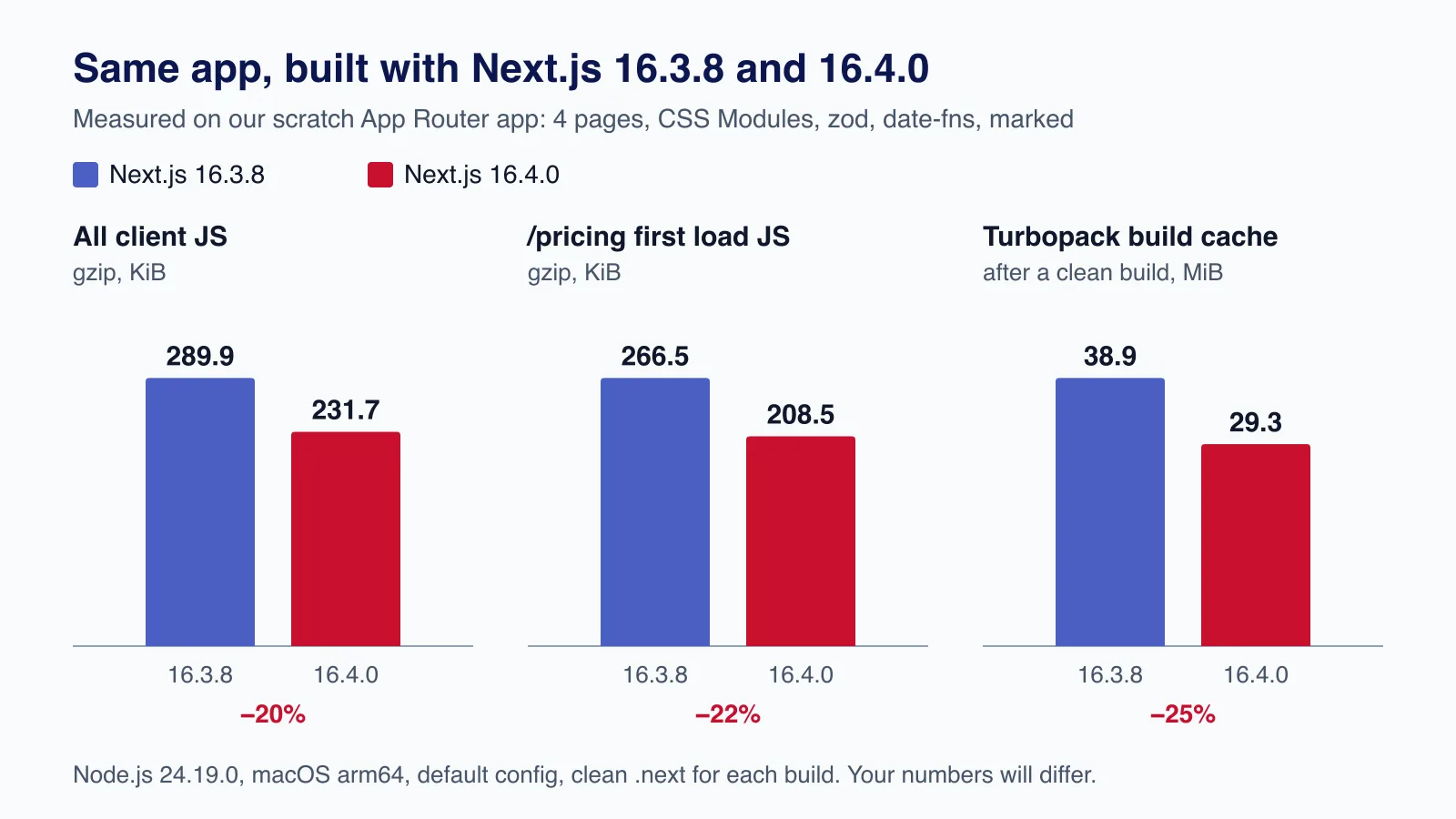
| Measure | 16.3.8 | 16.4.0 | Change |
|---|---|---|---|
All client JavaScript in .next/static/chunks (gzip) | 289.9 KiB | 231.7 KiB | −20% |
/pricing first-load JavaScript (gzip) | 266.5 KiB | 208.5 KiB | −22% |
/ first-load JavaScript (gzip) | 172.5 KiB | 173.6 KiB | +0.6% |
Turbopack cache after a clean build (.next/cache/turbopack) | 38.9 MiB | 29.3 MiB | −25% |
| CSS Module class name in production | Footer-module__EZoWya__siteFooter | EZoWya_siteFooter | Shorter |
Two things in that table deserve an honest reading. First, almost all of the JavaScript saving came from one place: the zod chunk on /pricing dropped from 89.8 KiB to 30.3 KiB gzip. In 16.3.8 the chunk still contained zod's translated error messages (we found the German locale strings in it); in 16.4.0 they were gone. Turning export mangling off in 16.4 changed the totals by about 0.1 KiB, so the saving came from better tree shaking, not mangling. Pages that did not use zod, such as the home page, stayed the same size within a kilobyte. Second, the cache saving matched Vercel's claim almost exactly: a 24.7% smaller Turbopack cache directory after a clean build.
The lesson is that 16.4 helps most where a large library was only partly tree-shaken before. Run the analyzer on your heaviest routes before and after the upgrade rather than expecting a flat percentage everywhere.
In 16.4 the bundle analyzer command is next analyze; next experimental-analyze still works as an alias. It opens on a route list sorted by size, adds a sortable table view, and keeps snapshots so you can diff a route after a change. Use npx next analyze --output --snapshot before to save one without starting the web interface.
The change that can break your build: strict route matching
Strict route matching (PR #97397) checks that every URL your App Router can produce maps to a complete route tree. Two patterns that used to build now fail:
- Interception routes without a canonical route. If
@modal/(.)photo/[...id]intercepts URLs like/photo/1/2, there must be an ordinary page that also matches/photo/1/2, otherwise a refresh or a shared link gives a 404 (PR #97428). - Parallel slots that cannot render a URL. If one named slot has a page for
/fooand another only for/bar, and neither has adefault.tsx, neither URL can load directly. The build now reports the slots and the unreachable pages.
We reproduced the first case with a photo modal. This layout built without complaint on 16.3.8:
app/
├── layout.tsx              renders {children} and {modal}
├── @modal/
│   ├── default.tsx
│   └── (.)photo/[...id]/page.tsx
└── photo/[id]/page.tsx     only matches /photo/1, not /photo/1/2
On 16.4.0 the same code stops the build:
![Terminal output of next build on Next.js 16.4.0 failing with the error that interception routes must have a canonical route, expected /photo/[...id].](https://media.cloudsoftzone.com/cloudsoftzone-media/media/cmv1y3up900gk97umgp0frhsw/0b08bd216792650745b00477.webp)
The fix is to make the ordinary route at least as broad as the interception route. Here that meant renaming photo/[id] to photo/[...id] and updating its params type:
// app/photo/[...id]/page.tsx
export function generateStaticParams() {
  return [{ id: ['1'] }]
}

export default async function Photo({ params }: { params: Promise<{ id: string[] }> }) {
  const { id } = await params
  return <h1>Photo {id.join('/')}</h1>
}
The check looks at coverage, not identical file names: a broader catch-all, or several ordinary routes that together cover every length, also pass. Route handlers and generated metadata routes do not count as canonical pages.
If you need to ship before fixing every route, there is a temporary escape hatch. Setting it restores the old behaviour and the build passes with a warning:
// next.config.ts
import type { NextConfig } from 'next'

const nextConfig: NextConfig = {
  deprecated: {
    // Temporary: restore loose matching while you fix the reported routes.
    looseRouteMatching: true,
  },
}

export default nextConfig
Treat it as a ticket, not a setting. The option sits under deprecated, accepts only true, and the routes it lets through are genuinely broken for anyone who opens the URL directly.
If the build reports dozens of these in a large app with nested modals and dashboards, a second pair of eyes helps; our React and Next.js team can map the route tree and fix it as a fixed-scope upgrade.
Cache Components is now the recommended default
From 16.4, Vercel recommends Cache Components for every Next.js app and says it will become the default in Next.js 17. We confirmed that create-next-app@16.4.0 writes cacheComponents: true and partialPrefetching: true into the new project's config. Existing apps are not switched over; you opt in with the same two flags.
Do not flip those flags as part of the version upgrade. When we enabled them on our scratch app, the build immediately failed on a client component that called new Date() during render:
Error: Route "/dashboard": ... This value would be evaluated during the prerender,
instead of recomputed on each visit.
  - [stream] Wrap the Client Component in <Suspense fallback={...}>
  - [defer] Move the read into a useEffect or event handler
Wrapping the component in <Suspense> fixed it, and a second error then appeared for the modal slot reading params outside a Suspense boundary. Each fix is small, but there may be dozens in a large app. Upgrade the version first, ship it, then migrate to Cache Components route by route using the official migration guide.
Once you are on Cache Components, two new tools are worth knowing:
ensureStaticfails the build if dynamic content creeps into a route. Set it to'navigation','prefetch'or'shell'on a page or layout. We addedexport const ensureStatic = 'navigation'to a page that readcookies()inside Suspense, and the build stopped with "Next.js encountered uncached or runtime data on a route that must be fully static". That is useful for marketing pages and shops where an accidental dynamic component means paying for compute on every visit.navigation()andprefetch()fromnext/cachelet you exclude cached work from a prefetch until the user actually navigates, which keeps link prefetching from loading whole threads, reports or lists nobody opens.
How to upgrade from 16.3 to 16.4
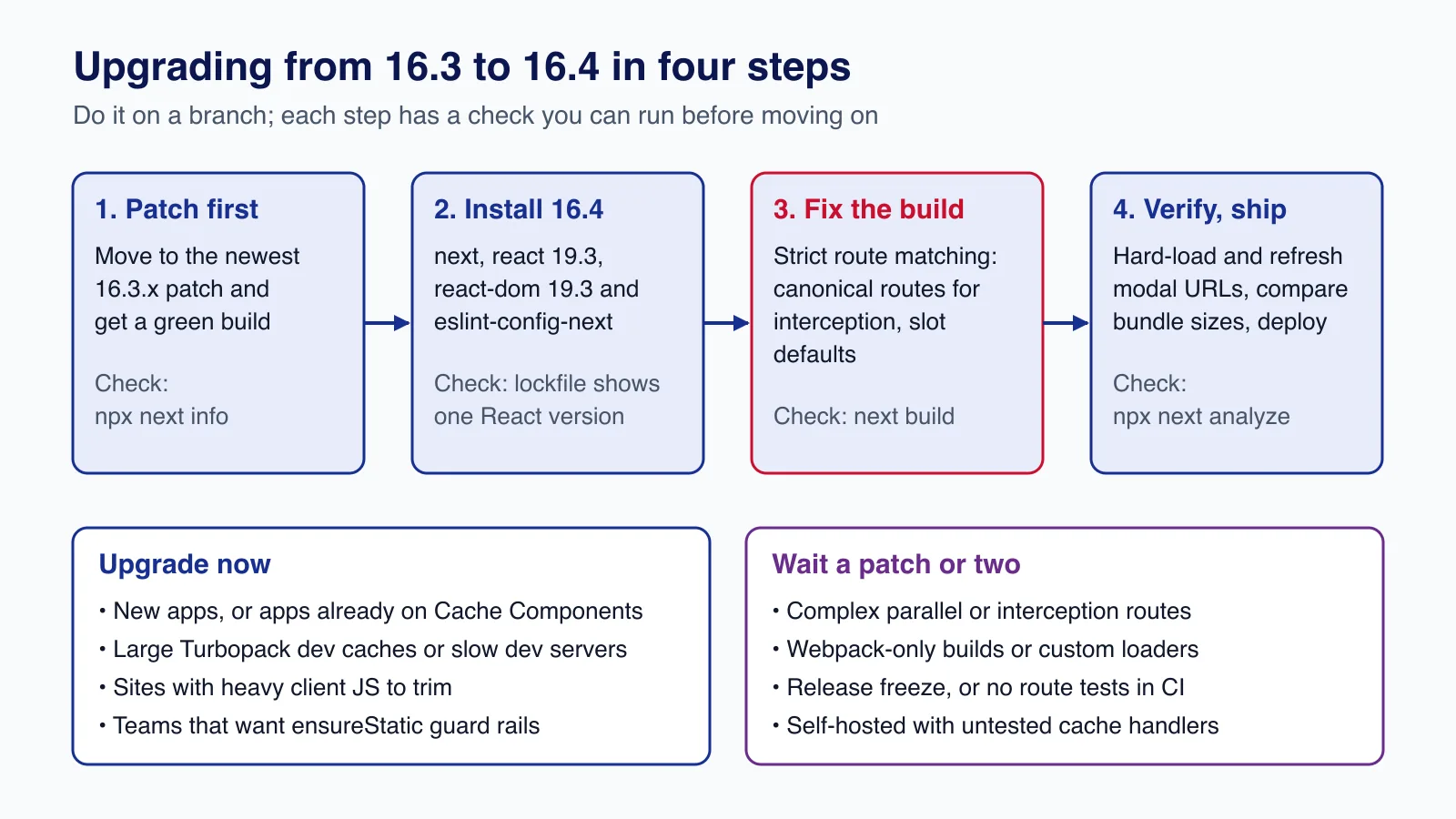
1. Start from a clean, patched 16.3. Make sure your branch builds and tests pass on the newest 16.3.x patch first, so any new failure belongs to 16.4. Our Next.js 16.3 performance guide covers the build cache and analyzer set-up you will want in place.
2. Install 16.4 and React 19.3 together. Either let the CLI do it or install explicitly:
# Interactive upgrade (available since 16.1)
npx next upgrade

# Or explicitly
npm install next@16.4 react@19.3 react-dom@19.3 eslint-config-next@16.4
npx next info
Check that next info reports 16.4.x and React 19.3.x, and that your lockfile has one copy of react. If you use a coding agent, npx next@canary upgrade --agent=latest prepares migration notes and checks for it, but review its diff like any other pull request.
3. Run next build and fix route errors. Look for "Interception routes must have a canonical route" and slot warnings. Add canonical routes or default.tsx files. Use deprecated.looseRouteMatching only if a release cannot wait.
4. Verify behaviour, not just the build. Load every modal or intercepted URL directly and refresh it. Run your end-to-end tests. If a test or analytics script selects elements by generated CSS Module class names, it will break with the shorter names; select by role, label or data-testid instead. Then compare next analyze snapshots for your top routes.
5. Decide on the reminders. With the default experimental.agentUpgrade: 'security', next dev and next build remind you when a release fixes a vulnerability in your installed version. Most teams should keep that on. If the message is noise in CI logs, set it in config rather than ignoring it:
// next.config.ts
import type { NextConfig } from 'next'

const nextConfig: NextConfig = {
  experimental: {
    agentUpgrade: 'security', // or 'latest', or false
  },
}

export default nextConfig
Production and security considerations
- Patch level matters more than minor version. Several 16.3 patches fixed security issues. Whatever you decide about 16.4, stay on the newest patch of the line you run, and see our RSC security checklist for what to audit after each advisory.
- Self-hosting with CDNs: the shared runtime chunk and new chunk names mean a deploy changes many asset URLs at once. Keep old assets available for a while after deploy so open tabs can still load chunks, and make sure
/_next/staticis served with long-lived immutable caching. - Agent feedback: new apps created with recommended settings enable
experimental.agentFeedback. It needs telemetry, drafts reports for you to review, and sends nothing until you press send. If your organisation forbids telemetry, setNEXT_TELEMETRY_DISABLED=1and check that the flag is off. - Experimental flags stay experimental. Worker threads for loaders, for example, currently fall back to child processes on Node.js 24.13.1 and newer because of a Node.js bug, so measure before you claim a saving.
Common mistakes
- Upgrading Next.js and enabling Cache Components in the same pull request, then not knowing which change broke a page.
- Leaving
reacton 19.2 while Next.js bundles 19.3 for the App Router. Pages Router pages and your unit tests use the installed copy, so keep them aligned. - Setting
looseRouteMatchingand forgetting it. The routes it hides still 404 on refresh. - Comparing bundle sizes across builds that used different
.nextcaches or lockfiles. Build from clean on both versions. - Turning on every new experimental flag at once. Enable one, measure, keep or revert.
Who should upgrade now, and who should wait
Upgrade this week if you are starting a new project, already run Cache Components, have a slow or disk-hungry Turbopack dev setup, or ship heavy client libraries such as validation or charting packages that may now tree-shake better. The upgrade is small for a typical App Router app with no interception routes; ours took a few minutes.
Wait for a patch or two if you rely on complex parallel and interception routes without good end-to-end coverage, are in a release freeze, use custom webpack loaders, or self-host with custom cache handlers you have not tested. In those cases run the upgrade in a branch now to learn what breaks, and schedule the fix.
When not to upgrade at all yet: if your app is still on Next.js 15 or the Pages Router only, get to the newest 16.3 patch first and follow the version 16 upgrade guide; jumping straight to 16.4 combines too many changes in one step.
Need a Next.js app upgraded to 16.4 with its routes fixed, bundles measured and a rollback plan in place? Cloudsoft Zone's React and Next.js development service handles version upgrades, Cache Components migrations and performance work for product teams.
Frequently asked questions
Is Next.js 16.4 a breaking release?
It is a minor release, but strict route matching is now on by default. Apps whose interception routes have no matching ordinary page, or whose parallel slots cannot render a URL, will fail
next build. You can setdeprecated.looseRouteMatching: truetemporarily while you fix them.Do I have to switch to Cache Components to use 16.4?
No. Existing apps keep their current model. New apps from
create-next-appgetcacheComponentsandpartialPrefetchingenabled, and Vercel says Cache Components will become the default in Next.js 17, so plan the migration separately.Does Next.js 16.4 make bundles smaller without config changes?
Yes, through the shared Turbopack runtime, export mangling in production builds and shorter CSS Module class names. In our test, total client JavaScript fell 20%, but almost all of that came from better tree shaking of one library; pages without it barely changed.
Which React version does Next.js 16.4 use?
React 19.3. The App Router uses a React build bundled inside Next.js; install
react@19.3andreact-dom@19.3so the Pages Router and your tests use the same version.What happened to next experimental-analyze?
In 16.4 the command is
next analyze, andexperimental-analyzeremains as an alias. The analyzer now has a route summary, a table view and snapshots you can compare.
Your next customer could start right here.
Introduce your tool, product or business to readers exploring technology.
Explore placements and request a private quote
Sources
- Next.js 16.4 — Vercel, 2026-10-06
- Release v16.4.0 — GitHub (vercel/next.js), 2026-10-07
- Enable strict route matching by default (PR #97397) — GitHub (vercel/next.js), 2026-09-21
- Require canonical routes for interception routes (PR #97428) — GitHub (vercel/next.js), 2026-09-10
- ensureStatic route segment config — Next.js documentation
- Migrating to Cache Components — Next.js documentation
- Package bundling and the bundle analyzer — Next.js documentation
- React 19.3 — React, 2026-09-09
Written with substantial AI assistance. Facts checked against cited sources. Editorial policy.
Comments
No comments yet. Be the first to join the conversation.
Leave a comment
Every comment is read by a moderator before it appears. Your email address is never published; it is used only to contact you about this comment.
More from Cloudsoft Zone

TutorialJavaScript
JavaScript using declarations: automatic cleanup without finally
Learn JavaScript's using and await using declarations, Symbol.dispose and DisposableStack, with tested browser recipes and October 2026 support data.
By Cloudsoft Zone

Architecture guideJavaScript
Ship JavaScript without a bundler: import maps and JSON modules
How to structure a front end as native ES modules: import maps for bare imports, JSON modules, modulepreload against waterfalls, and cache-busting.
By Cloudsoft Zone

ComparisonJavaScript
structuredClone vs JSON vs spread: deep copy JavaScript safely
Spread is shallow, JSON loses dates, Maps, Sets and undefined, and structuredClone keeps them. A tested comparison of JavaScript copy methods and their limits.
By Cloudsoft Zone