
Next.js 16.3 performance guide: faster builds, rendering and bundles
Next.js 16.3 caches production builds, trims dev-server memory and renders with Node.js streams. Here is how to get those gains in CI and Docker, and cut client JavaScript.
Updated 11 min read

In this article
Next.js 16.3, released on 3 August 2026, makes most apps faster without code changes: the Turbopack disk cache now covers next build, the dev server can drop cached data from memory, type checking can run on TypeScript 7, and App Router rendering uses native Node.js streams. This guide shows which of those defaults you get for free, which ones need your CI or Docker setup to cooperate, and how to find and cut the client JavaScript that still slows your pages down.
Tested with: Next.js 16.3.6 (Turbopack), React 19.3.0, TypeScript 7.0.2 and 5.9.3, Node.js 24.19.0 on macOS (Apple M2), 28 September 2026. 16.3.6 is the current patch release; 16.3.3 and 16.3.6 both fixed critical vulnerabilities, so do not benchmark on anything older.
What changed for performance in 16.3
The Next.js 16.3 announcement lists a long set of features. These are the ones that change speed or size, with the switch that controls each one:
| Area | Change in 16.3 | Default | Setting |
|---|---|---|---|
| Dev server memory | Turbopack evicts cached data from RAM once it is on disk | 'auto' | experimental.turbopackMemoryEviction |
| Production builds | Disk cache now used by next build, not just next dev | On | experimental.turbopackFileSystemCacheForBuild |
| Type checking | next build runs the project's own tsc, which makes TypeScript 7 work | On | experimental.useTypeScriptCli |
| Server rendering | App Router uses Node.js streams instead of web streams | On | None needed |
| Prefetching | Small segment prefetches are bundled into one response | On | experimental.prefetchInlining |
Vercel's own numbers are worth reading with care: up to 90% less dev-server memory after compiling 50 routes, builds up to 5.5 times faster on CI for one of its projects, and up to 22% more requests handled under load. Those are best cases on Vercel's apps. Measure yours before and after; the steps below show where.
Step 1: upgrade and confirm what you are running

Upgrade in a branch and check the resolved versions, not just package.json:
npm install next@16.3.6
npx next infoRelevant Packages:
next: 16.3.6
react: 19.3.0
react-dom: 19.3.0
typescript: 7.0.2One detail surprises people: the App Router does not use the react package from your node_modules. Next.js bundles its own React build for Server Components; in 16.3.6 that is a 19.3 canary dated 31 July 2026. The react and react-dom versions you install (19.3.0 is current) matter for the Pages Router and your tests. Keep both on the latest 19.x so the two do not drift far apart. If you are still learning what React 19.3 added, our React 19.3 explainer covers it.
Step 2: let the dev server use less memory
Since 16.1 the dev server has written Turbopack's work to .next/dev/cache/turbopack, so a restart picks up where it left off. In 16.3, Turbopack can also evict data from memory once it is safely on disk and reload it when needed. Vercel measured its dashboard dev server dropping from 21.5 GB to 2 GB after compiling 50 routes. You do not need to configure anything, but the option is there if a large monorepo still swaps:
// next.config.ts
import type { NextConfig } from 'next'

const nextConfig: NextConfig = {
  experimental: {
    // 'auto' is the default: evict only when enough memory has built up.
    // 'full' evicts after every snapshot (lowest RAM, more disk reads).
    // false keeps everything in memory (fastest, highest RAM).
    turbopackMemoryEviction: 'auto',
  },
}

export default nextConfig
Eviction only works while the dev disk cache is on (turbopackFileSystemCacheForDev, default true). If you turned that off during an earlier bug, turn it back on, or eviction has nothing to fall back on. The memory eviction reference marks the option as experimental, so pin the setting you test with.
Step 3: make the build cache survive between builds
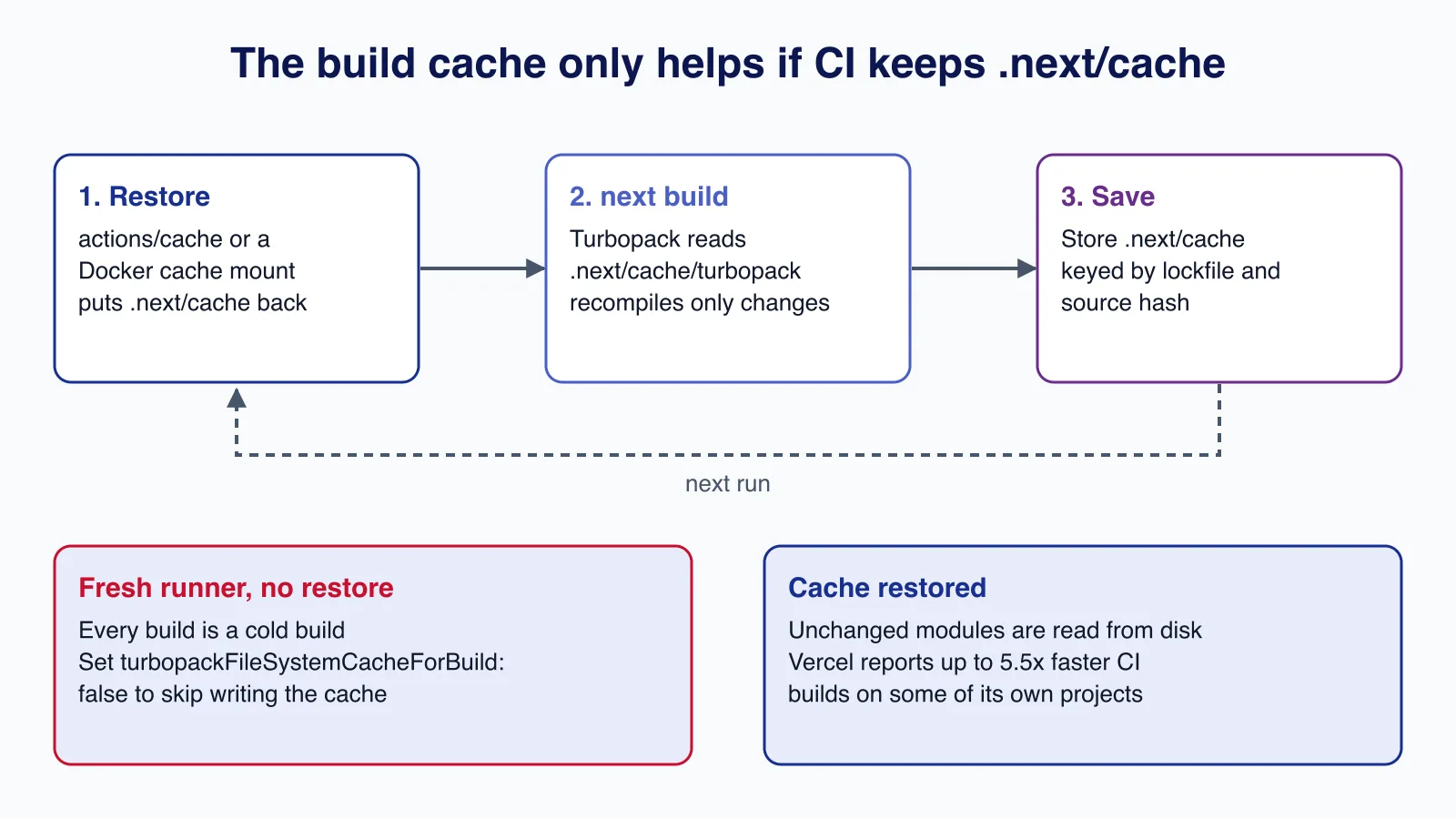
The biggest change for CI is that next build now writes Turbopack's work to .next/cache/turbopack and reads it back on the next build. On our two-route test app, the cold compile took 2.0 seconds and the warm one 0.27 seconds with a 24 MB cache. The gain on a real app is smaller in proportion but still large, because only changed modules are recompiled.
The catch is in the FileSystem cache documentation: builds only get faster when .next/cache is restored before each build. Vercel does this for you. Most other CI providers and every clean container build do not.
GitHub Actions
The official CI build caching guide uses actions/cache with a key based on the lockfile and source files:
- uses: actions/cache@v4
  with:
    path: |
      ~/.npm
      ${{ github.workspace }}/.next/cache
    key: ${{ runner.os }}-nextjs-${{ hashFiles('**/package-lock.json') }}-${{ hashFiles('**/*.js', '**/*.jsx', '**/*.ts', '**/*.tsx') }}
    restore-keys: |
      ${{ runner.os }}-nextjs-${{ hashFiles('**/package-lock.json') }}-
- run: npm ci
- run: npx next build
The restore-keys line matters: when source files change but dependencies do not, the build starts from the previous cache instead of from nothing.
Docker builds
A plain RUN next build in a Dockerfile always starts cold, because each build starts from a clean layer. A BuildKit cache mount keeps .next/cache on the builder without baking it into the image:
# syntax=docker/dockerfile:1
FROM node:24-bookworm-slim AS build
WORKDIR /app
COPY package.json package-lock.json ./
RUN --mount=type=cache,target=/root/.npm npm ci
COPY . .
# The cache mount survives between builds on the same builder,
# but is never copied into the image layer.
RUN --mount=type=cache,target=/app/.next/cache npx next build
This works on a long-lived builder (your own CI machine or a persistent remote builder). On hosted runners that start empty every time, the mount is empty too; export the BuildKit cache to a registry or use the CI cache instead. For the rest of the image (non-root user, standalone output, health checks), see how to write a production Dockerfile for Node.js 24.
Getting this right across preview, staging and production pipelines is where most teams lose a day; if your builds are still cold after the upgrade, our Next.js front-end team can review the pipeline with you.
If nothing ever restores the directory, writing the cache is wasted time and disk. Switch it off for those pipelines:
const nextConfig: NextConfig = {
  experimental: {
    // Only worth writing if something restores .next/cache next time
    turbopackFileSystemCacheForBuild: process.env.CI_KEEPS_NEXT_CACHE === 'true',
  },
}
Step 4: type check with TypeScript 7
From 16.3, next build runs your project's own tsc command instead of loading the TypeScript compiler API. That is what makes TypeScript 7, the native port released in July 2026, usable: install typescript@^7 and the build picks it up. We switched the test app from 5.9.3 to 7.0.2 with no config change and the build passed.
Three side effects to know before you rely on it:
- The CLI checker checks the whole project selected by your
tsconfig, including test files. Errors in a test helper can now fail a production build. - Diagnostics are printed by
tscdirectly, without Next.js code frames. - Setting
experimental.useTypeScriptCli: falsewhile on TypeScript 7 makesnext buildexit, because the compiler API it would need does not exist in 7.0.
If your tsconfig still has options TypeScript 7 removed, fix those first; our TypeScript 7 tsconfig checklist lists them.
Step 5: measure the faster server rendering
The App Router now renders with native Node.js streams instead of converting between web streams and Node streams. Vercel measured up to 22% more requests under load with no code changes (PR #94311). You get this by upgrading; your job is to confirm it on your own routes:
- Run the same load test against a production build (
next buildthennext start) on 16.2 and 16.3, on the same machine, against the same backend data. - Compare p95 latency and requests per second for your two or three busiest dynamic routes, not the home page alone.
- Watch memory too. Streams change buffering behaviour, and a container limit that was fine before should be rechecked.
If a route is slow because it waits on a database or API, streams will not fix it. Move the slow part behind a <Suspense> boundary so the shell streams first, or cache it.
Step 6: find and cut client JavaScript
Build speed helps your team; bundle size helps your users. The Turbopack bundle analyzer, added in 16.1, reads Turbopack's module graph and shows each module's size and full import chain, for client and server code:
npx next experimental-analyze            # interactive treemap on port 4000
npx next experimental-analyze --output   # write to .next/diagnostics/analyze
cp -r .next/diagnostics/analyze ./analyze-before
In 16.3 the command is next experimental-analyze (also available as next build --experimental-analyze). It does not produce a deployable build, so it is safe to run in a separate CI job. Save the output before and after a change and you have a size diff to attach to the pull request. The package bundling guide covers the webpack equivalent, @next/bundle-analyzer.
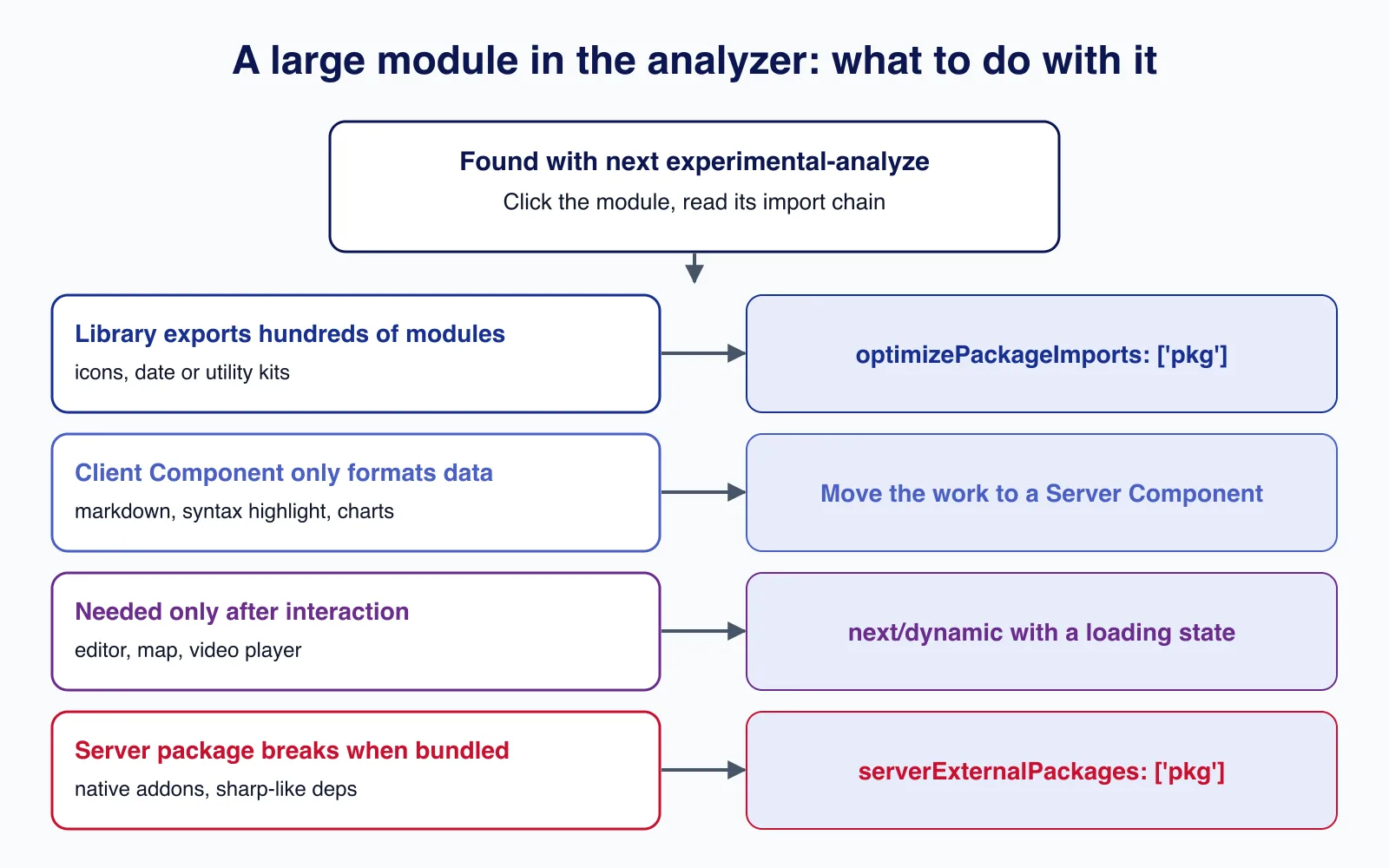
Once you know which module is large, the fix depends on why it is there:
const nextConfig: NextConfig = {
  experimental: {
    // Libraries with hundreds of named exports (icon sets, utility kits)
    optimizePackageImports: ['my-icon-library'],
  },
  // Server-only packages that break or bloat when bundled
  serverExternalPackages: ['some-native-addon'],
}
For code that is only needed after the user does something, load it on demand:
'use client'
import dynamic from 'next/dynamic'

// The editor's JavaScript loads only when this component renders
const RichEditor = dynamic(() => import('./rich-editor'), {
  loading: () => <p>Loading editor…</p>,
})

export function EditPanel({ open }: { open: boolean }) {
  return open ? <RichEditor /> : null
}
The biggest wins are usually Client Components that exist only to turn data into markup: markdown renderers, syntax highlighters, date formatting libraries. If the output does not need browser APIs or state, render it in a Server Component and the library never reaches the browser. Smaller bundles mostly show up as better Interaction to Next Paint; our Core Web Vitals guide explains how to measure that in the field.
Step 7: check prefetch volume
In 16.3, App Router prefetches that are small are bundled into one response instead of one request per segment. The defaults inline a segment of up to 2,048 bytes (gzip) and up to 10,240 bytes per bundled response. Most apps should leave this alone. If you are measuring request volume or debugging a navigation, you can tune or disable it:
const nextConfig: NextConfig = {
  experimental: {
    // Defaults: maxSize 2048, maxBundleSize 10240 (gzip bytes)
    prefetchInlining: { maxSize: 2048, maxBundleSize: 10240 },
  },
}
Lower thresholds keep more per-segment deduplication between routes; higher ones cut requests further. The bigger opt-in change, Instant Navigations (cacheComponents: true plus partialPrefetching: true), changes how data is cached and prefetched across the app. Treat it as a migration project with its own branch, not a performance flag.
Optional: the Rust React Compiler
16.3 also ships an experimental Rust port of the React Compiler that runs inside Turbopack instead of through Babel:
const nextConfig: NextConfig = {
  reactCompiler: true,
  experimental: {
    turbopackRustReactCompiler: true,
  },
}
Vercel reports 34% faster cold starts and 46% faster warm starts of next dev on v0, but only once Babel is gone entirely. If you still have a .babelrc, you will see less. It is experimental; try it on a branch and keep it out of production builds until it is stable.
Production and security considerations
- Pin exact patch versions. 16.3.3 fixed critical remote code execution issues in the Image Optimization API and on Windows-hosted servers, and 16.3.6 fixed a critical one in
next/og. Performance testing on an old patch wastes effort. - Do not share build caches across trust boundaries. A cache written by an untrusted fork's pull request should never feed a release build. Build release artefacts from the default branch's cache or from scratch.
- Keep caches out of images. Use cache mounts or CI caches; never
COPYa.next/cachedirectory from a developer laptop into a production image. - Re-run your full test suite after the upgrade. The streams change touches every App Router response, and the CLI type checker may surface errors in files that were ignored before.
Common mistakes
- Expecting faster CI builds without restoring
.next/cache. The setting is on, but a clean runner has nothing to read. - Caching
node_modulesbut not.next/cache, or the other way round with a key that changes on every commit and never restores. - Comparing a
next devpage load with a production build. Measure performance onnext buildplusnext start. - Adding every dependency to
optimizePackageImports. It helps libraries with many exports; for others it does nothing except slow the build down. - Turning on
cacheComponentsas a quick speed fix. It changes caching semantics across the app and needs a planned migration.
When not to bother
If your builds run on Vercel, the cache is already restored and you only need to upgrade. If your app is small and builds in under a minute on a clean runner, setting up Docker cache mounts may cost more effort than it saves. If you are on webpack (next build --webpack) because of a custom plugin, the Turbopack cache, analyzer and Rust compiler do not apply; plan the move to Turbopack first. And if your slow pages are slow because of a database query, no bundler setting will help: fix the query.
Cloudsoft Zone upgrades and tunes Next.js apps for small teams: a measured 16.3 upgrade, warm CI and Docker builds, and a before-and-after bundle report for your busiest pages. See our React and Next.js front-end development service.
Frequently asked questions
Is there a Next.js 16.4?
Not at the time of writing (28 September 2026). The current minor release is 16.3, published on 3 August 2026, and the current patch is 16.3.6. Check the Next.js releases page for anything newer.
Do I need to change next.config to get faster builds in 16.3?
No. The Turbopack disk cache is on by default for
next build. What you need is a CI or Docker setup that restores.next/cachebetween builds; without that, every build is cold.Which React version does Next.js 16.3 use?
The App Router uses a React 19.3 canary bundled inside Next.js (16.3.6 ships a build dated 31 July 2026). The
reactandreact-dompackages you install, currently 19.3.0, are used by the Pages Router and your tests.Can I use TypeScript 7 with Next.js 16.3?
Yes.
next buildruns the project's owntscby default, so installingtypescript@^7is enough. Expect it to check every file in your tsconfig, including tests.How do I see what is making my client bundle large?
Run
npx next experimental-analyzein 16.3. It opens a treemap of client and server modules with their import chains. Add--outputto save the result for before-and-after comparisons.
Your next customer could start right here.
Introduce your tool, product or business to readers exploring technology.
Explore placements and request a private quote
Sources
- Next.js 16.3 — Vercel (Next.js blog), 2026-08-03
- Next.js v16.3.0 release notes — GitHub, 2026-08-03
- Turbopack FileSystem Caching — Next.js documentation
- Turbopack Memory Eviction — Next.js documentation
- useTypeScriptCli — Next.js documentation
- prefetchInlining — Next.js documentation
- Optimizing package bundling — Next.js documentation
- How to configure CI build caching — Next.js documentation
Written with substantial AI assistance. Facts checked against cited sources. Editorial policy.
Comments
No comments yet. Be the first to join the conversation.
Leave a comment
Every comment is read by a moderator before it appears. Your email address is never published; it is used only to contact you about this comment.
Related tools
- Directory profile
Vercel
A hosting platform for web applications and frontend frameworks such as Next.js, with Git-based deployments, serverless functions and a global CDN.
The guide reviews Vercel's published performance figures for Next.js 16.3.
- Directory profile
Docker
Container platform for building, sharing and running applications, including Docker Desktop, Docker Engine, Docker Hub and Docker Scout.
The guide explains Docker cache mounts for keeping Next.js builds warm.
More from Cloudsoft Zone

TutorialJavaScript
JavaScript using declarations: automatic cleanup without finally
Learn JavaScript's using and await using declarations, Symbol.dispose and DisposableStack, with tested browser recipes and October 2026 support data.
By Cloudsoft Zone

Architecture guideJavaScript
Ship JavaScript without a bundler: import maps and JSON modules
How to structure a front end as native ES modules: import maps for bare imports, JSON modules, modulepreload against waterfalls, and cache-busting.
By Cloudsoft Zone

ComparisonJavaScript
structuredClone vs JSON vs spread: deep copy JavaScript safely
Spread is shallow, JSON loses dates, Maps, Sets and undefined, and structuredClone keeps them. A tested comparison of JavaScript copy methods and their limits.
By Cloudsoft Zone