
Next.js SEO for AI search: rendering, metadata and structured data
What AI search crawlers from OpenAI, Anthropic, Perplexity and Google actually fetch, and how to serve them complete HTML, metadata and JSON-LD from Next.js.
Updated 11 min read
In this article
AI search tools such as ChatGPT search, Claude, Perplexity and Google's AI Overviews can only cite a page they can fetch and read. For a Next.js site that comes down to four things you control: which crawlers your robots.txt lets in, whether the HTML they receive already contains your content and metadata, whether that metadata is accurate, and whether the page states plainly who wrote it and when. This guide covers each, using what the AI companies publish about their crawlers rather than guesswork, and one Next.js behaviour we found in testing that can hide your titles from AI crawlers.
Tested with: Next.js 16.3.0 (App Router, Turbopack), React 19.2.8, TypeScript 7.0.2, Node.js 24.19.0, next start on a local port, requests made with curl using each crawler's published user-agent string. Spoofed user agents test what our server sends; they do not prove how a crawler then processes it.
Who fetches your pages, and why
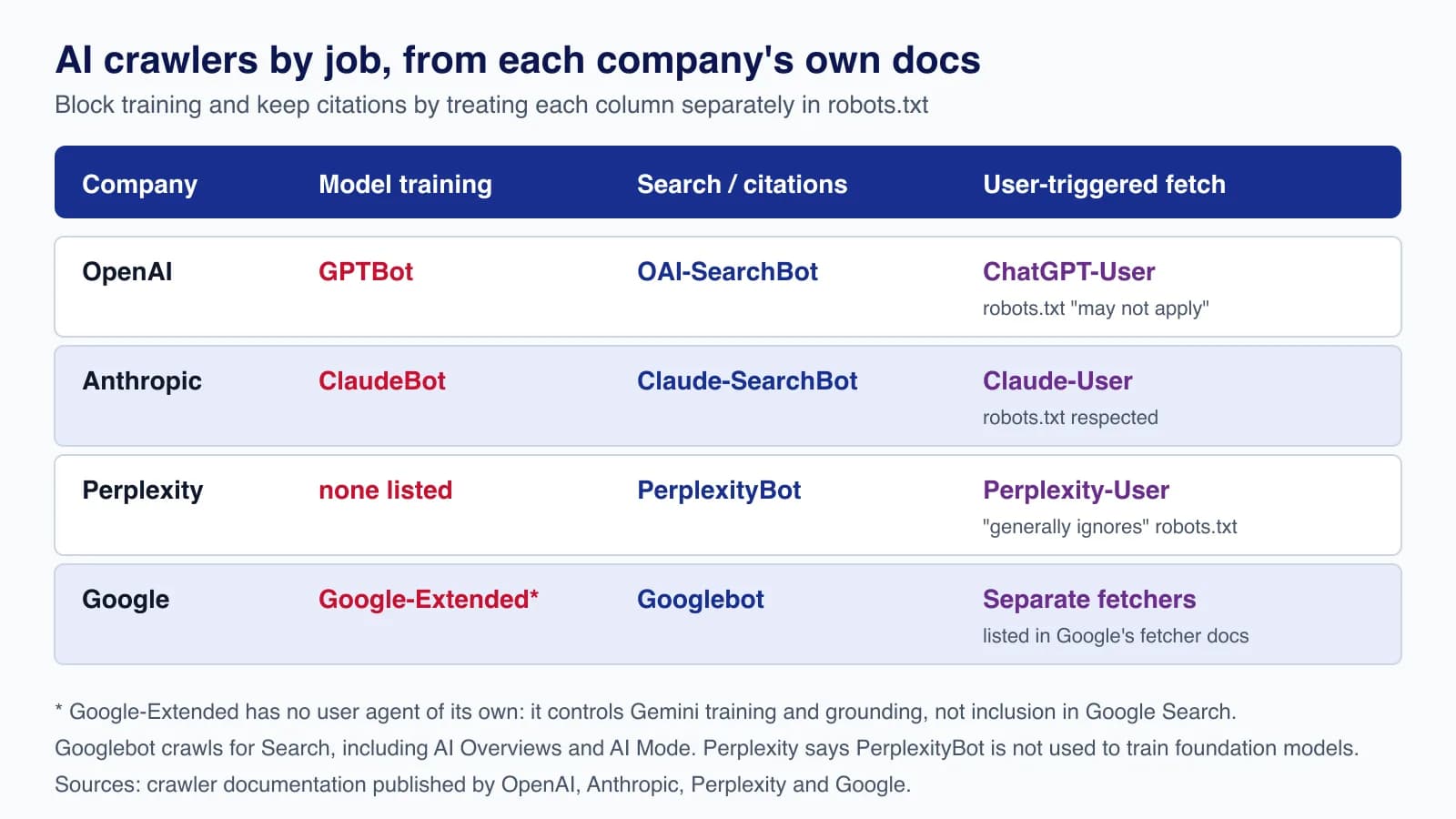
Each AI company now separates crawling for model training from crawling for search answers, and both from fetches a user triggers by asking about a URL. The names matter, because they are what you write in robots.txt:
| Company | Training | Search and citations | User-triggered fetch |
|---|---|---|---|
| OpenAI | GPTBot | OAI-SearchBot | ChatGPT-User ("robots.txt rules may not apply") |
| Anthropic | ClaudeBot | Claude-SearchBot | Claude-User |
| Perplexity | None listed; PerplexityBot "is not used to crawl content for AI foundation models" | PerplexityBot | Perplexity-User ("generally ignores robots.txt rules") |
Google-Extended (a robots.txt token, not a crawler) | Googlebot, including AI Overviews and AI Mode | Listed separately in Google's fetcher documentation |
The sources are the companies' own pages: OpenAI's crawler overview, Anthropic's crawler help article (updated 7 April 2026), Perplexity's bots guide and Google's common crawlers list (updated 14 July 2026). Three points from them are easy to get wrong:
- Blocking GPTBot does not remove you from ChatGPT search. OpenAI says the settings are independent; "Sites that are opted out of OAI-SearchBot will not be shown in ChatGPT search answers."
- Google-Extended does not affect Google Search. Google says it "does not impact a site's inclusion in Google Search" and is not a ranking signal. It controls whether content is used for Gemini training and for grounding in Gemini Apps and Vertex AI. AI Overviews and AI Mode are part of Search and follow Googlebot and the normal snippet controls.
- User-triggered fetchers may ignore robots.txt. OpenAI and Perplexity both say so. If something must not be fetched, protect it with authentication, not a robots rule.
Step 1: write robots.txt per job, not per company
Most publishers want to be cited but not used as free training data. With the App Router, generate robots.txt from app/robots.ts:
// app/robots.ts
import type { MetadataRoute } from 'next'

export default function robots(): MetadataRoute.Robots {
  return {
    rules: [
      // Search and answer engines: allowed, so pages can be cited with a link.
      { userAgent: ['OAI-SearchBot', 'Claude-SearchBot', 'PerplexityBot'], allow: '/' },
      // Model training: opted out. Google-Extended is a token, not a separate crawler.
      { userAgent: ['GPTBot', 'ClaudeBot', 'Google-Extended'], disallow: '/' },
      // Everyone else, including Googlebot and Bingbot.
      { userAgent: '*', allow: '/', disallow: ['/account/', '/api/'] },
    ],
    sitemap: 'https://www.example.com/sitemap.xml',
  }
}
Next.js builds it into a static file. Our build served exactly the groups you would write by hand, one User-Agent line per token followed by the rule. Changes are not instant: OpenAI says to allow about 24 hours for search results to reflect a robots.txt change, and Perplexity says up to 24 hours. If you want the opposite policy, to stay out of AI answers entirely, disallow the search crawlers too, and for Google use nosnippet or noindex, which Google lists as the controls for its AI features.
Step 2: make sure the HTML already contains the page
A crawler that does not run JavaScript sees only the HTML your server sends. Vercel's December 2024 analysis of crawler traffic found that the AI crawlers it measured, including OpenAI's and Anthropic's, fetched JavaScript files but did not execute them, while Googlebot renders pages. Treat that as a snapshot rather than a guarantee, and check your own logs, but the safe design is the same either way: put the content, title and description in the HTML response.
Next.js does this by default for Server Components. The risk comes from three patterns, which we reproduced in a small test app:
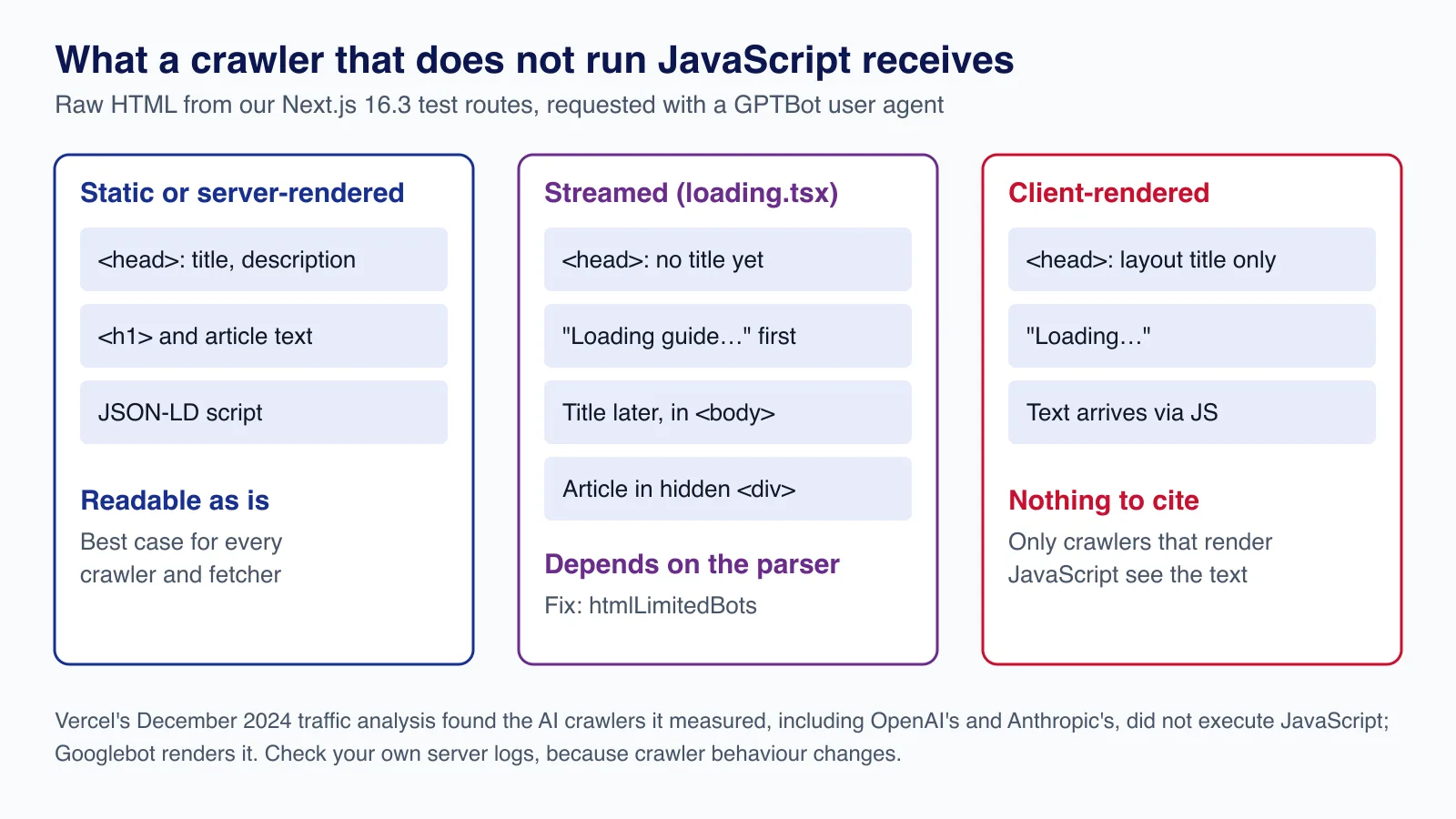
- Client-only pages. A
'use client'page that loads its text inuseEffectsent only "Loading…" to our GPTBot request. The text never existed in the HTML. - Streaming with
loading.tsx. The route rendered its loading fallback first and the article later in a hidden<div>that inline JavaScript moves into place. The text is in the HTML, but after a placeholder and outside the normal document flow. - Streaming metadata. The same route put its
<title>, description and canonical link in<body>, about 8 KB into the response, instead of in<head>. That one needs explaining.
Step 3: check where your metadata lands (streaming metadata)
Since Next.js 15.2, generateMetadata can stream: Next.js sends the page shell without waiting for metadata and appends the tags to <body> when they resolve. The documentation says this works for bots that run JavaScript, such as Googlebot, and that "HTML-limited bots" still get blocking metadata in <head>. Next.js decides which bots are HTML-limited by matching the user agent against a built-in list.
In Next.js 16.3.0 that list includes Bingbot, Twitterbot, Slackbot, facebookexternalhit and Google's non-Googlebot crawlers. It does not include GPTBot, OAI-SearchBot, ClaudeBot or PerplexityBot. Whether metadata actually streams depends on timing: on a page whose content and metadata awaited the same 300 ms lookup, the title stayed in <head>. Adding a loading.tsx to the route, which is very common, let the shell flush first, and then every non-listed user agent got its title in the body:
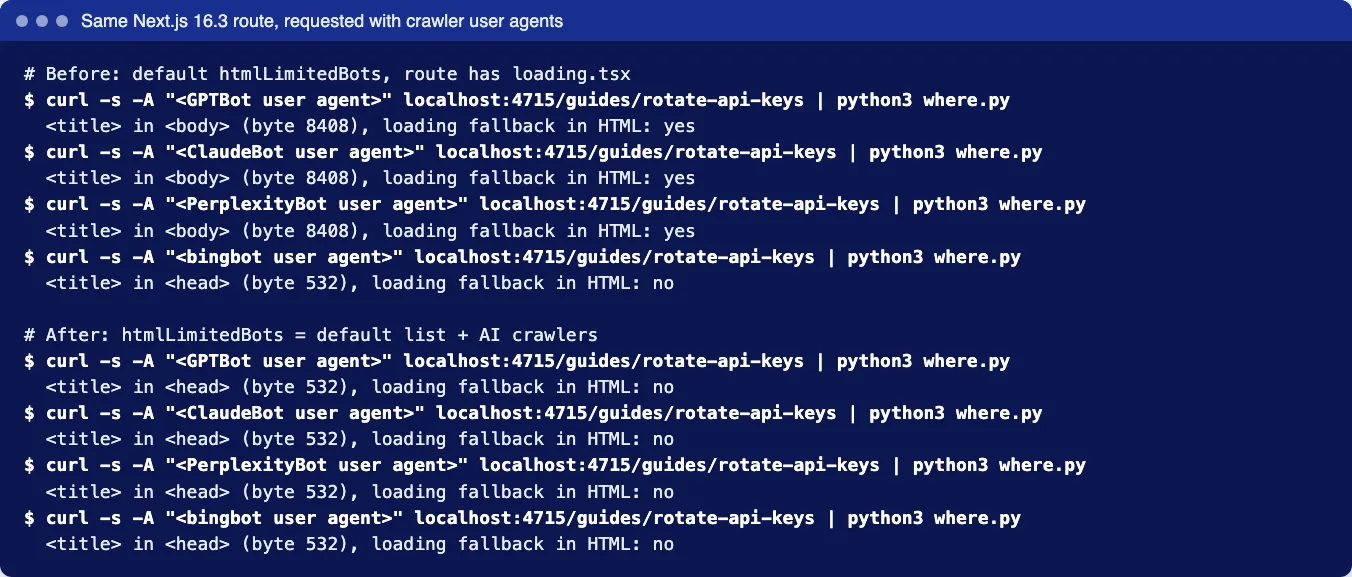
If your pages have loading.tsx files or slow generateMetadata calls, add the AI crawlers to htmlLimitedBots. Setting the option replaces the default list, so include the default too. We copied it from the Next.js 16.3.0 source:
// next.config.ts
import type { NextConfig } from 'next'

// Next.js's default list (16.3), copied from html-bots.ts, plus AI crawlers and fetchers.
// Setting htmlLimitedBots replaces the default, so keep both parts.
const defaultHtmlLimitedBots =
  '[\\w-]+-Google|Google-[\\w-]+|Chrome-Lighthouse|Slurp|DuckDuckBot|baiduspider|yandex|sogou|bitlybot|tumblr|vkShare|quora link preview|redditbot|ia_archiver|Bingbot|BingPreview|applebot|facebookexternalhit|facebookcatalog|Twitterbot|LinkedInBot|Slackbot|Discordbot|WhatsApp|SkypeUriPreview|Yeti|googleweblight'
const aiCrawlers = 'GPTBot|OAI-SearchBot|ChatGPT-User|ClaudeBot|Claude-SearchBot|Claude-User|PerplexityBot|Perplexity-User'

const nextConfig: NextConfig = {
  htmlLimitedBots: new RegExp(`${defaultHtmlLimitedBots}|${aiCrawlers}`, 'i'),
}

export default nextConfig
With this config, our GPTBot, ClaudeBot and PerplexityBot requests received the title in <head> and the complete article with no loading fallback, because Next.js renders the whole page before responding to HTML-limited bots. Browsers and Googlebot kept streaming. Two cautions: the default list can change between Next.js versions, so re-check html-bots.ts when you upgrade; and blocking rendering makes those responses slower, so keep generateMetadata fast, ideally cached.
This is the kind of detail that is cheap to check and expensive to miss across hundreds of pages. If you want a second opinion on how your Next.js routes render for crawlers, our React and Next.js team can run the same tests on your site.
Step 4: use the Metadata API properly
The Metadata API is how a Next.js page tells every crawler what it is. A typical dynamic page:
// app/guides/[slug]/page.tsx (metadata part)
import type { Metadata } from 'next'
import { getGuide } from '@/lib/guides'

type Props = { params: Promise<{ slug: string }> }

export async function generateMetadata({ params }: Props): Promise<Metadata> {
  const guide = await getGuide((await params).slug)
  if (!guide) return {}
  return {
    title: guide.title,
    description: guide.summary,
    alternates: { canonical: `/guides/${guide.slug}` },
    openGraph: {
      type: 'article',
      title: guide.title,
      description: guide.summary,
      publishedTime: guide.published,
      modifiedTime: guide.updated,
    },
  }
}- Set
metadataBaseonce in the root layout so relative canonical and Open Graph URLs become absolute. - Write the description as a factual one-sentence answer. It is what appears as the snippet, and a page that answers the question in its first paragraph gives any summariser less to guess.
- Use a canonical URL on every indexable page so duplicate URLs (tracking parameters, trailing slashes) consolidate.
- Use
robotsin metadata for page-level controls, for examplerobots: { googleBot: { 'max-snippet': 160 } }to limit snippet length in Google, including its AI features.
Generate sitemap.xml from app/sitemap.ts with real lastModified dates. Search crawlers use it to find updated pages, and an accurate date costs nothing.
Step 5: add structured data, without expecting magic
JSON-LD describes the page in a machine-readable way. Next.js recommends rendering it as a script tag in the page, and escaping < so that content from your CMS cannot close the script tag and inject HTML:
// inside the page component
const jsonLd = {
  '@context': 'https://schema.org',
  '@type': 'TechArticle',
  headline: guide.title,
  description: guide.summary,
  datePublished: guide.published,
  dateModified: guide.updated,
  author: { '@type': 'Person', name: guide.author },
  mainEntityOfPage: `https://www.example.com/guides/${guide.slug}`,
}

return (
  <article>
    <script
      type="application/ld+json"
      dangerouslySetInnerHTML={{ __html: JSON.stringify(jsonLd).replace(/</g, '\\u003c') }}
    />
    <h1>{guide.title}</h1>
    <p>
      By {guide.author}. Updated <time dateTime={guide.updated}>{guide.updated}</time>.
    </p>
    {/* ... */}
  </article>
)
Be realistic about what it does. Google's AI features guidance says "There's also no special schema.org structured data that you need to add" to appear in AI Overviews or AI Mode, and asks that structured data match the visible content. None of the OpenAI, Anthropic or Perplexity crawler pages mentions structured data. Use JSON-LD because it earns rich results in Google and keeps facts such as author and dates unambiguous, and show the same facts in visible text, as the byline above does.
What about llms.txt?
llms.txt is a proposal, published by Jeremy Howard in September 2024, for a Markdown file at /llms.txt that summarises a site and links to its key pages, mainly so that AI agents and coding assistants can find documentation at the moment they need it. Some documentation sites publish one; Next.js's own docs serve /docs/llms.txt.
What it is not, as of this writing, is a ranking or citation signal that any of these four companies documents. None of their crawler pages says their search or training crawlers read it, and Google's AI features guidance says: "You don't need to create new machine readable files, AI text files, or markup to appear in these features." Add one if you run developer documentation and want agents pointed at it to find the right pages; do not expect it to change whether ChatGPT, Claude, Perplexity or Google cite you.
Production considerations
- Verify crawlers before trusting a user agent. Anyone can send
GPTBotin a header. OpenAI and Perplexity publish JSON lists of their crawler IP ranges, and Anthropic publishes its own; use them in firewall rules rather than the user agent alone. - Do not let a firewall contradict robots.txt. CDN "block AI bots" settings can block search crawlers you meant to allow. Check the rule names against the table above.
- Serve the same content to bots and people.
htmlLimitedBotschanges how the page is delivered, not what it says. Hiding or adding text only for crawlers is cloaking. - Watch your logs. Count requests per crawler user agent and the status codes they get. A spike in 404s from one crawler usually means stale sitemap entries or broken redirects.
- Keep private pages private. Account pages and APIs belong behind authentication; a
Disallowline only asks politely.
Common mistakes
- Blocking every AI user agent to stop training, and disappearing from AI search answers as a result.
- Expecting
Google-Extendedto remove a site from AI Overviews. It does not; snippet controls do. - Client-rendering article text in a Next.js app, often by wrapping a whole page in
'use client'to use one hook. - Adding
loading.tsxto content routes without checking where the title ends up for non-browser user agents. - Structured data that disagrees with the page, such as a
dateModifiedthat changes on every build while the text does not. - Paying for "AI SEO" files or markup that no AI company documents using.
When this is not your problem
If your Next.js app is a logged-in product with no public content, none of this matters beyond a Disallow for crawlers and authentication on every route. And if your public pages are fully static (no loading.tsx, no slow metadata), the streaming issue does not apply: our static pages put metadata in <head> for every user agent. For content sites run on a CMS, the content model matters more than any of the above; our headless WordPress and Next.js architecture guide covers that side.
Want your Next.js site checked for what crawlers really receive, with robots rules, metadata, structured data and rendering fixed in one pass? Cloudsoft Zone's React and Next.js development service audits and fixes technical SEO for App Router sites, with before-and-after evidence from your own server.
Frequently asked questions
If I block GPTBot, will my site disappear from ChatGPT search?
No. OpenAI uses OAI-SearchBot for ChatGPT search and GPTBot for training, and the settings are independent. Disallow GPTBot and allow OAI-SearchBot to be cited without contributing to training.
Does Google-Extended stop my pages appearing in AI Overviews?
No. Google says Google-Extended does not affect inclusion in Google Search. AI Overviews and AI Mode are Search features; use
nosnippet,data-nosnippet,max-snippetornoindexto limit them.Do AI crawlers run JavaScript?
Googlebot renders pages. Vercel's December 2024 traffic analysis found the AI crawlers it measured, including OpenAI's and Anthropic's, did not execute JavaScript. Behaviour can change, so serve complete HTML and check your own logs.
Should I add an llms.txt file?
Only if it helps people or agents use your documentation. It is a 2024 community proposal; none of the OpenAI, Anthropic, Perplexity or Google crawler documentation says it is used for search or citations, and Google says no AI-specific text files are needed.
Why does my Next.js page title appear in the body?
Streaming metadata. When the page shell flushes before
generateMetadataresolves, Next.js appends the tags to the body for user agents not on its HTML-limited bot list. Add the crawlers you care about tohtmlLimitedBots, keeping the default list.
Your next customer could start right here.
Introduce your tool, product or business to readers exploring technology.
Explore placements and request a private quote
Sources
- Overview of OpenAI crawlers — OpenAI
- Does Anthropic crawl data from the web, and how can site owners block the crawler? — Anthropic, 2026-04-07
- Perplexity crawlers — Perplexity
- Google's common crawlers (Google-Extended) — Google, 2026-07-14
- AI features and your website — Google Search Central, 2025-12-10
- generateMetadata: streaming metadata — Next.js documentation
- htmlLimitedBots — Next.js documentation
- How to implement JSON-LD in your Next.js application — Next.js documentation
- The rise of the AI crawler — Vercel, 2024-12-17
- The /llms.txt file — llmstxt.org (Jeremy Howard), 2024-09-03
Written with substantial AI assistance. Facts checked against cited sources. Editorial policy.
Comments
No comments yet. Be the first to join the conversation.
Leave a comment
Every comment is read by a moderator before it appears. Your email address is never published; it is used only to contact you about this comment.
Related tools
- Directory profile
ChatGPT
OpenAI's AI assistant for chat, writing, image creation, file analysis and coding with Codex, on web, desktop and mobile, with paid plans for individuals and teams.
The guide covers OpenAI's crawlers and how ChatGPT search fetches and cites pages.
- Directory profile
Perplexity
AI answer engine that searches the web and replies with cited sources, with deep research, the Comet browser, desktop and mobile apps and a developer API.
The guide covers Perplexity's crawler and what its documentation says about it.
More from Cloudsoft Zone

TutorialJavaScript
JavaScript using declarations: automatic cleanup without finally
Learn JavaScript's using and await using declarations, Symbol.dispose and DisposableStack, with tested browser recipes and October 2026 support data.
By Cloudsoft Zone

Architecture guideJavaScript
Ship JavaScript without a bundler: import maps and JSON modules
How to structure a front end as native ES modules: import maps for bare imports, JSON modules, modulepreload against waterfalls, and cache-busting.
By Cloudsoft Zone
ComparisonJavaScript
structuredClone vs JSON vs spread: deep copy JavaScript safely
Spread is shallow, JSON loses dates, Maps, Sets and undefined, and structuredClone keeps them. A tested comparison of JavaScript copy methods and their limits.
By Cloudsoft Zone