
Multi-tenant SaaS beyond data isolation: tenant RBAC, billing, audit logs
Design the multi-tenant layer customers notice: tenant-scoped roles, safe invitations, plan entitlements and billing states, per-tenant audit logs, and offboarding with export.
Updated 18 min read

In this article
Isolating each customer's rows is the first thing a multi-tenant SaaS has to get right, but it is not what customers notice. Their administrators notice whether they can give a contractor access to one project, invite a colleague without emailing passwords, see who changed the billing contact, stay on a cheaper plan without losing data, and leave with a complete export. This guide covers that layer: tenant-scoped roles and permissions, invitations, plan entitlements and billing state, per-tenant audit logs, and offboarding with data export, with a PostgreSQL schema and TypeScript code that were run and tested.
Tested with: PostgreSQL 18.3 (through PGlite 0.5.8), Node.js 24.19.0 with built-in type stripping, and TypeScript 7.0.2 (tsc --noEmit with strict). The data access code uses the same query() shape as node-postgres.
Two companion articles cover the layers underneath. Multi-tenant SaaS data isolation compares shared tables, schemas and databases and enforces row-level security. Stripe subscription billing architecture that survives webhooks covers verifying, storing and processing billing events. This article assumes both and does not repeat them.
The model: users are global, everything else belongs to a tenant
The design decision that prevents most later pain is separating who someone is from what they can do in a given tenant. A person has one user record and one login. Their access to each organisation lives in a membership row that links user, tenant and role. The same consultant can be an owner of their own workspace and a read-only member of a client's, without two accounts.
From that starting point, each concern gets its own table:
- memberships: user, tenant, role and status. Suspending one membership does not touch the user's other tenants.
- roles and role_permissions: roles belong to a tenant. System roles (owner, admin, member, billing) are copied into every new tenant, so custom roles and system roles work the same way.
- invitations: hashed tokens with an expiry, tied to an email address and a role.
- tenant_entitlements: what the plan allows, written by your billing event processor and read by everything else.
- audit_events: an append-only record of who did what, inside which tenant.
The cover diagram shows how these tables relate.
Tenant-scoped roles and permissions
Check permissions, not role names. Code that asks role === 'admin' breaks the day a customer wants an "Accounts" role that can export invoices but not invite users. Code that asks for invoices:export keeps working when roles change. Keep the permission list in code, as the source of truth for what the application can check, and store which roles grant which permissions in the database.
The schema below enforces the rule that matters most in multi-tenant RBAC: a membership can only use a role from its own tenant. Without the composite foreign key, a bug or a crafted request could assign tenant B's custom "Super admin" role to a member of tenant A.
-- Tenancy, roles, invitations, entitlements and audit (PostgreSQL)
CREATE TABLE tenants (
  id          uuid PRIMARY KEY DEFAULT gen_random_uuid(),
  name        text NOT NULL,
  status      text NOT NULL DEFAULT 'active'
              CHECK (status IN ('active', 'read_only', 'suspended', 'pending_deletion', 'deleted')),
  delete_after timestamptz,
  created_at  timestamptz NOT NULL DEFAULT now()
);

CREATE TABLE users (
  id     uuid PRIMARY KEY DEFAULT gen_random_uuid(),
  email  text NOT NULL,
  name   text NOT NULL
);
CREATE UNIQUE INDEX users_email_key ON users (lower(email));

-- Every tenant gets its own copies of the system roles, plus any custom roles.
CREATE TABLE roles (
  id         uuid PRIMARY KEY DEFAULT gen_random_uuid(),
  tenant_id  uuid NOT NULL REFERENCES tenants (id),
  key        text NOT NULL,              -- 'owner', 'admin', 'member', 'billing', or custom
  is_system  boolean NOT NULL DEFAULT false,
  UNIQUE (tenant_id, key),
  UNIQUE (tenant_id, id)                 -- target for the composite foreign keys below
);

CREATE TABLE role_permissions (
  role_id     uuid NOT NULL REFERENCES roles (id) ON DELETE CASCADE,
  permission  text NOT NULL,             -- 'projects:write', 'members:invite', 'billing:manage'
  PRIMARY KEY (role_id, permission)
);

CREATE TABLE memberships (
  tenant_id  uuid NOT NULL REFERENCES tenants (id),
  user_id    uuid NOT NULL REFERENCES users (id),
  role_id    uuid NOT NULL,
  status     text NOT NULL DEFAULT 'active' CHECK (status IN ('active', 'suspended')),
  created_at timestamptz NOT NULL DEFAULT now(),
  PRIMARY KEY (tenant_id, user_id),
  -- A membership can only point at a role that belongs to the same tenant.
  FOREIGN KEY (tenant_id, role_id) REFERENCES roles (tenant_id, id)
);

CREATE TABLE invitations (
  id           uuid PRIMARY KEY DEFAULT gen_random_uuid(),
  tenant_id    uuid NOT NULL REFERENCES tenants (id),
  email        text NOT NULL,
  role_id      uuid NOT NULL,
  token_hash   bytea NOT NULL UNIQUE,     -- SHA-256 of the emailed token; never store the token
  invited_by   uuid NOT NULL REFERENCES users (id),
  expires_at   timestamptz NOT NULL,
  accepted_at  timestamptz,
  revoked_at   timestamptz,
  FOREIGN KEY (tenant_id, role_id) REFERENCES roles (tenant_id, id)
);
CREATE UNIQUE INDEX invitations_one_open ON invitations (tenant_id, lower(email))
  WHERE accepted_at IS NULL AND revoked_at IS NULL;

-- What the tenant's plan allows, derived from billing events (see the billing article).
CREATE TABLE tenant_entitlements (
  tenant_id       uuid PRIMARY KEY REFERENCES tenants (id),
  plan            text NOT NULL,
  billing_status  text NOT NULL,          -- mirrors the subscription: 'active', 'past_due', 'canceled' ...
  seats           integer NOT NULL CHECK (seats >= 0),
  features        text[] NOT NULL DEFAULT '{}',
  audit_retention_days integer NOT NULL DEFAULT 90,
  updated_at      timestamptz NOT NULL DEFAULT now()
);

CREATE TABLE audit_events (
  id           bigint GENERATED ALWAYS AS IDENTITY PRIMARY KEY,
  tenant_id    uuid NOT NULL REFERENCES tenants (id),
  occurred_at  timestamptz NOT NULL DEFAULT now(),
  actor_type   text NOT NULL CHECK (actor_type IN ('user', 'api_key', 'system', 'support')),
  actor_id     text NOT NULL,
  action       text NOT NULL,             -- 'member.role_changed', 'invoice.exported'
  target_type  text,
  target_id    text,
  changes      jsonb,                     -- {"role": ["member", "admin"]}; never secrets
  ip           inet,
  request_id   text
);
CREATE INDEX audit_events_tenant_time ON audit_events (tenant_id, occurred_at DESC);

-- Append-only for the application: no updates; deletes only by the retention job's role.
CREATE FUNCTION audit_events_append_only() RETURNS trigger LANGUAGE plpgsql AS $$
BEGIN
  IF TG_OP = 'UPDATE' OR current_setting('app.audit_purge', true) IS DISTINCT FROM 'on' THEN
    RAISE EXCEPTION 'audit_events is append-only';
  END IF;
  RETURN OLD;
END $$;
CREATE TRIGGER audit_events_no_change BEFORE UPDATE OR DELETE ON audit_events
  FOR EACH ROW EXECUTE FUNCTION audit_events_append_only();
Run against PostgreSQL 18.3, assigning another tenant's role failed with memberships_tenant_id_role_id_fkey, a second open invitation to the same address (in any letter case) failed on invitations_one_open, and both UPDATE and DELETE on audit_events raised "audit_events is append-only" unless the retention job set app.audit_purge for its transaction.
Some rules do not fit in a table and need explicit code paths:
- Never remove the last owner. Changing or removing an owner should lock the tenant's memberships in a transaction and refuse if no active owner would remain.
- No privilege escalation by delegation. A user can grant only roles whose permissions they already hold. Only owners grant ownership.
- Platform staff are not tenant admins. Your support team's access to a customer workspace should be a separate, time-limited grant that is visible to the customer and written to their audit log with actor type
support, not a hiddenis_adminflag that bypasses tenant checks. - Resolve the tenant from the request, then verify membership. Take the tenant ID from the URL or token, load the membership for that user, and fail with the same error whether the tenant does not exist or the user is not a member, so tenant IDs cannot be probed. OWASP's ASVS 5.0 chapter V8 describes these checks at the function and data level.
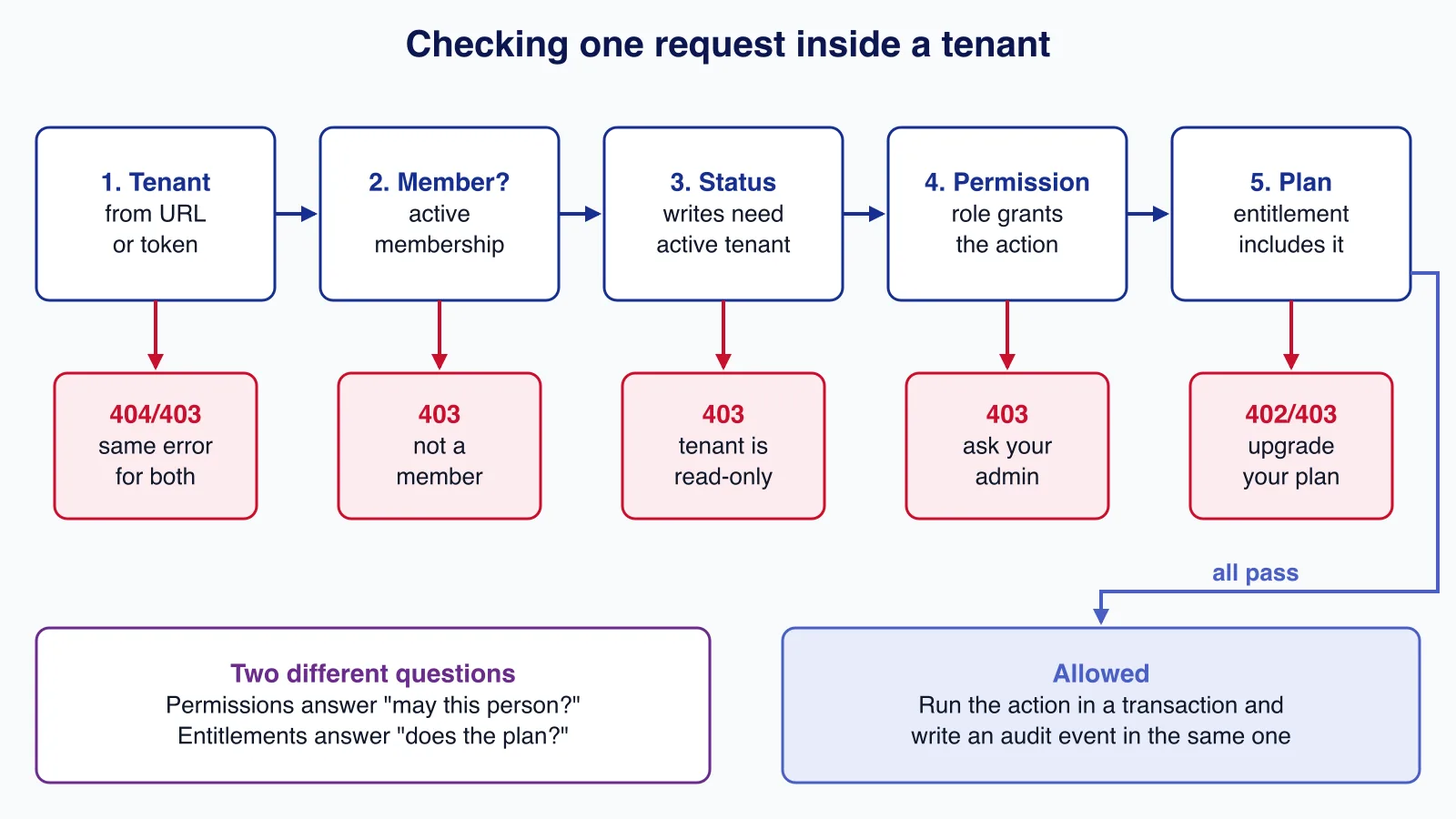
Load the context once per request and check it at each action:
import { createHash, randomBytes } from 'node:crypto';

// Works with a node-postgres PoolClient or any client with the same query() shape.
export interface Db {
  query<T = Record<string, unknown>>(sql: string, params?: unknown[]): Promise<{ rows: T[] }>;
}

export class Forbidden extends Error {}
export class PlanLimit extends Error {}

export interface TenantContext {
  tenantId: string;
  userId: string;
  tenantStatus: string;
  permissions: Set<string>;
  features: Set<string>;
}

// Load once per request, after authentication, from the tenant in the URL or token.
export async function loadContext(db: Db, tenantId: string, userId: string): Promise<TenantContext> {
  const { rows } = await db.query<{ status: string; permissions: string[] | null; features: string[] }>(
    `SELECT t.status,
            array_agg(rp.permission) FILTER (WHERE rp.permission IS NOT NULL) AS permissions,
            e.features
       FROM memberships m
       JOIN tenants t ON t.id = m.tenant_id
       JOIN tenant_entitlements e ON e.tenant_id = m.tenant_id
       LEFT JOIN role_permissions rp ON rp.role_id = m.role_id
      WHERE m.tenant_id = $1 AND m.user_id = $2 AND m.status = 'active'
      GROUP BY t.status, e.features`,
    [tenantId, userId],
  );
  if (rows.length === 0) throw new Forbidden('Not a member of this tenant'); // same error as "no such tenant"
  const row = rows[0];
  return {
    tenantId,
    userId,
    tenantStatus: row.status,
    permissions: new Set(row.permissions ?? []),
    features: new Set(row.features),
  };
}

const WRITE_BLOCKED = new Set(['read_only', 'suspended', 'pending_deletion', 'deleted']);

export function authorize(
  ctx: TenantContext,
  permission: string,
  opts: { write?: boolean; feature?: string } = {},
): void {
  if (ctx.tenantStatus === 'deleted' || ctx.tenantStatus === 'suspended') throw new Forbidden('Tenant unavailable');
  if (opts.write && WRITE_BLOCKED.has(ctx.tenantStatus)) throw new Forbidden('Tenant is read-only');
  if (!ctx.permissions.has(permission)) throw new Forbidden(`Missing permission ${permission}`);
  if (opts.feature && !ctx.features.has(opts.feature)) throw new PlanLimit(`Plan does not include ${opts.feature}`);
}

export const hashToken = (token: string) => createHash('sha256').update(token).digest();

export async function createInvitation(db: Db, ctx: TenantContext, email: string, roleKey: string) {
  authorize(ctx, 'members:invite', { write: true });
  if (roleKey === 'owner' && !ctx.permissions.has('owners:manage')) throw new Forbidden('Only owners can invite owners');
  const token = randomBytes(32).toString('base64url'); // goes in the email link only
  await db.query(
    `INSERT INTO invitations (tenant_id, email, role_id, token_hash, invited_by, expires_at)
     SELECT $1, $2, r.id, $3, $4, now() + interval '7 days'
       FROM roles r WHERE r.tenant_id = $1 AND r.key = $5`,
    [ctx.tenantId, email.trim().toLowerCase(), hashToken(token), ctx.userId, roleKey],
  );
  await audit(db, ctx, 'member.invited', 'invitation', email, { role: roleKey });
  return token;
}

// Run inside a transaction (BEGIN ... COMMIT) so the seat check and insert are atomic.
export async function acceptInvitation(db: Db, token: string, user: { id: string; email: string }) {
  const { rows } = await db.query<{ id: string; tenant_id: string; role_id: string; email: string }>(
    `SELECT id, tenant_id, role_id, email FROM invitations
      WHERE token_hash = $1 AND accepted_at IS NULL AND revoked_at IS NULL AND expires_at > now()
      FOR UPDATE`,
    [hashToken(token)],
  );
  const inv = rows[0];
  // Bind the invite to the address it was sent to; do not reveal which check failed.
  if (!inv || inv.email !== user.email.toLowerCase()) throw new Forbidden('Invitation is invalid or expired');

  // Lock the tenant's entitlement row so two acceptances cannot both take the last seat.
  const seats = await db.query<{ seats: number; used: number }>(
    `SELECT e.seats,
            (SELECT count(*)::int FROM memberships m WHERE m.tenant_id = e.tenant_id AND m.status = 'active') AS used
       FROM tenant_entitlements e WHERE e.tenant_id = $1 FOR UPDATE`,
    [inv.tenant_id],
  );
  if (seats.rows[0].used >= seats.rows[0].seats) throw new PlanLimit('No seats left on this plan');

  await db.query(
    `INSERT INTO memberships (tenant_id, user_id, role_id) VALUES ($1, $2, $3)
     ON CONFLICT (tenant_id, user_id) DO NOTHING`,
    [inv.tenant_id, user.id, inv.role_id],
  );
  await db.query(`UPDATE invitations SET accepted_at = now() WHERE id = $1`, [inv.id]);
  await db.query(
    `INSERT INTO audit_events (tenant_id, actor_type, actor_id, action, target_type, target_id)
     VALUES ($1, 'user', $2, 'member.joined', 'user', $2)`,
    [inv.tenant_id, user.id],
  );
  return inv.tenant_id;
}

export async function audit(
  db: Db, ctx: TenantContext, action: string, targetType: string, targetId: string,
  changes?: Record<string, unknown>,
) {
  await db.query(
    `INSERT INTO audit_events (tenant_id, actor_type, actor_id, action, target_type, target_id, changes)
     VALUES ($1, 'user', $2, $3, $4, $5, $6)`,
    [ctx.tenantId, ctx.userId, action, targetType, targetId, changes ? JSON.stringify(changes) : null],
  );
}
A test script exercised this module end to end: a member without members:invite was refused, an owner could not write while the tenant was read-only, a non-member got the same "Not a member" error, and the audit table recorded member.invited and member.joined.
Inviting users without creating holes
Invitations are an authentication path, so treat them like password reset links:
- Store only a hash of the token. The raw token exists in the email and nowhere else. A leaked database backup then contains no usable invitations.
- Expire, use once, allow revocation. Seven days is a common expiry. Accepting sets
accepted_at; the lookup ignores accepted, revoked and expired rows. - Bind to the invited email. In the test, a different signed-in user presenting a valid token was refused with the same generic message as an expired link. If someone needs to join with another address, the admin sends a new invitation.
- Check seats at acceptance, inside a transaction. Locking the tenant's entitlement row with
FOR UPDATEstops two people taking the last seat at the same moment. The test plan had two seats; the third person was refused with "No seats left on this plan". - Rate-limit invitations per tenant and log each one, because an invite form is also a way to send email from your domain.
Larger customers will ask for single sign-on and automatic provisioning. SCIM (RFC 7644) lets their identity provider create and deactivate memberships, which is the most reliable offboarding of all because it happens when HR closes the account. Plan the membership model so that a SCIM deprovisioning event simply suspends a membership.
Plan entitlements and billing state
Keep two ideas apart. Billing state is what the payment provider says about the subscription: active, trialing, past due, canceled. Entitlements are what your product allows: seats, features, limits and retention. Your billing processor turns the first into the second and writes one row per tenant; the rest of the application only reads entitlements and never calls the billing API during a request.
If you use Stripe, its Entitlements feature maps product features to customers and sends entitlements.active_entitlement_summary.updated when they change. Stripe's documentation recommends persisting entitlements internally for faster resolution, which is what tenant_entitlements is for. Its features are on or off, so numeric limits such as seats, projects or API calls per month still need your own columns or counters.
| Entitlement type | Example | Where to enforce |
|---|---|---|
| Feature flag | SSO, API access, advanced reports | API middleware and UI, with the same check |
| Seat limit | 10 active members | At invitation acceptance and reactivation, in a transaction |
| Usage quota | 5,000 API calls a month | Counter per tenant and period; reject or meter overage |
| Retention | Audit history for 90 or 365 days | In the purge job, not by deleting at read time |
Decide in advance what each billing state means for access, and make it boring and predictable:
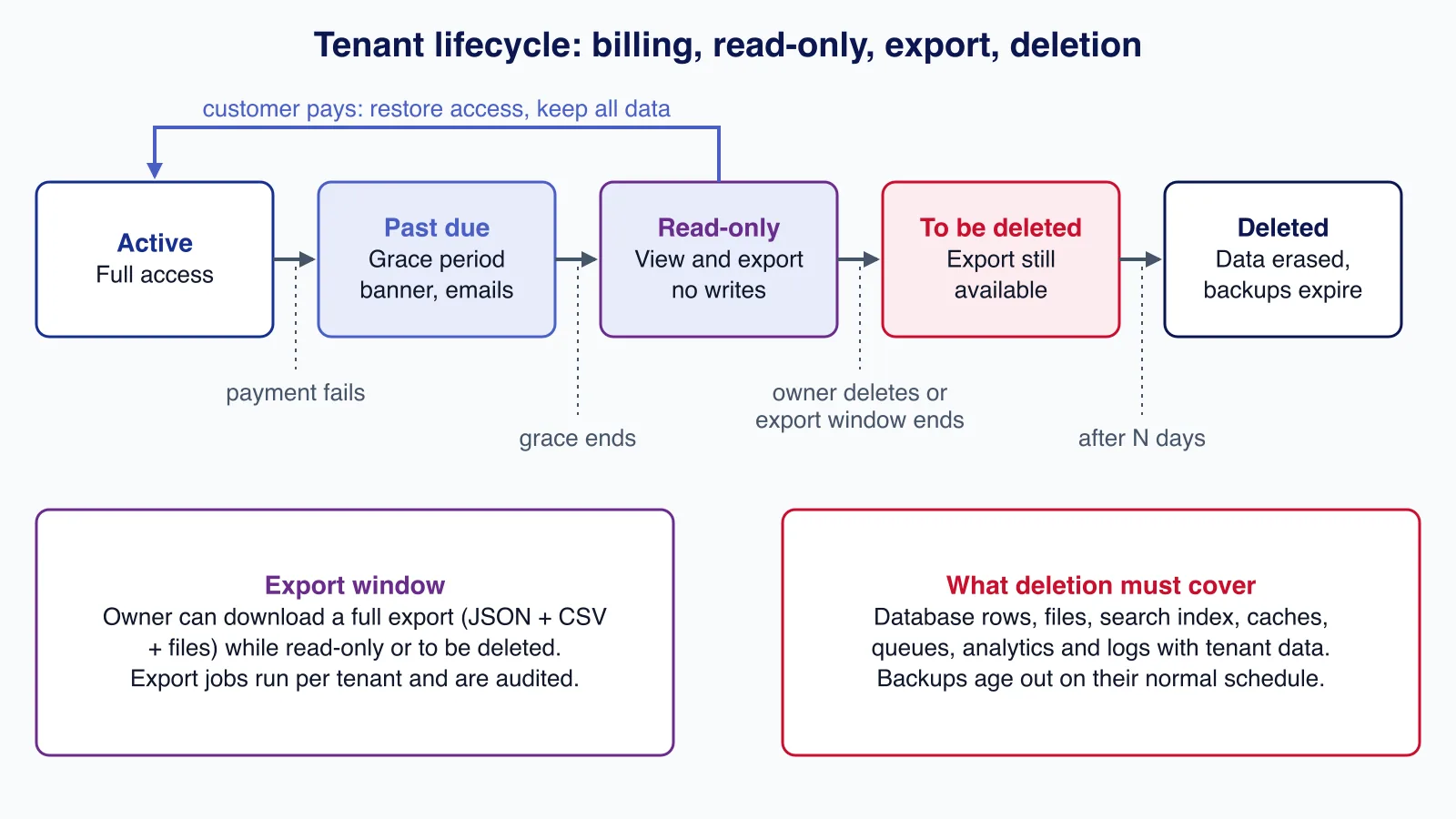
- Past due: keep full access during a grace period while the provider retries the payment; show a banner to owners and billing admins.
- Grace period over: switch the tenant to read-only. Users can view and export, but not create or change data.
- Downgrade: never delete data that exceeds the new plan. Lock it or make it read-only, and tell the owner what is over the limit.
- Upgrade or payment recovered: restore access immediately when the event arrives.
Commercial state should never leak into authorization by accident. Keep "is this person allowed to do this?" (permissions) and "does this tenant's plan include this?" (entitlements) as two separate checks with different error messages, as authorize() does with Forbidden and PlanLimit. Users then see "ask your admin" or "upgrade your plan" correctly.
Retrofitting plans, seats and roles onto a product that began as single-tenant is where most of the risk sits, because every existing query and job has to learn about tenants at once. If that is your situation, help with SaaS architecture early is cheaper than untangling it after customers have been onboarded.
Per-tenant audit logs
Customers on business plans will ask "who did this?", and security reviews will ask how you know. An audit log answers both if it is designed for them from the start.
What to record. The OWASP Logging Cheat Sheet frames each event as when, where, who and what, and lists high-risk functions such as user administration and access to sensitive data among the events to always log. For a SaaS tenant that means at least:
- membership changes: invited, joined, role changed, suspended, removed;
- security settings: SSO, password policy, API keys created or revoked;
- billing changes: plan, billing contact, payment method updated (not the card details);
- data exports, bulk deletes and support access sessions;
- authorization failures on sensitive actions.
What not to record. No passwords, tokens, API keys, session identifiers or payment card data. Store changed field names and safe values in changes, and mask anything sensitive.
Make it hard to change. The trigger in the schema blocks updates and deletes from the application. In production, also give the application's database role only INSERT and SELECT on the table, run retention deletes under a separate role, and copy events to write-once storage if your customers' compliance needs it. OWASP recommends tamper detection and recording access to the logs themselves.
Let tenant admins use it. An audit log only customer support can read creates support tickets. Give owners a filtered, paginated view (by actor, action and date) and an export, gated by an audit:read permission. Index by (tenant_id, occurred_at) so a tenant's view stays fast as the table grows, and let retention follow the plan's audit_retention_days.
Tenant offboarding and data export
Offboarding is a lifecycle, not a DELETE. A predictable sequence protects customers who forgot to pay as well as those who really are leaving:
- Cancellation requested or subscription ends: the tenant goes read-only. Owners can still sign in and export.
- Scheduled deletion: after the export window, set status to pending deletion with a
delete_afterdate, email the owners, and keep the tenant restorable until then. - Deletion: a job removes the tenant's data from every store, then marks the tenant deleted, keeping only what you must retain (invoices for tax law, for example) and a minimal record that the deletion happened.
"Every store" is where most implementations fall short. List all of them: database rows, uploaded files and their thumbnails, search indexes, caches, queued jobs, analytics events and third-party tools that received tenant data. Backups usually cannot be edited, so document that tenant data in backups expires on the normal backup schedule.
The export should be complete, machine-readable and produced per tenant by a background job, not assembled by hand: CSV or JSON for each entity, the files, and the audit log. A minimal PostgreSQL version run with psql -v tenant=... looks like this:
-- One export job per tenant: every table that carries tenant data, nothing else.
COPY (SELECT id, name, status, created_at FROM tenants WHERE id = :'tenant')
  TO STDOUT WITH (FORMAT csv, HEADER);
COPY (SELECT u.email, u.name, r.key AS role, m.status, m.created_at
        FROM memberships m
        JOIN users u ON u.id = m.user_id
        JOIN roles r ON r.id = m.role_id
       WHERE m.tenant_id = :'tenant')
  TO STDOUT WITH (FORMAT csv, HEADER);
COPY (SELECT occurred_at, actor_type, actor_id, action, target_type, target_id, changes
        FROM audit_events WHERE tenant_id = :'tenant' ORDER BY occurred_at)
  TO STDOUT WITH (FORMAT csv, HEADER);
There is also a legal reason to build this properly if you sell to customers in the EU. The EU Data Act has applied since 12 September 2025, and Germany's regulator, the Bundesnetzagentur, explains in its fact sheet on switching that its switching rules cover IaaS, PaaS and SaaS. In the low-complexity scenario, the provider has up to two months after notice to prepare, the switch must finish within a transitional period of 30 calendar days, and data must remain retrievable for at least 30 calendar days afterwards before being erased. Switching charges are limited to direct costs now, and from 12 January 2027 no switching charges may be imposed. A self-service export and a documented deletion schedule make those obligations routine. Take legal advice on how they apply to your contracts.
Common mistakes
- A
tenant_idcolumn on the users table, which forces duplicate accounts for anyone who works with two customers. - Role checks by name scattered through the code, instead of permission checks in one place.
- Global roles that can be assigned across tenants, or custom roles without a tenant foreign key.
- Invitation tokens stored in plain text, never expiring, or accepted by any signed-in user.
- Seat limits checked when the invitation is sent, not when it is accepted.
- Calling the billing API on every request instead of reading stored entitlements.
- Deleting data on downgrade or on the first failed payment.
- An audit log the application can edit, or one only your staff can read.
- "Deleting" a tenant from the database but not from files, search and analytics.
When not to build all of this
- Single-customer or internal software. One organisation needs ordinary RBAC, not tenancy.
- Consumer products without organisations. If every account is one person, memberships and per-tenant roles add complexity without benefit.
- Very early validation. Fixed owner and member roles are enough for the first customers, provided the schema already has memberships and permission checks so you can add custom roles later without a rewrite.
- When an identity platform fits. Several identity providers offer organisations, invitations and enterprise SSO as a managed feature. Using one is reasonable, but entitlements, audit logs and offboarding remain your application's job.
Checklist
- Users are global; access is a membership with a tenant-scoped role.
- Code checks permissions; a composite foreign key keeps roles inside their tenant.
- The last owner cannot be removed; nobody grants more than they hold.
- Invitations are hashed, expiring, single-use, bound to an email and seat-checked at acceptance.
- Billing events update one entitlements row; requests read it, never the billing API.
- Each billing state has a defined access level, and data is never deleted on downgrade.
- Audit events are append-only, exclude secrets and are visible to tenant owners.
- Offboarding runs read-only, export window, scheduled deletion, then deletion in every store.
Cloudsoft Zone designs and builds multi-tenant SaaS platforms with tenant roles, invitations, plan entitlements, audit logs and offboarding built in, or adds them to an existing product without a rewrite. See our SaaS and ERP development service.
Frequently asked questions
Should roles be global or per tenant in a multi-tenant SaaS?
Per tenant. Copy the system roles into each tenant and let tenants add custom roles. A composite foreign key from memberships to roles on (tenant_id, role_id) then guarantees nobody can be given another tenant's role.
Where should plan limits such as seats be enforced?
At the moment the limit is consumed: seats when an invitation is accepted or a member is reactivated, inside a transaction that locks the tenant's entitlement row. Checking only when the invitation is sent lets several pending invitations exceed the plan.
Is Stripe Entitlements enough to model plan limits?
It handles on-or-off features and notifies you when they change. Numeric limits such as seats, projects or monthly API calls still need your own columns or counters, and Stripe recommends persisting entitlements in your own database.
How long should a SaaS keep a cancelled tenant's data?
Long enough for a published export window and a restorable pending-deletion period, then delete it from every store. For EU customers, the Data Act's switching rules require data to stay retrievable for at least 30 calendar days after a switch, so plan your windows around that and take legal advice for your contracts.
Can tenant admins be allowed to read the audit log?
Yes, and they should be, behind a dedicated permission such as audit:read. Show only their tenant's events, exclude secrets, and record access to the log itself.
Your next customer could start right here.
Introduce your tool, product or business to readers exploring technology.
Explore placements and request a private quote
Sources
- Entitlements — Stripe
- Logging Cheat Sheet — OWASP
- ASVS 5.0, V8 Authorization — OWASP
- Data Act — European Commission
- Data Act fact sheet: Switching between data processing services — Bundesnetzagentur
- RFC 7644: System for Cross-domain Identity Management: Protocol — IETF, 2015-09-01
- CREATE TRIGGER — PostgreSQL Global Development Group
Written with substantial AI assistance. Facts checked against cited sources. Editorial policy.
Comments
No comments yet. Be the first to join the conversation.
Leave a comment
Every comment is read by a moderator before it appears. Your email address is never published; it is used only to contact you about this comment.
More from Cloudsoft Zone

Architecture guideAI and Automation
How to build a safe AI content pipeline with human fact review
An architecture for AI-assisted publishing where people stay responsible: untrusted source snapshots, claim checking with citations, a review queue AI cannot skip, labels and rollback.
By Cloudsoft Zone

TutorialNode.js
How to test a Node.js API with the built-in test runner (node:test)
Write, run, mock and measure coverage for a small Node.js HTTP API using only node:test and node:assert. Covers port-0 servers, fetch(), spies, t.mock.method(), fake dates and coverage thresholds.
By Cloudsoft Zone

TutorialNode.js
Node.js streams in practice: pipeline(), backpressure and async generators
Process files of any size in Node.js with flat memory use. A hands-on guide to stream/promises pipeline(), backpressure, async generator transforms, AbortSignal timeouts and streaming downloads over HTTP.
By Cloudsoft Zone