
Laravel queues vs NestJS BullMQ in 2026: architecture and performance
Laravel queues and BullMQ compared on architecture, retries, rate limits, cancellation and dashboards, with a benchmark on the same Redis and what it means for AI jobs.
Updated 11 min read

In this article
Laravel's queue system and BullMQ in a NestJS application both move slow work out of web requests, both commonly sit on Redis, and both retry, delay and rate-limit jobs. The real difference is the execution model: a Laravel worker is a PHP process that runs one job at a time, while a BullMQ worker is a Node.js process that can run many jobs at once on one event loop. For AI workloads, which mostly wait on a model API, that one difference outweighs every other performance number. This comparison covers the architecture, the features that matter in production, and a small benchmark run on the same Redis server, with the hardware, versions and limitations stated.
Tested with: PHP 8.5.7, Laravel 13.20.0 with predis 3.5.1; Node.js 24.18.0 with BullMQ 5.80.9 and ioredis 5.11.1; NestJS 11.1.28 with @nestjs/bullmq 11.0.4 for the code samples; Redis 8.2.2 on localhost. Hardware: Apple M2, 8 cores, 8 GB RAM, macOS. Horizon details refer to Horizon 5.48.0.
This article compares the queue layers only. For the wider choice between the two frameworks (ecosystem, hiring, typing, deployment), read Laravel vs NestJS for SaaS development in 2026.
How each one works
Laravel queues. You dispatch a job class; Laravel serialises it (including Eloquent model identifiers, not the full models) into a JSON payload and pushes it to a connection. Drivers include database, redis, sqs and beanstalkd, plus sync for tests and the newer deferred, background and failover connections. A queue:work process reserves one job, runs it, deletes it and takes the next. Concurrency is the number of worker processes, which Horizon (Redis only) starts, balances across queues and restarts. Timeouts are enforced by the worker with PCNTL signals, which kill the process if a job overruns.
BullMQ. BullMQ is a Node.js library that keeps jobs in Redis (or a Redis-compatible server) and moves them between states (wait, active, delayed, completed, failed) with atomic Lua scripts. A Worker takes a concurrency option: with 50, one process holds up to 50 jobs at once, and while one awaits a network response the event loop runs the others. A lock with periodic renewal marks active jobs; if renewal stops, a stalled-job check returns the job to the queue. NestJS adds dependency injection and decorators through @nestjs/bullmq (@Processor, WorkerHost, @InjectQueue), but the runtime behaviour is BullMQ's.
The same AI job in both
A job that summarises a support ticket with a model API, retried with backoff, unique per ticket and rate-limited, looks like this in each. Both files were syntax-checked (php -l and tsc --noEmit) against the versions above.
<?php

namespace App\Jobs;

use App\Models\Ticket;
use Illuminate\Contracts\Queue\ShouldBeUnique;
use Illuminate\Contracts\Queue\ShouldQueue;
use Illuminate\Foundation\Queue\Queueable;
use Illuminate\Queue\Attributes\Backoff;
use Illuminate\Queue\Attributes\Timeout;
use Illuminate\Queue\Attributes\Tries;
use Illuminate\Queue\Middleware\RateLimited;
use Illuminate\Support\Facades\Http;

#[Tries(5)]
#[Backoff(10, 60, 300)]
#[Timeout(120)]
class SummariseTicket implements ShouldQueue, ShouldBeUnique
{
    use Queueable;

    public function __construct(public Ticket $ticket) {}

    public function uniqueId(): string
    {
        return (string) $this->ticket->id;
    }

    public function middleware(): array
    {
        return [new RateLimited('llm')]; // RateLimiter::for('llm', ...) in a service provider
    }

    public function handle(): void
    {
        $summary = Http::timeout(90)->post(config('services.llm.url'), ['text' => $this->ticket->body])
            ->throw()->json('summary');
        $this->ticket->update(['summary' => $summary]);
    }
}

// Dispatch: SummariseTicket::dispatch($ticket)->onQueue('ai');
// Run: php artisan queue:work redis --queue=ai (or Horizon)import { InjectQueue, Processor, WorkerHost } from '@nestjs/bullmq';
import { Injectable } from '@nestjs/common';
import { Job, Queue } from 'bullmq';
@Injectable()
export class TicketService {
constructor(@InjectQueue('ai') private readonly queue: Queue) {}
summarise(ticketId: number) {
return this.queue.add('summarise-ticket', { ticketId }, {
jobId: `ticket-${ticketId}`, // ignored while a job with this ID exists
attempts: 5,
backoff: { type: 'exponential', delay: 10_000 },
});
}
}
@Processor('ai', { concurrency: 20, limiter: { max: 30, duration: 60_000 } })
export class SummariseTicketProcessor extends WorkerHost {
async process(job: Job<{ ticketId: number }>, _token?: string, signal?: AbortSignal) {
const res = await fetch(process.env.LLM_URL!, {
method: 'POST',
headers: { 'Content-Type': 'application/json' },
body: JSON.stringify({ ticketId: job.data.ticketId }),
signal: AbortSignal.any([AbortSignal.timeout(90_000), ...(signal ? [signal] : [])]),
});
if (!res.ok) throw new Error(`LLM returned ${res.status}`);
return res.json();
}
}
// Module: BullModule.forRoot({ connection }), BullModule.registerQueue({ name: 'ai' })The shapes are close. The differences are in the details: Laravel's rate limiter is a named limiter you can key by anything (a tenant, a user, a model); BullMQ's limiter applies to the whole queue across all workers. Laravel's timeout kills the worker process; BullMQ has no job timeout, so you put one on each call and pass the processor's AbortSignal so worker.cancelJob() can stop it.
Feature comparison
| Need | Laravel 13 queues | BullMQ 5 in NestJS |
|---|---|---|
| Backends | Database, Redis, SQS, Beanstalkd and more | Redis or Redis-compatible servers |
| Retries and backoff | tries, backoff arrays, retryUntil(), maxExceptions | attempts, fixed or exponential backoff with jitter, custom strategies |
| Duplicate prevention | ShouldBeUnique, WithoutOverlapping middleware | Custom jobId, deduplication option |
| Rate limiting | Named limiters keyed by anything, via job middleware | Global per queue; manual rateLimit() on 429; per-group limits need BullMQ Pro |
| Concurrency | One job per process; add processes | concurrency per worker plus more processes |
| Cancel a running job | No built-in abort; cancel batches; Interruptible reacts to worker signals | worker.cancelJob() aborts the processor's AbortSignal |
| Workflows | Chains and batches | Flows (parent and child jobs); batches and groups are Pro features |
| Recurring jobs | The task scheduler | Job Schedulers |
| Failed jobs | failed_jobs table, queue:retry, failed() hook | Failed set in Redis, job.retry(), failed events |
| Dashboard | Horizon (free, Redis only) | Third-party: Bull Board (open source) or Taskforce.sh (commercial) |
| Progress and events | Job events; progress is up to you | job.updateProgress() and QueueEvents across processes |
BullMQ Pro is a paid edition sold under a per-organisation licence that adds groups (with per-group rate limits and concurrency), batches and observables; check the BullMQ Pro documentation for current terms.
Performance: what we measured
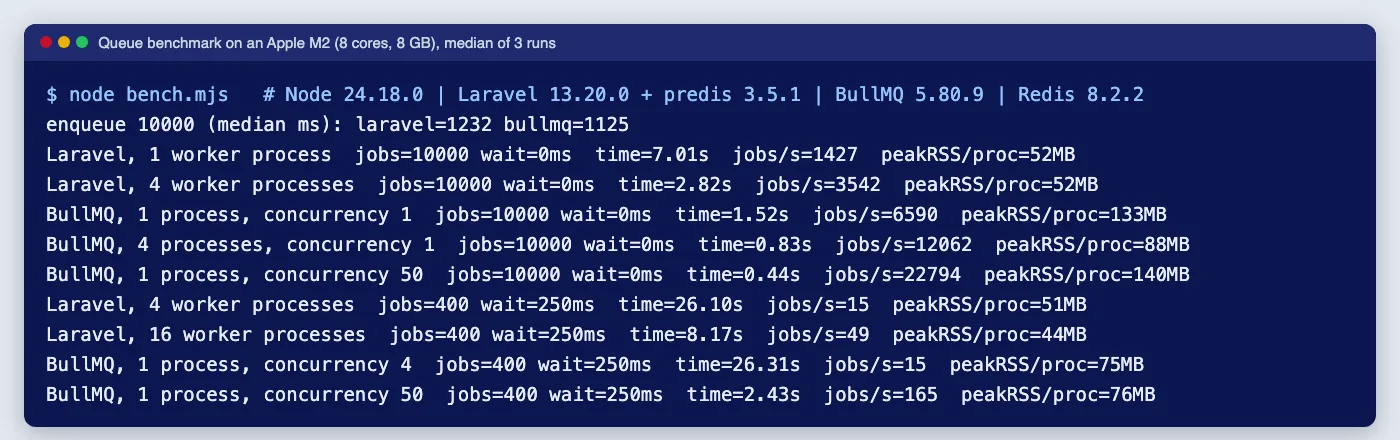
We ran the same three tests against one Redis 8.2.2 server on localhost, three runs each, and report the median. Each job did no real work, or waited a fixed time to stand in for a model API call. Laravel used predis because the phpredis extension was not installed on the test machine; phpredis is a compiled extension and is usually faster, so treat Laravel's no-op numbers as a lower bound. Timings include worker start-up.
| Test | Laravel | BullMQ |
|---|---|---|
| Enqueue 10,000 jobs one by one | 1.23 s | 1.13 s |
| Process 10,000 no-op jobs, 1 process (concurrency 1) | 7.01 s (1,427 jobs/s) | 1.52 s (6,590 jobs/s) |
| Process 10,000 no-op jobs, 4 processes | 2.82 s (3,542 jobs/s) | 0.83 s (12,062 jobs/s) |
| Process 10,000 no-op jobs, 1 process, concurrency 50 | not possible | 0.44 s (22,794 jobs/s) |
| 400 jobs waiting 250 ms, 4 concurrent | 26.1 s (4 processes) | 26.3 s (1 process) |
| 400 jobs waiting 250 ms, high concurrency | 8.2 s (16 processes, ~44 MB each) | 2.4 s (concurrency 50, one ~76 MB process) |
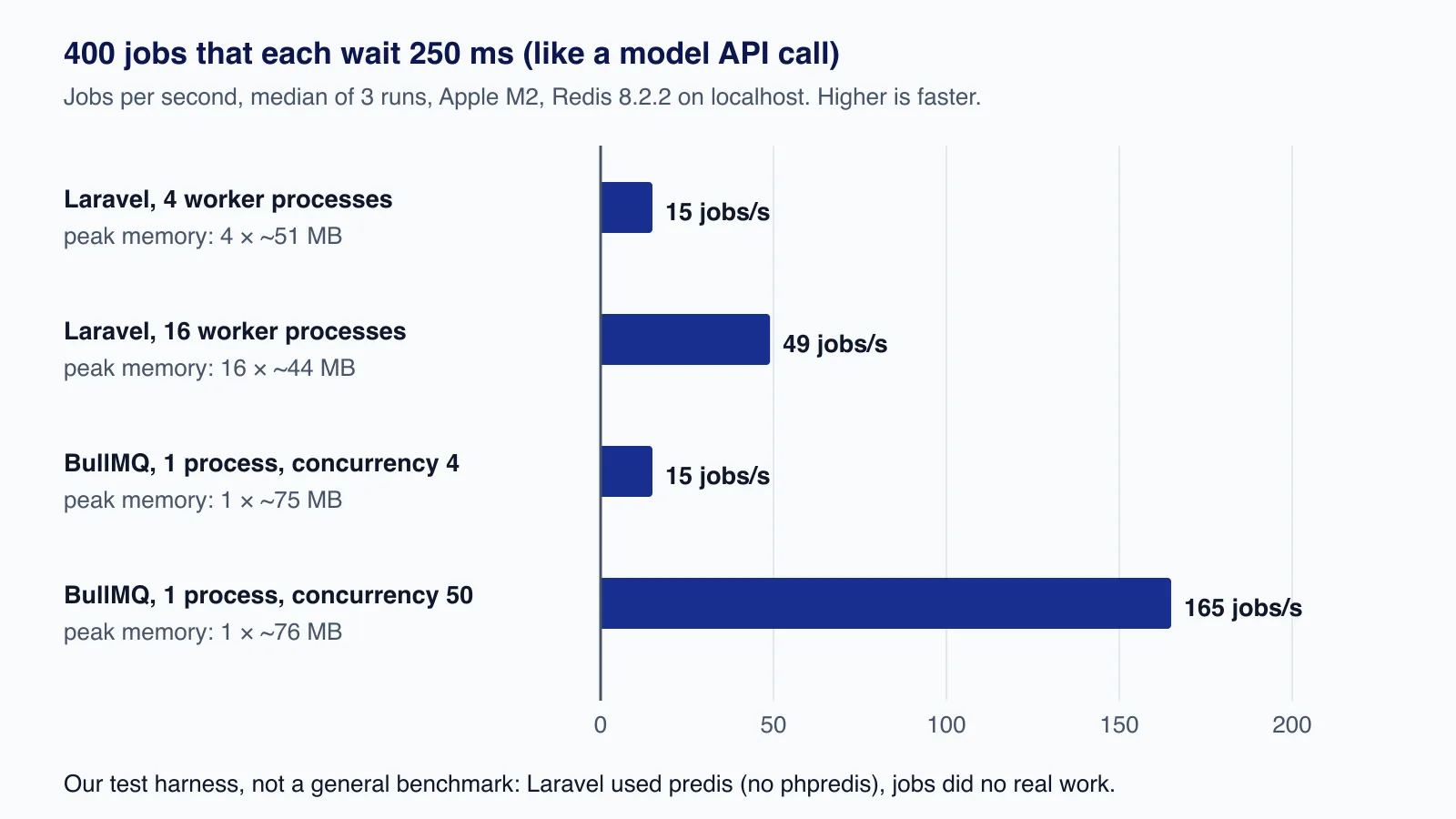
How to read this honestly:
- Queue overhead is small in both. Even Laravel's slowest result is under a millisecond of overhead per job. A model call takes from about a second to a minute, so for AI jobs neither queue's overhead will show up in your bills or latency.
- Waiting is where they differ. With the same concurrency (four), both took about 26 seconds, which is simply 400 × 250 ms ÷ 4. To go faster, Laravel needs more processes, at roughly 45 to 50 MB of memory each in our runs; BullMQ raised concurrency inside one process with almost no extra memory.
- Numbers move. An earlier full run of the same script gave figures up to about 25% different for some rows. Use these to understand the shape of the difference, not as a capacity plan, and measure on your own servers with your own jobs.
What matters for AI workloads
- Concurrency is a cost decision. Running 50 model calls at once only helps if your provider quota allows it. Laravel's per-process model makes over-concurrency expensive in memory, which is not always a bad thing; BullMQ makes high concurrency cheap, so set the limiter carefully.
- Timeouts and cancellation. Laravel's process-level timeout is a blunt but reliable kill switch. BullMQ gives finer control (abort a single call, cancel a single job) but you must wire signals through yourself.
- Retry and duplicate safety are equal concerns in both. Neither framework makes a job idempotent for you; you still need stable job IDs, a "result already stored?" check and a unique constraint where results are saved. Both also run a job twice if a worker's timeout and the queue's visibility timeout (Laravel's
retry_after, BullMQ's lock duration) are configured inconsistently. - Per-tenant fairness. Laravel's keyed rate limiters make "30 AI jobs per minute per customer" a few lines of code. In open-source BullMQ the limiter is per queue, so per-tenant limits need separate queues, your own logic or BullMQ Pro groups.
- CPU-heavy steps. Parsing PDFs or resizing images blocks the Node.js event loop and stalls every concurrent job in that worker; BullMQ offers sandboxed processors (separate processes) for that. In Laravel each job already has its own process.
Getting these settings right, especially concurrency, rate limits and timeouts against a provider's quota, is where queue projects for AI features usually go wrong. If you are planning that layer for a product, our SaaS development service can design and build it with you on either stack.
Operations
- Deployments: Laravel workers are long-lived PHP processes that do not see new code until restarted; run
php artisan horizon:terminateorqueue:restarton deploy. BullMQ workers are restarted with your Node.js process; callworker.close()on SIGTERM so active jobs finish. - Redis settings: both store queue state in Redis, so use persistence and a
maxmemory-policyofnoeviction; an evicted key is a lost job. - Monitoring: Horizon gives Laravel throughput, wait times, failed jobs and tags out of the box. For BullMQ, add a dashboard and export metrics or OpenTelemetry traces yourself.
- No Redis? Laravel's database driver runs on the database you already have, which suits low volumes. BullMQ needs Redis or a compatible server.
Testing and developer experience
Laravel makes queue tests cheap. Queue::fake() and Bus::fake() let you assert that a job was dispatched with the right data without running it, the sync driver runs jobs inline, and the database driver with SQLite lets you run a real worker inside a feature test, including release delays, by moving the test clock. Job behaviour (middleware, uniqueness, failure hooks) can be tested end to end without Redis.
BullMQ has no fake. You either unit-test the processor function directly, passing a hand-built job object, or run integration tests against a real Redis, which is the more honest option because retries, locks, rate limits and events all live in Redis scripts. In practice that means a Redis service in CI and a test database number or key prefix per run. NestJS's testing module helps you swap the model client for a scripted fake, so the queue is real and only the provider is simulated.
On the producing side, both are pleasant to use. Laravel jobs are classes with typed constructor arguments; BullMQ jobs are a name plus JSON data, so give the data a TypeScript type (Job<TicketData>) and validate it in the processor, because nothing checks the payload when an old job written by a previous deploy is picked up by new code.
Which to choose
| Situation | Better fit |
|---|---|
| Your application is Laravel | Laravel queues with Horizon; do not add a Node.js service just for jobs |
| Your application is NestJS | BullMQ through @nestjs/bullmq |
| Many slow, I/O-bound jobs (model calls, webhooks, scraping) | BullMQ handles high concurrency with less memory; Laravel works with more processes |
| Per-customer rate limits without extra licences | Laravel's keyed rate limiters |
| Need to cancel running jobs from the UI | BullMQ's cancelJob and AbortSignal |
| Small volume, no Redis | Laravel's database driver |
| A free built-in dashboard matters | Laravel Horizon |
Common mistakes when comparing
- Quoting no-op throughput as if it predicted AI job throughput. Your provider's latency and rate limit decide that.
- Comparing one Laravel process with one BullMQ process without matching concurrency.
- Forgetting the Redis client. predis and phpredis behave differently; so do ioredis versions.
- Choosing a queue to justify a rewrite. If the main application is in one framework, its native queue is almost always the right one.
When neither is the right tool
- For long-running business workflows that wait for people or span days, a workflow engine such as Temporal is easier to reason about than chained jobs.
- For large overnight AI batches, provider batch APIs are usually cheaper than calling the interactive API from any queue.
- On a single cloud, managed queues (Amazon SQS, Google Cloud Tasks) remove Redis from your operations; Laravel supports SQS directly.
Cloudsoft Zone builds SaaS products on Laravel and NestJS, including the background job layer for AI features: concurrency, rate limits, retries and monitoring sized to your provider quota. See our SaaS development service.
Frequently asked questions
Is BullMQ faster than Laravel queues?
In our no-op test on one machine, BullMQ processed jobs several times faster per process, partly because Laravel used the pure-PHP predis client. For AI jobs that wait seconds on a model API, queue overhead is negligible in both; what matters is how cheaply each runs many jobs at once.
Can a Laravel worker run several jobs at the same time?
No. Each
queue:workprocess runs one job at a time, so you add processes for concurrency, usually through Horizon. Each process costs memory, about 45 to 50 MB per worker in our test application.Does BullMQ have something like Horizon?
Not from the BullMQ project itself in the open-source edition. Teams use Bull Board, which is open source, or Taskforce.sh, a commercial service, and export metrics to their own monitoring.
Can I rate-limit AI jobs per customer?
In Laravel, yes: define a named rate limiter keyed by the customer and attach the
RateLimitedmiddleware. Open-source BullMQ limits a whole queue; per-customer limits need separate queues, your own logic or BullMQ Pro groups.
Your next customer could start right here.
Introduce your tool, product or business to readers exploring technology.
Explore placements and request a private quote
Sources
- Queues (Laravel 13.x) — Laravel
- Laravel Horizon (Laravel 13.x) — Laravel
- BullMQ documentation: Workers and concurrency — BullMQ
- Rate limiting — BullMQ
- Cancelling jobs — BullMQ
- BullMQ Pro introduction — BullMQ
- Queues (@nestjs/bullmq) — NestJS
- laravel/framework v13.20.0 — Laravel on GitHub, 2026-07-14
Written with substantial AI assistance. Facts checked against cited sources. Editorial policy.
Comments
No comments yet. Be the first to join the conversation.
Leave a comment
Every comment is read by a moderator before it appears. Your email address is never published; it is used only to contact you about this comment.
More from Cloudsoft Zone

Industry updateCodeIgniter
CodeIgniter 4.7.5 security release: what to patch and how
CodeIgniter 4.7.5 fixes six advisories, including a critical upload bypass and Parser code execution. See who is exposed and how to upgrade safely.
By Cloudsoft Zone

ComparisonNode.js
Express 5 vs Fastify 5: which Node.js framework to pick in 2026
Express 5 and Fastify 5 compared on support status, validation, error handling, upgrades and performance, with the same API built and tested in both.
By Cloudsoft Zone

Resource guideResources
Cron syntax cheat sheet: crontab, GitHub Actions, Kubernetes
Cron syntax with tested expressions, the day-of-week trap, and how time zones and limits differ in crontab, GitHub Actions, Kubernetes and Laravel in 2026.
By Cloudsoft Zone