
How Turbopack splits JavaScript into chunks in Next.js
Chunk groups, merging thresholds, component chunks and prefetching, explained with the real Turbopack output and network measurements of a small Next.js 16.3 app.
Updated 11 min read

In this article
Every Next.js production build turns your components and packages into a few dozen JavaScript files with names like 2boqxv-vee15z.js. Which code lands in which file decides how many requests a first visit makes, how much code is downloaded twice, and how much a returning visitor gets from the cache. This explainer shows how Turbopack makes those decisions in Next.js 16.3, using the real output of a small app we built and measured, and which of the experimental turbopackChunking settings are worth touching.
Tested with: Next.js 16.3.4 (Turbopack, App Router), React and React DOM 19.2.8 installed (the App Router uses the React 19.3 canary bundled with Next.js), TypeScript 7.0.2, Node.js 24.19.0, Chromium headless via Playwright for the network measurements.
The test app
To see chunking clearly you need code that is shared unevenly between routes. Our app has four pages and six client components:
| Route | Client components | Packages pulled in |
|---|---|---|
/ | Counter, Footer | none |
/blog/[slug] | ShareButton, Footer | none |
/dashboard | DateFilter, Chart | date-fns; marked via import() on click |
/pricing | DateFilter, PlanForm, Footer | date-fns, zod |
So Footer is shared by three routes, DateFilter and date-fns by two, zod by one, and marked is only needed after the user clicks "Render report" on the dashboard. The Chart component loads it like this:
'use client'
import { useState } from 'react'

export function Chart() {
  const [html, setHtml] = useState<string | null>(null)
  return (
    <section>
      <button
        type="button"
        onClick={async () => {
          // Loaded only when the user asks for it: a separate async chunk group.
          const { marked } = await import('marked')
          setHtml(await marked.parse('## Report\n\n- Visits: **1,204**'))
        }}
      >
        Render report
      </button>
      {html && <div dangerouslySetInnerHTML={{ __html: html }} />}
    </section>
  )
}
(The Markdown here is a constant. Never pass user input to dangerouslySetInnerHTML without sanitising it.)
Step 1: from a module graph to chunk groups
Turbopack starts, like every bundler, from a dependency graph: each file and package, and what it imports. Next.js then defines entry points. In the App Router each route's client side is an entry, and every dynamic import() starts a new, asynchronous one.
The set of chunks that must load together for one entry is a chunk group. The /pricing chunk group contains everything a browser needs to hydrate that page; the import('marked') chunk group contains only what that call needs, minus what its parent already loaded. Two rules follow from this, and they explain most of what you will see in the output:
- Merging chunks within one group can never make a page download code it did not need, because the whole group loads together anyway.
- Merging chunks across groups would make a page download code it does not use, so merging happens within a group; code shared between groups stays in, or is repeated in, separate files.
The open question is how far to merge inside a group. One file per module gives perfect reuse across pages but hundreds of requests; one file per group gives few requests but repeats shared code in every group. Turbopack's answer is a cost model, configured under experimental.turbopackChunking.
Step 2: what Turbopack actually emitted
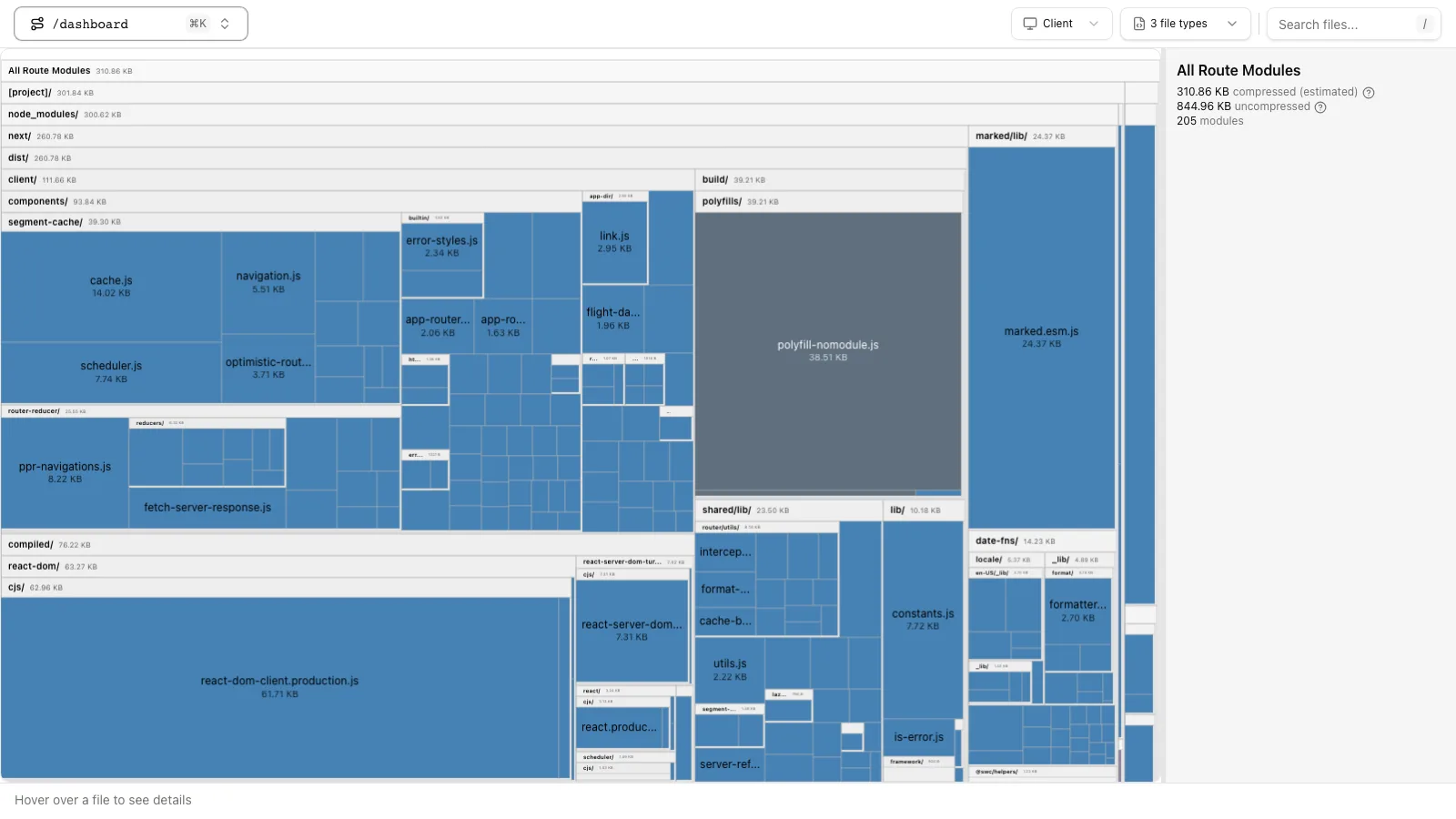
After next build we labelled every file in .next/static/chunks by searching its contents for known strings (for example zod's ZodError, our button labels) and by checking which prerendered HTML pages reference it:
| File (gzip size) | Contains | Loaded by |
|---|---|---|
| 6 files, ~134 KiB | Turbopack runtime, React DOM, App Router client, framework helpers | Every route |
polyfill-nomodule, 38.7 KiB | Legacy polyfills | Only browsers without ES modules (<script noModule>) |
| 0.4 KiB | Counter + Footer | / |
| 0.4 KiB | ShareButton + Footer | /blog/[slug] |
| 5.8 KiB | Chart + DateFilter + date-fns | /dashboard |
| 5.6 KiB | DateFilter + Footer + date-fns | /pricing |
| 83.8 KiB | PlanForm + zod | /pricing |
| 12.4 KiB | marked | Nobody on load; fetched on click |
Three things stand out. The framework chunks are shared by every route and never merged with page code: they are larger than maxMergeChunkSize (200,000 bytes of unminified code by default), so they stay separate and stay cached across every navigation. Small route chunks were merged, which is why Footer appears in three different files and date-fns in two. And the dynamic import really is separate: marked was never requested until the button was clicked.
Open one of the small files and you can see the format. This is the whole / route chunk, unminified only by line breaks:
(globalThis.TURBOPACK || (globalThis.TURBOPACK = [])).push([
  "object" == typeof document ? document.currentScript : void 0,
  63259, t => { t.v({ counterButton: "Counter-module__AC3vqW__counterButton" }) },
  56037, t => { "use strict"; var e = t.i(43476), o = t.i(71645), u = t.i(63259);
    t.s(["Counter", 0, function () { /* component body */ }]) },
  54803, t => { t.v({ siteFooter: "Footer-module__EZoWya__siteFooter" }) },
  56691, t => { "use strict"; /* ... */ t.s(["Footer", 0, function () { /* ... */ }]) }
])
A chunk is just a list of numeric module IDs and factory functions pushed onto a global queue. t.i(id) imports another module by ID, t.s([...]) declares exports and t.v(...) sets a value (here the CSS Module class map). The runtime chunk drains the queue and wires modules together, so it does not matter which file a module arrived in or in what order files finish downloading. That is what makes merging and splitting safe.
Step 3: how the browser finds the right chunks
On a full page load the HTML lists the shared chunks and the route chunks as <script async> tags. On a client-side navigation there is no new HTML, so how does the router know that /pricing needs the zod chunk? The build writes a client reference manifest per route. For PlanForm it says:
"[project]/components/PlanForm.tsx": {
  "id": 8237,
  "name": "*",
  "chunks": [
    "/_next/static/chunks/1mpnoxox0-4cg.js",
    "/_next/static/chunks/23wpww22dieur.js",
    "/_next/static/chunks/1w3rgxqzbcjsv.js"
  ],
  "async": false
}
When the server renders a Server Component that uses PlanForm, the RSC payload includes those chunk paths. The router loads any it does not already have, then renders. Prefetching works the same way: a <Link> that scrolls into view fetches the target's payload and its chunks early.
That last point surprised us in testing. With default <Link> prefetching, loading the home page pulled in the JavaScript of all four routes (11 requests, 857 KiB decoded) because all four links sit in the header. Every click after that needed zero new JavaScript. That is great for navigation speed and wasteful for visitors who leave after one page. For the measurements below we set prefetch={false} on the header links so each navigation's cost is visible.
Step 4: the cost model and its settings
The defaults, from the turbopackChunking reference, are:
// next.config.ts (Next.js 16.3): these are the defaults, written out
import type { NextConfig } from 'next'

const nextConfig: NextConfig = {
  experimental: {
    turbopackChunking: {
      minChunkSize: 50000,          // avoid more than one chunk smaller than this
      maxChunkCountPerGroup: 40,    // at most this many chunks per chunk group
      maxMergeChunkSize: 200000,    // never merge chunks bigger than this
      minComponentChunkSize: 20000, // only with generateComponentChunks
      generateComponentChunks: false,
    },
  },
}

export default nextConfig
All sizes are bytes of unminified, uncompressed code, which the docs estimate at about five times the compressed, minified size. A 50,000-byte threshold is therefore roughly 10 KB on the wire. The heuristics are separate options:
firstPageLoadPriority(0 to 1): how much to favour a fast single page load over cheap navigations. The docs suggest your bounce rate as a starting value.priorityRoutes(array ofRegExp): landing pages whose bundles should be merged more eagerly, withpriorityBoost(default 1.5) controlling how much.requestCost(default 200,000): the estimated cost of one extra request, in the same unminified bytes. Higher values mean fewer, larger chunks.
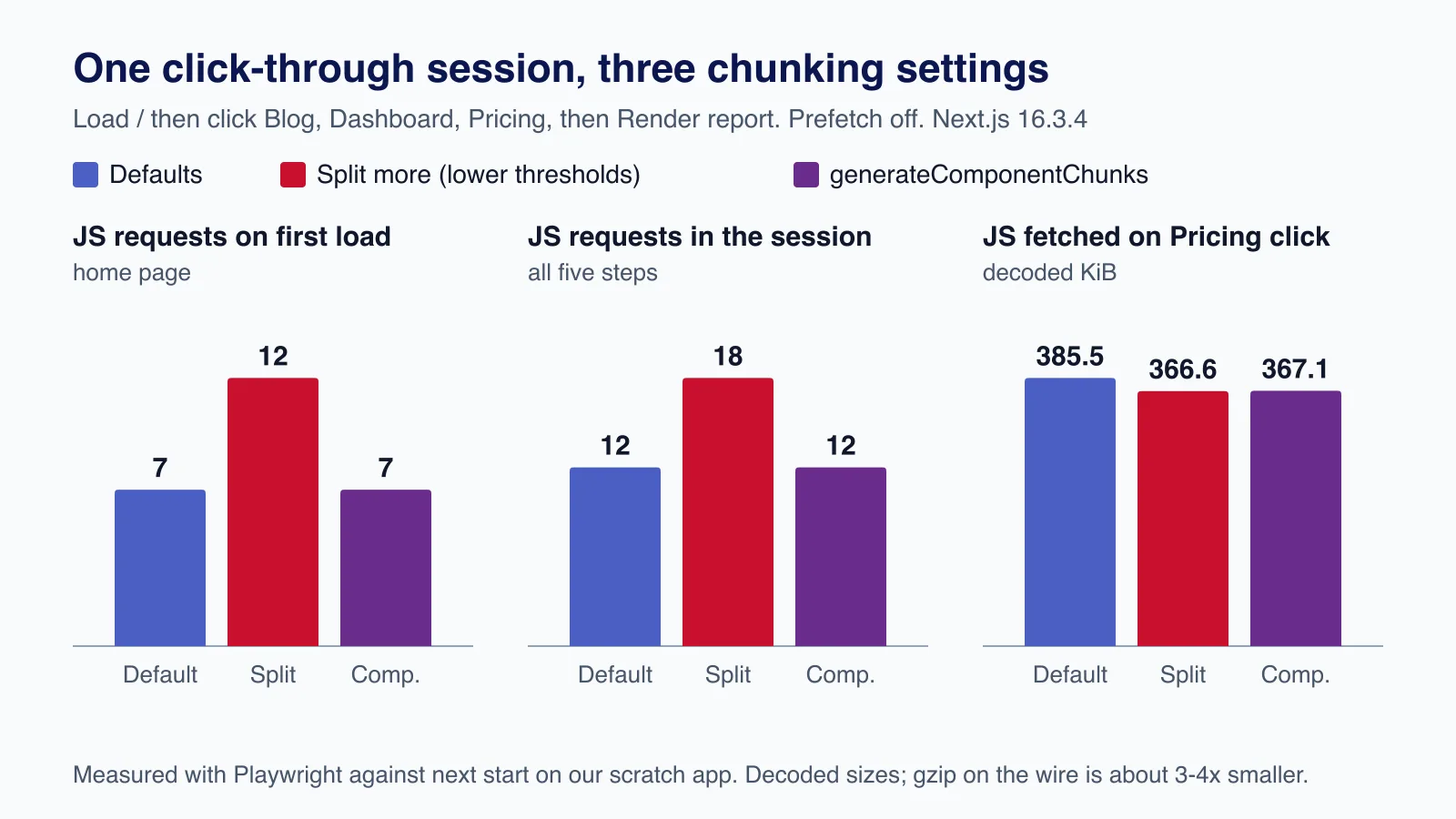
To see the trade-off, we built the app three ways and ran the same click-through session in Chromium: load /, click Blog, Dashboard and Pricing, then click "Render report".
| Setting | JS requests on first load | JS requests in session | Fetched on Pricing click (decoded) | Whole session (decoded) |
|---|---|---|---|---|
| Defaults | 7 | 12 | 385.5 KiB | 898.5 KiB |
minChunkSize: 0, requestCost: 1000, maxChunkCountPerGroup: 200 | 12 | 18 | 366.6 KiB | 880.2 KiB |
generateComponentChunks: true | 7 | 12 | 367.1 KiB | 881.0 KiB |
Lowering the thresholds made Turbopack emit 19 files instead of 14. Footer and the date-fns code each got their own shared chunk, so nothing was downloaded twice, but the first page load needed five more requests. With the defaults, the Pricing click re-downloaded date-fns and DateFilter inside its merged chunk, about 18 KiB of code the browser already had.
generateComponentChunks got the best of both in our run. Turbopack still emits the merged chunks but also writes their component pieces alongside them, and the runtime picks whichever is cheaper at request time. On the Pricing click it skipped the merged file and fetched only the small Footer piece, because date-fns and DateFilter had arrived with the dashboard. First-load requests stayed at seven. The cost is more files in the build output (20 instead of 14) and a feature that is still experimental.
Raising requestCost to 5,000,000 or lowering maxChunkCountPerGroup to 2 changed nothing in this app: the route groups were already as merged as the size limits allowed. On a small app the defaults are close to the floor; tuning only pays off on large apps with many shared components.
Other settings that change what ships
experimental.turbopackSharedRuntime(defaultfalsein 16.3): one runtime file shared across routes instead of a per-route runtime, with the per-route bootstrap inlined into the HTML. In our app it saved only a few hundred bytes, because every route already shared the same runtime file; apps with many differently-shaped routes benefit more.experimental.turbopackCjsTreeShaking(defaultfalse): tree-shakes unused exports from analysable CommonJS modules. Our dependencies are ESM, so it changed nothing; try it if the analyzer shows large CommonJS packages.experimental.cssChunking: CSS is chunked separately.true(default) merges where import order allows; Turbopack also supports'graph', a cost-based grouping similar to the JavaScript chunker.optimizePackageImportsand avoiding barrel files often matter more than any chunking flag, because they reduce how much code enters the graph in the first place.
If tuning these flags is turning into a project of its own, it may be cheaper to have someone audit the route structure and dependencies first; that is the kind of work our Next.js performance team does.
How to inspect chunking in your own app
- Run
npx next experimental-analyze(Next.js 16.1 and later, Turbopack only). It builds an analysis without producing a deployable build and opens a treemap per route. Use--outputto write the data to.next/diagnostics/analyzeso you can keep a copy for comparison. - After
next build, read.next/diagnostics/route-bundle-stats.json: it lists each route's first-load chunk paths and uncompressed bytes. - Open DevTools, disable the cache, and click through your three most common journeys with the Network panel filtered to JS. Count requests and bytes per step, as we did above.
- Change one setting, rebuild from a clean
.next, repeat. Keep the change only if your real journeys improve.
npx next build
cat .next/diagnostics/route-bundle-stats.json | head -20
npx next experimental-analyze --output
cp -r .next/diagnostics/analyze ./analyze-before
Production considerations
- Cache headers: chunk names are content hashes, so
/_next/staticcan be served withCache-Control: public, max-age=31536000, immutable. Next.js does this when it serves the files; check your CDN or nginx config does not override it. - Old chunks after deploys: a visitor with an open tab may request a chunk from the previous build. Keep previous builds' static files available for a while (or use a platform that does), otherwise those navigations fail. Next.js 16.3 retries failed chunk fetches, but it cannot fetch a file that no longer exists.
- Prefetching is a cost decision: default viewport prefetching moved all our routes' JavaScript to the first visit. For link-heavy pages on mobile data, consider
prefetch={false}on rarely used links rather than tuning chunk sizes. - Measure compressed sizes and request counts together. A configuration that saves 18 KiB uncompressed but adds five requests to first load is not a win for a site where most visits are one page.
Common mistakes
- Treating duplicated code in the analyzer as a bug. Some duplication is the price of fewer requests; it is a problem only when large libraries are duplicated across routes people commonly visit in sequence.
- Expecting
import()to split code that is also imported statically elsewhere in the same group. If a module is already in the parent group, the dynamic import adds nothing. - Copying chunking settings from a blog post. The thresholds encode assumptions about your traffic; use your own analytics for
firstPageLoadPriorityandpriorityRoutes. - Comparing builds without cleaning
.next, or comparing a webpack build with a Turbopack one. The chunkers are different.
When not to tune chunking
For most apps, leave turbopackChunking alone. If your pages are slow, the usual causes are larger: a heavy dependency on a landing page, client components that could be Server Components, or third-party scripts. Fix those first; field data for LCP and INP will tell you which pages need it. Tune chunking only when the analyzer shows meaningful duplication across a common journey, and you can measure the journey before and after. The options are experimental, so re-test after every Next.js upgrade.
Want your Next.js bundles measured against real user journeys, with fixes that cut JavaScript rather than move it around? Cloudsoft Zone's React and Next.js development service audits route structure, dependencies and chunking, and delivers the changes with before-and-after numbers.
Frequently asked questions
What is a chunk group in Turbopack?
It is the set of JavaScript files that must load together for one entry point: a route's client side, or a dynamic
import(). Turbopack only merges chunks inside one group, so merging never makes a page download code it did not need.Why does the same component appear in several chunks?
Because small chunks in a group are merged to reduce requests. A component shared by several routes can end up inside each route's merged chunk. That is a deliberate trade-off; lower
minChunkSizeor trygenerateComponentChunksif the duplication is large on common journeys.Does next/dynamic or import() always create a separate chunk?
It creates a separate async chunk group, but modules already loaded by the parent group are not repeated. If the imported module is also imported statically on the same route, the dynamic import saves nothing.
Should I change turbopackChunking settings?
Usually not. They are experimental and the defaults are sensible. Change them only when the analyzer shows meaningful duplication on journeys your analytics say are common, and measure requests and bytes before and after.
Why did my home page download JavaScript for other routes?
Link prefetching. A
<Link>in the viewport prefetches its target, including the chunks the target needs. Useprefetch={false}on rarely used links if first-visit data matters more than navigation speed.
Your next customer could start right here.
Introduce your tool, product or business to readers exploring technology.
Explore placements and request a private quote
Sources
- turbopackChunking — Next.js documentation
- cssChunking — Next.js documentation
- Package bundling (Next.js bundle analyzer) — Next.js documentation
- Lazy loading — Next.js documentation
- Turbopack: What's New in Next.js 16.3 — Vercel, 2026-06-29
- Next.js 16.3 — Vercel, 2026-08-03
- Link component: prefetch — Next.js documentation
Written with substantial AI assistance. Facts checked against cited sources. Editorial policy.
Comments
No comments yet. Be the first to join the conversation.
Leave a comment
Every comment is read by a moderator before it appears. Your email address is never published; it is used only to contact you about this comment.
More from Cloudsoft Zone

Industry updateJavaScript
Next.js 16.4: what's new and should you upgrade from 16.3?
Next.js 16.4 shrinks bundles and the Turbopack cache, ships React 19.3 and turns on strict route matching. What we measured, what breaks and how to upgrade.
By Cloudsoft Zone

TutorialJavaScript
JavaScript using declarations: automatic cleanup without finally
Learn JavaScript's using and await using declarations, Symbol.dispose and DisposableStack, with tested browser recipes and October 2026 support data.
By Cloudsoft Zone

Industry updateJavaScript
ECMAScript 2026 is final: 7 new JavaScript features explained
ES2026 adds Map upserts, Iterator.concat, Base64 on Uint8Array, JSON source text, Math.sumPrecise, Error.isError and Array.fromAsync. Examples and support.
By Cloudsoft Zone