
How to group an array by key and value in PHP
Group PHP arrays by a shared key with foreach, a reusable group_by() helper, array_reduce or Laravel collections, plus PHP 8.5 helpers and the key-type traps that merge groups.
Updated 9 min read

In this article
Grouping an array means turning a flat list of rows into buckets that share a value: orders by customer, labels by type, log lines by day. In PHP the core of it is one line inside a foreach: $groups[$row['key']][] = $row;. This guide starts from that line, builds a reusable group_by() helper, covers array_reduce, Laravel collections and the new PHP 8.4 and 8.5 array functions, and lists the key-type traps that silently merge groups.
Tested with PHP 8.5.7 and illuminate/collections 13.35.0. The plain-PHP examples run on PHP 8.0 and later, except where a section says it needs 8.4 or 8.5. Every output shown below was printed by running the code.
Is there a built-in group-by function in PHP?
No. PHP 8.5 has no array_group_by(). An RFC to add grouping to array_column was declined, and a separate array_group proposal is listed as inactive on the PHP RFC index. A foreach loop is the standard, fastest way, and Laravel's Collection::groupBy() is the usual framework option.
Group by one key with foreach
Here is the classic problem: rows with a text and a label_id, where you want one entry per text with all its labels:
<?php
declare(strict_types=1);

$data = [
    ['text' => 'X', 'label_id' => 'A1,35'],
    ['text' => 'X', 'label_id' => 'A2,34'],
    ['text' => 'Y', 'label_id' => 'B1,29'],
    ['text' => 'Z', 'label_id' => 'C1,20'],
    ['text' => 'Z', 'label_id' => 'C2,19'],
    ['text' => 'Z', 'label_id' => 'C3,18'],
];

// 1. Group with foreach: text => list of label_id values
$labelsByText = [];
foreach ($data as $row) {
    $labelsByText[$row['text']][] = $row['label_id'];
}

// 2. Reshape into one row per group (the original output format)
$output = [];
foreach ($labelsByText as $text => $labels) {
    $output[] = ['text' => $text, 'label_id' => $labels];
}
echo json_encode($output, JSON_PRETTY_PRINT), PHP_EOL;
Output:
[
    {"text": "X", "label_id": ["A1,35", "A2,34"]},
    {"text": "Y", "label_id": ["B1,29"]},
    {"text": "Z", "label_id": ["C1,20", "C2,19", "C3,18"]}
]
$labelsByText[$row['text']][] = ... creates the bucket the first time a key appears and appends after that. PHP arrays keep insertion order, so groups come out in the order their first row appeared. The second loop only reshapes the result; if an associative array such as ['X' => ['A1,35', 'A2,34'], ...] suits your code, stop after the first loop.
A reusable group_by() helper
When you group in more than one place, a small typed function keeps the code clear. It accepts a column name or a callback, and any iterable, including generators:
<?php
declare(strict_types=1);

/**
 * Group rows by a column name or by the result of a callback.
 *
 * @template T of array
 * @param iterable<T> $rows
 * @param string|callable(T): (int|string) $key
 * @return array<int|string, list<T>>
 */
function group_by(iterable $rows, string|callable $key): array
{
    $groups = [];
    foreach ($rows as $row) {
        $groupKey = is_string($key) ? $row[$key] : $key($row);
        $groups[$groupKey][] = $row;
    }
    return $groups;
}$orders = [
['id' => 101, 'customer' => 'acme', 'status' => 'paid', 'total_cents' => 12000, 'placed' => '2026-09-03'],
['id' => 102, 'customer' => 'globex', 'status' => 'pending', 'total_cents' => 8050, 'placed' => '2026-09-14'],
['id' => 103, 'customer' => 'acme', 'status' => 'paid', 'total_cents' => 4225, 'placed' => '2026-10-01'],
['id' => 104, 'customer' => 'acme', 'status' => 'refunded', 'total_cents' => 1500, 'placed' => '2026-10-02'],
];
$byCustomer = group_by($orders, 'customer'); // acme => 3 rows, globex => 1
$byMonth = group_by($orders, fn (array $o): string => substr($o['placed'], 0, 7)); // '2026-09', '2026-10'Group by a callback when the key is computed: a month from a date, a price band, or a lower-cased email domain.
Nested groups and totals
Add another [...] level to group by two keys, or skip storing rows and keep running totals instead, which uses far less memory on big inputs:
// Two levels: customer, then status
$nested = [];
foreach ($orders as $order) {
    $nested[$order['customer']][$order['status']][] = $order['id'];
}
// {"acme":{"paid":[101,103],"refunded":[104]},"globex":{"pending":[102]}}

// Totals per group without keeping the rows
$totals = [];
foreach ($orders as $order) {
    $totals[$order['customer']] ??= ['orders' => 0, 'revenue_cents' => 0];
    $totals[$order['customer']]['orders']++;
    $totals[$order['customer']]['revenue_cents'] += $order['total_cents'];
}
// {"acme":{"orders":3,"revenue_cents":17725},"globex":{"orders":1,"revenue_cents":8050}}
Amounts are in integer cents on purpose: summing floats such as 0.1 + 0.2 gives rounding errors that show up in financial totals.
Keep row ids, and why array_column is not grouping
If the input array is keyed by id, keep that key inside each group so you can still look rows up directly:
$orders = [
    101 => ['customer' => 'acme',   'status' => 'paid'],
    102 => ['customer' => 'globex', 'status' => 'pending'],
    103 => ['customer' => 'acme',   'status' => 'paid'],
];

$byStatus = [];
foreach ($orders as $id => $order) {
    $byStatus[$order['status']][$id] = $order;
}
// array_keys per group: {"paid":[101,103],"pending":[102]}

array_column(array_values($orders), 'status', 'customer');
// {"acme":"paid","globex":"pending"}  (acme's first row was overwritten)
A common mistake is to reach for array_column($rows, 'status', 'customer'). It re-indexes rather than groups: when two rows share the same index key, the later row overwrites the earlier one. That overwrite is exactly what the declined RFC wanted to change.
array_reduce: works, but slow on large arrays
The functional version is often suggested:
$byStatus = array_reduce(
    $orders,
    function (array $groups, array $order): array {
        $groups[$order['status']][] = $order['id'];
        return $groups;
    },
    [],
);
// {"paid":[101,103],"pending":[102],"refunded":[104]}
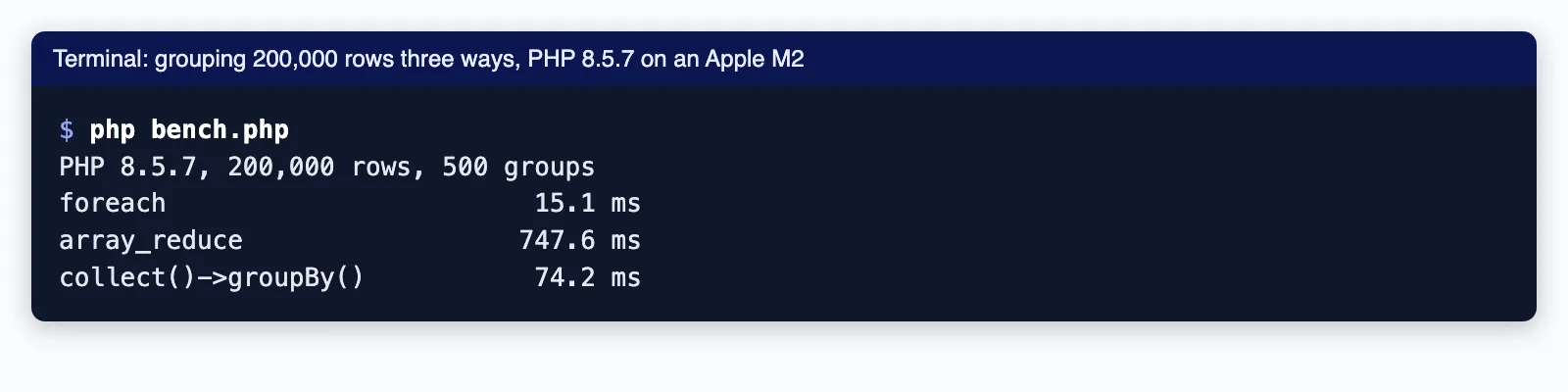
It returns the right result, but it is much slower. In our benchmark of 200,000 rows into 500 groups on PHP 8.5.7, a foreach took about 14 ms, collect()->groupBy() about 74 ms, and array_reduce about 740 ms. The carry array is passed into the callback by value and modified there while array_reduce still holds a reference, so PHP has to copy the outer array of groups on every iteration. Use it for small arrays if you like the style; use foreach for anything large.
| Method (200,000 rows, 500 groups) | Time per run |
|---|---|
foreach | about 14 ms |
collect($rows)->groupBy('customer') | about 74 ms |
array_reduce | about 740 ms |
PHP 8.4 and 8.5 helpers that help around grouping
None of the new functions group, but they make working with each group shorter. PHP 8.4 added array_find(), array_find_key(), array_any() and array_all(); PHP 8.5 added array_first(), array_last() and the pipe operator |>:
// PHP 8.5: the pipe operator. Arrow functions must be wrapped in parentheses.
$paidByCustomer = $orders
    |> (fn (array $rows): array => array_filter($rows, fn (array $o): bool => $o['status'] === 'paid'))
    |> (fn (array $rows): array => group_by($rows, 'customer'))
    |> (fn (array $groups): array => array_map(fn (array $g): int => count($g), $groups));
// {"acme":2}

// PHP 8.4 (array_find, array_any) and 8.5 (array_first, array_last) on one group
$acme = $byCustomer['acme'];
array_first($acme)['id'];                                              // 101
array_last($acme)['id'];                                               // 104
array_any($acme, fn (array $o): bool => $o['status'] === 'refunded');  // true
array_find($acme, fn (array $o): bool => $o['total_cents'] > 10000)['id'] ?? null; // 101
See what's new in PHP 8.5 for the rest of the release.
Laravel collections: groupBy, mapToGroups and countBy
In a Laravel application, groupBy() returns a collection of collections, keyed by the group value. It accepts a column, a dot-notation path, a closure, or an array of these for multi-level grouping:
use Illuminate\Support\Collection;

$orders = collect($orders);

// Group, then keep only the ids
$orders->groupBy('customer')->map(fn (Collection $g) => $g->pluck('id'));
// {"acme":[101,103,104],"globex":[102]}

// Two levels at once
$orders->groupBy(['customer', 'status']);

// Keep the original keys inside each group
$orders->keyBy('id')->groupBy('status', preserveKeys: true)->map->keys();
// {"paid":[101,103],"pending":[102],"refunded":[104]}

// Build groups and values in one pass
$orders->mapToGroups(fn (array $o) => [$o['status'] => $o['total_cents']]);
// {"paid":[12000,4225],"pending":[8050],"refunded":[1500]}

// Aggregates per group, and counts only
$orders->groupBy('customer')->map(fn (Collection $g) => [
    'orders' => $g->count(),
    'revenue_cents' => $g->sum('total_cents'),
]);
$orders->countBy('status');   // {"paid":2,"pending":1,"refunded":1}
Note that groupBy() on an Eloquent query and on a collection are different things. The query builder method adds SQL GROUP BY; the collection method groups rows already loaded into PHP:
// In the database: one row per customer, no PHP loop
$totals = DB::table('orders')
    ->select('customer_id')
    ->selectRaw('COUNT(*) AS orders, SUM(total_cents) AS revenue_cents')
    ->groupBy('customer_id')
    ->get();

// In memory: every order is loaded first, then grouped in PHP
$grouped = Order::query()->get()->groupBy('customer_id');
If you only need counts or sums, let the database do the grouping. It avoids loading every row, and with an index on the grouping column it is usually far faster. Teams that find these loops spreading through controllers usually benefit from moving them into query objects or reports; our Laravel and PHP development team does that kind of refactoring.
Key-type traps that merge or break groups
PHP array keys can only be integers or strings, and other values are converted. That causes groups to merge silently, or code to fail at runtime. These are the results we got on PHP 8.5.7:
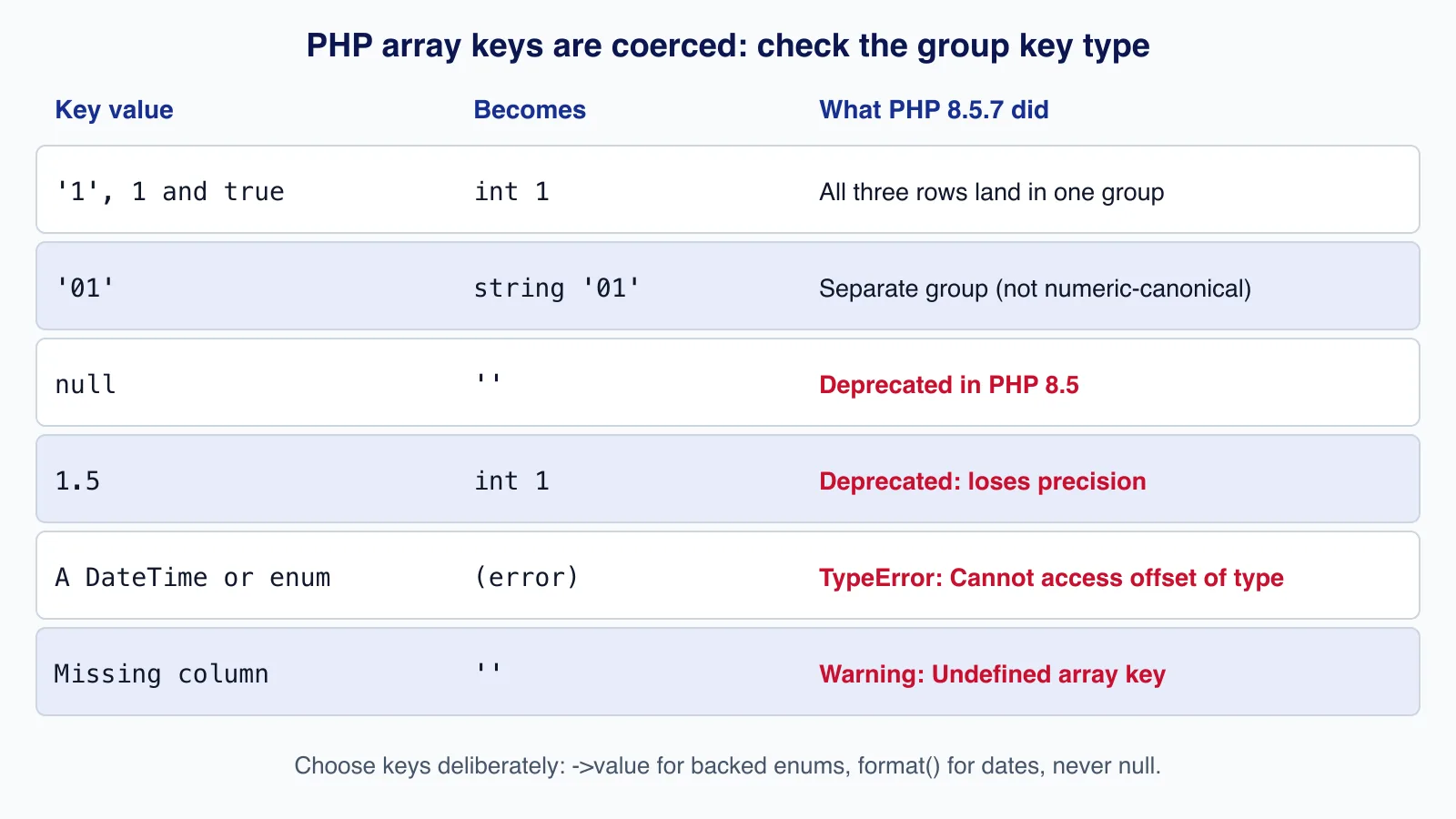
- Numeric strings become integers.
'1',1andtrueall become key1, so three different values end in one group.'01'stays a string. Casting with(string)does not help, because PHP converts the numeric string back to an integer key; prefix the key (for example'c' . $id) if the difference matters. - null keys are deprecated in PHP 8.5. Using
nullas an offset now raises "Using null as an array offset is deprecated, use an empty string instead". Decide what missing values should group under, for example$row['status'] ?? 'unknown'. - Floats are truncated.
1.5becomes1with "Implicit conversion from float 1.5 to int loses precision". Round or format the value into a string key. - Objects and enums cannot be keys. A
DateTimeImmutableor an enum case throwsTypeError: Cannot access offset of type ... on array. Use$date->format('Y-m-d')or$enum->valuefor a backed enum. - Missing columns.
$row['missing']raises "Undefined array key" and then groups under an empty key. Validate input rows first.
When not to group in PHP
- The data comes from SQL and you need counts, sums or the latest row per group: use
GROUP BYor window functions instead. - The input is very large (a multi-gigabyte CSV): grouping in memory holds every row. Stream the file and keep only running totals, or load it into a database table first.
- Order inside each group matters: sort first (for example with
usort), then group, because grouping keeps the input order.
Cloudsoft Zone builds and maintains Laravel and PHP applications, including reporting code that moves heavy grouping into well-indexed SQL. See our Laravel and PHP development service.
Frequently asked questions
Does PHP have an array_group_by function?
No, not in PHP 8.5. Proposals to add one were declined or became inactive. Use a
foreachloop with$groups[$row['key']][] = $row;, a small helper function, or Laravel'sCollection::groupBy().How do I group by two keys in PHP?
Add a second level:
$groups[$row['customer']][$row['status']][] = $row;. In Laravel, pass an array:collect($rows)->groupBy(['customer', 'status']).Why are my groups merged when keys look different?
PHP converts keys: numeric strings like
'1'and booleans become integers, floats are truncated, andnullbecomes an empty string (deprecated in PHP 8.5). Normalise keys explicitly, for example with a prefix or a fallback value.Is array_reduce slower than foreach for grouping?
Yes, often dramatically. In our test with 200,000 rows it took about 740 ms against about 14 ms for
foreach, because the growing carry array is copied on each call. Useforeachfor large arrays.Should I group in PHP or in SQL?
If you only need counts, sums or one row per group, use SQL
GROUP BY; it avoids loading every row. Group in PHP when you need the full rows of each group, for example to render a list per customer.
Your next customer could start right here.
Introduce your tool, product or business to readers exploring technology.
Explore placements and request a private quote
Sources
- Arrays (key casting rules) — PHP Manual
- array_reduce — PHP Manual
- array_find — PHP Manual
- array_first — PHP Manual
- Functional operators (pipe operator) — PHP Manual
- Deprecations for PHP 8.5 — PHP RFC wiki
- RFC: Add array_group function (declined) — PHP RFC wiki, 2021-11-28
- Laravel 13 collections: groupBy — Laravel
Written with substantial AI assistance. Facts checked against cited sources. Editorial policy.
Comments
No comments yet. Be the first to join the conversation.
Leave a comment
Every comment is read by a moderator before it appears. Your email address is never published; it is used only to contact you about this comment.
More from Cloudsoft Zone

TutorialPHP
PHPStan tutorial: catch PHP bugs before production with levels
Install PHPStan 2.3, choose a rule level, adopt a baseline for legacy code and fail CI only on new errors, with real output from a worked PHP 8.5 example.
By Cloudsoft Zone

Resource guidePHP
PHP 8.2 reaches end of life on 31 December 2026: an upgrade checklist
PHP 8.2 stops receiving security fixes on 31 December 2026. Here is the current support table from php.net, how to choose between PHP 8.4 and 8.5, and a step-by-step checklist for a safe upgrade.
By Cloudsoft Zone

TutorialPHP
Build a read-only PHP MCP server with MySQL and the official SDK
Expose product lookup, bounded low-stock searches and an inventory summary to AI clients with the official PHP MCP SDK, PDO and local STDIO transport.
By Cloudsoft Zone