
Build a read-only PHP MCP server with MySQL and the official SDK
Expose product lookup, bounded low-stock searches and an inventory summary to AI clients with the official PHP MCP SDK, PDO and local STDIO transport.
10 min read

In this article
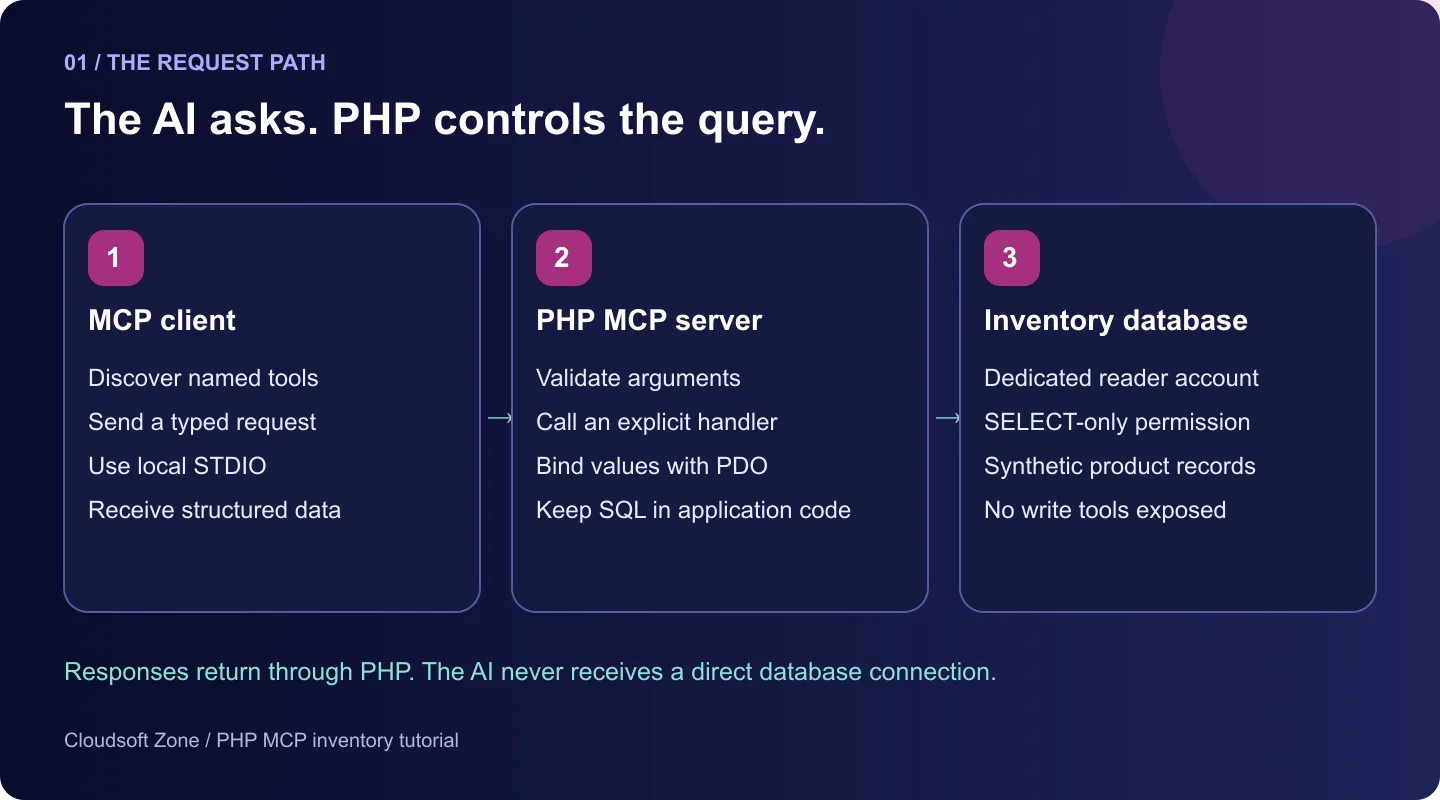
Build a read-only PHP MCP server that lets an AI client look up inventory through explicit, bounded PHP handlers instead of direct database access.
An AI assistant cannot inspect your PHP application simply because it can write PHP. It needs a defined interface to the operations you choose to expose. A Model Context Protocol (MCP) server provides that interface: the client discovers named capabilities, supplies typed arguments and receives results from your application.
This tutorial builds a small, framework-free inventory server with the official PHP SDK. It can find a product by SKU, list a bounded number of low-stock products and return an inventory summary. It cannot change stock, run arbitrary SQL or retrieve customer records. The example is useful for learning the boundary between an AI client and existing business logic.
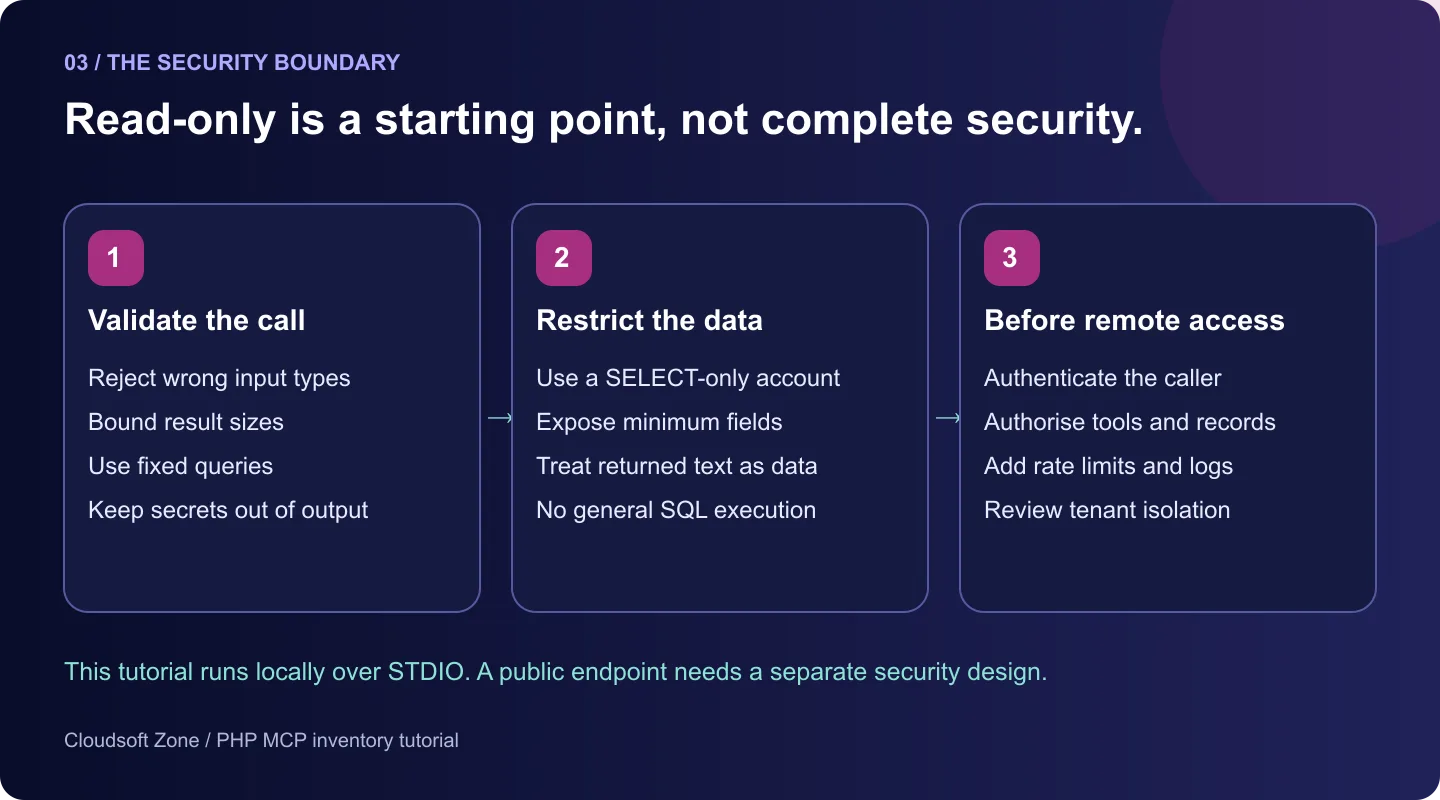
We use local STDIO transport. The client launches a PHP process and exchanges protocol messages through its input and output streams. This is not a public HTTP endpoint, and the example does not implement remote authentication or multi-tenant access. Those need a separate design before deployment.
What we are building
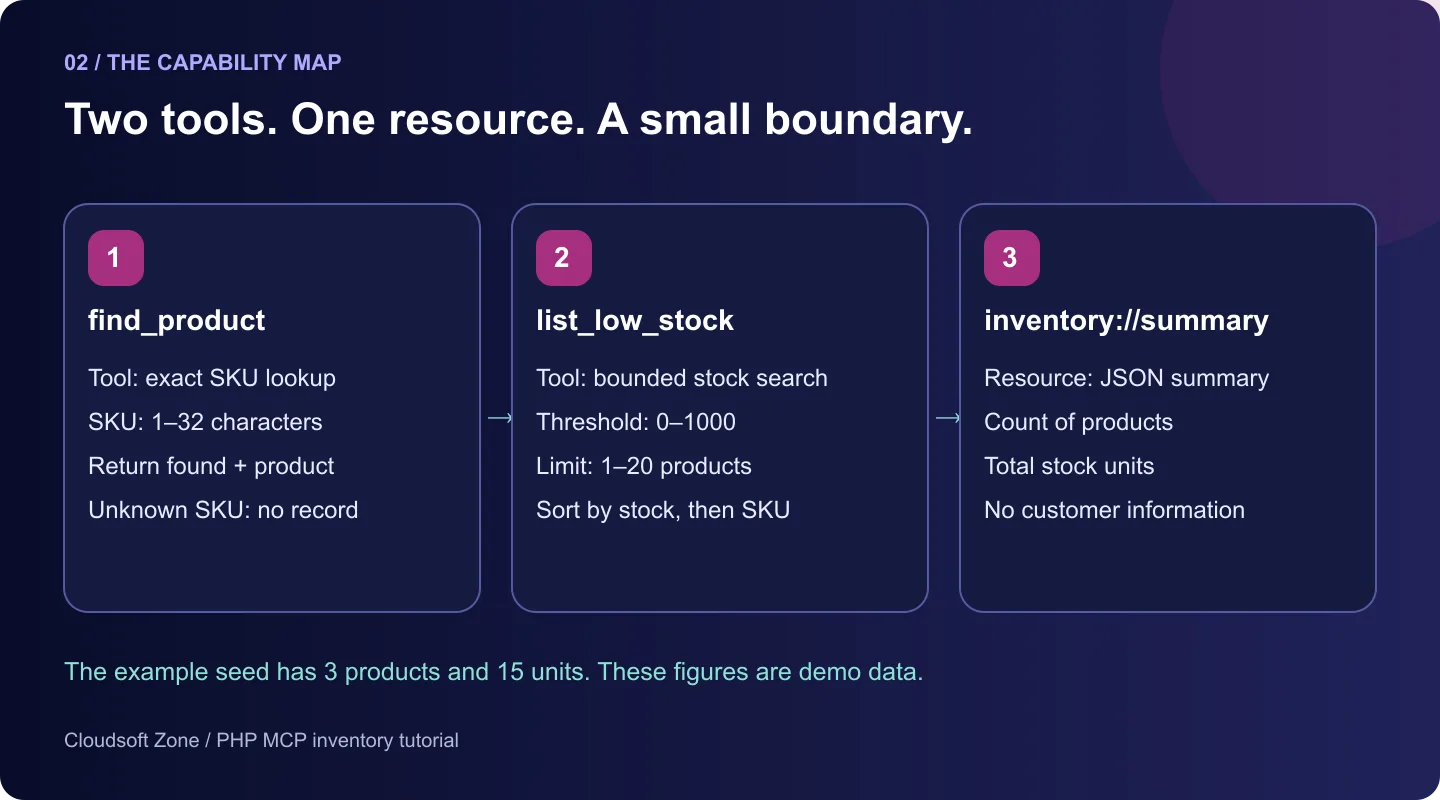
| Capability | Arguments | Result |
|---|---|---|
| find_product tool | sku | A product record or an explicit not-found result |
| list_low_stock tool | threshold and limit | At most 20 products, ordered by stock and SKU |
| inventory://summary resource | None | Product count and total units in stock |
The AI model never receives a database connection. PHP chooses the query and fields. Tools are callable operations with arguments; a resource exposes readable content at a known URI. For this example, the URI is a protocol identifier, not a website address.
Requirements and the version used here
The official SDK declares PHP 8.1 or newer and the fileinfo extension. Choose a PHP branch still receiving security fixes, and install PDO with the pdo_mysql driver for the MySQL example. Composer resolves the SDK dependencies. This draft pins mcp/sdk 0.7.1; a pre-1.0 SDK should not be upgraded silently when reproducing the tutorial.
The PHP files and STDIO round trips were checked with PHP 8.5.7 and SDK 0.7.1. The protocol check used a private SQLite fixture, not MySQL or our publication database. The MySQL setup and SELECT-only permissions still need a separate verification pass before publication. Do not interpret this as a completed production deployment test.
php -v
php -m
mkdir php-mcp-inventory
cd php-mcp-inventory
composer require mcp/sdk:0.7.1 --no-plugins --no-scripts
Keep composer.json and composer.lock together in version control. Vendor code belongs in vendor/, while credentials belong in the client environment or a private configuration system. The --no-plugins and --no-scripts options avoid executing installation hooks for this small example.
Create a separate inventory database
Use a new tutorial database containing synthetic product data. Do not point this schema at your existing application database. The script has no DROP or DELETE statements, but importing demonstration records into retained data is still the wrong operation.
-- Apply only to a NEW tutorial database you administer, never a retained application database.
CREATE DATABASE IF NOT EXISTS inventory_demo CHARACTER SET utf8mb4;
USE inventory_demo;
CREATE TABLE IF NOT EXISTS products (
  sku VARCHAR(32) PRIMARY KEY,
  name VARCHAR(120) NOT NULL,
  stock INT UNSIGNED NOT NULL
);
INSERT IGNORE INTO products (sku, name, stock) VALUES
('KB-104', 'Compact keyboard', 12),
('USB-220', 'USB-C cable', 3),
('ST-310', 'Laptop stand', 0);
-- Provision inventory_reader separately with a generated password, then grant
-- SELECT only on inventory_demo.products. Never use a root account in server.php.
A database administrator should provision a dedicated account with a generated password and SELECT permission only on inventory_demo.products. Run schema setup with the administrator account; run the MCP server with the restricted account. Do not give the server root credentials, schema-change rights or write permissions.
INSERT IGNORE makes the demonstration seed repeatable by keeping an existing SKU. It does not update stale records. If you change the example data, inspect that separate database deliberately rather than treating this script as an application migration.
Keep the database boundary in one class
Create Inventory.php. Every operation owns a fixed query. Product lookup validates the SKU format, binds its value and returns found:false when no row exists. Low-stock search bounds both the threshold and the result count; its stable secondary SKU sort makes repeated results easier to inspect.
<?php

declare(strict_types=1);

final class Inventory
{
    public function __construct(private PDO $db) {}

    /** Find a product by its exact SKU. */
    public function product(string $sku): array
    {
        if (!preg_match('/^[A-Z0-9-]{1,32}$/D', $sku)) {
            throw new InvalidArgumentException('sku must contain 1-32 uppercase letters, digits or hyphens.');
        }
        $query = $this->db->prepare('SELECT sku, name, stock FROM products WHERE sku = :sku');
        $query->execute(['sku' => $sku]);
        $row = $query->fetch();
        return ['found' => $row !== false, 'product' => $row === false ? null : $this->shape($row)];
    }

    /** List products at or below a stock threshold, with a bounded result count. */
    public function lowStock(int $threshold = 5, int $limit = 10): array
    {
        if ($threshold < 0 || $threshold > 1000 || $limit < 1 || $limit > 20) {
            throw new InvalidArgumentException('threshold must be 0-1000 and limit must be 1-20.');
        }
        $query = $this->db->prepare('SELECT sku, name, stock FROM products WHERE stock <= :threshold ORDER BY stock ASC, sku ASC LIMIT :limit');
        $query->bindValue('threshold', $threshold, PDO::PARAM_INT);
        $query->bindValue('limit', $limit, PDO::PARAM_INT);
        $query->execute();
        $rows = array_map(fn (array $row): array => $this->shape($row), $query->fetchAll());
        return ['count' => count($rows), 'products' => $rows];
    }

    /** Read a small inventory summary without customer or financial data. */
    public function summary(): array
    {
        $row = $this->db->query('SELECT COUNT(*) AS products, COALESCE(SUM(stock), 0) AS units FROM products')->fetch();
        return ['products' => (int) $row['products'], 'units' => (int) $row['units']];
    }

    private function shape(array $row): array
    {
        return ['sku' => (string) $row['sku'], 'name' => (string) $row['name'], 'stock' => (int) $row['stock']];
    }
}
The SDK can infer argument types and defaults from PHP signatures. Our runtime bounds remain necessary: an integer type does not stop someone requesting a million records. PDO parameters carry dynamic values; no client argument becomes a table name, SQL expression or ordering clause.
The handler casts stock to an integer because database drivers may otherwise return numeric columns as strings. It deliberately returns only SKU, name and stock. A real application should apply an authorisation check before querying and filter records to the current caller’s permitted scope. Read-only access alone does not prevent disclosure of confidential data.
Wire the capabilities into the MCP server
Create server.php beside Inventory.php and vendor/. Manual registration keeps the handlers explicit and avoids a separate file-discovery dependency for this example.
<?php

declare(strict_types=1);

use Mcp\Server;
use Mcp\Server\Transport\StdioTransport;

require __DIR__ . '/vendor/autoload.php';
require __DIR__ . '/Inventory.php';

try {
    $dsn = getenv('INVENTORY_DSN');
    if (!$dsn) {
        throw new RuntimeException('Missing inventory configuration.');
    }
    $db = new PDO($dsn, getenv('INVENTORY_USER') ?: null, getenv('INVENTORY_PASSWORD') ?: null, [
        PDO::ATTR_ERRMODE => PDO::ERRMODE_EXCEPTION,
        PDO::ATTR_DEFAULT_FETCH_MODE => PDO::FETCH_ASSOC,
        PDO::ATTR_EMULATE_PREPARES => false,
    ]);
    $inventory = new Inventory($db);
    $server = Server::builder()
        ->setServerInfo('Cloudsoft Zone Inventory', '1.0.0')
        ->addTool([$inventory, 'product'], name: 'find_product', description: 'Read one product by exact SKU. Does not modify inventory.')
        ->addTool([$inventory, 'lowStock'], name: 'list_low_stock', description: 'Read up to 20 low-stock products. Does not modify inventory.')
        ->addResource([$inventory, 'summary'], uri: 'inventory://summary', name: 'inventory_summary', mimeType: 'application/json')
        ->build();
    $server->run(new StdioTransport());
} catch (Throwable $error) {
    // Do not leak connection strings, credentials or raw SQL errors to a client.
    fwrite(STDERR, "Inventory MCP server could not start. Check configuration and private logs.\n");
    exit(1);
}
The server registers two tools and one resource, then hands control to StdioTransport. Tool descriptions help a client choose the appropriate operation; they are not security enforcement. Validation and database privileges enforce the boundary even if the model ignores a description.
Never add echo, print_r or var_dump to this process. STDOUT carries the MCP conversation; ordinary debug text can corrupt it. The startup error is written to STDERR and omits raw connection details. In a real application, attach a private logger with redaction rather than sending raw PDO exceptions to an AI client.
Pass configuration to the PHP process
The server reads environment variables directly. Merely creating an .env file does not load it. Set these variables in the process environment or your MCP client’s environment configuration; use a private secret store for deployed credentials.
INVENTORY_DSN=mysql:host=127.0.0.1;dbname=inventory_demo;charset=utf8mb4
INVENTORY_USER=inventory_reader
INVENTORY_PASSWORD=
The example DSN uses a local MySQL host. Adjust host and connection options for your own isolated setup, and require verified TLS for remote database connections. The database password is intentionally blank in the example file; supply a real generated value privately. Do not paste it into source control, tutorial screenshots or command history.
Inspect discovery and tool calls
MCP Inspector is the official interactive debugging tool. With the inventory environment already supplied to the child process, start it from this directory:
npx @modelcontextprotocol/inspector php server.phpFor repeatable verification, record and pin the Inspector version you actually use rather than assuming a future latest release has the same behaviour. Keep its local UI and proxy bound to loopback and preserve its authentication controls. Do not expose the debugging UI to the internet.
Connect to the STDIO server and list tools. You should see find_product and list_low_stock. Call the first with:
{ "sku": "KB-104" }For the unchanged seed, the structured result is:
{ "found": true, "product": { "sku": "KB-104", "name": "Compact keyboard", "stock": 12 } }Call list_low_stock with threshold:5 and limit:2. It should return ST-310 with zero units, then USB-220 with three. Read inventory://summary in Resources: the seed contains three products and fifteen total units. The SDK may include both text content and structuredContent for a tool result; inspect the actual protocol response rather than assuming the UI format is the wire format.
Connect an AI client without broadening access
A local STDIO-compatible client needs a PHP command, an absolute script path and the inventory environment. Configuration locations and formats differ between clients. A commonly used shape is:
{ "mcpServers": { "cloudsoftzone-inventory": { "command": "php", "args": ["/absolute/path/php-mcp-inventory/server.php"] } } }Configure the environment separately in the client’s supported interface. If the client cannot find PHP, supply its absolute executable path. It manages the server process; do not start a second copy manually and expect the client to attach to that unrelated STDIO stream.
Try “Find product KB-104” and “Which two products have stock at or below five?”. Verify the returned records and the tool invocation. An AI answer alone is not evidence that the server connected: the client could answer from previous context or invent a result.
Failure cases to check before using real data
| Case | Expected behaviour |
|---|---|
| Unknown valid SKU | found:false and product:null; not a fabricated record |
| SKU supplied as a number | SDK argument-schema validation rejects the call |
| limit:21 or a negative threshold | Handler rejects it before the query executes |
| Database unavailable | Server startup fails; inspect private diagnostics |
| Extra text on STDOUT | Remove debug printing; reserve STDOUT for protocol messages |
| Permission to write data | Remove that permission from the server’s database account |
In the checked SDK version, the invalid-limit handler exception returned a generic tool-execution protocol error, whereas a wrong JSON type returned an invalid-parameters response. Do not promise that all failures appear as a successful result with isError:true. For richer safe client errors, review the SDK’s error/result APIs and exercise those exact cases.
What changes for a remote production server
This local example relies on the trust of the process owner and configured client. A remotely reachable endpoint needs authenticated identities, token audience checks, per-tool and per-record authorisation, request bounds, rate limits and operational logging. Tenant identifiers must come from a verified identity, not a model-supplied argument.
Keep database results as untrusted data. Product descriptions or vendor text can contain instructions intended to manipulate the agent; they must not become higher-priority commands. Avoid a general execute_sql tool. Add write operations only after defining approvals, idempotency and an audit trail for their actual effects.
Read our MCP security guide for the broader boundary. For a framework-based workflow, see connecting Laravel AI agents to MCP servers. These articles cover related decisions rather than replacing the plain-PHP server built here.
Where to go next
Start with a small capability whose input and output you understand. Keep application rules in PHP, expose the minimum fields, constrain result sizes and check the real tool call. Once the local path works, design the authentication and authorisation boundary for your intended deployment before connecting business data.
If you need help integrating an existing PHP application with controlled AI workflows, explore API development and integration or discuss your project with Cloudsoft Zone.
Frequently asked questions
Does an MCP server give the AI direct MySQL access?
No. This server exposes named PHP handlers. PHP owns the queries, and the configured database account should have SELECT-only access.
Can I deploy this STDIO example as a public API?
No. A remote transport needs a separate authentication and authorisation design; this tutorial starts a local PHP process.
Does the server load an .env file automatically?
No. Supply the documented environment variables to the process or configure a reviewed environment loader.
Your next customer could start right here.
Introduce your tool, product or business to readers exploring technology.
Explore placements and request a private quote
Sources
- Official MCP PHP SDK, release v0.7.1 — Model Context Protocol
- MCP Inspector documentation — Model Context Protocol
- PDO prepared statements — PHP
- MySQL GRANT statement — Oracle MySQL
Written with substantial AI assistance. Facts checked against cited sources. Editorial policy.
Comments
No comments yet. Be the first to join the conversation.
Leave a comment
Every comment is read by a moderator before it appears. Your email address is never published; it is used only to contact you about this comment.
More from Cloudsoft Zone

TutorialPHP
PHPStan tutorial: catch PHP bugs before production with levels
Install PHPStan 2.3, choose a rule level, adopt a baseline for legacy code and fail CI only on new errors, with real output from a worked PHP 8.5 example.
By Cloudsoft Zone

Resource guidePHP
PHP 8.2 reaches end of life on 31 December 2026: an upgrade checklist
PHP 8.2 stops receiving security fixes on 31 December 2026. Here is the current support table from php.net, how to choose between PHP 8.4 and 8.5, and a step-by-step checklist for a safe upgrade.
By Cloudsoft Zone

Troubleshooting guideCodeIgniter
CodeIgniter 4 validation not working? 9 causes and fixes
Fix CodeIgniter 4 validation problems fast: wrong input source, lost errors after redirect, permit_empty, strict JSON rules, is_unique placeholders and more.
By Cloudsoft Zone