
Claude in Google Antigravity: setup, billing and multi-model workflows
Claude in Google Antigravity: how admins enable Opus 5.5 and Sonnet 5.5, how pay-as-you-go billing works, and cross-model review with Gemini subagents.
3 min read
In this article
Claude in Google Antigravity became available to Google Cloud customers on 21 October 2026. Claude Opus 5.5 and Claude Sonnet 5.5 can now be chosen alongside Gemini models in Antigravity 2.0, the Antigravity CLI and the IDE extensions for VS Code, JetBrains IntelliJ and Visual Studio.
Two conditions matter before you start. An administrator must authorise partner models, and Claude usage is billed pay-as-you-go rather than from pooled Gemini quotas.
Sources checked on 26 October 2026. Features, prices and availability can change; confirm the linked primary sources before acting.
How to enable Claude in Google Antigravity
Enablement is an administrator task. Developers see Claude in the model picker only after it is done.
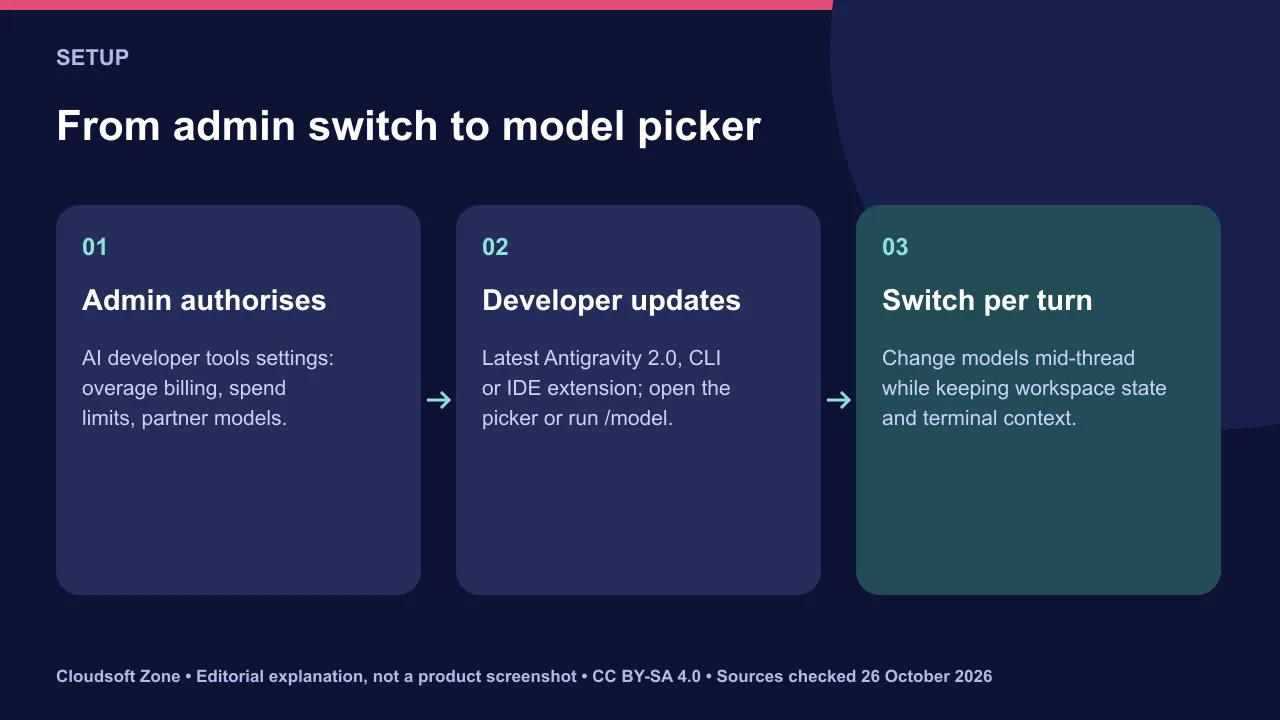
- Gemini Enterprise: in the Google Cloud console, open Gemini Enterprise, then Settings, then AI developer tools. Set overage billing and spend limits, and authorise partner models.
- Gemini platform (API): enable the Claude models in Model Garden and accept the standard Anthropic terms.
- Developers: update Antigravity 2.0, the CLI or the IDE extension, then open the model picker or run
/model.
You can switch models between turns in one conversation while keeping workspace state, open artifacts and terminal context.
Billing: what is and is not pooled
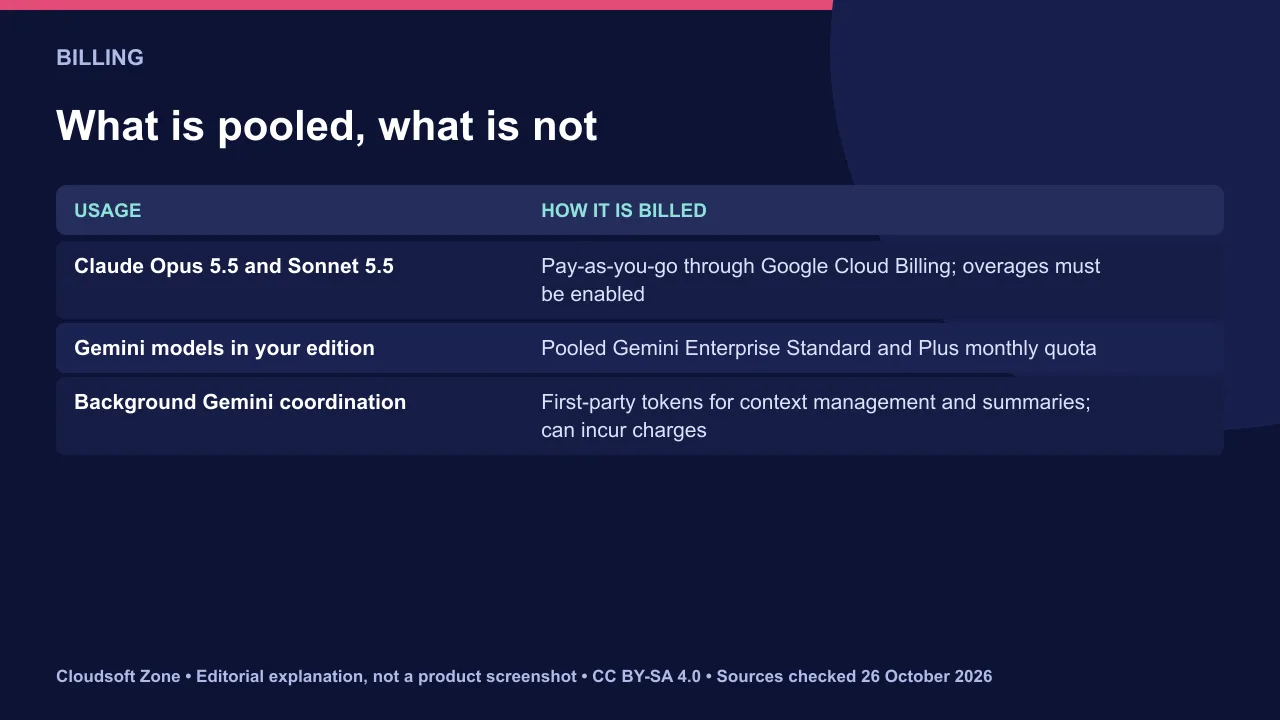
Claude usage does not draw from the pooled Gemini Enterprise Standard and Plus monthly token quota. It is billed through your Google Cloud Billing account, so overages must be enabled.
Lightweight Gemini models also run in the background for context management and summaries. They consume first-party tokens and can incur charges even in a Claude session.
Multi-model workflows: implement with one, review with another
Google describes two patterns. Both use a second model as a quality check, not as a replacement for review.
Cross-model verification. Plan and implement with one model, such as Claude Opus 5.5. Then switch, or run a one-shot /model check in the CLI, so a different model family critiques the change against your tests and requirements.
A reasoning model with Flash subagents. Subagents live in .agents/agents/*.md and set model to inherit, flash or pro. A test-triage subagent on Flash can classify failures while the main session keeps a deeper model.
---
name: test-triager
description: Runs unit tests and summarises failing assertions.
model: flash
tools:
  - read
---
Run the requested tests, classify failures by root cause and return a short summary.
Governance and spend controls
Set spend limits before enabling partner models. Then decide which repositories may use which models.
- Cap overages in the AI developer tools settings.
- Review background Gemini usage in billing reports, not only Claude usage.
- Keep human review and CI on every change; a second model is a reviewer, not an approver.
Our verdict: the cross-model review pattern is the most useful part for teams already on Google Cloud. Compare options in our AI coding assistants comparison. For help setting up coding agents with guardrails, see our AI business process automation service.
Sources and further reading
- Claude Opus 5.5 and Claude Sonnet 5.5 available in Antigravity — Google Cloud
- Configure AI developer tools settings — Google Cloud
- Antigravity models — Google
Image credits
Featured layout and explanatory diagrams: Cloudsoft Zone, CC BY-SA 4.0. Product artwork is resized proportionally for identification; no endorsement is implied. claude: Claude Logo Symbol, CC0. google: Google LLC, Public domain. Claude AI website screenshot: Software: Anthropic PBC Screenshot: VulcanSphere, Public domain, via Wikimedia Commons.
Frequently asked questions
Does Claude usage come out of my Gemini quota?
No. Partner models are billed pay-as-you-go through Google Cloud Billing, so overages must be enabled.
Can developers turn Claude on themselves?
No. An administrator authorises partner models in the AI developer tools settings, or enables them in Model Garden for the API.
Which Antigravity surfaces support Claude?
Antigravity 2.0, the Antigravity CLI and the IDE extensions for VS Code, JetBrains IntelliJ and Visual Studio.
Your next customer could start right here.
Introduce your tool, product or business to readers exploring technology.
Explore placements and request a private quote
Sources
- Claude Opus 5.5 and Claude Sonnet 5.5 available in Antigravity — Google Cloud, 2026-10-21
- Configure AI developer tools settings — Google Cloud
- Antigravity models — Google
Written with substantial AI assistance. Facts checked against cited sources. Editorial policy.
Comments
No comments yet. Be the first to join the conversation.
Leave a comment
Every comment is read by a moderator before it appears. Your email address is never published; it is used only to contact you about this comment.
More from Cloudsoft Zone

Industry updateAI and Automation
AI model containment: lessons from OpenAI’s DNS egress incident
AI model containment lessons from OpenAI: an internal model reached the internet through a DNS resolver misconfiguration. How to design agent sandboxes.
By Cloudsoft Zone

Industry updateAI and Automation
12-hour prompt caching: when OpenAI’s longer cache saves money
OpenAI’s 12-hour prompt caching costs 2.5x input to write and 0.1x to read. Break-even maths, when it beats the 30-minute default and how to enable it.
By Cloudsoft Zone

Industry updateAI and Automation
OpenAI Decisions API: pricing, use cases and when to use Responses
The OpenAI Decisions API is now GA with gpt-6-luna: predicate, choice and score answers at $0.10 per million input tokens, no output charge. When to use it.
By Cloudsoft Zone