
How to set token budgets and cost limits for AI applications
Per-user and per-tenant AI budgets with soft and hard caps, pre-flight token counts, an atomic reserve-and-settle ledger, provider spend limits and graceful degradation.
Updated 16 min read

In this article
An AI feature without a budget is an open tab. One customer pasting whole documents, one agent stuck in a loop or one leaked API key can turn a predictable bill into a surprise. This tutorial builds the controls that stop that: budgets per user, per tenant and per run; soft caps that switch to cheaper behaviour and hard caps that refuse politely; pre-flight token counting; and a small ledger that reserves the worst-case cost before each call, so concurrent requests cannot overspend. It ends with what Anthropic, OpenAI and Google actually let you cap on their side.
Tested with: Node.js 24.19.0 (built-in node:sqlite), TypeScript 7.0.2, @anthropic-ai/sdk 0.120.0, openai 7.5.0 and @google/genai 2.18.0. The ledger and demo run locally; the token-counting calls are type-checked against those SDK versions but need API keys to run.
Where the money goes, with real prices
Start from your own numbers. Suppose a support assistant inside a SaaS product sends about 2,400 input tokens (instructions, retrieved snippets and the question) and gets about 350 output tokens back. At the providers' published list prices per million tokens:
| Model | Input / output price | Cost per request | 880 requests a month |
|---|---|---|---|
| Claude Sonnet 4.6 | $3 / $15 | 2,400 x $3 + 350 x $15 = $0.01245 | $10.96 |
| Claude Haiku 4.5 | $1 / $5 | $0.0024 + $0.00175 = $0.00415 | $3.65 |
| Gemini 2.5 Flash | $0.30 / $2.50 | $0.00072 + $0.000875 = $0.001595 | $1.40 |
880 requests is an assumption: 40 requests a working day for 22 days, per active user. If the seat costs your customer $15 a month and you want AI to stay under 20% of that ($3), the default model, the per-user allowance and the fallback behaviour all follow from this table. Prompt caching and batching lower these numbers further; that is covered in how to cut LLM API costs with model choice, prompt caching and batching. This article is about putting a ceiling on whatever the per-request cost turns out to be.
Five budget layers

- Per request. Always set the maximum output tokens, and check input size before sending. This bounds the cost of a single call.
- Per agent run. Cap turns and total tokens for one task. A loop that retries a failing tool is the most common cause of runaway spend.
- Per user per day. Protects the tenant from one heavy user and slows down a stolen session.
- Per tenant per month. Matches what the customer pays for. This is the number sales and finance care about.
- Provider account. A spend limit on the provider's side is the backstop for bugs in layers 1 to 4, not a substitute for them, because it stops every customer at once.
Each of layers 3 and 4 has two thresholds. The soft cap (say 80% of the allowance) changes behaviour: a cheaper model, a lower output limit, fewer retrieved documents, and a notice to the account owner. The hard cap refuses new requests with a clear message saying which budget is used up and when it resets.
Pre-flight token counting
To reserve a cost before calling, you need the input token count. All three providers offer a counting endpoint that uses their own tokenizer:
import Anthropic from '@anthropic-ai/sdk';
import OpenAI from 'openai';
import { GoogleGenAI } from '@google/genai';

// Pre-flight input token counts from each provider's own endpoint. All three are separate API calls,
// so cache the count for prompts you reuse, and fall back to a local estimate if the call fails.
const anthropic = new Anthropic();
const openai = new OpenAI();
const gemini = new GoogleGenAI({ apiKey: process.env.GEMINI_API_KEY });

export async function countClaude(model: string, system: string, user: string): Promise<number> {
  const r = await anthropic.messages.countTokens({ model, system, messages: [{ role: 'user', content: user }] });
  return r.input_tokens;
}

export async function countOpenAI(model: string, instructions: string, user: string): Promise<number> {
  const r = await openai.responses.inputTokens.count({ model, instructions, input: user });
  return r.input_tokens;
}

export async function countGemini(model: string, system: string, user: string): Promise<number> {
  // countTokens counts contents; include the system text as content so the estimate is not low.
  const r = await gemini.models.countTokens({ model, contents: `${system}\n\n${user}` });
  return r.totalTokens ?? 0;
}- Anthropic's token counting is free, has its own rate limit separate from message creation, and returns an estimate that can differ slightly from the billed count.
- OpenAI's Responses API has
POST /v1/responses/input_tokens, exposed in the Node SDK asclient.responses.inputTokens.count(). - Gemini's
models.countTokensreturnstotalTokens. In the@google/genaiSDK, passingsystemInstructionto it in Gemini Developer API mode throws "systemInstruction parameter is only supported in Gemini Enterprise Agent Platform mode, not in Gemini Developer API mode", which is why the example counts the system text as part of the contents.
Counting is an extra network call. For high-volume paths, count your fixed prompt once, cache the number, count only the variable part, and fall back to a padded local estimate (the demo uses characters divided by four, plus 20%) if the counting call fails. Never use one provider's tokenizer to estimate another's: the same text produces different counts.
The ledger: reserve, call, settle
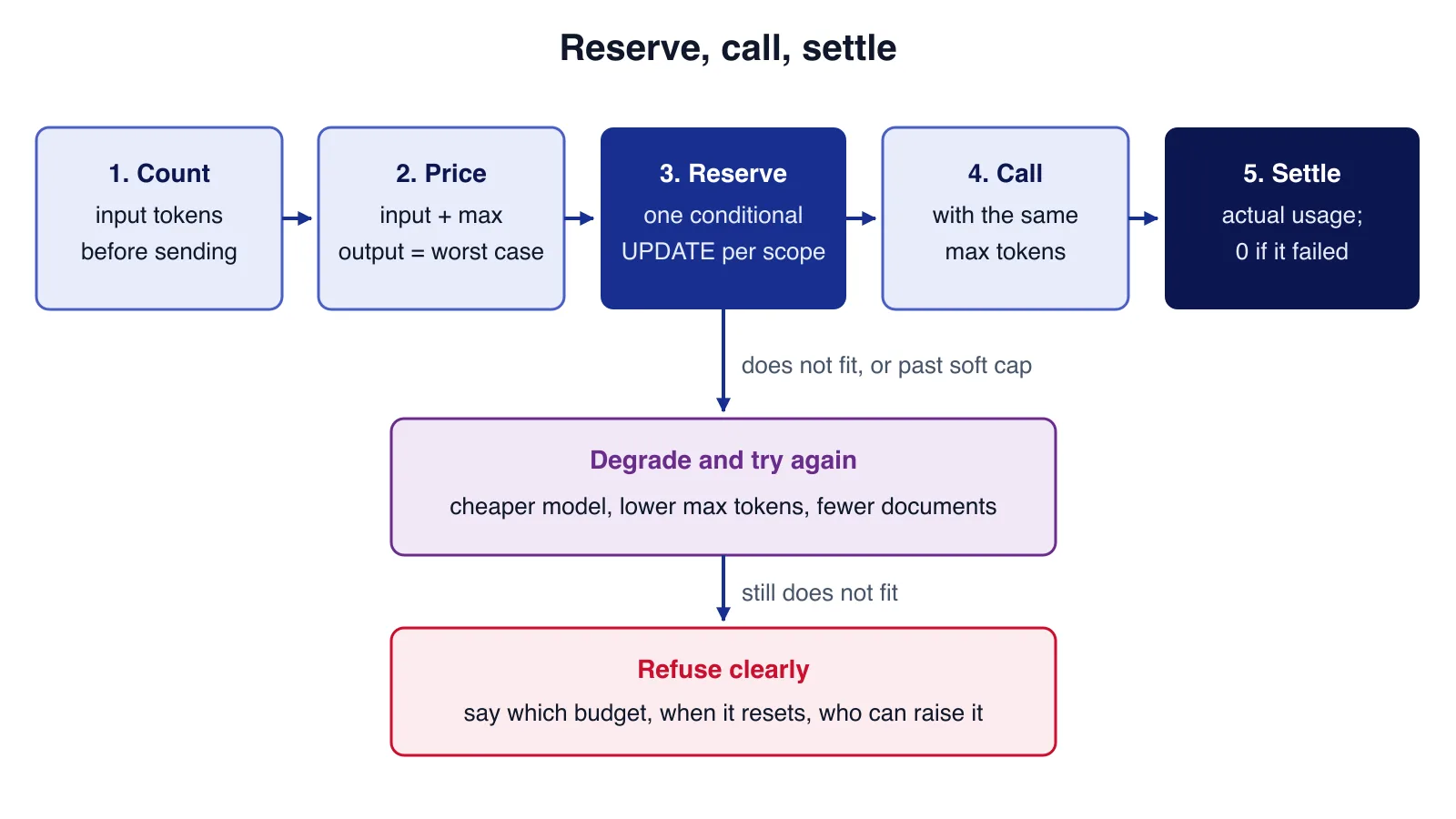
Checking "spent so far is under the limit" and then calling the model has a race: twenty requests can all pass the check before any of them records its cost. The fix is to reserve first. Before the call, add the worst-case cost (input tokens plus maximum output tokens, priced) to a reserved column, but only if spent + reserved + this still fits, in a single conditional UPDATE. After the call, replace the reservation with the actual cost from the provider's usage fields. If the call fails, settle at zero.
import { DatabaseSync } from 'node:sqlite';
import { randomUUID } from 'node:crypto';

// USD per million tokens, from the providers' published price lists. Keep in config, review monthly.
export const PRICES = {
  'claude-sonnet-4-6': { input: 3.0, output: 15.0 },
  'claude-haiku-4-5': { input: 1.0, output: 5.0 },
  'gemini-2.5-flash': { input: 0.3, output: 2.5 },
} as const;
export type Model = keyof typeof PRICES;

export const cost = (m: Model, inTok: number, outTok: number) =>
  (inTok * PRICES[m].input + outTok * PRICES[m].output) / 1_000_000;

// Budgets are stored in micro-dollars (integers) so sums never drift.
const micro = (usd: number) => Math.ceil(usd * 1_000_000);
export const usd = (m: number) => m / 1_000_000;

// Cheap local estimate when you cannot call a counting endpoint: about 4 characters per token
// for English text, padded by 20%. Use the provider's count endpoint for anything that matters.
export const roughCount = (text: string) => Math.ceil((text.length / 4) * 1.2);

export type Scope = { key: string; period: string; limitUsd: number; softUsd: number };
export type Decision =
  | { status: 'ok' | 'soft'; reservationId: string }
  | { status: 'hard'; scope: string; message: string };

export class BudgetLedger {
  private db: DatabaseSync;
  constructor(db: DatabaseSync) {
    this.db = db;
    db.exec(`
      CREATE TABLE IF NOT EXISTS budget_usage (
        scope TEXT NOT NULL, period TEXT NOT NULL,
        limit_micro INTEGER NOT NULL, soft_micro INTEGER NOT NULL,
        spent_micro INTEGER NOT NULL DEFAULT 0, reserved_micro INTEGER NOT NULL DEFAULT 0,
        PRIMARY KEY (scope, period));
      CREATE TABLE IF NOT EXISTS reservations (
        id TEXT PRIMARY KEY, scopes TEXT NOT NULL, amount_micro INTEGER NOT NULL,
        created_at TEXT NOT NULL, settled INTEGER NOT NULL DEFAULT 0);`);
  }

  // Reserve the worst-case cost against every scope (user, tenant, ...) or none of them.
  reserve(scopes: Scope[], estimateUsd: number): Decision {
    const amount = micro(estimateUsd);
    this.db.exec('BEGIN IMMEDIATE');
    try {
      let soft = false;
      for (const s of scopes) {
        this.db.prepare(`INSERT OR IGNORE INTO budget_usage (scope, period, limit_micro, soft_micro) VALUES (?, ?, ?, ?)`)
          .run(s.key, s.period, micro(s.limitUsd), micro(s.softUsd));
        // The check and the increment are one statement, so concurrent requests cannot both pass.
        const res = this.db.prepare(`UPDATE budget_usage SET reserved_micro = reserved_micro + ?
          WHERE scope = ? AND period = ? AND spent_micro + reserved_micro + ? <= limit_micro`)
          .run(amount, s.key, s.period, amount);
        if (res.changes !== 1) {
          this.db.exec('ROLLBACK');
          return { status: 'hard', scope: s.key, message: `The ${s.key.split(':')[0]} AI budget for ${s.period} is used up.` };
        }
        // Soft cap: already spent (not counting this request) is past the warning line.
        const row = this.db.prepare(`SELECT spent_micro, soft_micro FROM budget_usage WHERE scope = ? AND period = ?`)
          .get(s.key, s.period) as { spent_micro: number; soft_micro: number };
        if (row.spent_micro > row.soft_micro) soft = true;
      }
      const id = randomUUID();
      this.db.prepare(`INSERT INTO reservations (id, scopes, amount_micro, created_at) VALUES (?, ?, ?, ?)`)
        .run(id, JSON.stringify(scopes.map((s) => [s.key, s.period])), amount, new Date().toISOString());
      this.db.exec('COMMIT');
      return { status: soft ? 'soft' : 'ok', reservationId: id };
    } catch (e) {
      this.db.exec('ROLLBACK');
      throw e;
    }
  }

  // After the call: move the reservation to spent using the provider's reported usage (0 if the call failed).
  settle(reservationId: string, actualUsd: number): void {
    this.db.exec('BEGIN IMMEDIATE');
    try {
      const r = this.db.prepare(`SELECT scopes, amount_micro FROM reservations WHERE id = ? AND settled = 0`)
        .get(reservationId) as { scopes: string; amount_micro: number } | undefined;
      if (!r) { this.db.exec('ROLLBACK'); return; } // already settled: idempotent
      for (const [scope, period] of JSON.parse(r.scopes) as [string, string][]) {
        this.db.prepare(`UPDATE budget_usage SET reserved_micro = reserved_micro - ?, spent_micro = spent_micro + ?
          WHERE scope = ? AND period = ?`).run(r.amount_micro, micro(actualUsd), scope, period);
      }
      this.db.prepare(`UPDATE reservations SET settled = 1 WHERE id = ?`).run(reservationId);
      this.db.exec('COMMIT');
    } catch (e) {
      this.db.exec('ROLLBACK');
      throw e;
    }
  }

  usage(scope: string, period: string) {
    return this.db.prepare(`SELECT spent_micro, reserved_micro, soft_micro, limit_micro FROM budget_usage WHERE scope = ? AND period = ?`)
      .get(scope, period) as { spent_micro: number; reserved_micro: number; soft_micro: number; limit_micro: number };
  }
}
Amounts are stored as integer micro-dollars so repeated additions do not drift. The same conditional update works unchanged in PostgreSQL or MySQL; with several application servers, put the ledger in your main database or implement the same check-and-increment as a Redis Lua script. Run a periodic job that settles reservations older than your longest request timeout, so a crashed worker cannot hold budget for ever.
Soft caps that degrade, hard caps that refuse
The demo gives each user $0.05 a day (soft cap $0.03) and the tenant $0.15 a month (soft cap $0.12): tiny numbers so the caps trigger quickly. Normal requests use Claude Sonnet 4.6 with up to 1,000 output tokens; once a soft cap is passed, or the normal plan no longer fits, the request is retried on Claude Haiku 4.5 with 400.
import { DatabaseSync } from 'node:sqlite';
import { BudgetLedger, cost, roughCount, usd, type Model, type Scope } from './budget.ts';

const ledger = new BudgetLedger(new DatabaseSync(':memory:'));
const day = '2026-08-25', month = '2026-08';
const scopesFor = (userId: string): Scope[] => [
  { key: `user:${userId}`, period: day, limitUsd: 0.05, softUsd: 0.03 },        // per user per day
  { key: 'tenant:acme', period: month, limitUsd: 0.15, softUsd: 0.12 },          // per tenant per month
];

// Policy: normal requests use Sonnet with up to 1,000 output tokens; above the soft cap, Haiku with 400.
const plan = (soft: boolean): { model: Model; maxOut: number } =>
  soft ? { model: 'claude-haiku-4-5', maxOut: 400 } : { model: 'claude-sonnet-4-6', maxOut: 1000 };

// Stand-in for the provider call: returns the usage the API would report.
async function callModel(model: Model, inTok: number, maxOut: number) {
  await new Promise((r) => setTimeout(r, 5));
  return { model, inTok, outTok: Math.min(maxOut, 350) };
}

async function handle(userId: string, prompt: string): Promise<string> {
  const inTok = roughCount(prompt);
  const scopes = scopesFor(userId);
  // Reserve the worst case for the normal plan. Past the soft cap, or if it no longer fits, try the cheaper plan.
  let p = plan(false);
  let d = ledger.reserve(scopes, cost(p.model, inTok, p.maxOut));
  const degraded = d.status !== 'ok';
  if (degraded) {
    if (d.status === 'soft') ledger.settle(d.reservationId, 0); // release the larger reservation
    p = plan(true);
    d = ledger.reserve(scopes, cost(p.model, inTok, p.maxOut));
  }
  if (d.status === 'hard') return `refused  ${d.message}`;
  try {
    const r = await callModel(p.model, inTok, p.maxOut);
    const actual = cost(r.model, r.inTok, r.outTok);
    ledger.settle(d.reservationId, actual);
    return `${degraded ? 'degraded' : 'ok      '} ${r.model.padEnd(17)} in=${r.inTok} out=${r.outTok} cost=$${actual.toFixed(6)}`;
  } catch (e) {
    ledger.settle(d.reservationId, 0); // never leave a reservation hanging
    throw e;
  }
}

const prompt = 'x'.repeat(8_000); // about 2,400 tokens with the padded local estimate
for (let i = 1; i <= 6; i++) console.log(`maya #${i}  ${await handle('maya', prompt)}`);

console.log('\n20 concurrent requests from 5 colleagues:');
const results = await Promise.all(Array.from({ length: 20 }, (_, i) => handle(`user${i % 5}`, prompt)));
const tally = results.reduce<Record<string, number>>((t, r) => { const k = r.split(' ')[0]; t[k] = (t[k] ?? 0) + 1; return t; }, {});
console.log(tally);
const t = ledger.usage('tenant:acme', month);
console.log(`tenant spent $${usd(t.spent_micro).toFixed(6)} of $${usd(t.limit_micro).toFixed(2)}, reserved $${usd(t.reserved_micro).toFixed(6)}`);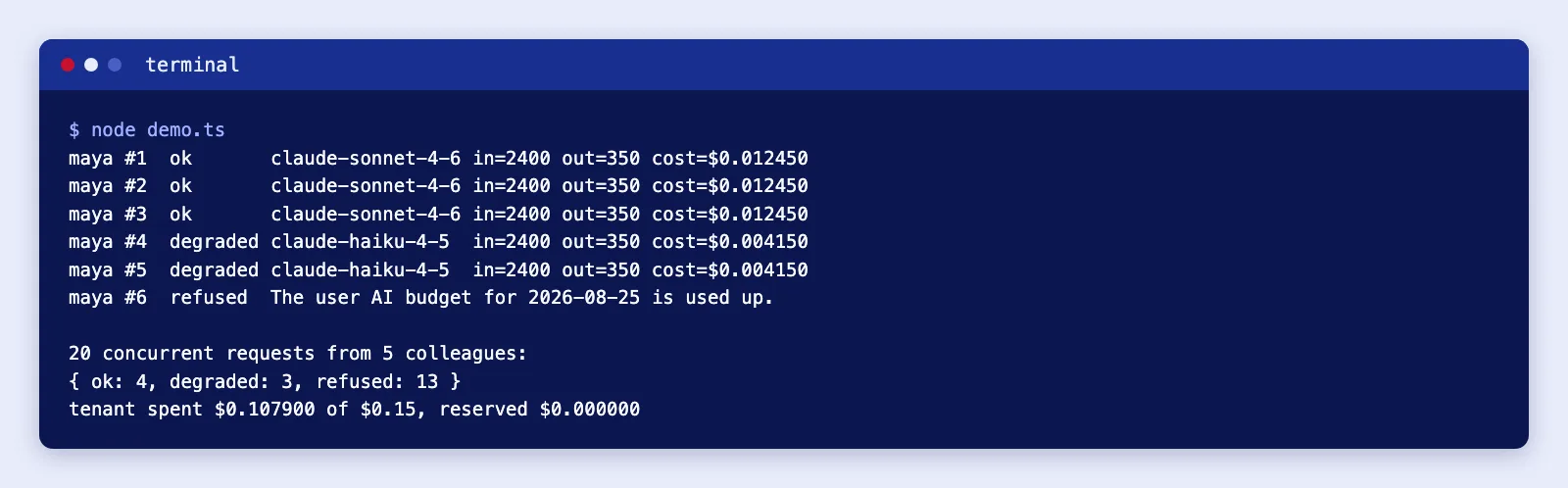
Maya's first three requests cost $0.01245 each. By then she has spent $0.03735, past her $0.03 soft cap, so requests four and five run on Haiku at $0.00415. The sixth would need a $0.0044 reservation on top of $0.0457 spent, more than her $0.05, so it is refused with a message naming the budget and the day.
The concurrent run shows the trade-off of worst-case reservations. The tenant had $0.1043 of headroom left; four Sonnet requests reserved $0.0222 each, three more fitted on Haiku, and the other 13 were refused while those reservations were outstanding. Final spend was $0.1079 of $0.15, never more. Reserving the worst case is safe but pessimistic, so keep max_tokens realistic for each feature rather than setting it to the model maximum.
Good degradation steps, roughly in order: a cheaper model in the same family; a lower output limit; fewer retrieved documents or a shorter history; turning off optional extras such as follow-up suggestions; queuing non-urgent work for a batch run; and finally a refusal that tells the user what to do. Whatever you choose, show it in the product ("You have used 80% of this month's AI allowance") so the change is not a silent drop in quality.
Budgets for agent runs
Agents need a budget of their own, because one user request can turn into many model calls. Reserve per call exactly as above, but also keep a running total for the run and stop when it passes a ceiling: for example 15 model turns or 60,000 input tokens, whichever comes first. Count input across turns, not just output, because every turn re-sends the growing conversation and the tool results. When the ceiling is reached, end the run with a summary of what was done and what is left, rather than an error, and log it so you can see which tasks need a higher ceiling or a better tool design. Some providers also offer model-side pacing (Anthropic's task budgets beta, for example, tells Claude how many tokens it has left for a loop), which complements but does not replace your own hard stop.
What the providers let you cap
| Provider | Account-side controls | What happens at the limit |
|---|---|---|
| Anthropic (Claude API) | Each usage tier has a monthly spend cap; you can set your own lower organisation limit, and separate spend and rate limits per workspace in the Claude Console | Requests fail until the limit is raised or the month resets; a limit you set returns a 400 invalid_request_error saying you reached your specified usage limit |
| OpenAI | Organisation and project spend limits, each either alert-only or enforced as a hard limit, plus spend alerts | Hard limits return 429 with code project_spend_limit_exceeded or organization_spend_limit_exceeded; enforcement is not instant, so spend can slightly exceed the limit |
| Google (Gemini API) | Project spend caps in AI Studio (experimental, from 12 March 2026), billing-account spend caps by usage tier (from 16 March 2026), and prepaid credit (from 23 March 2026) | Billing-account caps pause all linked projects until the next cycle; at a $0 prepaid balance requests fail with HTTP 402; project caps can overshoot by about ten minutes of usage |
Two practical points. First, a spend-limit error can share a status code with ordinary rate limiting (OpenAI uses 429 for both), so check the error code before retrying, or your retry logic will hammer a limit that will not clear until someone changes it. Second, Google Cloud Billing budgets in their usual alerts-only form do not cap anything; the Gemini caps above are the controls that actually stop requests. Treat every provider limit as a coarse backstop set somewhat above your own tenant totals, and test it on a throwaway project before you rely on it.
If you sell an AI feature inside a multi-tenant product, budgets belong next to plans, metering and billing. Cloudsoft Zone's SaaS development team can build the ledger, plan limits and usage screens into your platform.
Monitoring the budgets
- Record cost per call as a metric with user, tenant, feature and model labels; the article on AI agent observability shows how with OpenTelemetry.
- Alert when a tenant passes its soft cap unusually early in the month, and when total spend per hour jumps.
- Reconcile your ledger with the provider's usage or cost reports weekly. A gap means a code path is calling the model without going through the ledger.
- Review prices whenever you change models, and store the price used with each settled call so historic costs do not change when the table does.
Common mistakes
- Checking after the call. Recording spend afterwards without a reservation lets concurrent requests overshoot.
- No
max_tokens. Output is usually the expensive side; an unbounded answer makes every estimate meaningless. - Counting only the user's message. System prompts, tool definitions, retrieved documents and conversation history are input tokens too, and usually the majority.
- Retrying spend-limit errors. They do not clear by waiting a few seconds.
- Leaking reservations. Every path, including exceptions and timeouts, must settle.
- Relying on the provider cap alone. It stops your whole product at once and tells you nothing about which customer caused it.
- Silent degradation. Users notice worse answers; tell them why.
When not to build this
- Internal tools with a handful of users. A provider spend limit plus a per-request
max_tokensand a turn cap may be enough. - Fixed-price batch jobs. If a nightly job processes a known number of documents, estimate it up front and cap the job, not each user.
- When a managed gateway already does it. If you route all model traffic through an AI gateway with per-key budgets that you trust and can test, use it rather than writing your own ledger, but keep tenant-level limits in your product where customers can see them.
Cloudsoft Zone builds multi-tenant SaaS platforms with plan-based AI allowances, metering, budgets and the usage screens customers need to trust them. See our SaaS and ERP development service.
Frequently asked questions
Should I count tokens before every request?
Count when the input is variable and large enough to matter. Cache counts for fixed prompts, and fall back to a padded local estimate if the counting call fails.
What is the difference between a soft cap and a hard cap?
A soft cap changes behaviour, such as switching to a cheaper model or shorter answers, and warns the account owner. A hard cap refuses new requests until the budget resets or is raised.
Are provider spend limits enough?
No. They apply to your whole account or project, so they stop every customer at once. Use them as a backstop above your own per-user and per-tenant budgets.
How do I stop concurrent requests overspending?
Reserve the worst-case cost with one conditional update before calling the model, then settle the actual cost afterwards. Concurrent requests cannot all pass the check.
Your next customer could start right here.
Introduce your tool, product or business to readers exploring technology.
Explore placements and request a private quote
Sources
- Token counting — Anthropic
- Rate limits and spend limits — Anthropic
- Pricing — Anthropic
- Spend limits — OpenAI
- API pricing — OpenAI
- Billing — Google AI for Developers
- Gemini API release notes — Google AI for Developers
- Gemini Developer API pricing — Google AI for Developers
- Create, edit, or delete budgets and budget alerts — Google Cloud
Written with substantial AI assistance. Facts checked against cited sources. Editorial policy.
Comments
No comments yet. Be the first to join the conversation.
Leave a comment
Every comment is read by a moderator before it appears. Your email address is never published; it is used only to contact you about this comment.
More from Cloudsoft Zone

Architecture guideAI and Automation
How to build a safe AI content pipeline with human fact review
An architecture for AI-assisted publishing where people stay responsible: untrusted source snapshots, claim checking with citations, a review queue AI cannot skip, labels and rollback.
By Cloudsoft Zone

TutorialNode.js
How to test a Node.js API with the built-in test runner (node:test)
Write, run, mock and measure coverage for a small Node.js HTTP API using only node:test and node:assert. Covers port-0 servers, fetch(), spies, t.mock.method(), fake dates and coverage thresholds.
By Cloudsoft Zone

TutorialNode.js
Node.js streams in practice: pipeline(), backpressure and async generators
Process files of any size in Node.js with flat memory use. A hands-on guide to stream/promises pipeline(), backpressure, async generator transforms, AbortSignal timeouts and streaming downloads over HTTP.
By Cloudsoft Zone