
Build an AI social media publishing workflow with approval and retries
AI drafts, brand rules in code, approval bound to exact content, real X, LinkedIn and Meta API limits, and a Laravel job that retries safely without double-posting.
Updated 12 min read
In this article
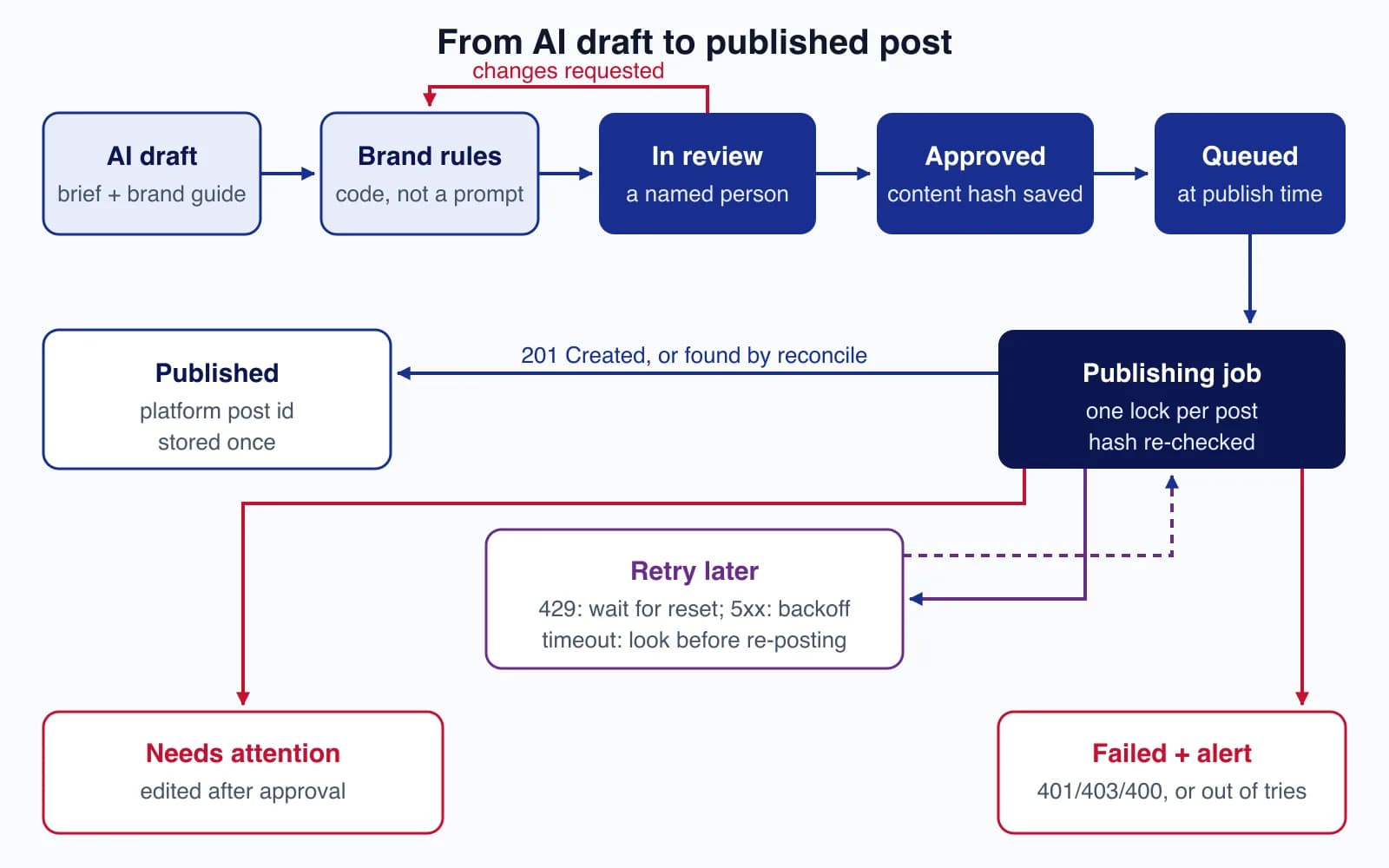
An AI social media workflow is worth building when it saves your team the drafting, not when it takes away the decision to publish. The version that holds up in production has five parts: AI drafts per channel from a brief, deterministic brand rules check every draft, a named person approves the exact text, your own scheduler publishes through each platform's official API, and a publishing job that retries safely, never posts twice and alerts someone when it gives up. This guide builds those parts in Laravel, with the real API limits of X, LinkedIn, Facebook, Instagram and Threads, and four failure scenarios we ran against the code.
Tested with: Laravel 13.25.0, PHP 8.5.7 and the database queue driver in a scratch app, with the X API stubbed by Laravel's Http::fake(); no live accounts were posted to. API limits and prices are from each platform's developer documentation at the time of writing.
The workflow at a glance
- Brief. A person writes what the post is about, the link, the audience and the channels.
- AI draft. A language model produces one draft per channel, following your brand guide.
- Brand rules. Code (not the model) checks length, banned claims, disclosure labels and leftover placeholders.
- Review. A named reviewer edits, requests changes or approves. Approval stores a hash of exactly what was approved.
- Schedule. At the publish time, your scheduler queues the post.
- Publish. A queued job calls the platform API, classifies any failure, retries the safe ones and alerts on the rest.
Drafting: what the AI should and should not do
Give the model the brief, the brand guide (tone, words you never use, how you write prices and dates) and two or three approved past posts per channel. Ask for structured output, one object per channel with the text and the link placement, so your code can check each field. Our guide to getting valid JSON from LLMs covers that part.
Keep these out of the model's hands:
- Facts it was not given. Prices, dates, statistics and customer names must come from the brief. If the draft contains a number that is not in the brief, flag it for the reviewer.
- Replies and direct messages. Responding to customers in public is a support decision, not a drafting task.
- Untrusted input as instructions. If drafts are built from web pages, reviews or comments, treat that text as data. A review that says "ignore previous instructions" should not change your post; see our prompt injection design patterns.
- The publish button. The model never calls a platform API. Only the publishing job does, and only for approved posts.
Brand rules as code
A prompt that says "stay under 280 characters and avoid medical claims" is a request, not a control. Run the same checks on every draft in code, whether a model or a person wrote it:
final class BrandRules
{
    /** Platform text limits from each API's documentation. */
    private const MAX_LENGTH = ['x' => 280, 'threads' => 500, 'instagram' => 2200];

    private const BANNED = ['guaranteed results', 'risk-free', 'best in the world', 'cure'];

    /** @return list<string> */
    public function violations(SocialPost $post): array
    {
        $problems = [];
        $length = mb_strlen($post->body);
        $max = self::MAX_LENGTH[$post->channel] ?? null;

        if ($max !== null && $length > $max) {
            $problems[] = "Too long for {$post->channel}: {$length}/{$max} characters.";
        }
        if ($post->channel === 'instagram' && substr_count($post->body, '#') > 30) {
            $problems[] = 'Instagram allows at most 30 hashtags.';
        }
        if ($post->channel === 'instagram' && ! $post->media_url) {
            $problems[] = 'Instagram posts need an image or video.';
        }
        foreach (self::BANNED as $phrase) {
            if (stripos($post->body, $phrase) !== false) {
                $problems[] = "Banned claim: \"{$phrase}\".";
            }
        }
        if ($post->is_paid_partnership && ! preg_match('/#ad\b|\bpaid partnership\b|\bsponsored\b/i', $post->body)) {
            $problems[] = 'Paid partnership posts must be labelled (#ad, Sponsored or Paid partnership).';
        }
        if (preg_match('/\{\{|\[(insert|todo)/i', $post->body)) {
            $problems[] = 'Template placeholder left in the text.';
        }

        return $problems;
    }
}
The limits come from the platforms: Threads caps text posts at 500 characters, and Instagram captions at 2,200 characters, 30 hashtags and 20 @ tags. X counts 280 characters for standard accounts using its own weighting (links count as a fixed length), so use X's counting library if you post many links. Disclosure rules for paid partnerships come from advertising regulators such as the FTC in the US and the ASA in the UK.
Approval that means something
Approval must bind to the exact content. If someone edits the text after approval, the post must go back to review, not out to the world. The approval action stores a hash of the channel, account, text, media and publish time:
final class ApprovePost
{
    public function __construct(private BrandRules $rules) {}

    public function __invoke(User $reviewer, SocialPost $post): void
    {
        DB::transaction(function () use ($reviewer, $post) {
            $post = SocialPost::whereKey($post->id)->lockForUpdate()->firstOrFail();

            if ($post->status !== PostStatus::InReview) {
                throw ValidationException::withMessages(['status' => 'Only posts in review can be approved.']);
            }
            if ($problems = $this->rules->violations($post)) {
                throw ValidationException::withMessages(['body' => $problems]);
            }
            if (! $post->scheduled_for || $post->scheduled_for->isPast()) {
                throw ValidationException::withMessages(['scheduled_for' => 'Choose a future publish time.']);
            }

            $post->update([
                'status' => PostStatus::Approved,
                'approved_by' => $reviewer->id,
                'approved_at' => now(),
                'approved_hash' => $post->contentHash(),
            ]);
        });
    }
}
Decide who may approve what. A common split: anyone in marketing can approve routine posts, while posts that mention prices, legal topics, incidents or named customers need a second approver. If you publish in the EU, note that the AI Act's transparency obligations in Article 50 started applying on 2 August 2026; for AI-generated text published to inform the public on matters of public interest, the disclosure duty does not apply where a person has reviewed it and holds editorial responsibility. A recorded human approval is good evidence of that.
What the official APIs actually allow
Use each platform's official API with tokens the account owner granted through OAuth. Browser automation against the consumer apps breaks often and breaks the platforms' terms.
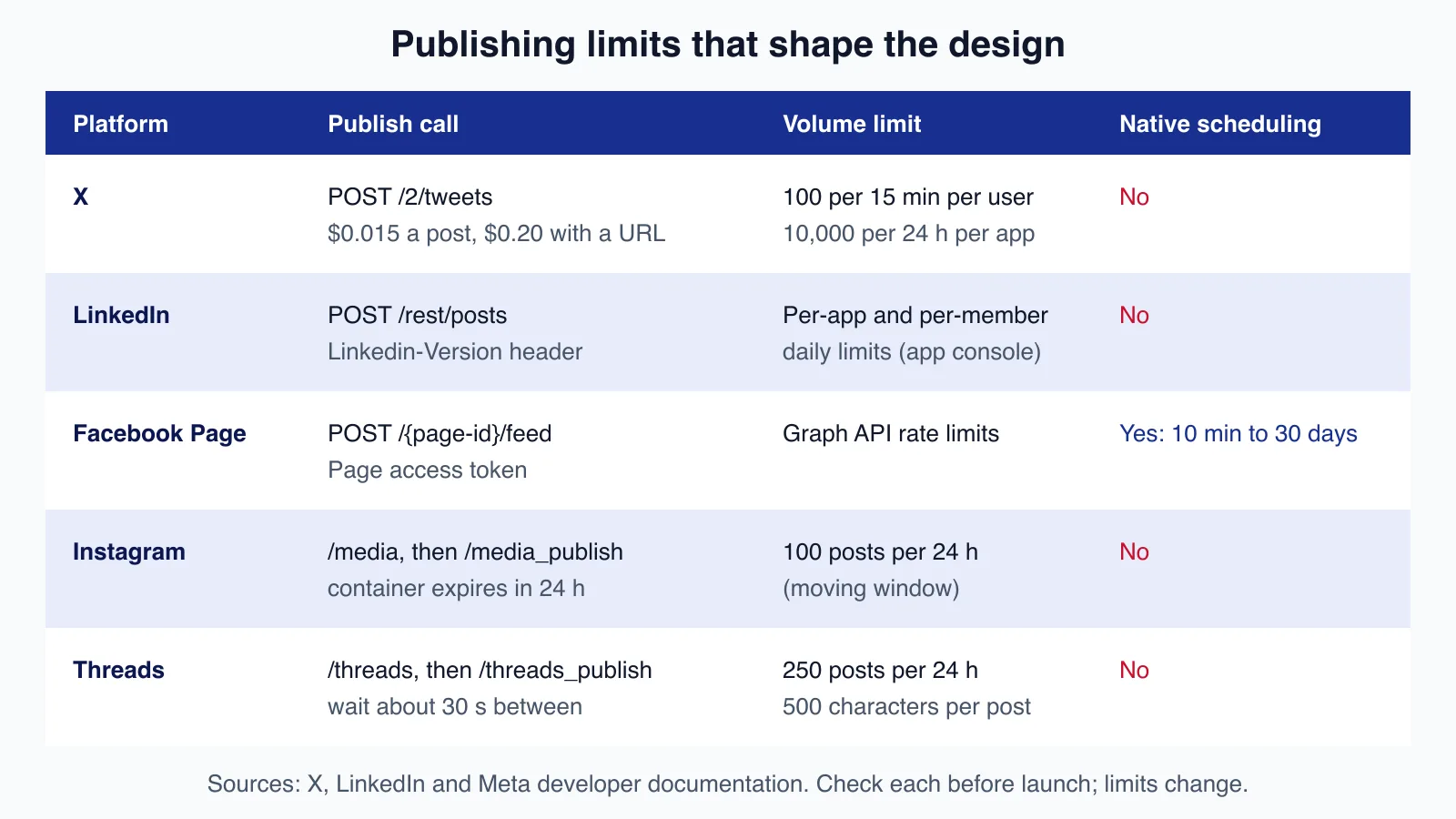
| Platform | How you publish | Limits and costs | Notes |
|---|---|---|---|
| X | POST /2/tweets with a user-context token | 100 requests per 15 minutes per user, 10,000 per 24 hours per app; pay-per-use at $0.015 per post, $0.20 per post containing a URL | No scheduling in the API; rate limit headers x-rate-limit-remaining and x-rate-limit-reset |
POST https://api.linkedin.com/rest/posts with Linkedin-Version: YYYYMM and X-Restli-Protocol-Version: 2.0.0 | Daily per-application and per-member limits, shown in the developer portal | w_organization_social for company pages (admin or content admin role), w_member_social for members; returns 201 with the post URN in x-restli-id; versions are retired on a schedule | |
| Facebook Page | POST /{page-id}/feed with a Page access token | Graph API rate limits | Native scheduling with published=false and scheduled_publish_time, 10 minutes to 30 days ahead |
POST /{ig-id}/media to create a container, then POST /{ig-id}/media_publish | 100 API-published posts per 24-hour moving window; check content_publishing_limit | Professional accounts only; images must be JPEG at a public URL; containers expire after 24 hours | |
| Threads | POST /{threads-user-id}/threads, then /threads_publish | 250 posts and 1,000 replies per 24 hours; check threads_publishing_limit | Meta suggests waiting about 30 seconds between the two calls |
Two consequences for the design. Only Facebook supports native scheduling, so your own scheduler has to own publish times for every channel to keep one source of truth. And Instagram and Threads publish in two steps, so store the container ID after the first call; a retry should reuse the container, not create a new one. See the X rate limits, LinkedIn Posts API and Instagram content publishing documentation for the details.
Publishing without duplicates
The hard part of social publishing is not the happy path. It is the request that times out after the platform has already created the post. Retry blindly and you post twice; give up and you may miss a launch. The job below handles each case separately.
First, a failure type that records what kind of failure happened:
final class PublishFailure extends RuntimeException
{
    private function __construct(
        string $message,
        public readonly bool $retryable,
        public readonly ?int $retryAfterSeconds = null,
        public readonly bool $outcomeUnknown = false,
    ) {
        parent::__construct($message);
    }

    public static function rateLimited(string $m, int $retryAfter): self { return new self($m, true, $retryAfter); }
    public static function temporary(string $m): self { return new self($m, true); }
    public static function unknownOutcome(string $m): self { return new self($m, true, null, true); }
    public static function permanent(string $m): self { return new self($m, false); }
}
Each channel implements publish() and findExisting(). For X, a connection error becomes an unknown outcome, 429 waits for the reset time, 5xx retries, and anything else is permanent:
final class XPublisher implements Publisher
{
    public function __construct(private string $userToken, private string $userId) {}

    public function publish(SocialPost $post): string
    {
        try {
            $response = Http::withToken($this->userToken)->timeout(20)
                ->post('https://api.x.com/2/tweets', ['text' => $post->body]);
        } catch (ConnectionException $e) {
            throw PublishFailure::unknownOutcome('X: '.$e->getMessage());
        }

        if ($response->created()) {
            return (string) $response->json('data.id');
        }

        throw $this->failureFrom($response);
    }

    public function findExisting(SocialPost $post): ?string
    {
        $since = $post->attempt_started_at?->subMinute()->utc()->format('Y-m-d\TH:i:s\Z');

        $response = Http::withToken($this->userToken)->timeout(20)
            ->get("https://api.x.com/2/users/{$this->userId}/tweets", array_filter([
                'start_time' => $since,
                'max_results' => 10,
            ]));

        if (! $response->successful()) {
            throw $this->failureFrom($response);
        }

        foreach ($response->json('data', []) as $tweet) {
            if (trim($tweet['text']) === trim($post->body)) {
                return (string) $tweet['id'];
            }
        }

        return null;
    }

    private function failureFrom(Response $response): PublishFailure
    {
        $detail = 'X '.$response->status().': '.($response->json('detail') ?? $response->body());

        return match (true) {
            $response->status() === 429 => PublishFailure::rateLimited(
                $detail, max(1, (int) $response->header('x-rate-limit-reset') - time()),
            ),
            $response->serverError() => PublishFailure::temporary($detail),
            default => PublishFailure::permanent($detail),
        };
    }
}
The job locks the post, refuses anything changed after approval, reconciles after an unknown outcome, and only then calls the API:
class PublishSocialPost implements ShouldQueue
{
    use Queueable;

    public int $tries = 6;

    public function __construct(public int $postId) {}

    public function middleware(): array
    {
        return [(new WithoutOverlapping((string) $this->postId))->releaseAfter(60)->expireAfter(300)];
    }

    public function handle(PublisherRegistry $publishers): void
    {
        $post = DB::transaction(function () {
            $post = SocialPost::whereKey($this->postId)->lockForUpdate()->firstOrFail();

            if (! in_array($post->status, [PostStatus::Queued, PostStatus::Publishing], true)) {
                return null;
            }
            if (! hash_equals((string) $post->approved_hash, $post->contentHash())) {
                $post->update(['status' => PostStatus::NeedsAttention, 'last_error' => 'Changed after approval.']);
                return null;
            }

            return $post;
        });

        if (! $post) {
            return;
        }

        $publisher = $publishers->for($post);

        // A previous attempt was interrupted: look before posting again.
        if ($post->status === PostStatus::Publishing && $post->attempt_started_at) {
            if ($existingId = $publisher->findExisting($post)) {
                $this->markPublished($post, $existingId);
                return;
            }
        }

        $post->update([
            'status' => PostStatus::Publishing,
            'attempts' => $post->attempts + 1,
            'attempt_started_at' => now(),
        ]);

        try {
            $this->markPublished($post, $publisher->publish($post));
        } catch (PublishFailure $e) {
            $post->update(['last_error' => $e->getMessage()]);

            if (! $e->retryable) {
                $this->fail($e);
                return;
            }

            $this->release(max($e->retryAfterSeconds ?? 0, $this->backoffFor($this->attempts())));
        }
    }

    public function failed(?Throwable $e): void
    {
        SocialPost::find($this->postId)?->update(['status' => PostStatus::Failed, 'last_error' => $e?->getMessage()]);

        Notification::route('mail', config('social.alert_email'))
            ->notify(new SocialPostFailed($this->postId, $e?->getMessage() ?? 'unknown error'));
    }

    private function markPublished(SocialPost $post, string $platformId): void
    {
        $post->update(['status' => PostStatus::Published, 'platform_post_id' => $platformId,
            'published_at' => now(), 'last_error' => null]);
    }

    private function backoffFor(int $attempt): int
    {
        $steps = config('social.retry_backoff', [60, 300, 900, 1800, 3600]);

        return $steps[min($attempt - 1, count($steps) - 1)];
    }
}
A scheduled command, run every minute with Schedule::command('social:dispatch-due')->everyMinute(), claims due posts with a conditional update (approved to queued) so two scheduler runs can never dispatch the same post. If one queue worker crashes mid-publish, the next attempt finds the post in publishing and reconciles first.
Four scenarios we ran
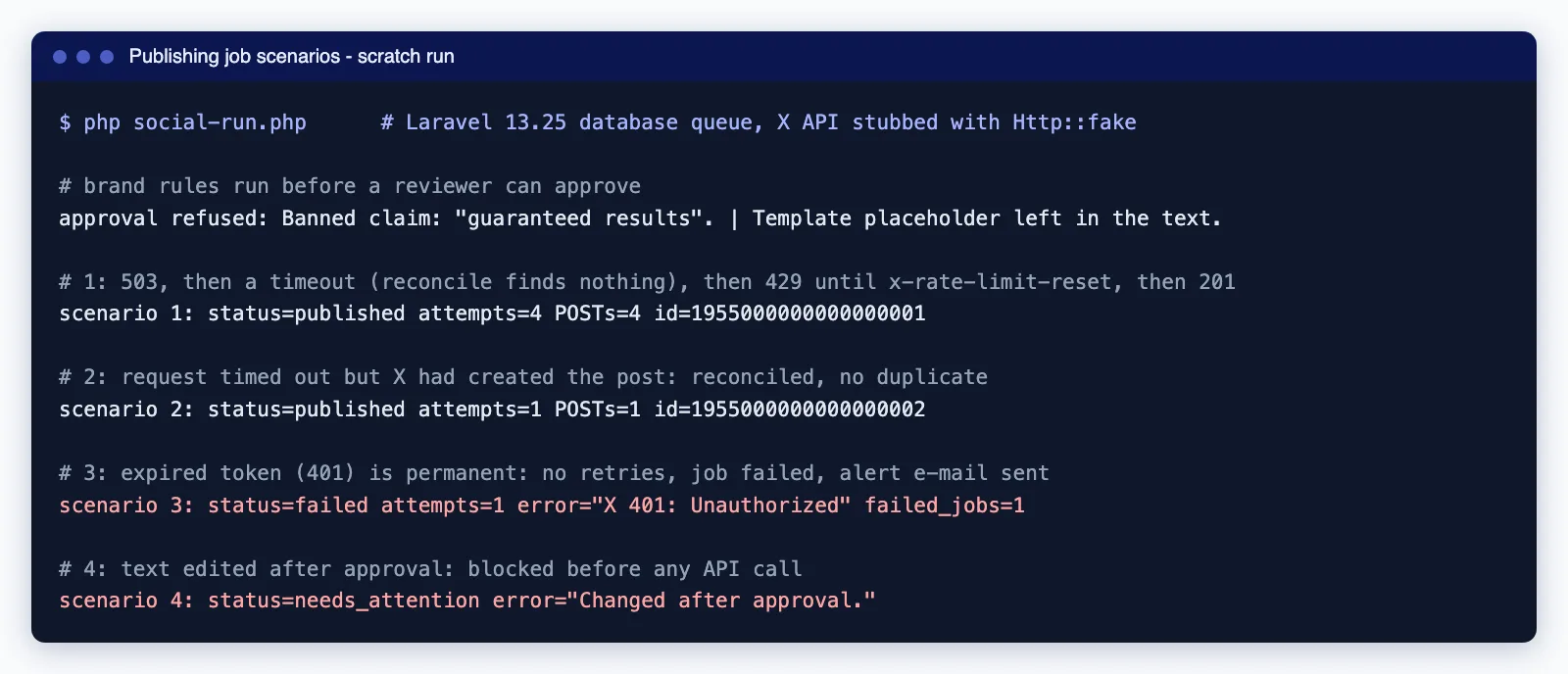
- Bad draft: a draft with "Guaranteed results" and a leftover link placeholder could not be approved.
- Outage, timeout, rate limit: a 503, then a timeout, then a 429 with a reset time, then success. The post published once, after four attempts.
- Timeout after success: the API created the post but the connection dropped. The next attempt found it through
findExisting()and stored its ID. One POST, no duplicate. - Expired token: a 401 failed immediately without retries, marked the post failed and sent the alert e-mail.
Our first test run reported a duplicate and a 401 retried six times. The cause was the test, not the job: Http::fake() callbacks stack within one process, so the first scenario's stub answered later requests. Swapping in a fresh client factory with Http::swap(new Factory()) between scenarios fixed it, and every run since matched the list above.
Failure alerts people act on
- Alert on permanent failures at once. A 401 or 403 almost always means an expired or revoked token, or a removed page role. Tell the account owner which account to reconnect.
- Alert on posts still unpublished 15 minutes after their slot. That catches stuck queues and long rate-limit waits that a job-level alert would not.
- Send one daily digest of what was published, where, by whom and with which approval, rather than a message per post.
- Watch token expiry ahead of time. Store when each token expires and remind the owner a week before.
Common mistakes
- Retrying a timeout as if nothing happened. That is how duplicates appear. Reconcile first.
- Letting rate-limit waits use up retry attempts. In Laravel each
release()counts as an attempt. If you expect long 429 waits, useretryUntil()with a deadline instead of a fixed$tries. - Approving a draft, then editing it. Without the content hash, approval stops meaning anything.
- Sharing one token across all clients or brands. Store tokens per connected account, encrypted, and revoke them when a client leaves.
- Treating X's duplicate-content rejection as success. X commonly rejects identical text from the same account with a 403; that is a reason to reconcile, not proof the post exists.
When not to build this
If you publish a few posts a week to two channels, a scheduling tool such as Buffer, Hootsuite or the platforms' own schedulers is cheaper than any custom build, and many already have approval steps and AI drafting. Build your own when publishing is part of your product (for example, a platform that posts on behalf of many client accounts), when approvals must follow your own rules and audit trail, or when posts are generated from your data, such as new listings or release notes.
Connecting the drafting, approval and publishing pieces to your own systems is where most of the risk sits. Cloudsoft Zone's content automation service can set up the workflow, platform app reviews and alerts with you.
Want AI-assisted social and blog publishing with human approval and reliable scheduling? Cloudsoft Zone builds content automation that drafts in your brand voice, routes every post to a reviewer and publishes through official APIs without duplicates.
Frequently asked questions
Can AI publish social media posts without human review?
It can technically, but it should not for a business account. Models invent details, miss context and can be steered by untrusted input. Let AI draft and check, and keep a named person approving the exact text that will be published.
How do I avoid duplicate posts when a publish request times out?
Treat a timeout as an unknown outcome. Before retrying, look for the post on the platform (for X, list the account's recent posts since the attempt started and compare the text). Store the platform's post ID as soon as you have it, and lock each post so only one worker publishes it.
Which platforms let me schedule posts through the API?
Facebook Pages support native scheduling with
scheduled_publish_time, between 10 minutes and 30 days ahead. X, LinkedIn, Instagram and Threads publish immediately, so your own scheduler has to hold the post until its time.How much does posting through the X API cost?
X uses pay-per-use pricing. Its pricing documentation lists $0.015 per post created and $0.20 per post that contains a URL, with prices subject to change. Check the Developer Console before you budget.
How many posts can I publish to Instagram through the API?
Instagram limits each professional account to 100 API-published posts in a 24-hour moving window, and a carousel counts as one post. Query
content_publishing_limitbefore publishing in bulk.
Your next customer could start right here.
Introduce your tool, product or business to readers exploring technology.
Explore placements and request a private quote
Sources
- X API pricing — X
- X API rate limits — X
- Posts API — LinkedIn (Microsoft Learn), 2026-05-07
- Pages API: posts — Meta
- Instagram content publishing — Meta
- IG User media reference (caption limits) — Meta
- Threads API: posts — Meta
- Threads API troubleshooting (publishing limits) — Meta
- Laravel queues (13.x) — Laravel
- Regulation (EU) 2024/1689 (AI Act) — EUR-Lex, 2024-07-12
Written with substantial AI assistance. Facts checked against cited sources. Editorial policy.
Comments
No comments yet. Be the first to join the conversation.
Leave a comment
Every comment is read by a moderator before it appears. Your email address is never published; it is used only to contact you about this comment.
Related tools
- Directory profile
ChatGPT
OpenAI's AI assistant for chat, writing, image creation, file analysis and coding with Codex, on web, desktop and mobile, with paid plans for individuals and teams.
A tool connected to a service selected for this article. Compare its fit for your project; inclusion is not an endorsement.
- Directory profile
Claude
Anthropic's AI assistant for chat, writing, research, coding and file analysis, available on web, desktop and mobile and through a developer API.
A tool connected to a service selected for this article. Compare its fit for your project; inclusion is not an endorsement.
More from Cloudsoft Zone

Architecture guideAI and Automation
How to build a safe AI content pipeline with human fact review
An architecture for AI-assisted publishing where people stay responsible: untrusted source snapshots, claim checking with citations, a review queue AI cannot skip, labels and rollback.
By Cloudsoft Zone

Industry updateAI and Automation
MCP 2026-07-28 explained: what the stateless protocol means for server builders
The Model Context Protocol revision dated 2026-07-28 removes the initialize handshake and HTTP sessions, adds server/discover and a new round-trip pattern, and moves TypeScript support to new v2 packages. Here is what changed and how to upgrade.
By Cloudsoft Zone

Resource guideResources
Cron syntax cheat sheet: crontab, GitHub Actions, Kubernetes
Cron syntax with tested expressions, the day-of-week trap, and how time zones and limits differ in crontab, GitHub Actions, Kubernetes and Laravel in 2026.
By Cloudsoft Zone