
AI features every modern ERP should consider, and which to avoid
Bill capture, bank reconciliation, queries and anomaly flags are worth it; auto-posting and AI-set bank details are not. Data prerequisites, vendor features, controls.
Updated 10 min read

In this article
The AI features worth adding to an ERP are the ones that remove keying and searching while leaving every financial control exactly where it was: turning vendor bills into draft invoices, suggesting bank reconciliation matches, answering questions about your own data, and flagging duplicates and anomalies before someone approves them. The features to avoid are the ones that post, pay or change master data on their own. This guide sets out both lists, the data quality you need first, what Microsoft Dynamics 365 Business Central, Oracle NetSuite and Odoo actually ship today, the controls that keep auditors comfortable, and a tested set of checks you can add to a custom ERP.
How we checked: vendor capabilities are taken from each vendor's own documentation, not marketing pages. The example checks were run with PHP 8.5.7. Features and licensing change quickly; confirm both for your edition and region before planning around them.
Data quality comes first
AI in an ERP amplifies whatever is in the master data. Microsoft says so plainly about its own Sales Order Agent: the quality of product information affects how well it finds items, and better descriptions, attributes and categories improve it. Before any AI project, check:
- One record per vendor, customer and item. Duplicate vendors are the main cause of duplicate payments and of AI matching bills to the wrong account.
- Contact e-mail addresses that are current. E-mail agents identify customers and vendors by sender address.
- Item descriptions, attributes and units of measure that a stranger could use to pick the right product.
- A chart of accounts people agree on, with posting rules documented, so suggested coding can be judged.
- Purchase orders and goods receipts recorded on time, because invoice matching is only as good as the receipts.
- History for anything predictive: forecasts and late-payment predictions need enough clean past transactions to learn from.
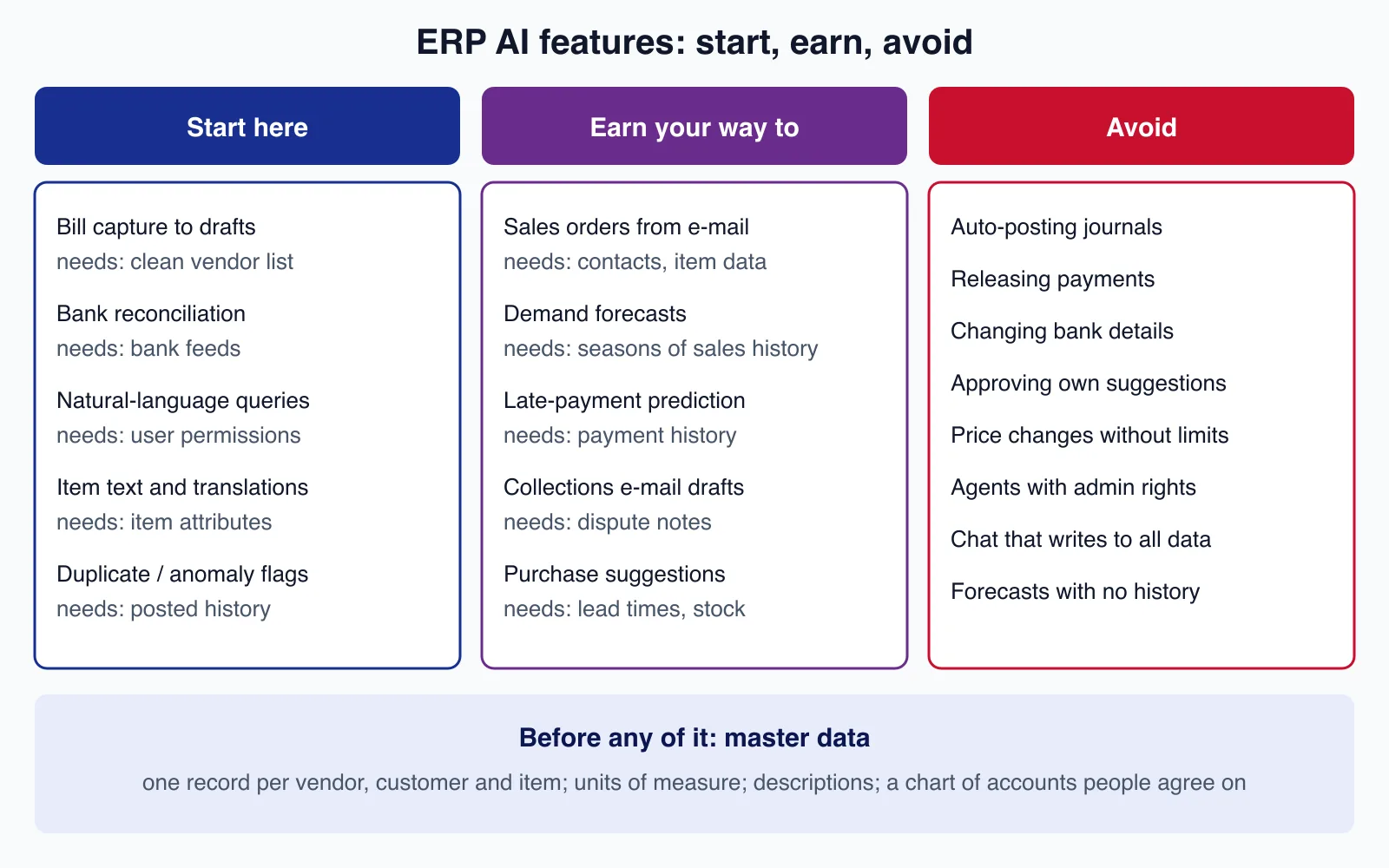
Features worth considering
| Feature | What it does | Data it needs | Control that must stay |
|---|---|---|---|
| Vendor bill capture | Reads PDF bills into draft purchase invoices, suggests vendor, lines and coding | Clean vendor list, purchase orders, receipts | Clerk reviews drafts; approval workflow unchanged |
| Bank reconciliation suggestions | Proposes matches between bank lines and ledger entries | Bank feeds, consistent references | Person accepts matches; unmatched lines investigated |
| Natural-language queries and list analysis | "Open orders over 10,000 for customer X this quarter" | Correct user permissions | Inherits the user's access, read-only |
| Item text, translations and summaries | Drafts product descriptions and record summaries | Item attributes | Reviewed before publishing |
| Duplicate and anomaly flags | Holds possible duplicate bills, unusual prices or journal entries | Posted history | Flags hold, people release |
| Sales orders from e-mail | Turns customer requests into quotes and orders | Contacts, items, availability | Outgoing messages and orders confirmed by staff |
| Forecasts and late-payment prediction | Machine-learning estimates for planning and collections | Seasons of history | Used as inputs to decisions, not as decisions |
What the main vendors ship today
Microsoft Dynamics 365 Business Central
Business Central's Copilot features include analysis assist on lists, chat, autofill, marketing text, item substitutions, sales line suggestions, bank reconciliation, mapping e-documents to purchase order lines, summaries, and two agents. Copilot features are online-only and, according to Microsoft's Copilot FAQ, included in the licence, inherit the user's permissions and are not used to train models without permission. The agents are billed separately in Copilot Credits.
- The Sales Order Agent reads customer e-mails, identifies the customer only by matching the sender's address to a contact's e-mail field, checks availability, creates a sales quote first (because quotes do not affect planning or cash flow), and has a designated user review every outgoing message before it is sent.
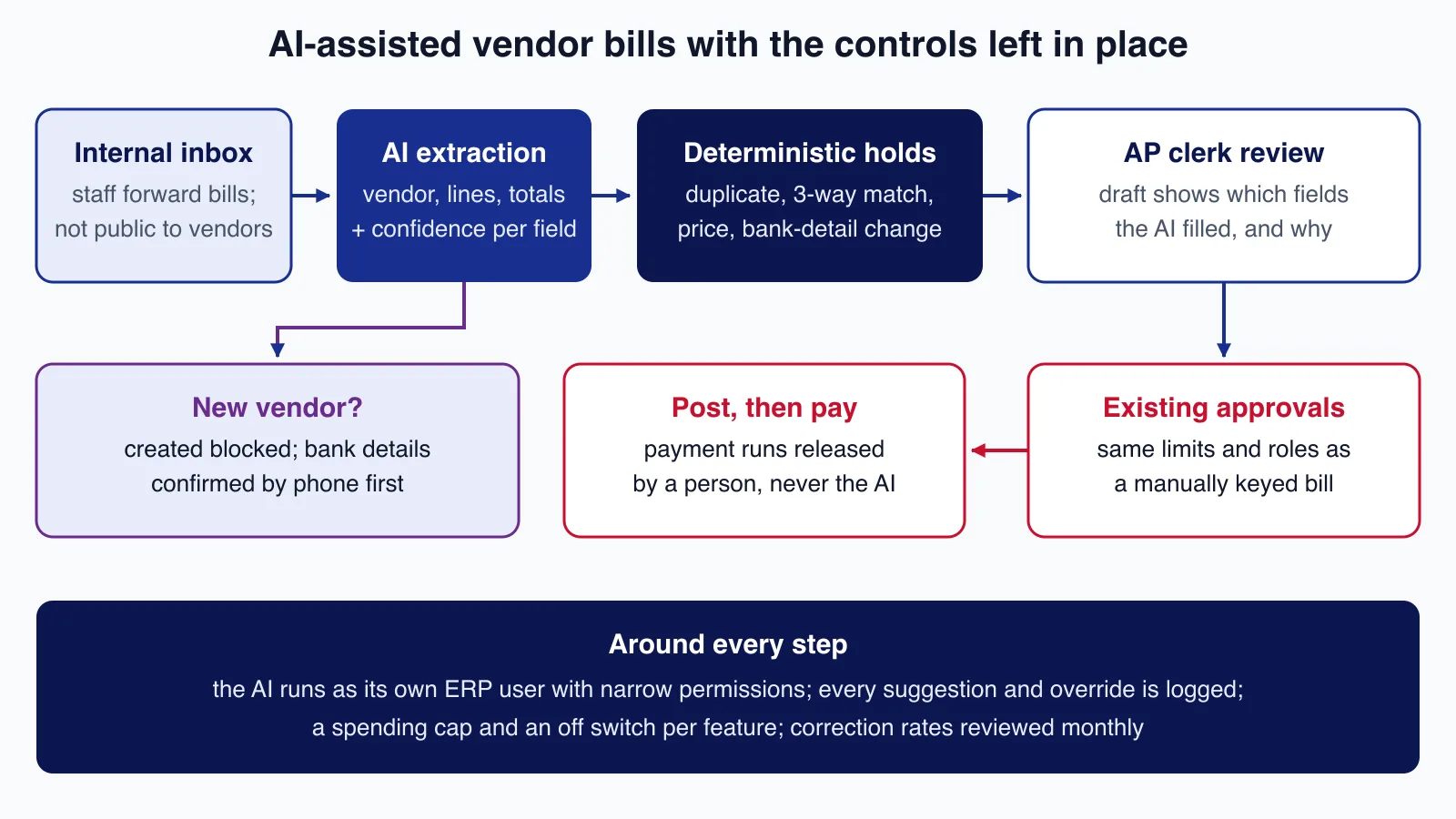
- The Payables Agent monitors a mailbox for PDF vendor invoices, extracts them with Azure Document Intelligence and drafts purchase invoices for a supervisor to review. When it creates a new vendor, the vendor is blocked until someone unblocks it, so bank details can be confirmed first; it does not post invoices. Microsoft recommends an internal shared mailbox not exposed to vendors, and documents limits such as 100 e-mails and 500 invoices a day.
Oracle NetSuite
NetSuite documents Bill Capture, an add-on that extracts vendor bill data with OCI Document Understanding, suggests matches to vendors, items and purchase orders, learns from corrections, and leaves existing three-way match and approval workflows in force. Text Enhance generates and refines text in records, with Prompt Studio for managing prompts. The NetSuite AI Connector Service exposes NetSuite data to external AI clients through the Model Context Protocol, using OAuth 2.0 with PKCE. Generative features draw on NetSuite AI Units; Bill Capture as an add-on module does not.
Odoo
Odoo 19 added an AI app with agents that answer from your documents and query records, AI-filled fields, natural-language search that becomes an Odoo filter, and improvements to document digitization for vendor bills, which can run automatically or on demand. Later 19.x releases extended agents further.
The common thread in the vendors' own designs is worth copying: drafts instead of postings, new vendors blocked, outgoing messages reviewed, agents running under their own permissions, and usage metered so it can be capped.
Features to avoid, or postpone
- Automatic posting or payment. AI drafts, people post and release payments. Fraud and errors cost far more than the keying saved.
- AI changing bank details or creating active vendors. Bank-detail change requests are a classic fraud route. Require a call-back on a known number and a second person's approval.
- Agents approving their own suggestions, or one agent account with broad permissions across companies. Treat each agent as a user under segregation-of-duties rules.
- Chat interfaces that can write anywhere. Start read-only; add narrow write actions one at a time with confirmations.
- Price changes and credit limits set by AI without hard limits and approval.
- Forecasts on thin or messy history. A confident forecast from two seasons of mixed-up item codes misleads buyers.
- Public mailboxes feeding agents. Anyone can e-mail a public address, including with instructions hidden in a PDF. Use internal mailboxes and treat document text as data, never as instructions.
A working example: holds before approval
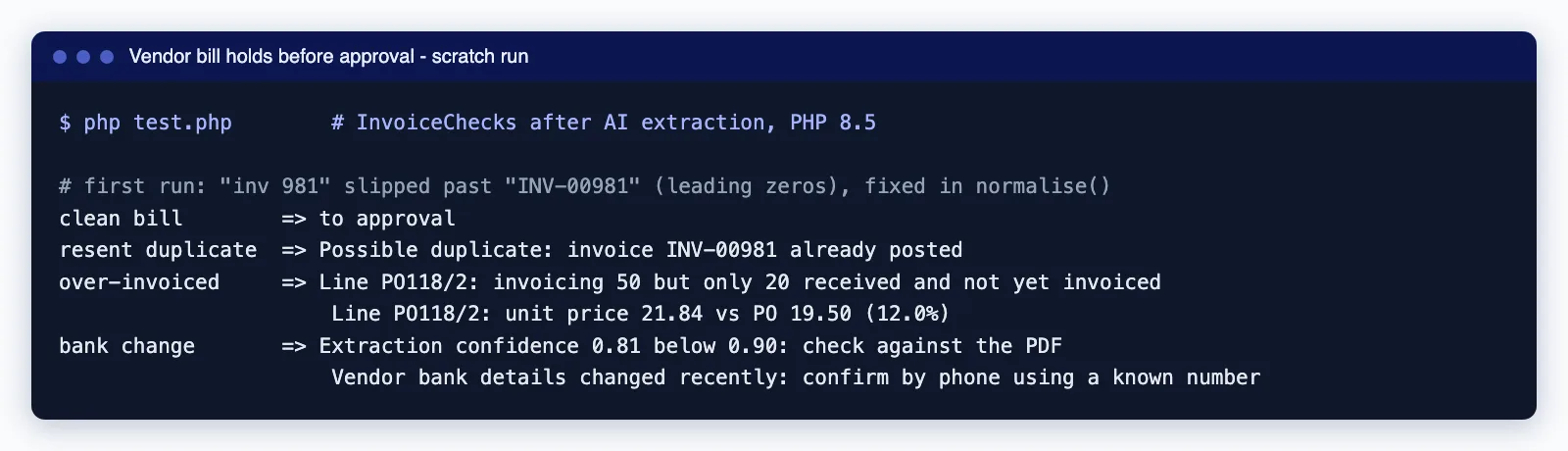
Whether you use a vendor's bill capture or build extraction into a custom ERP, add deterministic checks between the AI and the approver. The class below runs after extraction and returns reasons to hold a bill: low extraction confidence, a possible duplicate, a three-way match failure (more invoiced than received), a price variance beyond tolerance, or recently changed vendor bank details.
<?php

declare(strict_types=1);

final readonly class BillLine
{
    public function __construct(
        public string $poLine,
        public float $quantity,
        public float $unitPrice,
    ) {}
}

final readonly class Bill
{
    /** @param list<BillLine> $lines */
    public function __construct(
        public int $vendorId,
        public string $invoiceNumber,
        public DateTimeImmutable $invoiceDate,
        public float $total,
        public array $lines,
        public float $extractionConfidence,   // lowest field confidence from the OCR/AI step
    ) {}
}

final class InvoiceChecks
{
    public function __construct(
        private float $pricePct = 2.0,          // allowed unit price variance, %
        private float $minConfidence = 0.90,
        private int $bankChangeDays = 30,
    ) {}

    /**
     * @param  list<array{vendorId: int, invoiceNumber: string, invoiceDate: DateTimeImmutable, total: float}>  $postedBills
     * @param  array<string, array{ordered: float, received: float, invoiced: float, unitPrice: float}>  $poLines
     * @return list<string>  reasons to hold the bill; empty means it can go to normal approval
     */
    public function holds(Bill $bill, array $postedBills, array $poLines, ?DateTimeImmutable $bankDetailsChangedAt, DateTimeImmutable $today): array
    {
        $holds = [];

        if ($bill->extractionConfidence < $this->minConfidence) {
            $holds[] = sprintf('Extraction confidence %.2f below %.2f: check against the PDF', $bill->extractionConfidence, $this->minConfidence);
        }

        $number = self::normalise($bill->invoiceNumber);
        foreach ($postedBills as $posted) {
            if ($posted['vendorId'] !== $bill->vendorId) {
                continue;
            }
            if (self::normalise($posted['invoiceNumber']) === $number) {
                $holds[] = "Possible duplicate: invoice {$posted['invoiceNumber']} already posted";
            } elseif (abs($posted['total'] - $bill->total) < 0.005
                && abs($posted['invoiceDate']->getTimestamp() - $bill->invoiceDate->getTimestamp()) <= 3 * 86400) {
                $holds[] = 'Possible duplicate: same amount within 3 days';
            }
        }

        foreach ($bill->lines as $line) {
            $po = $poLines[$line->poLine] ?? null;
            if ($po === null) {
                $holds[] = "Line {$line->poLine}: no matching purchase order line";
                continue;
            }
            if ($po['invoiced'] + $line->quantity > $po['received']) {
                $holds[] = sprintf('Line %s: invoicing %.0f but only %.0f received and not yet invoiced',
                    $line->poLine, $line->quantity, $po['received'] - $po['invoiced']);
            }
            $variance = abs($line->unitPrice - $po['unitPrice']) / $po['unitPrice'] * 100;
            if ($variance > $this->pricePct) {
                $holds[] = sprintf('Line %s: unit price %.2f vs PO %.2f (%.1f%%)', $line->poLine, $line->unitPrice, $po['unitPrice'], $variance);
            }
        }

        if ($bankDetailsChangedAt !== null && $bankDetailsChangedAt > $today->modify("-{$this->bankChangeDays} days")) {
            $holds[] = 'Vendor bank details changed recently: confirm by phone using a known number';
        }

        return $holds;
    }

    private static function normalise(string $invoiceNumber): string
    {
        // "INV-00981", "inv 981" and "INV981" are the same invoice.
        $compact = preg_replace('/[^A-Z0-9]/', '', strtoupper($invoiceNumber));

        return preg_replace('/(?<![0-9])0+(?=[0-9])/', '', $compact);
    }
}
Our first run let a resent bill through: the vendor had sent "INV-00981" the first time and "inv 981" the second, and the original normalisation only stripped zeros from the start of the whole string. Removing leading zeros from each run of digits fixed it. This is exactly the kind of variation AI extraction produces, which is why the checks belong in code with tests, not in a prompt.
Controls auditors will ask about
- Identity. Each AI feature or agent runs as its own user with the narrowest permissions that work, so every change it makes is attributable.
- Segregation of duties. The agent may draft; a different person approves; a third may release payment, as before.
- Evidence. Keep the source document, the extracted values, the AI's suggestion, the person's changes and the approval in one trail.
- Thresholds and holds like the ones above, versioned and tested, with changes approved like any other control.
- Spend caps and an off switch per feature. Microsoft notes that its agents stop processing when Copilot Credits run out and resume later; plan for both the bill and the backlog.
- Monitoring. Review correction rates per field and per vendor monthly; a rising rate means drifting data or a changed document layout.
- Data handling. Know where prompts and documents are processed, whether the vendor trains on them, and how long they are kept.
If your ERP is custom-built or heavily modified, these controls have to be designed in rather than switched on. Cloudsoft Zone's ERP team can add AI-assisted capture, checks and audit trails around your existing approval workflow.
Risks to plan for
- Prompt injection through documents and e-mails. A PDF can contain text aimed at the model. Microsoft's Sales Order Agent runs a relevance check that filters out messages such as attempts to access internal data; your own features need the same idea plus narrow permissions.
- Silent quality drift. A supplier changes its invoice layout, and extraction quietly gets worse. Correction-rate monitoring catches it.
- Cost surprises. Metered agents and AI units scale with volume; set caps before go-live.
- Over-trust. When drafts are right 98% of the time, reviewers stop looking. Sample-check approved items and rotate reviewers.
When not to add AI to your ERP
If your team keys fifty bills a month, an AI capture project will not pay back; a supplier portal or e-invoicing may. If master data is a mess, spend the budget on cleaning it, because every AI feature above depends on it. And if your ERP vendor already ships a feature that fits, such as bill capture or bank reconciliation, configure that before building your own.
Planning AI features for a custom or growing ERP and want them to pass an audit? Cloudsoft Zone builds business management and ERP software with AI-assisted data entry, deterministic checks before approval and complete audit trails, around the controls your finance team already relies on.
Frequently asked questions
Which AI feature should an ERP add first?
Usually vendor bill capture into draft invoices, or bank reconciliation suggestions. Both remove a lot of keying, have clear right answers that staff can check, and leave approval and payment controls unchanged.
Should AI be allowed to post invoices or make payments?
No. Let AI draft and flag, and keep posting, approval and payment release with people under your existing segregation of duties. Vendors' own agents follow this pattern: Business Central's Payables Agent drafts invoices but does not post them.
Do I need clean data before adding AI to an ERP?
Yes. Duplicate vendors, outdated contact e-mails, vague item descriptions and late goods receipts all degrade AI matching and suggestions. Cleaning master data is often the best first AI project.
Are ERP Copilot and agent features free?
It varies. Microsoft states Copilot features in Business Central are included in the licence, while its Sales Order and Payables agents consume Copilot Credits. NetSuite meters generative features in AI Units, while its Bill Capture add-on does not use them. Check your edition and contract.
Your next customer could start right here.
Introduce your tool, product or business to readers exploring technology.
Explore placements and request a private quote
Sources
- Copilot FAQ - Business Central — Microsoft Learn
- Sales Order Agent overview — Microsoft Learn
- Payables Agent overview — Microsoft Learn
- NetSuite Bill Capture — Oracle
- NetSuite features that use AI — Oracle
- NetSuite AI Connector Service FAQ — Oracle
- Odoo 19 release notes — Odoo
- Document digitization (Odoo 19.0 documentation) — Odoo
Written with substantial AI assistance. Facts checked against cited sources. Editorial policy.
Comments
No comments yet. Be the first to join the conversation.
Leave a comment
Every comment is read by a moderator before it appears. Your email address is never published; it is used only to contact you about this comment.
Related tools
- Directory profile
Asana
Work management platform for tracking tasks, projects, portfolios and goals, with timeline views, AI automations, a free plan for two users and per-user paid tiers.
A tool connected to a service selected for this article. Compare its fit for your project; inclusion is not an endorsement.
- Directory profile
Salesforce
CRM platform for sales teams with lead, account and opportunity management, forecasting and Agentforce AI, sold in suites from a free tier to Max.
A tool connected to a service selected for this article. Compare its fit for your project; inclusion is not an endorsement.
More from Cloudsoft Zone

Resource guideBusiness Technology
10 practical AI automation ideas for small businesses in 2026
Ten AI automations that work for small teams in 2026, each with the workflow, real tools and checked prices, rough effort, risks, and the human review step that keeps it safe.
By Cloudsoft Zone

Troubleshooting guideCodeIgniter
CodeIgniter 4 validation not working? 9 causes and fixes
Fix CodeIgniter 4 validation problems fast: wrong input source, lost errors after redirect, permit_empty, strict JSON rules, is_unique placeholders and more.
By Cloudsoft Zone

TutorialPHP
PHPStan tutorial: catch PHP bugs before production with levels
Install PHPStan 2.3, choose a rule level, adopt a baseline for legacy code and fail CI only on new errors, with real output from a worked PHP 8.5 example.
By Cloudsoft Zone