
AI agents vs traditional workflow automation: when to use each
Use a workflow when you can write the steps down and an agent only when you cannot. Cost, reliability and audit compared, with a tested hybrid invoice workflow.
Updated 14 min read

In this article
Use a deterministic workflow when you can write the steps down in advance, and an AI agent only when you cannot. That one rule settles most decisions. Invoice approval, employee onboarding and order notifications have known steps and need an audit trail, so they belong in a workflow, perhaps with a language model doing one well-defined step such as reading a PDF. Open-ended jobs such as investigating why an invoice does not match or researching a supplier suit an agent, kept inside limits and reporting to a person. This guide compares the two on cost, reliability and audit, and includes a tested hybrid that uses each where it fits.
Tested with: Node.js 24.18.0 (running TypeScript directly), TypeScript 6.0.3 (tsc --noEmit, strict) and @anthropic-ai/sdk 0.115.0. The workflow and audit trail ran locally; the model calls were type-checked, and replaced by labelled test doubles in the run.
What each term means
Anthropic's widely cited Building effective agents draws the line clearly. Workflows are "systems where LLMs and tools are orchestrated through predefined code paths". Agents are "systems where LLMs dynamically direct their own processes and tool usage". The difference is who decides the next step: your code or the model.
Traditional workflow automation, in tools such as Zapier, Make, n8n, robotic process automation (RPA) platforms or plain scheduled code, is the far end of that range: no model at all, just triggers, rules and API calls. Between the two sit workflows that call a model for one step, and agents that may only use a few read-only tools before handing back to a person.
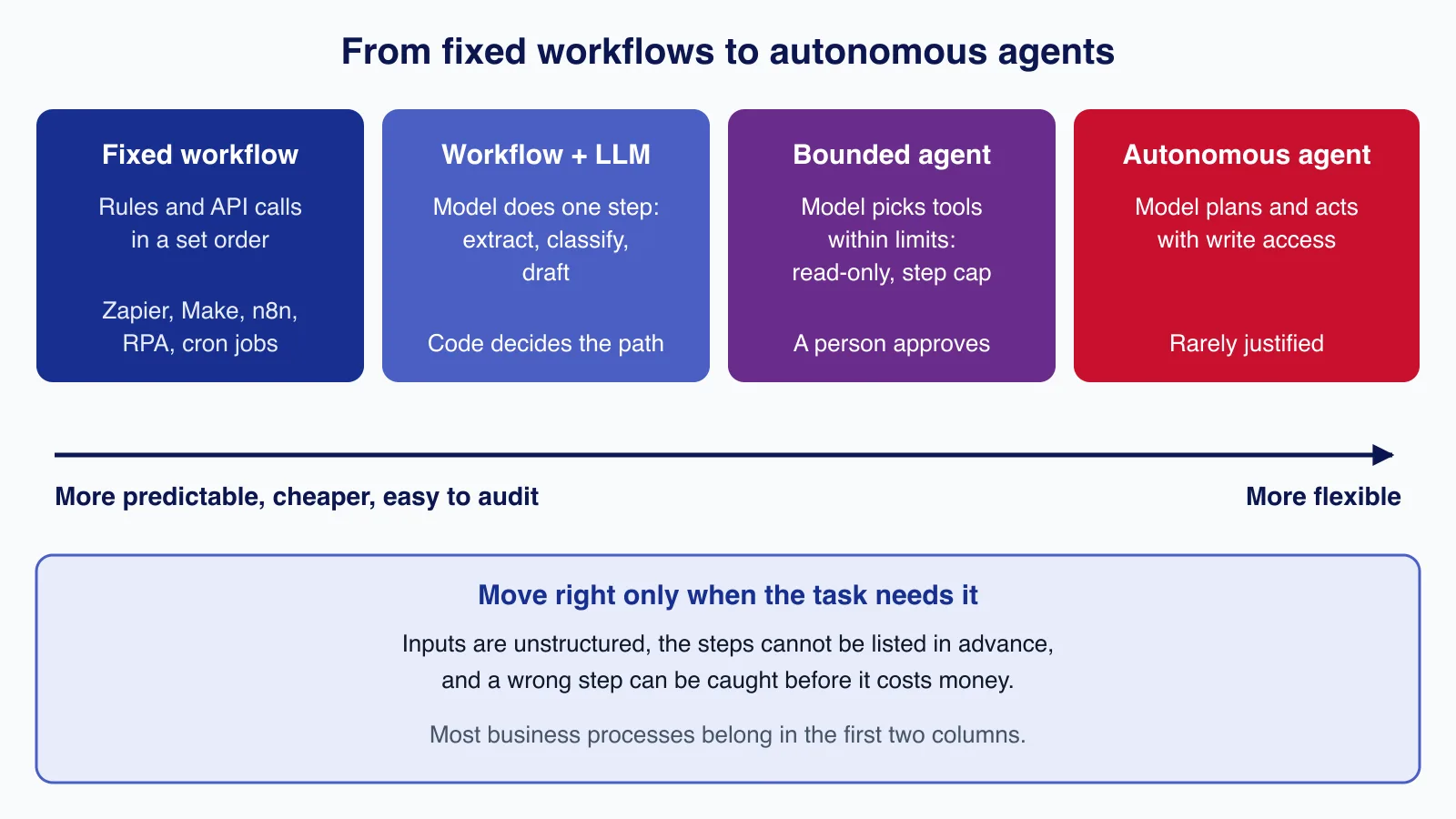
How they compare
| Deterministic workflow | Workflow with an LLM step | AI agent | |
|---|---|---|---|
| Who chooses the next step | Your rules | Your rules | The model |
| Same input, same result | Yes | The path, yes; the model's output can vary | No |
| Cost per run | Near zero beyond platform fees | One or a few model calls | Many calls, with context growing at each step |
| Handles unstructured input | Poorly | Yes, in the model step | Yes |
| Handles unforeseen cases | Fails or routes to a person | Fails or routes to a person | Tries something, which may be wrong |
| Audit | Simple: rule X fired | Simple, plus logged model output | Needs full traces of every tool call |
| Testing | Unit tests | Unit tests plus an evaluation set for the model step | Evaluation sets and trace review |
Reliability compounds
An agent that takes several steps multiplies its chances of going wrong. As an illustration, if each step were right 95% of the time and steps failed independently, a ten-step run would succeed only about 60% of the time (0.95 to the power of 10 is about 0.599). Real failure rates depend on the model, tools and task, so measure your own, but the shape holds: every extra decision the model makes is another chance for error. Anthropic's article puts it directly: "The autonomous nature of agents means higher costs, and the potential for compounding errors."
A deterministic workflow does not compound like this. Its failures are bugs or unexpected inputs, and both are reproducible, so you can fix them once and add a test.
Cost: a worked example
Take 10,000 supplier invoices a month and Claude Sonnet 4.6 at $3 per 1M input tokens and $15 per 1M output tokens. These token counts are our assumptions for illustration; measure your own.
- Model extraction step: about 1,500 input tokens and 50 output tokens per invoice. 1,500 × $3/1M = $0.0045, plus 50 × $15/1M = $0.00075, so about $0.005 per invoice.
- Agent investigation: five steps, with context growing from about 2,000 to 6,000 tokens, roughly 20,000 input tokens in total plus 1,500 output tokens. 20,000 × $3/1M = $0.06, plus 1,500 × $15/1M = $0.0225, so about $0.08 per invoice.
Sending every invoice through the agent would cost about 10,000 × $0.0825 = $825 a month. A hybrid in which rules settle invoices that carry a PO number and match, the model extracts fields for the 30% without a PO number (3,000 × $0.00525 = $15.75), and the agent looks only at the 5% that do not match (500 × $0.0825 = $41.25) costs about $57 a month, with more predictable results. For comparison of platform fees on Zapier, Make and n8n, see our automation platform pricing guide.
A tested hybrid: rules decide, the agent explains
The pattern that works for most business processes is a deterministic workflow with two kinds of model use: a constrained model step for messy input, and a bounded agent for exceptions that writes a note but never acts.
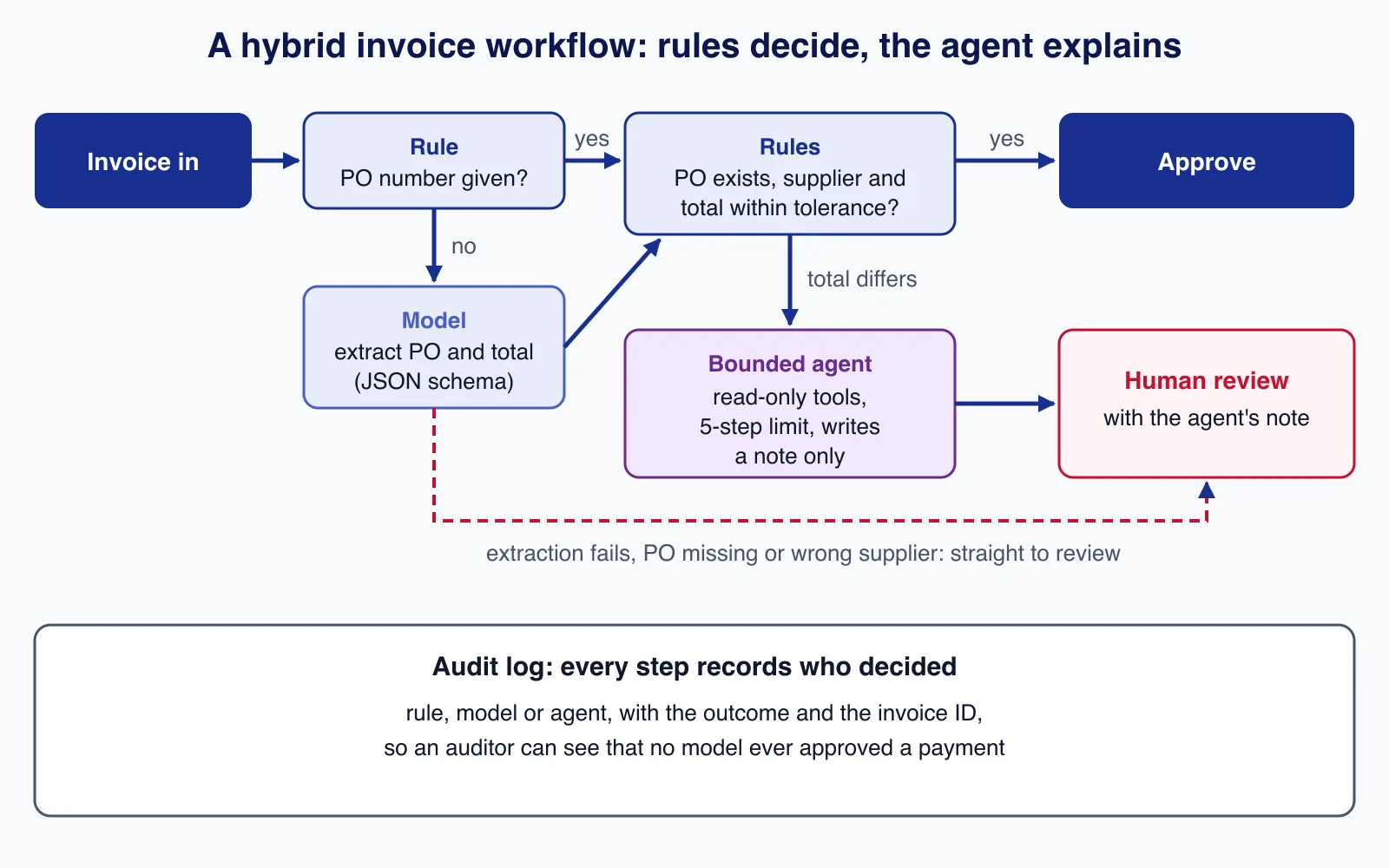
The workflow itself has no model in it. It calls injected functions and records who made each decision:
// Deterministic invoice workflow. The model extracts fields; rules decide; an agent only explains exceptions.
export interface Invoice { id: string; supplier: string; poNumber?: string; total: number; text: string }
export interface PurchaseOrder { number: string; supplier: string; total: number }
export interface Extracted { poNumber: string; total: number; found: boolean }
export interface AgentNote { summary: string; steps: number; stoppedBy: 'answer' | 'step_limit' }
export interface AuditEntry { invoice: string; step: string; by: 'rule' | 'model' | 'agent'; outcome: string }
export interface Deps {
  findPO(number: string): PurchaseOrder | undefined;
  extract(text: string): Promise<Extracted>;
  investigate(invoice: Invoice, po: PurchaseOrder): Promise<AgentNote>;
}
export type Decision = 'approved' | 'human_review';

const TOLERANCE = (total: number) => Math.max(5, total * 0.01); // 1% or $5, whichever is larger

export async function processInvoice(inv: Invoice, deps: Deps, audit: AuditEntry[]): Promise<Decision> {
  const log = (step: string, by: AuditEntry['by'], outcome: string) => audit.push({ invoice: inv.id, step, by, outcome });

  let poNumber = inv.poNumber;
  if (!poNumber) {
    const x = await deps.extract(inv.text);
    log('extract PO number', 'model', x.found ? `found ${x.poNumber}` : 'not found');
    if (!x.found || Math.abs(x.total - inv.total) > 0.005) { log('check extraction', 'rule', 'extracted total disagrees or PO missing'); return 'human_review'; }
    poNumber = x.poNumber;
  }

  const po = deps.findPO(poNumber);
  if (!po) { log('find PO', 'rule', `${poNumber} does not exist`); return 'human_review'; }
  if (po.supplier !== inv.supplier) { log('match supplier', 'rule', `PO belongs to ${po.supplier}`); return 'human_review'; }

  const diff = inv.total - po.total;
  if (Math.abs(diff) <= TOLERANCE(po.total)) { log('match PO total', 'rule', `within tolerance (${diff.toFixed(2)})`); return 'approved'; }

  log('match PO total', 'rule', `differs by ${diff.toFixed(2)}`);
  const note = await deps.investigate(inv, po);           // the agent explains; it never approves
  log('investigate', 'agent', `${note.stoppedBy} after ${note.steps} steps: ${note.summary}`);
  return 'human_review';
}
The model functions are kept in their own module. Extraction uses a JSON schema through output_config.format, so its output always parses, and the workflow still checks the extracted total against the invoice. The investigator is a small tool-use loop with two read-only tools and a hard step limit:
import Anthropic from '@anthropic-ai/sdk';
import type { Extracted, Invoice, PurchaseOrder, AgentNote } from './workflow.ts';

const client = new Anthropic();
const MODEL = process.env.CLAUDE_MODEL ?? 'claude-sonnet-4-6';

// Extraction with a JSON schema: the output always parses; the workflow still checks the values.
export async function extract(text: string): Promise<Extracted> {
  const res = await client.messages.create({
    model: MODEL,
    max_tokens: 300,
    system: 'Extract the purchase order number and invoice total from the invoice text. If there is no PO number, set found to false and poNumber to "".',
    messages: [{ role: 'user', content: text }],
    output_config: {
      format: {
        type: 'json_schema',
        schema: {
          type: 'object',
          properties: { poNumber: { type: 'string' }, total: { type: 'number' }, found: { type: 'boolean' } },
          required: ['poNumber', 'total', 'found'],
          additionalProperties: false,
        },
      },
    },
  });
  const block = res.content.find((b) => b.type === 'text');
  if (res.stop_reason !== 'end_turn' || !block || block.type !== 'text') throw new Error(`extraction stopped: ${res.stop_reason}`);
  return JSON.parse(block.text) as Extracted;
}

// A bounded agent: read-only tools, a step limit, and its only output is a note for a person.
export function makeInvestigator(tools: { poLines(po: string): string; recentInvoices(supplier: string): string }, maxSteps = 5) {
  return async (inv: Invoice, po: PurchaseOrder): Promise<AgentNote> => {
    const messages: Anthropic.MessageParam[] = [{
      role: 'user',
      content: `Invoice ${inv.id} from ${inv.supplier} totals ${inv.total}; PO ${po.number} totals ${po.total}. ` +
        'Find the most likely reason for the difference using the tools. Reply with a two-sentence note for the accounts team. You cannot approve or pay anything.',
    }];
    const toolDefs: Anthropic.Tool[] = [
      { name: 'po_lines', description: 'List the lines of a purchase order', input_schema: { type: 'object', properties: { po: { type: 'string' } }, required: ['po'] } },
      { name: 'recent_invoices', description: 'List this supplier\'s invoices from the last 90 days', input_schema: { type: 'object', properties: { supplier: { type: 'string' } }, required: ['supplier'] } },
    ];
    for (let step = 1; step <= maxSteps; step++) {
      const res = await client.messages.create({ model: MODEL, max_tokens: 1024, tools: toolDefs, messages });
      if (res.stop_reason !== 'tool_use') {
        const text = res.content.flatMap((b) => (b.type === 'text' ? [b.text] : [])).join(' ').trim();
        return { summary: text, steps: step, stoppedBy: 'answer' };
      }
      messages.push({ role: 'assistant', content: res.content });
      const results: Anthropic.ToolResultBlockParam[] = res.content.flatMap((b) => {
        if (b.type !== 'tool_use') return [];
        const input = b.input as { po?: string; supplier?: string };
        const out = b.name === 'po_lines' ? tools.poLines(String(input.po)) : b.name === 'recent_invoices' ? tools.recentInvoices(String(input.supplier)) : 'unknown tool';
        return [{ type: 'tool_result' as const, tool_use_id: b.id, content: out }];
      });
      messages.push({ role: 'user', content: results });
    }
    return { summary: 'No conclusion within the step limit; needs manual review.', steps: maxSteps, stoppedBy: 'step_limit' };
  };
}
To test the workflow logic without network calls, the run below passes test doubles for extract and investigate. Three invoices go through: one matches its purchase order within tolerance, one has no PO number so the model extracts it, and one is $160 over and goes to a person with the agent's note.
// Runs the workflow on three invoices. extract() and investigate() are test doubles here so the run is
// offline and repeatable; production passes extract and makeInvestigator(...) from model.ts.
import { processInvoice, type AuditEntry, type Deps, type Invoice, type PurchaseOrder } from './workflow.ts';

const pos: PurchaseOrder[] = [
  { number: 'PO-7710', supplier: 'Northwind Supplies', total: 1250.0 },
  { number: 'PO-7714', supplier: 'Contoso Office', total: 480.0 },
];
const deps: Deps = {
  findPO: (n) => pos.find((p) => p.number === n),
  extract: async () => ({ poNumber: 'PO-7714', total: 480.0, found: true }),
  investigate: async () => ({ summary: 'PO line 3 priced at old rate', steps: 3, stoppedBy: 'answer' }),
};
const invoices: Invoice[] = [
  { id: 'INV-2291', supplier: 'Northwind Supplies', poNumber: 'PO-7710', total: 1254.9, text: '' },
  { id: 'INV-2292', supplier: 'Contoso Office', total: 480.0, text: 'Invoice ... Your ref: PO-7714 ... Total due 480.00' },
  { id: 'INV-2293', supplier: 'Northwind Supplies', poNumber: 'PO-7710', total: 1410.0, text: '' },
];

const audit: AuditEntry[] = [];
for (const inv of invoices) console.log(`${inv.id}: ${await processInvoice(inv, deps, audit)}`);
console.log('\naudit trail');
for (const a of audit) console.log(`  ${a.invoice}  ${a.by.padEnd(5)}  ${a.step.padEnd(18)} ${a.outcome}`);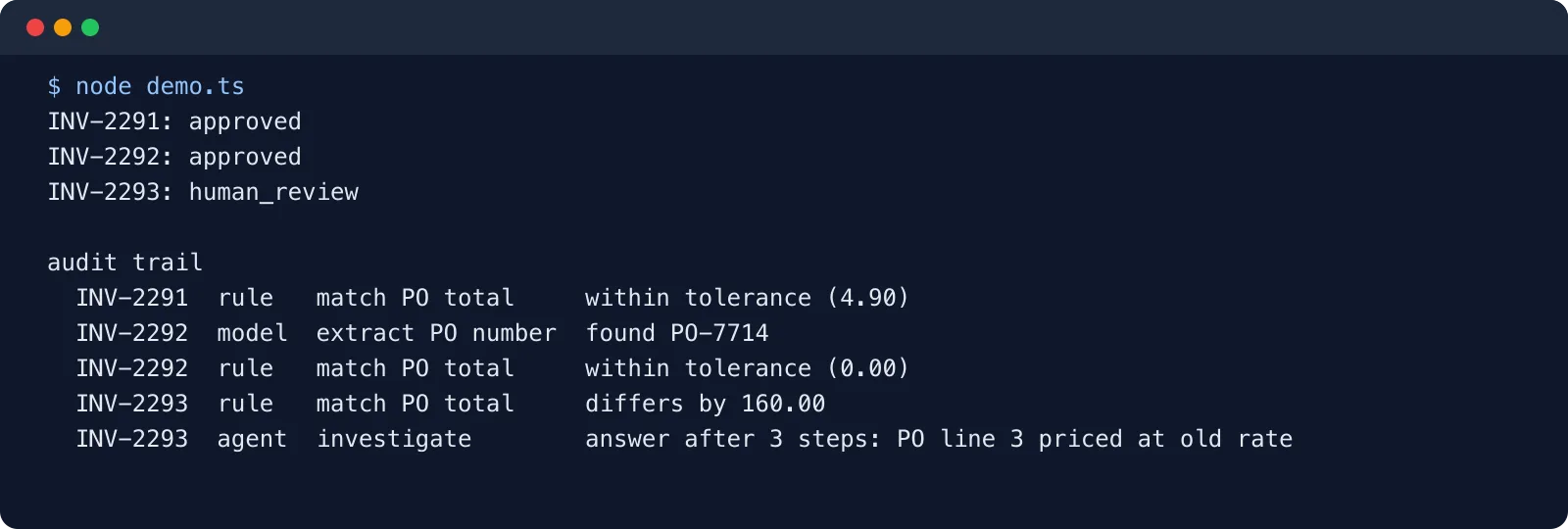
The audit trail is the point. An auditor, or you in six months, can see that the two approvals were made by rules and that the model's only influence on money was reading a PO number that a rule then verified. That is much easier to defend than "the agent decided".
Real examples, sorted
Keep these as deterministic workflows
- Order and shipping notifications: triggered by events, fixed content, no judgement.
- Employee onboarding and offboarding: a checklist of accounts to create or remove, which must be complete and auditable.
- Invoice approval and payment runs: rules and approval limits, with a model at most reading documents.
- Data sync between systems: CRM to accounting, shop to warehouse. Mappings, retries and idempotency matter more than intelligence.
Add a model step to a workflow
- Support ticket triage: the model classifies and extracts the order number; rules route by category.
- Document intake: the model reads invoices, CVs or forms into a schema; rules validate the fields.
- Drafting replies: the model drafts, a person or a rule-based check approves before sending.
Use a bounded agent
- Exception investigation: why does this invoice not match, why did this payment fail. The steps vary with the case.
- Research and preparation: gather supplier information, summarise a customer's history before a call, compare contract versions.
- Internal question answering across several systems, with read-only access.
In each agent case the agent's output is information for a person, not an action on the world.
When an agent is the wrong choice
- The steps are known. Write them down; that is a workflow.
- Mistakes are expensive and hard to reverse: payments, deletions, contract changes, messages to many customers.
- You need the same answer every time for compliance or fairness, such as eligibility, pricing or credit decisions.
- Volume is high and margins are thin. Model calls per step add up quickly, as the example shows.
- Nobody will read the traces. An agent nobody monitors is an incident waiting for a date.
When a fixed workflow is the wrong choice
- The input is unstructured and varied: free-text emails, scanned documents, voice notes.
- The number of cases is too large to enumerate, and most are rare.
- The task is exploration: finding information whose location you do not know in advance.
Even then, start with a workflow plus one model step and see how far it gets before adding agent autonomy.
Production checklist for hybrids
- Give the model the narrowest job: extract, classify or draft, with a schema.
- Validate model output with rules before it changes any state.
- Limit agents: read-only tools by default, a step cap, a token or cost budget, and a timeout.
- Keep people in the loop for money and customer-facing actions, with the agent's note attached.
- Log who decided each step: rule, model, agent or person, with inputs and outputs.
- Treat everything an agent reads as untrusted, including emails and documents, since they can carry instructions; see our prompt injection guide.
- Evaluate the model steps on a fixed set of real examples before each prompt or model change.
Drawing the line between rules and model steps is where most automation projects succeed or fail, and it is easier with someone who has mapped many processes. Our workflow automation service designs and builds these hybrids on the tools you already use.
Common mistakes
- Replacing a working workflow with an agent because agents are new. You trade predictability for flexibility you did not need.
- Letting the agent approve instead of explain. Keep decisions with money attached in rules or with people.
- No step or cost limit, so a confused agent loops until someone notices the bill.
- Logging only the final answer. Without the tool calls you cannot tell why an agent did something.
- Skipping retries and idempotency in the deterministic parts. Most automation failures are still timeouts and duplicate webhooks, not model errors.
Adding AI to a workflow you already run
If you already have automations in a platform or in your own code, you do not need to rebuild them. A safe sequence is:
- Find the manual step. Look for the point where the workflow stops and a person reads something: an email, an attachment, a free-text field. That is usually the only place a model is needed.
- Run the model in shadow mode. Let it produce its output alongside the person for a few weeks, store both, and compare. You get an evaluation set from real cases at no extra risk.
- Switch on with a fallback. When agreement is high enough for that step, let the model's output flow into the workflow, with rules checking it and anything that fails the checks going to the same person as before.
- Only then consider an agent for the cases that still need a person, and give it the job of preparing the case, not closing it.
Each stage is reversible, and at no point does a model gain the power to approve, pay or send without a rule or a person agreeing.
Summary
Deterministic workflows are cheap, predictable and easy to audit, and should carry most business processes. Language models earn a place as a single, constrained step where inputs are messy. Agents are worth their extra cost and risk for open-ended investigation and research, inside limits and reporting to a person. Build the workflow first, add model steps where rules cannot read the input, and give an agent only the exceptions.
Have a process that is half rules and half judgement? Cloudsoft Zone builds workflow automation that combines deterministic steps, AI where it helps and human approval where it matters.
Frequently asked questions
Are AI agents replacing tools like Zapier, Make and n8n?
No. Those platforms run deterministic workflows that most business processes still need, and they now offer AI steps and agent features of their own. The practical question is which steps need a model, not which tool category wins.
What is the difference between an AI workflow and an AI agent?
In a workflow your code decides the sequence of steps and may call a model for some of them. In an agent the model decides which tool to use next and when to stop. Workflows are more predictable; agents handle open-ended tasks.
Are AI agents more expensive than workflows?
Usually, because an agent makes several model calls per task and each call resends a growing context. In our worked example an agent investigation cost about 16 times a single extraction call per invoice. Limit agents to the cases that need them.
How do I make an AI agent auditable?
Log every model call and tool call with inputs, outputs and timestamps, record who made each decision, give the agent read-only tools where possible, and keep approvals that move money or contact customers with rules or people.
Your next customer could start right here.
Introduce your tool, product or business to readers exploring technology.
Explore placements and request a private quote
Sources
- Building effective agents — Anthropic, 2024-12-19
- Structured outputs — Anthropic
- Tool use with Claude — Anthropic
- Pricing — Anthropic
- Running TypeScript natively — Node.js
Written with substantial AI assistance. Facts checked against cited sources. Editorial policy.
Comments
No comments yet. Be the first to join the conversation.
Leave a comment
Every comment is read by a moderator before it appears. Your email address is never published; it is used only to contact you about this comment.
More from Cloudsoft Zone

Architecture guideAI and Automation
How to build a safe AI content pipeline with human fact review
An architecture for AI-assisted publishing where people stay responsible: untrusted source snapshots, claim checking with citations, a review queue AI cannot skip, labels and rollback.
By Cloudsoft Zone

TutorialNode.js
How to test a Node.js API with the built-in test runner (node:test)
Write, run, mock and measure coverage for a small Node.js HTTP API using only node:test and node:assert. Covers port-0 servers, fetch(), spies, t.mock.method(), fake dates and coverage thresholds.
By Cloudsoft Zone

TutorialNode.js
Node.js streams in practice: pipeline(), backpressure and async generators
Process files of any size in Node.js with flat memory use. A hands-on guide to stream/promises pipeline(), backpressure, async generator transforms, AbortSignal timeouts and streaming downloads over HTTP.
By Cloudsoft Zone