
Build a streaming AI chat interface with Next.js and the AI SDK
A tested Next.js and AI SDK 7 chat: streaming replies, provider fallbacks, user-scoped tool calls, rate limits, validation and accessible live announcements.
Updated 17 min read

In this article
A chat interface that streams its answer word by word feels fast even when the model takes ten seconds to finish. This tutorial builds one in a Next.js App Router project with the AI SDK 7: a Route Handler that streams from any major provider with automatic fallback to a second provider, a tool the model can call to look up the signed-in user's data, per-user rate limits, input validation, and a chat UI that screen reader users can follow. All the code below was type-checked and run, and we include the problems we hit along the way.
Tested with: Next.js 16.3.1, React 19.2.8, AI SDK ai 7.0.68 and @ai-sdk/react 4.0.71, @ai-sdk/openai 4.0.43, @ai-sdk/anthropic 4.0.39, @ai-sdk/google 4.0.45, zod 4.4.3, TypeScript 7.0.2, Node.js 24.19.0. Streaming, tool calls, fallbacks and error states were exercised with the AI SDK's own mock language models (ai/test), so no provider keys or paid calls were involved; the provider wiring is the same as in production.
What changed in AI SDK 7, briefly
AI SDK 7 was released on 25 June 2026. If you are coming from version 5 or 6 or from older tutorials, these are the changes that affect a chat app (from the official migration guide):
- Node.js 22 or later is required, and every package is ESM-only.
streamTexttakesinstructionsinstead ofsystem(the old name still works as a deprecated fallback). System messages insidemessagesare rejected by default.stepCountIsis nowisStepCount;onFinishisonEnd;usagenow totals all steps.- The stream helpers are stateless functions:
toUIMessageStreampluscreateUIMessageStreamResponse, replacing theresult.toUIMessageStreamResponse()method.
An official codemod, npx @ai-sdk/codemod v7, handles most renames when upgrading.
The architecture
The browser sends the conversation to one Route Handler. The handler checks who is asking, whether they are over their limit and whether the payload is sane, and only then calls the model. The response is a stream of small JSON events (server-sent events) that the useChat hook turns into message parts.
Keep every provider key on the server. Nothing in this design sends a key, a model name or a raw provider error to the browser.
Step 1: install and configure providers
npm install ai @ai-sdk/react @ai-sdk/openai @ai-sdk/anthropic @ai-sdk/google zod server-onlyEach provider package reads its key from the environment, so .env.local (never committed) only needs the keys for the providers you use, plus an ordered list of models:
# .env.local
ANTHROPIC_API_KEY=...
OPENAI_API_KEY=...
GOOGLE_GENERATIVE_AI_API_KEY=...
# First entry is the primary model; the rest are fallbacks, in order.
CHAT_MODELS="anthropic:claude-sonnet-4.5,openai:gpt-5.1"
The model IDs above are examples taken from the AI SDK 7 documentation. Check each provider's current model list before you deploy, because providers retire model IDs on their own schedules.
A provider registry turns those strings into model objects, which keeps the rest of the code provider-neutral:
// lib/models.ts
import 'server-only'
import { anthropic } from '@ai-sdk/anthropic'
import { google } from '@ai-sdk/google'
import { openai } from '@ai-sdk/openai'
import { createProviderRegistry } from 'ai'
import type { LanguageModelV4 } from '@ai-sdk/provider'
import { withFallbacks } from './fallback'

// Each provider reads its own key from the environment:
// OPENAI_API_KEY, ANTHROPIC_API_KEY, GOOGLE_GENERATIVE_AI_API_KEY.
const registry = createProviderRegistry({
  openai,
  anthropic,
  google,
})

type ModelId = Parameters<typeof registry.languageModel>[0]

// CHAT_MODELS is an ordered, comma-separated list, for example:
// CHAT_MODELS="anthropic:claude-sonnet-4.5,openai:gpt-5.1,google:gemini-3-flash-preview"
export function getChatModel() {
  const ids = (process.env.CHAT_MODELS ?? '').split(',').map((s) => s.trim()).filter(Boolean)
  if (ids.length === 0) throw new Error('CHAT_MODELS is not configured')
  const [primary, ...rest] = ids.map((id) => registry.languageModel(id as ModelId) as LanguageModelV4)
  return withFallbacks(primary, rest)
}
If you deploy on Vercel, the AI Gateway is an alternative: it routes 'provider/model' strings through one key and supports fallbacks with providerOptions.gateway.models and order. The approach below works on any host and with your own provider contracts.
Step 2: fall back to another provider when the first one fails
Providers have outages and rate limits. The AI SDK retries a failed call (maxRetries, default 2) but always against the same model. To move to another provider, wrap the primary model with middleware. wrapStream runs around the provider call, so it sees an error before any text has been produced and can re-run the same request on the next model:
// lib/fallback.ts
import { APICallError, wrapLanguageModel, type LanguageModel } from 'ai'
import type { LanguageModelV4 } from '@ai-sdk/provider'

// Errors worth retrying on another provider: rate limits, overload, outages, timeouts.
function shouldFallBack(error: unknown): boolean {
  if (APICallError.isInstance(error)) {
    const status = error.statusCode ?? 0
    return error.isRetryable || status === 408 || status === 429 || status >= 500
  }
  // Network failures (DNS, reset connections) surface as TypeError from fetch.
  return error instanceof TypeError
}

/**
 * Returns a model that streams from `primary` and, if the request fails before
 * any output is produced, retries the same call on each fallback in order.
 * Errors after streaming has started cannot be retried safely and are passed on.
 */
export function withFallbacks(primary: LanguageModelV4, fallbacks: LanguageModelV4[]): LanguageModel {
  return wrapLanguageModel({
    model: primary,
    middleware: {
      wrapStream: async ({ doStream, params }) => {
        let lastError: unknown
        try {
          return await doStream()
        } catch (error) {
          if (!shouldFallBack(error)) throw error
          lastError = error
        }
        for (const model of fallbacks) {
          try {
            console.warn(`[chat] falling back to ${model.provider}/${model.modelId}`)
            return await model.doStream(params)
          } catch (error) {
            if (!shouldFallBack(error)) throw error
            lastError = error
          }
        }
        throw lastError
      },
    },
  })
}
Two limits are deliberate. First, it only falls back on errors that another provider might not have: timeouts, 429s, 5xx responses and network failures. A 400 because your prompt is too long will fail everywhere, so it is passed straight on. Second, once text has started streaming, a mid-stream error cannot be retried without the user seeing a duplicated or spliced answer, so it reaches the client as an error and the user can try again.
In our test the primary model threw a 529 "Overloaded" error, the server logged [chat] falling back to mock/assistant, and the reply streamed from the second model with no visible difference to the user. When every model failed, the reply arrived as an error part after 2.3 seconds: maxRetries: 1 re-ran the whole chain once after a back-off. Keep that multiplication in mind: with three models and the default maxRetries: 2, one user message can cause nine provider calls before it fails.
Step 3: define tools the model can call
Tools let the model fetch facts instead of guessing them. Define the schema once in a module both server and client can import, so the UI gets typed tool parts:
// lib/chat-tools.ts
import { tool, type InferUITools, type UIDataTypes, type UIMessage } from 'ai'
import { z } from 'zod'

export const tools = {
  getOrderStatus: tool({
    description: "Look up the shipping status of one of the signed-in customer's orders.",
    inputSchema: z.object({
      orderId: z.string().regex(/^[A-Z]-\d{3,6}$/).describe('Order number, for example A-1042'),
    }),
    // The real lookup runs in the route handler, where the user is known (see route.ts).
  }),
}

export type ChatMessage = UIMessage<unknown, UIDataTypes, InferUITools<typeof tools>>
The execute function is added in the route, where the signed-in user is known. That way the model can only ever pass an order number; it can never choose whose orders to read. Treat every tool input as untrusted, exactly like a form field: the model may have been steered by text in the conversation (see our guide to prompt injection defence).
Step 4: the Route Handler
// app/api/chat/route.ts
import {
  convertToModelMessages,
  createUIMessageStreamResponse,
  isStepCount,
  safeValidateUIMessages,
  streamText,
  toUIMessageStream,
  tool,
} from 'ai'
import { getCurrentUser } from '@/lib/auth'
import { tools as toolSchemas, type ChatMessage } from '@/lib/chat-tools'
import { getChatModel } from '@/lib/models'
import { rateLimit } from '@/lib/rate-limit'

export const maxDuration = 60 // seconds; long answers need more than the default on some hosts

const MAX_MESSAGES = 40
const MAX_BODY_CHARS = 64_000

// Stand-in for your data layer: always filter by the signed-in user's ID.
async function findOrderForUser(userId: string, orderId: string) {
  if (userId !== 'demo-user-1' || orderId !== 'A-1042') return null
  return { orderId, status: 'shipped', shippedOn: '2026-08-14' }
}

export async function POST(req: Request) {
  const user = await getCurrentUser()
  if (!user) return Response.json({ error: 'Sign in to use the assistant.' }, { status: 401 })

  const limit = rateLimit(`chat:${user.id}`, user.plan === 'pro' ? 60 : 10, 60_000)
  if (!limit.ok) {
    return Response.json(
      { error: 'Too many messages. Please wait a moment.' },
      { status: 429, headers: { 'Retry-After': String(limit.retryAfterSeconds) } },
    )
  }

  const raw = await req.text()
  if (raw.length > MAX_BODY_CHARS) return Response.json({ error: 'Conversation too long.' }, { status: 413 })

  let body: unknown
  try {
    body = JSON.parse(raw)
  } catch {
    return Response.json({ error: 'Invalid JSON.' }, { status: 400 })
  }

  // Bind tool execution to this user so the model can only read their own orders.
  const tools = {
    getOrderStatus: tool({
      ...toolSchemas.getOrderStatus,
      execute: async ({ orderId }) => {
        const order = await findOrderForUser(user.id, orderId)
        return order ?? { orderId, error: 'No order with that number on this account.' }
      },
    }),
  }

  // Rejects malformed parts, unknown tools and tool inputs that fail the schema.
  const parsed = await safeValidateUIMessages<ChatMessage>({
    messages: (body as { messages?: unknown })?.messages,
    tools: toolSchemas,
  })
  if (!parsed.success) return Response.json({ error: 'Invalid messages.' }, { status: 400 })
  const messages = parsed.data.slice(-MAX_MESSAGES)

  const result = streamText({
    model: getChatModel(),
    instructions:
      'You are the support assistant for an online shop. Answer briefly. ' +
      'Use getOrderStatus for order questions. Never invent order details.',
    messages: await convertToModelMessages(messages),
    tools,
    stopWhen: isStepCount(4),
    maxOutputTokens: 800,
    maxRetries: 1,
    abortSignal: req.signal, // stop paying for tokens when the user leaves or presses Stop
    onEnd: ({ usage }) => {
      console.info('[chat] usage', { user: user.id, input: usage.inputTokens, output: usage.outputTokens })
    },
  })

  return createUIMessageStreamResponse({
    stream: toUIMessageStream({
      stream: result.stream,
      tools,
      originalMessages: messages,
      onError: (error) => {
        console.error('[chat] stream error', error)
        return 'The assistant is unavailable right now. Please try again.'
      },
    }),
  })
}
The order of checks matters. Authentication and rate limiting come before reading the body, so anonymous or abusive traffic costs almost nothing. safeValidateUIMessages rejects malformed message parts and tool inputs that do not match the schema, and slicing to the last 40 messages caps the context you pay for. abortSignal: req.signal stops generation when the user presses Stop or closes the tab, so you are not billed for tokens nobody reads.
We tested each path with curl: no session cookie returned 401, {"messages":"nope"} returned 400 "Invalid messages.", and the eleventh request inside a minute returned 429 with retry-after: 60. A normal request streamed text-delta events; an order question streamed tool-input-available, tool-output-available and then the text of the second step.
Two errors we hit while building this are worth knowing:
Property 'ip' does not exist on type 'NextRequest'. Several rate-limiting examples (including the one in the AI SDK docs) key the limit onreq.ip. Next.js 15 removed that property. Key limits on the authenticated user ID, and if you also need an IP limit, read it from the header your proxy or platform sets.- Typing tools for validation. Passing the route's
toolsobject (withexecute) tosafeValidateUIMessagesfailed type-checking with a long "not assignable to type Tool<unknown, unknown>" error. Passing the shared schemas with the message type,safeValidateUIMessages<ChatMessage>({ ..., tools: toolSchemas }), fixed it.
The in-memory limiter used here is honest about its limits: it works for a single server process only.
// lib/rate-limit.ts
import 'server-only'

// Fixed-window limiter kept in process memory. Fine for one server process;
// use Redis (or your platform's limiter) when you run more than one instance.
const windows = new Map<string, { start: number; count: number }>()

export function rateLimit(key: string, limit: number, windowMs: number) {
  const now = Date.now()
  const w = windows.get(key)
  if (!w || now - w.start >= windowMs) {
    windows.set(key, { start: now, count: 1 })
    return { ok: true, retryAfterSeconds: 0 }
  }
  if (w.count >= limit) {
    return { ok: false, retryAfterSeconds: Math.ceil((w.start + windowMs - now) / 1000) }
  }
  w.count += 1
  return { ok: true, retryAfterSeconds: 0 }
}
On serverless platforms or with more than one container, each instance has its own memory, so use a shared store such as Redis, or your platform's rate-limiting feature, with the same per-user key. Add a monthly token budget per account too: rate limits stop bursts, budgets stop a slow, steady bill. Getting limits, budgets and fallbacks right for real traffic is often where these projects stall; if you need help, our React and Next.js team builds and hardens AI features like this one.
Step 5: the chat UI
The client component uses useChat with the default transport and renders each message part by type. Tool parts have states, so the user sees "Checking your order…" while the tool runs and the result when it returns.
// app/chat.tsx
'use client'

import { useChat } from '@ai-sdk/react'
import { DefaultChatTransport } from 'ai'
import { useEffect, useRef, useState } from 'react'
import type { ChatMessage } from '@/lib/chat-tools'

function textOf(message: ChatMessage) {
  return message.parts.map((p) => (p.type === 'text' ? p.text : '')).join('')
}

export function Chat() {
  const [input, setInput] = useState('')
  const [announcement, setAnnouncement] = useState('')
  const inputRef = useRef<HTMLTextAreaElement>(null)
  const { messages, sendMessage, status, stop, error, regenerate, clearError } = useChat<ChatMessage>({
    transport: new DefaultChatTransport({ api: '/api/chat' }),
  })
  const busy = status === 'submitted' || status === 'streaming'

  // Announce once per reply, not once per token: screen readers cannot keep up
  // with a live region that changes 20 times a second.
  const prevStatus = useRef(status)
  useEffect(() => {
    if (status === 'submitted') setAnnouncement('Assistant is replying.')
    if (status === 'error') setAnnouncement('') // the role="alert" box below speaks instead
    if (prevStatus.current === 'streaming' && status === 'ready') {
      const last = messages.at(-1)
      if (last?.role === 'assistant') setAnnouncement(`Assistant said: ${textOf(last)}`)
    }
    prevStatus.current = status
  }, [status, messages])

  return (
    <>
      <ol className="log" aria-label="Conversation" aria-busy={busy}>
        {messages.map((m) => (
          <li key={m.id} className={`msg ${m.role}`}>
            <span className="who">{m.role === 'user' ? 'You' : 'Assistant'}</span>
            {m.parts.map((part, i) => {
              switch (part.type) {
                case 'text':
                  return <span key={i}>{part.text}</span>
                case 'tool-getOrderStatus':
                  if (part.state === 'output-available') {
                    const out = part.output as { orderId: string; status?: string; error?: string }
                    return <p key={i} className="tool">Checked order {out.orderId}: {out.error ?? out.status}</p>
                  }
                  if (part.state === 'output-error') return <p key={i} className="tool">Order lookup failed.</p>
                  return <p key={i} className="tool">Checking your order…</p>
                default:
                  return null
              }
            })}
          </li>
        ))}
      </ol>

      <div className="sr-only" role="status" aria-live="polite" aria-atomic="true">
        {announcement}
      </div>

      {error && (
        <div className="error" role="alert">
          <p>Sorry, the assistant could not reply. Please try again in a moment.</p>
          <div className="row">
            <button type="button" className="secondary" onClick={() => { clearError(); regenerate() }}>Try again</button>
          </div>
        </div>
      )}

      <form
        onSubmit={(e) => {
          e.preventDefault()
          const text = input.trim()
          if (!text || busy) return
          sendMessage({ text })
          setInput('')
          inputRef.current?.focus()
        }}
      >
        <label htmlFor="chat-input">Your message</label>
        <textarea
          id="chat-input"
          ref={inputRef}
          value={input}
          maxLength={2000}
          aria-describedby="chat-hint"
          onChange={(e) => setInput(e.currentTarget.value)}
          onKeyDown={(e) => {
            if (e.key === 'Enter' && !e.shiftKey) {
              e.preventDefault()
              e.currentTarget.form?.requestSubmit()
            }
          }}
        />
        <p id="chat-hint" className="hint">Enter sends, Shift+Enter adds a new line. Answers can be wrong; check order details in your account.</p>
        <div className="row">
          <button type="submit" disabled={busy || input.trim() === ''}>Send</button>
          {busy && <button type="button" className="secondary" onClick={() => stop()}>Stop</button>}
        </div>
      </form>
    </>
  )
}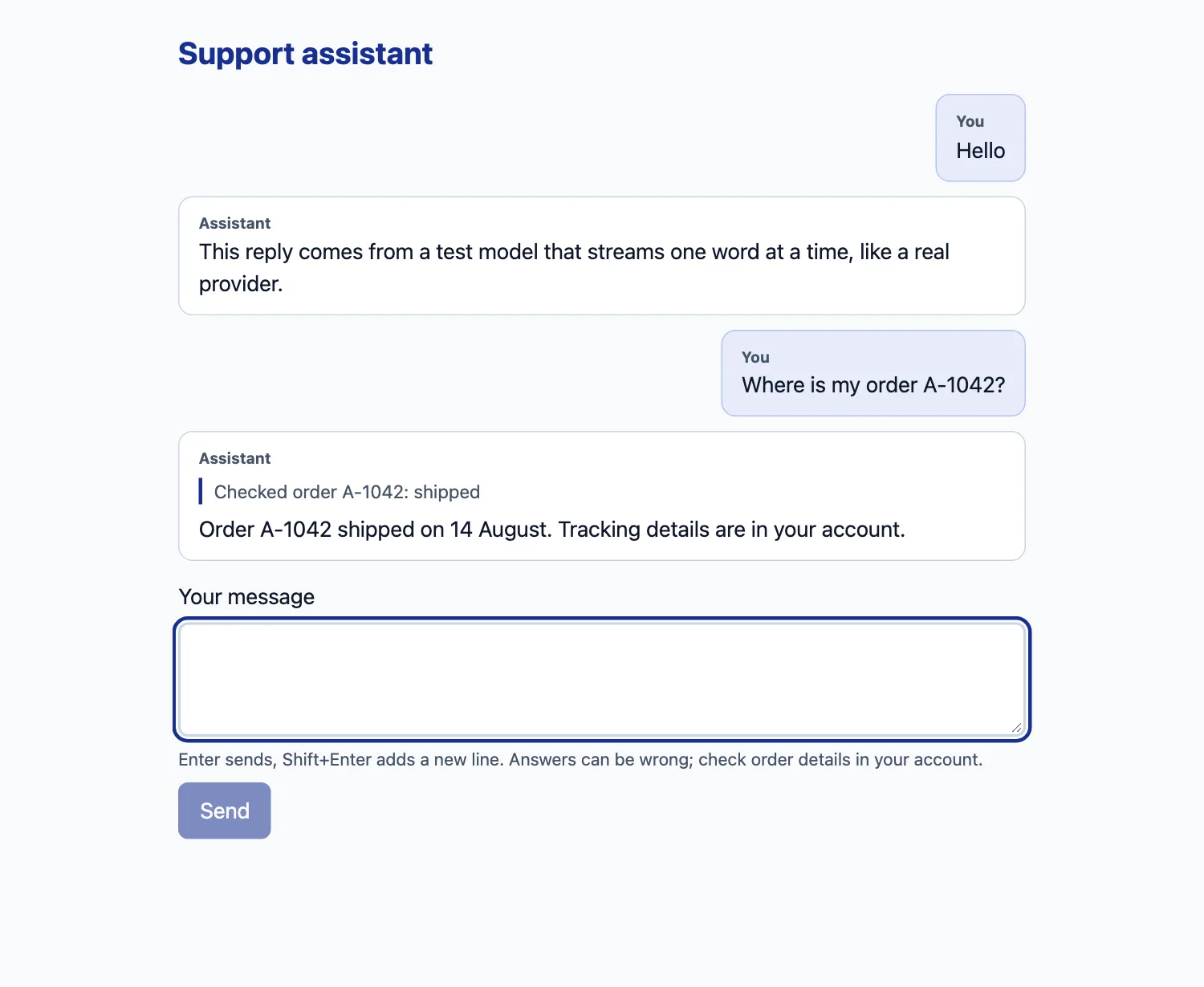
A few details that matter in use: the Send button is disabled while a reply is streaming, so double submits cannot fire two paid requests; Stop calls stop(), which aborts the fetch and, through req.signal, the model call; Enter sends and Shift+Enter adds a line, as users expect; and the error box offers a retry rather than a dead end.
Step 6: make streaming accessible
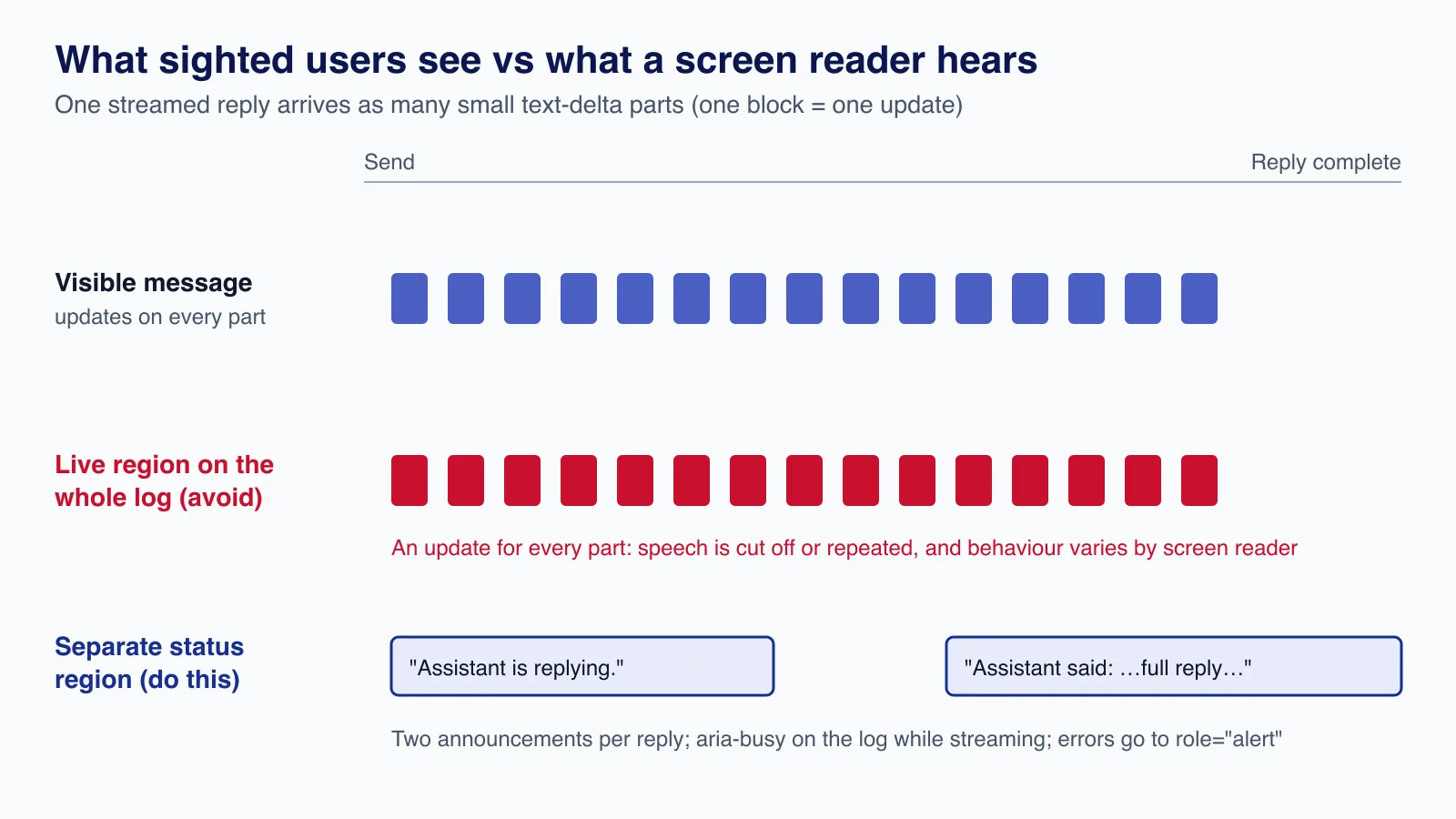
The obvious approach, putting aria-live on the whole message list, is the wrong one. A streamed reply updates the DOM for every text part, and a live region that changes many times a second makes screen readers interrupt themselves or repeat fragments. The pattern in the component above follows the WCAG 2.2 status messages guidance instead:
- The conversation is an ordinary list with
aria-busyset while a reply streams. It is not a live region. - A separate, visually hidden
role="status"region (polite by default) announces "Assistant is replying." when the request starts, and the complete reply once, when the status returns to ready. - Errors render in a
role="alert"box, and the status region is cleared so the two do not compete. - The textarea has a visible label and a description; focus stays in it after sending.

We checked the behaviour with Playwright by recording the status region's text through a session. It changed exactly twice per reply: "Assistant is replying.", then "Assistant said: Order A-1042 shipped on 14 August. Tracking details are in your account.". An axe-core scan with the WCAG 2.0, 2.1 and 2.2 A/AA rule sets found no violations in either the success or the error state, and the layout had no horizontal scrolling at 320 px. Automated checks do not replace testing with NVDA, JAWS or VoiceOver, which you should do before launch; our WCAG 2.2 developer guide covers what else to check.
Very long answers are a fair objection: hearing three paragraphs announced at once is tiring. For long-form replies, announce only "Assistant replied" and move focus to the new message on request (for example with a "Read reply" button), rather than reading it automatically.
Production and security considerations
- Do not trust conversation history from the client.
useChatsends the whole conversation, including earlier tool results. A user can edit those in the request and feed the model a fake "order refunded" result. For anything that matters, store messages on the server (the AI SDK's message persistence guide shows how), send only the new message from the client, and rebuild history from your database. - Hide provider errors.
toUIMessageStreammasks error details by default; ouronErrorlogs the real error and returns a generic sentence. Never forward raw provider messages: they can include request IDs, model names or prompt fragments. - Monitor the right signal. Model failures arrive as an
errorpart on an HTTP 200 response, because the stream had already started. Count errors inonErrorand token usage inonEnd, not in your access log. - Set time and size limits.
maxDurationmust cover your longest expected reply on serverless hosts;maxOutputTokensandisStepCountcap cost per request and stop tool loops. - Personal data. Messages go to a third-party model provider. Tell users, check each provider's data retention terms, and if you serve people in the EU or UK, record the provider as a processor under GDPR.
- Label it as AI. Say clearly that answers come from an AI and can be wrong, as the hint under the input does, and link to a human contact for anything account-critical.
Common mistakes
- Calling a provider SDK from a Client Component, which exposes the key in the browser bundle.
- Putting the user ID in the tool's input schema, which lets the model (or a prompt injection) ask for someone else's data.
- Stacking retries and fallbacks without counting the worst case; one message can turn into many paid calls.
- Rate limiting by IP in memory on a serverless platform, where every instance has its own counter.
- Copying v5 or v6 examples into a v7 project:
system,stepCountIs,onFinishandtoUIMessageStreamResponse()are deprecated or renamed. - Testing only the happy path. Force a provider failure (the
ai/testmock models make this easy) and watch what the user sees.
When not to build a streaming chat
Chat is the right interface for open questions. It is a poor one for tasks with a fixed shape, such as "summarise this ticket" or "suggest three subject lines": a button that returns structured output is faster to use, cheaper and easier to test (see our guide to getting valid JSON from LLMs). Skip streaming for short machine-to-machine calls too, where the caller needs the whole result anyway. And if you cannot yet answer "what data may the assistant read, and who checks its answers?", settle that before writing the UI.
Want an AI assistant built into your Next.js product with provider fallbacks, user-scoped tools, budgets and an accessible interface? Cloudsoft Zone's React and Next.js development service designs, builds and tests AI chat features end to end, from the Route Handler to the screen reader.
Frequently asked questions
Which AI SDK version should I use with Next.js 16?
AI SDK 7 (
ai7.x with@ai-sdk/react4.x) is the current major version. It needs Node.js 22 or later and ESM. Version 6 still receives fixes on a separate npm tag, but new projects should start on 7.Does the AI SDK fall back to another provider automatically?
Not by itself. It retries the same model (
maxRetries). For cross-provider fallback, wrap the model with middleware as shown here, or use the AI Gateway'smodelsandorderoptions if you deploy on Vercel.How do I stop a streaming response and avoid paying for it?
Call
stop()fromuseChaton the client and passabortSignal: req.signaltostreamTexton the server. The aborted request then cancels the provider call.Should the chat message list be an aria-live region?
No. Streaming updates it too often. Use a separate polite status region that announces when a reply starts and the complete reply when it ends, mark the list
aria-busywhile streaming, and put errors inrole="alert".Can I keep conversation history on the client?
For low-risk chats, yes. If tool results or history affect money, accounts or personal data, store messages on the server and rebuild history there, because the client can edit anything it sends.
Your next customer could start right here.
Introduce your tool, product or business to readers exploring technology.
Explore placements and request a private quote
Sources
- AI SDK 7 — Vercel, 2026-06-25
- Migrate AI SDK 6.x to 7.0 — AI SDK documentation
- Next.js App Router quickstart — AI SDK documentation
- Chatbot (useChat) — AI SDK documentation
- Language model middleware — AI SDK documentation
- Provider and model management — AI SDK documentation
- AI Gateway provider — AI SDK documentation
- Understanding SC 4.1.3: Status Messages — W3C WAI
- Route Segment Config: maxDuration — Next.js documentation
Written with substantial AI assistance. Facts checked against cited sources. Editorial policy.
Comments
No comments yet. Be the first to join the conversation.
Leave a comment
Every comment is read by a moderator before it appears. Your email address is never published; it is used only to contact you about this comment.
More from Cloudsoft Zone

TutorialJavaScript
JavaScript using declarations: automatic cleanup without finally
Learn JavaScript's using and await using declarations, Symbol.dispose and DisposableStack, with tested browser recipes and October 2026 support data.
By Cloudsoft Zone

Architecture guideJavaScript
Ship JavaScript without a bundler: import maps and JSON modules
How to structure a front end as native ES modules: import maps for bare imports, JSON modules, modulepreload against waterfalls, and cache-busting.
By Cloudsoft Zone

ComparisonJavaScript
structuredClone vs JSON vs spread: deep copy JavaScript safely
Spread is shallow, JSON loses dates, Maps, Sets and undefined, and structuredClone keeps them. A tested comparison of JavaScript copy methods and their limits.
By Cloudsoft Zone