
NestJS with Fastify: build a production-ready REST API
Build a REST API on NestJS 12 and Fastify 5 with schema validation, helmet, CORS, rate limits, pino logs, health checks, graceful shutdown, inject() tests and Docker.
Updated 12 min read
In this article
NestJS gives you modules, dependency injection and decorators; Fastify gives you a fast HTTP core with a plugin system built for production. This tutorial builds a small but complete REST API on NestJS 12 with the Fastify adapter: schema validation, security headers, CORS, rate limiting, structured logs, liveness and readiness checks, graceful shutdown, in-process tests and a Docker image. Every snippet below was compiled and run, and the outputs shown are real.
Tested with: NestJS 12.1.0 (@nestjs/platform-fastify 12.1.0, which pins Fastify 5.12.5), @nestjs/throttler 6.7.1, @nestjs/terminus 12.1.0, @fastify/helmet 13.1.1, nestjs-pino 5.2.1, zod 4.6.5, TypeScript 5.9, Node.js 24.19.0, 26 September 2026.
Why Fastify, and what changes from Express
If you are still choosing between the two HTTP layers, our Express 5 vs Fastify 5 comparison covers performance and ecosystem. Inside Nest, the practical differences are few but they bite:
- Express middleware packages (
helmet,express-rate-limit,compression) do not work. Use the@fastify/*plugins and register them withapp.register(). - Fastify listens on
localhostonly by default. In a container you must passhost: '0.0.0.0', or nothing outside the container can reach the app. - Nest middleware receives the raw Node.js
reqandres, not Fastify's wrappers. That affects anything readingreq.url(see the logging section). - Redirects are written
res.status(302).redirect('/login').
NestJS 12, released on 27 August 2026, ships its packages as ESM and requires Node.js 20.19+ or 22.12+. Existing CommonJS apps still work through Node's require(esm); the example below compiles to CommonJS and runs unchanged on Node.js 24.
Project setup
npm i @nestjs/core@12.1.0 @nestjs/common@12.1.0 @nestjs/platform-fastify@12.1.0 \
  @nestjs/throttler@6.7.1 @nestjs/terminus@12.1.0 @fastify/helmet@13.1.1 \
  nestjs-pino@5.2.1 pino-http@11.0.0 pino@10.3.1 zod@4.6.5 reflect-metadata rxjs
npm i -D typescript @types/node @nestjs/testing@12.1.0{
"compilerOptions": {
"module": "nodenext",
"moduleResolution": "nodenext",
"target": "es2023",
"outDir": "dist",
"rootDir": ".",
"strict": true,
"experimentalDecorators": true,
"emitDecoratorMetadata": true,
"skipLibCheck": true,
"sourceMap": true
},
"include": ["src", "test"]
}The two decorator options are required: Nest reads constructor types through emitted metadata to inject dependencies. If injection fails at start-up, our guide to fixing "Nest can't resolve dependencies" walks through every cause.
Bootstrap: adapter, security headers, CORS, shutdown
createApp() is exported separately so tests can build the exact same app without listening on a port:
// src/main.ts
import 'reflect-metadata';
import { NestFactory } from '@nestjs/core';
import {
  FastifyAdapter,
  type NestFastifyApplication,
} from '@nestjs/platform-fastify';
import helmet from '@fastify/helmet';
import { Logger } from 'nestjs-pino';
import { AppModule } from './app.module.js';

export async function createApp() {
  const adapter = new FastifyAdapter({
    trustProxy: process.env.TRUST_PROXY ?? false, // e.g. '10.0.0.0/8' behind a load balancer
    bodyLimit: 1_048_576, // 1 MiB, Fastify's default, stated explicitly
    requestIdHeader: 'x-request-id',
  });

  const app = await NestFactory.create<NestFastifyApplication>(AppModule, adapter, {
    bufferLogs: true,
  });

  app.useLogger(app.get(Logger));
  await app.register(helmet);
  app.enableCors({
    origin: (process.env.CORS_ORIGINS ?? '').split(',').filter(Boolean),
    methods: ['GET', 'POST', 'PATCH', 'DELETE'],
    credentials: true,
  });
  app.setGlobalPrefix('api/v1', { exclude: ['health/live', 'health/ready'] });
  app.enableShutdownHooks();
  return app;
}

async function bootstrap() {
  const app = await createApp();
  await app.listen({ port: Number(process.env.PORT ?? 3000), host: '0.0.0.0' });
}

if (process.env.NODE_ENV !== 'test') {
  void bootstrap();
}
Points worth copying:
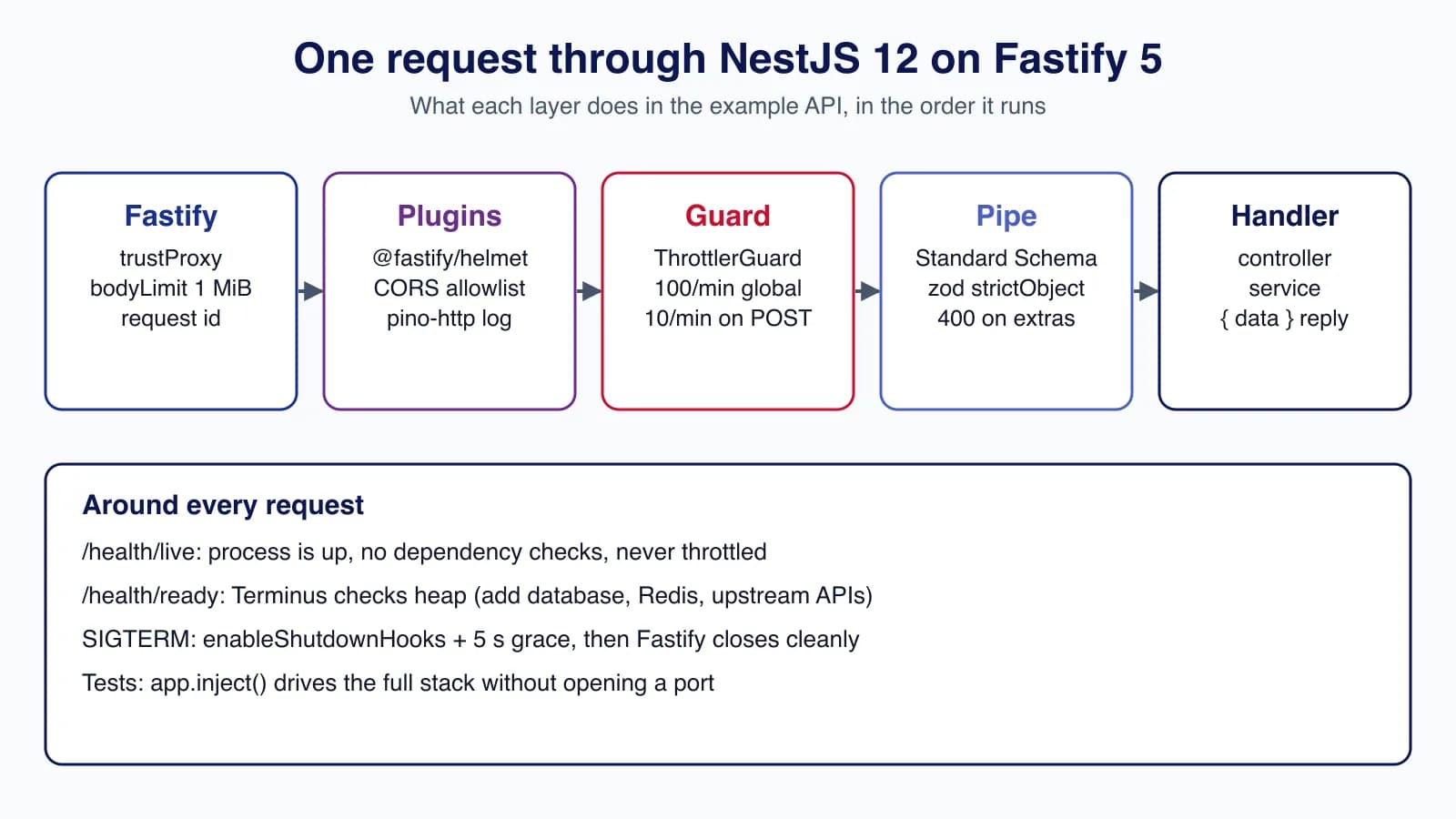
trustProxydecides whetherrequest.ipcomes fromX-Forwarded-For. Leave it off unless a proxy you control sits in front, then set it to that proxy's address range. Trusting every hop lets clients fake their IP and dodge rate limits.bodyLimitis 1 MiB by default. Set it explicitly and lower it if your API only takes small JSON bodies.@fastify/helmetsends a strict Content-Security-Policy, HSTS,X-Content-Type-Options: nosniffand related headers. If you serve Swagger UI over plain HTTP outside development, itsupgrade-insecure-requestsdirective will break it; serve docs over HTTPS. The HTTP security headers checklist explains each header.- CORS takes an explicit list of origins from configuration. Never combine
credentials: truewith a wildcard. enableShutdownHooks()makes Nest listen for SIGTERM and run its lifecycle hooks; without it, a container stop kills requests mid-flight.
Validation with Standard Schema
NestJS 12 added a schema option to @Body(), @Query() and @Param() and a built-in StandardSchemaValidationPipe, so Zod, Valibot or ArkType schemas validate requests without class-validator DTOs. Class-based DTOs with ValidationPipe remain fully supported; pick one style per project.
// src/notes/notes.schemas.ts
import { z } from 'zod';

export const createNoteSchema = z.strictObject({
  title: z.string().trim().min(1).max(120),
  body: z.string().max(10_000).default(''),
});
export type CreateNoteInput = z.infer<typeof createNoteSchema>;

export const listNotesQuerySchema = z.strictObject({
  page: z.coerce.number().int().min(1).default(1),
  pageSize: z.coerce.number().int().min(1).max(50).default(20),
});
export type ListNotesQuery = z.infer<typeof listNotesQuerySchema>;

export const noteIdSchema = z.uuid();
z.strictObject rejects unknown keys, which is the Standard Schema equivalent of forbidNonWhitelisted: a client cannot sneak isAdmin: true into your service. The max(50) on pageSize keeps every list endpoint bounded.
// src/notes/notes.controller.ts
import { Body, Controller, Get, HttpCode, Param, Post, Query } from '@nestjs/common';
import { Throttle } from '@nestjs/throttler';
import { NotesService } from './notes.service.js';
import {
  createNoteSchema, listNotesQuerySchema, noteIdSchema,
  type CreateNoteInput, type ListNotesQuery,
} from './notes.schemas.js';

@Controller('notes')
export class NotesController {
  constructor(private readonly notes: NotesService) {}

  @Get()
  list(@Query({ schema: listNotesQuerySchema }) query: ListNotesQuery) {
    return this.notes.list(query);
  }

  @Get(':id')
  get(@Param('id', { schema: noteIdSchema }) id: string) {
    return { data: this.notes.get(id) };
  }

  @Post()
  @HttpCode(201)
  @Throttle({ default: { limit: 10, ttl: 60_000 } })
  create(@Body({ schema: createNoteSchema }) body: CreateNoteInput) {
    return { data: this.notes.create(body) };
  }
}// src/notes/notes.service.ts
import { Injectable, NotFoundException } from '@nestjs/common';
import { randomUUID } from 'node:crypto';
import type { CreateNoteInput, ListNotesQuery } from './notes.schemas.js';
export interface Note { id: string; title: string; body: string; createdAt: string }
@Injectable()
export class NotesService {
// In-memory store keeps the example self-contained; swap for your repository.
private readonly notes = new Map<string, Note>();
create(input: CreateNoteInput): Note {
const note = { id: randomUUID(), ...input, createdAt: new Date().toISOString() };
this.notes.set(note.id, note);
return note;
}
list({ page, pageSize }: ListNotesQuery) {
const all = [...this.notes.values()];
const start = (page - 1) * pageSize;
return { data: all.slice(start, start + pageSize), meta: { page, pageSize, total: all.length } };
}
get(id: string): Note {
const note = this.notes.get(id);
if (!note) throw new NotFoundException('Note not found', { errorCode: 'NOTE_NOT_FOUND' });
return note;
}
}The new errorCode option on Nest's HTTP exceptions gives clients a stable identifier to branch on. Real responses from the running app:
$ curl -s -X POST localhost:3000/api/v1/notes \
    -H 'content-type: application/json' -d '{"title":"","x":1}'
{"message":["title: Too small: expected string to have >=1 characters",
 "Unrecognized key: \"x\""],"error":"Bad Request","statusCode":400}

$ curl -s localhost:3000/api/v1/notes/9b2f6d1e-3c1a-4b8e-9a4f-1f2e3d4c5b6a
{"message":"Note not found","error":"Not Found","statusCode":404,"errorCode":"NOTE_NOT_FOUND"}
Rate limiting, logging and health checks in the root module
// src/app.module.ts
import { Module } from '@nestjs/common';
import { APP_GUARD, APP_PIPE } from '@nestjs/core';
import { StandardSchemaValidationPipe } from '@nestjs/common';
import { ThrottlerGuard, ThrottlerModule } from '@nestjs/throttler';
import { TerminusModule } from '@nestjs/terminus';
import { LoggerModule } from 'nestjs-pino';
import { NotesModule } from './notes/notes.module.js';
import { HealthController } from './health/health.controller.js';

@Module({
  imports: [
    LoggerModule.forRoot({
      pinoHttp: {
        level: process.env.LOG_LEVEL ?? 'info',
        redact: ['req.headers.authorization', 'req.headers.cookie'],
        autoLogging: {
          // Behind Fastify's middleware layer req.url is mount-relative; use originalUrl.
          ignore: (req) =>
            ((req as { originalUrl?: string }).originalUrl ?? req.url ?? '').startsWith('/health'),
        },
      },
    }),
    ThrottlerModule.forRoot({
      throttlers: [{ name: 'default', ttl: 60_000, limit: 100 }],
    }),
    TerminusModule.forRoot({ gracefulShutdownTimeoutMs: 5_000 }),
    NotesModule,
  ],
  controllers: [HealthController],
  providers: [
    { provide: APP_PIPE, useValue: new StandardSchemaValidationPipe() },
    { provide: APP_GUARD, useClass: ThrottlerGuard },
  ],
})
export class AppModule {}
Rate limiting
ThrottlerGuard, registered as a global guard, works the same on Fastify as on Express. ttl is in milliseconds. The controller tightens POST /notes to 10 requests a minute; in our test the 11th request returned 429 Too Many Requests with Retry-After: 60. The default storage is in memory, so each instance counts separately: behind a load balancer with three instances, a client gets three times the limit. Use a shared store (the docs point to a community Redis storage package) or enforce limits at the proxy.
For a coarse, cheap global limit you can also register Fastify's own plugin, which rejects requests before Nest does any routing work:
import rateLimit from '@fastify/rate-limit'

// Runs inside Fastify before Nest routing: cheapest way to shed abusive traffic
await app.register(rateLimit, { max: 300, timeWindow: '1 minute' })
Logging
nestjs-pino writes one JSON line per request with a request ID, method, URL, status and timing, and replaces Nest's logger so your Logger calls end up in the same stream. redact keeps tokens and cookies out of logs. One Fastify-specific catch we hit: in the autoLogging.ignore callback, req.url is / because the middleware layer strips the mount path. Use req.originalUrl, as above, or health checks flood your logs.
Health checks
// src/health/health.controller.ts
import { Controller, Get } from '@nestjs/common';
import { SkipThrottle } from '@nestjs/throttler';
import { HealthCheck, HealthCheckService, MemoryHealthIndicator } from '@nestjs/terminus';

@SkipThrottle()
@Controller('health')
export class HealthController {
  constructor(
    private readonly health: HealthCheckService,
    private readonly memory: MemoryHealthIndicator,
  ) {}

  // Liveness: is the process able to serve at all? No dependency checks here.
  @Get('live')
  live() {
    return { status: 'ok' };
  }

  // Readiness: can this instance take traffic right now?
  @Get('ready')
  @HealthCheck()
  ready() {
    return this.health.check([
      () => this.memory.checkHeap('memory_heap', 300 * 1024 * 1024),
      // add: () => this.db.pingCheck('database'), redis, downstream APIs
    ]);
  }
}
Keep liveness dumb: if /health/live checks the database, a database blip makes the orchestrator restart every healthy instance at once. Put dependency checks in readiness. Both routes are excluded from the api/v1 prefix and from throttling, so probes never get a 429.
Graceful shutdown
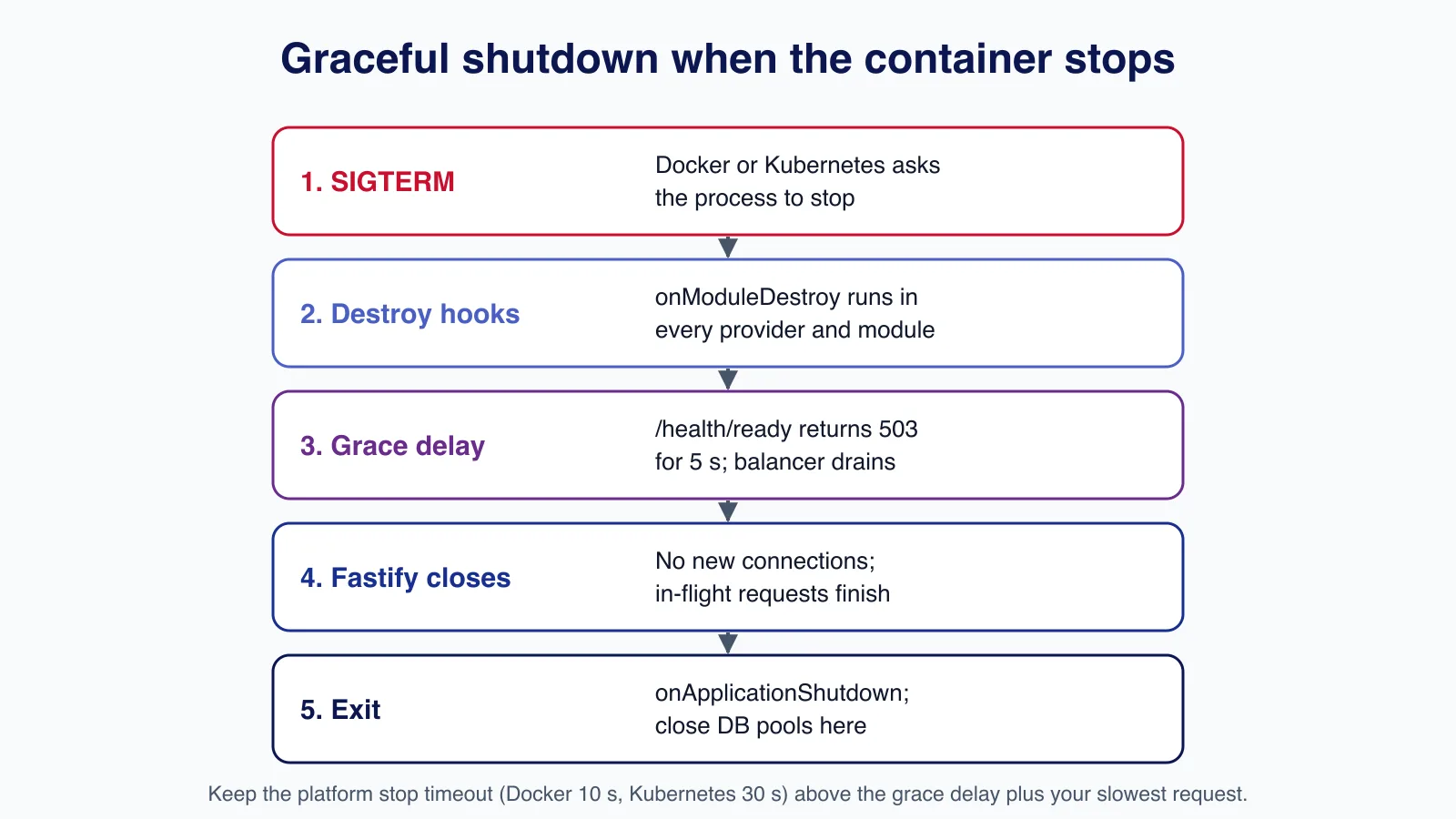
With enableShutdownHooks() and TerminusModule.forRoot({ gracefulShutdownTimeoutMs: 5_000 }), a SIGTERM runs onModuleDestroy, then Terminus's beforeApplicationShutdown hook, which marks the app as shutting down and waits five seconds before Fastify closes. We checked it: after SIGTERM, /health/ready returned 503 with "status":"shutting_down" while /health/live still answered 200, and the process exited cleanly after the delay. That window is what lets a load balancer stop sending traffic before connections close.
Close database pools and queue connections in onApplicationShutdown, and make sure the platform's stop timeout (10 seconds for docker stop, 30 for a Kubernetes pod by default) is longer than the grace delay plus your slowest request.
Testing without opening a port
Fastify's inject() sends a fake request through the whole stack: plugins, guards, pipes, controller and serialisation. It is fast and needs no free port. This uses Node's built-in test runner; the same code works in Vitest, which NestJS 12 now uses by default for new ESM projects.
// test/notes.e2e.test.ts
import { after, before, test } from 'node:test';
import assert from 'node:assert/strict';
import type { NestFastifyApplication } from '@nestjs/platform-fastify';
import { createApp } from '../src/main.js';

let app: NestFastifyApplication;

before(async () => {
  app = await createApp();
  await app.init();
  await app.getHttpAdapter().getInstance().ready();
});
after(() => app.close());

test('creates a note and reads it back', async () => {
  const created = await app.inject({
    method: 'POST', url: '/api/v1/notes',
    payload: { title: 'Ship it', body: 'Fastify adapter' },
  });
  assert.equal(created.statusCode, 201);
  const { data } = created.json();
  const read = await app.inject({ method: 'GET', url: `/api/v1/notes/${data.id}` });
  assert.equal(read.json().data.title, 'Ship it');
});

test('rejects unknown fields with 400', async () => {
  const res = await app.inject({
    method: 'POST', url: '/api/v1/notes', payload: { title: 'x', isAdmin: true },
  });
  assert.equal(res.statusCode, 400);
});

test('caps pageSize at 50', async () => {
  const res = await app.inject({ method: 'GET', url: '/api/v1/notes?pageSize=500' });
  assert.equal(res.statusCode, 400);
});

test('sends helmet headers and a readiness report', async () => {
  const res = await app.inject({ method: 'GET', url: '/health/ready' });
  assert.equal(res.statusCode, 200);
  assert.equal(res.headers['x-content-type-options'], 'nosniff');
  assert.equal(res.json().status, 'ok');
});$ NODE_ENV=test LOG_LEVEL=silent node --test "dist/test/*.test.js"
✔ creates a note and reads it back (36ms)
✔ rejects unknown fields with 400 (1ms)
✔ caps pageSize at 50 (0.8ms)
✔ sends helmet headers and a readiness report (0.7ms)
ℹ tests 4 ℹ pass 4 ℹ fail 0Note the getInstance().ready() call: without it, Fastify plugins registered in createApp() may not have loaded when the first inject() runs. For more on the built-in runner, see testing a Node.js API with node:test.
Docker image
# syntax=docker/dockerfile:1
FROM node:24-bookworm-slim AS build
WORKDIR /app
COPY package.json package-lock.json ./
RUN npm ci
COPY tsconfig.json ./
COPY src ./src
RUN npx tsc -p . && npm prune --omit=dev

FROM node:24-bookworm-slim
ENV NODE_ENV=production PORT=3000
WORKDIR /app
COPY --from=build --chown=node:node /app/node_modules ./node_modules
COPY --from=build --chown=node:node /app/dist/src ./dist/src
COPY --chown=node:node package.json ./
USER node
EXPOSE 3000
HEALTHCHECK --interval=15s --timeout=3s --retries=3 \
  CMD node -e "fetch('http://127.0.0.1:3000/health/live').then(r=>process.exit(r.ok?0:1)).catch(()=>process.exit(1))"
# Node is PID 1 and receives SIGTERM directly (exec form, no shell)
CMD ["node", "dist/src/main.js"]
The image runs as the unprivileged node user, contains only production dependencies and the compiled output, and starts Node directly so SIGTERM reaches it. For multi-stage details, caching and image scanning, see our production Dockerfile guide for Node.js 24.
From here, the hard part of a real API is rarely the framework: it is versioning, idempotent writes, consistent errors across many endpoints and integrations with payment or CRM systems that fail in their own ways. If you are designing an API that other teams or partners will depend on, talk to us about API development and integration before the contract is frozen.
Production checklist
- Configuration validated at start-up (
@nestjs/config12 accepts a Zod schema asvalidationSchema); the app refuses to boot with a missing secret. trustProxylimited to your proxy's addresses; rate limits backed by a shared store when you run more than one instance.- Every list endpoint bounded (
pageSizemaximum) and every sort key allowlisted. - Errors return a consistent body with a stable code; our RFC 9457 guide shows a standard format.
- Logs are JSON, carry the request ID, and redact credentials.
- Readiness checks real dependencies; liveness does not.
- Upgrades to Nest and Fastify patch releases happen monthly, with
npm audit --omit=devin CI.
Common mistakes
- Registering Express middleware such as
helmet()withapp.use()on the Fastify adapter. - Calling
app.listen(3000)in Docker and wondering why the port mapping returns nothing (Fastify bound to localhost). - Throttling health probes, so the orchestrator sees 429s under load and kills healthy pods.
- Using
z.objectinstead ofz.strictObjectand silently accepting extra fields (Zod strips them, but you lose the 400 that tells the client it sent something wrong). - Forgetting
await app.getHttpAdapter().getInstance().ready()in tests and getting flaky failures. - Running Node behind a shell in the Dockerfile (
CMD npm start), so SIGTERM never reaches the app.
When not to use NestJS with Fastify
If your team depends on Express-only middleware (some authentication or file-upload libraries, or Nest recipes that assume Express), staying on @nestjs/platform-express is the cheaper choice: Fastify's speed advantage rarely matters next to a database round trip. If the service is a handful of endpoints with no shared business logic, plain Fastify without Nest is less code. And if you run on a serverless platform with frequent cold starts, measure Nest's start-up time first; a dependency-injection container is not free.
Cloudsoft Zone designs and builds production APIs on NestJS and Fastify: validated contracts, rate limits, observability and tested integrations with the systems your business already runs. See our API development and integration service.
Frequently asked questions
Which NestJS version should I use with Fastify in 2026?
NestJS 12 (12.1.0 at the time of writing) with
@nestjs/platform-fastify12.1.0, which depends on Fastify 5.12.5. NestJS 12 needs Node.js 20.19+ or 22.12+; Node.js 24 LTS is a good default.Does @nestjs/throttler work with the Fastify adapter?
Yes. Register
ThrottlerGuardas anAPP_GUARD. If you are behind a proxy, set Fastify'strustProxyto that proxy's addresses so the client IP is correct, and use a shared store when you run several instances.Do I have to use Zod with NestJS 12?
No. NestJS 12 adds Standard Schema support (Zod, Valibot, ArkType), but class-validator DTOs with
ValidationPiperemain fully supported. Choose one approach per project.Why does my NestJS Fastify app not respond inside Docker?
Fastify listens on
localhostby default. Callapp.listen({ port, host: '0.0.0.0' })so the container's published port can reach it.
Your next customer could start right here.
Introduce your tool, product or business to readers exploring technology.
Explore placements and request a private quote
Sources
- NestJS v12.0.0 release notes — GitHub, 2026-08-27
- Performance (Fastify) — NestJS documentation
- Helmet — NestJS documentation
- Rate limiting — NestJS documentation
- Health checks (Terminus) — NestJS documentation
- Lifecycle events — NestJS documentation
- Fastify server options — Fastify
- nestjs-pino — GitHub
Written with substantial AI assistance. Facts checked against cited sources. Editorial policy.
Comments
No comments yet. Be the first to join the conversation.
Leave a comment
Every comment is read by a moderator before it appears. Your email address is never published; it is used only to contact you about this comment.
More from Cloudsoft Zone

ComparisonNode.js
Express 5 vs Fastify 5: which Node.js framework to pick in 2026
Express 5 and Fastify 5 compared on support status, validation, error handling, upgrades and performance, with the same API built and tested in both.
By Cloudsoft Zone

TutorialNode.js
How to test a Node.js API with the built-in test runner (node:test)
Write, run, mock and measure coverage for a small Node.js HTTP API using only node:test and node:assert. Covers port-0 servers, fetch(), spies, t.mock.method(), fake dates and coverage thresholds.
By Cloudsoft Zone

TutorialNode.js
Node.js streams in practice: pipeline(), backpressure and async generators
Process files of any size in Node.js with flat memory use. A hands-on guide to stream/promises pipeline(), backpressure, async generator transforms, AbortSignal timeouts and streaming downloads over HTTP.
By Cloudsoft Zone