
File uploads in NestJS with Fastify: the new upload interceptors
Use the NestJS 12.1 Fastify upload interceptors: limits, magic-number validation and streaming large files to S3, with the errors we hit in testing and how we fixed them.
12 min read

In this article
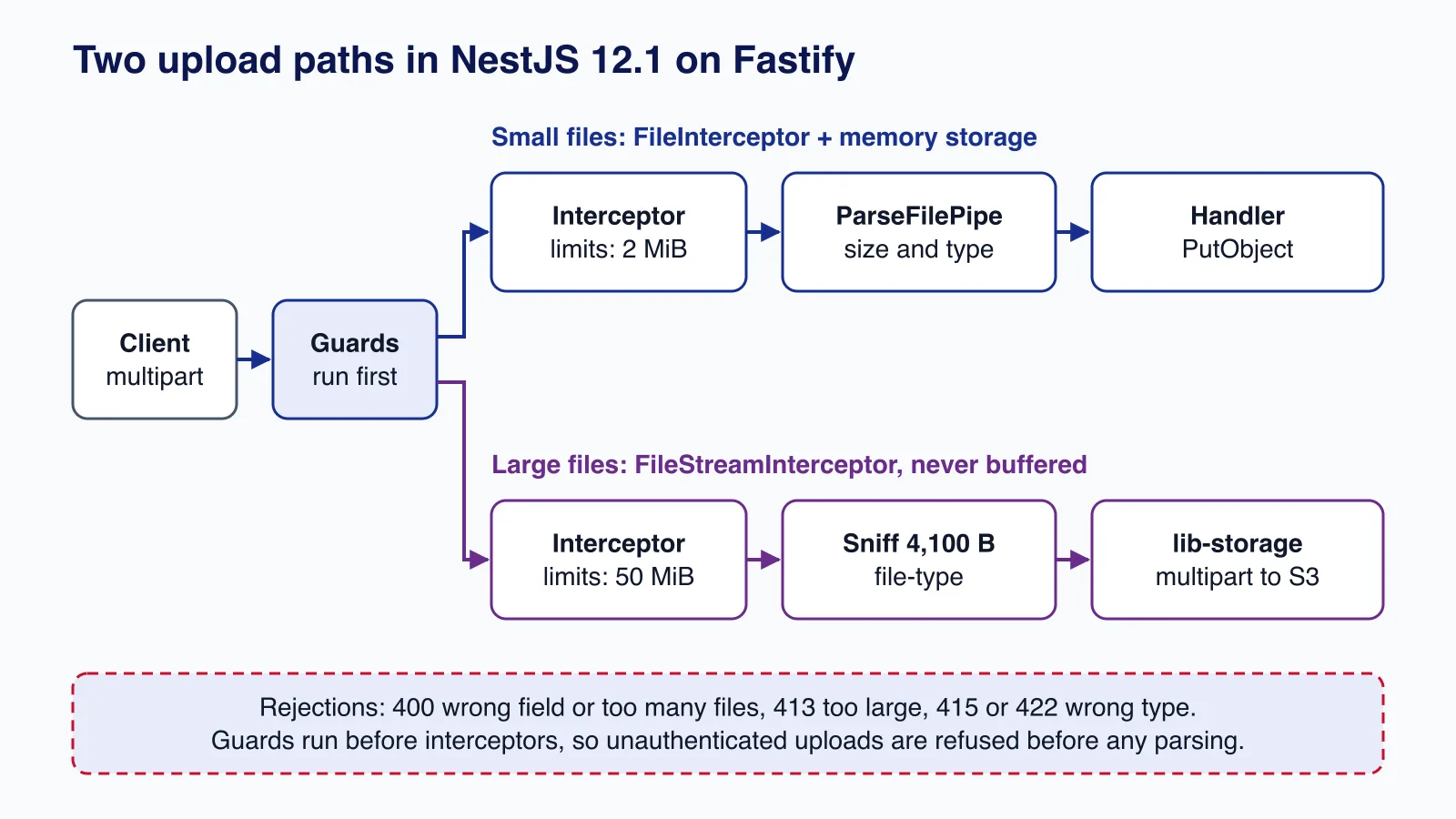
Since NestJS 12.1, a Fastify application can accept file uploads with the same FileInterceptor, @UploadedFile() and ParseFilePipe API that Express users have had for years, plus a Fastify-only FileStreamInterceptor that hands your handler a stream. This tutorial builds two endpoints with it: a small avatar upload that is buffered and checked by size and magic number, and a large document upload that is type-sniffed and streamed straight into S3-compatible object storage without ever being held in memory. Every response quoted below comes from our own test run, including two failures we hit and fixed.
Tested with: Node.js 24.19.0, NestJS 12.1.2 (@nestjs/platform-fastify), Fastify 5.12.5, @fastify/multipart 10.1.3, file-type 22.1.1, AWS SDK for JavaScript v3 (@aws-sdk/client-s3 and @aws-sdk/lib-storage 3.1149.0), TypeScript 5.9 with nodenext modules, against a local S3-compatible server.
What changed in 12.1, and what stays the same
The upload interceptors arrived in NestJS 12.1.0 (PR #17835). They live in @nestjs/platform-fastify/multipart and are backed by @fastify/multipart instead of multer. The file upload documentation maps the names one to one:
| Express (multer) | Fastify (12.1+) |
|---|---|
FileInterceptor, FilesInterceptor, FileFieldsInterceptor, AnyFilesInterceptor, NoFilesInterceptor | Same names, arguments and options, imported from @nestjs/platform-fastify/multipart |
MulterOptions, MulterModule | MultipartOptions, MultipartModule |
Express.Multer.File | UploadedMultipartFile (same shape, no @types/multer needed) |
memoryStorage(), diskStorage() | Same, from the Fastify package |
| No equivalent | FileStreamInterceptor: one file as a stream |
The interceptors fail at startup on the Express adapter. If you are moving an Express app to Fastify, the controller code can stay as it is; only imports and types change. If you are still deciding between the two adapters, our Express 5 vs Fastify 5 comparison covers the wider trade-offs.
Install and bootstrap
npm install @nestjs/core@^12.1.2 @nestjs/common@^12.1.2 @nestjs/platform-fastify@^12.1.2 \
  @fastify/multipart@^10.1.0 file-type @aws-sdk/client-s3 @aws-sdk/lib-storage
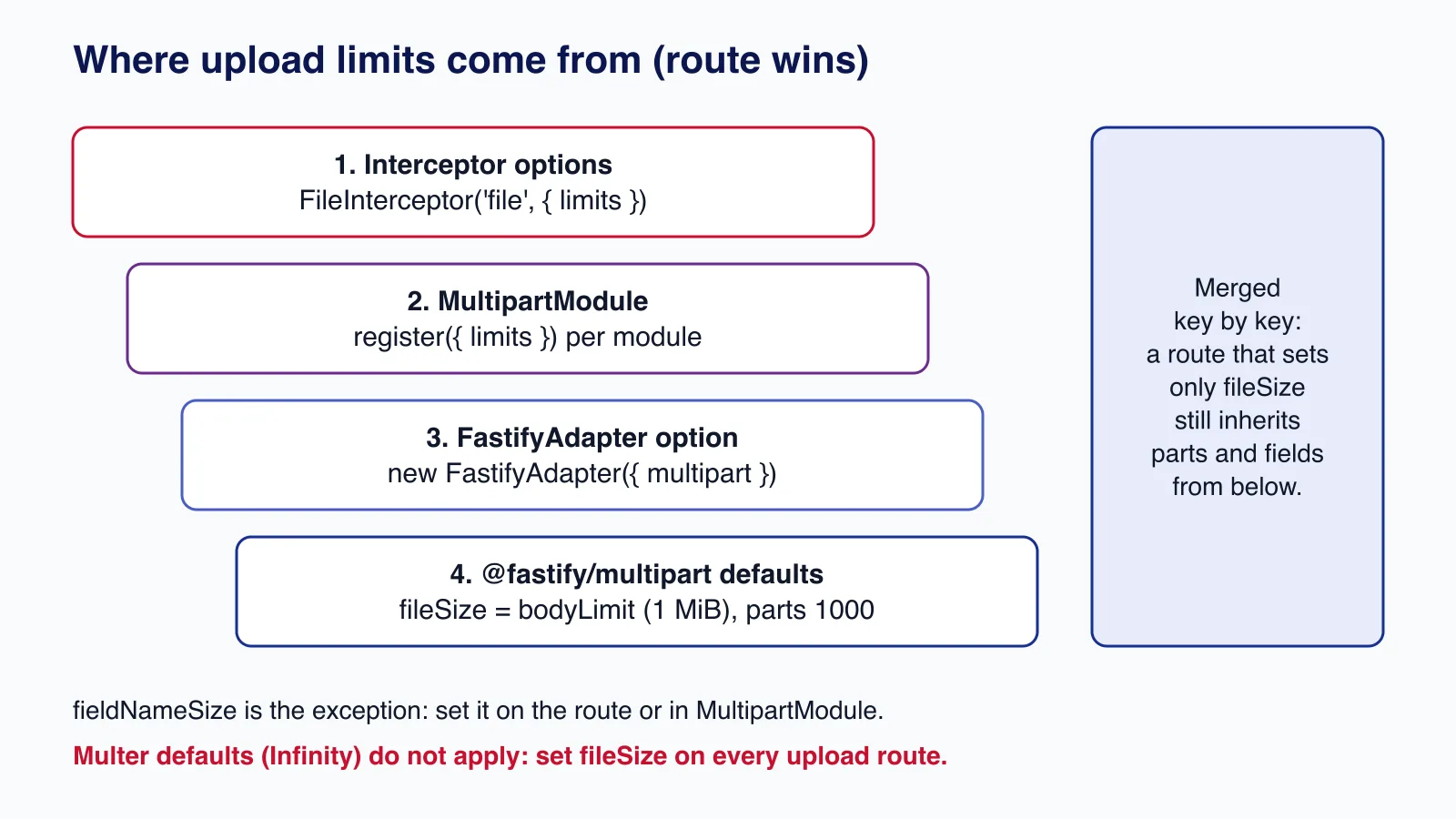
You do not register the multipart plugin yourself: the adapter registers it the first time an upload interceptor is used. Pass plugin-wide options through the adapter's multipart option instead. Keep bodyLimit small for JSON; it does not need to grow for uploads, because each interceptor sets its own file size limit.
import 'reflect-metadata';
import { Module } from '@nestjs/common';
import { NestFactory } from '@nestjs/core';
import { FastifyAdapter, type NestFastifyApplication } from '@nestjs/platform-fastify';
import { UploadsController } from './uploads.controller.js';
import { StorageService } from './storage.service.js';

@Module({ controllers: [UploadsController], providers: [StorageService] })
class AppModule {}

const app = await NestFactory.create<NestFastifyApplication>(
  AppModule,
  new FastifyAdapter({
    bodyLimit: 1024 * 1024,                         // JSON bodies stay at 1 MiB
    multipart: { limits: { parts: 20, fieldSize: 64 * 1024 } }, // app-wide multipart defaults
  }),
);
app.enableShutdownHooks();
await app.listen(Number(process.env.PORT ?? 4710), '127.0.0.1');
Limits: the default that will surprise you
Multer defaults fileSize to unlimited. @fastify/multipart does not: an interceptor with no limits falls back to Fastify's bodyLimit, which is 1 MiB. We confirmed it with a bare FileInterceptor('file'): a 66-byte PNG returned 201 and a 3 MiB file returned 413 {"message":"File too large"}. That is safer than unlimited, but it means every upload route needs an explicit fileSize. Limits merge key by key, so a route that sets only fileSize still inherits parts and fieldSize from the module or the adapter.
Endpoint 1: small files, buffered and validated
For avatars and other small files, memory storage (the default) is fine: the interceptor collects the file into file.buffer, and ParseFilePipe validates it before your handler runs. FileTypeValidator checks the file's magic number with the file-type package by default, not just the client-supplied Content-Type.
import {
  BadRequestException, Body, HttpException, Controller, HttpStatus, ParseFilePipeBuilder,
  Post, UnsupportedMediaTypeException, UploadedFile, UseInterceptors,
} from '@nestjs/common';
import {
  FileInterceptor, FileStreamInterceptor,
  type MultipartFileStream, type UploadedMultipartFile,
} from '@nestjs/platform-fastify/multipart';
import { randomUUID } from 'node:crypto';
import { StorageService } from './storage.service.js';
import { sniff } from './sniff.js';

const AVATAR_MAX = 2 * 1024 * 1024;        // 2 MiB
const DOCUMENT_MAX = 50 * 1024 * 1024;     // 50 MiB
const DOCUMENT_TYPES = new Set(['application/pdf', 'image/png', 'image/jpeg']);

@Controller('uploads')
export class UploadsController {
  constructor(private readonly storage: StorageService) {}

  /** Small files: buffered in memory, validated by size and magic number. */
  @Post('avatar')
  @UseInterceptors(FileInterceptor('file', { limits: { fileSize: AVATAR_MAX, files: 1, fields: 5 } }))
  async avatar(
    @UploadedFile(
      new ParseFilePipeBuilder()
        .addMaxSizeValidator({ maxSize: AVATAR_MAX })
        .addFileTypeValidator({ fileType: /^image\/(png|jpeg|webp)$/ })
        .build({ errorHttpStatusCode: HttpStatus.UNPROCESSABLE_ENTITY }),
    )
    file: UploadedMultipartFile,
  ) {
    const key = `avatars/${randomUUID()}`;
    await this.storage.put(key, file.buffer!, file.mimetype);
    return { key, size: file.size, type: file.mimetype };
  }

  /** Large files: streamed straight to object storage, never buffered whole. */
  @Post('document')
  @UseInterceptors(FileStreamInterceptor('file', { limits: { fileSize: DOCUMENT_MAX, fields: 5 } }))
  async document(
    @UploadedFile() file: MultipartFileStream | undefined,
    @Body() body: { title?: string },
  ) {
    if (!file) throw new BadRequestException('A file is required in the "file" field');
    const { mime, ext, stream } = await sniff(file.stream);
    if (!mime || !DOCUMENT_TYPES.has(mime)) {
      file.stream.resume(); // let the interceptor drain the rest
      throw new UnsupportedMediaTypeException(`Detected type ${mime ?? 'unknown'} is not allowed`);
    }
    // Remember why the upload stream failed: when the size limit trips, the
    // S3 SDK reports its own abort error, which would otherwise become a 500.
    let streamError: unknown;
    file.stream.once('error', (err) => { streamError = err; });
    const key = `documents/${randomUUID()}.${ext}`;
    let size: number;
    try {
      size = await this.storage.put(key, stream, mime);
    } catch (err) {
      if (streamError instanceof HttpException) throw streamError; // e.g. 413 File too large
      throw err;
    }
    return { key, size, type: mime, title: body.title?.slice(0, 200) ?? null };
  }
}
The storage service wraps the AWS SDK's managed upload, which splits a body into parts and uploads them concurrently. Memory use is roughly queueSize times partSize per upload, here 16 MiB; S3 requires parts of at least 5 MiB except the last. The same code works against AWS S3, Cloudflare R2, MinIO or any S3-compatible store by setting S3_ENDPOINT and path-style addressing.
import { Injectable } from '@nestjs/common';
import { S3Client } from '@aws-sdk/client-s3';
import { Upload } from '@aws-sdk/lib-storage';
import type { Readable } from 'node:stream';

@Injectable()
export class StorageService {
  private readonly s3 = new S3Client({
    region: process.env.S3_REGION ?? 'us-east-1',
    endpoint: process.env.S3_ENDPOINT, // unset for AWS; set for MinIO, R2 and similar
    forcePathStyle: process.env.S3_FORCE_PATH_STYLE === 'true',
  });
  private readonly bucket = process.env.S3_BUCKET ?? 'uploads';

  async put(key: string, body: Buffer | Readable, contentType: string): Promise<number> {
    let bytes = 0;
    const upload = new Upload({
      client: this.s3,
      params: { Bucket: this.bucket, Key: key, Body: body, ContentType: contentType },
      queueSize: 2,                 // parts in flight at once
      partSize: 8 * 1024 * 1024,    // 8 MiB parts: memory use is about queueSize x partSize
      leavePartsOnError: false,     // abort the multipart upload if anything fails
    });
    upload.on('httpUploadProgress', (p) => { bytes = p.loaded ?? bytes; });
    await upload.done();
    return bytes;
  }
}
Endpoint 2: large files, streamed to object storage
FileStreamInterceptor gives the handler a MultipartFileStream with a stream property and no buffer. Because the size is unknown up front, MaxFileSizeValidator cannot apply and neither can FileTypeValidator's magic number check; the stream itself errors with a PayloadTooLargeException once limits.fileSize is exceeded. So you sniff the type yourself from the first bytes, then pass the same stream on:
import { Readable } from 'node:stream';
import type { ReadableStream as WebReadableStream } from 'node:stream/web';
import { fileTypeStream } from 'file-type';

/**
 * Reads the first bytes of an upload, detects the real type from its
 * magic number and returns a stream that still contains every byte.
 */
export async function sniff(stream: Readable) {
  const web = Readable.toWeb(stream) as WebReadableStream<Uint8Array>;
  const detected = await fileTypeStream(web, { sampleSize: 4100 });
  return {
    mime: detected.fileType?.mime,
    ext: detected.fileType?.ext,
    stream: Readable.fromWeb(detected as WebReadableStream<Uint8Array>),
  };
}
fileTypeStream() reads a sample (4,100 bytes here), detects the type, and returns a stream that still contains every byte, so nothing is lost between detection and upload. Three rules from the interceptor's documentation shape the handler:
- Text fields must come before the file. Fields after it are not parsed. In our run, sending
titleafterfilestored the file and returned"title": null. Tell API clients the field order, or put metadata in a separate JSON request. - One file, one field. A file in any other field fails with 400.
- Unread data is discarded before the response is sent, so a handler can reject early (as ours does with 415) and the client still finishes its upload cleanly.
Several files, module-wide defaults and disk storage
FilesInterceptor(field, maxCount, options) accepts several files in one field, and MultipartModule.registerAsync() sets defaults for every upload interceptor in the importing module, here from configuration. diskStorage() writes each file to the destination with a random 32-character hex name and no extension, exactly like multer:
import { Controller, Module, Post, UploadedFiles, UseInterceptors } from '@nestjs/common';
import { ConfigModule, ConfigService } from '@nestjs/config';
import { FilesInterceptor, MultipartModule, diskStorage, type UploadedMultipartFile } from '@nestjs/platform-fastify/multipart';

@Controller('gallery')
class GalleryController {
  @Post()
  @UseInterceptors(FilesInterceptor('photos', 10, { limits: { fileSize: 5 * 1024 * 1024 } }))
  upload(@UploadedFiles() photos: UploadedMultipartFile[]) {
    return photos.map((p) => ({ name: p.filename, size: p.size }));
  }
}

@Module({
  imports: [
    MultipartModule.registerAsync({
      imports: [ConfigModule],
      inject: [ConfigService],
      useFactory: (config: ConfigService) => ({
        storage: diskStorage({ destination: config.get<string>('UPLOAD_TMP_DIR') ?? '/tmp/uploads' }),
        limits: { files: 10, fields: 10, parts: 25 },
      }),
    }),
  ],
  controllers: [GalleryController],
})
export class GalleryModule {}
Posting two images returned 201 with two random file names; posting eleven returned 400 {"message":"Too many files"} because of maxCount. Disk storage leaves the files behind, so delete them in a finally block once they have been processed or moved, and point the destination at a volume with its own size limit.
Testing it: the results, and two things we had to fix
We ran the app against s3rver, a local S3-compatible server, and sent real files with curl:
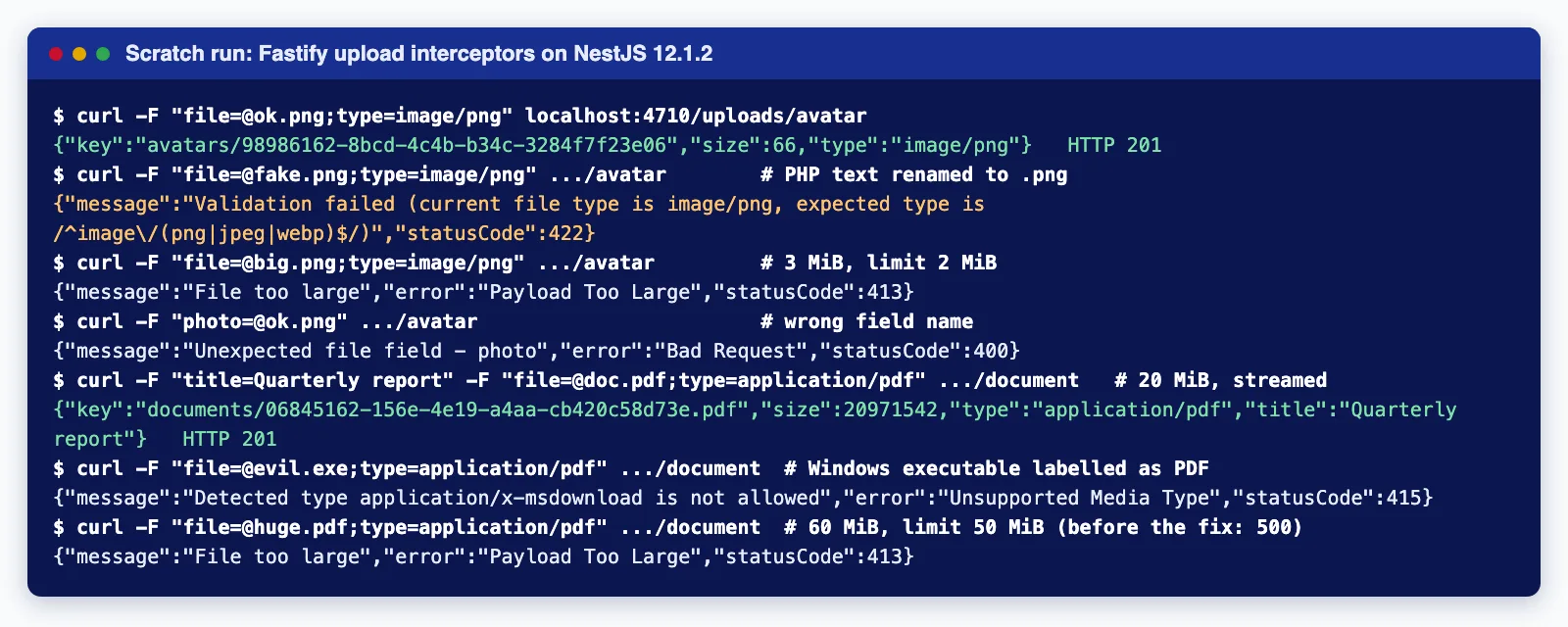
The text file renamed to .png and sent as image/png was rejected with 422 by the magic number check; a Windows executable labelled application/pdf was detected as application/x-msdownload and refused with 415; a 20 MiB PDF streamed through in about 0.2 seconds while the process stayed at roughly 170 MB resident memory. Note that the validator's message reports the type the client claimed ("current file type is image/png"), not the detected one, so do not show that message to users as proof of what the file is.
First failure: a 60 MiB upload to the 50 MiB route returned 500, not 413. The stream errored with PayloadTooLargeException as documented, the SDK then tried to abort the multipart upload, and the error that reached Nest was the SDK's (our local server did not implement AbortMultipartUpload, so it was a 405 MethodNotAllowed). Whatever the backend does, the cause the client needs is the size limit, so the handler now records the stream's own error and rethrows it when the upload fails. After the change the same request returned 413 File too large. Because aborts can fail, also add a bucket lifecycle rule that cleans up incomplete multipart uploads after a day or two (AbortIncompleteMultipartUpload on S3), or orphaned parts will cost storage silently.
Second failure: the default limit. Our first draft used FileInterceptor('file') with validators only, and every file over 1 MiB came back 413 before the pipe ran. The fix is the explicit limits.fileSize on each route shown above.
Security checklist for upload endpoints
- Authenticate before parsing. Guards run before interceptors in Nest, so an
AuthGuardon the route refuses anonymous uploads before a byte is parsed. Add rate limiting per user as well. - Never trust the client's type or name. Check magic numbers, generate your own object key (a UUID), and never build a filesystem path from
originalname. - Bound everything:
fileSize,files,fields,partsandfieldSize. Text fields count toward memory too. - Serve uploads from a separate origin or with
Content-Disposition: attachment, and store the detectedContentType, so an uploaded HTML or SVG file cannot run script on your main domain. - Scan before you trust. Magic numbers say what a file claims to be, not that it is safe. For files other people will open, put them in a quarantine prefix and scan them (for example with ClamAV) before moving them to the public bucket.
- Use presigned URLs for very large files. If users upload hundreds of megabytes, let the browser upload directly to object storage with a presigned URL and have your API record the result; your servers then never carry the bytes.
Upload endpoints are where small API mistakes become storage bills or security incidents. If you would like a second pair of eyes on an existing upload flow, or need one built with scanning and presigned uploads, our API development and integration service covers exactly this.
Common mistakes
- Leaving out
limits.fileSizeand wondering why files over 1 MiB fail. - Using
FileStreamInterceptorand expectingMaxFileSizeValidatorto work; it cannot without a buffer. - Sending text fields after the file to a streaming route.
- Raising Fastify's global
bodyLimitto "fix" uploads, which also raises the JSON body limit for every route. - Registering
@fastify/multipartmanually withattachFieldsToBody; the Nest interceptors do not support that mode. - Returning the S3 URL of a private object directly instead of a short-lived presigned download URL.
When not to use this approach
Do not stream multi-gigabyte files through your API: use presigned or multipart uploads from the client to the bucket. Do not use memory storage for anything larger than a few megabytes or for endpoints with many concurrent uploads. If you are on the Express adapter and happy with multer, there is no reason to switch adapters for uploads alone; take the multer 2.4.0 fix shipped in @nestjs/platform-express 11.2.6 and 12.0.3 and carry on. And if the application only accepts the occasional small attachment, a base64 field in a JSON body with a strict size limit can be simpler, at about a third more bytes on the wire.
Need uploads, scanning and object storage wired into a NestJS API without the surprises above? Cloudsoft Zone designs and builds NestJS APIs and integrations, from the endpoint and its limits to the bucket policy and lifecycle rules.
Frequently asked questions
Do I need to register @fastify/multipart myself?
No. Install the package and the Fastify adapter registers it when an upload interceptor is first used. Pass plugin-wide options through
new FastifyAdapter({ multipart: { ... } }), or setmultipart: falseif you register the plugin yourself.Why do uploads over 1 MiB fail with 413 on Fastify?
When no
fileSizelimit is set,@fastify/multipartfalls back to Fastify'sbodyLimit, which defaults to 1 MiB. Setlimits.fileSizeon the interceptor rather than raisingbodyLimitfor every route.Can FileStreamInterceptor validate file size and type?
Not with the built-in validators, because there is no buffer. The stream errors with
PayloadTooLargeExceptionwhenfileSizeis exceeded, and you detect the type from the first bytes yourself, for example withfileTypeStream()from thefile-typepackage.Does this work with Cloudflare R2 or MinIO?
Yes. The storage code uses the standard S3 API through the AWS SDK; set the endpoint and path-style addressing for your provider. Check that the provider supports multipart uploads and lifecycle rules for incomplete uploads.
Your next customer could start right here.
Introduce your tool, product or business to readers exploring technology.
Explore placements and request a private quote
Sources
- File upload — NestJS documentation
- feat(fastify): add file upload interceptors backed by @fastify/multipart (#17835) — NestJS (GitHub), 2026-09-23
- Release v12.1.0 — NestJS (GitHub), 2026-09-23
- @fastify/multipart — Fastify (GitHub)
- file-type — GitHub
- Uploading and copying objects using multipart upload — Amazon Web Services
- Configuring a bucket lifecycle configuration to delete incomplete multipart uploads — Amazon Web Services
- File Upload Cheat Sheet — OWASP
Comments
No comments yet. Be the first to join the conversation.
Leave a comment
Every comment is read by a moderator before it appears. Your email address is never published; it is used only to contact you about this comment.
More from Cloudsoft Zone

ComparisonNode.js
Express 5 vs Fastify 5: which Node.js framework to pick in 2026
Express 5 and Fastify 5 compared on support status, validation, error handling, upgrades and performance, with the same API built and tested in both.
By Cloudsoft Zone

TutorialNode.js
How to test a Node.js API with the built-in test runner (node:test)
Write, run, mock and measure coverage for a small Node.js HTTP API using only node:test and node:assert. Covers port-0 servers, fetch(), spies, t.mock.method(), fake dates and coverage thresholds.
By Cloudsoft Zone

Industry updateNode.js
Which Node.js version to use in October 2026: LTS lines and the new schedule
Node.js 26 becomes LTS on 28 October 2026, Node.js 24 moves to maintenance and 20.x is already end of life. Here is every supported line, the new yearly release model from Node.js 27, and which version to run.
By Cloudsoft Zone