
NestJS API versioning: URI, header, media type or custom strategy
All four NestJS versioning strategies tested on Fastify and Express, a version-neutral fallback, per-version OpenAPI documents and RFC 9745 Deprecation and Sunset headers.
Updated 12 min read

In this article
NestJS has built-in API versioning with four strategies: the version in the URI, in a custom header, in the Accept media type, or wherever your own extractor function finds it. Each one works, but they behave differently for unversioned requests, caches, documentation and the Express adapter, and the defaults surprised us in testing. This guide shows all four with code we ran on both Fastify and Express, a version-neutral fallback, per-version OpenAPI documents, and standard Deprecation and Sunset headers so clients get warned before an old version is switched off.
Tested with: Node.js 24.19.0, NestJS 11.2.1 (@nestjs/platform-fastify with Fastify 5.11.3 and @nestjs/platform-express with Express 5.2.1), @nestjs/swagger 11.4.7, @fastify/static 10.1.2, TypeScript 5.9.3. Every request in the matrix below ran on both adapters with identical results except where noted.
The two controllers we version
Versioning is per controller or per route. Version 1 of GET /cats/:id returns name and a flat breed; version 2 renames a field and nests another, which is exactly the kind of breaking change versioning exists for. A route-level @Version() overrides the controller's version, so the list route below exists only in versions 2 and 3:
import { Controller, Get, Param, ParseIntPipe, VERSION_NEUTRAL, Version } from '@nestjs/common';

@Controller({ path: 'cats', version: '1' })
@Deprecated({
  deprecatedAt: new Date('2026-10-01T00:00:00Z'),
  sunsetAt: new Date('2027-04-01T00:00:00Z'),
  link: 'https://api.example.com/docs/migrate-v1-to-v2',
})
export class CatsV1Controller {
  @Get(':id')
  findOne(@Param('id', ParseIntPipe) id: number) {
    return { id, name: 'Tom', breed: 'Tabby' };                       // v1 shape
  }
}

@Controller({ path: 'cats', version: '2' })
export class CatsV2Controller {
  @Get(':id')
  findOne(@Param('id', ParseIntPipe) id: number) {
    return { id, displayName: 'Tom', breed: { name: 'Tabby' }, birthYear: 2019 }; // v2 shape
  }

  @Version(['2', '3'])          // overrides the controller version for this route
  @Get()
  list() {
    return { data: [{ id: 1, displayName: 'Tom' }] };
  }
}

@Controller({ path: 'health', version: VERSION_NEUTRAL })  // answers whatever version is sent
export class HealthController {
  @Get()
  ok() { return { status: 'ok' }; }
}
The @Deprecated() decorator is ours and is defined further down. The rest is the API described in the NestJS versioning documentation.
Strategy 1: URI versioning
app.setGlobalPrefix('api');
app.enableVersioning({ type: VersioningType.URI });   // prefix 'v' by default; prefix: false removes it
// GET /api/v1/cats/1, GET /api/v2/cats/1, GET /api/v3/cats
The version goes after the global prefix. Results: /api/v1/cats/1 and /api/v2/cats/1 returned their own shapes, /api/v3/cats returned the list, /api/v3/cats/1 returned 404 (no v3 of that route), /api/cats/1 returned 404, and /api/health returned 200 because it is version-neutral. URI versioning is the easiest to debug: the version is visible in every log line, browser bar and cache key, and OpenAPI tools see distinct paths.
Strategy 2: header versioning
app.enableVersioning({ type: VersioningType.HEADER, header: 'X-API-Version' });
// curl -H 'X-API-Version: 2' https://api.example.com/api/cats/1
URLs stay clean and the version travels in a header of your choice. With X-API-Version: 1 and 2 we got the matching shapes, and with no header at all: 404. A shared cache or CDN must know the response depends on that header, and Nest does not add Vary for you; our responses had none until we set it (code below).
Strategy 3: media type versioning
app.enableVersioning({ type: VersioningType.MEDIA_TYPE, key: 'v=' });
// curl -H 'Accept: application/json;v=2' https://api.example.com/api/cats/1
The version is a parameter of the Accept header, in the spirit of HTTP content negotiation. application/json;v=1 and ;v=2 worked; plain application/json and a missing Accept both returned 404. Most HTTP clients send Accept: */* or application/json by default, so every consumer has to change its client configuration, which is the main practical cost of this strategy.
Strategy 4: a custom extractor
When none of the three fit, for example a vendor media type such as application/vnd.example.v2+json, pass an extractor that returns the version string, or an array of versions in order of preference:
app.enableVersioning({
  type: VersioningType.CUSTOM,
  extractor: (req: unknown): string | string[] => {
    const accept = String((req as { headers: Record<string, string | undefined> }).headers['accept'] ?? '');
    const match = accept.match(/application\/vnd\.example\.v(\d+)\+json/);
    return match ? match[1] : '';   // '' means no route matches: 404
  },
});
Both vendor types routed correctly on both adapters. Arrays are where the adapters differ, as the documentation warns: we returned ['3', '2', '1'] for a resource that exists in versions 1 and 2. Fastify answered with version 2, the highest match. Express answered with version 1. On Express, make the extractor return a single version.
Unversioned requests: defaultVersion is not a fallback
Our first assumption was that defaultVersion: '2' would send requests without a version to v2. It does not. In every strategy, on both adapters, an unversioned request to a versioned route still returned 404 with defaultVersion set. defaultVersion only assigns a version to controllers and routes that declare none. To serve the current version when the client sends nothing, put VERSION_NEUTRAL in the controller's version list:
@Controller({ path: 'orders', version: ['2', VERSION_NEUTRAL] })  // v2, and requests with no version
export class OrdersV2Controller { /* ... */ }
With header versioning, X-API-Version: 1 reached v1, 2 and no header reached v2, and 9 still returned 404. Be deliberate about this: a neutral fallback means clients that never pin a version will move to v3 the day you move the fallback, so only use it for clients you control or document it loudly.
Deprecation and Sunset headers
Two standards tell clients a version is going away. RFC 9745 (March 2025, Standards Track) defines the Deprecation header, whose value is a structured-field date: @ followed by Unix seconds, in the past or the future, plus a deprecation link relation for the migration guide. RFC 8594 (May 2019) defines Sunset, an HTTP-date after which the resource is expected to stop responding. RFC 9745 adds one rule: the Sunset time must not be earlier than the Deprecation time. Deprecation is a hint and does not change behaviour; it is up to you to switch the version off at the sunset date. This global interceptor sets both headers from metadata, returns 410 Gone after the sunset date, and adds Vary for header-based versioning:
import {
  type CallHandler, type ExecutionContext, GoneException, Injectable, type NestInterceptor, SetMetadata,
} from '@nestjs/common';
import { Reflector } from '@nestjs/core';
import type { Observable } from 'rxjs';

export interface DeprecationInfo {
  /** When the version was (or will be) deprecated. May be in the future. */
  deprecatedAt: Date;
  /** When it stops responding. Must not be earlier than deprecatedAt (RFC 9745). */
  sunsetAt?: Date;
  /** Human-readable migration guide. */
  link?: string;
}

const DEPRECATION = Symbol('deprecation');

export function Deprecated(info: DeprecationInfo) {
  if (info.sunsetAt && info.sunsetAt < info.deprecatedAt) {
    throw new Error('Sunset must not be earlier than Deprecation (RFC 9745)');
  }
  return SetMetadata(DEPRECATION, info);
}

/** Register globally: sets Vary for header-based versioning and the deprecation headers. */
@Injectable()
export class ApiVersionHeadersInterceptor implements NestInterceptor {
  constructor(private readonly reflector: Reflector, private readonly varyOn?: string) {}

  intercept(ctx: ExecutionContext, next: CallHandler): Observable<unknown> {
    const res = ctx.switchToHttp().getResponse();
    // Express: res.setHeader/getHeader; Fastify: reply.header/getHeader
    const get = (n: string): string | undefined => (res.getHeader?.(n) as string | undefined);
    const set = (n: string, v: string) => (typeof res.header === 'function' ? res.header(n, v) : res.setHeader(n, v));
    if (this.varyOn) {
      const vary = get('Vary');
      set('Vary', vary ? `${vary}, ${this.varyOn}` : this.varyOn);
    }
    const info = this.reflector.getAllAndOverride<DeprecationInfo | undefined>(DEPRECATION, [ctx.getHandler(), ctx.getClass()]);
    if (info) {
      if (info.sunsetAt && Date.now() >= info.sunsetAt.getTime()) {
        if (info.link) set('Link', `<${info.link}>; rel="deprecation"; type="text/html"`);
        throw new GoneException('This API version has been retired. See the Link header for the migration guide.');
      }
      set('Deprecation', `@${Math.floor(info.deprecatedAt.getTime() / 1000)}`); // RFC 9745: @ + Unix seconds
      if (info.sunsetAt) set('Sunset', info.sunsetAt.toUTCString());          // RFC 8594: HTTP-date
      if (info.link) set('Link', `<${info.link}>; rel="deprecation"; type="text/html"`);
    }
    return next.handle();
  }
}app.useGlobalInterceptors(new ApiVersionHeadersInterceptor(app.get(Reflector), 'X-API-Version'));On both adapters a v1 request returned Vary: X-API-Version, Deprecation: @1790812800 (1 October 2026), Sunset: Thu, 01 Apr 2027 00:00:00 GMT and the Link header; v2 returned only Vary. A controller with a sunset date in the past returned 410 with the link. The decorator refuses a sunset earlier than the deprecation date at startup. Interceptors run after guards, so unauthenticated callers still get 401 rather than learning which versions exist.
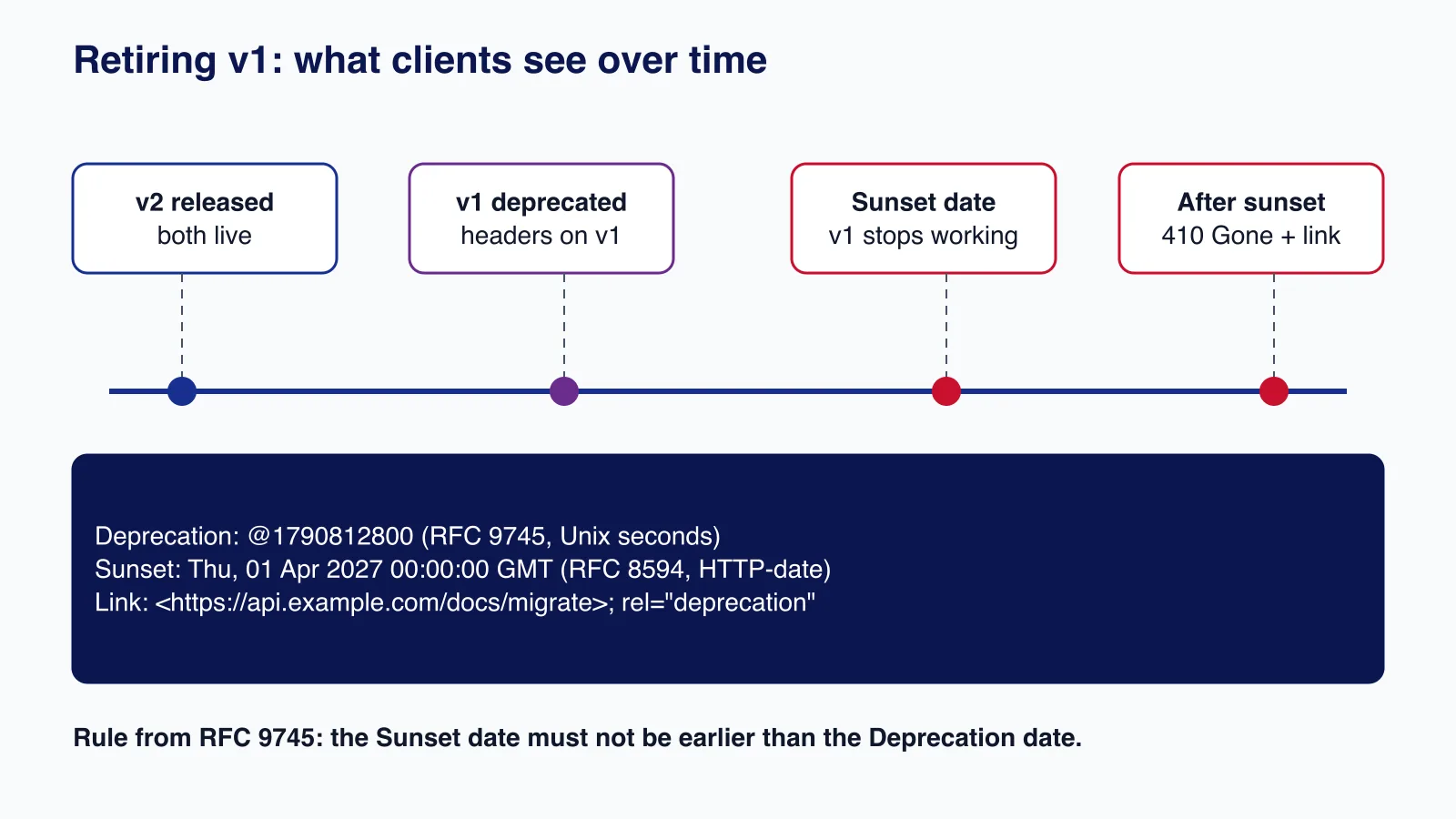
Headers only help if someone reads them. Log requests to deprecated versions with the client identity, and contact the remaining callers well before the sunset. Retiring a version safely is mostly this kind of operational work, and it is something our API development and integration service plans with you alongside the code.
OpenAPI documentation per version
With URI versioning, SwaggerModule.createDocument() lists each version as its own path (/api/v1/cats/{id}, /api/v2/cats/{id}), so one document works. With header versioning it does not: both versions share /api/cats/{id}, and in our test the generated document silently contained only the v2 operation. The fix is one document per version, built from modules that hold each version's controllers, with the version header documented as a required parameter and the old version marked deprecated:
@Module({ controllers: [CatsV1Controller] }) class CatsV1Module {}
@Module({ controllers: [CatsV2Controller] }) class CatsV2Module {}

function markDeprecated(doc: OpenAPIObject) {
  for (const path of Object.values(doc.paths))
    for (const op of Object.values(path))
      if (op && typeof op === 'object' && 'responses' in op) (op as { deprecated?: boolean }).deprecated = true;
  return doc;
}

for (const [v, mod, deprecated] of [['1', CatsV1Module, true], ['2', CatsV2Module, false]] as const) {
  const config = new DocumentBuilder()
    .setTitle('Cats API')
    .setVersion(v)
    .addGlobalParameters({ name: 'X-API-Version', in: 'header', required: true, schema: { type: 'string', enum: [v] } })
    .build();
  let doc = SwaggerModule.createDocument(app, config, { include: [mod] });
  if (deprecated) doc = markDeprecated(doc);
  SwaggerModule.setup(`docs/v${v}`, app, doc, { jsonDocumentUrl: `docs/v${v}/openapi.json` });
}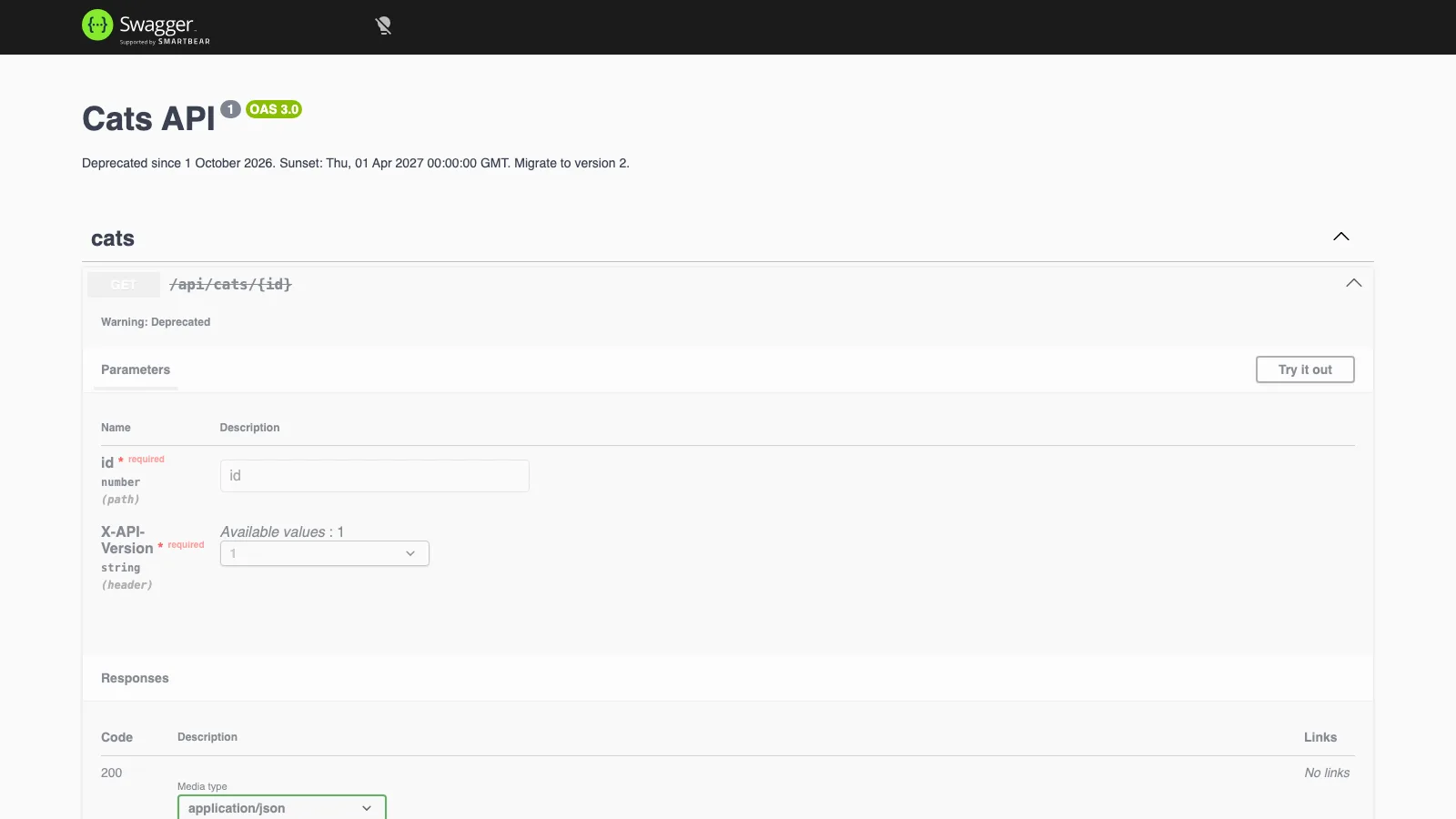
On Fastify, SwaggerModule.setup() failed until we installed @fastify/static; the error was "The \"@fastify/static\" package is missing". Swagger UI shows the v1 operation struck through with "Warning: Deprecated", and the version header as a required field with a single allowed value, so "Try it out" sends the right version.
Versioned middleware: check the version yourself with header versioning
The documentation shows middleware targeted at one version with forRoutes({ path, method, version }) and says it works with every strategy. We tested forRoutes({ path: 'cats/*path', method: RequestMethod.ALL, version: '1' }) on both adapters. With URI versioning it ran for /v1/cats/1 and not for /v2/cats/1, as expected. With header versioning it ran for both X-API-Version: 1 and X-API-Version: 2, on Fastify and on Express, with both cats/*path and cats/:id patterns: the version filter is applied through the URL, and a header-versioned URL has none. Until that changes, read the version inside the middleware, and keep a test that proves it:
import 'reflect-metadata';
import { after, before, test } from 'node:test';
import assert from 'node:assert/strict';
import { Injectable, type MiddlewareConsumer, Module, type NestMiddleware, RequestMethod, VersioningType } from '@nestjs/common';
import { NestFactory, Reflector } from '@nestjs/core';
import { FastifyAdapter, type NestFastifyApplication } from '@nestjs/platform-fastify';
import { CatsV1Controller, CatsV2Controller, HealthController } from './cats.js';
import { ApiVersionHeadersInterceptor } from './deprecation.js';

const seen: string[] = [];
@Injectable()
class DeprecatedVersionLogger implements NestMiddleware {
  // With header versioning, forRoutes({ version }) does not filter by version: check it here.
  use(req: { headers: Record<string, string | string[] | undefined> }, _res: unknown, next: () => void) {
    if (req.headers['x-api-version'] === '1') seen.push('v1 call'); // e.g. log the client id for the sunset plan
    next();
  }
}

@Module({ controllers: [CatsV1Controller, CatsV2Controller, HealthController], providers: [DeprecatedVersionLogger] })
class TestModule {
  configure(consumer: MiddlewareConsumer) {
    consumer.apply(DeprecatedVersionLogger).forRoutes({ path: 'cats/*path', method: RequestMethod.ALL });
  }
}

let app: NestFastifyApplication;
before(async () => {
  app = await NestFactory.create<NestFastifyApplication>(TestModule, new FastifyAdapter(), { logger: false });
  app.enableVersioning({ type: VersioningType.HEADER, header: 'X-API-Version' });
  app.useGlobalInterceptors(new ApiVersionHeadersInterceptor(app.get(Reflector), 'X-API-Version'));
  await app.init();
  await app.getHttpAdapter().getInstance().ready();
});
after(() => app.close());

test('v1 keeps the v1 shape and announces its sunset', async () => {
  const res = await app.inject({ method: 'GET', url: '/cats/1', headers: { 'x-api-version': '1' } });
  assert.equal(res.statusCode, 200);
  assert.deepEqual(res.json(), { id: 1, name: 'Tom', breed: 'Tabby' });
  assert.equal(res.headers['deprecation'], '@1790812800');
  assert.match(String(res.headers['sunset']), /2027/);
});

test('v2 is not deprecated', async () => {
  const res = await app.inject({ method: 'GET', url: '/cats/1', headers: { 'x-api-version': '2' } });
  assert.equal(res.json().displayName, 'Tom');
  assert.equal(res.headers['deprecation'], undefined);
  assert.equal(res.headers['vary'], 'X-API-Version');
});

test('a missing version is a 404, not a silent default', async () => {
  const res = await app.inject({ method: 'GET', url: '/cats/1' });
  assert.equal(res.statusCode, 404);
});

test('the middleware acts only on version 1', async () => {
  seen.length = 0;
  await app.inject({ method: 'GET', url: '/cats/1', headers: { 'x-api-version': '2' } });
  await app.inject({ method: 'GET', url: '/cats/1', headers: { 'x-api-version': '1' } });
  assert.deepEqual(seen, ['v1 call']);
});
node --test ran all four tests green against the Fastify adapter using app.inject(), without opening a port. Tests like these are cheap insurance: they pin the response shape of each version, the deprecation headers, and the 404 for unversioned calls, so a refactor of shared services cannot silently change v1.
Which strategy to choose
| Strategy | Choose it when | Watch out for |
|---|---|---|
| URI | Public APIs, many third-party clients, CDN caching | Clients hard-code URLs; moving a client is a code change |
| Header | Internal or partner APIs with clients you control | Add Vary; one OpenAPI document per version |
| Media type | Teams already doing content negotiation | Default Accept values get 404 unless you add a neutral fallback |
| Custom | Vendor media types, versions in a JWT claim or query string | Return a single version on Express; test the empty case |
Common mistakes
- Expecting
defaultVersionto route unversioned requests. - Versioning every endpoint on every change. Additive changes (new optional fields, new endpoints) do not need a new version; reserve versions for breaking changes.
- Generating one OpenAPI document with header or media type versioning and losing operations.
- Forgetting
Varybehind a CDN, so one version's response is served to clients asking for another. - Setting a
Sunsetdate and never enforcing it, or enforcing it without having told anyone. - Copying v1 controllers wholesale into v2. Keep shared logic in services and make the versioned controllers thin mappers between the domain and each response shape.
When not to version
If the only client is your own front end, deployed together with the API, versioning adds routes and tests for no benefit: change both sides in one release. For GraphQL APIs, the usual practice is to evolve one schema and deprecate fields with @deprecated rather than run parallel versions. And for small additive changes, a new optional field is kinder to clients than a new version. If you need a refresher on consistent error bodies across versions, see our guide to RFC 9457 Problem Details.
Planning a v2 of a NestJS API, or retiring a v1 that partners still call? Cloudsoft Zone designs, builds and versions NestJS APIs, including per-version documentation, deprecation headers and the client communication plan.
Frequently asked questions
Does defaultVersion make unversioned requests go to a version?
No. In our tests unversioned requests to versioned routes returned 404 with
defaultVersionset, on every strategy and both adapters. It only labels controllers and routes that declare no version. AddVERSION_NEUTRALto a controller's version list to serve requests without a version.Which versioning strategy works best with a CDN?
URI versioning, because the version is part of the cache key. Header and media type versioning work if responses carry
Varyfor that header, which NestJS does not add by default.What format does the Deprecation header use?
RFC 9745 defines it as a structured-field date:
@followed by Unix seconds, for exampleDeprecation: @1790812800.Sunset(RFC 8594) uses an HTTP-date, and it must not be earlier than the deprecation date.Why does my OpenAPI document show only one version?
With header or media type versioning, both versions share the same path, and the generated document kept only one operation in our test. Build one document per version with the
includeoption and serve each at its own URL.
Your next customer could start right here.
Introduce your tool, product or business to readers exploring technology.
Explore placements and request a private quote
Sources
- Versioning — NestJS documentation
- OpenAPI (Swagger) introduction — NestJS documentation
- RFC 9745: The Deprecation HTTP Response Header Field — IETF, 2025-03-01
- RFC 8594: The Sunset HTTP Header Field — IETF, 2019-05-01
- RFC 9110: HTTP Semantics, section 12.5.5 Vary — IETF, 2022-06-01
- Middleware — NestJS documentation
Written with substantial AI assistance. Facts checked against cited sources. Editorial policy.
Comments
No comments yet. Be the first to join the conversation.
Leave a comment
Every comment is read by a moderator before it appears. Your email address is never published; it is used only to contact you about this comment.
More from Cloudsoft Zone

ComparisonNode.js
Express 5 vs Fastify 5: which Node.js framework to pick in 2026
Express 5 and Fastify 5 compared on support status, validation, error handling, upgrades and performance, with the same API built and tested in both.
By Cloudsoft Zone

TutorialNode.js
How to test a Node.js API with the built-in test runner (node:test)
Write, run, mock and measure coverage for a small Node.js HTTP API using only node:test and node:assert. Covers port-0 servers, fetch(), spies, t.mock.method(), fake dates and coverage thresholds.
By Cloudsoft Zone

TutorialNode.js
Node.js streams in practice: pipeline(), backpressure and async generators
Process files of any size in Node.js with flat memory use. A hands-on guide to stream/promises pipeline(), backpressure, async generator transforms, AbortSignal timeouts and streaming downloads over HTTP.
By Cloudsoft Zone