
Fix MySQL 'Incorrect string value' errors by moving to utf8mb4
Why MySQL rejects emoji with error 1366, how to find utf8mb3 columns, convert tables and connections to utf8mb4, and avoid key-length and collation errors.
Updated 8 min read

In this article
If MySQL rejects an emoji or a rare character with ERROR 1366 (HY000): Incorrect string value: '\xF0\x9F\x9A\x80', the column is almost certainly using the 3-byte utf8mb3 character set (often declared as utf8). The fix is to convert the column, table and connection to utf8mb4, MySQL's full 4-byte UTF-8, and pick one collation for the whole schema.
This guide shows how to confirm the cause, find every affected table, convert safely and avoid the two errors that usually follow a careless conversion: Specified key was too long and Illegal mix of collations. Every statement and error message below was run on MySQL 8.4.11 LTS in a throwaway schema; the behaviour is the same on 9.7 LTS.
Why the error happens
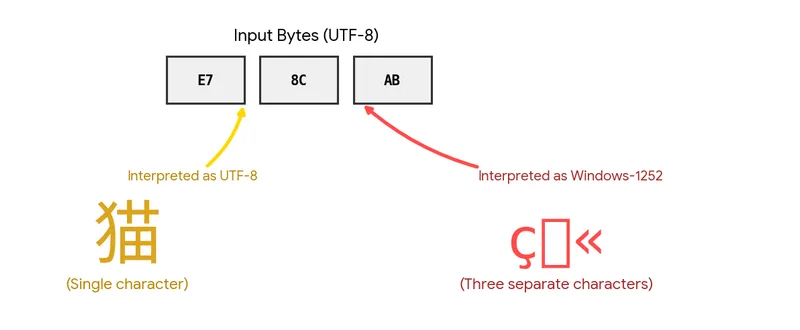
UTF-8 encodes characters in one to four bytes. MySQL's utf8mb3 stores at most three bytes per character, so it can hold only the Basic Multilingual Plane (BMP). Emoji, many historic scripts, musical and mathematical symbols and some CJK ideographs live outside the BMP and need four bytes. utf8mb4 is a superset of utf8mb3: BMP characters are stored identically, and supplementary characters get their fourth byte.
Here is the failure, reproduced on a table created with the legacy character set and the default strict SQL mode:
CREATE TABLE legacy_comments (
  id     INT PRIMARY KEY,
  author VARCHAR(100),
  body   TEXT
) CHARACTER SET utf8mb3 COLLATE utf8mb3_general_ci;

INSERT INTO legacy_comments VALUES (1, 'Ana', 'Great post 🚀');
-- ERROR 1366 (HY000): Incorrect string value: '\xF0\x9F\x9A\x80'
--   for column 'body' at row 1
The four bytes in the message, F0 9F 9A 80, are the UTF-8 encoding of the rocket emoji. Any value whose first byte is \xF0 to \xF4 is a 4-byte character, which is your confirmation that this is a character set problem rather than corrupted input.
Without strict mode, MySQL would store the row with the character replaced and only a warning, which is worse: data is lost silently. Keep strict mode on.
Where MySQL 8.4 stands on utf8 and utf8mb3
- The server defaults are
character_set_server = utf8mb4andcollation_server = utf8mb4_0900_ai_ci. New schemas get these unless you say otherwise. utf8mb3is deprecated. The manual says it remains supported for the lifetimes of the 8.0 and 8.4 LTS series and should be expected to disappear in a future major release.utf8is still an alias forutf8mb3. Using it raises warning 3719: 'utf8' is currently an alias for the character set UTF8MB3, but will be an alias for UTF8MB4 in a future release.SHOW CREATE TABLEalready printsutf8mb3.
So the problem is rarely a fresh 8.4 install. It is tables created years ago, dumps restored with old CREATE TABLE statements, or application code that still says utf8.
Step 1: find every column still on utf8mb3
Check the schema default, the table defaults and, most importantly, the columns. Column settings are what decide whether an insert succeeds.
-- Schema defaults (used for new tables)
SELECT SCHEMA_NAME, DEFAULT_CHARACTER_SET_NAME, DEFAULT_COLLATION_NAME
FROM information_schema.SCHEMATA
WHERE SCHEMA_NAME = 'app';

-- Table defaults
SELECT TABLE_NAME, TABLE_COLLATION
FROM information_schema.TABLES
WHERE TABLE_SCHEMA = 'app' AND TABLE_COLLATION NOT LIKE 'utf8mb4%';

-- Columns that cannot store 4-byte characters
SELECT TABLE_NAME, COLUMN_NAME, COLUMN_TYPE, CHARACTER_SET_NAME, COLLATION_NAME
FROM information_schema.COLUMNS
WHERE TABLE_SCHEMA = 'app'
  AND CHARACTER_SET_NAME IS NOT NULL
  AND CHARACTER_SET_NAME <> 'utf8mb4'
ORDER BY TABLE_NAME, ORDINAL_POSITION;
Replace app with your schema name. Also list the distinct collations in use across utf8mb4 columns; if you see more than one, plan to unify them in the same change.
Step 2: check the connection, not just the tables
A perfect table still breaks if the client talks to the server in a 3-byte character set. The server reads statements in character_set_client, converts them to character_set_connection and returns results in character_set_results. SET NAMES 'utf8mb4' sets all three, and sets collation_connection to the default collation for utf8mb4.
SHOW SESSION VARIABLES LIKE 'character\_set\_%';
SHOW SESSION VARIABLES LIKE 'collation\_%';
In application code, set the character set in the driver configuration rather than with a manual SET NAMES, so that the driver's own escaping knows about it. For PHP's PDO that means charset=utf8mb4 in the DSN; Laravel's MySQL connection uses utf8mb4 in its default configuration. If your config still says utf8, change it to utf8mb4.
Step 3: convert tables to utf8mb4
Change the schema default first so new tables are correct, then convert each table. CONVERT TO CHARACTER SET changes the table default and every character column in one statement.
ALTER DATABASE app
  CHARACTER SET utf8mb4 COLLATE utf8mb4_0900_ai_ci;

ALTER TABLE legacy_comments
  CONVERT TO CHARACTER SET utf8mb4 COLLATE utf8mb4_0900_ai_ci;

INSERT INTO legacy_comments VALUES (2, 'Ana', 'Great post 🚀');
SELECT body, LENGTH(body) AS bytes, CHAR_LENGTH(body) AS chars
FROM legacy_comments WHERE id = 2;
-- Great post 🚀 | 15 | 12
Three things are worth knowing before you run this on production:
- It rebuilds the table. On 8.4, asking for
ALGORITHM=INPLACEfails with error 1846, Cannot change column type INPLACE. Try ALGORITHM=COPY. A copy rebuild blocks writes while it runs, so schedule large tables in a maintenance window or use an online schema change tool. - TEXT types can grow. In our test,
CONVERT TOchanged theTEXTcolumn toMEDIUMTEXTso it could still hold the same number of characters. CheckSHOW CREATE TABLEafterwards and update your migrations so they match. - Existing data is preserved. utf8mb3 data cannot contain supplementary characters, so there is nothing to re-encode. Conversion does not repair text that was already garbled (mojibake) by a misconfigured client; that needs a separate cleanup.
Gotcha 1: Specified key was too long
Index limits are measured in bytes, not characters, and utf8mb4 reserves four bytes per character. With the default DYNAMIC row format, an InnoDB index key prefix can be up to 3072 bytes, which is 768 utf8mb4 characters. Tables still using COMPACT or REDUNDANT are limited to 767 bytes, or 191 utf8mb4 characters, which is where the famous VARCHAR(191) convention comes from.
CREATE TABLE t_idx2 (
  a VARCHAR(500), b VARCHAR(500), KEY (a, b)
) CHARACTER SET utf8mb4;
-- ERROR 1071 (42000): Specified key was too long; max key length is 3072 bytes| Row format | Max index key | utf8mb3 characters | utf8mb4 characters |
|---|---|---|---|
| DYNAMIC (default), COMPRESSED | 3072 bytes | 1024 | 768 |
| COMPACT, REDUNDANT | 767 bytes | 255 | 191 |
Fixes, in order of preference: make sure old tables use ROW_FORMAT=DYNAMIC; shorten columns that never need their declared length (an email address does not need 500 characters); or index a prefix, such as KEY (url(191)), accepting that a prefix index cannot enforce uniqueness of the full value.
Gotcha 2: Illegal mix of collations
Convert half the schema to utf8mb4_0900_ai_ci while older tables use utf8mb4_unicode_ci, and joins between them fail:
SELECT * FROM t_a JOIN t_b ON t_a.c = t_b.c;
-- ERROR 1267 (HY000): Illegal mix of collations (utf8mb4_0900_ai_ci,IMPLICIT)
--   and (utf8mb4_unicode_ci,IMPLICIT) for operation '='
Pick one collation for the whole application and convert everything to it. Adding COLLATE to the query makes the error go away but usually stops MySQL using an index on the converted side, so it is a stopgap, not a fix.
Choosing a collation
The collation decides how strings compare, sort and collide in unique indexes. These were checked with SELECT comparisons on 8.4.11:
| Collation | Basis | Pad attribute | Notes |
|---|---|---|---|
utf8mb4_0900_ai_ci | UCA 9.0.0 | NO PAD | Server default. Accent- and case-insensitive: 'resume' = 'résumé' and 'Strasse' = 'Straße' are both true. Trailing spaces count: 'a' = 'a ' is false. |
utf8mb4_0900_as_cs | UCA 9.0.0 | NO PAD | Accent- and case-sensitive variant. |
utf8mb4_0900_bin | Code point | NO PAD | Binary comparison; fast and exact. |
utf8mb4_unicode_ci | UCA 4.0.0 | PAD SPACE | Older UCA; trailing spaces ignored. Common in older frameworks. |
utf8mb4_general_ci | Legacy | PAD SPACE | One-to-one comparisons only; less accurate. |
For a new or fully converted application, utf8mb4_0900_ai_ci is the sensible default: it is the server default, the manual notes UCA 9.0.0 collations are faster than older UCA ones, and it handles modern Unicode. If your framework or existing schema is standardised on utf8mb4_unicode_ci, staying on it consistently is better than mixing.
Gotcha 3: new duplicate keys after conversion
Changing collation changes what counts as equal. In our test, a UNIQUE column holding both Strasse and Straße was valid under utf8mb3_general_ci, but converting it to utf8mb4_0900_ai_ci failed with ERROR 1062 (23000): Duplicate entry 'Straße' for key 'cv.name'. Find collisions before you convert:
SELECT a.id, b.id, a.name, b.name
FROM cv AS a
JOIN cv AS b
  ON a.id < b.id
 AND CONVERT(a.name USING utf8mb4) COLLATE utf8mb4_0900_ai_ci
   = CONVERT(b.name USING utf8mb4) COLLATE utf8mb4_0900_ai_ci;
This self-join scans the table, so run it on a replica or a restored copy for large tables. Resolve each pair with the data owner before the migration.
A safe conversion checklist
- Take and test a backup, and rehearse the conversion on a restored copy.
- List non-utf8mb4 columns and all collations in use (Step 1).
- Check unique indexes for collisions under the target collation.
- Check index lengths and row formats; fix anything over 3072 bytes.
- Set the driver character set to
utf8mb4in every application and job. - Run
ALTER DATABASE, thenALTER TABLE ... CONVERT TOper table, largest last. - Insert a 4-byte test string through the application, not just the MySQL client.
- Update your migrations and ORM models so new tables are created as utf8mb4.
If you replicate, every replica must understand the character set used on the source; the manual specifically warns against running utf8mb3 on the source and utf8mb4 on a replica because the index length limits differ. Convert in a way that keeps source and replicas identical.
What to do next
Run the Step 1 queries today even if nothing is failing yet: every utf8mb3 column is a future support ticket and a blocker for the release that removes utf8mb3. Once the schema is clean, add a check to your migration review so that utf8 and utf8mb3 never come back.
Frequently asked questions
Is utf8 the same as utf8mb4 in MySQL?
No. In MySQL 8.4,
utf8is a deprecated alias for the 3-byteutf8mb3, and using it raises warning 3719. Always writeutf8mb4explicitly.Does converting to utf8mb4 make my database bigger?
Not for existing text. Characters in the Basic Multilingual Plane are stored with the same bytes in utf8mb3 and utf8mb4; only new 4-byte characters use the extra byte. Some
TEXTcolumns may be widened to a larger type byCONVERT TO, which changes the maximum size, not the stored data.Why do people use VARCHAR(191) with utf8mb4?
Because the
COMPACTandREDUNDANTrow formats limit an index key to 767 bytes, which is 191 four-byte characters. With the defaultDYNAMICrow format the limit is 3072 bytes, or 768 characters, so the 191 rule is no longer needed for most tables.Which collation should I use with utf8mb4?
For most applications, the server default
utf8mb4_0900_ai_ci. What matters most is using one collation consistently, because mixing collations causes error 1267 and can stop indexes being used in joins.Can I convert a large table without downtime?
Not with a plain
ALTER TABLE ... CONVERT TO, which requires a table copy and blocks writes while it runs. For large, busy tables use an online schema change tool or a maintenance window, and rehearse on a restored copy first.Will the conversion fix text that already looks garbled?
No. Garbled text (mojibake) was stored wrongly by a misconfigured client. Converting the character set preserves the stored bytes, so that data needs a separate, carefully tested cleanup.
Your next customer could start right here.
Introduce your tool, product or business to readers exploring technology.
Explore placements and request a private quote
Sources
- MySQL 8.4 Reference Manual: The utf8mb4 Character Set — Oracle (MySQL documentation)
- MySQL 8.4 Reference Manual: The utf8 Character Set (Deprecated alias for utf8mb3) — Oracle (MySQL documentation)
- MySQL 8.4 Reference Manual: Converting Between 3-Byte and 4-Byte Unicode Character Sets — Oracle (MySQL documentation)
- MySQL 8.4 Reference Manual: Connection Character Sets and Collations — Oracle (MySQL documentation)
- MySQL 8.4 Reference Manual: Unicode Character Sets — Oracle (MySQL documentation)
- MySQL 8.4 Reference Manual: Server Character Set and Collation — Oracle (MySQL documentation)
Written with substantial AI assistance. Facts checked against cited sources. Editorial policy.
Comments
No comments yet. Be the first to join the conversation.
Leave a comment
Every comment is read by a moderator before it appears. Your email address is never published; it is used only to contact you about this comment.
More from Cloudsoft Zone

ComparisonMySQL
MySQL 8.4 LTS, 9.7 LTS or 26.7 Innovation: choosing a version and upgrading
MySQL now ships LTS and Innovation releases with calendar version numbers. Compare 8.4 LTS, 9.7 LTS and 26.7 Innovation, see the supported upgrade paths, and follow a checklist for moving an application from 8.4 to 9.7.
By Cloudsoft Zone

Resource guideWordPress
WordPress security hardening checklist for 2026 (WordPress 7.1)
A practical WordPress 7.1 hardening checklist based on the official handbook: updates, two-step logins, wp-config.php constants, file permissions, database privileges, firewalls, WP-CLI checksum checks and tested backups.
By Cloudsoft Zone

Troubleshooting guideCodeIgniter
CodeIgniter 4 validation not working? 9 causes and fixes
Fix CodeIgniter 4 validation problems fast: wrong input source, lost errors after redirect, permit_empty, strict JSON rules, is_unique placeholders and more.
By Cloudsoft Zone