
MySQL deadlocks and lock wait timeouts: causes, diagnosis and fixes
Why InnoDB returns errors 1213 and 1205, how isolation levels and gap locks decide what gets locked, how to find blocking transactions with the Performance Schema, and the application changes that make deadlocks rare.
Updated 9 min read

In this article
Two errors account for most of the concurrency trouble application developers see with MySQL: ERROR 1213 (40001): Deadlock found when trying to get lock; try restarting transaction and ERROR 1205 (HY000): Lock wait timeout exceeded; try restarting transaction. They tend to appear only under real traffic, they are hard to reproduce locally, and the instinctive fixes (raising the timeout, wrapping everything in bigger transactions) usually make them worse.
This guide explains what InnoDB is doing when these errors occur, how to find the transactions involved, and the changes that actually reduce them: shorter transactions, consistent lock ordering, better indexes, the right isolation level, and retry logic in the application. It covers MySQL 8.4 LTS, 9.7 LTS and the 26.7 Innovation release; every default quoted was checked in the MySQL 9.7 Reference Manual.
Transactions and isolation in InnoDB
InnoDB's default isolation level is REPEATABLE READ. Under it, ordinary SELECT statements are consistent reads: they read from a snapshot established by the first read in the transaction and take no row locks. Writes and locking reads are different. UPDATE, DELETE, SELECT ... FOR UPDATE and SELECT ... FOR SHARE lock the index records they touch.
How much they lock depends on the search condition. For a unique index with a unique search condition, InnoDB locks only the matching index record. For other conditions under REPEATABLE READ, it locks the scanned range using gap locks or next-key locks, which block other sessions from inserting into the gaps. This is the detail that surprises people: an UPDATE ... WHERE status = 'pending' with no index on status scans, and therefore locks, far more than the rows it changes.
| Isolation level | Consistent reads | Locking behaviour for writes and locking reads |
|---|---|---|
| READ UNCOMMITTED | May see uncommitted changes (dirty reads) | As READ COMMITTED |
| READ COMMITTED | Fresh snapshot for each statement | Locks index records only; gap locks only for foreign-key and duplicate-key checks. Locks on non-matching rows are released after the WHERE is evaluated. |
| REPEATABLE READ (default) | One snapshot per transaction, from the first read | Record locks for unique lookups; gap or next-key locks for ranges and non-unique scans |
| SERIALIZABLE | Plain SELECT becomes SELECT ... FOR SHARE when autocommit is off | As REPEATABLE READ |
The manual adds one warning worth repeating: in a REPEATABLE READ transaction, do not mix locking statements with non-locking SELECTs and expect them to agree, because the plain reads see the snapshot while the locking statements see the latest committed data.
What a lock wait timeout means
When a statement waits for a row lock longer than innodb_lock_wait_timeout (default 50 seconds, settable per session), it fails with error 1205. Crucially, by default only the statement is rolled back, not the transaction. The earlier statements in the transaction still hold their changes and their locks. If your code catches 1205 and carries on, or commits, you can end up with a half-applied unit of work. Either roll back explicitly in your error handler, or enable innodb_rollback_on_timeout (a global, non-dynamic setting that is off by default) so the whole transaction is rolled back.
A lock wait timeout almost always means some other transaction held a lock for a long time. Typical culprits are a transaction left open while the application called an external API, a batch job updating many rows in one transaction, or an interactive session someone forgot to commit.
What a deadlock means
A deadlock is a cycle: transaction A holds a lock B needs, while B holds a lock A needs. Neither can proceed. With deadlock detection enabled (innodb_deadlock_detect, on by default), InnoDB notices the cycle immediately and rolls back one transaction, the victim, which receives error 1213. The other continues.
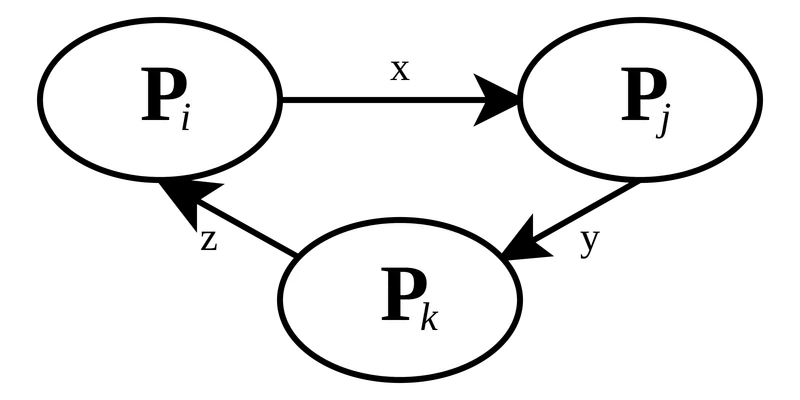
The classic application example is two requests transferring money in opposite directions:
-- Session A                               -- Session B
START TRANSACTION;                          START TRANSACTION;
UPDATE accounts SET balance = balance - 100
 WHERE id = 1;                              UPDATE accounts SET balance = balance - 50
                                             WHERE id = 2;
UPDATE accounts SET balance = balance + 100
 WHERE id = 2;   -- waits for B
                                            UPDATE accounts SET balance = balance + 50
                                             WHERE id = 1;   -- cycle: one session gets 1213
The manual's position is calm: deadlocks are not dangerous, just try again. They are a normal outcome of row-level locking under concurrency. The goal is to make them rare and to handle them correctly, not to eliminate them entirely.
Finding the transactions involved
The latest deadlock
SHOW ENGINE INNODB STATUS\G includes a LATEST DETECTED DEADLOCK section with both transactions, the statements they were running, the locks they held and the locks they were waiting for. It only keeps the most recent one. To log every deadlock to the error log while you investigate, enable innodb_print_all_deadlocks, and turn it off again when finished.
Locks being waited on right now
The Performance Schema exposes current locks in performance_schema.data_locks (held and requested locks, with LOCK_STATUS of GRANTED or WAITING) and performance_schema.data_lock_waits (which request is blocked by which held lock). These tables need no configuration. A query that shows who is blocking whom:
SELECT
  w.REQUESTING_ENGINE_TRANSACTION_ID AS waiting_trx,
  w.BLOCKING_ENGINE_TRANSACTION_ID   AS blocking_trx,
  bl.OBJECT_SCHEMA, bl.OBJECT_NAME, bl.INDEX_NAME,
  bl.LOCK_MODE, bl.LOCK_DATA
FROM performance_schema.data_lock_waits AS w
JOIN performance_schema.data_locks AS bl
  ON bl.ENGINE_LOCK_ID = w.BLOCKING_ENGINE_LOCK_ID;
Join the transaction IDs to TRX_ID in information_schema.INNODB_TRX (which needs the PROCESS privilege) to see each transaction's state, TRX_STARTED time, MySQL thread ID and current statement. A blocking transaction that started minutes ago and is idle is usually an application bug: an open transaction around slow, non-database work.
Reducing deadlocks and lock waits
The manual's recommendations, in the order that usually pays off most for web applications:
- Keep transactions small and short. Do HTTP calls, file uploads, email and heavy computation before
START TRANSACTIONor afterCOMMIT, never in between. Commit as soon as a related set of changes is made. - Access rows and tables in a consistent order. In the transfer example, always update the lower account ID first. When every code path locks in the same order, transactions queue instead of deadlocking. Centralising each multi-statement operation in one function or service helps enforce this.
- Add well-chosen indexes. A statement that can find its rows through an index scans and locks fewer records. Use
EXPLAINon everyUPDATEandDELETEin a hot path; a full scan there locks the whole table's worth of records under REPEATABLE READ. - Use fewer locking reads. If a
SELECTcan work from a snapshot, do not addFOR UPDATEorFOR SHARE. - Consider READ COMMITTED. The manual suggests it for workloads that use locking reads, because it avoids most gap locking. Note that with READ COMMITTED only row-based binary logging is supported (row-based is the default in current releases).
- As a last resort, serialise.
LOCK TABLES, or a single-row "semaphore" table every transaction updates first, removes deadlocks at the cost of concurrency.
Raising innodb_lock_wait_timeout is not on this list. It only makes users wait longer before the same failure.
Job queues: SKIP LOCKED and NOWAIT
A table used as a job queue is a common source of contention: several workers all try to lock the same "next pending" row. Locking reads accept two options for this. NOWAIT fails immediately (error 3572) if a row is locked. SKIP LOCKED silently leaves locked rows out of the result, so each worker takes a different job:
START TRANSACTION;

SELECT id, payload
FROM jobs
WHERE state = 'pending'
ORDER BY id
LIMIT 10
FOR UPDATE SKIP LOCKED;

-- mark the selected ids as 'running', then COMMIT
The manual is clear about the trade-off: SKIP LOCKED returns an inconsistent view of the data and is not suitable for general transactional work. Use it for queue-like tables only, and index the columns in the WHERE and ORDER BY (here (state, id)) so workers do not scan and lock their way through finished jobs. Both options make statements unsafe for statement-based replication.
Retry logic in the application
Because deadlocks are expected, every transaction that writes should be retryable as a unit. The pattern is: run the whole transaction in a function; on error 1213 (or 1205), roll back, wait briefly with some randomness, and run the whole function again, up to a small limit. Here is a minimal version for PHP's PDO with exceptions enabled:
<?php
function withTransactionRetry(PDO $pdo, callable $work, int $maxAttempts = 3): mixed
{
    for ($attempt = 1; ; $attempt++) {
        $pdo->beginTransaction();
        try {
            $result = $work($pdo);
            $pdo->commit();
            return $result;
        } catch (PDOException $e) {
            if ($pdo->inTransaction()) {
                $pdo->rollBack();
            }
            $mysqlCode = $e->errorInfo[1] ?? null;   // 1213 deadlock, 1205 lock wait timeout
            $retryable = in_array($mysqlCode, [1213, 1205], true);
            if (!$retryable || $attempt >= $maxAttempts) {
                throw $e;
            }
            usleep(random_int(20_000, 100_000) * $attempt);  // 20-100 ms, growing
        }
    }
}
Three rules make retries safe. Retry the whole transaction, never a single statement. Keep side effects such as sending email outside the retried function, or make them idempotent. And log every retry with the statement involved, so a rising deadlock rate shows up in monitoring rather than in support tickets.
Troubleshooting checklist
- Does the error handler roll back the transaction after 1205, not just the statement?
- Is there retry logic for 1213 around the whole transaction?
- Does any transaction stay open across a network call or user think-time?
- Do
UPDATEandDELETEstatements in hot paths use an index (check withEXPLAIN)? - Do all code paths that touch the same rows lock them in the same order?
- Are locking reads necessary, or would a snapshot read do?
- Would READ COMMITTED suit this workload, and is binary logging row-based?
- Are queue tables using
SKIP LOCKEDwith a supporting index?
Summary
Lock wait timeouts point to long-held locks; deadlocks point to inconsistent lock order or over-broad locking. Find the culprits with SHOW ENGINE INNODB STATUS and the Performance Schema lock tables, then shorten transactions, order your writes, index your WHERE clauses and retry deadlock victims as whole transactions. Those four habits remove most concurrency incidents without touching a single server setting.
Frequently asked questions
Should I increase innodb_lock_wait_timeout?
Rarely. The default is 50 seconds. A longer timeout only delays the failure; find and shorten the transaction holding the lock instead.
Does a lock wait timeout roll back my transaction?
Not by default. Only the failed statement is rolled back unless
innodb_rollback_on_timeoutis enabled, so your code should roll back the transaction itself.Is a deadlock a sign of a MySQL bug?
No. Deadlocks are a normal result of row-level locking under concurrency. InnoDB detects them and rolls back one transaction; your application should retry it.
When should I use SKIP LOCKED?
For queue-like tables where several workers pick jobs. It skips rows other transactions have locked, so it gives an inconsistent view and should not be used for general transactional logic.
Your next customer could start right here.
Introduce your tool, product or business to readers exploring technology.
Explore placements and request a private quote
Sources
- MySQL 9.7 Reference Manual: Transaction Isolation Levels — Oracle (MySQL documentation)
- MySQL 9.7 Reference Manual: Locking Reads — Oracle (MySQL documentation)
- MySQL 9.7 Reference Manual: Deadlocks in InnoDB — Oracle (MySQL documentation)
- MySQL 9.7 Reference Manual: How to Minimize and Handle Deadlocks — Oracle (MySQL documentation)
- MySQL 9.7 Reference Manual: InnoDB Startup Options and System Variables — Oracle (MySQL documentation)
- MySQL 9.7 Reference Manual: The data_locks Table — Oracle (MySQL documentation)
- MySQL 9.7 Reference Manual: The data_lock_waits Table — Oracle (MySQL documentation)
- MySQL 9.7 Error Reference: Server Error Message Reference — Oracle (MySQL documentation)
Written with substantial AI assistance. Facts checked against cited sources. Editorial policy.
Comments
No comments yet. Be the first to join the conversation.
Leave a comment
Every comment is read by a moderator before it appears. Your email address is never published; it is used only to contact you about this comment.
More from Cloudsoft Zone

ComparisonMySQL
MySQL 8.4 LTS, 9.7 LTS or 26.7 Innovation: choosing a version and upgrading
MySQL now ships LTS and Innovation releases with calendar version numbers. Compare 8.4 LTS, 9.7 LTS and 26.7 Innovation, see the supported upgrade paths, and follow a checklist for moving an application from 8.4 to 9.7.
By Cloudsoft Zone

Resource guideWordPress
WordPress security hardening checklist for 2026 (WordPress 7.1)
A practical WordPress 7.1 hardening checklist based on the official handbook: updates, two-step logins, wp-config.php constants, file permissions, database privileges, firewalls, WP-CLI checksum checks and tested backups.
By Cloudsoft Zone

Troubleshooting guideCodeIgniter
CodeIgniter 4 validation not working? 9 causes and fixes
Fix CodeIgniter 4 validation problems fast: wrong input source, lost errors after redirect, permit_empty, strict JSON rules, is_unique placeholders and more.
By Cloudsoft Zone