
Laravel Reverb vs Pusher and Ably: choosing WebSockets in 2026
Self-hosted Laravel Reverb, Reverb on Laravel Cloud, Pusher or Ably: a tested broadcast example, scaling limits, presence caps and a cost model with real prices.
Updated 11 min read
In this article
For most Laravel applications with a few thousand simultaneous users in one region, self-hosted Laravel Reverb is the cheapest real-time option and needs no code changes if you later move to a hosted service. Pusher Channels and Ably earn their price when you need several regions, contractual uptime, mobile or IoT clients outside Laravel, or message history. This guide compares the four realistic choices (self-hosted Reverb, Reverb on Laravel Cloud, Pusher and Ably) on cost, scaling, presence and operations, with a tested broadcast example and a cost model you can rerun with your own numbers.
Tested with: Laravel 13.32.0, laravel/reverb 1.11.1, PHP 8.5.7 and a Node.js 24 Pusher-protocol client, on a scratch app. Prices are from the vendors' own pricing pages at the time of writing, in US dollars.
What you are actually choosing between
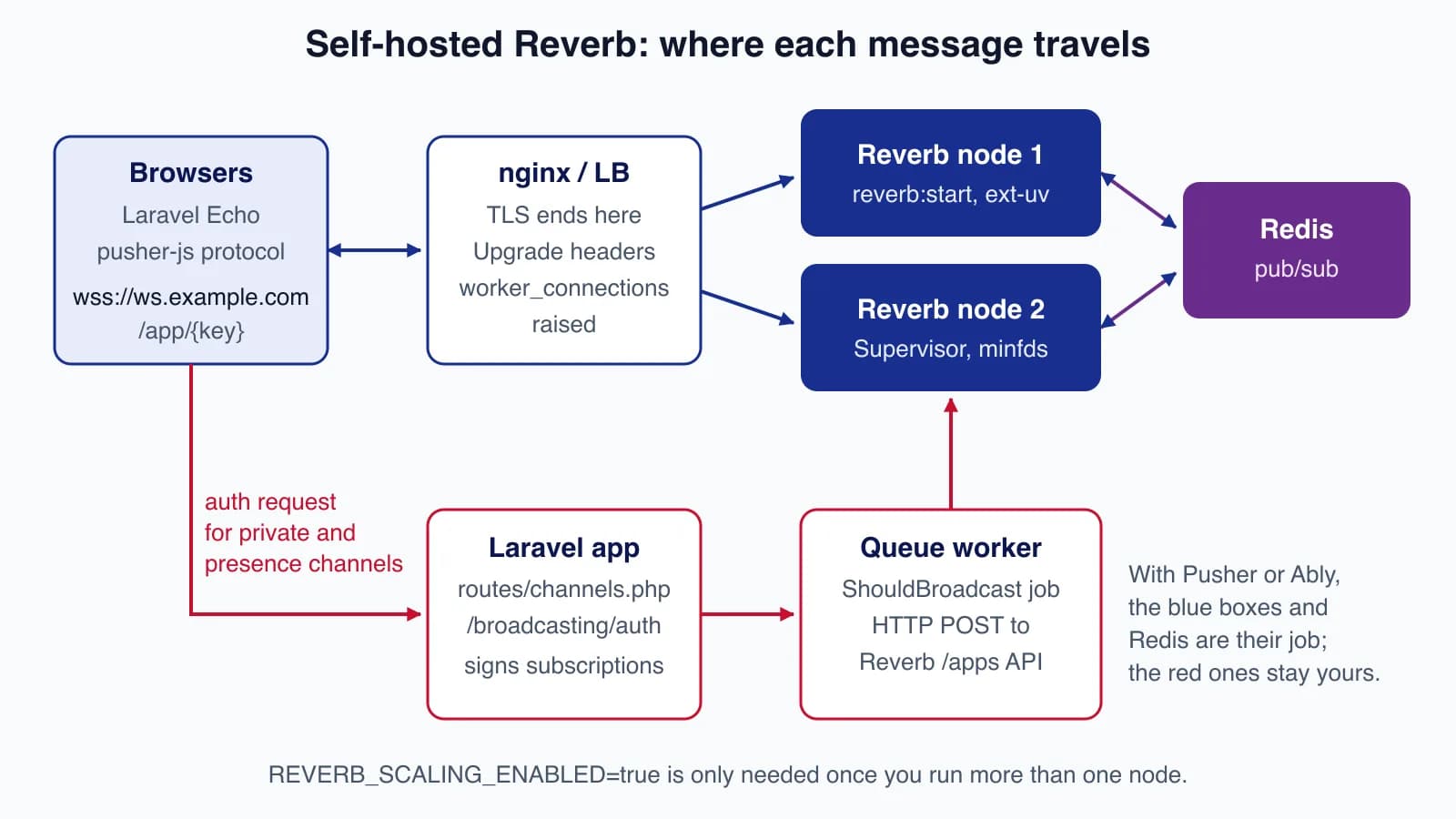
Laravel's broadcasting layer hides the transport. Your events implement ShouldBroadcast, channel authorisation lives in routes/channels.php, and the browser listens with Laravel Echo. The broadcasting documentation lists four server-side drivers: Reverb, Pusher Channels, Ably and Mercure. Reverb, Pusher and Ably all speak the Pusher protocol to the browser (Ably through its Pusher protocol adapter), so switching between them is mostly a change of environment variables.
| Self-hosted Reverb | Reverb on Laravel Cloud | Pusher Channels | Ably | |
|---|---|---|---|---|
| Who runs the servers | You | Laravel | Pusher | Ably |
| Pricing model | Your VPS and Redis | Fixed tier by concurrent connections | Fixed tier by connections and messages per day | Base fee plus messages, connection minutes and channel minutes |
| Entry price | About $12/month (one small VPS) | $5/month for 100 connections | Free for 100 connections; $49/month for 500 | Free for 200 connections; $29/month base |
| Presence channel limit | None built in | Not published separately | 100 members per channel | 200 (Free) to 20,000 (Enterprise) members |
| Message size | 10,000 bytes by default (configurable) | 10 KB | 10 KB | 64 KiB (Free, Standard), 256 KiB (Pro) |
| Regions | Wherever you deploy | The cluster's region | One cluster per app | Global edge network |
The figures come from Pusher's pricing page, Ably's pricing page, the Laravel Cloud pricing documentation and Reverb's own config/reverb.php.
A tested broadcast on Reverb
The example is a shipment status update for a multi-tenant operations dashboard: one private channel per account, plus a presence channel showing which dispatchers are online.
composer require laravel/reverb
php artisan install:broadcasting --reverb
The event broadcasts on a private channel, uses a short event name and sends only IDs and state:
<?php

namespace App\Events;

use Illuminate\Broadcasting\InteractsWithSockets;
use Illuminate\Broadcasting\PrivateChannel;
use Illuminate\Contracts\Broadcasting\ShouldBroadcast;
use Illuminate\Foundation\Events\Dispatchable;
use Illuminate\Queue\SerializesModels;

class ShipmentStatusUpdated implements ShouldBroadcast
{
    use Dispatchable, InteractsWithSockets, SerializesModels;

    public function __construct(
        public int $shipmentId,
        public int $accountId,
        public string $status,
    ) {}

    public function broadcastOn(): array
    {
        return [new PrivateChannel("accounts.{$this->accountId}.shipments")];
    }

    public function broadcastAs(): string
    {
        return 'shipment.status';
    }

    /** Keep the payload small: ids and state, never the whole model. */
    public function broadcastWith(): array
    {
        return ['id' => $this->shipmentId, 'status' => $this->status];
    }
}
The authorisation callbacks decide who may subscribe. A presence callback returns the member data other subscribers will see, so keep it to an ID and a display name:
<?php

use App\Models\User;
use Illuminate\Support\Facades\Broadcast;

Broadcast::channel('accounts.{accountId}.shipments', function (User $user, int $accountId) {
    return (int) $user->account_id === $accountId;
});

Broadcast::channel('accounts.{accountId}.dispatch-room', function (User $user, int $accountId) {
    if ((int) $user->account_id !== $accountId) {
        return false;
    }

    return ['id' => $user->id, 'name' => $user->name];
});
In the browser, listen with a leading dot because the event uses a custom broadcastAs name:
window.Echo.private(`accounts.${accountId}.shipments`)
    .listen('.shipment.status', (e) => updateRow(e.id, e.status));

window.Echo.join(`accounts.${accountId}.dispatch-room`)
    .here((users) => setOnline(users))
    .joining((user) => addOnline(user))
    .leaving((user) => removeOnline(user));
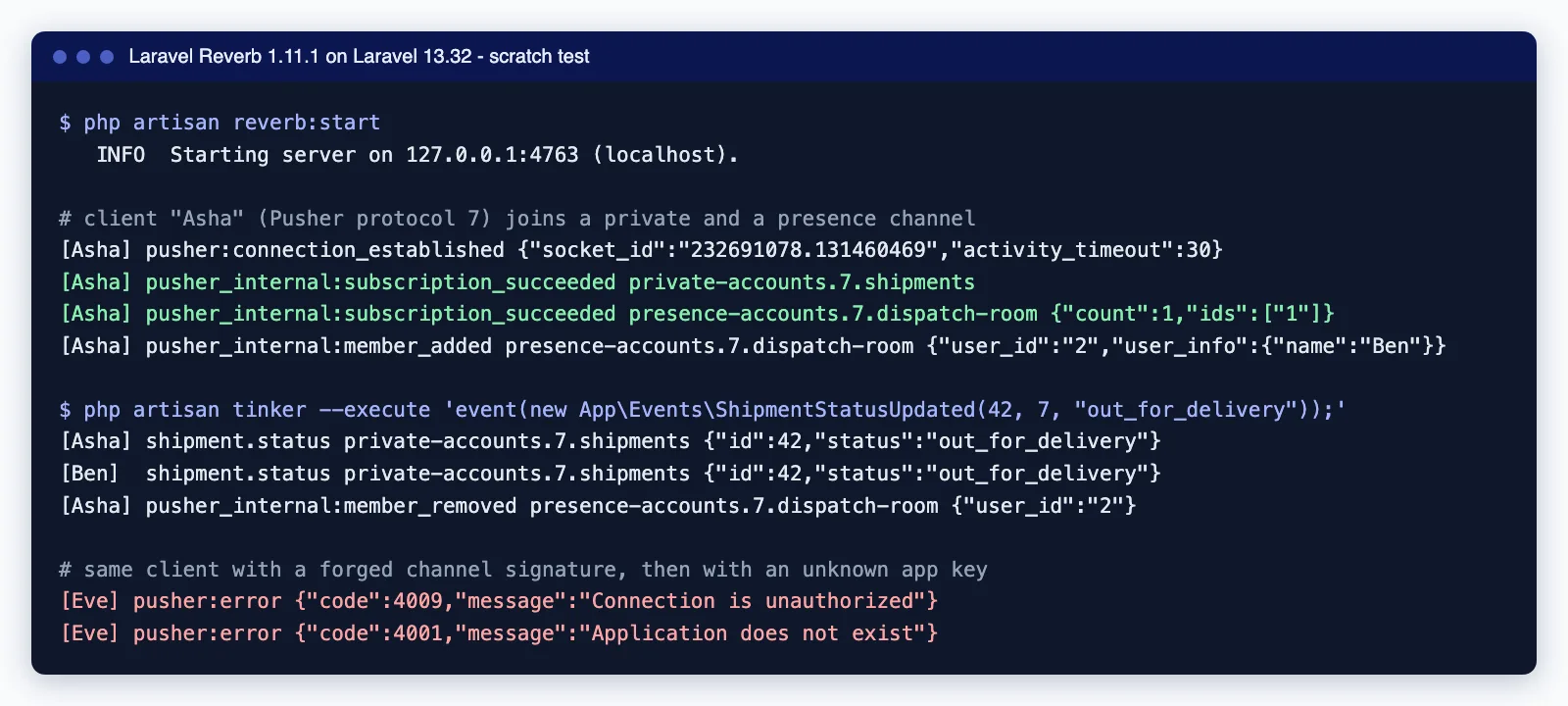
To check the server side without a front end, we connected two Node.js 24 clients that speak the Pusher protocol directly, signed their subscriptions the way /broadcasting/auth does, and fired the event from Tinker. Both clients received it, the presence channel reported joins and leaves, and a client with a forged signature was refused with error 4009.
Two errors we hit
Failed to create broadcaster for connection "reverb" ... Pusher\Pusher::__construct(): Argument #1 ($auth_key) must be of type string, null given..envalready hadBROADCAST_CONNECTION=reverbbut noREVERB_APP_KEYyet, so every Artisan command that touched broadcasting failed, includingreverb:install. SettingBROADCAST_CONNECTION=log, runningphp artisan reverb:install, then switching back fixed it. The same error appears in production when a deploy forgets theREVERB_*variables.Failed to listen on "tcp://127.0.0.1:8080": Address already in use. Another process held the port. SetREVERB_SERVER_PORT(where Reverb listens) separately fromREVERB_PORT(where Laravel and the browser connect, usually 443 behind nginx).
Running Reverb in production
Reverb is a long-running ReactPHP process, not a request handler, so it needs its own supervision and operating system limits. The production section of the Reverb docs covers each item below.
# .env on the Reverb host
REVERB_SERVER_HOST=0.0.0.0
REVERB_SERVER_PORT=8080
REVERB_HOST=ws.example.com
REVERB_PORT=443
REVERB_SCHEME=https

# /etc/supervisor/conf.d/reverb.conf
[program:reverb]
command=php /var/www/app/artisan reverb:start
autostart=true
autorestart=true
user=deploy
stopwaitsecs=30
minfds=10000- Open files. Every connection is a file descriptor. Raise
nofilein/etc/security/limits.conf, Supervisor'sminfds, and nginx'sworker_rlimit_nofileandworker_connectionstogether, or the lowest of them becomes your limit. - Event loop. The default
stream_selectloop is typically limited to 1,024 open files. Above about 1,000 connections install theuvextension (pecl install uv); Reverb switches to it automatically. - Proxy paths. Reverb accepts WebSocket connections at
/appand API requests at/apps; your nginx location must forward both with theUpgradeandConnectionheaders. - Deploys. Reverb does not reload code. Run
php artisan reverb:restartafter each deploy; it closes connections gracefully and Supervisor starts a fresh process. Echo clients reconnect on their own. - Monitoring. Add the
ReverbConnectionsandReverbMessagesrecorders to Laravel Pulse and runpulse:checkon one Reverb server.
Security settings worth changing
The generated config/reverb.php sets 'allowed_origins' => ['*'] and leaves rate limiting off. Restrict origins to your own domains, set REVERB_APP_MAX_CONNECTIONS so one tenant's runaway tab cannot exhaust the server, and enable REVERB_APP_RATE_LIMITING_ENABLED if clients can send whispers. accept_client_events_from defaults to members; set it to none if you do not use typing indicators or other client events. The app secret signs every private and presence subscription, so treat it like a password and keep it out of front-end builds (only VITE_REVERB_APP_KEY belongs there).
Scaling Reverb past one server
One well-tuned server handles thousands of idle dashboard connections, and the documented port range alone allows about 28,000. When you need more, or want a second node for resilience, set REVERB_SCALING_ENABLED=true, point every Reverb node at the same Redis server and put them behind a load balancer. A message arriving at one node is published through Redis pub/sub to the others.
Three things to know before you rely on it:
- Redis becomes part of the real-time path. If it is down, nodes stop seeing each other's messages, so use a managed or replicated Redis or Valkey.
- Read the Reverb changelog for scaling fixes. Version 1.11.0, for example, fixed
toOthers()when the sender and receiver were connected to different servers. Test presence channels andtoOthers()with two nodes before launch, not only on a laptop. - Reverb has no cross-region replication. Two regions means two clusters and your own routing.
Pusher and Ably: what you get for the money
Pusher Channels sells fixed tiers: Sandbox (free, 100 connections, 200,000 messages a day), Startup ($49, 500 connections, 1 million a day), Pro ($99, 2,000 and 4 million), Business ($299, 5,000 and 10 million) and larger plans up to Growth Plus ($1,199, 30,000 connections). Two limits shape designs: presence channels hold at most 100 members with 1 KB of user data each, and messages are capped at 10 KB. Pusher counts every delivery, so one event sent to 50 subscribers counts as 51 messages. The daily allowance resets at midnight UTC.
Ably charges a base package plus usage. Free covers 200 connections and 6 million messages a month. Standard is $29 a month plus $2.50 per million messages, $1.00 per million connection minutes and $1.00 per million channel minutes, with up to 10,000 connections. Pro is $399 a month plus usage, with 50,000 connections and 256 KiB messages. Ably also counts each delivery: a publish to 10 subscribers is 11 messages. In return you get a global edge network, message history, SDKs for many platforms and larger presence sets. Laravel connects to Ably through the ably broadcast driver, and Echo talks to it via the Pusher protocol adapter, which you must enable in the Ably dashboard.
Laravel Cloud runs managed Reverb clusters priced by maximum concurrent connections: $5 a month for 100, $10 for 200, $25 for 500, $100 for 2,000 and $200 for 5,000, with daily message allowances from 200,000 to 16 million and a 10 KB message limit. It suits teams already hosting on Laravel Cloud who want Reverb without running it.
A cost model you can rerun
Assume an operations dashboard used in business hours: 1,500 concurrent connections for 10 hours a day on 22 working days, 20,000 events published a day, each delivered to 20 subscribers on average, and about 300 active account channels.
- Messages a day = 20,000 publishes + 20,000 × 20 deliveries = 420,000; a month = 420,000 × 22 = 9.24 million.
- Connection minutes a month = 1,500 × 600 × 22 = 19.8 million.
- Channel minutes a month = 300 × 600 × 22 = 3.96 million.
| Option | Arithmetic | Monthly cost |
|---|---|---|
| Self-hosted Reverb, one node | DigitalOcean 2 GiB Basic Droplet | $12 + your time |
| Self-hosted Reverb, two nodes | 2 × $12 Droplets + $15 managed Valkey + $12 load balancer | $51 + your time |
| Laravel Cloud WebSockets | 2,000-connection tier (8 million messages a day) | $100 |
| Pusher Channels | Pro tier (2,000 connections, 4 million a day); Startup's 500 connections are too few | $99 |
| Ably Standard | $29 + 9.24 × $2.50 + 19.8 × $1.00 + 3.96 × $1.00 = 29 + 23.10 + 19.80 + 3.96 | $75.86 |
At this size the gap is small; the real difference is who gets paged at 3 a.m. Self-hosting pulls ahead as connections grow, because a VPS does not charge per message. The hosted services pull ahead when you add a second region, need an uptime SLA, or have nobody to run Redis and Supervisor. Remember that presence events count as messages on both Pusher and Ably, so a chatty presence channel changes the sums.
When to choose which
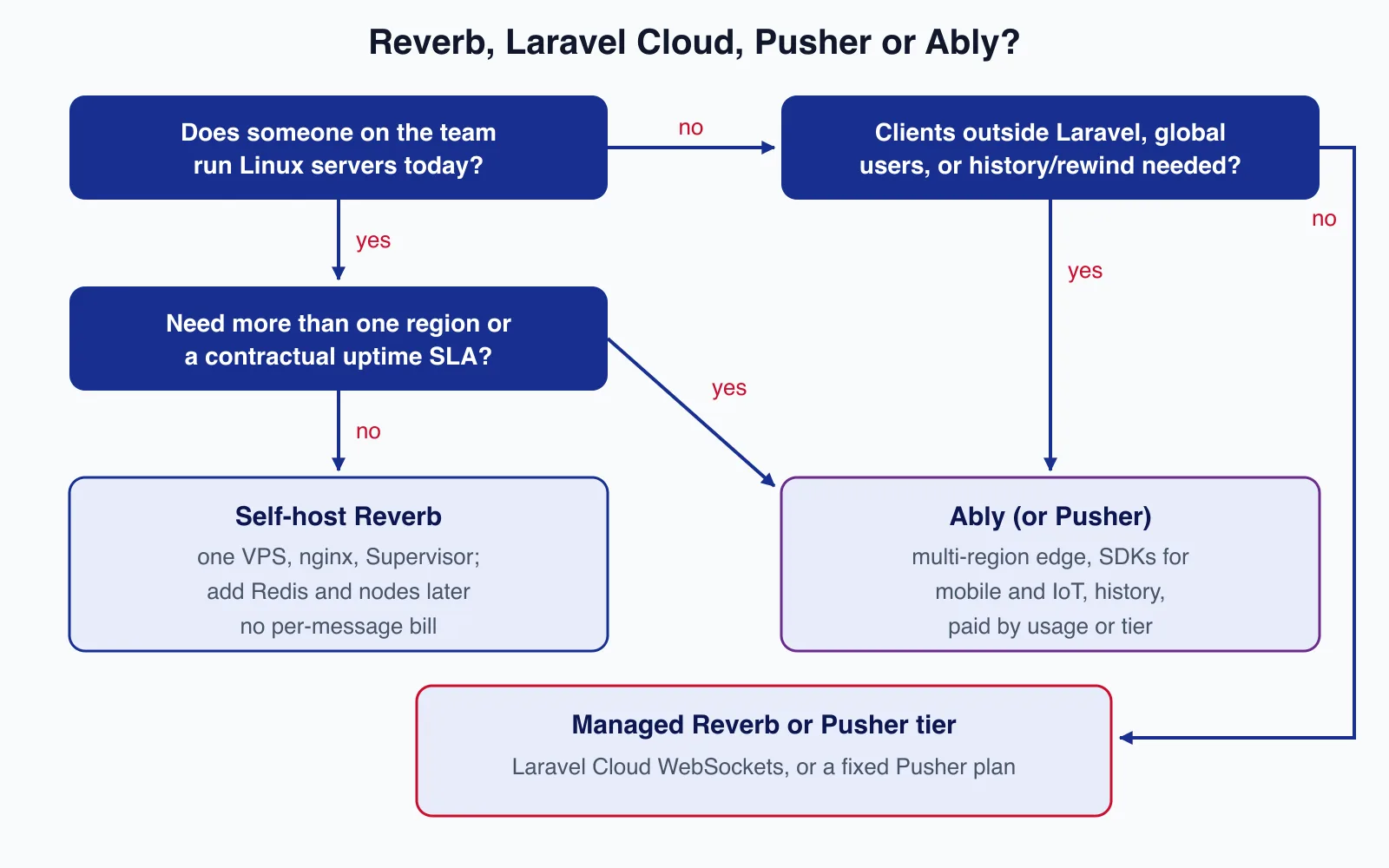
- Self-host Reverb when someone already runs your Linux servers, users are mostly in one region, and you want flat costs. Start with one node and add Redis-backed scaling when you need it.
- Reverb on Laravel Cloud when the app already lives on Laravel Cloud and you would rather pay per connection tier than maintain Supervisor and kernel limits.
- Pusher when you want a fixed monthly price, small presence rooms and a service many libraries already support.
- Ably when users are spread across continents, native mobile or IoT clients publish too, or you need message history and large presence sets.
If you are unsure which applies, a review of your expected connections and traffic usually settles it. Cloudsoft Zone's Laravel team can size and set up the option that fits before you commit to a plan.
Common mistakes
- Broadcasting whole models. A serialised order with relations can exceed the 10 KB limit, and every subscriber receives every field. Send IDs and state, and let the client fetch details through your API.
- Trusting the channel name. Authorise every private and presence channel against the user's tenant, as in the example; never accept a channel just because the client asked for it.
- Forgetting the queue.
ShouldBroadcastevents wait for a queue worker. If updates arrive minutes late, check the worker before blaming Reverb, or useShouldBroadcastNowfor the few events that must skip the queue. - Using presence channels as a user list. Pusher caps them at 100 members. For a 2,000-person event lobby, keep counts on the server and broadcast totals instead.
- Treating WebSockets as delivery guarantees. A client that is offline misses the message. Reload state from the API when Echo reconnects.
When not to use WebSockets at all
If updates are rare and a few seconds' delay is fine, polling every 15 to 30 seconds is simpler, cacheable and needs no new server. If only the server ever sends data, server-sent events or the Mercure driver may be enough. Real-time infrastructure is worth it for live dashboards, chat, collaborative editing and dispatch screens, not for a report that changes twice a day.
For more on running Laravel in production, see our Laravel 13 production deployment checklist and the Horizon queue setup guide, since queued broadcasts depend on healthy workers.
Need live dashboards, notifications or chat added to a Laravel application, with hosting sized to your traffic? Cloudsoft Zone builds and maintains Laravel applications for small teams, including Reverb or hosted WebSocket set-up, tuning and monitoring.
Frequently asked questions
Is Laravel Reverb free?
Yes. Reverb is an open-source, MIT-licensed Composer package. You pay only for the servers it runs on, or for a Laravel Cloud WebSocket cluster if you want it managed.
Can I switch from Pusher to Reverb without changing my code?
Usually yes. Reverb speaks the Pusher protocol, so events, channel callbacks and Echo listeners stay the same. You change
BROADCAST_CONNECTION, add theREVERB_*variables and switch Echo'sbroadcastertoreverbwith your host and port.How many connections can one Reverb server handle?
It depends on memory, message volume and limits you set. Without the
uvextension the default event loop is typically limited to 1,024 open files; with it, the operating system's file and port limits become the ceiling. Load-test with your own traffic before sizing.Do presence channel events count towards Pusher and Ably message limits?
Yes. Pusher counts presence join and leave events, and Ably counts presence enter, leave and update messages plus each delivery to presence subscribers. Large, busy presence channels can cost more than your application events.
Does Reverb support multiple regions?
Not on its own. Horizontal scaling uses one Redis server shared by nodes in a single location. For several regions you run separate clusters and route users yourself, or use a hosted service with a global network such as Ably.
Your next customer could start right here.
Introduce your tool, product or business to readers exploring technology.
Explore placements and request a private quote
Sources
- Laravel Reverb documentation (13.x) — Laravel
- Broadcasting documentation (13.x) — Laravel
- laravel/reverb releases — GitHub, 2026-08-06
- Laravel Cloud pricing: Laravel Reverb — Laravel
- Pusher Channels pricing — Pusher
- Presence channels (limits) — Pusher
- How is my message count calculated in Channels? — Pusher (Bird)
- Ably pricing — Ably
- Ably message counting — Ably
- Droplet pricing — DigitalOcean
Written with substantial AI assistance. Facts checked against cited sources. Editorial policy.
Comments
No comments yet. Be the first to join the conversation.
Leave a comment
Every comment is read by a moderator before it appears. Your email address is never published; it is used only to contact you about this comment.
More from Cloudsoft Zone

Laravel
Upgrading from Laravel 12 to Laravel 13: a practical guide
Laravel 12 lost bug-fix support in August 2026. This guide covers the PHP 8.3 requirement, Composer changes, the CSRF middleware rename, cache and session hardening, low-impact changes that often bite, and a safe rollout plan.
By Cloudsoft Zone
ComparisonLaravel
Laravel Sanctum vs Passport: which API authentication package to use
Sanctum and Passport both authenticate Laravel APIs, but they solve different problems. This comparison explains tokens, SPA cookies, OAuth2 grants, expiry and clean-up in Laravel 13, and when each package is the right choice.
By Cloudsoft Zone

Resource guideResources
Cron syntax cheat sheet: crontab, GitHub Actions, Kubernetes
Cron syntax with tested expressions, the day-of-week trap, and how time zones and limits differ in crontab, GitHub Actions, Kubernetes and Laravel in 2026.
By Cloudsoft Zone