
Laravel AI SDK vs calling OpenAI, Gemini and Claude APIs directly
The same Laravel task written with laravel/ai and with the Anthropic, OpenAI and Gemini PHP clients: trade-offs, lock-in, missing features, batch costs and testing.
Updated 10 min read
In this article
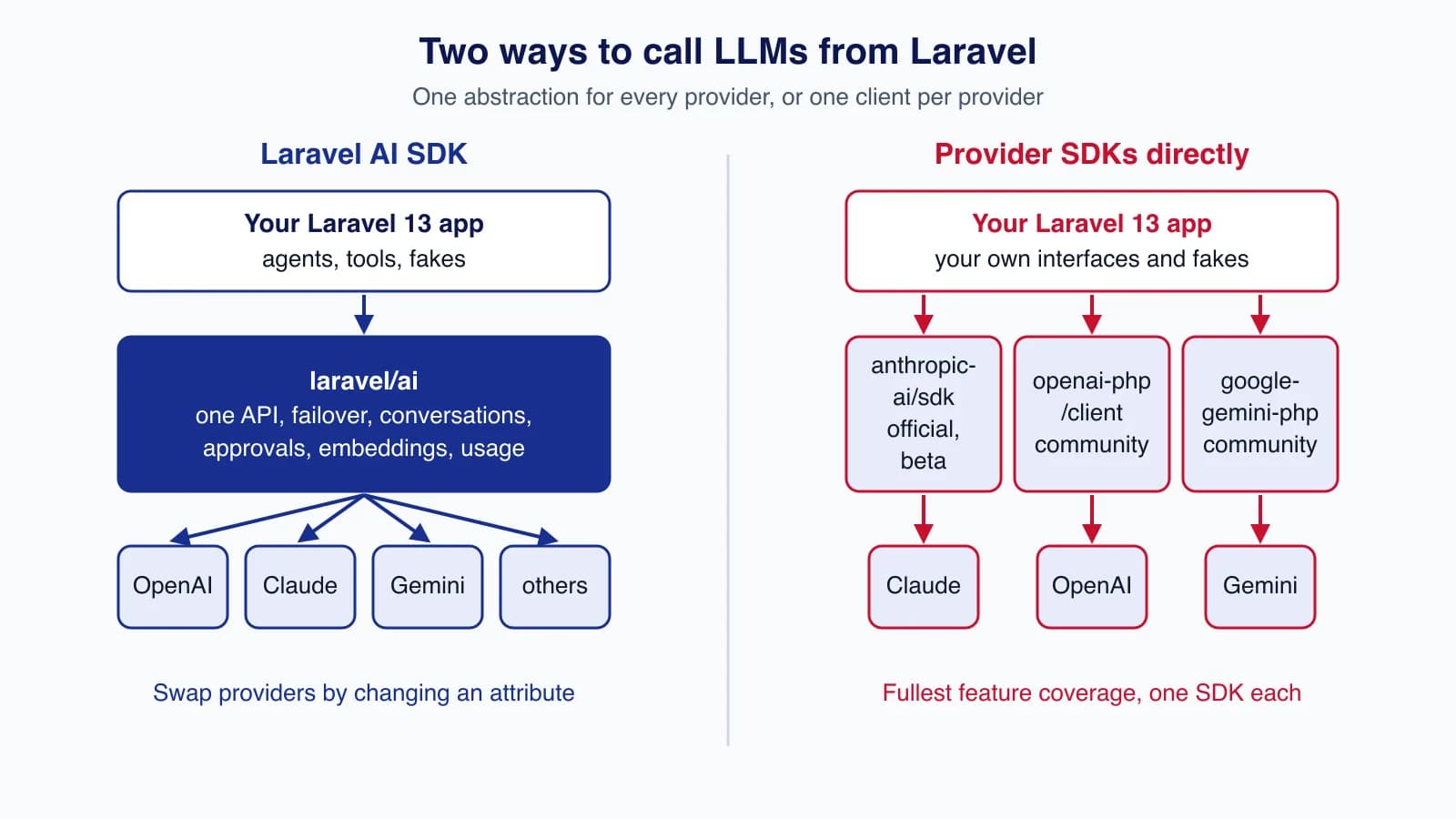
If you are adding AI to a Laravel application in late 2026 you have two realistic options: the first-party Laravel AI SDK (laravel/ai), which reached 1.0 on 23 September, or each provider's own PHP client. The short answer is to use the Laravel AI SDK for agents, tools, chat and anything that may change provider, and to call a provider SDK directly for the jobs that need a feature the abstraction does not cover, above all the half-price batch APIs. This article shows the same task written four ways, compares what each option gives you, and is honest about where the abstraction costs you something.
Tested with: Laravel Framework 13.35.0 and PHP 8.5.7; laravel/ai 1.0.1; anthropic-ai/sdk 0.54.0; openai-php/client 0.21.0; google-gemini-php/client 2.7.4. Each example below ran in a scratch project against that library's fake or a mocked HTTP transport, so the request shapes and parsing are real; no paid API calls were made.
First, what "directly" means in PHP
Only one of the three big providers ships an official PHP SDK. Anthropic lists PHP among its seven official client SDKs; the package is anthropic-ai/sdk, it needs PHP 8.1, and its docs say it "is currently in beta" with a 0.x version, so APIs may change between releases. OpenAI's libraries page lists no official PHP SDK and points to community libraries, including openai-php/client, with the warning that OpenAI "does not verify the correctness or security of these projects". Google's GenAI SDK covers Python, JavaScript, Go, Java and C#; for PHP the usual choice is the community google-gemini-php/client, whose latest release at the time of writing, 2.7.4, dates from December 2025.
So "calling the APIs directly" from PHP usually means one official beta SDK, two community libraries, or Laravel's Http client against the REST endpoints. That matters for maintenance as much as for features.
The same task four ways
The task: classify a support ticket into a category and an urgency, returning JSON that matches a schema. It is small enough to compare line by line and representative of most production uses.
Laravel AI SDK
An anonymous agent with a schema, and a failover list across three providers. Swapping provider is a change to that list, not to your code.
use Illuminate\Contracts\JsonSchema\JsonSchema;
use Laravel\Ai\Enums\Lab;
use function Laravel\Ai\agent;

$triage = agent(
    instructions: 'Classify the support ticket.',
    schema: fn (JsonSchema $schema) => [
        'category' => $schema->string()->enum(['billing', 'bug', 'how_to', 'account'])->required(),
        'urgency' => $schema->string()->enum(['low', 'normal', 'urgent'])->required(),
    ],
)->prompt($ticketText, provider: [
    Lab::Anthropic->value => 'claude-sonnet-5-5',
    Lab::OpenAI->value => 'gpt-6.1-sol',
    Lab::Gemini->value => 'gemini-3.8-flash',
]);

$triage['category']; // 'billing'
Anthropic PHP SDK (official, beta)
The SDK builds the JSON schema from a PHP class and returns a typed object. Unsupported constraints such as minimum or maxLength are moved into the description and, according to the SDK's own example, validated on the SDK side. Backed PHP enums as property types were not accepted by 0.54.0 in our test; the #[Required(enum: [...])] attribute is the supported route.
use Anthropic\Core\Attributes\Required;
use Anthropic\Lib\Concerns\StructuredOutputModelTrait;
use Anthropic\Lib\Contracts\StructuredOutputModel;

class TicketTriage implements StructuredOutputModel
{
    use StructuredOutputModelTrait;

    #[Required(enum: ['billing', 'bug', 'how_to', 'account'])]
    public string $category;

    #[Required(enum: ['low', 'normal', 'urgent'])]
    public string $urgency;
}

$client = new Anthropic\Client(apiKey: config('services.anthropic.key'));

$message = $client->messages->create(
    maxTokens: 300,
    model: 'claude-sonnet-5-5',
    system: 'Classify the support ticket.',
    messages: [['role' => 'user', 'content' => $ticketText]],
    outputConfig: ['format' => TicketTriage::class],
);

$triage = $message->parsedOutput(); // TicketTriage instance
OpenAI with openai-php/client (community)
The Responses API takes the schema in text.format with strict: true, and you decode outputText yourself.
$client = OpenAI::client(config('services.openai.key'));
$response = $client->responses()->create([
    'model' => 'gpt-6.1-sol',
    'instructions' => 'Classify the support ticket.',
    'input' => $ticketText,
    'max_output_tokens' => 300,
    'text' => ['format' => [
        'type' => 'json_schema',
        'name' => 'ticket_triage',
        'strict' => true,
        'schema' => [
            'type' => 'object',
            'properties' => [
                'category' => ['type' => 'string', 'enum' => ['billing', 'bug', 'how_to', 'account']],
                'urgency' => ['type' => 'string', 'enum' => ['low', 'normal', 'urgent']],
            ],
            'required' => ['category', 'urgency'],
            'additionalProperties' => false,
        ],
    ]],
]);

$triage = json_decode($response->outputText, true, flags: JSON_THROW_ON_ERROR);
Gemini with google-gemini-php/client (community)
Gemini uses responseMimeType and responseSchema in the generation config; the client's json() helper decodes the reply.
$client = Gemini::client(config('services.gemini.key'));
$result = $client
    ->generativeModel(model: 'gemini-3.8-flash')
    ->withSystemInstruction(Content::parse('Classify the support ticket.'))
    ->withGenerationConfig(new GenerationConfig(
        maxOutputTokens: 300,
        responseMimeType: ResponseMimeType::APPLICATION_JSON,
        responseSchema: new Schema(
            type: DataType::OBJECT,
            properties: [
                'category' => new Schema(type: DataType::STRING, enum: ['billing', 'bug', 'how_to', 'account']),
                'urgency' => new Schema(type: DataType::STRING, enum: ['low', 'normal', 'urgent']),
            ],
            required: ['category', 'urgency'],
        ),
    ))
    ->generateContent($ticketText);

$triage = $result->json(associative: true);
The direct versions are not much longer for one call. The difference appears in everything around the call: three ways to define a schema, three response shapes, three sets of exceptions and retry options, three ways to fake responses in tests, and three places to read token usage.
Trade-offs at a glance
| Concern | Laravel AI SDK 1.0 | Provider SDKs directly |
|---|---|---|
| Providers | OpenAI, Anthropic, Gemini, Azure, Bedrock, Groq, xAI, DeepSeek, Mistral, Ollama, OpenRouter, OpenAI-compatible | One per library |
| Switching provider | Change #[Provider] and #[Model], re-run evals | Rewrite calls, schemas and parsing |
| Failover on 429 or outage | Built in (a provider list) | Write it yourself |
| Agents, tool loop, approvals | Built in, with stored conversations | Anthropic SDK has a beta tool runner; otherwise your own loop |
| Testing | Agent::fake(), preventStrayPrompts(), fakes for embeddings, images and more | ClientFake in openai-php and gemini-php; a mocked PSR-18 client for Anthropic |
| Batch APIs (50% off) | Not supported in 1.0 | Yes, through the provider SDK or REST endpoint: Anthropic Message Batches, OpenAI Batch, Gemini Batch mode |
| New provider features | After the SDK adds them; providerOptions and $response->raw as escape hatches | As soon as the library adds them (official SDK fastest) |
| Usage reporting | Same inputTokens/outputTokens fields for every provider | Provider-specific fields |
| Framework coupling | Laravel 12 or 13 only | Any PHP 8.1+/8.2+ code |
| Maintenance | Laravel team; frequent releases | Anthropic official beta; OpenAI and Gemini community-maintained |
Errors, retries and streaming
Error handling is where the direct libraries differ most from each other. The Anthropic SDK throws typed exceptions per status code (RateLimitException for 429, APIConnectionException for network errors and so on) and retries connection errors, 408, 409, 429 and 5xx responses twice by default with exponential backoff, configurable through maxRetries. The community OpenAI and Gemini clients have their own exception classes and transport options, so a shared retry policy across all three means writing glue. The Laravel AI SDK normalises failures into its own exceptions and fails over to the next provider in your list only for rate limits, overloaded providers and insufficient credits; a bad request fails immediately, which is the behaviour you want.
Streaming follows the same pattern. Each direct library has its own streaming method (createStream in the Anthropic SDK, createStreamed for OpenAI responses in openai-php, streamGenerateContent in gemini-php), each emitting provider-specific events. The Laravel AI SDK's stream() returns one event format for every provider and can speak the Vercel AI SDK data protocol or the AG-UI protocol, so a React chat component written against useChat keeps working when you change provider. If you run streaming behind Nginx or a proxy, 1.0 also stopped proxies buffering native streamed responses.
Lock-in: you trade one kind for another
Calling a provider directly locks your code to that provider's request and response shapes. Using the Laravel AI SDK removes most of that, but locks you to Laravel and to the package's release cadence. The 1.0 release itself had breaking changes to conversation storage, middleware, usage fields and stream protocols, with a backfill migration, so "abstraction" did not mean "no upgrade work". Neither is free; the question is which change you are more likely to face. Small teams change model providers far more often than they leave Laravel, which is the strongest argument for the SDK.
Prompts and behaviour do not port automatically either way. Claude Sonnet 5.5, for example, rejects a non-default temperature with HTTP 400, and models differ in how they follow instructions and use tools. Whatever you choose, keep an evaluation set and re-run it whenever you change model or provider; our guide to LLM evals shows how.
What provider SDKs give you that the abstraction may not
- Batch processing. Anthropic's Message Batches, OpenAI's Batch API and Gemini's Batch mode all cost about half of synchronous calls; OpenAI's batches complete within 24 hours.
laravel/ai1.0.1 has no batch support. For nightly classification of thousands of records this is the single biggest cost difference. - Day-one features. New tool types, beta headers, realtime and Live APIs, and model-specific controls reach the provider's own SDK first. The Laravel AI SDK covers a lot through
providerOptions, custom headers and provider tools such as web search, file search and code execution, but some features need a release. - Provider-native typing. The Anthropic SDK maps structured output to PHP classes and validates constraints the API cannot enforce. The Laravel AI SDK returns an array, and for Anthropic it moves unsupported constraints into descriptions without validating them, so you validate in your own code.
- Full response detail. Every field the provider returns is typed in its SDK. The Laravel AI SDK exposes the underlying HTTP response as
$response->rawwhen you need something it does not map.
Cost: the libraries are free, the features are not
None of these packages charges a fee; you pay the provider's token prices either way. Cost differences come from which provider features you can use. Batch APIs save about 50% on bulk work, which only the direct SDKs give you today. Prompt caching is supported on both sides: the Laravel AI SDK adds Anthropic cache breakpoints with #[CacheInstructions] and #[CacheToolDefinitions], and OpenAI and Gemini cache repeated prefixes automatically. Failover can also save money indirectly, by letting a job finish on a second provider instead of retrying into a rate limit. For the provider-side levers, see how to cut LLM API costs with model choice, prompt caching and batching.
A practical rule: decide per job
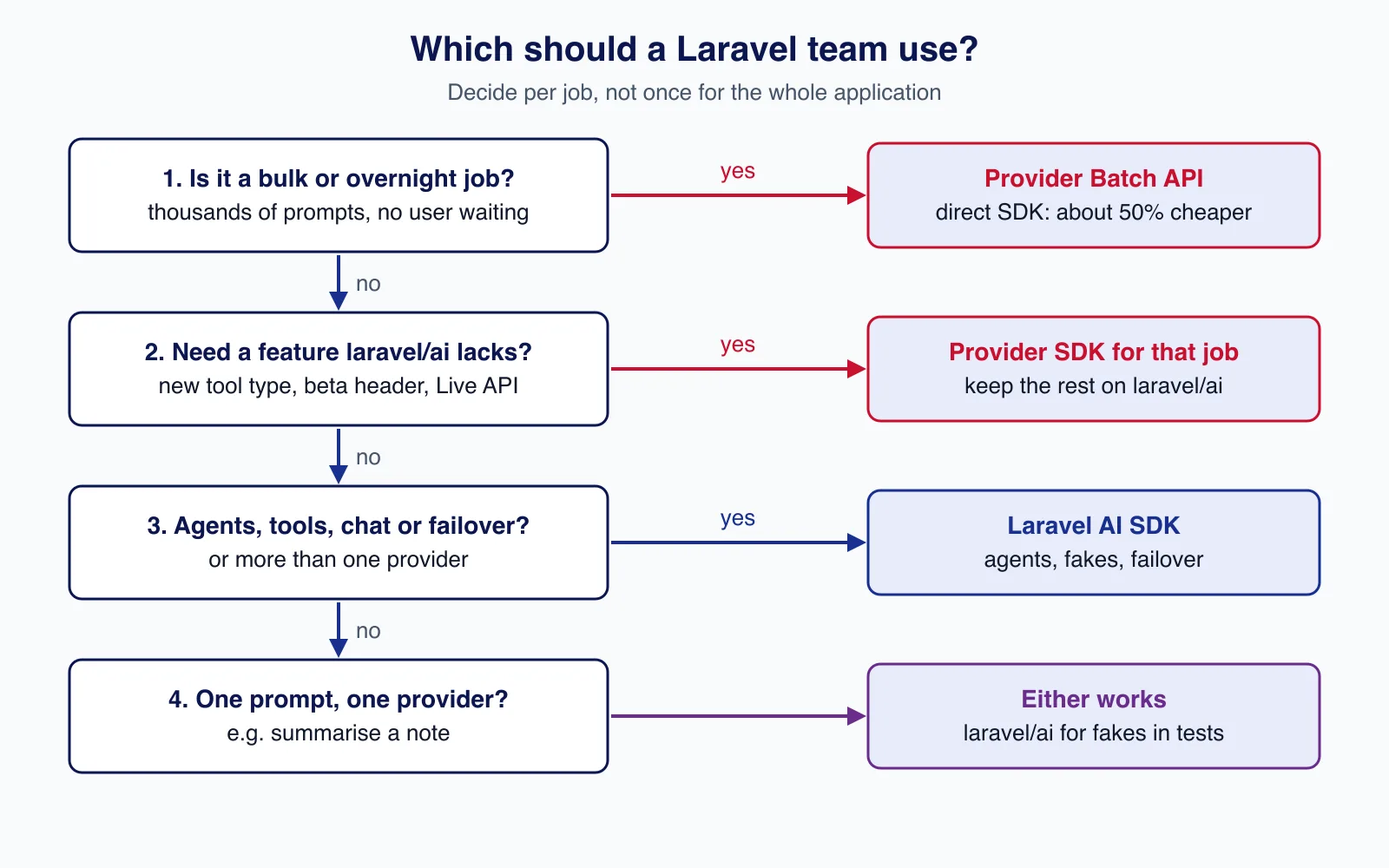
Most applications end up with both. Put the Laravel AI SDK behind the interactive features, such as chat, agents and RAG, where its fakes, failover and conversation storage save the most code. Use a provider SDK for the specific job that needs a batch API or a feature the SDK lacks. Hide each behind a small interface of your own, so the choice can change without touching controllers:
interface TicketClassifier
{
    /** @return array{category: string, urgency: string} */
    public function classify(string $ticket): array;
}

// AppServiceProvider::register()
$this->app->bind(TicketClassifier::class, LaravelAiTicketClassifier::class);
// ...later, for one job only:
// $this->app->bind(TicketClassifier::class, AnthropicBatchTicketClassifier::class);
Mixing approaches is where integrations get messy: two sets of credentials, two retry policies, two places where usage is logged and two kinds of test double. If you are about to wire several AI providers into an existing Laravel codebase, an API integration review that settles those conventions first will save rework later.
Common mistakes
- Assuming a community library is official. Check maintenance activity and pin versions; review changelogs before upgrading.
- Abstracting too early. Writing your own multi-provider layer before you need it duplicates what
laravel/aialready provides. - Abstracting too far. Forcing a bulk job through a synchronous abstraction when a batch API would halve the bill.
- Trusting schema constraints. Whichever library you use, validate enums, ranges and lengths in PHP before storing model output.
- Leaking keys. All three libraries read keys server-side; keep them in
.envor a secrets manager and never pass them to the browser.
When not to use either
If a rule, a regular expression or a database query answers the question, do not call a model at all. If you need a single call to one provider from a small script outside Laravel, Laravel's Http client or plain cURL against the REST endpoint is often enough, with no dependency to maintain.
Cloudsoft Zone designs and builds API integrations for Laravel teams, including AI provider integrations with a single interface, shared retry and logging conventions, and tests that never spend tokens.
Frequently asked questions
Is there an official OpenAI or Gemini SDK for PHP?
Not at the time of writing. OpenAI lists community PHP libraries such as
openai-php/client, and Google's GenAI SDK does not cover PHP. Anthropic does publish an official PHP SDK,anthropic-ai/sdk, currently in beta.Does the Laravel AI SDK support batch APIs?
Not in 1.0.x. For bulk jobs where a 50% discount matters, call the provider's batch API through its SDK or REST endpoint, and keep interactive features on the Laravel AI SDK.
Can I use the Laravel AI SDK and a provider SDK in the same app?
Yes, and many apps should. Put each behind your own small interface, share credentials through
config/services.phporconfig/ai.php, and log usage in one place.Does the Laravel AI SDK cost anything?
No. It is MIT-licensed open source. You pay the providers for tokens exactly as you would when calling them directly.
Your next customer could start right here.
Introduce your tool, product or business to readers exploring technology.
Explore placements and request a private quote
Sources
- Laravel AI SDK documentation (13.x) — Laravel
- Introducing Laravel AI SDK v1.0 — Laravel, 2026-09-23
- Anthropic PHP SDK — Anthropic
- OpenAI libraries — OpenAI
- OpenAI Batch API guide — OpenAI
- Gemini API libraries — Google
- openai-php/client — GitHub, 2026-09-17
- google-gemini-php/client — GitHub, 2025-12-29
Written with substantial AI assistance. Facts checked against cited sources. Editorial policy.
Comments
No comments yet. Be the first to join the conversation.
Leave a comment
Every comment is read by a moderator before it appears. Your email address is never published; it is used only to contact you about this comment.
More from Cloudsoft Zone

Architecture guideAI and Automation
How to build a safe AI content pipeline with human fact review
An architecture for AI-assisted publishing where people stay responsible: untrusted source snapshots, claim checking with citations, a review queue AI cannot skip, labels and rollback.
By Cloudsoft Zone

Industry updateAI and Automation
MCP 2026-07-28 explained: what the stateless protocol means for server builders
The Model Context Protocol revision dated 2026-07-28 removes the initialize handshake and HTTP sessions, adds server/discover and a new round-trip pattern, and moves TypeScript support to new v2 packages. Here is what changed and how to upgrade.
By Cloudsoft Zone

Resource guideAI and Automation
How to cut LLM API costs with model choice, prompt caching and batching
A practical guide to lowering Claude and OpenAI API bills: measure token usage, route tasks to cheaper models, cache repeated prompt prefixes, move non-urgent work to the 50%-off batch APIs, and avoid the mistakes that defeat caching.
By Cloudsoft Zone