
In this article
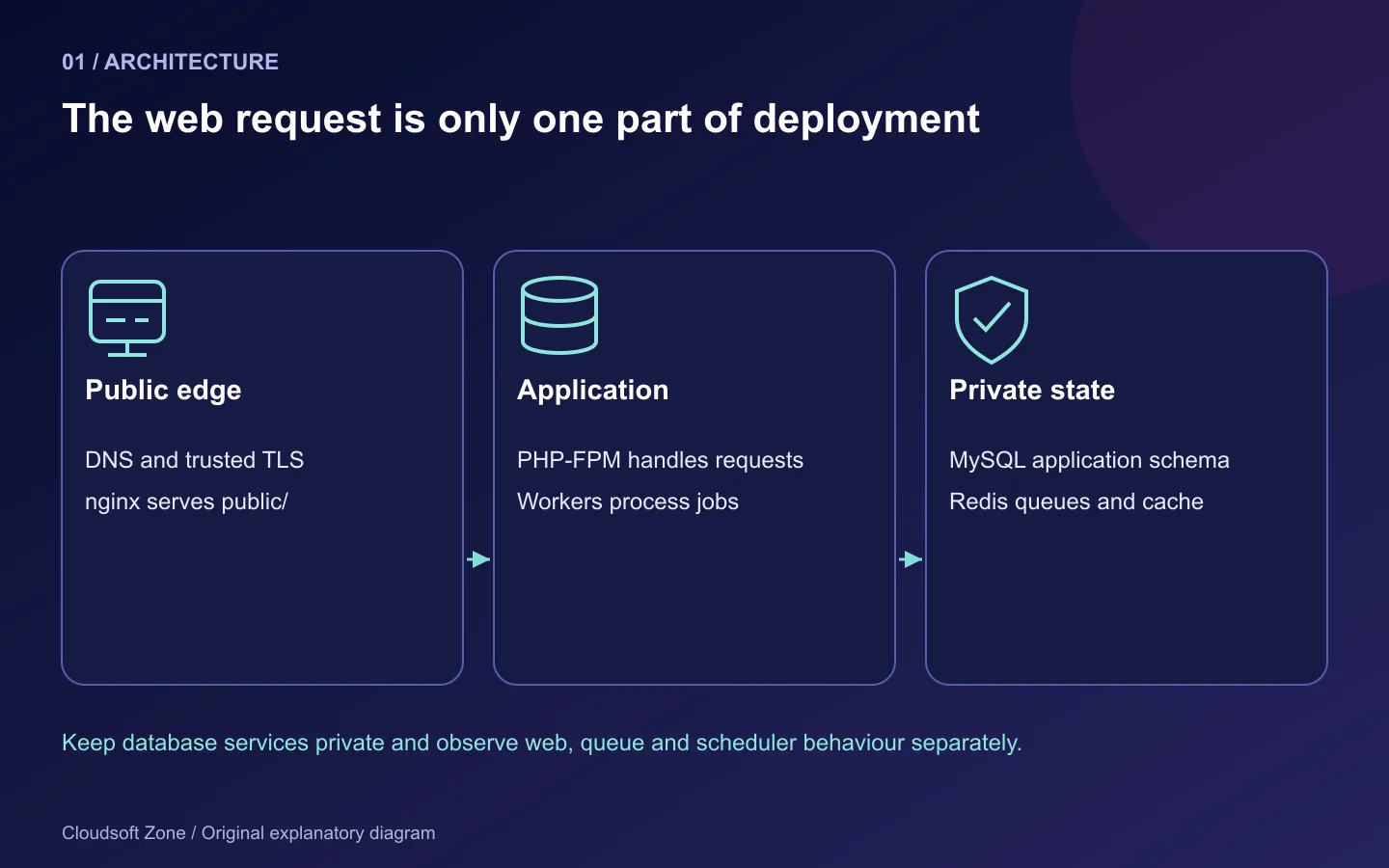
A Laravel application can return a healthy page while its queue worker is stopped, its scheduler has never run and uploaded files will disappear during the next deployment. Getting PHP to execute is only one part of putting an application on a VPS.
This guide walks through Laravel 13 Ubuntu deployment with nginx, PHP-FPM, MySQL and Redis. The target is a single Ubuntu 24.04 server with a non-root deployment account, private database services, persistent application data and supervised background work. It is a conventional PHP-FPM deployment, not Octane or a high-availability cluster.
The configuration is researched against official documentation on 10 October 2026. Run the walkthrough on an isolated Ubuntu staging server before applying it to retained data. Package patches, the application lockfile and FPM pool names must be recorded from that actual run; a successful macOS PHP command is not evidence that the Ubuntu deployment works.
Step 1: Establish the server and version boundary
Use a fresh Ubuntu 24.04 VM, a domain you control, console recovery access and an administrator account with sudo. Keep administration separate from the application identity. The commands below assume a deployment user named deploy and Ubuntu's default PHP-FPM worker group, www-data. Create these identities deliberately; do not run Composer or your queue worker as root.
Laravel 13 requires PHP 8.3 or later. Ubuntu's Noble package index includes PHP 8.3 FPM, so this walkthrough uses the distribution's 8.3 package family without adding an unofficial package repository. Check supported versions and your dependencies before choosing a newer PHP line. Mixing CLI 8.5 with FPM 8.3 can leave migrations working while web requests fail.
sudo apt update
apt-cache policy php8.3-fpm mysql-server redis-server nginx
sudo apt install nginx php8.3-fpm php8.3-cli php8.3-mysql \
  php8.3-mbstring php8.3-xml php8.3-curl php8.3-zip \
  php8.3-redis php8.3-opcache mysql-server redis-server \
  supervisor git unzip acl
php8.3 -v
php8.3 -m
sudo systemctl status nginx php8.3-fpm mysql redis-server --no-pager
Install Composer using its official verified installer or your approved package source, and record composer --version. The operating system owns security patches for its package build; do not compare only the upstream patch number without considering distribution backports.
Build JavaScript assets in CI with a pinned supported Node release and the project's committed package-manager lockfile. Transfer the resulting artifact rather than turning the web server into an uncontrolled build machine. If building on staging instead, use the same lockfile and runtime as CI.
Step 2: Create a release directory without giving PHP ownership of the code
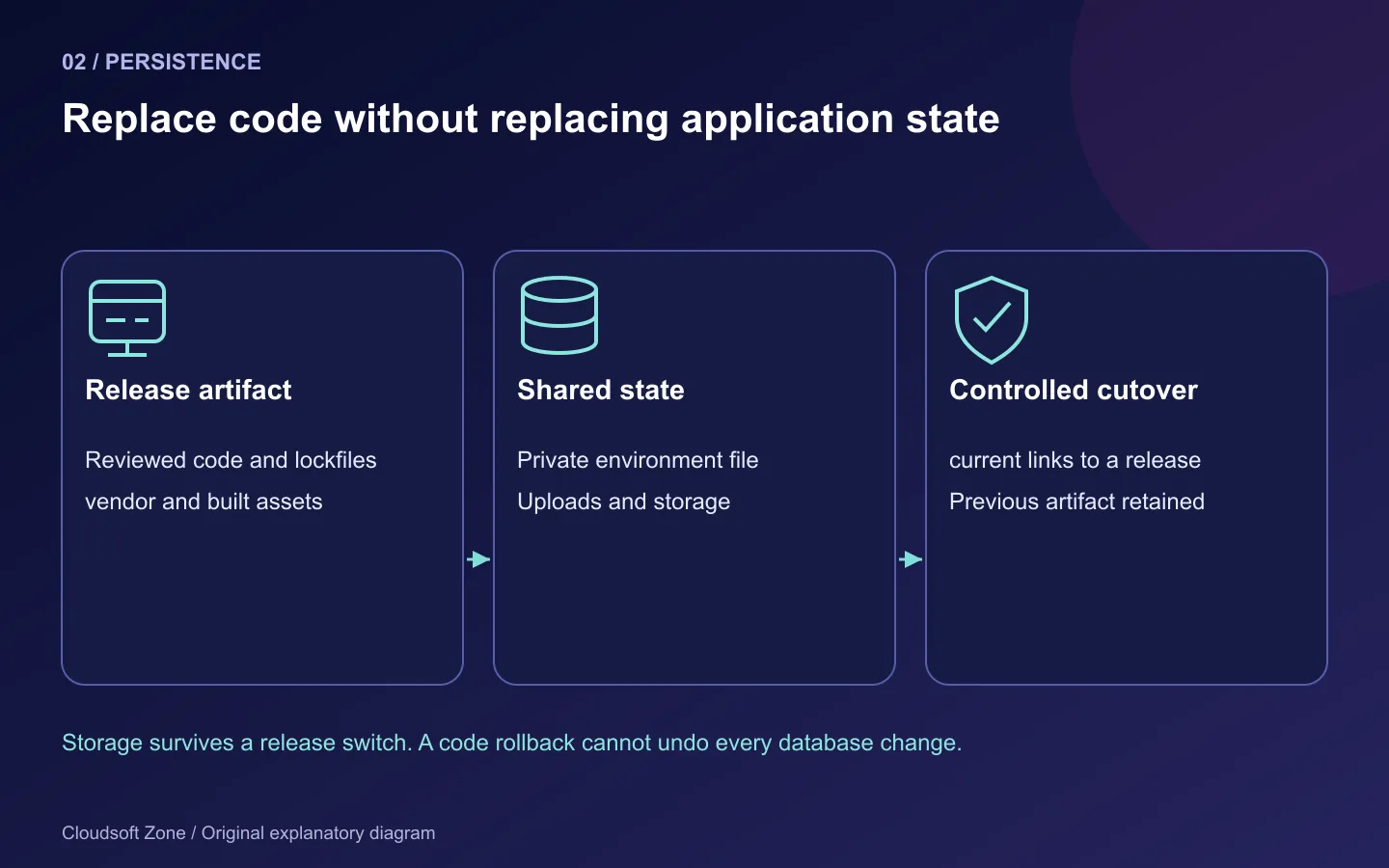
A useful layout separates a replaceable code release from retained state:
/srv/laravel-app/
  releases/20261010-01/    application code and vendor dependencies
  shared/.env            private configuration
  shared/storage/        logs, sessions and uploaded files
  current -> releases/20261010-01
As administrator, create the directories and give the deployment account control of the code area:
sudo install -d -o deploy -g www-data -m 2750 /srv/laravel-app
sudo install -d -o deploy -g www-data -m 2750 /srv/laravel-app/releases
sudo install -d -o deploy -g www-data -m 2750 /srv/laravel-app/shared
Deploy a reviewed commit into a new release directory. Your artifact or checkout must supply the complete application, including its lockfiles. Avoid embedding a private Git token in a URL or copying your laptop's .env to the server. Verify the release path before changing ownership or permissions.
PHP needs to write storage and bootstrap/cache, not the entire application. Prepare shared/storage from the application's expected directory structure and link it into the release. Use a group or ACL policy that lets both the deployment account and PHP create files there; do not use chmod -R 777. For a first release, after placing code and establishing the storage link:
sudo setfacl -R -m u:deploy:rwx,u:www-data:rwx /srv/laravel-app/shared/storage
sudo setfacl -R -d -m u:deploy:rwx,u:www-data:rwx /srv/laravel-app/shared/storage
sudo setfacl -R -m u:deploy:rwx,u:www-data:rwx /srv/laravel-app/releases/20261010-01/bootstrap/cache
sudo setfacl -R -d -m u:deploy:rwx,u:www-data:rwx /srv/laravel-app/releases/20261010-01/bootstrap/cache
Apply these only to the named writable directories. Readable source files and traversable parents are still necessary for FPM; verify the full path with namei -l. A later deployment must recreate the cache-directory permission policy for its new release.
Step 3: Provision the database with separate runtime and migration responsibilities
Keep MySQL and Redis off the public network. Verify their bind addresses and host firewall rules instead of assuming package defaults. Use a MySQL account restricted to this application's schema and connection origin. A runtime account can commonly be limited to SELECT, INSERT, UPDATE and DELETE, while a separate migration account temporarily needs schema-change privileges. The precise privilege set depends on the application's real migrations and features.
Create the schema and accounts through an administrator session or your secret-management workflow. Do not paste generated passwords into a tutorial command, shell history or CI log. Avoid granting privileges on every database. Run migrations with the intended deployment identity, then restore the runtime credentials before starting long-lived processes.
Redis serves the queue and optionally cache or sessions. Those uses have different durability requirements: losing a cache entry is different from losing a queued task. For a shared instance, choose memory limits and eviction policy with queue data in mind. Do not expose an unauthenticated Redis endpoint just because the application is on the same VPS.
Step 4: Supply production configuration and install the locked dependencies
Create the private shared environment file with restrictive permissions, then link it into the release. Use the chosen database and Redis credentials privately:
APP_ENV=production
APP_DEBUG=false
APP_URL=https://app.example.com
LOG_CHANNEL=stack
DB_CONNECTION=mysql
DB_HOST=127.0.0.1
DB_PORT=3306
DB_DATABASE=laravel_app
DB_USERNAME=laravel_runtime
QUEUE_CONNECTION=redis
CACHE_STORE=redis
SESSION_DRIVER=redis
REDIS_HOST=127.0.0.1
These are tutorial-server values, not Cloudsoft Zone's local infrastructure addresses. Supply APP_KEY, database password and Redis authentication privately. Generate an application key once for a new environment. Rotating the key on every deployment can invalidate encrypted data and cookies; a deployment should reuse the established key.
Run dependency commands as the deployment user in the release directory:
cd /srv/laravel-app/releases/20261010-01
composer install --no-dev --prefer-dist --optimize-autoloader --no-interaction
composer check-platform-reqs --no-dev
php8.3 artisan about
php8.3 artisan migrate:status
Composer installation scripts are application code: review them rather than blindly disabling all hooks or running them with root privileges. Install from the lockfile; composer update belongs in a reviewed dependency change, not a live release.
For a new empty staging database, apply the reviewed migrations with the migration credentials using php8.3 artisan migrate --force. On a retained database, first prove backup restoration and understand each migration's compatibility and locking behaviour. The flag suppresses a prompt; it does not make destructive SQL safe.
Step 5: Route nginx only to the public entry point
Save a site configuration under /etc/nginx/sites-available/laravel-app. Replace the hostname and confirm the real socket in your FPM pool configuration. This initial HTTP block is for controlled staging or certificate bootstrapping; finish TLS before accepting production credentials.
server {
    listen 80;
    listen [::]:80;
    server_name app.example.com;
    root /srv/laravel-app/current/public;
    index index.php;
    charset utf-8;

    location / {
        try_files $uri $uri/ /index.php?$query_string;
    }

    location ~ ^/index\.php(/|$) {
        include fastcgi_params;
        fastcgi_param SCRIPT_FILENAME $realpath_root$fastcgi_script_name;
        fastcgi_pass unix:/run/php/php8.3-fpm.sock;
        fastcgi_hide_header X-Powered-By;
    }

    location ~ \.php$ { return 404; }
    location ~ /\.(?!well-known).* { deny all; }
}
Only the front controller may execute as PHP. Pointing the document root at the repository instead of public risks exposing configuration. $realpath_root resolves the current release path before handing the script to FPM; test it with your actual symlink layout.
After creating the current link and enabling this site:
sudo nginx -t
sudo systemctl reload nginx
curl -I -H 'Host: app.example.com' http://127.0.0.1/up
curl -I -H 'Host: app.example.com' http://127.0.0.1/.env
A normal health route should succeed, while .env must never return its contents. Ensure the default site does not unintentionally serve the wrong application. Configure a trusted TLS certificate and test renewal using the certificate tool's official instructions; see our nginx HTTPS guide.
Step 6: Start queues and the scheduler as explicit services
A worker must outlive your SSH session. An example Supervisor program is:
[program:laravel-app-worker]
directory=/srv/laravel-app/current
command=/usr/bin/php8.3 artisan queue:work redis --queue=default --sleep=3 --tries=3 --timeout=60
user=deploy
numprocs=1
autostart=true
autorestart=true
stopasgroup=true
killasgroup=true
stopwaitsecs=120
redirect_stderr=true
stdout_logfile=/srv/laravel-app/shared/storage/logs/worker.log
stdout_logfile_maxbytes=10MB
stdout_logfile_backups=5
The numbers describe one small-job example, not universal tuning. Configure the queue connection's retry interval above the worker timeout and leave enough shutdown time for a valid running job. Check application-specific timeouts and idempotency before increasing attempts or process counts.
sudo supervisorctl reread
sudo supervisorctl update
sudo supervisorctl status laravel-app-worker
Add the scheduler entry to the deployment user's crontab, not an unrelated system account:
* * * * * cd /srv/laravel-app/current && /usr/bin/php8.3 artisan schedule:run >> /srv/laravel-app/shared/storage/logs/scheduler.log 2>&1
Use rotation and retention for this log. Confirm schedule:list, a due task and its observable effect; the presence of a cron line is not proof of execution. Tasks that run on multiple servers require deliberate overlap and single-server locking decisions.
Step 7: Cache, verify and retain a recovery path
Run the application's reviewed optimisation step in the release, then reload or restart long-lived processes through the documented release procedure. A cached configuration means arbitrary calls to env() in business code may no longer read the file as expected. Configuration values should be accessed through Laravel's configuration layer.
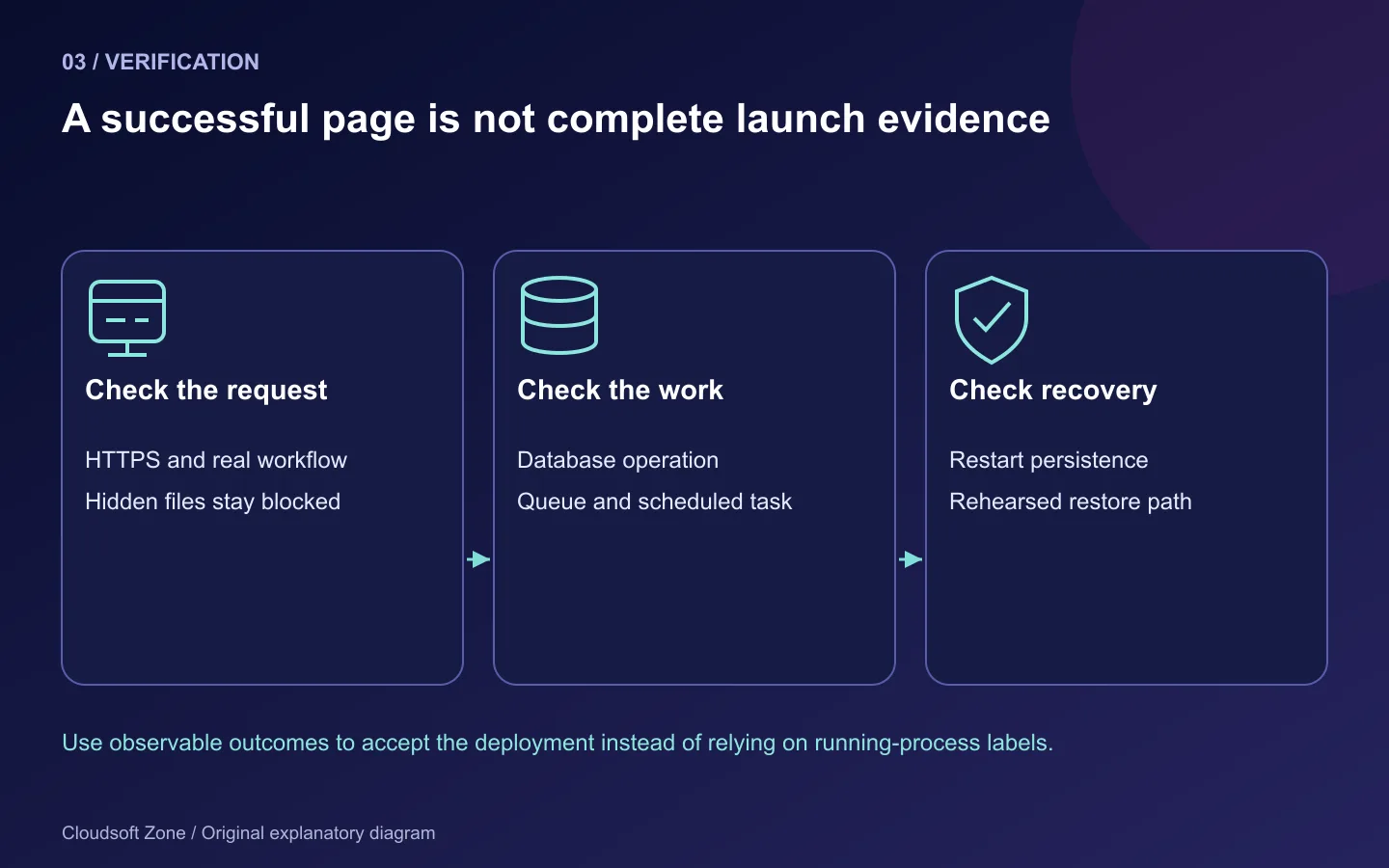
| Check | Evidence to collect |
|---|---|
| Browser | HTTPS route, authentication, assets and one representative user workflow |
| Database | A synthetic read/write through the application with the runtime identity |
| Queue | A dispatched job reaches its recorded completion once |
| Scheduler | A due task produces its expected effect |
| Uploads | A private upload remains available after switching code releases |
| Exposure | Database/Redis not public; hidden files inaccessible; debug off |
| Recovery | A backup restores into an isolated environment and a previous compatible release works |
Keep the previous release artifact and the shared files. Rolling application code back does not automatically roll back database writes or destructive migrations. If compatibility was broken, use the rehearsed recovery procedure rather than guessing with migrate:rollback.
For repeat deployments, use the Laravel production checklist and the separate zero-downtime guide when it is available. If you need a scoped deployment review or maintenance plan, discuss your application with Cloudsoft Zone.
Featured image: Cloudsoft Zone explanatory layout with sourced product artwork: laravel — Laravel (Public domain); ubuntu — Canonical Ltd (Public domain); nginx — Igor Sysoev (Public domain). Product marks resized and arranged for identification; no endorsement implied. Layout: CC BY-SA 4.0.
Frequently asked questions
Can I use Ubuntu's PHP 8.3 packages for Laravel 13?
Laravel 13's documented minimum is PHP 8.3. Confirm your lockfile, required extensions and the distribution package build, then check both CLI and FPM.
Why not give PHP ownership of the whole application?
The request process generally needs to write storage and bootstrap/cache. Keeping source deployment-owned reduces the consequences of a compromised request process.
Does switching the previous release undo migrations?
No. Code rollback only works while the database and shared state remain compatible. Destructive changes need a separate reviewed recovery plan.
Your next customer could start right here.
Introduce your tool, product or business to readers exploring technology.
Explore placements and request a private quote
Sources
- Laravel 13 deployment — Laravel
- Laravel 13 queues — Laravel
- Laravel 13 task scheduling — Laravel
- Ubuntu PHP installation — Canonical
- Ubuntu Noble PHP 8.3 FPM package — Canonical
- Composer CLI — Composer
- Supervisor configuration — Supervisor
Comments
No comments yet. Be the first to join the conversation.
Leave a comment
Every comment is read by a moderator before it appears. Your email address is never published; it is used only to contact you about this comment.
More from Cloudsoft Zone

Industry updateLaravel
Pest 5 for Laravel 13: what's new and how to upgrade safely
Pest 5 brings test impact analysis, an agent verification plugin, LLM evals and time-balanced sharding. Here is what Laravel 13 teams need to upgrade.
By Cloudsoft Zone

TutorialLaravel
Laravel Horizon setup guide: monitored Redis queues in Laravel 13
Install Laravel Horizon 5 on Laravel 13, configure supervisors and balancing, set retries and timeouts safely, secure the dashboard and run it under Supervisor.
By Cloudsoft Zone
Resources
HTTP status codes cheat sheet for API developers (RFC 9110)
Which HTTP status codes a JSON API needs, when to use each, the headers that go with them and common mistakes, checked against RFC 9110 and the IANA registry.
By Cloudsoft Zone