
How to enable CORS in Node.js: Express 5 and plain node:http
Fix browser CORS errors in Node.js properly: an Express 5 allowlist with the cors package, a plain node:http version, preflight, credentials and the common console errors.
Updated 9 min read
In this article
A browser shows a CORS error when a page on one origin calls your Node.js API on another origin and the API's response does not grant that origin access. The fix is to send the right Access-Control-* headers from the API, for the right origins, on both the preflight OPTIONS request and the real request. This guide shows how to do that with Express 5 and the cors package, how to do it with plain node:http, and how to read each browser error so you fix the actual cause instead of switching CORS off.
Updated for Express 5.3 and Node.js 24 LTS. Tested with Node.js 24.19.0, Express 5.3.0, cors 2.8.6 and headless Chromium (Playwright 1.63). Every request and error message below was produced against these servers.
What CORS actually protects
An origin is the scheme, host and port together: http://localhost:5173, http://127.0.0.1:5173 and https://localhost:5173 are three different origins. By default a browser lets a script send a cross-origin request but refuses to let the script read the response. Cross-Origin Resource Sharing (CORS), defined in the WHATWG Fetch standard, is how a server relaxes that rule for origins it trusts.
Two consequences matter for API developers:
- CORS is enforced by browsers only.
curl, Postman, mobile apps and other servers ignore it. It is not authentication and it does not hide your API. - A blocked response may still have run on the server. For a "simple" request, such as a
POSTwithContent-Type: text/plain, the browser sends the request first and only blocks the page from reading the answer. Your handler has already executed.
Simple requests and preflight
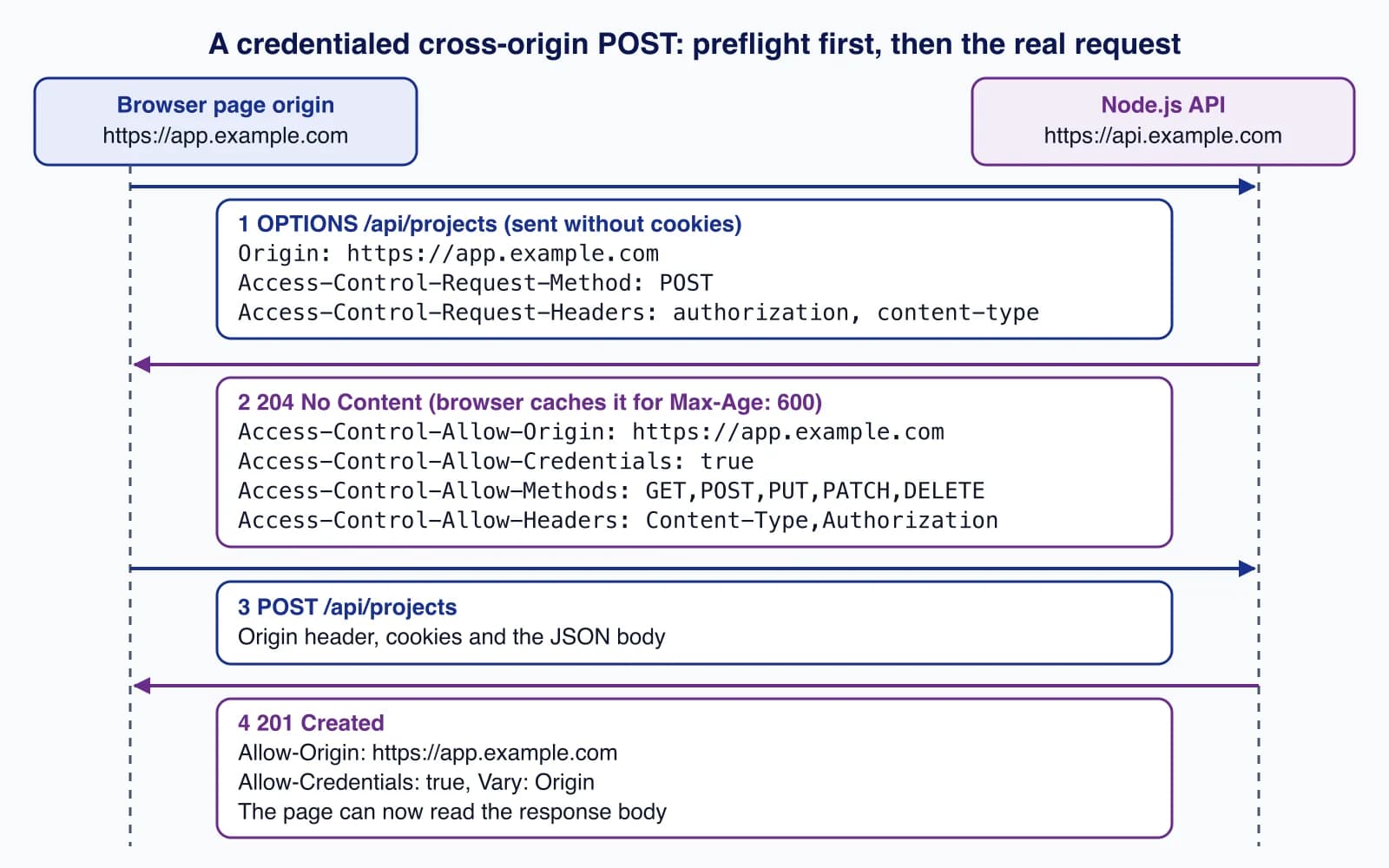
According to MDN's CORS guide, a request is "simple" when it uses GET, HEAD or POST, sets only safelisted headers, and its Content-Type (if any) is application/x-www-form-urlencoded, multipart/form-data or text/plain. Anything else, including a JSON body (Content-Type: application/json), an Authorization header, or PUT, PATCH and DELETE, triggers a preflight: the browser first sends an OPTIONS request asking which method and headers are allowed, and sends the real request only if the answer permits it.
For a request that carries cookies or HTTP authentication (fetch(url, { credentials: 'include' })), the server must also return Access-Control-Allow-Credentials: true, and it must name the exact origin: the wildcard * is not allowed in Access-Control-Allow-Origin, -Allow-Headers, -Allow-Methods or -Expose-Headers for credentialed requests.
Enable CORS in Express 5 with an allowlist
The cors middleware is maintained by the Express project and handles both preflight and normal responses. Install it next to Express:
npm install express@5 corsThe old one-liner, app.use(cors()), sends Access-Control-Allow-Origin: * to everyone. That is fine for a genuinely public, read-only API with no cookies. For anything with logins, use an allowlist read from configuration. This complete server is an ES module (express-app.mjs):
import express from 'express';
import cors from 'cors';

const app = express();
const allowedOrigins = new Set(
  (process.env.CORS_ORIGINS ?? 'http://localhost:5173,https://app.example.com').split(','),
);

const corsOptions = {
  origin(origin, callback) {
    // Requests without an Origin header (curl, server-to-server, same-origin GET) are not CORS requests.
    if (!origin || allowedOrigins.has(origin)) return callback(null, true);
    return callback(null, false); // no CORS headers: the browser blocks the response
  },
  credentials: true,
  methods: ['GET', 'POST', 'PUT', 'PATCH', 'DELETE'],
  allowedHeaders: ['Content-Type', 'Authorization'],
  exposedHeaders: ['X-Request-Id'],
  maxAge: 600,
};

app.use((req, res, next) => {
  res.vary('Origin'); // every response depends on Origin, allowed or not
  const origin = req.get('Origin');
  if (origin && !allowedOrigins.has(origin)) {
    return res.status(403).json({ error: 'Origin not allowed' });
  }
  next();
});
app.use(cors(corsOptions));
app.use(express.json());

app.get('/api/projects', (req, res) => {
  res.set('X-Request-Id', crypto.randomUUID());
  res.json({ data: [{ id: 1, name: 'Website rebuild' }] });
});

app.post('/api/projects', (req, res) => {
  res.status(201).json({ data: { id: 2, ...req.body } });
});

app.listen(process.env.PORT ?? 4711, () => console.log('listening'));
What each part does:
- The first middleware adds
Vary: Originto every response and answers403to browsers on other origins. Without it, a disallowed origin simply gets a response without CORS headers, and, as we saw in testing, atext/plainPOSTfrom that origin still reached the handler and returned201 Created. Same-origin pages also send anOriginheader onPOST, so add the API's own origin to the list if it serves pages. origincallback: returnstruefor allowed origins, socorsreflects that one origin back. Requests withoutOrigin(server-to-server calls,curl, health checks) pass through untouched.credentials: trueaddsAccess-Control-Allow-Credentials: trueso cookies andAuthorizationwork.exposedHeaderslets browser code read response headers that are not safelisted, such asX-Request-Id.maxAge: 600lets the browser cache the preflight answer for ten minutes. Browsers cap it: MDN lists 7,200 seconds for Chromium and 86,400 seconds for Firefox, and the default without the header is 5 seconds.
Register cors() before your routes, body parsers, authentication and 404 handler. Headers set by cors stay on the response even when a later handler throws, so error responses remain readable by the page.
Testing the preflight with curl
You can reproduce the browser's preflight from a terminal by sending the same headers:
curl -i -X OPTIONS http://127.0.0.1:4711/api/projects \
  -H 'Origin: http://localhost:5173' \
  -H 'Access-Control-Request-Method: POST' \
  -H 'Access-Control-Request-Headers: content-type,authorization'
The response we got from the server above:
HTTP/1.1 204 No Content
Vary: Origin
Access-Control-Allow-Origin: http://localhost:5173
Access-Control-Allow-Credentials: true
Access-Control-Allow-Methods: GET,POST,PUT,PATCH,DELETE
Access-Control-Allow-Headers: Content-Type,Authorization
Access-Control-Max-Age: 600
Access-Control-Expose-Headers: X-Request-Id
The same request with Origin: https://evil.example returns 403 with only Vary: Origin, and in Chromium the page's fetch rejects with TypeError: Failed to fetch.
The Express 5 wildcard route trap
Many older answers register preflight handling with app.options('*', cors()). Express 5 uses a newer path-to-regexp, and on Express 5.3.0 that line throws at start-up:
PathError: Missing parameter name at index 1: *; visit https://git.new/pathToRegexpError for infoYou rarely need a separate OPTIONS route, because app.use(cors(...)) already answers preflights for every path. If you do want one, the Express 5 migration guide explains that wildcards must be named, for example app.options('/{*splat}', cors(corsOptions)).
Enable CORS with plain node:http
Without a framework you set the headers yourself and answer OPTIONS before your routing. This version uses only built-in modules (http-server.mjs):
import { createServer } from 'node:http';

const allowedOrigins = new Set(['http://localhost:5173', 'https://app.example.com']);

function applyCors(req, res) {
  const origin = req.headers.origin;
  res.setHeader('Vary', 'Origin');
  if (!origin || !allowedOrigins.has(origin)) return false;
  res.setHeader('Access-Control-Allow-Origin', origin);
  res.setHeader('Access-Control-Allow-Credentials', 'true');
  return true;
}

const server = createServer((req, res) => {
  const allowed = applyCors(req, res);

  if (req.method === 'OPTIONS') {
    if (allowed && req.headers['access-control-request-method']) {
      res.setHeader('Access-Control-Allow-Methods', 'GET, POST, PUT, PATCH, DELETE');
      res.setHeader('Access-Control-Allow-Headers', 'Content-Type, Authorization');
      res.setHeader('Access-Control-Max-Age', '600');
    }
    res.writeHead(204).end();
    return;
  }

  if (req.url === '/api/projects' && req.method === 'GET') {
    res.writeHead(200, { 'Content-Type': 'application/json' });
    res.end(JSON.stringify({ data: [{ id: 1, name: 'Website rebuild' }] }));
    return;
  }

  res.writeHead(404, { 'Content-Type': 'application/json' });
  res.end(JSON.stringify({ error: 'Not found' }));
});

server.listen(process.env.PORT ?? 4712);
Three details people miss when writing this by hand: always send Vary: Origin when the answer depends on the origin; only add the Allow-Methods and Allow-Headers headers to real preflights (an OPTIONS request carrying Access-Control-Request-Method); and never echo the request's Origin back without checking it against the list, because reflecting any origin together with Allow-Credentials: true lets every website read your users' data.
If you use NestJS, app.enableCors(options) takes the same options object as the cors package, so the allowlist above carries over unchanged. For framework choice in general, see Express 5 vs Fastify 5.
Common CORS errors and how to fix them
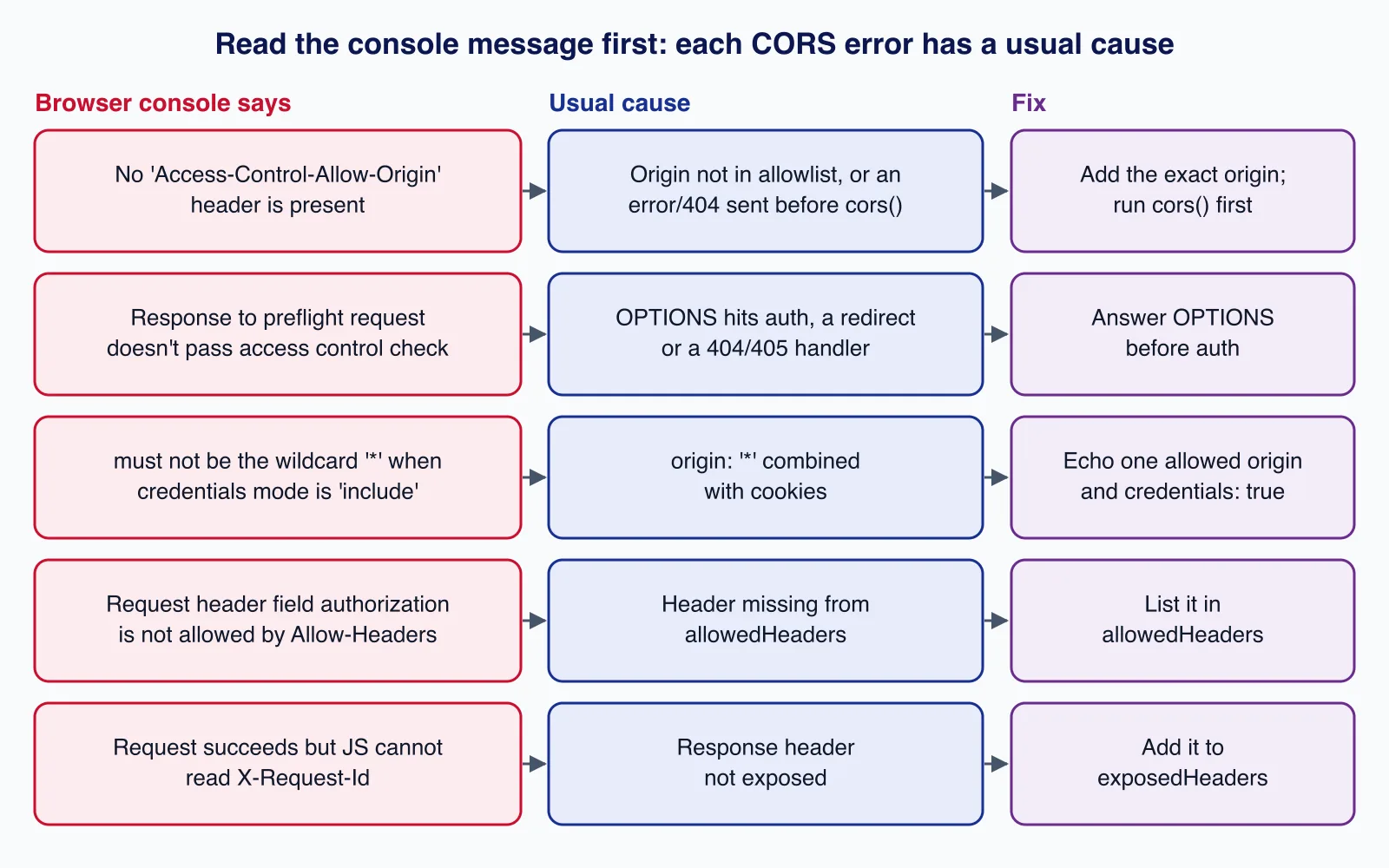
Chromium prints a specific message in the console for each failure. These are the messages we reproduced while testing, with their usual causes:
| Console message (Chromium) | Usual cause | Fix |
|---|---|---|
| No 'Access-Control-Allow-Origin' header is present on the requested resource. | The origin is not in your list (check scheme, port and trailing slash), or a 401, 404 or 500 was sent by code that runs before cors(). | Add the exact origin string; register cors() first. |
| Response to preflight request doesn't pass access control check | The OPTIONS request hit authentication, a redirect (HTTP to HTTPS, missing trailing slash) or a proxy that does not forward it. | Let OPTIONS through before auth; call the final URL directly. |
| The value of the 'Access-Control-Allow-Origin' header in the response must not be the wildcard '*' when the request's credentials mode is 'include'. | app.use(cors()) with credentials: 'include' on the client. | Use an allowlist and credentials: true. |
| Request header field authorization is not allowed by Access-Control-Allow-Headers in preflight response. | The header is missing from allowedHeaders. | Add it, spelled as the client sends it (matching is case-insensitive). |
Other mistakes we see often:
- Trailing slashes in the allowlist. The
Originheader never has a path, sohttps://app.example.com/never matches. - Allowing
null. Sandboxed iframes andfile://pages sendOrigin: null. Any attacker can produce that value, so never put it on the list. - Loose pattern matching. A regular expression like
/example\.com$/also matcheshttps://evil-example.com. Compare exact strings, or anchor the pattern fully (/^https:\/\/([a-z0-9-]+\.)?example\.com$/). - CORS headers added twice. If both nginx and Express add
Access-Control-Allow-Origin, the browser sees two values and rejects the response. Set CORS in one layer only. - Treating CORS as CSRF protection. Cookie-based APIs still need
SameSitecookies and, for state-changing routes, a CSRF token or a strictOrigincheck like the one above.
If a CORS problem turns out to be a symptom of an API whose authentication, proxies and environments have drifted apart, our API development and integration team can review the whole request path rather than patching headers.
Production considerations
- Keep origins in configuration, one list per environment, and exclude localhost from production.
- Prefer one origin when you can. Serving the front end and the API from the same origin, for example by routing
/apithrough your reverse proxy, removes CORS and preflight latency altogether. - Check your CDN cache key. If responses are cached,
Vary: Originmust reach the cache, or one origin's headers will be served to another. - Log rejected origins at a low level; a sudden burst usually means a new front-end deployment URL nobody added.
The Node.js production security checklist covers the headers and limits that sit alongside CORS.
When not to enable CORS
- Server-to-server integrations and webhooks: browsers are not involved, so CORS headers do nothing.
- A front end and API that already share an origin: adding CORS only widens access.
- Internal admin APIs: keep them same-origin rather than allowing extra origins "just in case".
Cloudsoft Zone designs and builds Node.js and NestJS APIs with allowlisted CORS, cookie or token authentication and tested error handling. See our API development and integration service.
Frequently asked questions
Why does my API work in Postman but not in the browser?
CORS is enforced only by browsers. Postman and curl do not check
Access-Control-Allow-Origin, so they show the response even when a browser would block the page from reading it. Reproduce the browser by sending anOriginheader (and for preflights,Access-Control-Request-Method) with curl.Is app.use(cors()) safe in production?
Only for a public, read-only API that uses no cookies or user-specific data. It sends
Access-Control-Allow-Origin: *to every site. For anything behind a login, use an allowlist of exact origins withcredentials: true.Can I use Access-Control-Allow-Origin: * with cookies?
No. For credentialed requests the browser rejects the wildcard and reports that the header must not be
*when the credentials mode isinclude. Return the single requesting origin after checking it against your list, and addVary: Origin.Does CORS protect my API from other websites?
Only partly. It stops other sites' scripts from reading responses, but simple requests are still sent and executed. Protect state-changing routes with authentication,
SameSitecookies and CSRF tokens or a strictOrigincheck.Why does app.options('*', cors()) crash in Express 5?
Express 5 uses a newer path matcher in which a bare
*is invalid; it throwsPathError: Missing parameter name. Use a named wildcard such as/{*splat}, or rely onapp.use(cors()), which already answers preflights.
Your next customer could start right here.
Introduce your tool, product or business to readers exploring technology.
Explore placements and request a private quote
Sources
- Cross-Origin Resource Sharing (CORS) — MDN Web Docs
- CORS errors — MDN Web Docs
- Access-Control-Max-Age — MDN Web Docs
- Fetch Standard: CORS protocol — WHATWG
- Express cors middleware — Express
- Migrating to Express 5 — Express
- Express v5.3.0 release — Express (GitHub), 2026-10-09
- HTTP module documentation — Node.js
Written with substantial AI assistance. Facts checked against cited sources. Editorial policy.
Comments
No comments yet. Be the first to join the conversation.
Leave a comment
Every comment is read by a moderator before it appears. Your email address is never published; it is used only to contact you about this comment.
More from Cloudsoft Zone

TutorialNode.js
How to test a Node.js API with the built-in test runner (node:test)
Write, run, mock and measure coverage for a small Node.js HTTP API using only node:test and node:assert. Covers port-0 servers, fetch(), spies, t.mock.method(), fake dates and coverage thresholds.
By Cloudsoft Zone

TutorialNode.js
Node.js streams in practice: pipeline(), backpressure and async generators
Process files of any size in Node.js with flat memory use. A hands-on guide to stream/promises pipeline(), backpressure, async generator transforms, AbortSignal timeouts and streaming downloads over HTTP.
By Cloudsoft Zone

Industry updateNode.js
Which Node.js version to use in October 2026: LTS lines and the new schedule
Node.js 26 becomes LTS on 28 October 2026, Node.js 24 moves to maintenance and 20.x is already end of life. Here is every supported line, the new yearly release model from Node.js 27, and which version to run.
By Cloudsoft Zone