
How to compare arrays in JavaScript correctly
Compare JavaScript arrays shallowly, deeply or in any order with tested functions, avoid the JSON.stringify, toString and Set shortcuts that lie, and see how fast each method is.
Updated 9 min read

In this article
Two JavaScript arrays with the same contents are not equal under ===, because === compares object identity, not contents. To compare arrays you have to decide what "equal" means for your data: same values in the same order, the same values in any order, or the same nested structure. This guide gives a tested function for each case, shows which popular shortcuts give wrong answers, and measures how fast each approach is.
Tested with Node.js 24.19.0 (V8 13.6). Every result shown in comments was printed by running the code; the browser-compatible functions also work in current Chrome, Firefox and Safari, and the Set methods need Node.js 22 or a 2024-or-later browser.
Why === and == do not work
const a = [1, 2, 3];
const b = [1, 2, 3];
console.log(a === b); // false: two different array objects
console.log(a === a); // true: the same object
Arrays are objects, and object comparison checks whether both sides are the same object in memory. That is exactly what you want when you check whether a value has changed by reference (React's dependency arrays and memo rely on it), but it does not tell you whether two separate arrays hold the same data.
Choose the comparison you actually need
Most bugs in array comparison come from using an ordered check for unordered data, or a check that ignores duplicates when duplicates matter. Decide first:
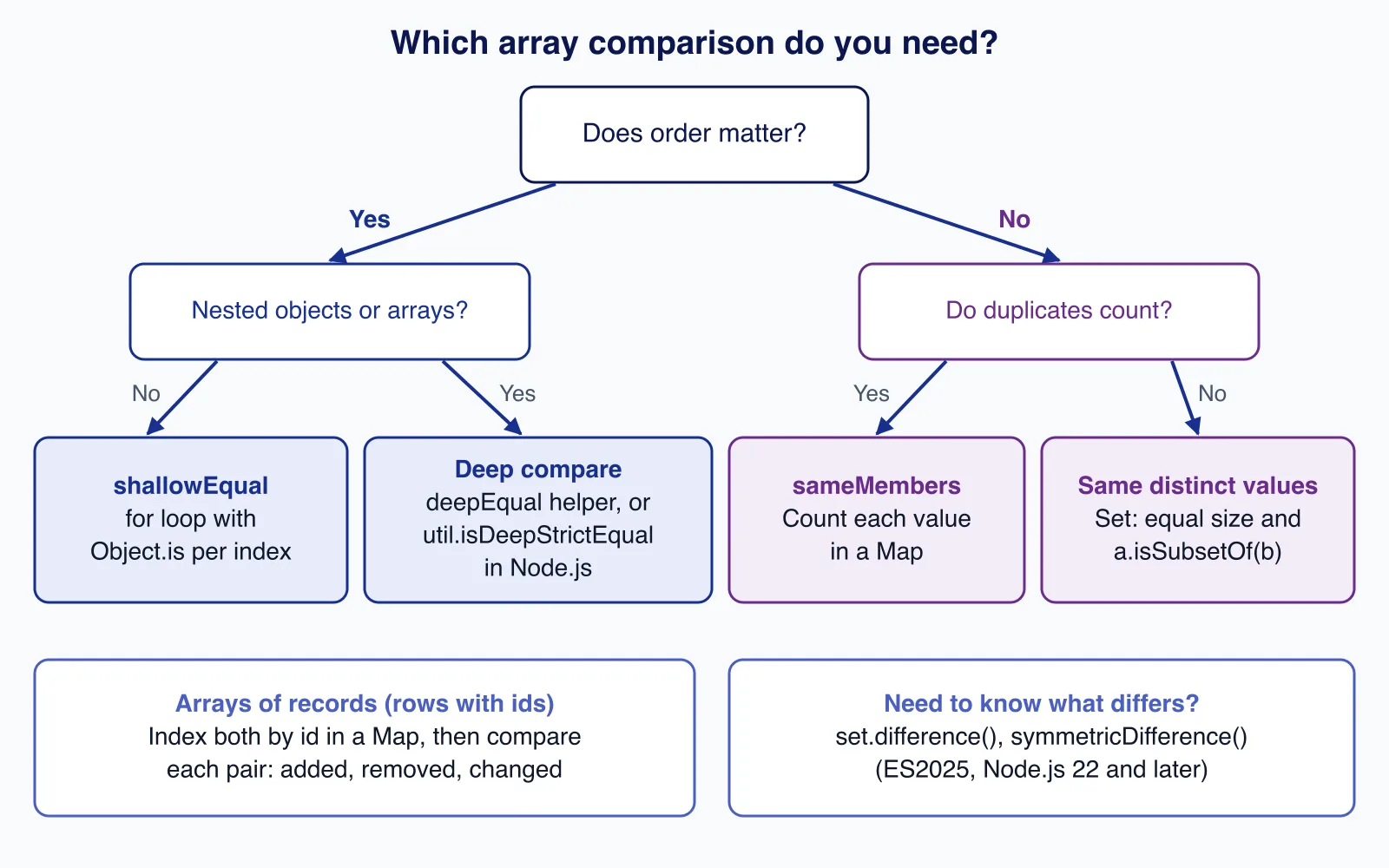
Same values, same order (shallow)
A plain loop is the most correct and the fastest option. It uses Object.is by default, so NaN equals NaN:
// Shallow, ordered: same length and same element at every index (holes count as undefined)
export function shallowEqual(a, b, same = Object.is) {
  if (a === b) return true;
  if (a.length !== b.length) return false;
  for (let i = 0; i < a.length; i++) {
    if (!same(a[i], b[i])) return false;
  }
  return true;
}shallowEqual([1, 2, 3], [1, 2, 3]); // true
shallowEqual([NaN], [NaN]); // true (=== would say false)
shallowEqual([0], [-0]); // false (pass (x, y) => x === y to treat them as equal)
shallowEqual([1, , 3], [1, 2, 3]); // false (every() says true)Why a for loop rather than every()? Array methods such as every() skip holes in sparse arrays, so a.every((v, i) => v === b[i]) returns true for [1, , 3] and [1, 2, 3]. The loop reads index 1 as undefined and correctly returns false. Sparse arrays are rare, but they appear after delete arr[i] or new Array(n).
Same values, any order
When duplicates count
For "same items, order irrelevant", count occurrences. This is O(n) and does not change either array:
// Unordered, duplicates matter (multiset): [1, 1, 2] is not [1, 2, 2]
export function sameMembers(a, b) {
  if (a.length !== b.length) return false;
  const counts = new Map();
  for (const x of a) counts.set(x, (counts.get(x) ?? 0) + 1);
  for (const x of b) {
    const n = counts.get(x);
    if (!n) return false;
    counts.set(x, n - 1);
  }
  return true;
}
Sorting copies and comparing them also works, but beware of the default sort: it compares values as strings.
[10, 9, 1].toSorted();                 // [1, 10, 9]  (string order!)
[10, 9, 1].toSorted((x, y) => x - y);  // [1, 9, 10]
When only distinct values matter
Comparing Set sizes alone is a common mistake: [1, 2, 3] and [4, 5, 6] both give a set of size three. Check membership as well. The Set methods added in ES2025 make this, and finding the differences, one line each:
const before = new Set(['a', 'b', 'c']);
const after = new Set(['b', 'c', 'd']);

const sameValues = before.size === after.size && before.isSubsetOf(after); // false
const added = [...after.difference(before)];             // ['d']
const removed = [...before.difference(after)];           // ['a']
const changed = [...before.symmetricDifference(after)];  // ['a', 'd']
Sets compare values with SameValueZero, so objects inside a Set are matched by identity, not by contents.
Deep comparison: nested arrays and objects
When elements are objects or arrays, compare recursively. This helper handles arrays, plain objects, Date, and Map and Set with primitive keys, and it survives circular references. It also requires both sides to have the same prototype, so a class instance never equals a plain object:
// Deep, ordered: arrays, plain objects, Dates, Maps and Sets of primitives
export function deepEqual(a, b, seen = new WeakMap()) {
  if (Object.is(a, b)) return true;
  if (typeof a !== 'object' || typeof b !== 'object' || a === null || b === null) return false;
  if (Object.getPrototypeOf(a) !== Object.getPrototypeOf(b)) return false;
  if (seen.get(a) === b) return true; // already comparing this pair (cycles)
  seen.set(a, b);

  if (a instanceof Date) return Object.is(a.getTime(), b.getTime());
  if (a instanceof Map || a instanceof Set) {
    if (a.size !== b.size) return false;
    for (const [k, v] of a.entries()) {
      if (!b.has(k)) return false;
      if (a instanceof Map && !deepEqual(v, b.get(k), seen)) return false;
    }
    return true;
  }
  if (Array.isArray(a)) {
    if (a.length !== b.length) return false;
    for (let i = 0; i < a.length; i++) {
      if (!deepEqual(a[i], b[i], seen)) return false;
    }
    return true;
  }
  const keysA = Object.keys(a);
  if (keysA.length !== Object.keys(b).length) return false;
  for (const key of keysA) {
    if (!Object.hasOwn(b, key) || !deepEqual(a[key], b[key], seen)) return false;
  }
  return true;
}
On Node.js you do not need to write this yourself. util.isDeepStrictEqual uses the same rules as assert.deepStrictEqual, which you should use in tests because it prints a diff on failure (see testing a Node.js API with node:test):
import { isDeepStrictEqual } from 'node:util';
import assert from 'node:assert/strict';

isDeepStrictEqual([{ id: 1 }, [NaN]], [{ id: 1 }, [NaN]]); // true
isDeepStrictEqual([1], ['1']);                             // false: strict types

// In tests, assert gives you a readable diff when it fails
assert.deepStrictEqual(actualRows, expectedRows);
In browser code, either keep a small helper like the one above or use a maintained library such as Lodash's isEqual; do not ship a large dependency for one comparison.
Comparing arrays of records by id
When you sync a list from an API or a form, "equal" usually means "same rows with the same values, in any order". Index one side by id and compare pairs:
import { isDeepStrictEqual } from 'node:util';

const oldRows = [{ id: 1, qty: 2 }, { id: 2, qty: 1 }];
const newRows = [{ id: 2, qty: 3 }, { id: 3, qty: 1 }, { id: 1, qty: 2 }];

const oldById = new Map(oldRows.map((row) => [row.id, row]));
const report = newRows.map((row) => {
  const prev = oldById.get(row.id);
  if (!prev) return `${row.id}: added`;
  return isDeepStrictEqual(prev, row) ? `${row.id}: same` : `${row.id}: changed`;
});
// ['2: changed', '3: added', '1: same']
const newIds = new Set(newRows.map((row) => row.id));
const removed = oldRows.filter((row) => !newIds.has(row.id)); // []
This tells you what to insert, update and delete, which is usually what you needed to know in the first place. It is the pattern behind most list-diffing in admin screens and React tables; if those screens are slow or re-render on every keystroke, our React and Next.js front-end team can profile and fix them.
Shortcuts that give wrong answers
The two shortcuts most often suggested, JSON.stringify and toString(), convert both arrays to strings and compare those. They work for short arrays of plain numbers and strings, and fail silently for everything else:
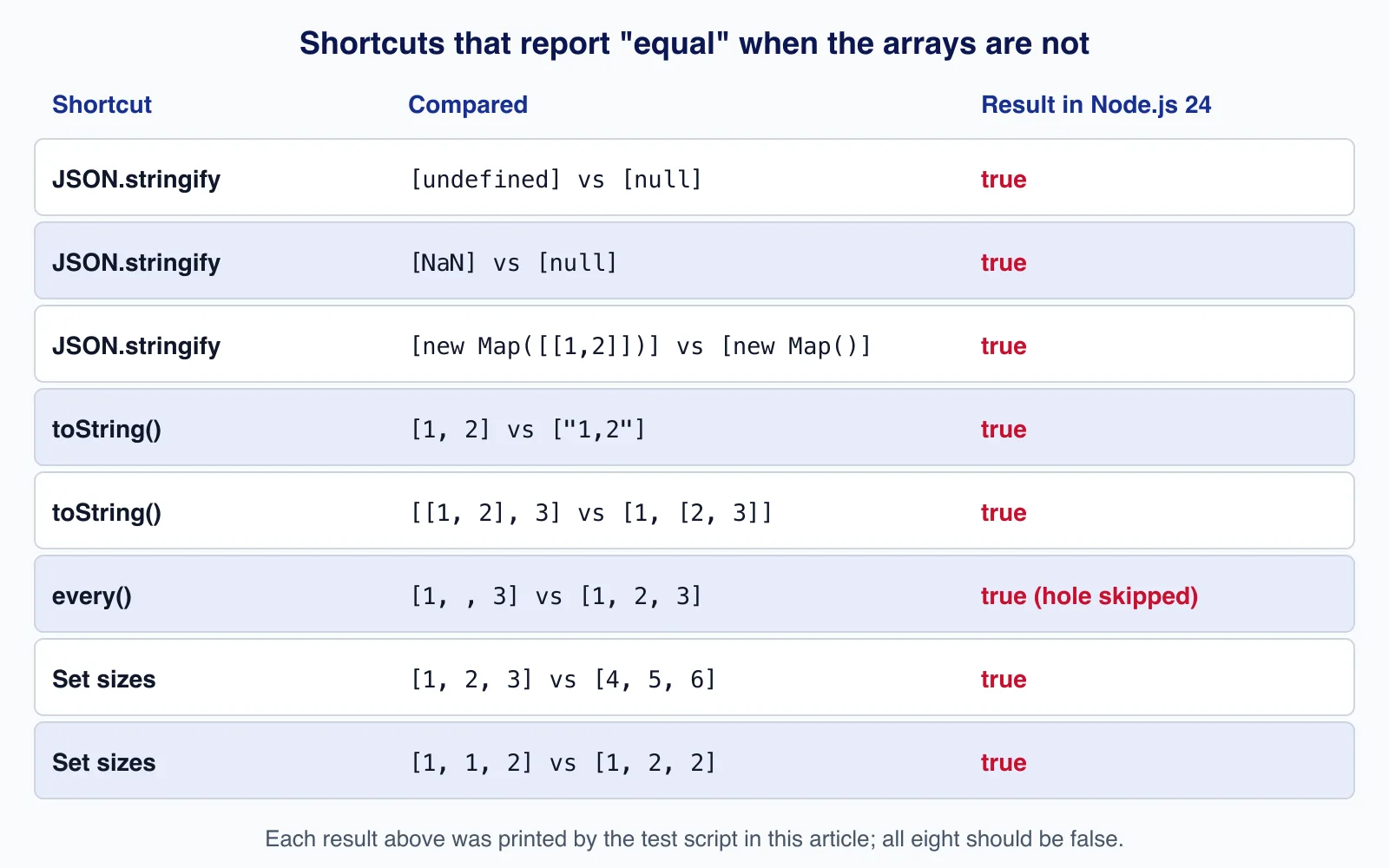
JSON.stringifyturnsundefined,NaNandInfinityintonull, serialisesMapandSetas{}, throws onBigInt("Do not know how to serialize a BigInt") and circular references, and depends on object key order:{a: 1, b: 2}and{b: 2, a: 1}compare as different.toString()flattens nested arrays and does not distinguish numbers from strings:[1, 2]equals["1,2"].
structuredClone pitfalls when comparing copies
A common test is "clone the data, change the clone, compare with the original". structuredClone is the right way to deep-copy data, but it does not preserve classes, and it cannot clone functions:
class Money {
  constructor(cents) { this.cents = cents; }
  format() { return (this.cents / 100).toFixed(2); }
}
const original = [new Money(4900), new Date(0), new Map([['k', 1]])];
const copy = structuredClone(original);

copy === original;                            // false
Object.getPrototypeOf(copy[0]) === Object.prototype; // true: the class is gone
isDeepStrictEqual(original, copy);            // false: prototypes differ
structuredClone([() => 1]);
// DataCloneError: () => 1 could not be cloned.
So a strict deep comparison of an original against its clone fails whenever the array holds class instances, even though every field matches. Compare the data you care about (for example copy[0].cents), or convert to plain objects first. Our article on structuredClone vs JSON vs spread covers copying in detail.
Performance
We timed each approach on Node.js 24.19.0 on an Apple M2, averaging 300 runs after a warm-up. Treat the numbers as relative, not absolute:
| Test | Method | Time per comparison |
|---|---|---|
| 100,000 equal numbers | for loop (shallowEqual) | 0.08 ms |
| 100,000 equal numbers | util.isDeepStrictEqual | 0.20 ms |
| 100,000 equal numbers | every() | 0.57 ms |
| 100,000 equal numbers | JSON.stringify both | 1.76 ms |
| 10,000 objects with nested arrays | JSON.stringify both | 2.04 ms |
| 10,000 objects with nested arrays | util.isDeepStrictEqual | 2.47 ms |
| 10,000 objects with nested arrays | deepEqual (above) | 2.61 ms |
| 100,000 numbers, first element differs | for loop | under 0.001 ms |
| 100,000 numbers, first element differs | JSON.stringify both | 1.89 ms |
Two lessons: the plain loop wins for flat arrays and stops at the first difference, while JSON.stringify always serialises both arrays in full. For nested objects, JSON.stringify was slightly faster in our run, but it is the method with the wrong answers listed above, so the small gain is rarely worth it. If comparisons show up in a profile, the better fix is usually to avoid them: keep a version number or an immutable reference that changes when the data changes.
Strings: case and locale
For arrays of user-facing text, "the same" often means "the same ignoring case or accents". Pass a comparer to shallowEqual instead of changing the data:
const collator = new Intl.Collator('en', { sensitivity: 'base' });
const sameText = (x, y) => collator.compare(x, y) === 0;

shallowEqual(['Cafe', 'Tea'], ['café', 'tea'], sameText); // true
shallowEqual(['Cafe', 'Tea'], ['café', 'tea']);           // false
An Intl.Collator with sensitivity: 'base' treats "Cafe" and "café" as equal, which is what a search or duplicate check usually wants, while keeping the original strings untouched for display.
Common mistakes checklist
- Comparing with
==or===and expecting a content check. - Forgetting the length check, so
[1, 2]"equals"[1, 2, 3]when you only loop over the first array. - Sorting the original arrays in place to compare them; use
toSorted()or copy first, and pass a numeric comparator. - Using an ordered check for data whose order is not meaningful, such as tags or permissions.
- Comparing floating-point results with equality instead of a tolerance.
When not to compare arrays at all
- Change detection in UI state: use immutable updates and compare references, as React does.
- Large server data: compare a hash or an
updated_atcolumn in the database instead of downloading both lists. - Floating-point results: compare with a tolerance, not equality.
Cloudsoft Zone builds and tunes React and Next.js front ends, including state handling and rendering performance. See our React and Next.js front-end development service.
Frequently asked questions
Why is [1, 2, 3] === [1, 2, 3] false in JavaScript?
Arrays are objects, and
===compares object identity. Two array literals create two different objects, so the result isfalseeven though the contents match. Compare the elements instead.Is JSON.stringify a good way to compare arrays?
Only for small arrays of plain strings and finite numbers. It treats
undefinedandNaNasnull, ignores Map and Set contents, depends on object key order, throws on BigInt and circular data, and always processes both arrays in full.How do I check if two arrays have the same elements in any order?
If duplicates matter, count each value in a
Mapand check the counts match. If only distinct values matter, comparenew Set(a)andnew Set(b)by size andisSubsetOf. Comparing set sizes alone is wrong.What is the built-in deep equality check in Node.js?
util.isDeepStrictEqual(a, b)returns a boolean, andassert.deepStrictEqual(a, b)throws with a diff, which is better in tests. Browsers have no built-in equivalent.
Your next customer could start right here.
Introduce your tool, product or business to readers exploring technology.
Explore placements and request a private quote
Sources
- Equality comparisons and sameness — MDN Web Docs
- Array.prototype.every() — MDN Web Docs
- Set.prototype.difference() — MDN Web Docs
- JSON.stringify() — MDN Web Docs
- structuredClone() — MDN Web Docs
- util.isDeepStrictEqual — Node.js
- assert.deepStrictEqual — Node.js
- ECMAScript 2025 Language Specification — Ecma International TC39
Written with substantial AI assistance. Facts checked against cited sources. Editorial policy.
Comments
No comments yet. Be the first to join the conversation.
Leave a comment
Every comment is read by a moderator before it appears. Your email address is never published; it is used only to contact you about this comment.
More from Cloudsoft Zone

TutorialJavaScript
JavaScript using declarations: automatic cleanup without finally
Learn JavaScript's using and await using declarations, Symbol.dispose and DisposableStack, with tested browser recipes and October 2026 support data.
By Cloudsoft Zone

Architecture guideJavaScript
Ship JavaScript without a bundler: import maps and JSON modules
How to structure a front end as native ES modules: import maps for bare imports, JSON modules, modulepreload against waterfalls, and cache-busting.
By Cloudsoft Zone

ComparisonJavaScript
structuredClone vs JSON vs spread: deep copy JavaScript safely
Spread is shallow, JSON loses dates, Maps, Sets and undefined, and structuredClone keeps them. A tested comparison of JavaScript copy methods and their limits.
By Cloudsoft Zone