
Fix 'Uncaught (in promise)': find every unhandled rejection
Why browsers log Uncaught (in promise), the five code patterns behind most unhandled rejections, how to find them in DevTools, and a safe global handler.
6 min read

In this article
"Uncaught (in promise)" means a promise was rejected and nothing was attached to handle that rejection by the time the browser checked. The fix is almost never to wrap everything in try...catch; it is to find the promise that nobody is waiting for and either await it, return it, or give it a deliberate .catch(). This guide shows the five patterns that cause most of these errors, how to find the culprit with DevTools, and how to add a global safety net that reports the ones you miss.
Every pattern below was reproduced on Node.js 24 with a rejection tracker attached, so you can see exactly which code produces an unhandled rejection and which does not.
What the browser is telling you
When a promise rejects, the engine waits briefly for a handler. If none is attached, the browser fires an unhandledrejection event on window (or on the worker's global scope) and, unless something cancels it, logs the red Uncaught (in promise) message in the console. The text after it is the rejection reason:
| Console shows | Usually means |
|---|---|
Uncaught (in promise) TypeError: Failed to fetch | A network or CORS failure in a fetch() that nobody awaited or caught. |
Uncaught (in promise) Error: ... with a stack | Your own code threw inside an async function that was called without await. |
Uncaught (in promise) undefined or a plain object | Code called reject() or threw something that is not an Error, so there is no stack trace. |
Uncaught (in promise) AbortError: ... | An aborted fetch() whose AbortError was not caught. |

The five patterns behind most unhandled rejections
1. Fire-and-forget calls
The most common case: an async function is called from an event handler, and its promise is dropped.
async function save() {
  const res = await fetch('/api/settings', { method: 'POST' });
  if (!res.ok) throw new Error(`Save failed: ${res.status}`);
}

button.addEventListener('click', () => {
  save(); // the returned promise is ignored
});
Fix it by handling the result where the user can be told about it:
button.addEventListener('click', async () => {
  try {
    await save();
    showToast('Saved');
  } catch (err) {
    showError('Could not save your settings', err);
  }
});
If you genuinely do not care about the result, say so explicitly with save().catch(reportError), so the next reader knows it was a decision rather than an accident.
2. Starting several requests, awaiting them one by one
This one looks correct and still leaks a rejection:
async function loadPage() {
  const user = fetchUser();   // starts now
  const posts = fetchPosts(); // starts now
  try {
    renderUser(await user);   // if this rejects...
    renderPosts(await posts); // ...this await never runs
  } catch (err) {
    showError(err);
  }
}
When user rejects, the code jumps to catch and never attaches a handler to posts. If posts also fails, that rejection is unhandled. In our test run, only the second request was reported. Use a combinator, which attaches handlers to every promise at once:
const [user, posts] = await Promise.all([fetchUser(), fetchPosts()]);

// or, when one failure should not hide the other result:
const results = await Promise.allSettled([fetchUser(), fetchPosts()]);
// results[0].status === 'rejected' | 'fulfilled'
3. async callbacks in forEach
try {
  items.forEach(async (item) => {
    await upload(item); // a rejection here escapes the try block
  });
} catch (err) {
  // never runs for upload errors
}
forEach ignores the promises its callback returns. Use for...of with await for sequential work, or await Promise.all(items.map(upload)) for parallel work.
4. A missing return inside .then()
function refresh() {
  return loadConfig().then((config) => {
    fetchFlags(config); // forgot "return"
  });
}
refresh().catch(showError); // does not see fetchFlags errors
Without return, the inner promise is detached from the chain. Return it, or rewrite the function with async/await, where this mistake is harder to make.
5. Rejecting with something that is not an Error
reject('timeout') or throw { code: 42 } produce rejections with no stack trace, which is why the console sometimes shows only Uncaught (in promise) undefined. Always reject with an Error (or a subclass), and use the cause option to keep the original problem when you wrap it:
async function getProfile() {
  try {
    return await api.get('/profile');
  } catch (err) {
    throw new Error('Could not load profile', { cause: err });
  }
}
Error cause is supported in every current browser (Chrome 93, Firefox 91, Safari 15 and later, per MDN's data), and DevTools shows the cause chain when it logs the error.
Finding the culprit with DevTools
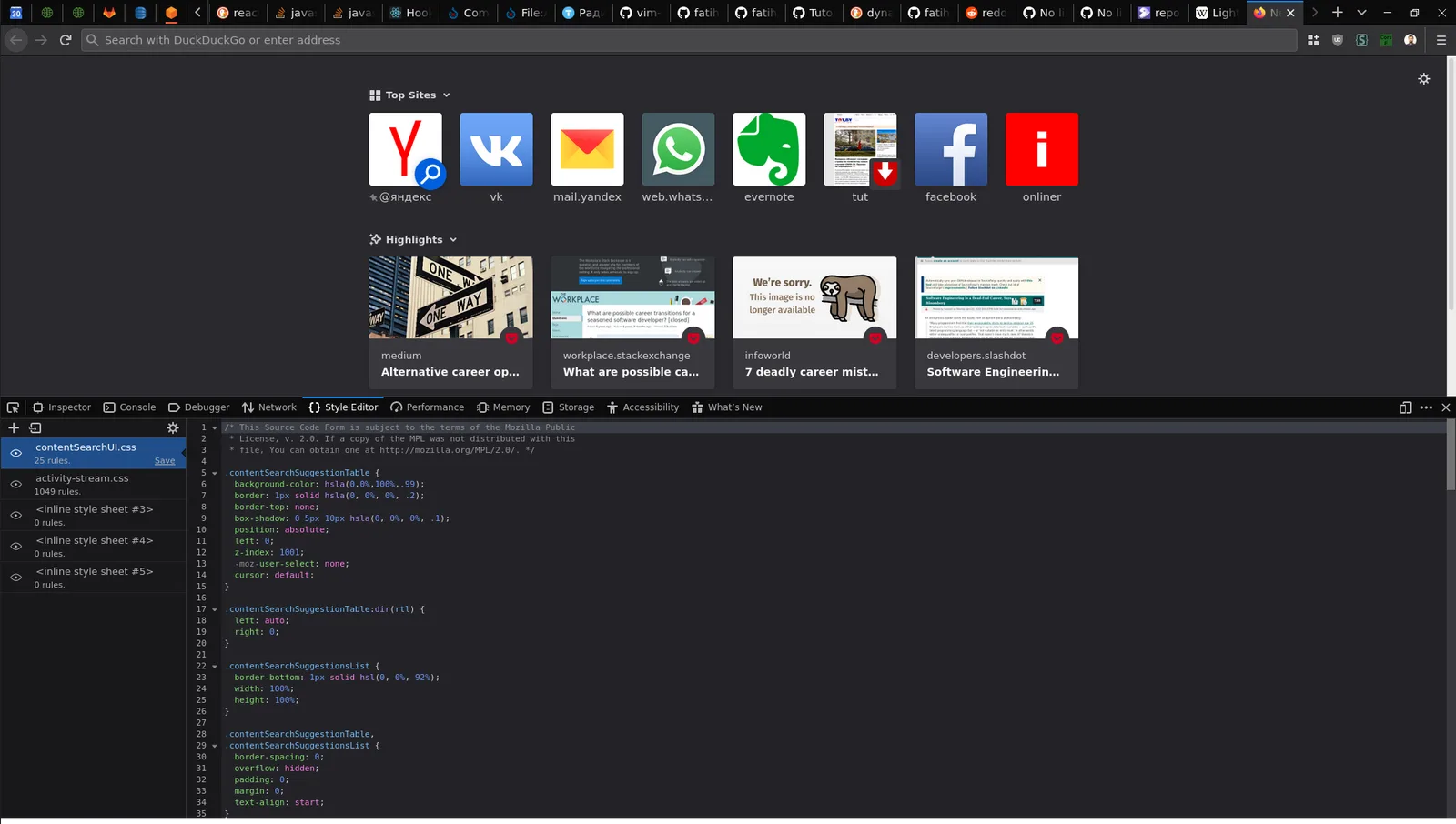
- Click the source link on the right of the console message. If the reason is a real
Error, the stack shows where it was created, and Chrome's async stack traces show the chain ofawaits that led there. - Pause at the moment of the error. In Chrome's Sources panel, open the Breakpoints section and tick Pause on uncaught exceptions. Chrome's documentation notes that for asynchronous code the debugger looks for rejection handlers across promises to decide when to stop, so it pauses on rejections that nobody handles. Firefox's debugger offers a similar pause-on-exceptions setting.
- Add a logpoint (right-click a line number, Add logpoint) at the suspicious call to print values without editing code.
- Search for dropped promises. The patterns above are easy to grep for:
.forEach(async, calls to async functions on their own line withoutawaitorreturn, and.then(callbacks with braces but noreturn.
A global safety net (not a fix)
Even careful code misses a few. Listen for unhandledrejection to report them to your error tracker:
window.addEventListener('unhandledrejection', (event) => {
  const { reason, promise } = event;
  reportError(reason instanceof Error ? reason : new Error(String(reason)));
  // event.preventDefault(); // only if you also want to hide the console message
});

window.addEventListener('rejectionhandled', (event) => {
  // a handler was attached late, after unhandledrejection had already fired
  markAsHandled(event.promise);
});
Both events carry a PromiseRejectionEvent with promise and reason properties, supported in all current browsers. Keep three facts from MDN in mind:
unhandledrejectionis cancelable;preventDefault()stops the default console message. Do this only if you log the error yourself, or you will make debugging harder.- Rejections that originate from a cross-origin script do not fire the event, because it could leak data. Serve third-party scripts with CORS and the
crossoriginattribute if you need their errors. - The event also fires in workers, on the worker's global scope, so register a listener there as well.
Gotchas
- Abort is not failure. When you cancel a
fetch()with anAbortController, the rejection is anAbortError. Catch it and ignore it explicitly:if (err.name === 'AbortError') return;. Promise.any()rejects with anAggregateError. Log itserrorsarray, not just its message, or you lose the individual causes.- Do not add
.catch(() => {})everywhere. It silences the console and your safety net, and turns a visible bug into an invisible one. - Late handlers. Attaching
.catch()after anawaitelsewhere can be too late; that is whenrejectionhandledfires.
What to do next
- Turn on Pause on uncaught exceptions, reproduce the error once and note which pattern it matches.
- Enable lint rules that catch dropped promises, such as typescript-eslint's
no-floating-promisesandno-misused-promises. - Add the
unhandledrejectionlistener to your error reporting so production rejections reach you with a stack trace. - Replace string rejections with
Errorobjects andcause, so every report tells you where it started.
Frequently asked questions
What does Uncaught (in promise) mean?
A promise was rejected and no rejection handler was attached to it. The browser fires an
unhandledrejectionevent and logs the reason in the console.Why does the console show Uncaught (in promise) undefined?
Something rejected without a value or with a non-Error value, for example
reject()with no argument. Reject with anErrorobject so you get a message and a stack trace.Does try...catch catch promise rejections?
Only rejections of promises you
awaitinside thetryblock. A promise you start but do not await, or one created inside aforEachcallback, escapes it.Should I call preventDefault() in my unhandledrejection handler?
Only if you log or report the error yourself. It suppresses the default console message, which makes local debugging harder if nothing else records the error.
Why does my handler not see errors from a third-party script?
MDN notes that rejections originating from cross-origin scripts do not fire
unhandledrejection, because that could leak data.Is Promise.all safer than awaiting promises one by one?
For error handling, yes.
Promise.allattaches handlers to every promise, so a second failure does not become an unhandled rejection. UsePromise.allSettledwhen you need every result.
Your next customer could start right here.
Introduce your tool, product or business to readers exploring technology.
Explore placements and request a private quote
Sources
- Window: unhandledrejection event — MDN Web Docs
- Window: rejectionhandled event — MDN Web Docs
- PromiseRejectionEvent — MDN Web Docs
- Pause your code with breakpoints — Chrome for Developers
- Error: cause — MDN Web Docs
- MDN browser-compat-data 8.1.5 (data.json) — MDN Web Docs, 2026-10-08
Written with substantial AI assistance. Facts checked against cited sources. Editorial policy.
Comments
No comments yet. Be the first to join the conversation.
Leave a comment
Every comment is read by a moderator before it appears. Your email address is never published; it is used only to contact you about this comment.
More from Cloudsoft Zone
TutorialJavaScript
JavaScript using declarations: automatic cleanup without finally
Learn JavaScript's using and await using declarations, Symbol.dispose and DisposableStack, with tested browser recipes and October 2026 support data.
By Cloudsoft Zone

Architecture guideJavaScript
Ship JavaScript without a bundler: import maps and JSON modules
How to structure a front end as native ES modules: import maps for bare imports, JSON modules, modulepreload against waterfalls, and cache-busting.
By Cloudsoft Zone

ComparisonJavaScript
structuredClone vs JSON vs spread: deep copy JavaScript safely
Spread is shallow, JSON loses dates, Maps, Sets and undefined, and structuredClone keeps them. A tested comparison of JavaScript copy methods and their limits.
By Cloudsoft Zone