
In this article
The mysql command-line client is still the quickest way to check that a database is reachable, run a query, or load a SQL file. Connecting is one command, but the details decide whether it works and whether it is safe: which host and protocol the client really uses, whether the connection is encrypted and verified, and where your password lives. This guide covers the classic mysql client and MySQL Shell (mysqlsh), option files and login paths, TLS, socket versus TCP, and the errors you are most likely to see.
Updated for MySQL 8.4 LTS and 9.7 LTS. Tested with the MySQL 9.7.1 server and client and MySQL Shell 26.7.1 on a scratch server; every error message below was reproduced there. Commands and options are the same on 8.4.
Step 1: Check the client
Install the client from your operating system's packages, the MySQL APT/YUM repositories, Homebrew, or the MySQL Installer on Windows, then check it:
mysql --version
mysql -h 127.0.0.1 -P 3306 -u app -p shop
-p with no value makes the client prompt for the password, so it never appears in your shell history or the process list. Writing --password=secret works, but the client warns "Using a password on the command line interface can be insecure", and it is right.
If mysql --version mentions MariaDB, you have the MariaDB client. It connects to MySQL for basic work, but some options differ (MariaDB uses --ssl-verify-server-cert rather than --ssl-mode), so install the MySQL client if you follow this guide.
Step 2: Connect and choose a database
The last argument (shop above) selects the default database, which saves typing USE shop;. Once you see the mysql> prompt, end each statement with ;:
SELECT DATABASE(), CURRENT_USER(), @@version;
SHOW TABLES;
SELECT id, total FROM orders ORDER BY id LIMIT 10;
Type status (or \s) at the prompt to see what you are connected to. This is the real output from our test connection:
mysql> status
Current user:      app@localhost
SSL:               Cipher in use is TLS_AES_128_GCM_SHA256
Connection:        127.0.0.1 via TCP/IP
Check three things: the account the server matched (Current user), whether TLS is in use (SSL), and the transport (Connection). Leave with exit or \q.
Socket or TCP: what "localhost" means
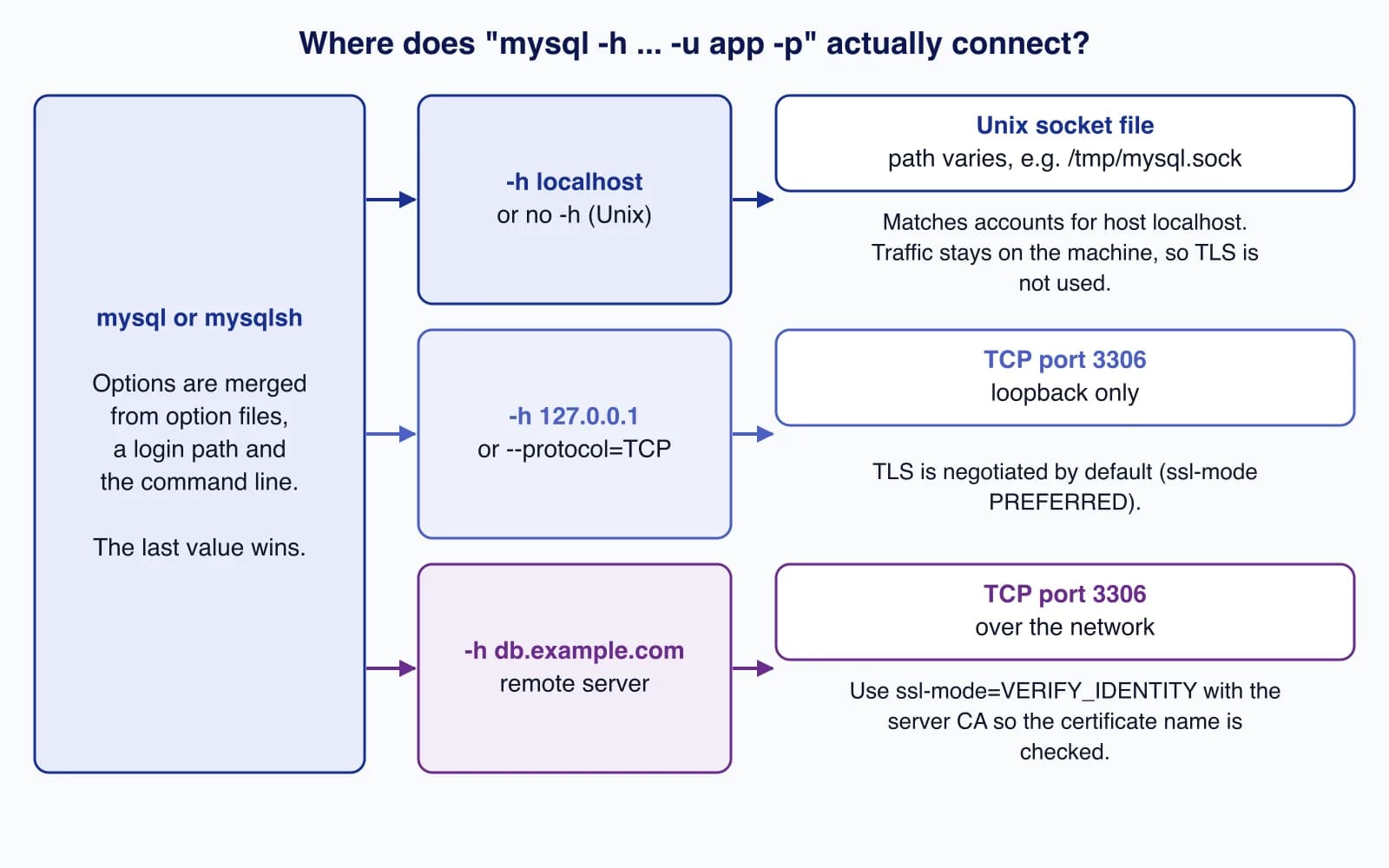
On Linux and macOS, -h localhost (or no -h at all) does not use the network. The client connects through a Unix socket file, such as /var/run/mysqld/mysqld.sock on Debian and Ubuntu or /tmp/mysql.sock on Homebrew. -h 127.0.0.1 uses TCP. The two can reach different accounts and, on a machine with more than one server, even different servers.
# Unix socket (only works on the database host itself)
mysql -u app -p -S /var/run/mysqld/mysqld.sock shop

# Force TCP even when the host is "localhost"
mysql -h localhost --protocol=TCP -P 3306 -u app -p shop
On Windows, the client uses TCP by default. Socket connections are fast and never leave the host, so TLS is not used on them; the MySQL server treats a socket as a secure transport for require_secure_transport.
Encrypt and verify the connection
The client's default --ssl-mode is PREFERRED: it encrypts if the server supports TLS, but it does not check the server's certificate, so it cannot detect a machine in the middle. For any connection that crosses a network, verify the server:
mysql -h db.example.com -P 3306 -u app -p \
  --ssl-mode=VERIFY_IDENTITY \
  --ssl-ca=/etc/ssl/certs/db-ca.pem \
  shop
--ssl-mode | Encrypts | Checks the CA | Checks the host name |
|---|---|---|---|
DISABLED | No | No | No |
PREFERRED (default) | If possible | No | No |
REQUIRED | Yes | No | No |
VERIFY_CA | Yes | Yes | No |
VERIFY_IDENTITY | Yes | Yes | Yes |
Managed services (Amazon RDS, Azure Database for MySQL, Google Cloud SQL) publish their CA bundles; download the bundle from the provider and pass it with --ssl-ca. A self-hosted server's automatically generated certificate has a name like MySQL_Server_9.7.1_Auto_Generated_Server_Certificate, which will never match your host name, so VERIFY_IDENTITY fails against it. Issue a proper certificate for the server's DNS name instead of dropping to REQUIRED. To force encryption for an account on the server side, create it with REQUIRE SSL.
Keep credentials out of commands: option files and login paths
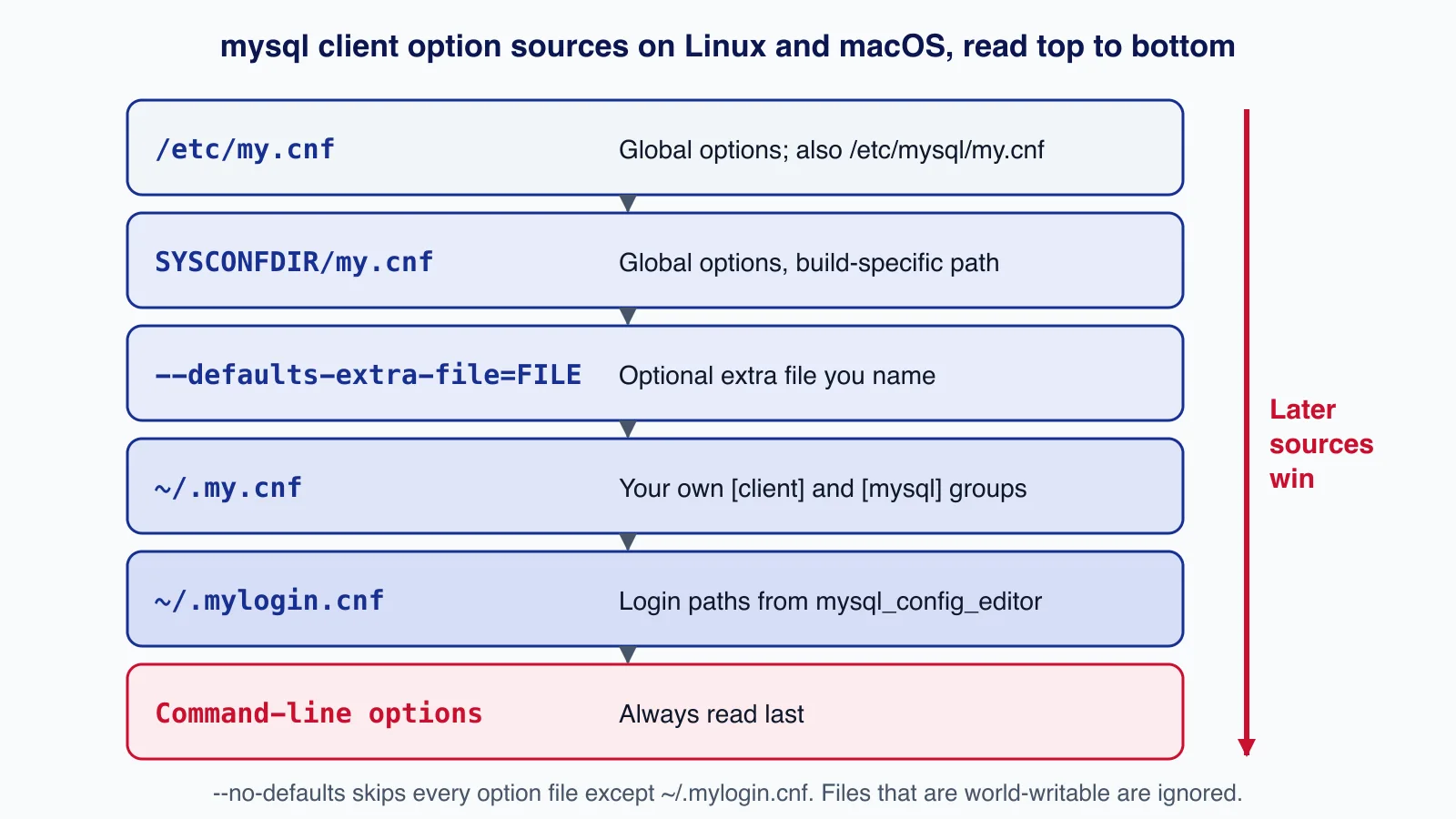
Typing the same host, port and TLS options every time is how mistakes happen. Put them in ~/.my.cnf; options in [client] apply to every MySQL client program, options in [mysql] only to the mysql client:
[client]
host=db.example.com
port=3306
user=app
ssl-mode=VERIFY_IDENTITY
ssl-ca=/etc/ssl/certs/db-ca.pem

[mysql]
database=shopchmod 600 ~/.my.cnf
mysql --print-defaults # shows the merged options (masks the password)
mysql -p # connects using the file, prompts for the passwordYou can add password= to the file, but then anyone who can read it has the password. MySQL ignores world-writable option files on Unix; it does not refuse world-readable ones, so set chmod 600 yourself.
A login path stores host, user, password, port and socket in ~/.mylogin.cnf (on Windows, %APPDATA%\MySQL\.mylogin.cnf), written by mysql_config_editor, which prompts for the password:
mysql_config_editor set --login-path=shop-ro \
  --host=db.example.com --port=3306 --user=app --password
mysql_config_editor print --all
mysql --login-path=shop-ro shop
The file is obfuscated rather than plain text, which stops casual reading, but it is not strong protection: treat it like a password file. --login-path also works with mysqldump and mysqladmin, which makes it handy for cron jobs. Options are read in a fixed order, and the last value for an option wins:
Run SQL from scripts
# One query, tab-separated output, no header: good for scripts
mysql --login-path=shop-ro --batch --skip-column-names shop \
  -e "SELECT id, total FROM orders"

# Run a file of statements; stop at the first error (the default)
mysql --login-path=shop-ro shop < migrate.sql
For backups and restores, use the dedicated tools; see MySQL backups with mysqldump, MySQL Shell and point-in-time recovery.
MySQL Shell (mysqlsh)
MySQL Shell is the newer client. It speaks SQL, JavaScript and Python, connects with URIs, and has utilities for dumps, upgrades and InnoDB Cluster. The mysql:// scheme uses the classic protocol (port 3306 by default); mysqlx:// uses the X Protocol (port 33060).
mysqlsh --sql mysql://app@db.example.com:3306/shop \
  --ssl-mode=VERIFY_IDENTITY --ssl-ca=/etc/ssl/certs/db-ca.pem

# JSON output for scripts
mysqlsh --sql mysql://app@db.example.com:3306/shop \
  --result-format=json/array -e "SELECT id, total FROM orders"
MySQL Shell can save passwords in a secret store (the macOS keychain, Windows Credential Manager, or a login-path file) after asking you; add --save-passwords=never on shared machines. One detail we noticed in testing: with --result-format=json/array, a DECIMAL value such as 49.00 was printed as 49, so do not use that output where exact decimal formatting matters.
Common connection errors and fixes
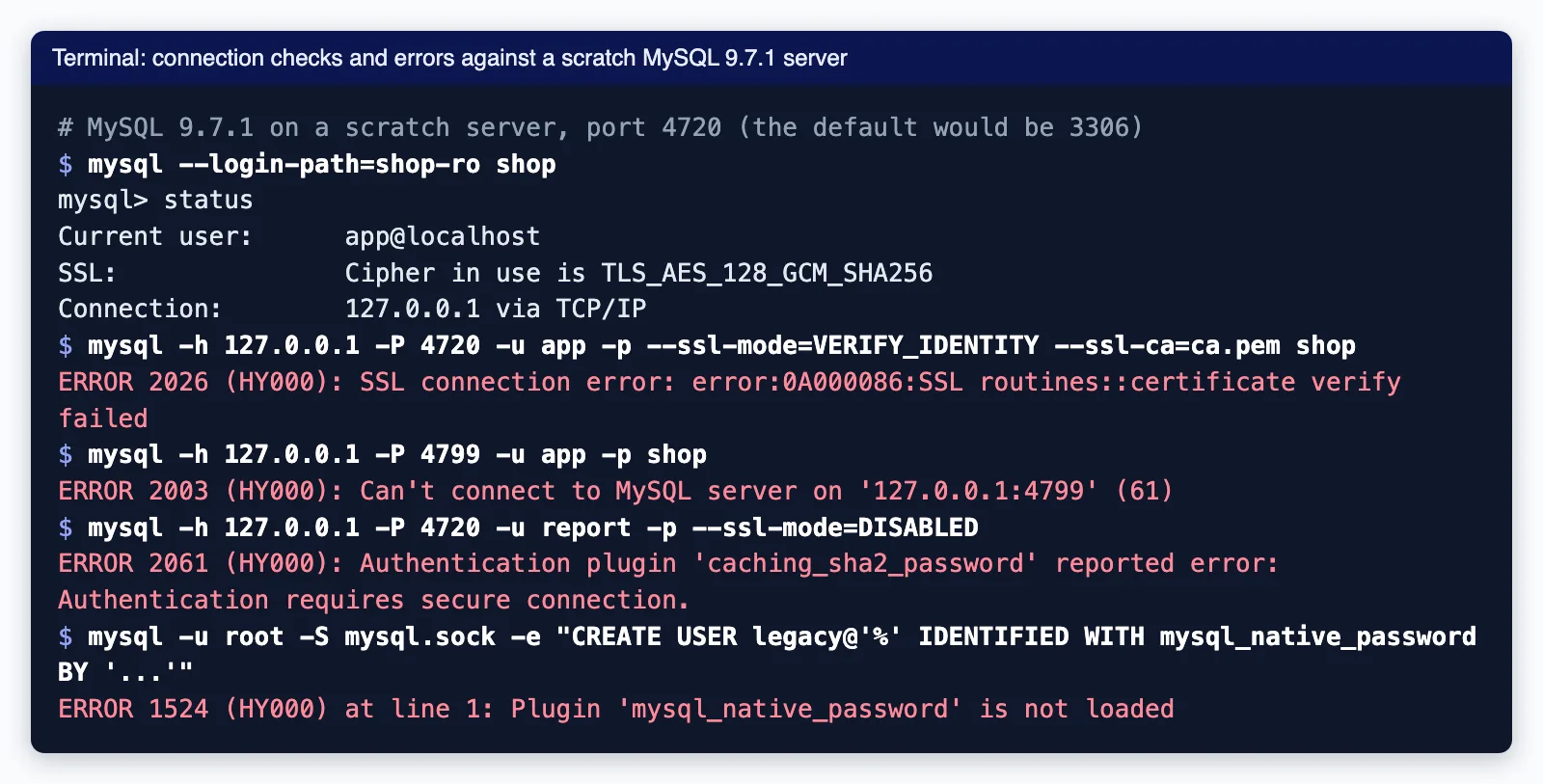
All of these came from our test server:
| Error | Cause | Fix |
|---|---|---|
ERROR 2002 (HY000): Can't connect to local MySQL server through socket '...' (2) | The client is using a socket that does not exist: the server is stopped, or the socket is somewhere else. | Start the server; pass -S with the right path; or use -h 127.0.0.1. |
ERROR 2003 (HY000): Can't connect to MySQL server on 'host:port' | Nothing listening on that host and port: wrong port, bind-address=127.0.0.1 on the server, or a firewall or security group. | Check the port, bind-address and network rules. |
ERROR 1045 (28000): Access denied for user 'app'@'localhost' | Wrong password, or the server matched a different account (for example app@localhost instead of app@'%'), or the account requires TLS and you disabled it. | Read the user and host in the message; check SELECT user, host FROM mysql.user. |
ERROR 1044 (42000): Access denied ... to database 'shpo' | A typo in the database name, or no privileges on it. The server answers "access denied" rather than "unknown database" when the account lacks privileges. | Check the name with SHOW DATABASES. |
ERROR 2026 (HY000): SSL connection error ... certificate verify failed | The CA file does not match, or the certificate name does not match the host with VERIFY_IDENTITY. | Use the provider's CA bundle and connect using the name on the certificate. |
ERROR 2061 (HY000): ... caching_sha2_password reported error: Authentication requires secure connection. | TLS disabled and the server has not cached this account's password yet. | Use TLS; or, on a trusted network, add --get-server-public-key. |
ERROR 1524 (HY000): Plugin 'mysql_native_password' is not loaded | mysql_native_password is disabled by default in 8.4 and removed in 9.0. | Use caching_sha2_password and update old client libraries. |
If remote access means opening port 3306 to the internet, stop and reconsider: an SSH tunnel, a VPN or a private network is safer. Our server deployment and cloud setup service can put MySQL on a private network with verified TLS and least-privilege accounts.
Production checklist
- Give each person and each application its own account with only the privileges it needs; avoid
rootfor daily work. - Use
VERIFY_IDENTITYfor every connection that leaves the host. - Keep passwords out of shell history and scripts; use prompts, option files with mode 600, or login paths. The
MYSQL_PWDenvironment variable is deprecated and visible to other processes on some systems. - Use
--safe-updates(alias--i-am-a-dummy) for interactive sessions on production; it refusesUPDATEandDELETEwithout a key in theWHEREclause or aLIMIT.
When not to use the command line
- For repeatable schema changes, use migrations in your application or a migration tool, not hand-typed SQL.
- For large exports and imports, use MySQL Shell's dump and load utilities, which run in parallel.
- For choosing a server version, see MySQL 8.4 LTS, 9.7 LTS or 26.7 Innovation.
Cloudsoft Zone sets up and hardens MySQL servers and cloud databases, including private networking, TLS, accounts and backups. See our server deployment and cloud setup service.
Frequently asked questions
What is the command to connect to MySQL from the terminal?
mysql -h HOST -P 3306 -u USER -p DATABASE. The-pflag with no value prompts for the password. Leave out-hto connect through the local Unix socket on Linux or macOS.Why does localhost work but 127.0.0.1 gives access denied (or the other way round)?
On Unix,
localhostuses a socket file and127.0.0.1uses TCP. MySQL matches accounts by user and host, and the two paths can match different accounts, or reach different servers if more than one is running. CheckstatusandSELECT CURRENT_USER().How do I connect without typing the password every time?
Create a login path with
mysql_config_editor set --login-path=NAME ... --passwordand connect withmysql --login-path=NAME, or put the options in~/.my.cnfwith permissions 600. Never put the password in scripts or on the command line.Is my mysql connection encrypted by default?
Over TCP, usually yes: the default
--ssl-mode=PREFERREDuses TLS when the server supports it. But it does not verify the server certificate. Use--ssl-mode=VERIFY_IDENTITYwith--ssl-cafor remote servers.Should I use mysql or mysqlsh?
Both connect fine. The classic
mysqlclient is installed almost everywhere and is ideal for quick checks and SQL files. MySQL Shell adds JavaScript and Python modes, JSON output, and parallel dump, load and upgrade-check utilities.
Your next customer could start right here.
Introduce your tool, product or business to readers exploring technology.
Explore placements and request a private quote
Sources
- mysql client options — Oracle MySQL
- Command options for connecting to the server — Oracle MySQL
- Using option files — Oracle MySQL
- mysql_config_editor — Oracle MySQL
- Configuring MySQL to use encrypted connections — Oracle MySQL
- Native pluggable authentication — Oracle MySQL
- Troubleshooting problems connecting to MySQL — Oracle MySQL
- MySQL Shell command options — Oracle MySQL
Written with substantial AI assistance. Facts checked against cited sources. Editorial policy.
Comments
No comments yet. Be the first to join the conversation.
Leave a comment
Every comment is read by a moderator before it appears. Your email address is never published; it is used only to contact you about this comment.
More from Cloudsoft Zone

ComparisonMySQL
MySQL 8.4 LTS, 9.7 LTS or 26.7 Innovation: choosing a version and upgrading
MySQL now ships LTS and Innovation releases with calendar version numbers. Compare 8.4 LTS, 9.7 LTS and 26.7 Innovation, see the supported upgrade paths, and follow a checklist for moving an application from 8.4 to 9.7.
By Cloudsoft Zone

Resource guideWordPress
WordPress security hardening checklist for 2026 (WordPress 7.1)
A practical WordPress 7.1 hardening checklist based on the official handbook: updates, two-step logins, wp-config.php constants, file permissions, database privileges, firewalls, WP-CLI checksum checks and tested backups.
By Cloudsoft Zone

TutorialWordPress
How to update WordPress safely with WP-CLI: backup, update, verify, roll back
A repeatable WordPress update routine with WP-CLI: check pending updates, export the database and archive files, update core, plugins, themes and translations in order, verify checksums, and restore if something breaks.
By Cloudsoft Zone